
Our readers keep the lights on and my morning glass full of iced black tea. As an Amazon Associate, I earn from qualifying purchases.
Specs are compiled from manufacturer listings and verified buyer reviews and can change over time — please confirm the key details on the product page before buying.
If you’ve got a PS5, a streaming stick, and a soundbar fighting over one TV port, you need a 4K HDMI switch that actually keeps up. The best ones pass high refresh rates like 4K@120Hz without cutting your signal, and the OREI 4-port 8K model is the crowd favorite because it juggles four consoles at once without dropping a frame.
I’m Min — the founder and writer behind Gadgets Feed. This guide is built by comparing the manufacturers’ published specifications and the patterns across verified customer reviews, so you get each pick’s real strengths and trade-offs instead of marketing spin.
This list uses flexible, human-like matching, so not every pick is the exact number searched; the nearest same-type size serves the same purpose. From 4-port hubs to 8×8 matrix systems, here is our breakdown of the 4k hdmi switch options that solve your port problem.
Our Picks at a Glance

How To Choose The Best 4K HDMI Switch
An HDMI switch lets you plug several gadgets into one box, then that box plugs into a single port on your TV. The trick is matching the switch’s capabilities to what your devices actually output — a basic switch will bottleneck a gaming console that wants 120 frames per second.
Match bandwidth to your devices
Modern consoles and 4K Blu-ray players need wide data pipes. A switch that handles 18Gbps is fine for standard 4K@60Hz, but if you own a PS5 or Xbox Series X, look for 48Gbps models that can pass 4K@120Hz without compressing the picture.
Decide on auto-switching
Auto-switching detects which device is active and routes to it automatically, saving you from hunting for a remote. The catch is that some devices (like Apple TV and Xbox) keep sending a weak signal even when off, which confuses the switcher — many of our picks let you disable auto mode entirely.
Count your ports honestly
Think about how many gadgets you’ll plug in today, not just the ones you own now. A 3-port switch clears up the basics, but a 5-port unit gives you room for a console, streamer, Blu-ray player, and a laptop without re-cabling everything later.
Quick Comparison
| Model | Best For | Ports | Bandwidth | Max Resolution | Amazon |
|---|---|---|---|---|---|
| OREI 8K 4-Port★ Best Overall | Gaming & auto-switch | 4 | 48Gbps | 8K@60Hz | Amazon |
| Fosmon 3-Port 8KCompact Pick | Compact setups | 3 | 48Gbps | 8K@60Hz | Amazon |
| SkycropHD 5-PortBest Value | Value 4K@60Hz | 5 | 18Gbps | 4K@60Hz | Amazon |
| ROOFULL 5-Port | Audio extraction | 5 | 18Gbps | 4K@60Hz | Amazon |
| Fosmon 5-Port 8K | Budget 8K | 5 | 48Gbps | 8K@60Hz | Amazon |
| UGREEN 5-Port 8K | Reliable 8K | 5 | 40Gbps | 8K@60Hz | Amazon |
| AVIDGRAM 5-Port | Flexible switching | 5 | 48Gbps | 8K@60Hz | Amazon |
| Kinivo 4-Port | Premium build | 4 | 48Gbps | 8K@60Hz | Amazon |
| OREI 8×8 Matrix | Multi-room setups | 8×8 | 18Gbps | 4K@60Hz | Amazon |
In-Depth Reviews
1. OREI 8K 4-Port HDMI 2.1 Switch
Our pick — 4.5★ from 300+ verified ratings; the strongest balance of quality and price.
The four-port hub that handles PS5, PC, and streaming boxes without a single dropped frame.
This OREI is the one that ends the daily cable shuffle. It packs four inputs into a single output, so your TV, PS5, PC, and arcade emulator all stay wired and ready — no more crawling behind the TV to swap HDMI cables. The 48Gbps pipe means it supports 8K@60Hz, 4K@120Hz, and even 1080p@240Hz, which is exactly what a next-gen console needs to run smoothly.
What wins people over is how easily it handles everything — buyers report the signal comes in clear from all sources, whether it’s a Nintendo Switch, a laptop, or an upscaler box. The auto-switching feature detects the active device in about two seconds, and you can also flip between ports with the front button or the included IR remote. It’s small enough to double-stick tape behind your TV, yet the build feels surprisingly heavy-duty.
The one honest caveat is that you can’t switch the auto-feature off. Since auto-switching gets mixed feedback (it can jump to the wrong input if a device wakes up unexpectedly), this is note if your gear powers on randomly. It’s backed by a 1-year OREI warranty.
What Owners Love
- Plug-and-play setup — literally works from the start
- Full 4K@120Hz support for PS5 and Xbox Series X
- Compact enough to hide with double-stick tape
- Remote button makes switching easy from the couch
Know Before Buying
- Auto-switching can’t be disabled
- Power adapter required (included)
The setup for you: If you own a PS5 or Xbox and want a single box that keeps every device ready, this is the pick.
Think twice if: You have gear that wakes up on its own and hate surprises — the always-on auto-switch might grab the wrong input.
2. Fosmon 3-Port HDMI 8K Switch
A tiny three-port unit that clears up desk or TV cabinet clutter with all-rear ports.
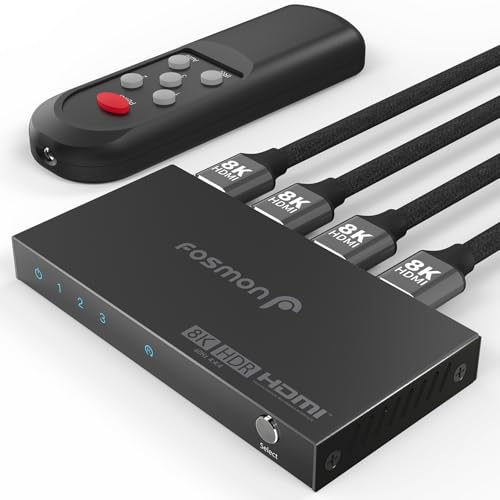
If your setup only needs a few extra ports, this Fosmon does the job in a package small enough to vanish behind a monitor. It handles 8K@60Hz through a 48Gbps connection, so it’s ready for a gaming PC or a PS5, and it auto-detects the most recently active source. That’s a 2.7x bandwidth advantage over a standard 18Gbps 4K@60Hz switch, which makes it a smart buy if you plan to upgrade your display down the road.
The design is thoughtful — all ports sit on the rear, which keeps cables tidy and the front free for the one-button manual switch. Owners running three computers (a Mac, a Windows desktop, and a laptop) love that it auto-switches between them by recency, and the remote rarely gets used because the desk button is so convenient. The aluminum shell helps with heat dissipation and keeps the signal stable.
There are two things to know going in. First, it needs external power via USB-C, and the charger block is not included — you supply a 5V USB adapter. Second, if you’re a PC gamer using G-Sync at 144Hz, owners mention the screen cuts out with G-Sync enabled; it works fine when G-Sync is off or the switch is bypassed.
Clean and compact: Rear ports and a small footprint make this the neatest way to add three inputs to any display.
The honest catch: You’ll need to supply the USB power adapter, and G-Sync users at 144Hz will likely hit cutouts.
3. SkycropHD 4K@60Hz 5-in-1 HDMI Switch
Five inputs, a programmable remote, and a metal shell — the sensible budget upgrade for any TV.
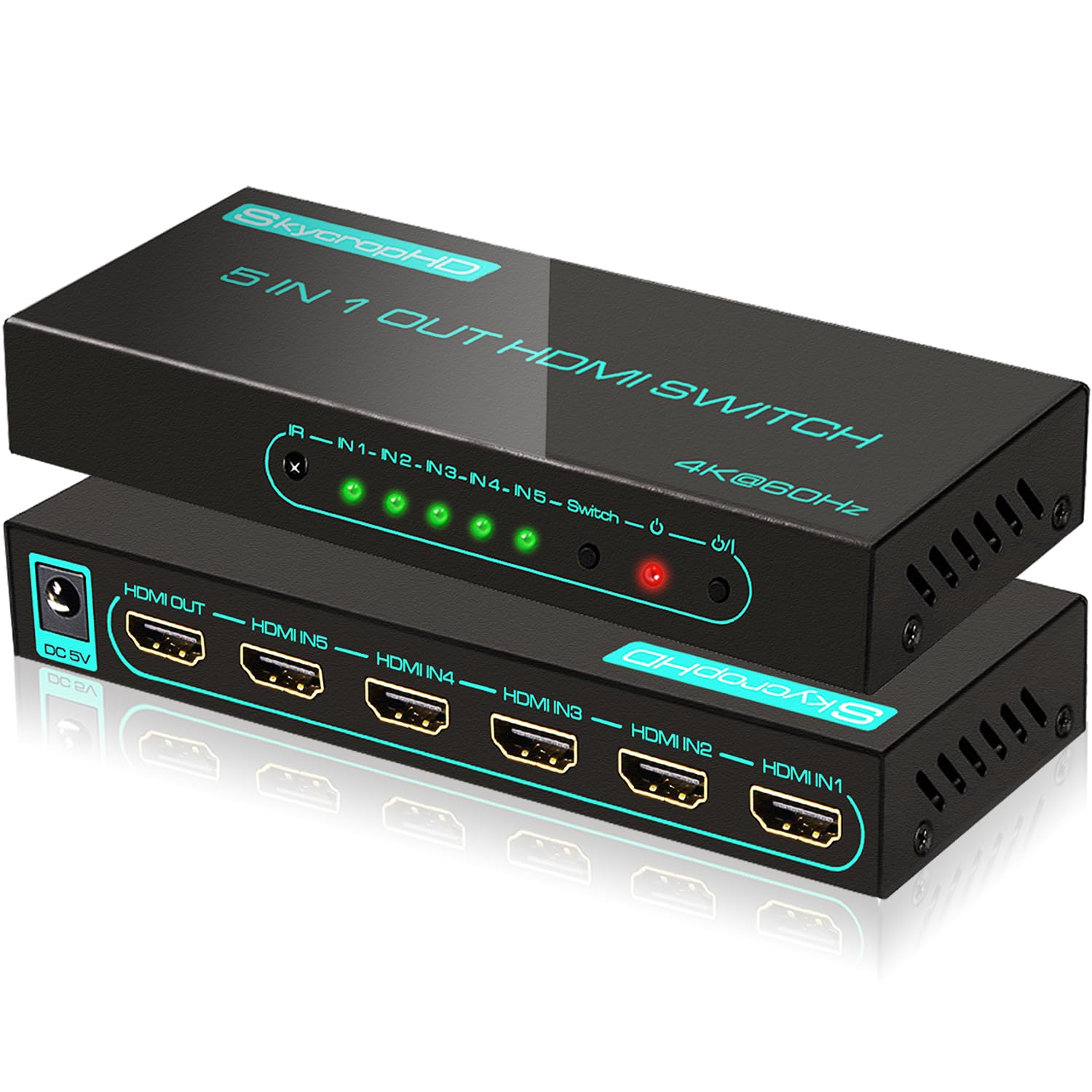
This SkycropHD gives you the most ports per dollar in this lineup. Five inputs into one output means you can wire up a Switch, laptop, Chromecast, Raspberry Pi, and a Blu-ray player all at once, then flick between them with the large IR remote. It supports true 4Kx2K (4096×2160) at 60fps with HDR10, Dolby Vision, and Dolby Atmos over an 18Gbps connection — more than enough bandwidth for standard 4K content.
The metal enclosure isn’t just for looks; it pulls heat away quickly and protects the internals, which is why customers note no picture degradation even after months of use. A handful of owners hit a failed unit after a few months, and the brand’s support team stepped in with a same-day replacement — a level of service that earns loyalty. The red and green LEDs on the front make it obvious which input is active at a glance.
The auto-switch works, but it has quirks — a Nintendo Switch dock can trigger it, while an Apple TV 4K won’t. Owners solve this by disabling auto-switch and relying on the remote, which is fast and responsive. If you want one clean box to handle five gadgets and don’t need 120Hz, this is the smart money pick.
The value champion: Five inputs and rock-solid 4K@60Hz for the price of a pizza — nothing else here matches that.
A note on auto-switch: It’s not perfect with always-on devices, so plan to use the remote for daily switching.
4. ROOFULL 5-Port HDMI Switch with Audio Extractor

The switcher that routes pristine audio to a soundbar or surround system via optical or AUX.
This ROOFULL is the answer when your TV’s limited ports are only half the problem — the other half is getting sound to an older audio system. It takes five HDMI inputs, switches them to one display, and also extracts audio out through Optical SPDIF or 3.5mm AUX to a soundbar, receiver, or headphones. Owners feeding a Bose system or a Sonos via optical report clear, lag-free audio with no signal degradation.
You get crisp, detailed images because this switch handles real 4K@60Hz at 4096×2160 with HDR10, Dolby Vision, and Dolby Atmos, and it still works with older 4K@30Hz and 2K@120Hz sources. The three EDID settings (the data your TV sends back to a source telling it what to output) let you choose between 2CH and 5.1CH audio formats, so you can get Dolby Digital 5.1 out of the optical port. ARC support also lets the TV send audio back down to the switch, so you don’t need a separate audio cable.
The caveats are small but real. The optical and AUX ports sit on the front, which makes cable management a bit messy. Also, auto-switching depends on a device’s standby behavior — PS5, Fire TV, and Apple TV keep emitting a weak voltage when off, which can stop the switch from jumping to another active device. Owners still rate the auto-switch positively, and the 2-year warranty adds confidence.
Why It Stands Out
- Optical and AUX audio outputs for older sound systems
- Three EDID settings to match your audio format
- ARC support for TV audio return
- 5 LED indicators show active port clearly
Keep in Mind
- Audio ports on the front complicate cable routing
- Auto-switch can stall with always-on consoles
Reach for this if: You’re connecting a soundbar or receiver that needs optical input — this is the only pick here that does it cleanly.
Look elsewhere if: You want a purely hidden install; the front-facing audio ports demand visible cables.
5. Fosmon 5-Port HDMI 8K Switch
A five-port 8K switch that’s easy to use when it works — but quality control varies.
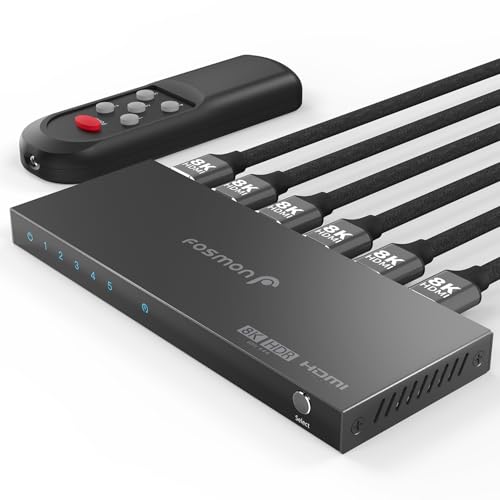
This Fosmon lets you connect five inputs to one display and still get 8K@60Hz and 4K@120Hz, so it’s a budget-friendly way to future-proof your setup. With 48Gbps of bandwidth, it has the headroom for the latest consoles, and the compact aluminum body keeps it light at 200g. Owners with a picky Samsung 85″ TV report flawless handshake and a crisp picture, with full 120Hz support on 4K and 1440p.
The setup is genuinely plug-and-play, and the USB-C power input is convenient. But the reliability picture is mixed — while some units work flawlessly, others arrive with a dead remote or hit “No Signal” disconnects. A few owners needed replacements, and in those cases the brand’s support team responded quickly with a tested unit. This is the classic budget gamble: when you get a good one, it’s great value; when you don’t, it’s a return trip.
The remote control gets the most negative feedback across all aspects here, so treat it as a bonus rather than the main way you switch. For the price, this is a reasonable risk if you want five 8K-ready ports, but it’s not the one to choose if you need absolute reliability.
A budget reach: Five 8K ports for the money is hard to argue with, and the good units are genuinely excellent.
The trade-off: Remote and reliability issues mean a real chance you’ll be dealing with a return or replacement.
6. UGREEN 8K@60Hz HDMI Switch 5-in-1

A powered 8K switch with a reliable remote and enough bandwidth for 240Hz gaming.
If you want a switch that just works, the UGREEN is where reliability meets performance. It routes five inputs to one display at 8K@60Hz with a 40Gbps data rate, and it’s backward compatible with 4K@60Hz and 1080P@240Hz — so it handles high-refresh gaming PCs as smoothly as a console. The active power (it comes with an AC adapter) eliminates the flicker and blackouts that plague unpowered switches, which owners say is the key difference.
The remote is a genuine highlight — it works within 33 feet and switching is instant, with five LED indicators showing exactly which port is active. It’s even listed in the Logitech Harmony database (Model CM693), so it works like a charm with universal remote setups. The aluminum body with Dimensions of 6.5″D x 2.2″W x 0.8″H stays cool and sits flat under a TV. CEC support lets your TV remote control connected devices.
The big caveat is that there’s no automatic switching — you’ll use the remote or the on-box button every time. Also, the cable length matters: to hit 8K@60Hz, the input cable should be within 1m and the output within 2m. It doesn’t support ARC pass-through, so audio return to a soundbar via this switch isn’t possible. For a powered, reliable, high-bandwidth experience, this is the one.
What Makes It Reliable
- AC adapter prevents flicker and blackouts
- Works with Logitech Harmony universal remotes
- Instant, responsive remote switching
- 40Gbps handles 8K and 240Hz gaming
What to Know
- No auto-switching at all
- Short cable lengths required for 8K
- No ARC pass-through support
Your pick if: You have a Harmony remote or want a powered switch that never drops a signal.
Not for you if: You rely on auto-detect and hate reaching for a remote every time you switch sources.
7. AVIDGRAM HDMI 2.1 Switch 5-in-1

Three ways to switch, rear ports for clean wiring, and full 4K 120Hz HDR pass-through.
The AVIDGRAM gives you options where most switches force one path. It offers auto, manual, and IR remote switching — and you can turn off both auto and IR functions to stop interference from other remotes in the room. That flexibility is a real differentiator for a home theater where a Harmony hub or another IR source might confuse a lesser switch. It handles 8K@60Hz, 4K@120Hz, and 1080p@240Hz with 48Gbps bandwidth and HDCP 2.3.
Owners running a PS5 report flawless 4K 120Hz with HDR and VRR pass-through, and the rear HDMI connections make for excellent wire routing — a detail that earns genuine praise from people who care about a clean setup. It also supports LPCM, Dolby TrueHD, DTS HD Master Audio, and Dolby-AC3 for high-quality sound. The package includes a USB-A to USB-C power cable and a 2-year warranty.
The reliability feedback is mixed, though. Some owners hit random power-offs or HDMI handshake drops (2-5 second blackouts) with a PS5, and the remote input buttons sometimes arrive dead. Others report it works perfectly, especially when not pushing the absolute max resolution. If you get a good unit, it’s a great flexible switch — but there’s variance in quality control.
Most flexible switching: Auto, manual, and IR that you can toggle off individually — no other pick here matches that control.
The variable: Some units suffer handshake drops; the Roku/Fire Stick may need Dolby Vision disabled to work reliably.
8. Kinivo 8K HDMI Switch 4-in-1

A premium aluminum hub with 24K gold-plated connectors built for meeting rooms and home theaters.
The Kinivo is the switch you buy when build quality matters as much as function. It routes four HDMI devices to one display with 24K gold-plated connectors and an aluminum alloy shell that dissipates heat efficiently — a construction detail that shows up in the 200g weight and the reassuring heft. Inside, it carries the full 48Gbps pipe for 8K@60Hz and 4K@120Hz, with HDR10+, Dolby Vision, and HDCP 2.3 support.
What impressed owners most is that it’s one of the few switches that genuinely works — verified full 4K/120Hz and 8K/60Hz passthrough with lossless audio, even outperforming bigger names like Anker and Ugreen in direct use. It handles a PS5, MacBook, Apple TV, and iPad without input lag, and the auto-scan plus compact design cleared up cable clutter on one reviewer’s entertainment shelf. The remote makes switching fast, and it even retains CEC functions for volume and power control.
Two notes before you buy. First, not all devices support auto-switching — Apple TV, Fire TV, Xbox One, PS5, and Roku are called out as exceptions, so you’ll rely on the remote for those. Second, longevity is a mixed story: some units are still perfect after a year, while others report failures around the 6-month mark. The two-year warranty with lifetime US-based support softens that risk considerably.
The Premium Appeal
- 24K gold-plated connectors for clean signal
- Aluminum alloy shell for heat dissipation
- Verified full 8K/60Hz pass-through
- Retains CEC functions for volume and power
Consider This
- Auto-switch won’t work with Apple TV, Fire TV, or PS5
- Long-term reliability has mixed reports
Choose this for: A home theater or meeting room where build quality and lossless passthrough justify the cost.
Be prepared to: Use the remote for most switching and lean on the warranty if longevity becomes an issue.
9. OREI 8×8 HDMI Matrix Switch
A professional-grade 8×8 matrix that routes any of eight sources to any of eight displays independently.
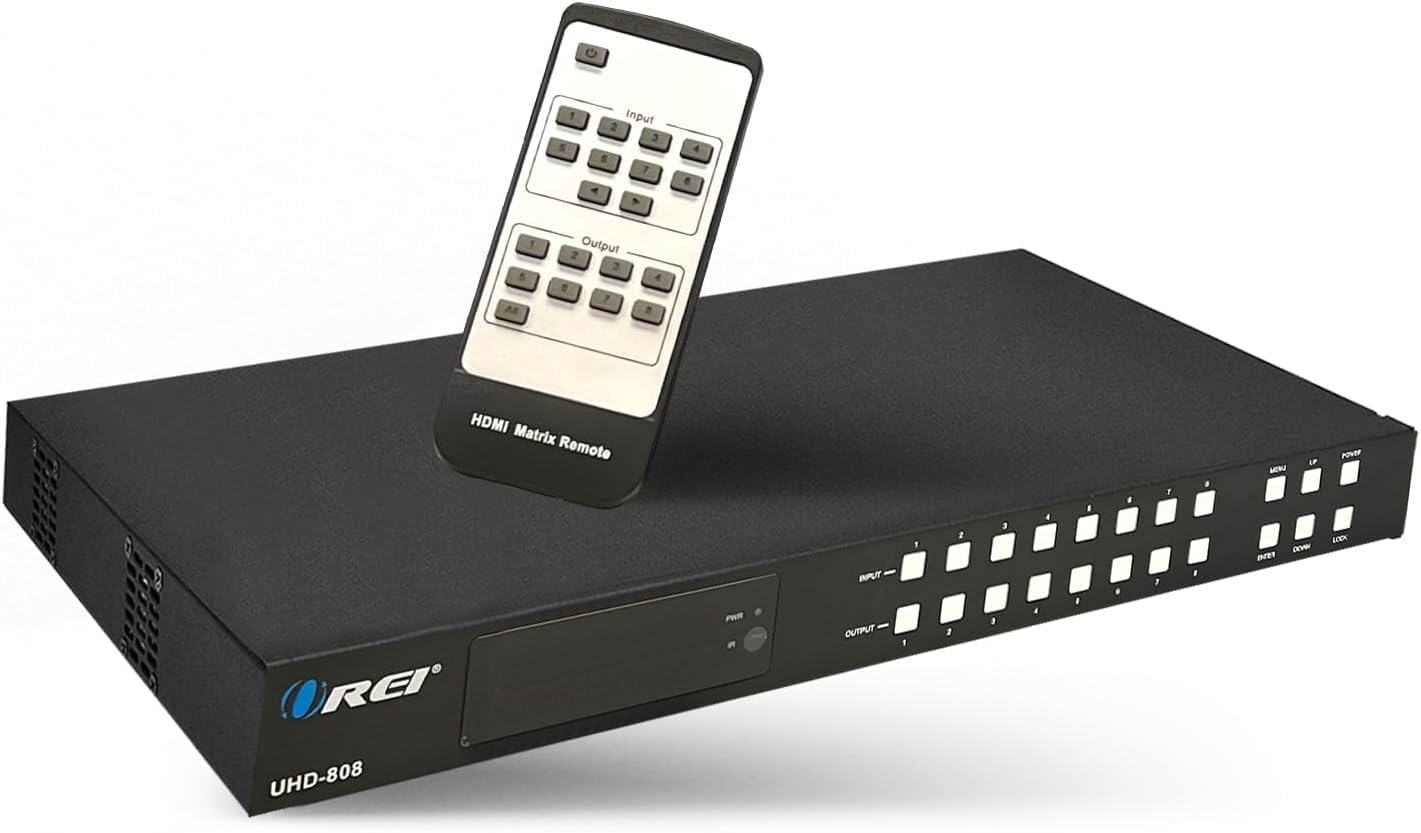
This isn’t a switch for a single TV — it’s a distribution hub for the whole house. The OREI matrix takes up to eight HDMI inputs and sends any of them to any of eight outputs, independently, without signal degradation. That makes it the pick for a home with multiple TVs, a sports bar, a digital signage setup, or a classroom where different screens show different content at the same time. It handles 4K@60Hz with YUV 4:4:4 8-bit color and HDR support.
The 18Gbps pipe supports 7.1-channel audio including Dolby TrueHD and DTS-HD Master, and it extracts audio through 8 analog and 8 SPDIF coaxial outputs — a feature buyers with older receivers rely on. There’s also a 4K downscaler, which lets you send a 4K signal to an older 1080p display without a problem. Owners running complex setups with an Apple TV 4K, a Switch 2, and an Epson projector report it “just works,” even with 4K over Cat5e extenders.
Control options are extensive: front panel buttons, IR remote, RS-232, LAN, and even a web GUI for remote management. The trade-offs are that the remote feels flimsy with unresponsive buttons at times, and it’s incompatible with Rokid AR glasses (the seller confirmed this and offered a refund). At 2.4 pounds, it’s a substantial piece of gear, and the 1-year warranty covers you. This is the premium, no-compromise solution for multi-display setups.
Built for scale: Eight sources to eight displays independently — nothing else in this list comes close to this capability.
Know the limits: The remote is the weak point, and it won’t drive AR glasses; plan the control method you’ll actually use.
Understanding the Specs
Bandwidth (Gbps)
This is the width of the data pipe between your devices and the TV. An 18Gbps switch moves standard 4K@60Hz video comfortably. A 48Gbps switch is needed for 8K or for 4K@120Hz, which is what newer consoles output. Matching your devices’ bandwidth needs prevents signal dropouts or force-reduced resolution.
Auto-Switching vs Manual
Auto-switching detects which device is on and routes to it automatically. It’s convenient but not perfect — some gadgets like Apple TV and PS5 keep emitting a weak signal when off, which confuses the auto-detection. Manual switches use a button or remote every time, which is more predictable. The best picks let you turn auto-switching on or off.
FAQ
Will an 18Gbps HDMI switch work with my PS5?
Why does my auto-switching HDMI switch jump to the wrong input?
What is the difference between an HDMI switch and a matrix?
How long do HDMI switch cables need to be for 8K to work?
Do all 4K HDMI switches need a power adapter?
Why does my switch not output Dolby Vision or HDR10+?
Can I use an HDMI switch with older devices that only output 1080p?
Why does my switch show a black screen for a few seconds after switching?
Does a 4K HDMI switch affect picture quality?
What does HDCP 2.2 or 2.3 mean for my switch?
Final Thoughts: The Verdict
If you want one dependable pick, the 4k hdmi switch winner is the OREI 8K 4-Port because it balances four ports, 48Gbps bandwidth, and reliable auto-switching at a price that makes sense. If you want a powered switch that never drops a signal and works with a Harmony remote, grab the UGREEN 5-Port. And for routing audio to a soundbar or managing multiple TVs, the ROOFULL 5-Port and OREI 8×8 Matrix are the specialists to reach for.
How We Picked
We do not accept paid placement. Every pick is matched to a real buyer and a real use-case; we do not hands-on test units.
Sources & Methodology
Specifications: manufacturer listings and product documentation. Review insights: verified customer reviews, as of August 2026. Pricing: not shown on this page (it changes often); check the current price via the retailer link.
As an Amazon Associate, Gadgets Feed earns from qualifying purchases. This does not affect which products we feature.