
Our readers keep the lights on and my morning glass full of iced black tea. As an Amazon Associate, I earn from qualifying purchases.
Specs are compiled from manufacturer listings and verified buyer reviews and can change over time — please confirm the key details on the product page before buying.
If your paycheck depends on color accuracy, buy the Dell UltraSharp U2725QE. If you want a big, color-accurate screen without spending a lot, get the LG 32UN650-W. The surprise pick is the ASUS ProArt PA279CRV: it covers 99% DCI-P3 (a wide color range for video and print) and 99% Adobe RGB (a color range for print work) at a mid-range price, which is pro-level color for the money. A 4K monitor for graphic design is a reference tool: if its color is off, every file you export inherits the error.
I’m Min — the founder and writer behind Gadgets Feed. This guide is built by comparing the manufacturers’ published specifications and the patterns across verified customer reviews, so you get each pick’s real strengths and trade-offs instead of marketing spin.
One honest note before the picks: this list uses flexible matching on the color-accuracy requirement, so not every pick is the exact number you typed into the search bar. The nearest same-type size or panel serves the same purpose. Read on for the full breakdown in this 4k monitor for graphic design guide.
Our Picks at a Glance



How To Choose The Best 4K Monitor For Graphic Design
Choosing a design monitor is not the same as choosing a gaming monitor or a cheap office screen. You are buying a reference tool, and three specs decide whether it earns its place on your desk.
Gamut coverage: the color space your files actually live in
sRGB is the color space the web runs on, so if you design for screens, 99% sRGB coverage is your baseline. DCI-P3 is a wider space used for video and print-adjacent work, and Adobe RGB is the print and photo standard. Higher coverage percentages mean the panel displays more of your file’s color instead of approximating it.
Delta E: how far the screen drifts from the truth
Delta E measures the gap between the color your file asks for and what the panel produces. Lower is better, and factory calibration claims like Delta E < 2 or Delta E ≤ 3 tell you the panel left the line reasonably accurate. A lot of buyers still calibrate on arrival with a puck or a Spyder, since shipping and panel variance move things slightly.
Ports, power and the cable you actually need
USB-C with power delivery is the single biggest quality-of-life spec here. It carries video, data and laptop charging down one cable. Look at the wattage: 60W keeps a thin laptop topped up, and 90W to 140W handles bigger machines. KVM switches and daisy-chain support let you run multiple computers or monitors without a dock.
Quick Comparison
| Model | Best For | Color Gamut | USB-C Power | Panel / Refresh | Amazon |
|---|---|---|---|---|---|
| LG 32UN650-W★ Best Overall | Big canvas on a budget | 95% DCI-P3 | — | IPS / 60Hz | Amazon |
| Dell UltraSharp U2725QEAlso Great | Reference-grade color | 99% DCI-P3 | 140W | IPS Black / 120Hz | Amazon |
| ASUS ProArt PA279CRVWidest Gamut Per Dollar | Widest gamut per dollar | 99% DCI-P3 / 99% Adobe RGB | 96W | IPS / 60Hz | Amazon |
| LG 27UP850K-W | MacBook single-cable desk | 95% DCI-P3 | 90W | IPS / 60Hz | Amazon |
| Dell S2725QC | Design plus high refresh | 99% sRGB | 65W | IPS / 120Hz | Amazon |
| ASUS ProArt PA279CV | sRGB/Rec.709 accuracy | 100% sRGB / 100% Rec.709 | 65W | IPS / 60Hz | Amazon |
| ViewSonic VP2756-4K | Pantone-validated work | 100% sRGB / Rec.709 | 60W | IPS / 60Hz | Amazon |
| Samsung ViewFinity S8 | Tool-free setup and pivot | — | — | IPS / 60Hz | Amazon |
| BenQ PD2706U | Pantone and KVM workflow | 99% sRGB / 95% P3 | 90W | IPS / 60Hz | Amazon |
| BenQ PD3205U | Large-format color work | 99% sRGB / 99% Rec.709 | 90W | IPS / 60Hz | Amazon |
In‑Depth Reviews
1. LG 32UN650-W Monitor 32″ UHD IPS Ultrafine Display
Our pick — 4.5★ from 750+ verified ratings; the strongest balance of quality and price.
A 32-inch 4K canvas that fits four smaller screens’ worth of artboards at once
The pitch here is 32 inches of 4K canvas for the money. At 32 inches with 3840 × 2160 resolution, one owner describes it as fitting roughly four regular screens’ worth of workspace — real room for a design file, a reference browser and a toolbox all open at once. Color coverage lands at DCI-P3 95%, wide enough for web and video color work, and HDR10 compatibility adds contrast range in graded content.
AMD FreeSync keeps motion tear-free, and the height-adjustable stand plus three-side virtually borderless design make it easy to pair two of these side by side as one wide surface. The Mac crowd likes it too: buyers report it plays particularly well with MacBooks and Mac Minis, with beautiful 4K output and color accuracy. Owners even report games running at 4K 60Hz on a GTX 1080 Ti alongside the design work.
Now the trade-offs — and there are a couple worth naming plainly. It runs 60Hz, so competitive gamers will find it limiting, and you get no USB hub or USB-C port here, unlike the LG 27UP850K-W below. Some buyers also note the plastic stand feels wobbly and the power cord is short at around five feet, so plan your outlet placement. Two more honest specs: the review pages report slightly slower 4-5ms response and no USB hub at all.
The size-first pick: 32 inches of 4K with DCI-P3 95% color, height adjustment, and FreeSync — and it plays nicely with MacBooks and Mac Minis.
The honest gaps: no USB-C, no hub, a 60Hz ceiling, and a plastic stand that some buyers call wobbly.
Good fit for: designers who want maximum screen area at a value tier and do not need single-cable USB-C docking.
Look to the LG 27UP850K-W instead if: USB-C, a hub and better ergonomics matter more than raw size.
2. Dell UltraSharp U2725QE 27-Inch 4K UHD IPS Black Monitor
The reference-grade panel that ships already calibrated — and still throws 140W down one cable
If your client judges work by how it prints, care about this number: Delta E less than 1.5 (a measure of color difference). That means the gap between the color your file requests and the color the screen produces is small enough that most eyes cannot catch it. The monitor arrives factory-calibrated, so you are not fighting magenta drift during your first week. It also covers 99% DCI-P3, the wide color space the video and print world grades against.
Then there is the output side. Thunderbolt 4 (a single-connector standard that carries video, data and power at once) sends up to 140W to a laptop, and you can daisy chain up to two additional 4K monitors off that same cable. Pair that with a built-in KVM hub (a switch that lets one keyboard, mouse and Ethernet connection control two computers) and your keyboard, mouse and Ethernet share one desk with two computers. A few Mac owners ran into a compatibility error the panel did not talk its way out of, though the same buyer noted a less expensive Dell handled the Mac cleanly — worth knowing if you work exclusively on Mac hardware.
Motion is where it pulls ahead of the 60Hz crowd. At 120Hz with a 5ms response time, scrolling a long site mockup or dragging layers feels visibly smoother than the LG 32UN650-W, whose 60Hz panel is capped at the slower rate. Contrast lands at 1000:1 on the IPS Black layer, with the review pages calling out no backlight bleed and no coil whine after months of use.
What earns it the top slot
- Factory calibration to Delta E less than 1.5 from the start
- 99% DCI-P3 coverage for wide-gamut grading work
- Thunderbolt 4 with up to 140W power delivery over one cable
- 120Hz refresh and 5ms response for smooth layer dragging
- Built-in KVM hub, Ethernet, and daisy chain for two extra 4K displays
The honest catch
- Mac compatibility complaints exist; not every Mac pairs cleanly
- Premium-tier pricing puts it at the top of this list
Reach for this if: your work lives in wide-gamut color and a single Thunderbolt cable into a laptop is how you want to run the desk.
Think again if: you run a Mac-only studio — the compatibility hiccup is a real risk to weigh against the calibration.
3. ASUS ProArt PA279CRV 27 Inch 4K UHD USB-C HDR Professional Monitor for Mac
Adobe RGB at 99% coverage is the print-world number most mid-range panels never touch
Ask a print designer what actually matters and they will say Adobe RGB, the wider color space print clients judge by. This panel covers 99% of it, plus 99% DCI-P3, and it arrives Calman Verified and factory pre-calibrated to Delta E less than 2. A buyer measuring theirs confirmed 99.5% sRGB and 99% Adobe RGB after calibrating — numbers that land in the same neighborhood as professional reference displays. That is unusually wide gamut for a mid-range price.
Where it separates from the Dell UltraSharp U2725QE is refresh and power delivery: this tops out at 60Hz rather than the Dell’s 120Hz, and it pushes 96W over USB-C versus the Dell’s 140W. If you are a designer first and your side gig is not fast-motion gaming, 60Hz is not a penalty you will feel. The 27-inch form factor is also the reason one long-time owner passed on 32-inch panels — saying 32 inches is simply too big for their setup.
Connectivity is a real strength here: DisplayPort over USB-C with 96W power, DisplayPort, HDMI and a USB hub, plus DisplayPort daisy chain to run a second screen off one cable. The recurring annoyance across the review pages is setup friction — you may need to switch Power Saving to Normal and disable eco, deep sleep and auto standby to get it running the way you expect. Tinkerers will not care. Plug-and-play buyers might.
The print-first pick: 99% Adobe RGB and 99% DCI-P3 coverage on a panel that left the factory calibrated to Delta E less than 2, at a tier that undercuts most reference displays.
Worth knowing: 60Hz and 96W are both a step below the Dell UltraSharp U2725QE, so if smooth motion or laptop charging headroom matter most, look there.
Best suited to: print and photo designers who need Adobe RGB coverage and will spend five minutes in the OSD to get it behaving.
Less ideal for: people who want zero setup fiddling on day one.
4. BenQ PD3205U Mac-Ready Monitor 32″ 4K UHD

Thirty-one and a half inches of screen real estate so two browser windows finally stop fighting
A 32-inch panel solves one specific problem: side-by-side windows. One owner moved up from a 27-inch 1440p screen to this 31.5-inch 4K display for photo editing specifically to stop windows overlapping, and reported excellent color accuracy and a matte, non-reflective screen that stays readable when light hits it. The 3840 × 2160 resolution at that size gives you document room a 27-inch simply cannot match.
Color accuracy is headline-grade: 99% sRGB and 99% Rec.709 coverage, Calman Verified and Pantone Validated, factory-calibrated to Delta E ≤ 3. Pantone validation means the panel has been tested against the Pantone Matching System color library — the swatches clients hand you in a brand book. It also carries a KVM switch so two computers share one keyboard and mouse, plus the Hotkey Puck G2 for flipping color modes without diving into menus.
Two honest limits surface in the owner pages. The built-in speakers are weak — one buyer describes them as tinny with near-zero bass and calls the “professional quality” speaker marketing inaccurate, so plan on separate audio. And portrait rotation is not possible on the standard stand according to that same owner; that trick needs the Ergo Arm. Still, the color tone was called spot-on with uniform brightness and sharp text, and it worked smoothly on HDMI with a Mac.
Screen space, done right: 31.5 inches at 4K, 99% sRGB and Rec.709, Pantone Validated and factory-calibrated to Delta E ≤ 3 — plus KVM and that physical Hotkey Puck.
The size question: 32 inches is a lot of panel to sit in front of; if your desk depth is tight, the 27-inch ASUS ProArt PA279CRV is easier to live with.
Built for: designers who work with two apps open constantly and want a big, accurate canvas with a physical control dial.
Skip the speakers entirely: bring your own audio — the built-ins are a known weak point.
5. BenQ PD2706U Mac-Ready Monitor 27” 4K UHD

A 90W single-cable Mac desk with a built-in KVM dial for switching between machines
Rated at 99% sRGB and Rec.709 with 95% P3 coverage, and calibrated to Delta E ≤ 3, this is the smaller companion to the PD3205U above with a different strength: ergonomics. It carries Pantone, Pantone SkinTone and Calman certification, and sends 90W down a single USB-C cable so your Mac charges while it drives the screen. The AQCOLOR engine handles the color management, and ICCsync switches color profiles within about a second through the BenQ Display Pilot app.
The feature buyers single out is the KVM switch — one set of keyboard and mouse controlling two PC systems so you save desk space and stop unplugging cables. The built-in video switch got called out directly on a Mac Mini M4 Pro setup for toggling between a Mac and a Windows laptop via a dial. If you split your day across two machines, that one physical control is the reason to pick this over a cheaper panel.
What buyers keep repeating about the image itself is simple: it is sharp, and for photo editing it is clear with no problems reported. Owner opinion on value is more divided than the praise for the panel itself. The ergonomic stand does tilt, swivel, pivot and height adjustment, and the eye-care layer adds a flicker-free backlight, anti-glare coating and low blue light.
Why designers keep it on the desk
- 90W USB-C handles video, data and Mac charging on one cable
- KVM switch runs two computers from one keyboard and mouse
- Pantone, Pantone SkinTone and Calman verified color
- ICCsync flips color profiles in about a second
Where it asks you to compromise
- 95% P3 trails the 99% DCI-P3 panels higher up this list
- Fewer owner reviews to draw on than its larger sibling
Made for: Mac users who bounce between two machines all day and want the switch built into the monitor.
The trade-off to accept: 95% P3 coverage, not the widest gamut here — fine for sRGB and P3 web work, less so for deep Adobe RGB print.
6. ViewSonic VP2756-4K 27 Inch 4K UHD ColorPro Monitor

The Pantone-validated panel that makes client color sign-off a much shorter conversation
Pantone Validated is a specific claim: the display has been tested and certified for reproducing Pantone Matching System colors, the swatches clients hand you in a brand book. Pair that with 100% sRGB and Rec.709 coverage and factory calibration to Delta E less than 2, and you have a monitor built to settle arguments about whether a red is the right red. Designers on the review pages mention it directly as suitable for graphics work.
The desk setup is where it quietly wins. A single USB-C cable carries video, audio and data, and delivers 60W to your laptop. Owners run that cable between a MacBook, a Legion Go and an iPad Air M2, switching inputs without crawling behind the desk. There is a 2-port USB hub on board, and while the on-screen menu is described as clunky, the ViewSonic software gives full control from your computer instead.
One limitation deserves a plain mention. Rotating the screen 90 degrees into portrait mode does not work with a Mac according to a buyer who was disappointed to discover it, and they felt the listing should have said so upfront. Aside from that, the panel gets called bright, consistent and lifelike, with 8mm bezels and a heavy, genuinely adjustable stand. The display is also VESA mountable if you run an arm.
Right call if: Pantone fidelity and easy single-cable laptop switching top your list, and you work in sRGB.
Check first if: portrait rotation matters to you and you work on a Mac.
7. SAMSUNG 27″ ViewFinity S8 (S80D) Series 4K UHD

Assembles without a single screw — and pivots ninety degrees for long document work
The Easy Setup Stand needs no tools and no screws, which sounds minor until you are mounting a second screen alone at 11 p.m. The screen pivots a full 90 degrees for viewing long documents with less scrolling, and it swivels and tilts for angle changes. The 3840 × 2160 resolution is the same 4K UHD pixel count as everything else on this list, so text and vector edges stay crisp.
Color realism gets a boost from HDR10 (a standard that opens up the contrast range between the brightest and darkest parts of an image), so dark areas read deeper and bright areas pop. Review pages describe the picture as incredibly sharp with clear ultra-high resolution, and note it works well for Photoshop and Lightroom tasks. It also runs cleanly with Mac Mini systems, and there is a USB hub on board with HDMI, DisplayPort, USB-A and USB-B inputs.
Two small frictions show up consistently. There are no built-in speakers at all, and the single rear control button for the menu is described as hard to find — centered on the back, a couple of inches up from the bottom, pressed and held. A rare unit arrived with a dead-pixel line, which buyers should watch for during the return window. For most, though, setup was called simple and the base locks with a twist.
Setup you will appreciate on arrival: tool-free stand assembly, a base that locks with a twist, and 90-degree pivot for document-heavy work.
The catch: no speakers and a rear button that takes some finding — bring headphones and patience for the first menu trip.
Pick this when: you want a clean 4K design panel that goes together with zero tools and pivots into a reading orientation.
Pass if: you need built-in audio or easy front-facing controls.
8. Dell 27 Monitor S2725QC, 4K UHD IPS, 120Hz

The 120Hz outlier — smooth enough for motion, accurate enough for 99% sRGB work
Two specs put this Dell ahead of most of its 60Hz competition for a design desk. The 120Hz refresh rate is double the 60Hz ceiling of the LG 32UN650-W, which means far smoother scrolling through long layouts and layer dragging.
Color is aimed at the web designer’s world: 99% sRGB coverage, plus HDR readiness for depth and detail in graded content. ComfortView Plus cuts blue light emissions to 35% or lower, which matters across long artboard sessions. One USB-C cable handles video and up to 65W of laptop charging, and a KVM setup lets multiple computers share the same peripherals.
What the owner pages call standout is the display quality itself — sharp with crisp colors and deep blacks, and one buyer compared the blacks to OLED. The USB-C dock function is the recurring weak point; at least one unit failed to keep docking properly after a few months, and that is the functionality to test hard while it is under warranty. On the plus side, the front pop-out USB ports make plugging in a dongle easy to reach.
Refresh and contrast lead: 120Hz against the LG 32UN650-W’s 60Hz, and 1500:1 against its 1000:1 — so motion and shadow depth both pull ahead.
Test early: the USB-C dock is the piece to stress-test in the first weeks.
For you if: you want a fast, color-accurate screen that handles design and smooth scrolling without a second thought.
Less ideal if: you rely entirely on the built-in USB-C dock and cannot tolerate a firmware hiccup.
9. ASUS ProArt PA279CV 27 Inch 4K UHD USB-C Professional Monitor
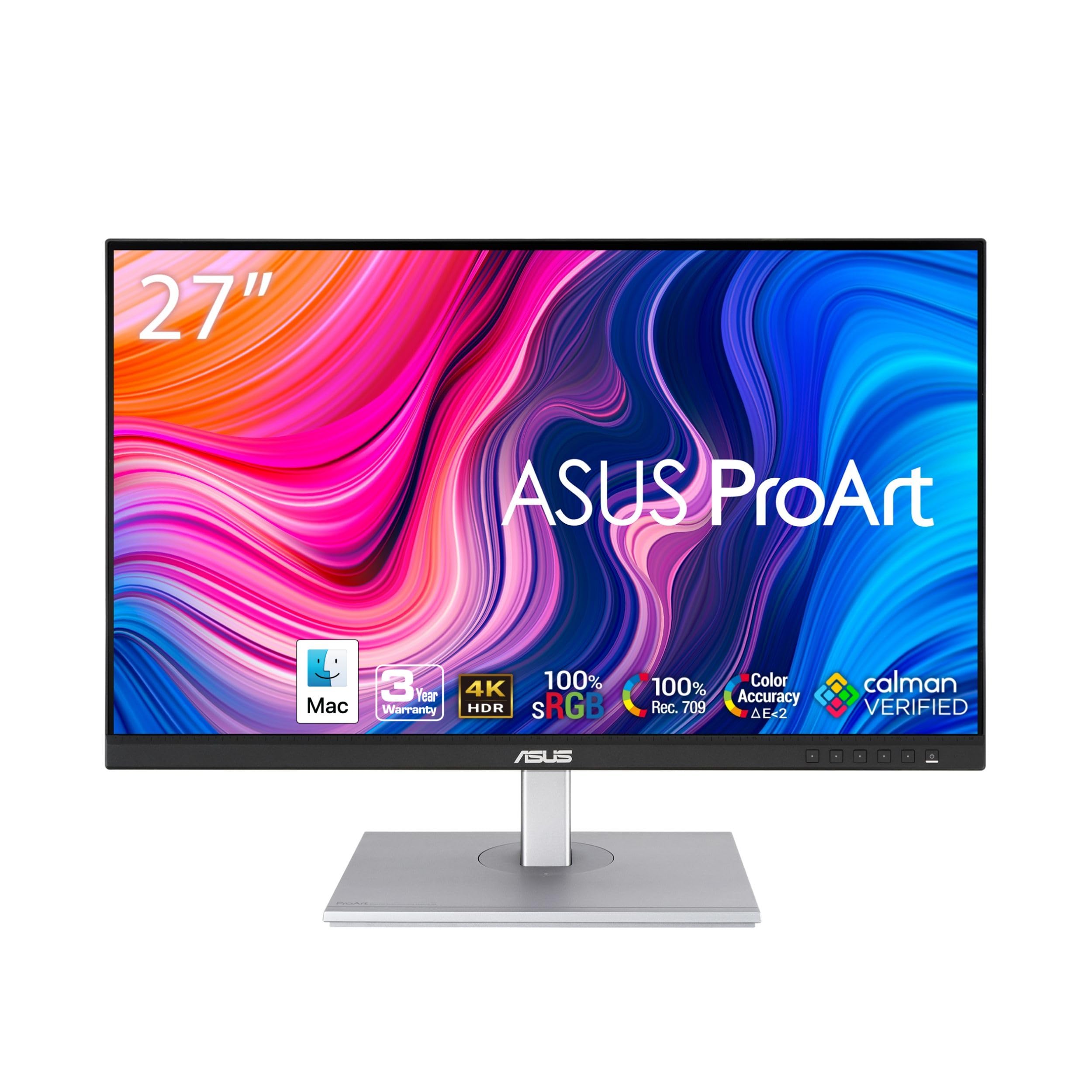
Full sRGB and Rec.709 coverage at a value tier — the entry point to pro-brand color
Coverage is the whole draw: 100% sRGB and 100% Rec.709, with Calman Verified factory calibration to Delta E less than 2. Photographers on the review pages swapped to this from older monitors, bought four, and reported the color mapping and print mismatch problem simply resolved. Reviewers also describe seeing the slightest detail in the sharpest images, with sRGB performance called out specifically.
Connectivity is unusually generous for the tier: DisplayPort over USB-C with 65W power delivery, DisplayPort, HDMI, and a USB 3.1 hub so your peripherals live at the monitor rather than on your desk. There is a 5-year warranty, which is longer coverage than most panels in this price band offer. The stand tilts, swivels, pivots and adjusts in height, and ProArt modes cover sRGB and Rec.709.
The calibration story has a caveat. Several owners found a slight green tint straight from the start, fixable but present, which is why buyers who care about absolute accuracy should plan to calibrate rather than trust the factory number blindly. There is also a known signal quirk with older USB-C laptops — one buyer had to power-cycle to get the handshake to stick. On connectivity specifically, reviewers rate it the weakest part of an otherwise strong monitor.
The case for it
- 100% sRGB and 100% Rec.709 with Delta E < 2 factory calibration
- 65W USB-C power plus a 5-year warranty
- USB 3.1 hub and full ergonomic stand adjustment
What to expect going in
- Slight green tint from the start on some units; plan to calibrate
- USB-C handshake issues reported with older laptops
- No 120Hz or high-end gaming features
Strong when: you want a color-managed ProArt panel with generous ports and long warranty coverage, and are happy to run a calibration pass.
Not the one for: anyone who wants plug-in-and-forget accuracy or high refresh rates.
10. LG 27UP850K-W 27-inch Ultrafine 4K UHD IPS DisplayHDR 400 Monitor

One USB-C cable into a MacBook — video, data, peripherals and 90W of charging
For a Mac designer who hates dongles, the spec that matters is USB-C with power delivery up to 90W. One cable drives the 27-inch 3840 × 2160 panel, carries your data, and charges the laptop, and there is a USB 3.0 hub plus two HDMI and a DisplayPort for everything else. The panel covers 95% DCI-P3, so wide-gamut color work reads correctly, and it hits VESA DisplayHDR 400, a brightness and contrast tier above a standard screen.
Owners describe sharp, accurate, vibrant 4K images that work beautifully with Mac M-series laptops over that single cable, and call out the ergonomics as excellent — you get height, tilt and pivot adjustment. The included cable set covers DisplayPort, HDMI, USB-C and power, so you are not buying anything extra on day one. Text and image clarity both get strong marks from the review pages.
The compromises here are mostly on the peripherals side. The built-in speaker sound is thin — adequate, but you may want proper speakers for audio work. The menu and volume button sits underneath the panel, which is an awkward reach. And you get only one USB-C port, which is fine for a single-laptop setup but limiting if you want to daisy chain. Refresh tops out at 60Hz.
The single-cable Mac specialist: 90W USB-C power, 95% DCI-P3 color, DisplayHDR 400, and a full adjust stand — with all the cables in the box.
What you give up: 60Hz, weak built-in speakers, an awkward underside button, and just one USB-C port.
Ideal for: a MacBook-driven design desk that wants one clean cable and accurate P3 color without a dock.
Skip if: you want a second USB-C port for daisy chaining or need strong built-in sound.
Understanding the Specs
Color Gamut Coverage
Gamut coverage is the percentage of a defined color space a panel can physically display — sRGB for web, DCI-P3 for video and screen work, Adobe RGB for print. A number like 99% sRGB means the screen can show almost the full range of web colors, which keeps your exported files looking as intended. Wider spaces like Adobe RGB can run into the high nineties on dedicated design panels, and that range is what print buyers pay extra for.
Delta E and Factory Calibration
Delta E measures the gap between the color your file requests and the color the panel produces — lower is more accurate. Factory-calibrated claims like Delta E < 2 or Delta E ≤ 3 describe the panel’s expected accuracy from the start, though shipping and panel variation can nudge it. Many designers still run their own calibration pass on arrival, since a green tint or drift can appear even on good panels.
USB-C Power Delivery
USB-C with power delivery sends video, data and laptop charging down one cable, which is why the wattage matters. Around 60W keeps a slim laptop topped up; 90W to 140W handles larger machines and leaves headroom. If you want a clean single-cable desk and no external dock, wattage is one of the first numbers to check on any 4K panel you consider.
Contrast Ratio and Panel Type
Contrast ratio compares the brightest white to the deepest black a panel can produce, so higher numbers usually mean richer shadows and less visible banding in gradients. IPS panels (the type most design monitors use for consistent color across wide viewing angles) sit around 1000:1 to 1500:1 in typical cases, and specialized layers like IPS Black push blacks deeper without shifting color.
FAQ
Is 4K resolution actually necessary for graphic design work?
How do I know if a monitor covers enough color gamut for my work?
Does the factory calibration mean I never have to calibrate the monitor myself?
What does USB-C power delivery really do for a design desk?
Is a 120Hz 4K monitor better than 60Hz for design work?
Can a 4K design monitor rotate to portrait mode for long documents?
Does a 32 inch 4K monitor work well for design or is 27 inch better?
What is a KVM switch and why do designers want one?
Do I need a wide gamut monitor if I only design for the web?
Will a 4K design monitor work with my MacBook or Mac Mini?
Final Thoughts: The Verdict
For most designers, the 4k monitor for graphic design winner is the Dell UltraSharp U2725QE because it ships factory-calibrated to Delta E less than 1.5 with 99% DCI-P3 coverage, then adds 120Hz motion, a 140W Thunderbolt 4 cable and a built-in KVM so the whole desk runs on one connection. If wide Adobe RGB gamut for print work is your priority, grab the ASUS ProArt PA279CRV — 99% Adobe RGB and 99% DCI-P3 at a tier that undercuts most reference displays. And for a Mac-only studio that wants one clean cable and accurate P3 color without a dock, the LG 27UP850K-W is the one to reach for.
How We Picked
We do not accept paid placement. Every pick is matched to a real buyer and a real use-case; we do not hands-on test units.
Sources & Methodology
Specifications: manufacturer listings and product documentation. Review insights: verified customer reviews, as of September 2026. Pricing: not shown on this page (it changes often); check the current price via the retailer link.
As an Amazon Associate, Gadgets Feed earns from qualifying purchases. This does not affect which products we feature.