
A 4K streaming encoder is the bridge between your camera’s pristine image and a live audience expecting broadcast‑quality video. Choosing the wrong one means dropped frames, sync issues, or a workflow that requires a laptop tethered to every shoot. The right encoder handles H.265 compression, multi‑protocol output, and network bonding without introducing noticeable latency.
I’m Min — the co-founder and writer behind Gadgets Feed. I’ve spent countless hours analyzing encoder benchmarks, firmware capabilities, and real-world streaming performance across the ‑ range to separate the units that deliver reliable 4K output from those that overheat or drop connections mid‑stream.
This guide focuses exclusively on hardware encoders that accept HDMI input and output compressed IP streams using protocols like RTMP, SRT, or NDI, cutting through the noise to find the best 4k streaming encoder for your specific production needs.
How To Choose The Best 4K Streaming Encoder
Selecting a 4K streaming encoder requires balancing encoding efficiency, protocol support, physical connectivity, and the specific demands of your live production workflow. The wrong choice forces you into a laptop‑tethering workflow even after spending hundreds of dollars.
Encoding Standard: H.264 vs. H.265
H.264 is the most widely supported codec across platforms like YouTube and Facebook, but it demands roughly twice the bitrate of H.265 to deliver equivalent 4K image quality. H.265 (HEVC) halves your bandwidth requirement at the same resolution, which is critical when streaming over cellular bonding or constrained upload connections. If your target platforms support HEVC, prioritize an encoder with hardware H.265 encoding to save bandwidth without sacrificing clarity.
Protocol Support and Multi‑Streaming
Not all encoders support every streaming protocol. RTMP remains the standard for most CDNs, but SRT offers reliable transport over unpredictable networks through packet retransmission and forward error correction. NDI enables IP‑based production workflows without dedicated video cabling. Multi‑protocol encoders that can output different streams simultaneously — one RTMP to YouTube, one SRT to a backup server, one HLS for local monitoring — provide redundancy and flexibility that single‑protocol units cannot match.
Connectivity and Physical I/O
Your encoder must match your source devices. HDMI 2.0 inputs handle 4K at 60 fps, while HDMI 1.4 caps at 4K 30 fps. SDI inputs are common in broadcast environments for longer cable runs and locked connections. Check the number of input ports: a single‑input unit works for a fixed camera setup, but 4‑input models like the FoMaKo KC800 or YoloBox Ultra support live switching between multiple cameras without an external switcher. Thunderbolt and USB‑C interfaces, such as those on the Blackmagic UltraStudio 4K Mini, connect to a computer’s high‑bandwidth bus for uncompressed capture before encoding.
Quick Comparison
On smaller screens, swipe sideways to see the full table.
| Model | Category | Best For | Key Spec | Amazon |
|---|---|---|---|---|
| YoloLiv YoloBox Ultra | All-in-One | Multi‑platform streaming with bonding | 4 HDMI + NDI HX3 + cellular bonding | Amazon |
| FoMaKo KC800 | Switcher | Multi‑camera switching with PTZ control | 4× 4K HDMI in, 6‑ch audio mixer | Amazon |
| URayCoder UHE265-8 | Multi‑Channel | 8‑input IPTV and broadcast encoding | 8× HDMI in, dual‑stream per input | Amazon |
| Blackmagic UltraStudio 4K Mini | Capture & Encode | Uncompressed 4K capture via Thunderbolt 3 | 12G SDI + HDMI 2.0, 40 Gbps throughput | Amazon |
| Osee GoStream Duet Kit | Portable Studio | Mobile production with built‑in monitor | 4 HDMI/SDI in, 14″ screen, NDI license | Amazon |
| URayCoder UHE265-4-4K | Mid‑Range | Single‑source 4K multi‑protocol streaming | H.265/H.264, 4K@30fps, WebRTC support | Amazon |
| Magewell Pro Convert NDI to HDMI | NDI Decoder | Reliable NDI decoding for IP workflows | NDI/NDI HX decode, 4K60 HDMI out | Amazon |
In‑Depth Reviews
1. YoloLiv YoloBox Ultra

The YoloBox Ultra integrates a 4‑channel HDMI switcher, H.265 encoder, 8‑inch touchscreen monitor, and cellular bonding into a single battery‑powered unit. Its Snapdragon 865 chipset handles simultaneous encoding to up to five platforms — three horizontal (YouTube, Facebook, Twitch) and two vertical (TikTok, Instagram) — without requiring a laptop or capture card. The 4G LTE modem, dual USB dongle support, Wi‑Fi, and Ethernet combine for reliable streaming over unstable networks.
NDI HX3 and SRT support enables low‑latency remote production, while ISO recording captures every input separately for post‑production flexibility. The 9‑hour battery life covers full‑day events, and the 650‑nit touchscreen remains readable outdoors. Users consistently praise its immediate source detection when plugging or unplugging cameras, reducing setup friction during live events. The dedicated YoloCast platform adds cloud‑based overlays and remote management.
Audio input from the 3.5mm jack is adequate but not broadcast‑grade; professionals with XLR mics may need an external audio interface. The interface lacks stinger transitions and macro automation, and local video storage is limited to five clips. At the premium end of the market, the YoloBox Ultra delivers the most complete all‑in‑one experience for mobile 4K streaming without a computer.
Why it’s great
- Battery‑powered all‑in‑one with 9‑hour runtime
- Cellular bonding combines 5 network links for reliability
- Simultaneous horizontal and vertical streaming
Good to know
- Audio input limited to 3.5mm without phantom power
- No stinger transitions or macro automation
- Local video storage capped at 5 clips
2. FoMaKo KC800
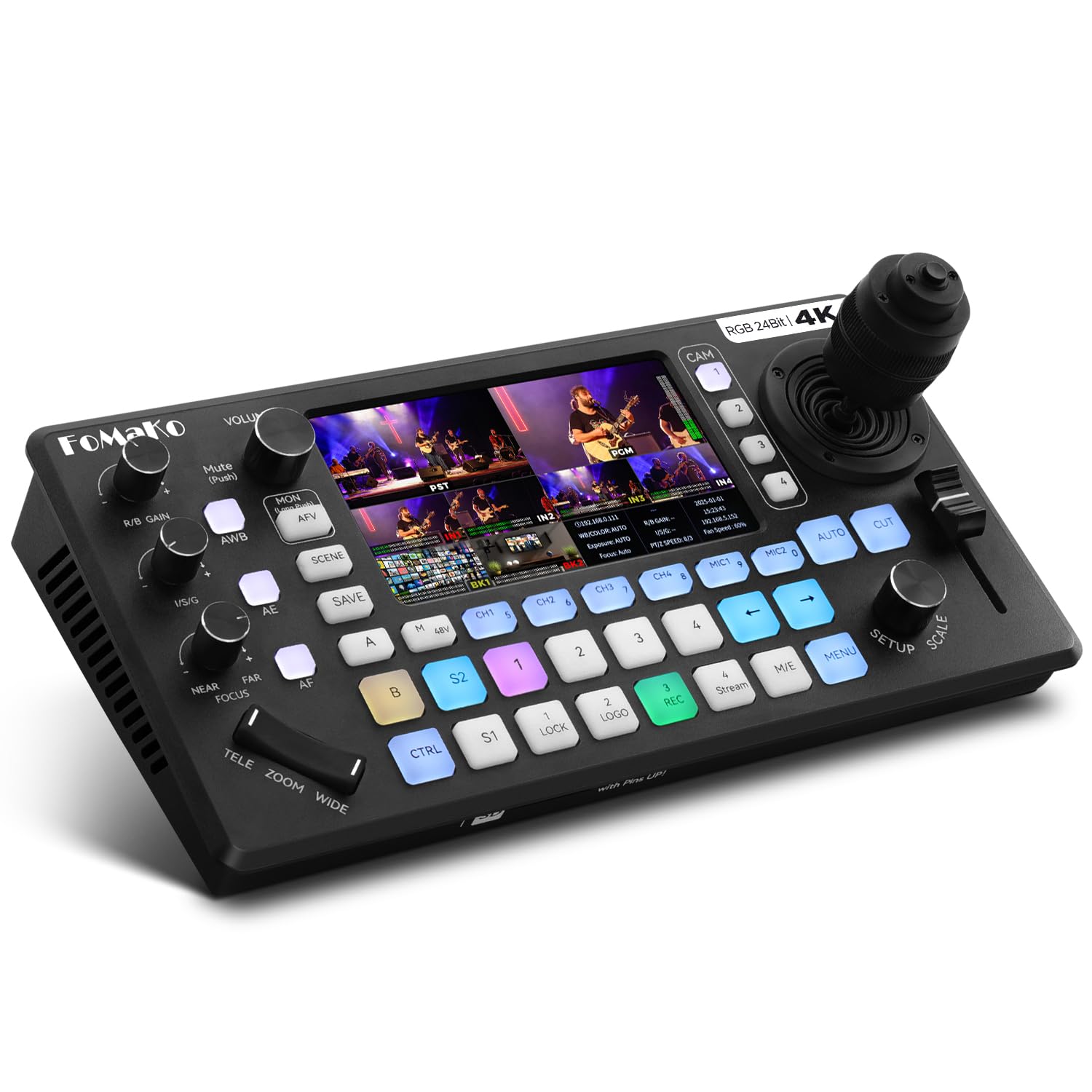
The FoMaKo KC800 combines a 4‑input 4K HDMI video switcher, PTZ camera controller with a 4D joystick, and a 6‑channel audio mixer in a single desktop chassis. Its RGB 24‑bit color processing delivers 16.7 million hues without the color shift common in budget switchers. The integrated PTZ controller supports VISCA and VISCA‑over‑IP with 10 programmable presets and AI tracking, eliminating the need for a separate control surface.
Three HDMI outputs provide PGM, multiview, and 4K loop‑through simultaneously. The dual recording engine writes to USB and SD card (up to 2TB each) in MP4 or TS format at up to 16 Mbps. Streaming supports three platforms plus a UVC feed, with bitrate adjustable from 2 to 12 Mbps and adaptive reduction for unstable networks. The 5.5‑inch LCD screen shows status without requiring an external monitor.
Some users report the unit can run hot in extended sessions, though FoMaKo’s support team has been responsive with replacements when cooling issues arise. The audio section includes two XLR inputs with 48V phantom power plus two 3.5mm inputs and four HDMI digital channels, making it suitable for church and corporate productions that need clean sound without an external mixer. Remote web management allows overlay customization and firmware updates from any browser.
Why it’s great
- Built‑in PTZ joystick and AI tracking reduce extra gear
- RGB 24‑bit color avoids the muted palette of cheaper switchers
- XLR inputs with phantom power for pro audio
Good to know
- Thermal management can struggle in extended sessions
- Network streaming setup may require support assistance
- 1080p output only despite 4K inputs
3. URayCoder UHE265-8

The URayCoder UHE265-8 accepts up to eight independent HDMI sources and outputs two simultaneous streams per input, each configurable with different protocols and targets. This makes it a natural fit for IPTV headends, multi‑camera church broadcasts, or surveillance systems that need separate feeds for recording and live streaming. Support for RTMP, RTSP, SRT, HLS, UDP, RTP, ONVIF, and FLV ensures compatibility with virtually any streaming server or video management system.
H.265 encoding at 4K resolution keeps bandwidth manageable even with eight concurrent streams, and the dual‑output architecture allows one stream to push to YouTube while the other feeds an internal NVR. The metal enclosure is compact at 7 × 5 × 1.5 inches, and the web interface provides full control over resolution, frame rate, bitrate, cropping, rotation, and overlay text or logos. Users report excellent video quality at low bitrates when using RTSP with ffmpeg and gstreamer pipelines.
A known revision split exists: earlier units use a different chipset that struggles with 720×480i interlaced sources. The newer chipset (firmware 1.63CU3‑L55M‑U) resolves this, but buyers should confirm the hardware revision before purchase. Customer support from URayCoder is consistently praised for rapid firmware updates and configuration assistance, making the UHE265-8 a solid choice for installations requiring 8‑channel encoding in one rack unit.
Why it’s great
- Eight independent HDMI inputs in a single device
- Dual‑stream output per input with separate protocols
- Excellent video quality at low bitrates
Good to know
- Older chipset revision has interlaced input issues
- Initial setup requires a computer with precise steps
- No HDMI passthrough on all inputs simultaneously
4. Blackmagic Design UltraStudio 4K Mini

The Blackmagic UltraStudio 4K Mini is a Thunderbolt 3 capture and playback device that delivers uncompressed 4K DCI video at up to 60 fps through a 40 Gbps connection. Unlike standalone encoders that compress before output, the UltraStudio sends raw video to a connected computer where software like DaVinci Resolve or OBS handles encoding. This approach provides maximum flexibility for post‑production and allows software‑side encoding with customizable codec parameters.
Connectors include 12G SDI input and output, HDMI 2.0 input and output, analog and digital audio I/O, and a dedicated microphone input. The compact metal chassis fits into any rack or desk setup, and compatibility spans Mac, Windows, and Linux systems through Blackmagic’s Desktop Video drivers. Users consistently report pristine capture quality with zero compression artifacts when feeding signals into Resolve or Premiere Pro.
The unit requires a true Thunderbolt 3 cable — standard USB‑C cables will not establish connection, a common first‑time setup mistake. Some units arrive DOA, and the microphone input has unadjustable delay that requires an external audio interface for live productions. The lack of a built‑in encoder means you must supply a computer, increasing overall system cost, but for users who already own a capable workstation, the UltraStudio offers uncompromised 4K capture quality that hardware encoders cannot match.
Why it’s great
- Uncompressed 4K DCI capture at 60 fps through Thunderbolt 3
- 12G SDI and HDMI 2.0 for broadcast and consumer gear
- Cross‑platform support for Mac, Windows, and Linux
Good to know
- Requires a computer with Thunderbolt 3 — no standalone operation
- Microphone input has unadjustable delay
- DOA risk requires verifying the unit immediately on arrival
5. Osee GoStream Duet Kit
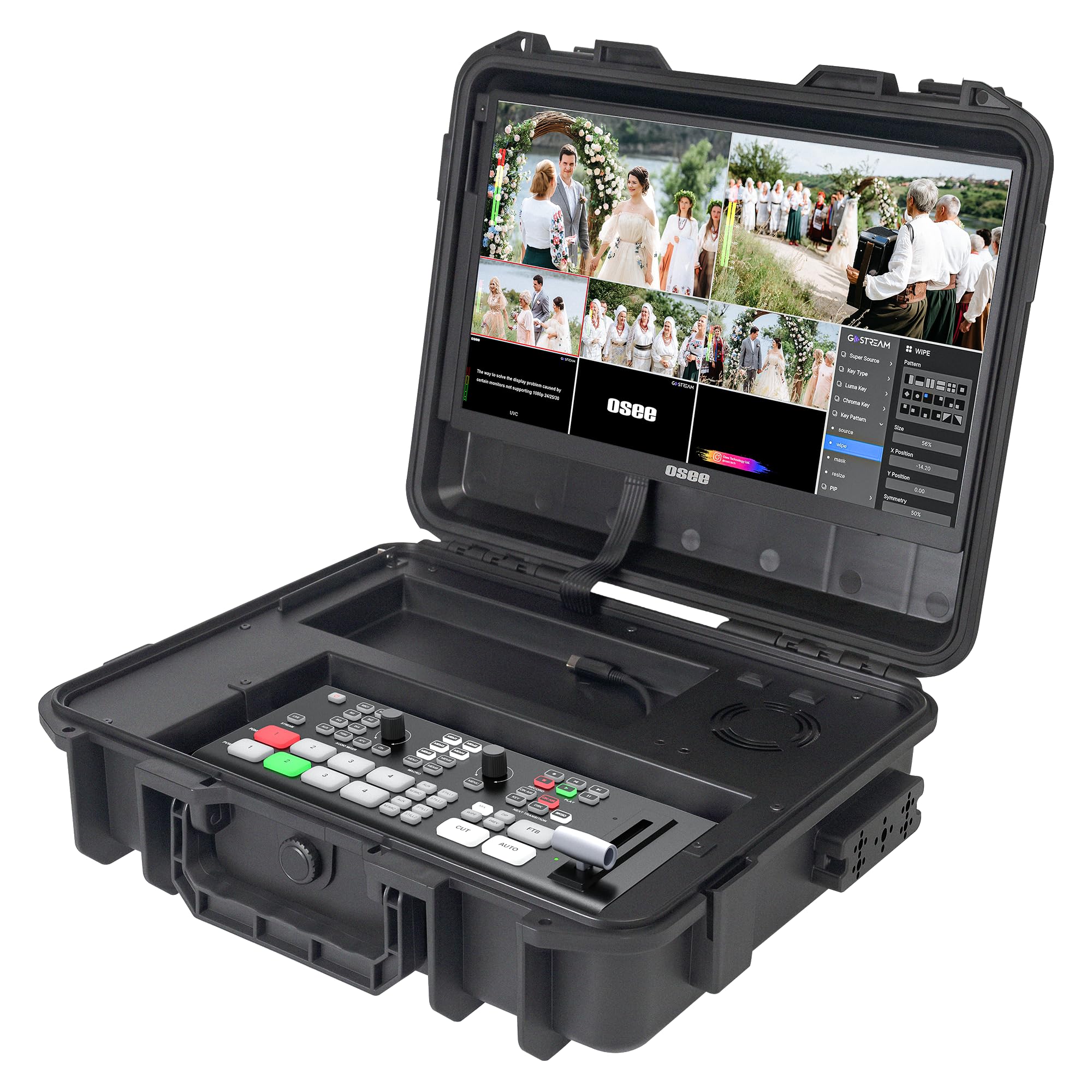
The Osee GoStream Duet Kit bundles a 4‑input HDMI/SDI switcher with a 14‑inch 1080×1920 monitor, silent fan, and three cheese plates with 1/4″ and 3/8″ threads — effectively a mobile live production studio in a single carry package. The whole kit weighs about 5 kg, making it practical for location work where setup time is critical. The included NDI activation eliminates the licensing cost that competing units often add.
Connectivity covers 4 HDMI/SDI inputs, 2 HDMI outputs for PGM and multiview, and 2 USB ports — one for USB camera input and one for streaming software like OBS or vMix. Power flexibility stands out: the unit accepts AC, DC, or USB power bank input, with seamless switching between modes. The built‑in USB DC 5V output can power a camera or other accessory, reducing cabling at the production desk.
Some users find the initial setup process confusing, with menu navigation and audio routing requiring YouTube tutorials. The built‑in monitor’s color accuracy is noticeably weaker than a dedicated production monitor, though the HDMI output to an external screen remains clean. The GoStream Duet Kit delivers a complete hardware solution for mobile streaming without a laptop, but operators should budget time for the learning curve before a live event.
Why it’s great
- All‑in‑one kit includes monitor, switcher, and mounting hardware
- Triple power input (AC, DC, USB power bank) for field use
- Free NDI activation reduces total cost of ownership
Good to know
- Monitor color accuracy is weaker than dedicated displays
- Setup menu and audio routing require prior study
- No 4K output at the monitor — limited to 1080p
6. URayCoder UHE265-4-4K
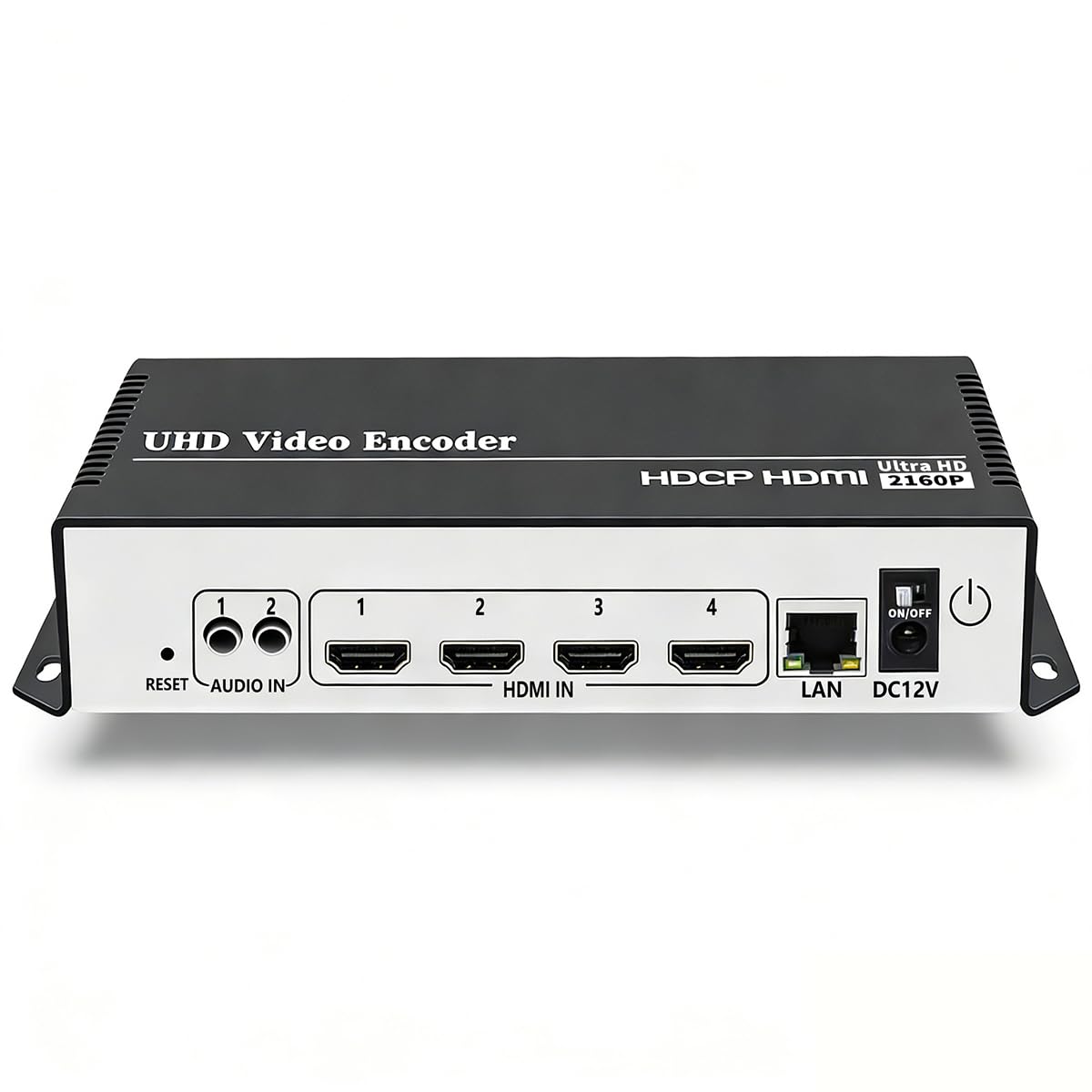
The URayCoder UHE265-4-4K is a single‑input HDMI encoder that supports H.265 and H.264 encoding at 4K resolution with a maximum frame rate of 30 fps (120 fps at 2K and below). Its broad protocol support — RTMP, RTSP, RTMPS, SRT, HLS, UDP, FLV, WebRTC, TRTC, and ONVIF — makes it compatible with virtually any streaming destination, including YouTube, Facebook, Twitch, Vimeo, and custom servers running ffmpeg or Blue Iris surveillance software.
Users report that the device works reliably for 24/7 streaming after a firmware update, though the initial setup is challenging because DHCP is disabled by default, causing connectivity frustration for those who skip the manual. The intuitive web interface accepts static text, scrolling captions, logos, and timestamps, plus cropping, rotation, and mirroring adjustments. Dual audio inputs — HDMI embedded and line‑in — allow flexible audio routing with adjustable quality.
The unit lacks a way to stop streaming without physically unplugging the power, making it better suited for permanent installations than on‑location productions that change sources frequently. Customer support from Linda and Allen at URayCoder is consistently responsive, providing firmware updates within 24 hours. For budget‑conscious buyers needing a single 4K stream to multiple platforms simultaneously, the UHE265-4-4K delivers comparable quality to units costing twice as much.
Why it’s great
- Broad protocol support including WebRTC and SRT
- Excellent lifetime technical support and firmware updates
- Comparable video quality to encoders at double the price
Good to know
- DHCP disabled by default causes initial connection issues
- No remote stream stop — must unplug to end a stream
- 4K limited to 30 fps; 60 fps only at 2K or lower
7. Magewell Pro Convert NDI to HDMI
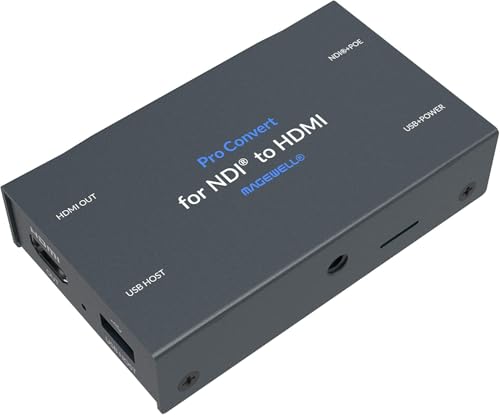
The Magewell Pro Convert NDI to HDMI is a dedicated NDI decoder that converts full‑bandwidth NDI and NDI HX streams to HDMI output at up to 4K60. While most encoders on this list focus on encoding camera feeds to IP, the Pro Convert handles the reverse path — essential for monitoring, confidence displays, or sending program video to a large screen in a house of worship or event venue. Its metal housing supports 24/7 operation in rack or portable setups.
Built‑in video processing includes de‑interlacing, aspect ratio conversion, frame rate conversion, color space adjustment, cropping, and scaling. Power is supplied through PoE or USB, with web‑based configuration providing full control over EDID optimization, tally indicators, and PTZ camera integration. Gigabit Ethernet ensures sufficient bandwidth for multiple NDI streams without congestion on a local network.
Users migrating from Birddog report that the Magewell unit is more reliable in extended operation, with zero failures compared to Birddog’s feature‑richer but less stable firmware. One warranty complaint details a failed RMA process, so buyers should verify warranty terms before purchase. For production workflows already built around NDI, the Pro Convert NDI to HDMI is the most dependable way to get NDI streams onto an HDMI display without introducing decoding artifacts or dropouts.
Why it’s great
- Rock‑solid NDI decoding reliability in 24/7 operation
- PoE and USB power for flexible deployment
- Advanced video processing including de‑interlacing and frame rate conversion
Good to know
- Warranty support has had reported gaps in RMA processing
- Decode‑only — requires a separate encoder for the camera side
- No built‑in streaming output, limited to HDMI display
FAQ
Can I stream 4K at 60 fps to YouTube with a budget encoder?
What is the difference between NDI and SRT for live production?
Final Thoughts: The Verdict
For most users, the best 4k streaming encoder winner is the YoloLiv YoloBox Ultra because it combines a multi‑camera switcher, H.265 encoder, cellular bonding, and battery power into a single device that works without a laptop. If you want built‑in PTZ control and XLR audio for church or corporate productions, grab the FoMaKo KC800. And for uncompressed 4K capture where post‑production quality is the priority, nothing beats the Blackmagic UltraStudio 4K Mini.