
Our readers keep the lights on and my morning glass full of iced black tea. As an Amazon Associate, I earn from qualifying purchases.
Specs are compiled from manufacturer listings and verified buyer reviews and can change over time — please confirm the key details on the product page before buying.
You are looking for a 4K streaming webcam, but you want one that delivers sharp, glitch-free video with reliable autofocus, not just a marketing label. Many cameras claim 4K, but only a few give you the true resolution, dependable autofocus, and good low-light performance that actually makes you look professional without a full studio setup. This guide cuts through the noise to help you find the webcam that works for your specific computer, your lighting, and your budget.
I’m Min — the founder and writer behind Gadgets Feed. This guide is built by comparing the manufacturers’ published specifications and the patterns across verified customer reviews, so you get each pick’s real strengths and trade-offs instead of marketing spin.
Streamers, remote workers, and content creators all need different things. Here is a breakdown of the best 4k streaming webcam options available today.
Quick Picks
- Insta360 Link 2 Pro — Best Overall
- YOLOLIV YoloCam S3 — Premium Pick
- Elgato Facecam 4K — Top Performer
- Hollyland Lyra 4K Webcam — Versatile Pick
- OBSBOT Tiny PTZ 4K Webcam — Compact PTZ
- Jabra PanaCast 20 — Conference Pro
- EMEET SmartCam S800 — Dual Focus Tech
- NexiGo N930E Pro — Best Ring Light
- Angetube 913 AI King — Budget-Plus Pick
How To Choose The Best 4K Streaming Webcam
Picking the right webcam is about matching the specs to your specific use case—whether that’s solo streaming, group meetings, or content creation. Here are the three most important things to look at.
Sensor Size and Low-Light Performance
The physical size of the image sensor (measured in inches, like 1/2.8” or 1/1.3”) is the single biggest factor for video quality. A larger sensor captures more light, which means you get a clearer, less grainy image even when you aren’t sitting under a ring light. Look for a sensor at least 1/2.8” if you plan to stream or take calls in a normal room without studio lighting. The 1/1.3” sensor found in premium models is a step up for truly dim environments.
Autofocus and AI Tracking
Not all autofocus is the same. Standard contrast-based autofocus can be slow and will sometimes hunt for focus. Phase Detection Autofocus (PDAF) locks on faster and tracks movement more reliably, so you don’t go blurry when you lean in to read a note or gesture on stream. If you pace around while presenting, look for a camera with physical AI tracking (a motorized gimbal or PTZ), rather than software-based digital zoom, which crops the image and lowers quality.
Field of View and Frame Rate
The field of view (FOV) determines how much of your background is visible. A wide FOV around 100° is great for showing off a desk setup or including multiple people, but it can make you look small if you are alone. A narrower FOV between 73° and 82° is better for a solo streamer close to the camera. For frame rate, 30fps is standard for 4K, but 1080p at 60fps gives you much smoother motion for fast hand movements or gaming streams.
Quick Comparison
| Model | Best For | Sensor | Autofocus | Max Resolution | Amazon |
|---|---|---|---|---|---|
| Insta360 Link 2 Pro | PTZ Group Tracking | 1/1.3” | AI + Gimbal PTZ | 4K@30fps | $199.99$249.99Amazon |
| YOLOLIV YoloCam S3 | DSLR-Like Image Quality | 1/1.3” Sony | PDAF | 4K@30fps | $219.00Amazon |
| Elgato Facecam 4K | Studio & Stream Control | Sony STARVIS 2 | Auto / Manual | 4K@60fps | $199.99Amazon |
| Hollyland Lyra 4K | Wireless Mic Integration | 1/1.5” CMOS | 50MP PDAF | 4K@30fps | $159.00Amazon |
| OBSBOT Tiny PTZ 4K | AI-Powered Auto Framing | Sony 1/2.8” | Autofocus + Gimbal | 4K@30fps | $129.00$169.00Amazon |
| Jabra PanaCast 20 | Professional Conferencing | 13MP | Intelligent Zoom | 4K UHD | $155.22$229.00Amazon |
| EMEET SmartCam S800 | Fast Dual Autofocus | Sony 1/2” | PDAF + TOF | 4K@30fps | $119.00$149.99PrimeAmazon |
| NexiGo N930E Pro | Integrated Ring Light | Sony 1/2.5” | PDAF | 4K | $99.99Amazon |
| Angetube 913 AI King | Value & Remote Control | 1/2.8” | AI Tracking | 4K@30fps | Amazon |
In‑Depth Reviews
1. Insta360 Link 2 Pro

The gimbal-powered tracker that keeps you centered as you move around the room.
If you move around while you present or stream, the Insta360 Link 2 Pro is the hands-down winner. Its physical pan-tilt-zoom (PTZ) gimbal actually follows you, rather than just digitally cropping the frame like lesser cameras do. The large 1/1.3” sensor delivers sharp, detailed 4K video with clean low-light performance, so you don’t need blinding studio lights to look professional.
Buyers report that the setup takes less than five minutes and integrates flawlessly with major platforms. The audio is also a step up, with directional beamforming mics that isolate your voice from keyboard clatter. For creators, the Elgato Stream Deck integration lets you switch modes and trigger presets without fiddling with menus.
The trade-off is that the AI tracking truly needs decent lighting to lock on perfectly. Also, it is currently not compatible with ARM-based Windows systems or Windows Hello Face Recognition, so check your device if those matter to you.
Best Parts
- PTZ gimbal provides physical AI tracking without cropping the image
- Large 1/1.3” sensor cleans up low-light video significantly
- Directional mics reduce background noise for clear audio
Know Before You Buy
- AI tracking struggles in very low light
- Not compatible with ARM-based Windows systems
Best pick if: you present, teach, or stream while standing and moving around, and you want the camera to physically follow you without any quality loss.
The fine print: you need decent ambient light for the tracking to work its best.
2. YOLOLIV YoloCam S3

DSLR-quality depth of field from a webcam without the complex rig.
The YoloCam S3 is designed to give you a cinematic look right from the start. It uses a large 1/1.3″ Sony sensor, which is one of the biggest you will find in a webcam, to create a natural bokeh effect—that soft background blur that makes you pop on stream. The fast PDAF autofocus ensures you stay razor-sharp even when you lean forward to read a note or show a product close-up.
Owners mention that the image quality is “phenomenal” and “DSLR-like”, with vibrant colors and excellent low-light performance that beats most competitors. The all-aluminum body acts as a heatsink, so the camera stays cool during long streams—a common problem with other 4K webcams. It also includes a foldable magnetic mount for easy switching between landscape and portrait orientation.
Most people will find this an overkill for casual video calls, but if you are a streamer or content creator who wants that professional, shallow depth-of-field look without the complexity of a mirrorless camera, this is your best bet.
What Stands Out
- Largest sensor size (1/1.3”) in this guide provides true cinematic background blur
- All-aluminum body designed for 24/7 streaming without overheating
- Color grading software (Picasso Resolve) for manual DSLR-like adjustments
Keep in Mind
- Overkill for simple video calls
- Advanced color grading software is Windows-only at launch
Ideal for the serious streamer or content creator who: wants the most filmic image possible from a plug-and-play webcam, with true bokeh and pro-level color control.
Not the right fit if: you only need a webcam for occasional Zoom meetings.
3. Elgato Facecam 4K

The streamer’s studio cam with smooth 60fps and DSLR filter support.
If your priority is buttery-smooth motion in your streams, the Facecam 4K delivers true 4K at 60 FPS, which is rare at this level. It pairs this with a Sony STARVIS 2 CMOS sensor and Elgato’s Prime Lens for sharp, vibrant footage. One of its most unique features is the standard 49mm lens filter thread, letting you screw on a polarizer or diffusion filter just like you would on a camera lens.
Customers note that the “clarity is amazing” and that it is a clear step up in quality from the older Logitech Brio. The built-in flash memory saves your camera settings to the device, so your custom exposure and white balance stay the same even when you plug the webcam into a different computer for a stream. Reviewers point out it does not have a built-in microphone, so you will need a separate one for audio.
Because it lacks a microphone, the Facecam 4K is strictly for streamers and content creators who already own a USB mic. It is also very wide at 20mm, so digital zoom is required for a tighter frame, which reduces 4K quality. This is a niche tool for the creator who values custom lens control and high frame rates over all-in-one convenience.
Studio Strength
- True 4K at 60 FPS for silky-smooth motion
- Accepts standard 49mm lens filters for creative control
- Built-in flash memory saves settings across different computers
Trade-off
- No microphone built-in—requires a separate USB mic
- Very wide 20mm lens means digital zoom loses 4K quality
Made for the advanced streamer who: already has a separate microphone and wants the highest frame rate (60fps) and professional lens filter options.
skip it if: you need an all-in-one solution with a built-in microphone.
4. Hollyland Lyra 4K Webcam

A complete creator package that pairs a pro sensor with a wireless lav mic.
The Lyra stands out as a complete package for creators who also need high-quality audio. It features a large 1/1.5” CMOS sensor that is 3x larger than standard webcams, providing excellent low-light performance and a natural blurred background. The real headline feature is direct wireless pairing with the LARK A1 microphone, which gives you professional, noise-canceling audio (20dB intelligent noise cancellation) without needing a separate receiver, allowing you to roam up to 33 feet (10m) from your desk.
Shoppers say that the camera is “excellent for content creators and professionals” and that the autofocus locks on quickly and stays sharp. The included HollyStudio app offers one-click skin smoothing, color correction, and a precise green screen algorithm that can even preserve fine hair details. This is a rare feature set for a webcam.
The main concern from multiple buyers is that the camera runs very hot, even when idle. While the manufacturer touts the metal body as a heat sink, some users worry about long-term durability. If you need an all-in-one video and audio solution that can handle live streaming and professional calls, the Lyra is a compelling choice despite the heat concern.
Great For
- Direct wireless pairing with LARK A1 mic for pro audio without a receiver
- Large 1/1.5” sensor creates a professional, natural bokeh background
- Advanced software with green screen and skin-smoothing algorithms
Concern
- Camera runs very hot during use, raising potential durability questions
A strong fit for the content creator who: wants a video and audio combo in one box, especially for dynamic presentations where you walk and talk.
Be aware that: several buyers report the camera gets hot enough to be a concern.
5. OBSBOT Tiny PTZ 4K Webcam

The tiny gimbal camera that follows you with a simple hand gesture.
The OBSBOT Tiny uses a physical 2-axis gimbal for true AI tracking, which is a huge step up from software-based digital cropping. It packs a Sony 1/2.8″ sensor that delivers crisp 4K video at 30fps, and its HDR mode handles backlit windows well, keeping your face properly exposed. The gesture control is a neat trick—hold up a ✋ to start tracking, or use a 👆 to zoom in, all without a remote.
Buyers mention that it is “excellent for Zoom PT/training” and that the video and audio quality are great for its size. The physical privacy feature is unique: when powered off, the camera physically points down at the desk, giving you total privacy. It is also incredibly compact, fitting easily into a carry bag for travel.
Some users have reported that firmware updates can break the gesture recognition system, making it slow or unreliable until a fix is released. If you rely heavily on gesture controls, this is a risk to be aware of. For most people, it is a fantastic, portable PTZ camera that offers a lot of value.
Why It Shines
- Physical 2-axis gimbal provides true, high-quality AI tracking
- Gesture controls let you zoom and track without any remote
- Very compact design and physically points down for privacy when off
Potential Issue
- Firmware updates have been known to break gesture controls for some users
You will love this if: you need a portable, compact PTZ camera for travel or teaching, and you like the idea of hands-free gesture control.
Worth noting: the gesture control software can be finicky after updates.
6. Jabra PanaCast 20

The business-class webcam that tune your lighting and framing automatically.
The PanaCast 20 is built for the professional who wants a “low-maintenance” experience for video calls. It uses powerful on-device AI to deliver a crisp 4K Ultra-HD image in real-time without any noticeable lag. Its Intelligent Zoom automatically follows your movements to keep you perfectly framed, and its intelligent lighting optimization analyzes your environment to fix bad lighting on the fly.
Buyers rave about the picture quality, saying “I get comments on how my picture is so clear” for WFH. It is certified for Microsoft Teams and Zoom, so you can trust it will work smoothly in those environments. The build quality is excellent, with a sturdy clamp that stays put on your monitor. It also integrates with Jabra’s software suite for unified control of your camera and headset.
The main complaint is that the auto-zoom can sometimes frame you too high or too small, and there is no way to manually adjust the framing. The camera also runs very hot due to the on-device processing, which is a durability concern for some users.
Business Ready
- AI-driven intelligent zoom and lighting optimization work automatically
- Certified for Microsoft Teams and Zoom for guaranteed compatibility
- Sturdy, well-built design with a reliable monitor clamp
Considerations
- Auto-framing cannot be manually adjusted in position or size
- Camera runs very hot due to on-device processing
Ideal for the remote professional who: wants a fuss-free, high-quality webcam for daily Teams or Zoom calls with automatic lighting and tracking.
Not ideal if: you need precise manual control over your framing.
7. EMEET SmartCam S800

Blazing-fast autofocus that locks on instantly, thanks to dual PDAF and TOF sensors.
The S800’s a neat extra is its dual autofocus system, combining Phase Detection (PDAF) with Time of Flight (TOF) sensors. This gives you faster, more precise focusing than single-autofocus systems, making it ideal if you move around or have objects coming into the frame. You get crisp 4K@30fps and smooth 1080P@60fps video from a good Sony 1/2″ sensor with an F/1.8 aperture, which helps in lower light.
Buyers confirm that it has “superior 4K HDR image” and “good digital zoom” with excellent, low-noise audio. The flexible stand offers a 44.5° horizontal angle and a 45° vertical forward angle, giving you plenty of options for different desk setups. It also includes a physical privacy cover for confidence.
The reliability is a significant caveat. Multiple buyer reports indicate that several units failed within a year due to USB interface issues. One reviewer noted they had 4 of 6 units fail. It also runs hot, and on Macs it can disconnect frequently unless you disable low power mode. This makes it a risky buy for mission-critical daily use.
Standout Feature
- PDAF + TOF dual autofocus is incredibly fast and precise
- Excellent 4K HDR image quality with a Sony F/1.8 sensor
- Low-noise microphones provide clear audio
Major Risk
- Multiple reports of units failing within a year due to USB issues
- Can be unreliable on Macs, requiring power setting changes
Best value for dual-focus tech if: you primarily use it on a Windows PC and want the fastest possible autofocus, and are willing to accept a higher than usual failure rate.
Not a safe choice if: you need a reliable camera for daily professional use or primarily use a Mac.
8. NexiGo N930E Pro
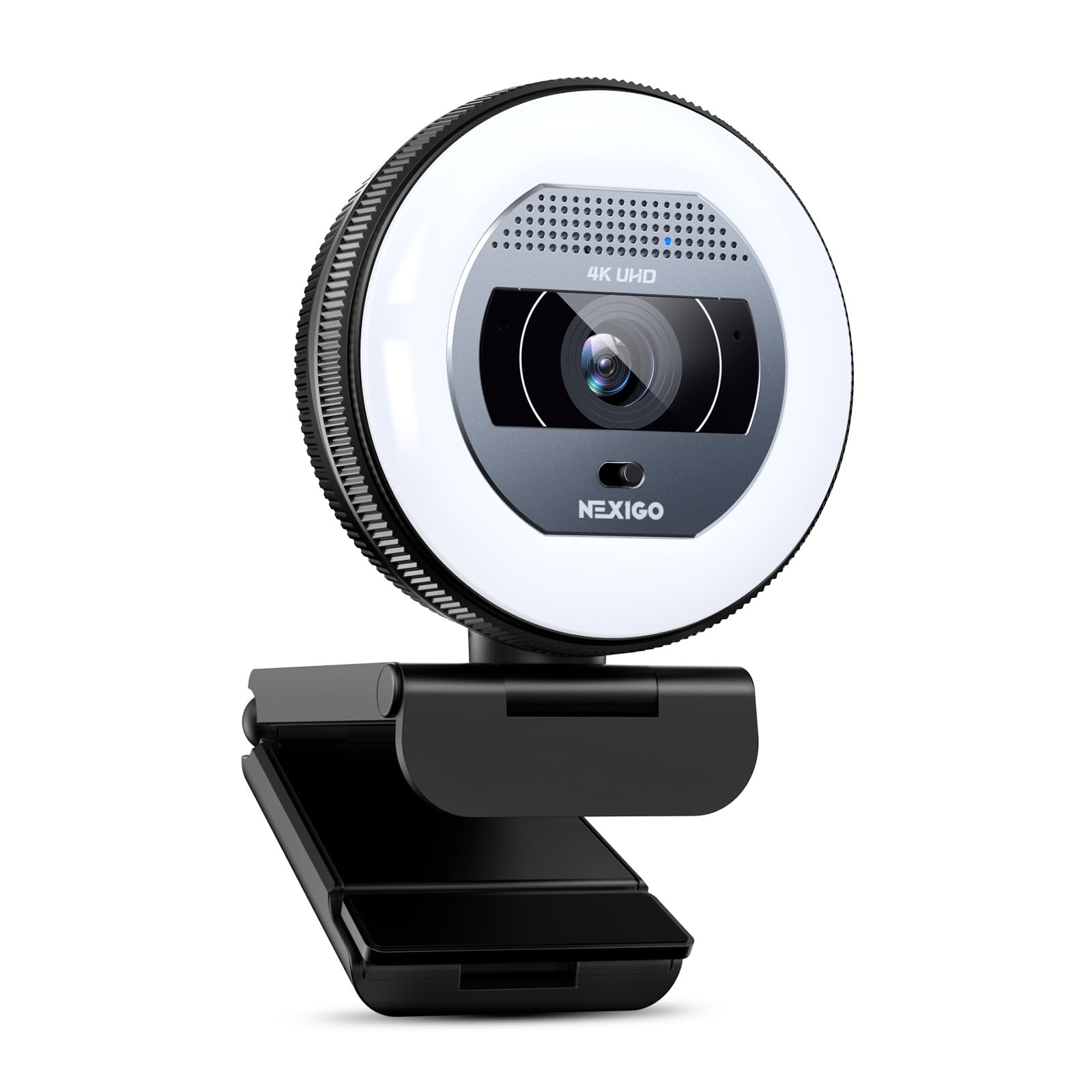
The self-contained solution that lights your face perfectly without needing a separate lamp.
If you take calls in a dim room or just want to look more polished without buying a separate ring light, the NexiGo N930E Pro is a fantastic pick. It has a built-in ring light with a touch sensor that lets you switch between white, natural, or warm light, and a dial for stepless dimming. Under the hood, it uses a Sony 1/2.5″ sensor to deliver true 4K clarity with enhanced light transmission.
Buyers confirm that it is the “best for low light areas” and that the autofocus and autoexposure work well, even for scanning QR codes from inches away. The image quality is sharp in 1080p at 60fps and detailed in 4K. Buyer feedback notes the PDAF autofocus is fast, keeping your face clear with small movements, and the noise-canceling mics provide clear audio.
The main concern is quality control. One buyer mentioned that their unit was nonfunctional from the start, with both auto and manual focus not working. This could be a lemon, but it is a risk to be aware of. The webcam is also white, which might not fit all desk aesthetics.
Lighting Perks
- Integrated ring light with adjustable color and brightness improves low-light video
- PDAF autofocus is fast and accurate for normal use
- Good 4K clarity with a quality Sony sensor
Risks
- Some units arrive with non-functional autofocus systems
- White plastic build may not suit all setups
Reach for this if: you need an all-in-one camera with a built-in ring light to look your best without extra gear, especially for low-light rooms.
But be aware: there is a risk of receiving a defective unit, so buy from a seller with a good return policy.
9. Angetube 913 AI King
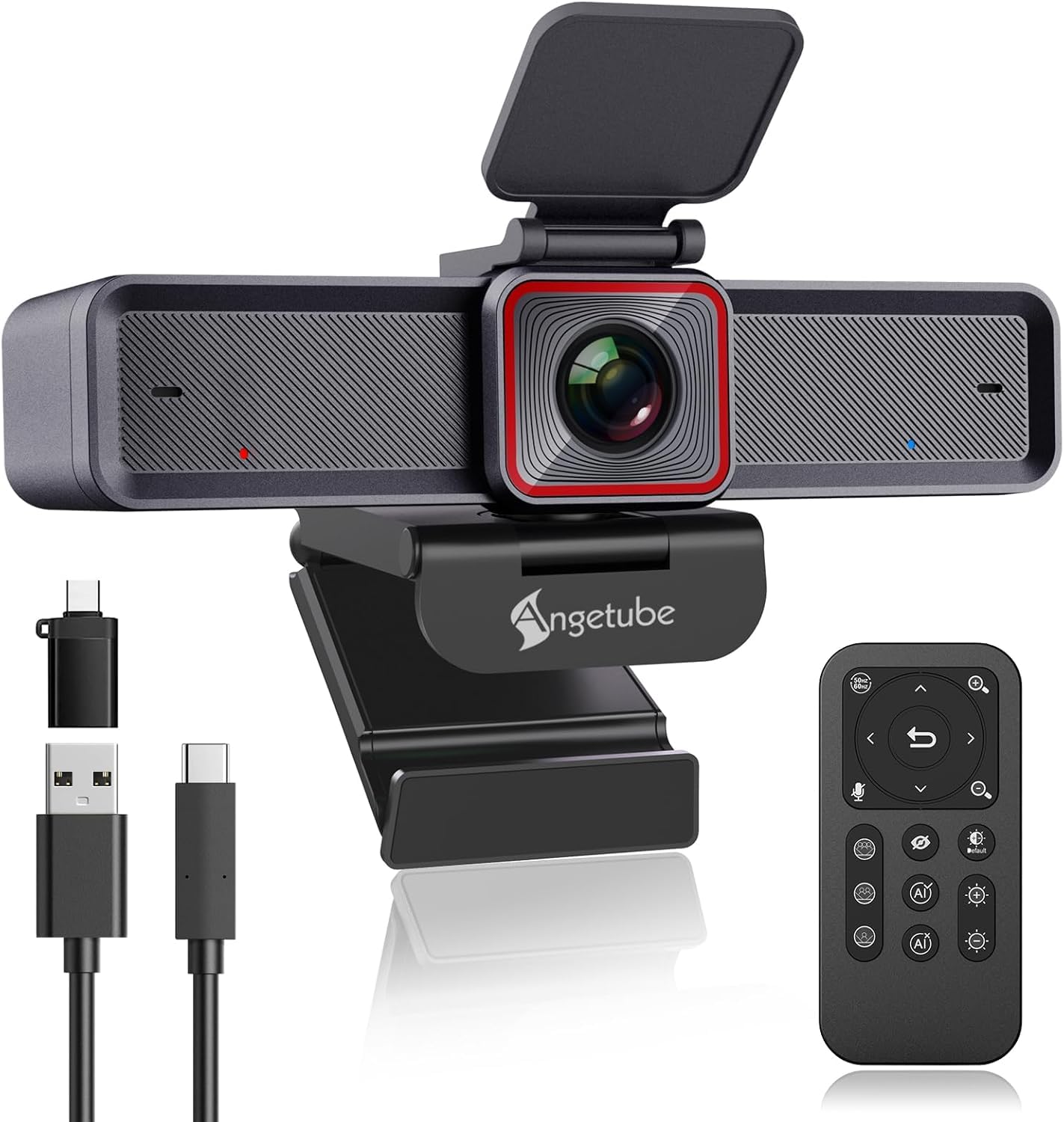
The feature-packed entry-level cam with a remote control and powerful 10x zoom.
The Angetube 913 AI King punches way above its price class by offering an 18-key RF wireless remote control, which lets you control zoom, pan, and AI tracking from across the room—a huge advantage for locked-down work PCs that can’t install software. It also has a 1/2.8” sensor that delivers “true 4K/30fps via USB-C with excellent clarity and white balance,” according to buyers.
Owners mention that the “picture quality is excellent, even in poor lighting,” and that the built-in mics sound surprisingly good, often rivaling external microphones. The dual noise-canceling mics filter out wind and keyboard noise effectively. The build quality is substantial with a versatile mount, and buyer reports mention that the customer support from Angetube is “outstanding,” even replacing a broken cable for free after a year.
Its AI tracking struggles a bit with small, fast-moving objects like kids, but for normal meetings, it works well. While it lacks the premium sensor size of top-tier picks, it offers incredible value for anyone who wants a 4K webcam with AI tracking and a remote, while staying affordable.
What Makes It Different
- 18-key RF remote control for zoom, AI, and mic control without software
- 10x digital zoom offers significantly more reach than the 4x standard
- Excellent customer support from the manufacturer
Limits
- AI tracking lags behind small, fast-moving subjects
- Smaller 1/2.8” sensor means less light capture than premium picks
This is the best entry-level pick if: you want AI tracking and the convenience of a remote control for a locked-down work computer, all at a very competitive price.
Don’t expect it to: track fast-moving children or perform as well in very dark rooms as larger-sensor cameras.
Understanding the Specs
Sensor Size
This is the most important spec for video quality. It is the physical piece of silicon that captures light. A larger sensor (e.g., 1/1.3″ vs. 1/2.8″) captures more light, which reduces graininess and gives you a better image in dim rooms. It also allows for a more natural background blur (bokeh).
PDAF (Phase Detection Autofocus)
This is the technology that keeps you in focus when you move. Standard autofocus is like a camera shaking a lens back and forth to find focus (slow). PDAF uses dedicated sensors to measure focus instantly, so you stay sharp even when you lean forward or gesture. Some cameras add TOF (Time of Flight) sensors to measure distance for even faster lock-on.
AI Tracking vs. Digital Zoom
True AI tracking uses a physical motor (a gimbal or PTZ) to move the lens, keeping you in the center of the frame without losing picture quality. “Fake” AI tracking just digitally crops the image to follow you, which makes the picture grainier and gives you a zoomed-in look. Always check if the tracking uses a motor.
HDR (High Dynamic Range)
This feature helps balance the light in your scene. If you sit in front of a bright window, HDR will brighten your face without blowing out the background into a white glare. It also helps prevent overexposure from nearby lamps. Turn this on if your room has mixed lighting.
FAQ
Does a 4K streaming webcam require a powerful computer to run?
What is the difference between true 4K and upscaled 4K in a webcam?
Will a 4K webcam work with USB 2.0 ports?
What field of view (FOV) is best for a single streamer vs. a group?
Can I use a 4K streaming webcam as my only camera for YouTube?
How important is a built-in privacy shutter?
The webcam runs very hot. Is that normal?
What is the ideal placement for a streaming webcam?
Final Thoughts: The Verdict
For most buyers, the best 4k streaming webcam winner is the Insta360 Link 2 Pro because its physical PTZ gimbal and large 1/1.3” sensor deliver the best balance of pro-quality video and reliable, non-destructive AI tracking. If you want true DSLR-like cinematic bokeh and color control, grab the YOLOLIV YoloCam S3. And for the streamer who prioritizes smooth 60fps motion and professional lens filters, the Elgato Facecam 4K is your best bet.
How We Picked
We do not accept paid placement. Every pick is matched to a real buyer and a real use-case; we do not hands-on test units.
Sources & Methodology
Specifications: manufacturer listings and product documentation. Review insights: verified customer reviews, as of July 2026. Pricing: not shown on this page (it changes often); check the current price via the retailer link.
As an Amazon Associate, Gadgets Feed earns from qualifying purchases. This does not affect which products we feature.
Product prices and availability are accurate as of the date/time indicated and are subject to change. Any price and availability information displayed on Amazon at the time of purchase will apply to the purchase of this product. As an Amazon Associate I earn from qualifying purchases.
CERTAIN CONTENT THAT APPEARS ON THIS SITE COMES FROM AMAZON. THIS CONTENT IS PROVIDED "AS IS" AND IS SUBJECT TO CHANGE OR REMOVAL AT ANY TIME.
Amazon and the Amazon logo are trademarks of Amazon.com, Inc. or its affiliates.