
Our readers keep the lights on and my morning glass full of iced black tea. As an Amazon Associate, I earn from qualifying purchases.
Specs are compiled from manufacturer listings and verified buyer reviews and can change over time — please confirm the key details on the product page before buying.
The biggest headache with a 4K touch screen monitor isn’t the resolution or the touch — it’s the stand. You pay a premium for a razor-sharp display you can tap, swipe, and sketch on, only to find it sits on a fixed stand that kills your neck and clogs your desk. The real question is which monitor gives you vivid color, a responsive touch layer, and the physical flexibility to actually enjoy both without fighting the hardware every day.
I’m Min — the founder and writer behind Gadgets Feed. This guide is built by comparing the manufacturers’ published specifications and the patterns across verified customer reviews, so you get each pick’s real strengths and trade-offs instead of marketing spin.
You need a 4K touch screen monitor that fits your actual workspace — not just your wishlist. This roundup of the best 4k touch screen monitor options covers three types: a portable 15.6-inch model for travel, a fixed 27-inch or 32-inch desktop monitor with an ergonomic stand, and a rolling 32-inch smart TV on a wheeled stand that moves from room to room.
Quick Picks
- Upperizon Portable Monitor 15.6″ OLED — Best Overall
- Magedok 17.3″ 4K Touchscreen — High Refresh
- LG Smart Monitor Swing 32U889SA-W — Ergonomic Marvel
- ApoloSign 32″ Smart Portable TV — Family Hub
- KTC MEGAPAD 32″ A32Q7 Pro — Battery Power
- TouchWo 55″ Industrial Monitor — Commercial Grade
- ALOGIC Clarity Pro Touch 27″ — Studio Precision
- YCKJNB 43″ Floor-Standing Kiosk — Retail Ready
- COOLHOOD 65″ Smart Board — Classroom Power
How To Choose The Best 4K Touch Screen Monitor
Buying a 4K touch screen monitor is different from picking a regular monitor. You are paying a premium for two things at once: an ultra-sharp 3840×2160 resolution and a layer of glass that registers every tap and swipe. If you pick the wrong one, you end up with a monitor that has great specs but a terrible touch experience — or vice versa.
Panel Technology: OLED vs IPS vs VA
OLED gives you perfect blacks and an infinite contrast ratio, so text and images look like they are floating on glass. IPS panels offer wider viewing angles and are more common in portable models, but their black levels are nowhere near as deep. VA panels, found in some rolling smart monitors, offer a middle ground with a 3000:1 contrast ratio that beats IPS but still falls short of OLED. For a touch monitor you look at from arm’s length, the panel type defines how vibrant everything looks.
Touch Compatibility: Windows vs macOS vs Game Consoles
But macOS does not support touch input on external monitors, so a MacBook user loses the touch functionality. Game consoles (PS5, Xbox, Switch) also do not pass touch signals over HDMI. If you plan to use the touchscreen, make sure your device supports external touch input.
Portability vs Fixed Install
A 15.6-inch portable monitor slips into a bag and runs off a single USB-C cable, so it works for traveling colorists or dual-screen road warriors. A fixed 27-inch or 32-inch desktop monitor has a proper ergonomic stand with height, tilt, and swivel. A rolling 32-inch smart TV on a wheeled stand sits somewhere in between — it moves from room to room but stays in one spot per session. Think about if you need to carry the monitor or roll it before you decide on a size.
Quick Comparison
| Model | Best For | Panel & Size | Contrast Ratio | Color Gamut | Amazon |
|---|---|---|---|---|---|
| Upperizon 15.6″ OLED | Portable color grading | 15.6″ OLED | 100000:1 | 100% DCI-P3 | Amazon |
| Magedok 17.3″ Touch | High-refresh gaming & design | 17.3″ IPS LCD | 1000:1 | 100% DCI-P3 | Amazon |
| LG Swing 32U889SA-W | Rolling ergonomic workstation | 32″ IPS LED | 1000:1 | 95% DCI-P3 | Amazon |
| ApoloSign 32″ Smart TV | Family smart display on wheels | 32″ VA LCD | 3000:1 | — | Amazon |
| KTC MEGAPAD A32Q7 Pro | Battery-powered mobile TV | 32″ VA LCD | 3000:1 | 121% sRGB | Amazon |
| TouchWo 55″ Multi-Touch | Commercial kiosk & signage | 55″ LED | 1200:1 | — | Amazon |
| ALOGIC Clarity Pro 27″ | Design work with built-in webcam | 27″ IPS LCD | 1000:1 | 97% DCI-P3 | Amazon |
| YCKJNB 43″ Kiosk | Floor-standing retail display | 43″ IPS LCD | 1000:1 | — | Amazon |
| COOLHOOD 65″ Smart Board | Interactive classroom whiteboard | 65″ IPS LCD | 2000:1 | 100% DCI-P3 | Amazon |
In‑Depth Reviews
1. Upperizon Portable Monitor 15.6″ OLED

The portable OLED that makes 4K color grading feel like a studio session anywhere.
This 15.6-inch monitor delivers a contrast ratio of 100000:1 — a massive 100x gap over the typical 1000:1 IPS portable displays — so blacks are truly black and colors feel dimensional rather than flat. The 100% DCI-P3 color gamut covers a 25% larger chromaticity area than standard monitors, which means reds, greens, and blues pop with saturation that makes photo editing and color grading noticeably more accurate.
At just 1.9 lbs and 0.17 inches at the thinnest point, it slides into a sleeve case that comes in the box and sets up on the included kickstand without wobbling. The 10-point touch works on Windows but buyers should note it is not supported on macOS, iPad, iPhone, or game consoles. The glossy screen delivers that punchy OLED look, though buyers report a “one-year update: USB-C failed with new laptop; firmware update fixed quickly” — so keep the firmware current if you upgrade your laptop.
Compared to the Magedok 17.3″ below, the Upperizon runs at a smooth 60 Hz instead of 120 Hz, but its OLED panel gives it a far deeper contrast ratio — 100000:1 versus the Magedok’s 1000:1 — so creative professionals will notice richer blacks long before they miss the extra frames.
What makes it shine
- OLED 100000:1 contrast ratio produces inky blacks and vivid highlights
- 1.9 lb weight and slim profile fit easily into travel bags
- Plug-and-play via USB-C with pass-through power (needs sufficient wattage)
What to watch for
- Touchscreen does not work with Mac, iPad, iPhone, or game consoles
- Built-in speakers are low quality according to reviewers
- Glossy screen needs an anti-glare protector in bright rooms
Reach for this if: You need a portable OLED monitor with accurate 100% DCI-P3 color for on-the-go photo or video work and you use a Windows laptop.
Look elsewhere if: You rely on a MacBook or want a monitor with built-in speakers that can fill a room — the speakers here are thin.
2. Magedok 17.3″ 4K Touchscreen
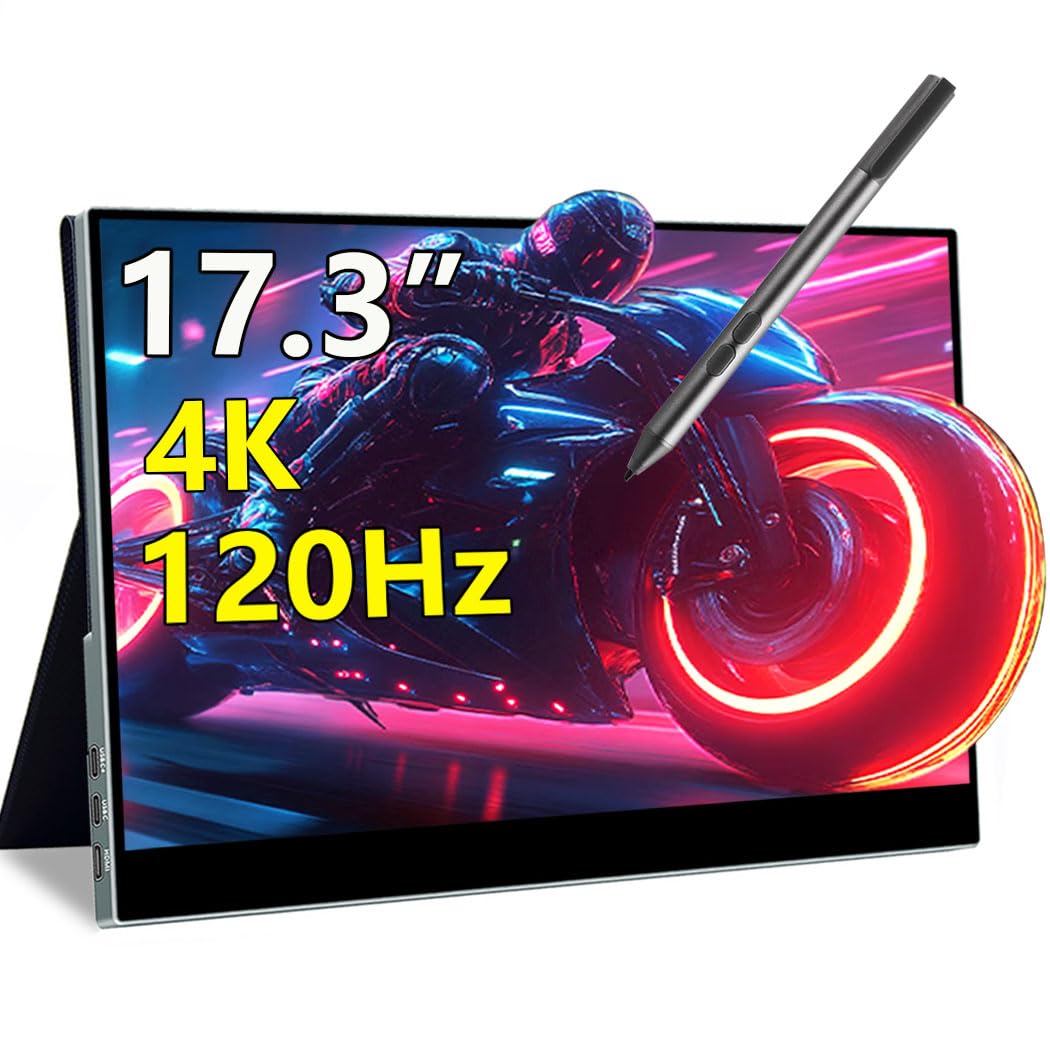
The 17.3-inch portable that doubles your frame rate for gaming and sketching alike.
This is the only portable 4K touch monitor in this roundup with a 120 Hz refresh rate — twice as fast as the standard 60 Hz portable displays — so swipe gestures, scrolling, and fast-motion games all look noticeably smoother. The 1 ms response time (the time a pixel takes to change color) keeps motion blur to a minimum, so console games on PS5 or Xbox benefit from that extra fluidity even though the touch layer itself won’t work on those consoles.
The 100% DCI-P3 color gamut matches the Upperizon above for color punch, but the contrast ratio sits at 1000:1 (standard IPS), so you trade deep blacks for a larger 17.3-inch canvas. The 10-point capacitive touch also supports MPP stylus pens, making it a natural pick for designers, students, and teachers who want to annotate or draw directly on screen. Dual USB-C ports and HDMI 2.1 handle connectivity, and the 75×75 mm VESA mount lets you attach it to a monitor arm for a cleaner desktop setup.
Owners mention that “in case signal doesn’t go through on USB-C, just unplug and replug and then you’re good to go” — a small quirk but easy to work around. The metal body and magnetic smart cover give it a travel-friendly build, though its 1000:1 contrast ratio means it won’t match the OLED depth of the Upperizon for color grading work.
Why it stands out
- 120 Hz refresh rate feels twice as smooth as standard 60 Hz portable monitors
- MPP stylus support for natural note-taking and drawing
- HDMI 2.1 and dual USB-C ports for broad device compatibility
Trade-offs
- 1000:1 contrast ratio lacks the deep blacks of OLED panels
- Brightness controls take some getting used to according to buyers
- Built-in speakers are tinny and quiet
This one fits if: You want a large portable 4K display with high refresh for gaming and stylus support for creative work.
Skip it for: Color-critical photo or video editing where the 100000:1 contrast of an OLED panel matters more than refresh rate.
3. LG Smart Monitor Swing 32U889SA-W
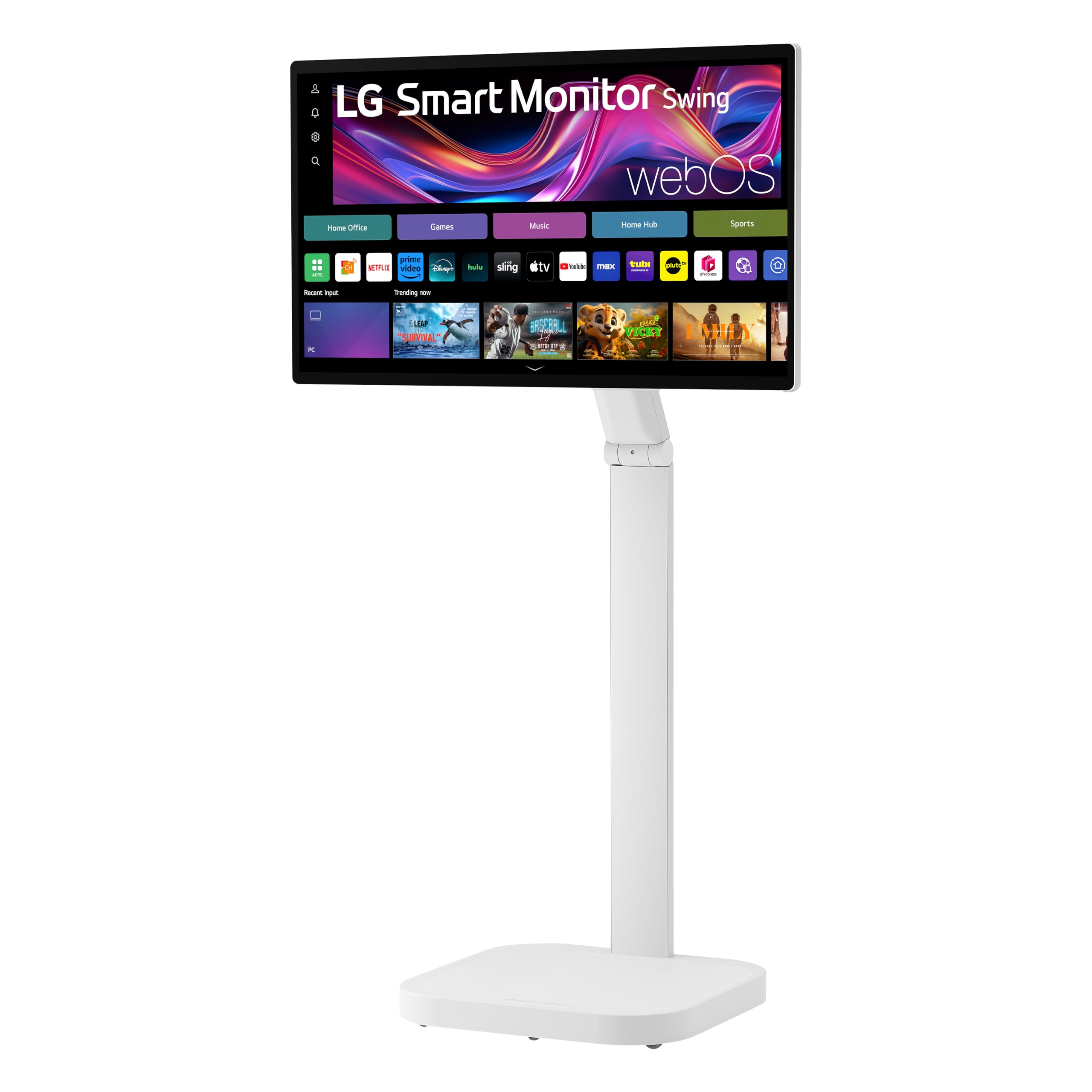
The 32-inch desk monitor that rolls, swings, and tilts into any position you need.
A 32-inch 4K UHD IPS touchscreen on a fully adjustable wheeled base — this is the monitor for anyone tired of hunching over a fixed stand. The LG Swing offers 360-degree adjustability: tilt, swivel, height, pivot, and portrait mode, all supported by a torsion spring hinge on a rolling stand that glides across the floor. The hidden adapter compartment keeps cables tucked away, so the setup looks as clean as it feels flexible.
The 95% DCI-P3 color gamut sits just 5% below the 100% DCI-P3 of the Magedok above, but the 32-inch IPS panel delivers vibrant colors and 350 nits brightness that works well in bright rooms. Powered by webOS, it runs streaming apps and supports Remote PC access without needing a separate computer plugged in — just connect over Wi-Fi. Three USB-C ports deliver up to 65W charging to a connected laptop, and the Switch app splits the screen into up to 6 sections for multitasking.
Buyers love the image quality and freedom of movement, but note that the built-in speakers are quiet and the Wi-Fi can drop randomly. A few reviews mention the monitor arrives as a Latin American regional unit, so verify the product code includes “.AUS” for the US version — otherwise the app store may be locked to a different region.
What makes it great
- Fully adjustable wheeled stand with tilt, swivel, height, and portrait mode
- webOS runs streaming apps without needing a PC connected
- Three USB-C ports with up to 65W laptop charging via one cable
What to consider
- Built-in speakers are quiet — plan to use a Bluetooth speaker or soundbar
- Wi-Fi disconnects randomly according to some buyers
- Verify you receive the US version (product code with.AUS) to avoid region-locked apps
Ideal for: Anyone who needs a flexible, room-to-room monitor for work and streaming without wanting to manage a separate PC or tablet.
One real catch: The LG Swing is significantly pricier than a generic 32-inch TV on a portable stand, and the webOS interface can feel slightly laggy under load.
4. ApoloSign 32″ Smart Portable TV

The wheeled 4K smart TV that runs on battery for six hours without a wall outlet.
This 32-inch rolling display packs a 15000mAh rechargeable battery that delivers up to 6 hours of cord-free use — so you can roll it from the living room to the patio or kitchen without hunting for an outlet. The 3840×2160 UHD touchscreen supports 10-point touch, and the Android-based OS opens up Google Play for streaming apps like Netflix, YouTube, Disney+, and Zoom. The 3000:1 contrast ratio from the VA panel sits between the 100000:1 OLED and the 1000:1 IPS models, giving decent depth without the OLED price tag.
The rolling stand moves smoothly on casters and adjusts in height and angle, and the ApoloSign Dashboard lets you switch modes from a digital photo frame to a family calendar or workout display. Buyers praise the sharp picture and responsive touchscreen for everyday use around the house, calling it a “favorite Amazon find” that works well in the kitchen, bedroom, and outdoors.
One serious warning: some customers note the unit runs Android 14 TV rather than the advertised Android 16, with an EDLA license that locks the app store and restricts multitasking. The UI also renders at 1080p internally, so 4K content is only visible in native streaming apps — casting from a phone gets downscaled and upscaled, creating blurry text. If you want a pure tablet-like Android experience, verify the OS version on arrival.
Strengths
- 15000mAh battery runs cord-free for up to 6 hours
- Responsive 10-point touchscreen on a rolling, adjustable stand
- Android app ecosystem for streaming, recipes, and video calls
Drawbacks
- May ship with Android 14 TV (not Android 16) — verify on arrival
- UI renders at 1080p; full 4K only in native streaming apps
- Some reviewers point out the EDLA license limits app availability and multitasking
Best suited for: Families who want a portable, always-on interactive display that can roll between rooms for streaming, recipes, and video calls without plugging in.
Worth noting: The Android TV interface is not a full Android tablet experience — it is designed for lean-back media consumption rather than desktop-style productivity.
5. KTC MEGAPAD 32″ A32Q7 Pro

The 32-inch Android tablet on wheels that charges fast and plays loud.
Built around a 9500mAh battery that fully charges in just 3 hours, the KTC MEGAPAD gives you up to 11 hours of music playback and runs Android 13 with full Google EDLA certification. The 32-inch 4K VA screen uses a 3000:1 contrast ratio — the same as the ApoloSign above — and a 121% sRGB color gamut for punchy, saturated colors. Ten-point touch and an anti-glare coating make it comfortable to use in bright rooms, and the adjustable stand offers height, tilt, swivel, and pivot so you can watch from any angle.
Dual 6W 3D speakers are integrated into the lifting rod, and shoppers say they sound “loud and punchy” compared to the thin speakers on most portable monitors. The Rockchip octa-core processor with 8GB RAM and 128GB storage keeps Netflix, YouTube, and GeForce Now running smoothly. Five silent universal wheels let you roll it from room to room, and Wi-Fi 6 and Bluetooth 5.2 handle wireless connections.
Some buyers report occasional freezing where the sound plays but the picture freezes, and the battery lasts roughly 3 hours under real use — shorter than the 11-hour music playback figure. A few reviews also note the absence of a USB-C input, which limits connection options for newer laptops.
Highlights
- 3-hour full charge and long battery life for cord-free use
- Punchy dual 6W speakers sound better than typical monitor audio
- 75x75mm VESA mount compatible for desk arm setups
Limitations
- Some units experience occasional freezing; picture freezes while sound continues
- Lacks USB-C input for direct laptop video connection
- Touchscreen can be overly sensitive according to buyer feedback
Choose this if: You want a large battery-powered Android display with good speakers that can roll around the house, and you value fast charging over maximum absolute screen brightness.
Consider alternatives for: Color-critical creative work — the 220-nit brightness and VA panel do not match the color accuracy of OLED or high-end IPS monitors.
6. TouchWo 55″ Industrial Monitor

The 55-inch capacitive giant built for high-traffic kiosks and interactive gaming tables.
This is a true industrial-grade monitor — an IP65-rated (dust-tight and protected against water jets) capacitive touch screen with a true flat smooth design, meaning it resists dust and water jets and can handle constant tapping in a restaurant, retail store, or museum kiosk. The 4K resolution across 55 inches creates a massive interactive canvas, and the 1200:1 contrast ratio is slightly higher than the standard 1000:1 IPS panels, giving decent contrast for presentations and signage.
The 10-point touch works with gloves and supports multi-finger pinch-to-zoom from the start — no drivers required for Windows, Mac, Android, Linux, or Raspberry Pi. VGA, DVI, HDMI, and USB ports give it broad compatibility with older and newer devices alike. Buyers have used this as a “giant iPad” for a gaming table and as an always-on family schedule display, praising the durable build and sharp optically bonded screen.
The catch: some owners mention the monitor develops lag and freezing after running 24/7, requiring occasional restarts. One reviewer noted the unit fried their laptop battery when plugged in directly — so power it from a wall outlet rather than a laptop USB port.
Built for
- IP65 dust and water resistance for commercial installations
- True flat smooth design in an aluminum alloy frame
- 10-point touch works with gloves — no driver required
Be aware
- Some units develop lag and freezing under 24/7 operation
- One buyer mentioned frying a laptop battery via USB connection
- Essential to power via wall outlet, not laptop USB
Best for: Commercial deployments like restaurant menu boards, interactive kiosks, and trade show exhibits that need a big, durable touch surface with industrial IP65 protection.
Not ideal for: A standard desktop workstation — the 55-inch size is overwhelming at arm’s length, and the commercial-grade fan may be noisier than consumer monitors.
7. ALOGIC Clarity Pro Touch 27″

The 27-inch desk centerpiece with a retractable 4K webcam and an 8-in-1 hub.
This business-grade monitor packs an 8MP retractable webcam that slides into the frame when not in use, keeping your workspace private and clutter-free. The 27-inch IPS panel covers 97% DCI-P3 and 99% Adobe RGB — broader than the LG Swing’s 95% DCI-P3 — making it a strong option for photo editors and designers who need accurate color across Adobe apps. The 65W USB-C Power Delivery charges a connected laptop through a single cable while passing touch and video signals.
The 8-in-1 USB hub includes 2x USB-A, USB-C (65W PD), 2x HDMI, DisplayPort, and audio output, so you can plug a keyboard, mouse, and secondary display without reaching behind your PC. The 10-point touchscreen gives you the same tap-and-swipe control as a tablet, and buyers describe the monitor as “a giant iPad” with sharp images and vibrant colors. The 1000:1 contrast ratio is standard IPS-level — not the deep blacks of OLED — but the color coverage is excellent for the price tier.
One downside: the built-in webcam is not great. Customers note the camera is “pretty bad” compared to dedicated webcams, so if you rely on video calls for client presentations, you will still want an external camera. The glossy film on the screen gives it a premium feel but can pick up reflections in bright rooms.
Key strengths
- 97% DCI-P3 and 99% Adobe RGB for accurate color in creative apps
- 8MP retractable webcam keeps your desk clean and private
- 65W PD charges a laptop while carrying touch and video signals
Trade-offs
- Built-in webcam quality is weak — plan for an external camera
- 1000:1 contrast ratio lacks the deep blacks of OLED alternatives
- Glossy screen picks up reflections in bright rooms
Perfect for: Designers and professionals who want a single-cable 4K touch monitor with broad color coverage and a built-in hub that keeps their desk tidy.
Consider a different pick if: You do video calls all day and need excellent webcam quality — the retractable camera here disappoints.
8. YCKJNB 43″ Floor-Standing Kiosk

The 43-inch floor-standing kiosk with 480-nit brightness for bright retail floors.
At 480 nits of brightness (a measure of screen luminance), this standing kiosk outshines every other monitor in this list — significantly brighter than the 350 nits of the LG Swing or the 300 nits of the TouchWo — so it stays readable even in sunlit storefronts or brightly lit lobbies. The 4K IPS panel delivers a 178-degree ultra-wide viewing angle, meaning customers can see the content clearly whether they stand head-on or off to the side. The floor-standing design with timed on/off scheduling makes it ideal for retail, airports, hospitals, and restaurants.
The Android OS supports U-disk plug-and-play, software installation, and remote control operation. An upgraded split-screen feature plays pictures and videos simultaneously, which gives your ads more dynamic appeal. Buyers are impressed by the triple-layered packaging, excellent build quality, and responsive customer service that provides software updates with extra features. The internal electrical receptacle lets you hide a small media player inside the kiosk.
A minor issue: the monitor lacks adjustable feet, so you will want to place it on a perfectly level floor. Some buyers also note that the screen resolution described as 2K in some reviews conflicts with the advertised 4K, so verify the model you receive before mounting heavy content on it.
Strengths
- 480 nits brightness stays readable in bright commercial environments
- Floor-standing design with timed on/off and split-screen playback
- 3-year warranty and responsive customer support
Considerations
- No adjustable feet — needs a level floor for stability
- Some reviews mention 2K resolution rather than 4K — verify model
- Android OS does not require Google sign-in for basic media player use
Built for: Retail stores, restaurants, and any commercial setting that needs a bright, floor-standing interactive display with scheduling and split-screen ad playback.
Skip if: You want a consumer desktop monitor — this is a commercial kiosk designed for 24/7 operation, not a personal workstation.
9. COOLHOOD 65″ Smart Board

The 65-inch interactive whiteboard that tracks 20 touches and responds in 6 milliseconds.
This is not a monitor you sit at — it is a wall-mounted interactive whiteboard built for classrooms, conference rooms, and collaborative workspaces. The 65-inch IPS panel with a 2000:1 contrast ratio sits between the standard 1000:1 and OLED 100000:1 range, offering solid depth for presentations and video conferencing. The 20-point multi-touch system responds in 6ms with ±1mm precision, so multiple people can write, draw, and annotate simultaneously without noticeable lag.
Powered by an octa-core processor (4 A73 + 4 A53) with Android 13 and 128GB of storage, the COOLHOOD board runs Zoom, Google Meet, Microsoft Teams, and Webex natively. Wireless screen sharing works across Mac, Windows, iOS, and Android, so anyone in the room can cast their screen without cables. The built-in annotation tools, smart voting, timer, and screenshot functions make it a all-in-one collaboration hub. QR code sharing lets participants grab files and notes on their own devices instantly.
Buyers praise the build quality and ease of use — “no IT needed” — but note the whiteboard lacks a built-in camera for video conferencing, so you will need an external webcam. One review mentions the stand is shipped separately due to its size, so factor in additional setup time. The picture quality may need adjustment from the start according to some users.
What it delivers
- 20-point multi-touch with 6ms response and ±1mm accuracy for smooth collaboration
- Wireless screen sharing across Mac, Windows, iOS, and Android
- QR code file sharing for instant distribution of notes and documents
Shortcomings
- No built-in camera for video conferencing — needs an external webcam
- Stand shipped separately and requires extra assembly
- Picture quality may need adjustment from the start
Right for: Schools, training rooms, and corporate meeting spaces that need a large, responsive touch whiteboard with annotation tools and wireless screen sharing.
Not for: A personal desktop workstation — the 65-inch size requires wall mounting and multiple feet of viewing distance to be usable.
Understanding the Specs
Contrast Ratio
This number tells you how deep the black areas of the screen look. A 100000:1 ratio (OLED) makes blacks look completely dark, like the screen is turned off in those areas — ideal for movies and color grading. A 1000:1 ratio (standard IPS) makes blacks look more like dark gray, which is fine for office work but less rich. A 2000:1 or 3000:1 ratio (VA panel) sits in between, giving decent depth without the OLED price. For a touch monitor you look at from close range, the contrast ratio determines how much “pop” the image has.
Color Gamut (DCI-P3 and sRGB)
This measures how many colors the screen can show. A 100% DCI-P3 rating covers a wider range of red and green than standard sRGB, so photos, movies, and design work look richer and more vivid. Portable monitors like the Upperizon and Magedok hit 100% DCI-P3, which is excellent for color grading. The LG Swing hits 95% DCI-P3 — still very good for most uses but you lose a little saturation at the edges. A higher percentage means more accurate color for creative work.
Touch Compatibility
macOS does not support touch on external monitors at all, so a MacBook user loses the touch functionality. Game consoles (PS5, Xbox, Switch) also do not pass touch signals over HDMI. If you plan to use the touchscreen, make sure your device supports external touch input — otherwise you are paying for a feature you cannot use.
Refresh Rate
This is how many times per second the screen updates the image. A 60 Hz refresh rate (standard on most monitors) is smooth enough for office work and video playback. A 120 Hz refresh rate (like the Magedok) updates twice as often, making scrolling, swiping, and fast-moving games feel noticeably smoother. For a touch screen, a higher refresh rate makes every tap and swipe feel more responsive because the screen shows your finger’s movement with less delay.
FAQ
Can I use a 4K touch screen monitor with a MacBook or iMac?
Does a 4K touch screen monitor work with a PS5, Xbox, or Nintendo Switch?
What is the difference between a 4K touch screen monitor and a portable monitor?
How do I know if my laptop supports 4K output over USB-C?
What is MPP stylus support and why does it matter?
Why is the contrast ratio on OLED monitors so much higher than IPS monitors?
Can a rolling smart TV monitor replace a desktop computer?
What does IP65 rating mean on a touch screen monitor?
Final Thoughts: The Verdict
For most buyers, the best 4k touch screen monitor winner is the Upperizon 15.6-inch OLED because it delivers a 100000:1 contrast ratio and 100% DCI-P3 color in a 1.1-pound portable that fits in a bag. If you want a larger rolling display for the whole family, grab the LG Smart Monitor Swing 32U889SA-W for its class-leading ergonomic flexibility. And for commercial or classroom use, the COOLHOOD 65″ Smart Board stands out with its 20-point touch and 6ms response time for true collaborative work.
How We Picked
We do not accept paid placement. Every pick is matched to a real buyer and a real use-case; we do not hands-on test units.
Sources & Methodology
Specifications: manufacturer listings and product documentation. Review insights: verified customer reviews, as of July 2026. Pricing: not shown on this page (it changes often); check the current price via the retailer link.
As an Amazon Associate, Gadgets Feed earns from qualifying purchases. This does not affect which products we feature.