
That single laptop display is the bottleneck in your workflow. Every tab shuffle, every alt-tab reflex, every time you squint at a spreadsheet crammed into half the screen, you’re burning minutes that add up to lost hours. A dedicated expansion rig turns your portable workstation into a true multi-monitor command center, giving you the desk-like real estate your productivity demands.
I’m Min — the co-founder and writer behind Gadgets Feed. I’ve spent countless hours poring over the technical specifications, panel technologies, and connection protocols that define this specific category, separating the genuinely capable expansion solutions from the ones that compromise on resolution or refresh rate.
This guide cuts through the noise to help you choose the right best 4k triple screen monitor expansion for laptop that matches your workflow, whether you’re a trader, developer, or creative professional.
How To Choose The Best 4K Triple Screen Monitor Expansion For Laptop
Choosing the right triple-screen expansion for your laptop isn’t just about the number of screens. You need to weigh resolution, panel quality, connection method, build integrity, and portability to get a setup that genuinely improves your workflow without introducing new frustrations.
Resolution & Panel Quality
The entire point of a triple-screen expansion is to view more information at once. A 4K (3840×2160) panel delivers drastically sharper text and allows you to fit more windows without scrolling compared to 1080p or even QHD. Look for a panel with high color accuracy (100% sRGB or DCI-P3) and adequate brightness (300 nits minimum, 400+ nits for bright environments) so your extended screens match your laptop’s display.
Connection Type & Compatibility
Most triple-screen expansions rely on a single USB-C cable for both video and power. This requires a laptop with a USB-C port that supports DisplayPort Alt Mode. If your laptop lacks this, you’ll need a solution that uses DisplayLink technology, which works over any USB port but requires a driver. Some premium units also offer HDMI or Mini DisplayPort inputs for broader console compatibility.
Build Quality & Portability
A portable expansion must survive daily travel. Look for aluminum alloy chassis that resist bending and feature reinforced hinges. The clamping or mounting mechanism should secure the screens without straining your laptop’s own display hinge. Weight matters — a 2.2-pound unit is vastly more backpack-friendly than a 4-pound brick.
Quick Comparison
On smaller screens, swipe sideways to see the full table.
| Model | Category | Best For | Key Spec | Amazon |
|---|---|---|---|---|
| SOTSU FlipAction Elite 16″ | Premium | Creative Professionals | 3840×2400 UHD+, 450 nits | Amazon |
| Xebec Tri-Screen 3 | Premium | Road Warriors | Patented Tension-Fit | Amazon |
| Magedok 16″ OLED 4K | Premium | Color-Critical Work | OLED, 100% DCI-P3 | Amazon |
| KYY Quad Monitor | Mid-Range | Quad-Screen Power Users | Auto-Rotation Top Display | Amazon |
| InnoView 4K Dual Monitor | Mid-Range | Stacked Dual 4K Setup | 3840×2160, 100% sRGB | Amazon |
| Mobile Pixels Trio 3 Pro | Mid-Range | Ultra-Portable Stability | QHD 1400p, 65W Pass-Thru | Amazon |
| UPERFECT 19″ 4K 144Hz | Mid-Range | Gaming & High Refresh Rate | 3840×2160, 144Hz, QLED | Amazon |
| Aura Displays Triple Boost Pro | Mid-Range | All-Aluminum Durability | 3x 14″ FHD, 320 nits | Amazon |
| Blackview DCM5 14″ | Mid-Range | Steel Shell Durability | 1080p, TÜV SÜD Certified | Amazon |
| Blackview DCM8 Pro | Value | Ultra-Light Travel | 2.2 lbs, 1920×1200 | Amazon |
| Larksmile Triple Extender | Value | Versatile 235° Rotation | 16″ 1200p, 45% NTSC | Amazon |
In-Depth Reviews
1. SOTSU FlipAction Elite 16″

The SOTSU FlipAction Elite 16″ is the gold standard for professionals who demand the highest resolution in a portable format. Its 3840×2400 UHD+ panel delivers a 16:10 aspect ratio that provides 11% more vertical screen real estate than standard 16:9 4K displays, making it exceptional for reading long documents, code, or trading charts. The 450-nit brightness and 100% DCI-P3 color gamut ensure the extended screen matches the visual fidelity of a high-end laptop display.
The full metal CNC construction with an aerospace-grade aluminum chassis gives it a premium heft that resists flexing in a backpack. The integrated kickstand packs flat via magnets, collapsing to just half an inch thick. It supports power pass-through, so a single cable from your laptop can drive the monitor while simultaneously charging. The built-in SD card slot in the kickstand is a welcome addition for photographers who need to offload footage without a dongle.
The 60Hz refresh rate is standard for 4K productivity work, but the auto-rotation feature can be finicky according to some user reports. At this premium price point, the included carrying case feels thin for the investment. The anti-reflective coating, while useful, isn’t quite as effective as that on a MacBook Pro display. Still, for pure image fidelity and build integrity, this is the reference design for 4K portable monitors.
Why it’s great
- True 4K UHD+ resolution at 3840×2400 for maximum screen real estate
- Aerospace-grade aluminum build with CNC machining and anodized finish
- Packs flat to 0.5 inches with magnetic kickstand for easy travel
Good to know
- Premium price reflects the build materials and panel quality
- Limited to 60Hz refresh rate, not ideal for high-refresh gaming
2. Xebec Tri-Screen 3
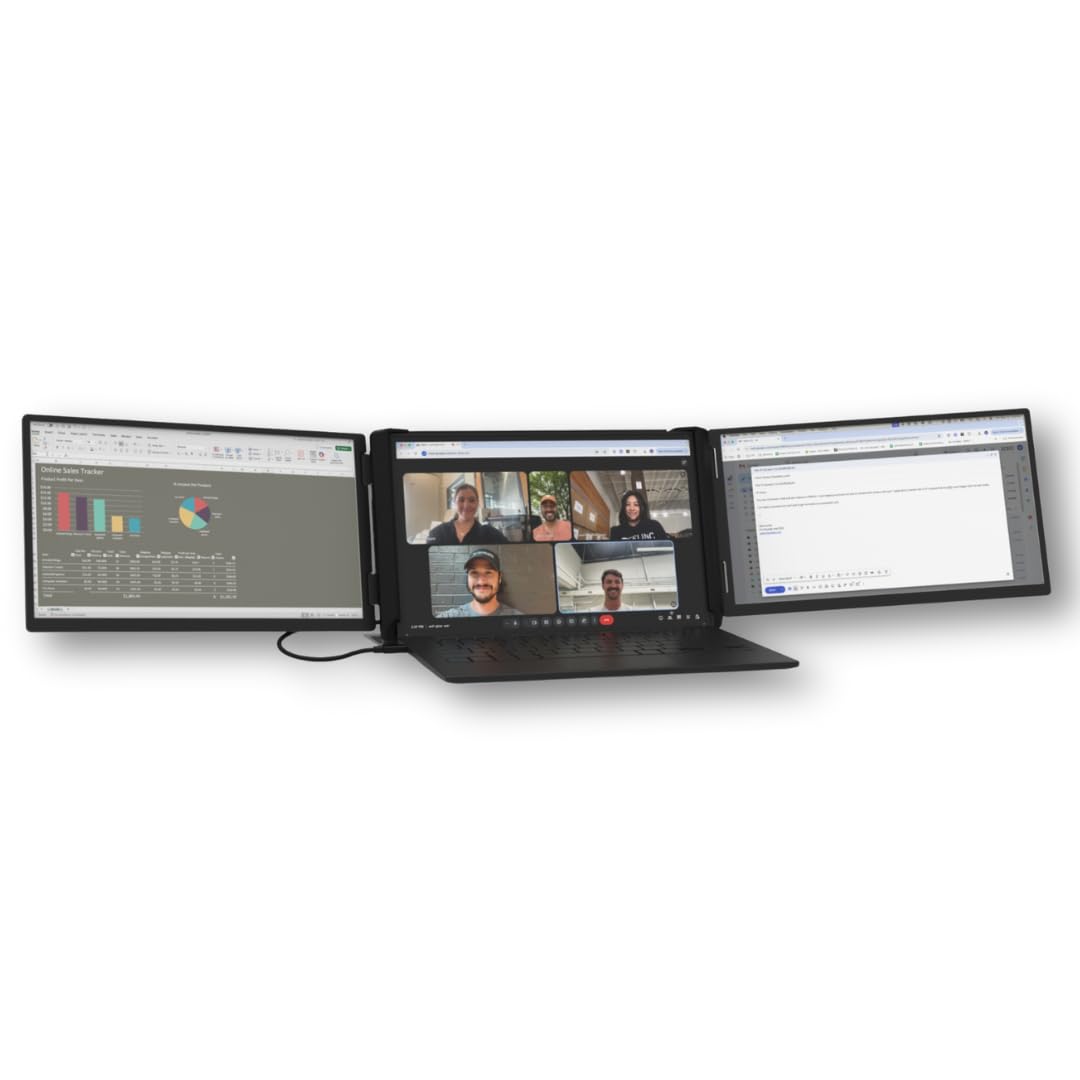
The Xebec Tri-Screen 3 is the original patented tension-fit design that set the standard for laptop screen extenders. Unlike clip-on solutions that rely on magnets and can wobble, Xebec’s tension-fit mechanism grips the laptop securely without stressing the display hinges. The two 13.3-inch 1080p panels are driven by a single embedded USB-C cable, keeping desk clutter to a minimum, and the 60W pass-through charging ensures your laptop stays powered.
The all-aluminum construction weighs 3.6 pounds, which is noticeable but justified by the durability required for road warriors who are checking their bags and visiting client sites. Included in the box is a protective travel case, so the unit arrives ready for the daily commute. Xebec offers two variants — one for PC and one for Mac — because Macs require a DisplayLink driver, a detail many buyers miss. The Texas-based support team is responsive and can confirm compatibility before purchase.
The 1080p resolution on 13.3-inch panels is sharp enough for text and spreadsheets, but falls short of the pixel density offered by 4K solutions. Some users wish the screens were closer to 15-16 inches for more coverage, and the premium price tag is significant compared to more budget-friendly options. However, for those who prioritize stability and long-term durability over raw resolution, this is a proven workhorse.
Why it’s great
- Patented tension-fit design eliminates wobble and protects the laptop hinge
- Premium aluminum construction with 60W pass-through charging
- Comes with a protective travel case and responsive Texas-based support
Good to know
- Only 1080p resolution on 13.3-inch panels, not 4K
- Heavy at 3.6 pounds compared to some lighter alternatives
3. Magedok 16″ OLED Portable Monitor 4K

The Magedok 16″ OLED 4K is a game-changer for color-critical work. It uses a Samsung E4 AMOLED panel with a pixel pitch of 283 PPI, producing inky blacks and an infinite contrast ratio that IPS panels simply cannot match. The 100% DCI-P3 color gamut with Delta E < 1 color accuracy means it’s suitable for professional photo and video editing directly on the go. The 16:10 aspect ratio adds 10% more vertical space compared to standard 16:9 displays.
At just 2 pounds and a slim profile of 0.22 inches at its thinnest point, it’s remarkably portable. The 93% screen-to-body ratio minimizes bezels, so the display feels immersive. The integrated kickstand adjusts from 0 to 90 degrees, and it supports a standard 75x75mm VESA mount for more permanent setups. Connectivity is handled via Mini DisplayPort, USB-C, and HDMI, making it compatible with laptops, gaming consoles, and smartphones with desktop modes.
The glossy OLED panel is prone to reflections in brightly lit environments, and the brightness maxes out at 400 nits, so it can struggle in direct sunlight. Some users have reported quality control issues, including a green dot formation after a couple of months of use. The stand mechanism is functional, but it is not as refined as the SOTSU or Xebec alternatives. For the sheer visual quality, however, it’s a legitimate option for creative professionals.
Why it’s great
- Genuine OLED panel with 100% DCI-P3 and Delta E < 1 color accuracy
- Weighs only 2 pounds with a 93% screen-to-body ratio
- 16:10 aspect ratio offers extra vertical workspace for creative tools
Good to know
- Glossy screen is prone to reflections in bright environments
- Quality control concerns reported by some long-term users
4. KYY Laptop Screen Extender Quad Monitor
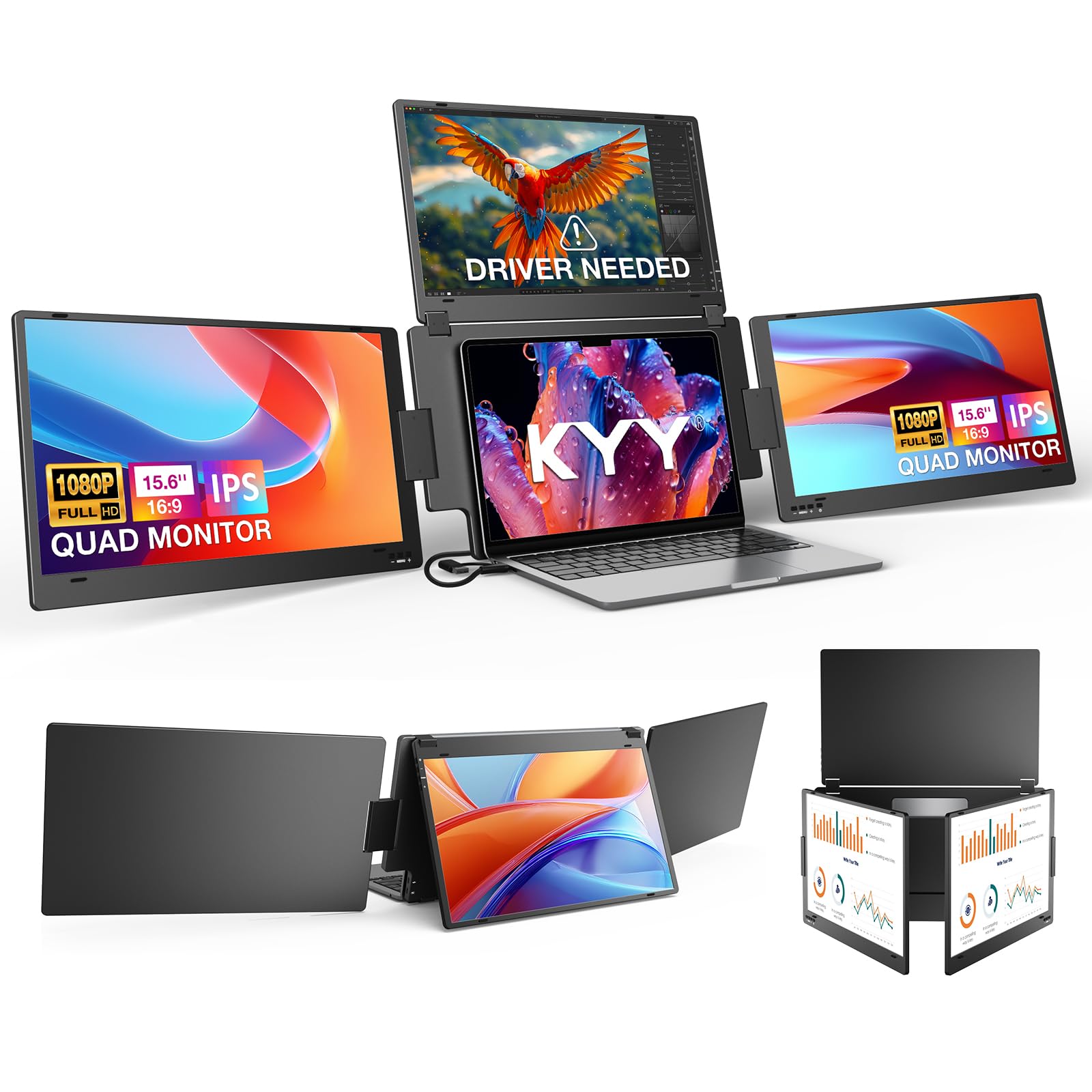
The KYY Quad Monitor takes the concept of a triple-screen extender and adds a fourth screen for a true quad-monitor workstation. Each of the three side panels (plus your laptop’s main display) is a 15.6-inch 1080p IPS panel with 400 nits of brightness. The top screen features smart auto-rotation, so when you fold it backward, it automatically reorients — useful for sharing your screen with a client sitting across the table.
Instead of a clip-on design that stresses your laptop’s hinge, KYY uses a stable aluminum alloy stand that sits independently on your desk. Your laptop simply rests in front of it, which is a crucial ergonomic advantage. A single USB-C cable connects the entire setup, though a driver is required for extended mode on Windows, macOS, and Linux. Users report it works out-of-the-box on Windows for mirror mode, with the driver install taking under two minutes.
At this price point, the panels are 1080p, not 4K, so pixel density is lower than premium options. The unit is bulky and heavy, so it is better suited for a dedicated desk setup that occasionally travels rather than daily backpack carry. The design requires a separate power cable alongside the video cable for stable operation, which slightly complicates the “single-cable” promise.
Why it’s great
- Quad-screen design with independent aluminum alloy stand protects laptop hinge
- Smart auto-rotation on the top screen for flexible viewing angles
- Bright 400-nit panels reduce eye strain during long sessions
Good to know
- 1080p resolution only, not 4K
- Large and heavy, better suited for a semi-permanent desk setup
5. InnoView Portable Dual Monitor 4K

The InnoView Portable Dual Monitor delivers two stacked 15.6-inch 4K UHD panels with a combined resolution of 3840×2160 for each. This setup is ideal for users who prefer a vertical stacking configuration over side-by-side panels. The 100% sRGB color gamut and 1.07 billion color support ensure accurate color reproduction for design work, and the 178-degree viewing angle keeps the picture consistent across the frame.
The “Owl Eye Vision” feature uses AI to enhance image details and contrast in real-time, which is useful for working in varying lighting conditions. The built-in stand offers 0-180 degrees of tilt adjustment, and the foldable design allows the monitors to collapse into a portable package. Connectivity is comprehensive with USB-C, HDMI, and DisplayPort inputs, plus a 30W PD charger included in the box for power. The unit works with a single USB-C cable from the laptop, which simultaneously powers the monitors.
Some users report issues with the monitors failing to wake from standby, requiring an unplug and replug of the power cable. The included cables are shorter than ideal for a clean desk setup, and cable management can be messy. The dual monitor setup is heavier than a single-panel solution, and the 60Hz refresh rate is standard for 4K but not suited for high-frame-rate gaming.
Why it’s great
- True 4K UHD resolution on both 15.6-inch stacked panels
- 100% sRGB with 1.07 billion colors for accurate design work
- AI-powered blue light filter for comfortable long viewing sessions
Good to know
- Wake-from-standby glitch reported by some users
- Heavier than single-panel solutions, less portable for daily carry
6. Mobile Pixels Trio 3 Pro
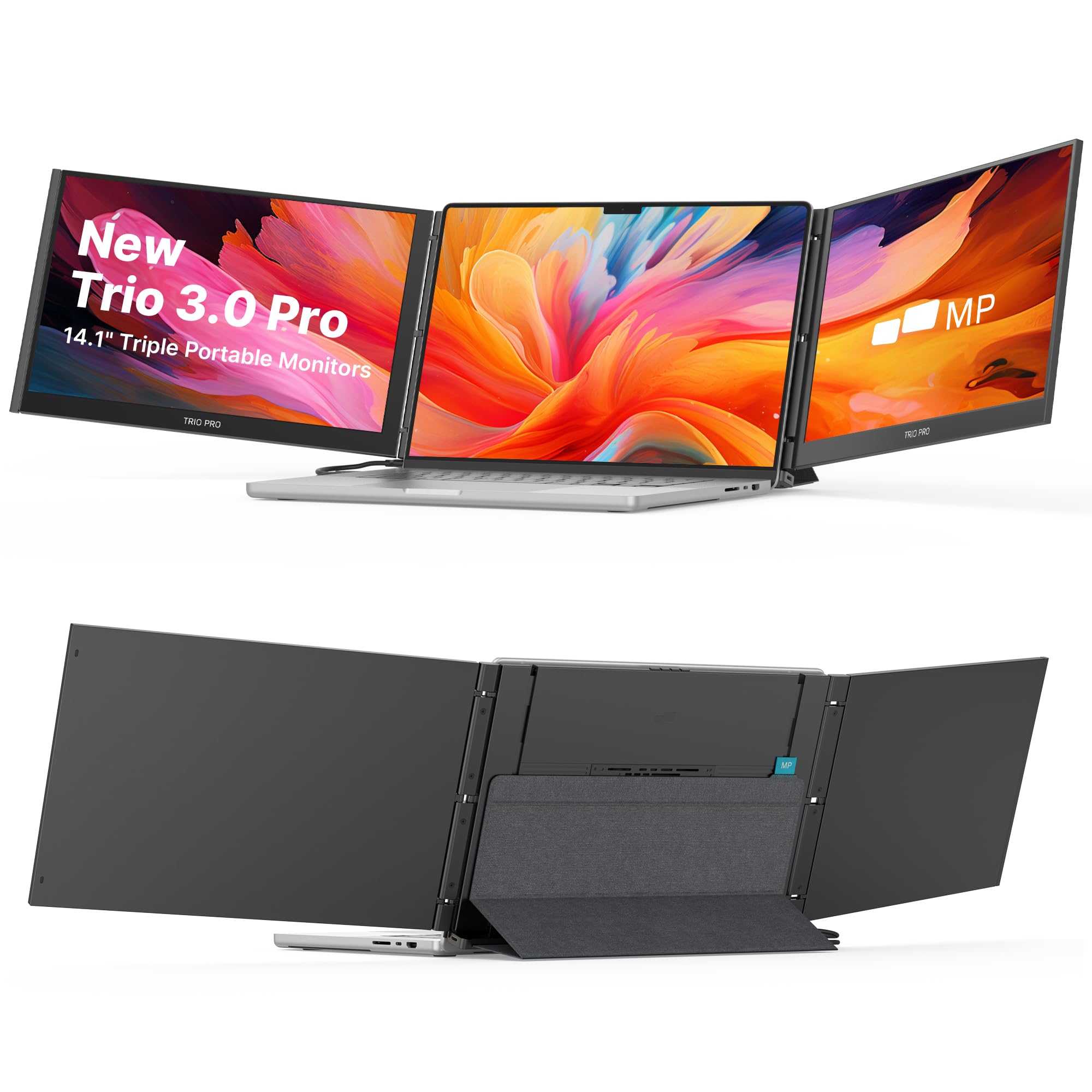
The Mobile Pixels Trio 3 Pro is a refined second-generation design that focuses on stability and portability. It features two attachable QHD (2240×1400) displays that provide a 16:10 aspect ratio, offering more vertical pixels than standard 1080p panels. The built-in kickstand securely supports all three screens, and the redesigned mounting system uses stronger magnets for a more reliable grip on the laptop.
Single-cable simplicity is a hallmark here — one USB-C cable handles video, data, and power delivery, with 65W pass-through charging to keep your laptop running. The unit supports four viewing modes: Landscape, Portrait, Collaboration, and Presentation. The IPS panels feature reduced blue light emission for comfortable all-day use, and no drivers are required for macOS or Windows, making it ready to use out of the box.
Some users report the magnetic attachment can be tricky to position correctly during the initial setup, requiring some weight to be applied for a secure hold. A small number of units have exhibited flickering after a few weeks of use, raising concerns about long-term reliability. The 14.1-inch screen size is smaller than the 15-16 inch competitors, which may be a consideration for those prioritizing maximum screen real estate.
Why it’s great
- QHD 1400p resolution offers sharper text than standard 1080p panels
- 65W pass-through charging keeps laptop powered via single cable
- Four versatile viewing modes with built-in kickstand for stability
Good to know
- 14.1-inch screens are smaller than 15-16 inch competitors
- Magnetic attachment can be finicky to position initially
7. UPERFECT 19″ 4K 144Hz QLED
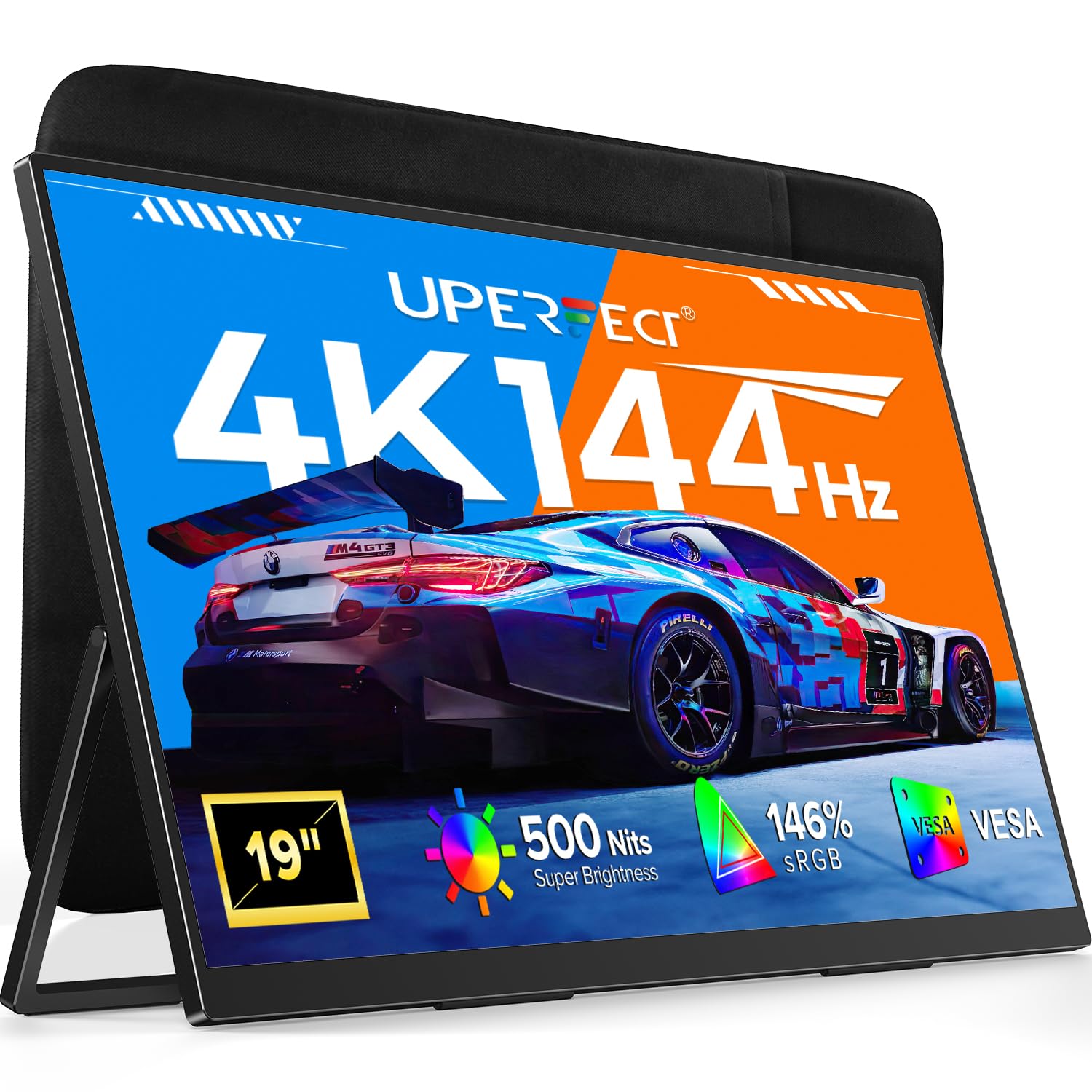
The UPERFECT 19″ 4K 144Hz QLED monitor is a unique hybrid that targets both productivity and gaming. The 3840×2160 QLED panel delivers 500 nits of brightness, a 2000:1 contrast ratio, and 146% sRGB color gamut, making it exceptionally vivid. The 144Hz refresh rate and 0.1ms response time ensure buttery-smooth motion for competitive gaming, while the 19-inch size provides more screen real estate than typical 15-16 inch portable monitors.
The built-in 180-degree adjustable stand and VESA 75×75 mount offer flexibility for both desk and wall setups. Connectivity includes USB-C and HDMI, with the note that achieving 4K at 144Hz requires HDMI 2.1 or USB-C with DisplayPort 1.4 Alt Mode. The unit includes a 30W PD charger in the box, though optimal brightness requires a 30W+ power source. The QLED panel technology means no burn-in risk compared to OLED, which is a practical advantage for mixed-use scenarios.
The 19-inch size is large enough that it’s less portable than smaller options, making it better for a hotel desk or dedicated workspace than daily backpack carry. The control panel has multiple buttons that some users find easy to accidentally press. Achieving the full 144Hz refresh rate requires compatible hardware and cables, which may add cost for some users. The bigger panel size also demands more bag space.
Why it’s great
- Combines 4K resolution with 144Hz refresh rate for gaming and productivity
- 500-nit QLED panel with 146% sRGB and 2000:1 contrast ratio
- 19-inch screen provides desktop-like real estate in portable form
Good to know
- 19-inch size is less portable for daily backpack carry
- Requires HDMI 2.1 or DP 1.4 for full 4K 144Hz performance
8. Aura Displays Triple Boost Pro 14″
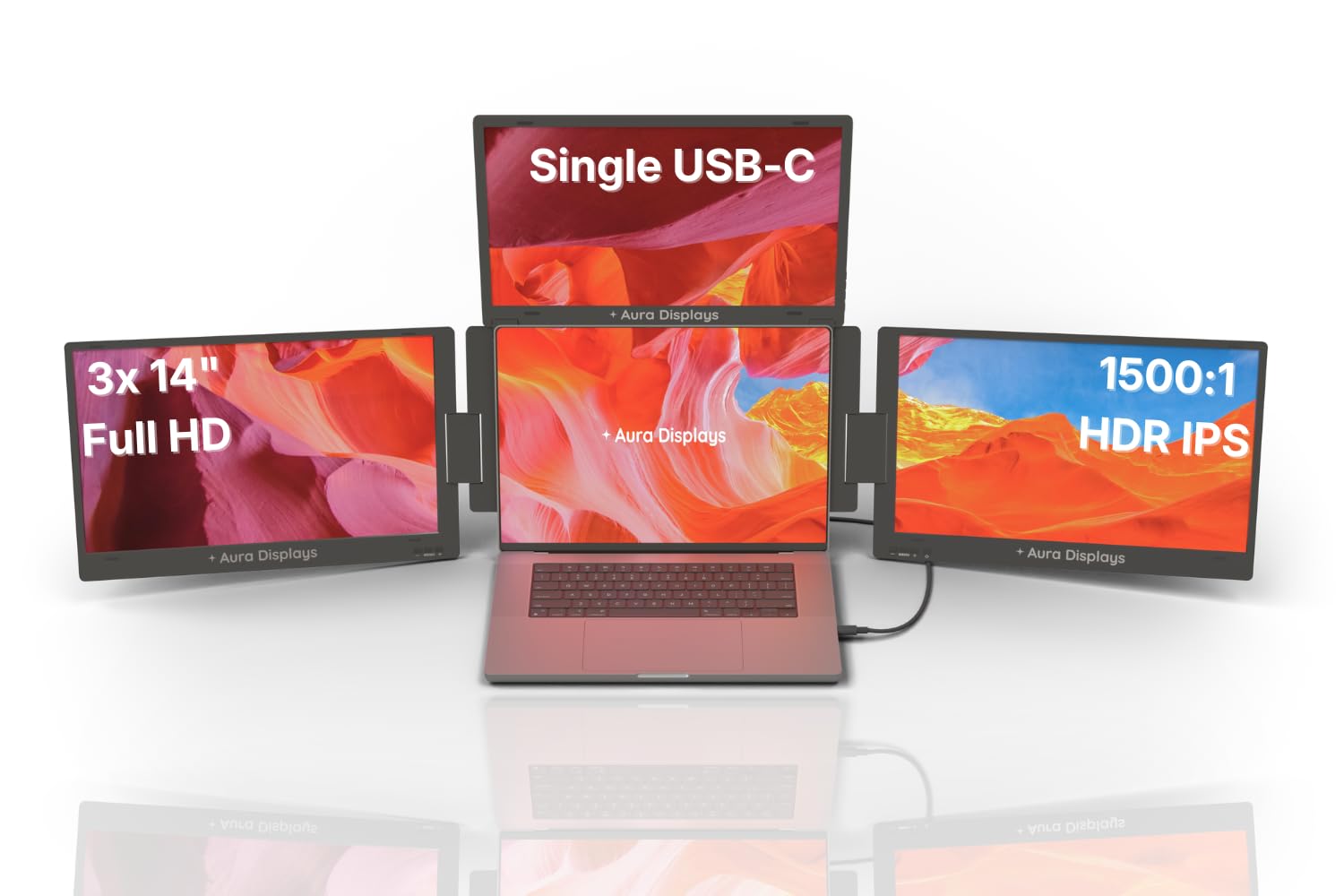
The Aura Displays Triple Boost Pro 14″ packs three matte IPS 14-inch panels into a single aluminum chassis that deploys above your laptop. Each panel is 1920×1080 with 320 nits brightness, a 1500:1 contrast ratio, and 72% NTSC color gamut. The reinforced aluminum alloy chassis and hinged design are built to outlast cheaper alternatives, with an adjustable stand that steadies the unit on a desk, airplane tray, or cafe table.
Single USB-C cable connects the entire three-screen array to your laptop. A bundled USB key contains the display driver, which takes less than five minutes to install. The unit supports four display modes: Panoramic, Triangle meeting, Rotated 180°, and Portrait. The included 30W PD power adapter is optional for full brightness; the extender can run at 70% brightness on laptop power alone, conserving battery. The built-in blue light filter and matte anti-glare panels reduce eye strain.
The 14-inch panels, while portable, offer less screen real estate than 15.6 or 16-inch options. Some users report the need for a separate power cable to prevent screen glitching at higher brightness levels, which slightly complicates the single-cable promise. The unit is bulky when folded, adding noticeable weight to a laptop bag. The 65Hz refresh rate is adequate for office work but not suited for gaming.
Why it’s great
- Reinforced aluminum chassis with adjustable stand for desk or travel use
- Four display modes (Panoramic, Triangle, Portrait, 180° rotated)
- Matte anti-glare panels with blue light filter for eye comfort
Good to know
- 14-inch panels offer less screen real estate than 15-16 inch alternatives
- May require separate power cable at higher brightness settings
9. Blackview DCM5 14″ Triple Screen Extender
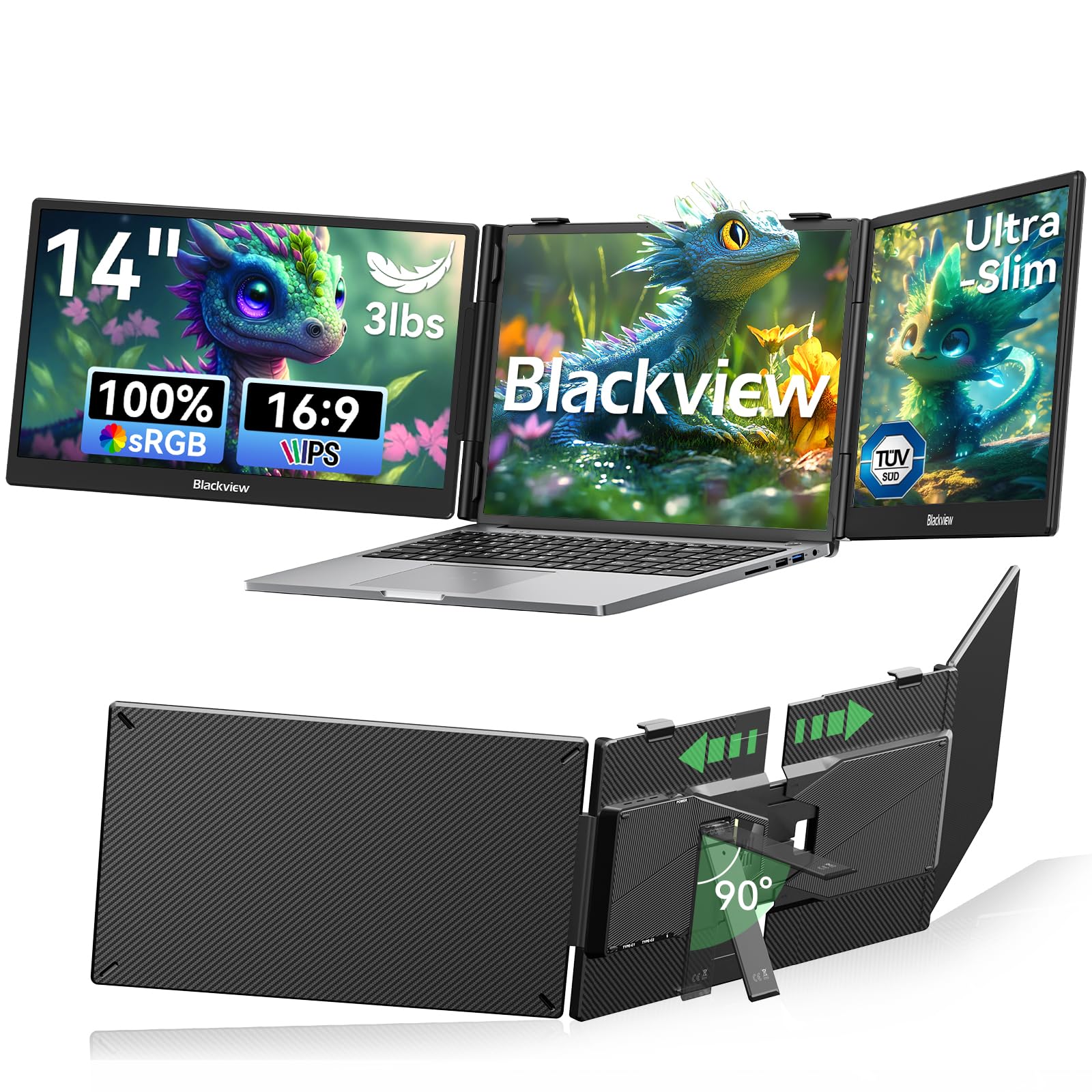
The Blackview DCM5 uses a galvanized steel shell with a matte finish that resists scratches and fingerprints, addressing a common complaint about cheaper plastic extenders. The 6-point mounting system and 90-degree adjustable strand provide what Blackview calls “solid stability” — the unit locks tight with zero wobble. At 3 pounds, it balances rugged build with reasonable portability for a triple-panel solution.
The 1080p IPS panels deliver 300 nits of brightness with TÜV SÜD certification for reduced eye strain. The anti-glare screen helps maintain visibility in bright environments like coffee shops or co-working spaces. Plug-and-play setup via USB-C or HDMI requires no driver installation for mirror mode. The unit clamps onto laptops from 13 to 17.3 inches, with reinforced springs and 6-point non-slip pads ensuring a secure grip. Blackview offers a 24-month warranty with a replacement-only policy.
The 1080p resolution on 14-inch panels is good for text readability but doesn’t match the pixel density of 4K options. Full triple-screen functionality may require two USB-C ports on the laptop — one for each side screen — or one USB-C plus one HDMI, which reduces portability for thinner laptops. The galvanized steel construction adds weight compared to aluminum alternatives.
Why it’s great
- Galvanized steel shell with scratch-resistant matte finish
- TÜV SÜD certified anti-glare panels for reduced eye strain
- 24-month warranty with replacement-only support policy
Good to know
- 1080p resolution on 14-inch panels, not 4K
- May require two USB-C ports for full triple-screen functionality
10. Blackview DCM8 Pro 15.6″ Screen Extender
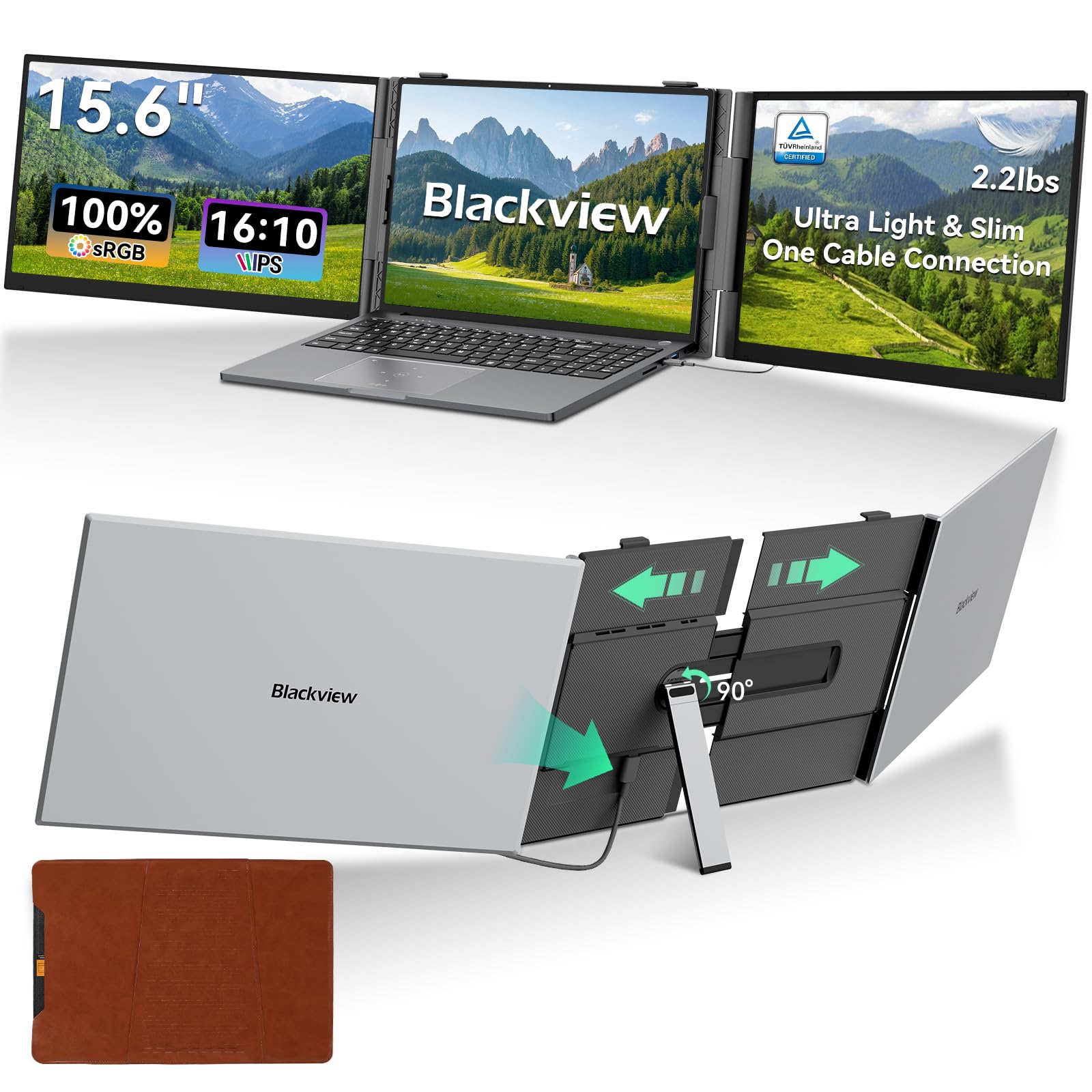
The Blackview DCM8 Pro is a compelling option for travelers who prioritize weight savings. At only 2.2 pounds and 0.17 inches thick, it’s significantly lighter than most triple-panel solutions, which often weigh over 3 pounds. The 15.6-inch display at 1920×1200 resolution (16:10 aspect ratio) provides 11% more vertical space than standard 16:9 panels, making it practical for reading documents and browsing the web.
The single-cable USB-C connection simplifies the setup — just one cable for both video and power. The panel is TÜV Rheinland and TÜV SÜD certified for low blue light and flicker-free operation, reducing eye fatigue during long work sessions. The 100% sRGB color gamut ensures accurate color reproduction for design and presentation work. The premium aluminum alloy design with a minimalist metal finish is built for business travel, and Blackview’s 24-month warranty adds peace of mind.
The DCM8 Pro is a single extender panel, not a true triple-screen solution on its own — it adds one external screen, not two. This makes it a good starting point for those new to screen extenders, but it won’t give you a triple-monitor setup by itself. The 300-nit brightness is adequate for indoor use but may struggle in very bright environments. The 16:10 aspect ratio, while beneficial for vertical workspace, is less common than 16:9 for media consumption.
Why it’s great
- Ultra-light at 2.2 pounds for easy daily carry
- TÜV certified for low blue light and flicker-free viewing
- Premium aluminum design with 24-month warranty
Good to know
- Single extender panel, not a triple-screen solution
- 300-nit brightness may be insufficient in bright environments
11. Larksmile Triple Laptop Screen Extender 16″
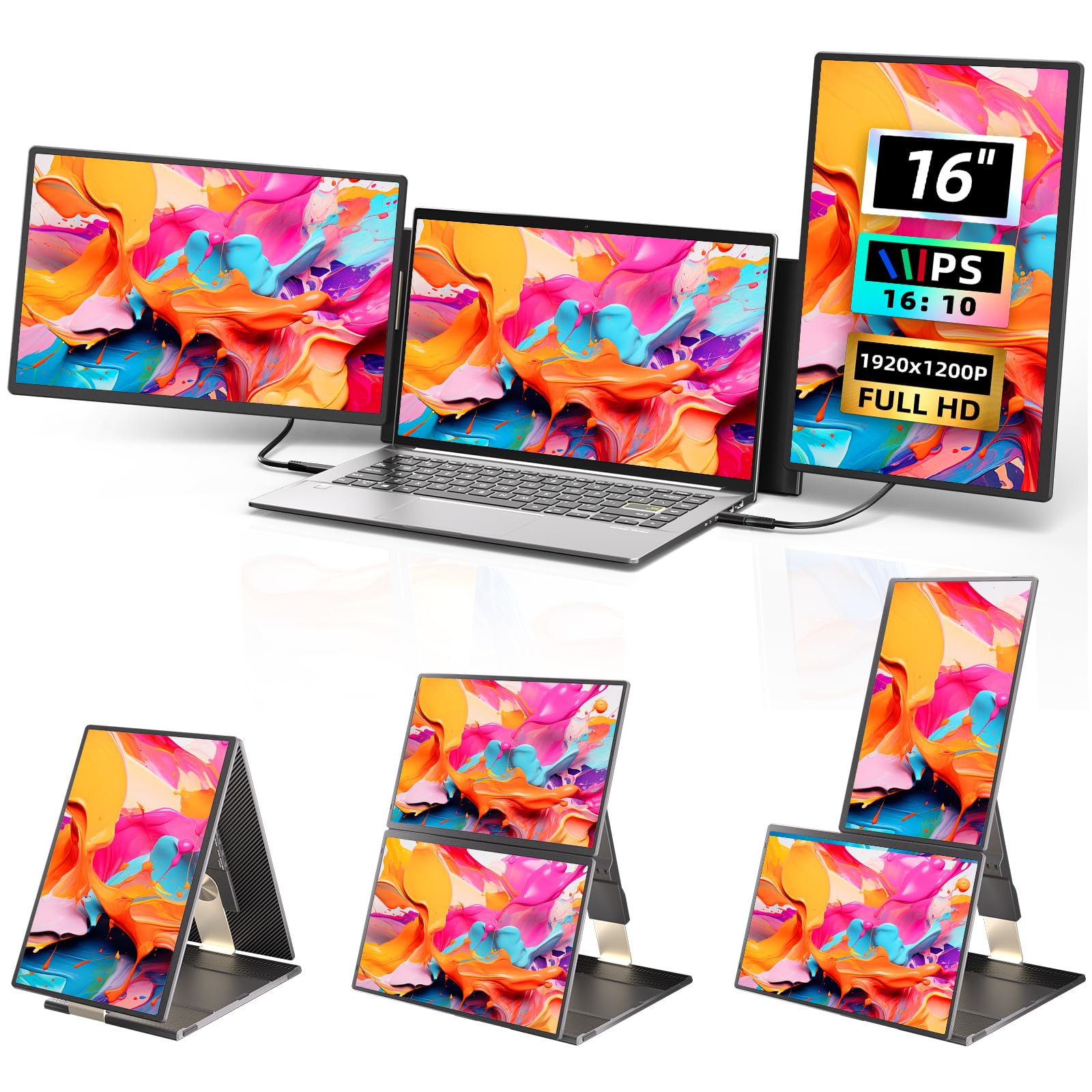
The Larksmile Triple Laptop Screen Extender offers a flexible configuration with two 16-inch IPS panels at 1920×1200 resolution (16:10 ratio). The unique 235-degree horizontal rotation and 90-degree vertical rotation allow for 11 different configurations, including stacking screens vertically, flipping a panel for client presentations, or detaching a screen for use as a standalone tablet. The 4mm ultra-slim bezels create a seamless visual experience across the three screens.
The plug-and-play setup works with a single USB-C cable if your laptop has a full-function USB-C port. For older machines or those without USB-C, it supports HDMI and USB-A connections as well. The unit includes both a mountable desk stand and a portable stand for flexible workstation setups. It comes with a protective case that accommodates the cables, making it easy to pack and go. The 300-nit brightness and 1000:1 contrast ratio provide adequate image quality for office tasks.
The 45% NTSC color accuracy is lower than the 100% sRGB or DCI-P3 standards found on premium panels, so colors won’t be as vibrant or accurate for professional design work. Some users report that the main screen with extension can fall backward when moving the laptop, indicating the clamping mechanism may not be as secure as dedicated solutions. The weight, while acceptable for a triple-panel setup, is higher than single-panel alternatives.
Why it’s great
- Highly adjustable 235° rotation for 11 different screen configurations
- Two 16-inch IPS panels at 1200p with ultra-slim 4mm bezels
- Comes with both desk stand and portable stand with protective case
Good to know
- 45% NTSC color accuracy is limited for color-critical work
- Clamping mechanism may allow assembly to fall backward when moving laptop
FAQ
What laptop specs do I need for a triple-screen 4K expansion to work?
Are triple-screen expanders compatible with MacBooks running M-series chips?
Does a 4K triple-screen expansion significantly drain laptop battery?
What is the difference between a clip-on extender and a stand-alone extender?
Final Thoughts: The Verdict
For most users, the best 4k triple screen monitor expansion for laptop winner is the SOTSU FlipAction Elite 16″ because it delivers genuine 4K UHD+ resolution in a portable CNC-machined aluminum frame with the best-in-class stand system and premium color accuracy. If you want the durability of a patented tension-fit design and don’t need 4K resolution, grab the Xebec Tri-Screen 3. And for color-critical creative work where OLED black levels matter most, nothing beats the Magedok 16″ OLED 4K.