
Every second wasted fiddling with a misaligned roll or a frozen driver is a second you aren’t packing orders. For e-commerce sellers and small-business owners who ship daily, the thermal printer on your desk is either a silent profit center or a nagging productivity tax. The difference comes down to print-head durability, connectivity reliability, and whether the printer handles the exact 4×6 format without constant calibration.
I’m Min — the co-founder and writer behind Gadgets Feed. I’ve spent hundreds of hours dissecting the technical specifications, reading through verified buyer experiences, and comparing the real-world performance of thermal printers across dozens of brands to separate the reliable workhorses from the ones that land in a desk drawer after two weeks.
This guide focuses exclusively on dedicated thermal printers built for the 4×6 shipping format, evaluating print speed, connection stability, build quality, and long-term cost of ownership to help you find the best 4×6 shipping label printer for your fulfillment workflow.
How To Choose The Best 4×6 Shipping Label Printer
A thermal label printer is a long-term investment in your fulfillment speed. Before you compare models, focus on the three factors that determine whether a printer will serve you for years or frustrate you within weeks: connectivity that matches your devices, print-head technology that won’t fade mid-batch, and media compatibility that prevents constant re-loading.
Connectivity: USB, Bluetooth, or Wi-Fi?
Your workspace layout and device ecosystem dictate which connection type you need. USB-only printers like the Rollo USB and Westinghouse WHTP203e offer the most stable, lowest-latency connection for a dedicated desktop computer — no pairing drops, no network latency. Bluetooth 5.0 models like the Phomemo PM64D let you print directly from a phone or tablet, critical if you’re printing labels from a shipping app on the warehouse floor. Ethernet-connected printers like the Arkscan 2054A-LAN are ideal for shared office networks where multiple workstations need access to a single printer without USB cable swaps. Wi-Fi models like the Arkscan 2054K-WF and Brother QL-1110NWB offer the most flexibility but require a stable network signal and proper IP configuration.
Print Speed and Resolution
Every thermal printer in this category prints at 203 DPI — that’s the sweet spot for scannable barcodes on 4×6 labels. The real differentiator is print speed measured in inches per second (ips) or labels per minute. A printer running at 150mm/s (about 6 ips) can produce a 4×6 label in under one second. Slower models around 5 ips are still functional but introduce a small delay when you’re printing fifty labels in a row. Print speed becomes noticeable only during high-volume batching; for occasional shipping, any modern thermal printer is fast enough.
Build Quality and Print Head Lifespan
The print head is the only component that wears out in a direct thermal printer. Standard print heads last roughly 30 to 50 kilometers of label printing — that’s tens of thousands of 4×6 labels. Some models, like the MUNBYN RW405B, offer replaceable print heads, extending the printer’s usable life to over 970,000 labels before you need to retire the machine. Build quality also affects jam rates. Printers with a straight paper path and adjustable media guides, such as the Westinghouse WHTP203e and the Brother QL-1100c, minimize the most common source of jams: label peeling during feeding. A metal chassis and steel internal rollers typically outlast plastic light-duty frames in daily commercial use.
Quick Comparison
On smaller screens, swipe sideways to see the full table.
| Model | Category | Best For | Key Spec | Amazon |
|---|---|---|---|---|
| Phomemo PM64D | MID-RANGE | Touch Screen & Mobile Printing | 150mm/s speed, Bluetooth 5.0 | Amazon |
| HP Label Printer | MID-RANGE | Simple USB Setup | 7 ips print speed | Amazon |
| MUNBYN RW405B | MID-RANGE | Replaceable Print Head & Color Labels | 180 ppm, Bluetooth + USB-C | Amazon |
| Westinghouse WHTP203e | PREMIUM | Reliable USB + Ethernet Desktop Workhorse | 6 ips, Ethernet + USB | Amazon |
| Rollo USB | PREMIUM | Proven Durability & Software Integration | 150mm/s, 250 ppm | Amazon |
| Brother QL-1100c | PREMIUM | High-Quality Barcode & Label Precision | 300 DPI, 69 labels/min | Amazon |
| Arkscan 2054K-WF | PREMIUM | Wi-Fi & Multi-Platform Connectivity | 5 ips, Wi-Fi + Bluetooth support | Amazon |
| Arkscan 2054A-LAN | PREMIUM | Wired Ethernet Network for Multi-User Offices | 5 ips, Ethernet + USB | Amazon |
| Brother QL-1110NWB | PREMIUM | Full Wireless (Wi-Fi + Bluetooth + Ethernet) | 69 ppm, 300 DPI | Amazon |
In‑Depth Reviews
1. Phomemo PM64D
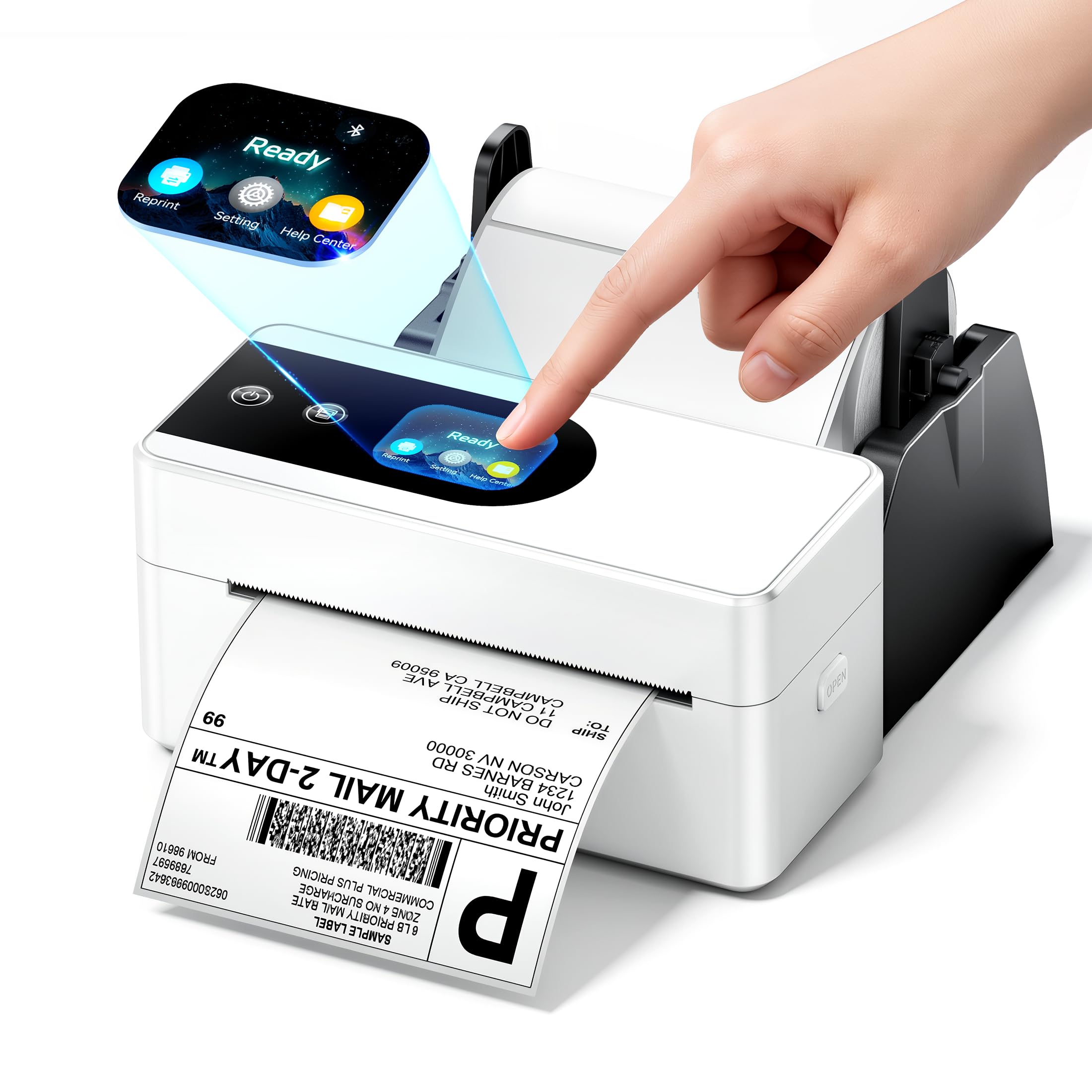
The Phomemo PM64D brings a rare feature to the budget-conscious thermal printer segment: a full touch screen interface that displays print status, allows one-click factory resets, and makes label alignment adjustments intuitive without a connected computer. The printer measures just 6.63 x 3.25 x 2.94 inches, saving significant desk space compared to bulkier commercial models. Its Bluetooth 5.0 connectivity supports wireless printing from Android and iOS devices, plus direct Bluetooth pairing with Windows and macOS computers — not just the USB fallback that many Bluetooth printers offer.
Print quality at 203 DPI and 150mm/s speed delivers sharp, scannable labels that major carriers accept without issue. The PM64D handles label widths from 0.79 inches up to 4.53 inches, making it useful for shipping labels, product barcodes, and inventory management tags. Compatibility spans USPS, UPS, FedEx, Amazon, Shopify, Etsy, eBay, and PayPal — essentially every major logistics and e-commerce platform a small business ships through. The included label holder and Type-C power adapter mean you can set up and start printing within minutes of unboxing.
The LabelLife companion app carries a subscription fee that some users find unnecessary, and a small percentage of units arrived non-functional out of the box, suggesting variability in manufacturing consistency. However, for the vast majority of users, the combination of a color touch screen, dual-mode Bluetooth and USB connectivity, and ultra-compact footprint at this price point is unmatched in the current market. If you want a printer that can sit on any desk, connect to any device, and produce professional 4×6 shipping labels instantly, the Phomemo PM64D is the clear first choice.
Why it’s great
- Innovative touch screen for intuitive status checks and settings
- Bluetooth 5.0 works with Android, iOS, Windows, and Mac
- Ultra-compact footprint saves 30% desk space over standard models
Good to know
- LabelLife app has a subscription fee that some users dislike
- Quality control issues reported with a small number of dead-on-arrival units
2. HP 4×6 Shipping Label Printer

HP’s entry into the direct thermal label printer space focuses on simplicity and speed. This USB-connected printer delivers 7 inches per second print speed — among the fastest in its class — and uses a 203 DPI print head that produces clear, scannable barcodes without requiring ink or toner. The adjustable media holders accept label widths up to 4 inches, covering the standard 4×6 shipping label format plus smaller address and product labels. Setup involves plugging the USB cable into a Windows PC, and the driver auto-installs for a genuinely plug-and-play experience.
Compatibility includes Amazon, UPS, Shopify, ShipStation, and Etsy, which covers the vast majority of e-commerce shipping workflows. The printer comes with a power cord, AC adapter, USB cable, and quick start guide. HP recommends using HP-branded thermal labels for optimal performance, but the printer works with third-party 4×6 thermal labels as well. The compact white chassis fits neatly into a home office or warehouse desk configuration without dominating the workspace.
The USB-only connectivity means you cannot print from a phone or tablet — this printer requires a computer connection, and users on macOS should verify driver availability before purchasing. A small number of reviews report blurry printing or blank labels after extended use, though the majority highlight reliable performance through hundreds or thousands of labels. For sellers who need a no-fuss USB printer with proven brand support and consistently fast output, the HP label printer is a solid mid-range contender.
Why it’s great
- Auto-installing drivers on Windows make setup truly plug-and-play
- Fast 7 ips print speed keeps label production moving during batching
- Low noise operation suitable for shared office environments
Good to know
- USB-only connection — no Bluetooth or Wi-Fi for mobile printing
- Some units have reported print quality degradation over time
3. MUNBYN RW405B
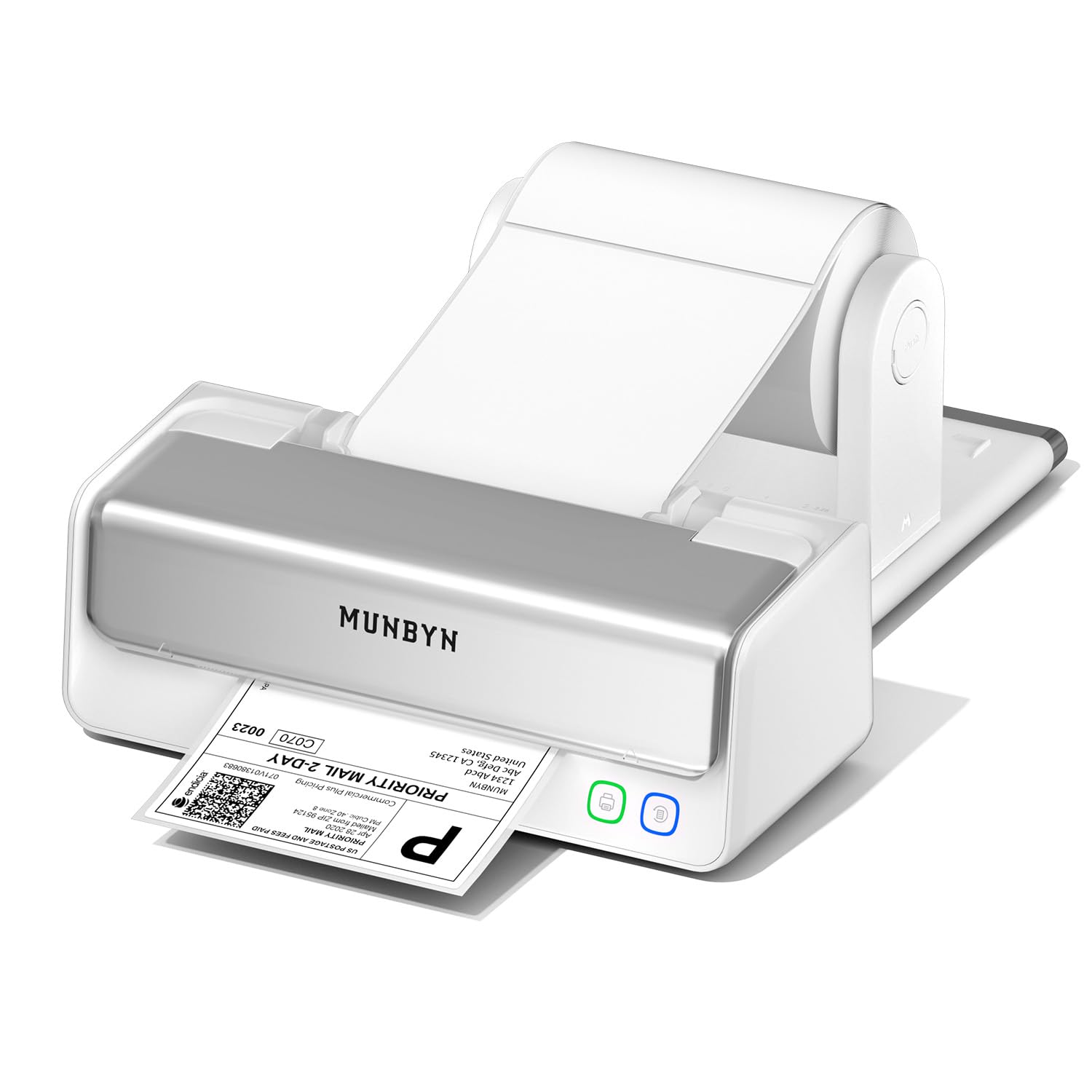
The MUNBYN RW405B addresses the single biggest drawback of consumer-grade thermal printers: the non-replaceable print head. This model features a user-replaceable print head rated for up to 970,000 labels, roughly six times the lifespan of standard fixed-head printers. When the print quality eventually fades, you swap the head instead of the entire machine. The printer also supports a unique capability for this class — black/red and black/blue two-color printing using MUNBYN’s specialty thermal labels, which adds visual differentiation for inventory tags, return labels, or branding stickers.
Connectivity includes Bluetooth for direct pairing with iOS and Android devices via the MUNBYN Print App, plus USB-C for desktop computers. The app provides over 3,500 design elements, 2,000 templates, 80 fonts, and even OCR and voice recognition for label creation. On the hardware side, the RW405B includes an integrated paper holder and uses a 4-inch DAC chip with military-standard precision to auto-calibrate label alignment, claiming a 99.8% reduction in vertical misalignment. The near-zero jam rate of less than 0.01% means fewer interruptions during high-volume shipping sessions.
Compatibility covers FedEx, UPS, USPS, Amazon, Shopify, Etsy, and eBay. The setup is driver-free for most platforms, and MUNBYN backs the RW405B with 24 months of technical support — double the industry standard. A small number of users have reported defective units that refuse to print or smear labels, which indicates some risk in manufacturing consistency. For sellers who plan to print tens of thousands of labels over several years and want the ability to repair rather than replace their printer, the MUNBYN RW405B offers the lowest long-term cost of ownership in its price tier.
Why it’s great
- Replaceable print head extends printer lifespan to nearly 1 million labels
- Two-color thermal printing (black/red, black/blue) for added label options
- USB-C connectivity and Bluetooth 5.0 support modern device ecosystems
Good to know
- Two-color printing requires MUNBYN’s proprietary thermal labels
- A small percentage of units arrive defective with printing issues
4. Westinghouse WHTP203e

The Westinghouse WHTP203e delivers the kind of commercial-grade build quality that justifies its position at the top of the mid-range stack. The chassis feels substantially denser and more rigid than budget alternatives, with a straight paper path that virtually eliminates jams even during extended print runs. It supports both USB and Ethernet connectivity — the Ethernet port allows network sharing across multiple workstations without needing a dedicated print server, which is a significant advantage for fulfillment teams. The printer also includes a USB flash drive in the box containing drivers for Windows, macOS, and Linux, plus ZPL software support for advanced label programming.
Print speed tops out at 6 inches per second with 203 DPI resolution, producing crisp text and scannable barcodes for any major carrier label. The WHTP203e handles fanfold labels and rolls with a maximum outer diameter of 4.75 inches and core sizes from 1 to 3 inches. Media width ranges from 0.78 inches to 4.6 inches, with a max printing width of 4.25 inches. The inclusion of starter labels, an internal label holder, and reference cards make unboxing to first print possible in under 30 minutes according to user feedback.
The printer lacks Bluetooth and Wi-Fi — it is a wired-only device, which means mobile printing is not an option without a network-connected computer. Ethernet functionality is limited to router speeds under 1 GHz, and the Ethernet cable and USB-C adapter are sold separately. Users consistently praise the ease of setup and the reliability of the straight label path, with multiple reviews noting flawless performance after thousands of labels. For a desktop shipping station that needs a reliable wired connection and commercial durability, the Westinghouse WHTP203e is a top-tier choice.
Why it’s great
- Ethernet connectivity enables network sharing across multiple computers
- Straight label path design minimizes jams during high-volume printing
- Sturdy commercial build with included USB Flash drive for driver installation
Good to know
- No Bluetooth or Wi-Fi — wired connection only
- Ethernet cable and USB-C adapter are not included in the box
5. Rollo USB

Rollo has built a reputation in the e-commerce community for producing reliable, no-nonsense thermal printers, and the Rollo USB model is the most proven iteration of that design. It prints at 150mm/s (roughly one 4×6 label per second) with a 203 DPI print head, delivering clear output that scanners read on the first pass. The Rollo USB is compatible with both Windows and Mac — driver installation is straightforward, and the printer works with all major shipping platforms including FedEx, UPS, USPS, ShipStation, ShippingEasy, Shippo, Amazon, Shopify, Etsy, and eBay. The included Rollo Ship Manager app provides access to exclusive discounted shipping rates, which can offset the printer’s cost over time.
The printer’s construction is notably solid — users report dropping the unit, moving it between desks, and running tens of thousands of labels through it without mechanical issues. The LED display provides basic status feedback, and the adjustable media guides handle label widths from 1.57 inches to 4.1 inches, making it suitable for everything from barcode stickers to shipping labels. The Rollo USB uses a standard USB connection and ships with a power adapter and USB cable. Print density and speed settings are adjustable through the driver software, allowing fine-tuning for different label materials or carrier requirements.
The Rollo USB is strictly wired — there is no Bluetooth or Wi-Fi variant included at this price point, so phone and tablet users need a computer intermediary. Some users find the driver requires a good PDF editor for cropping labels from full-page templates, which adds an extra step to the workflow. Despite these minor friction points, the Rollo USB’s track record for long-term reliability is among the best in this category, with countless sellers running it for years without a single jam or print head failure.
Why it’s great
- Proven long-term reliability with thousands of positive reviews from active sellers
- Adjustable print density and speed settings for fine-tuning label output
- Compatible with almost every e-commerce and shipping platform
Good to know
- USB-only connection — no wireless printing from mobile devices
- Label cropping may require a third-party PDF editor for some workflows
6. Brother QL-1100c

Brother’s QL-1100c stands apart from the crowd with its 300 DPI print resolution — significantly higher than the 203 DPI standard across most of this category. This higher resolution produces visibly sharper text and more precise barcodes, especially important when printing dense 2D barcodes or QR codes that cheaper printers struggle to render cleanly. The QL-1100c prints up to 69 standard address labels per minute and uses Brother’s DK drop-in label rolls, which include pre-sized, easy-peel labels and continuous-length tape for banners up to three feet long. The direct thermal technology means no ink or toner replacements are ever needed.
The automatic crop function (Windows only) lets sellers easily print product and barcode labels from A4 or letter-size templates, eliminating manual cropping steps. The Plug & Label feature requires no software installation on Windows PCs, enabling direct printing from Microsoft Word, Excel, and Outlook. USB connectivity ensures a stable wired connection, and Brother’s P-touch Editor software provides extensive template options for custom label creation. The printer also features an auto cutter for continuous tape, making it useful for creating custom-length labels beyond standard 4×6 shipping dimensions.
The QL-1100c relies entirely on Brother’s proprietary DK roll system, which means labels cost more than generic thermal labels over the printer’s lifetime. The printer is USB-only with no Bluetooth or Wi-Fi, so mobile printing requires a computer intermediary. Some users report the initial label loading process is less intuitive than competing models. However, for sellers who prioritize barcode accuracy and label sharpness — especially those shipping products requiring dense, high-density codes that must scan flawlessly every time — the Brother QL-1100c’s 300 DPI output is a clear advantage over the 203 DPI competition.
Why it’s great
- 300 DPI resolution produces sharper text and more reliable barcode scanning
- Automatic crop function saves time printing from standard template sheets
- Plug & Label feature works directly from Word, Excel, and Outlook
Good to know
- Uses proprietary Brother DK label rolls, which cost more than generic alternatives
- USB-only connection — no wireless or mobile printing capability
7. Arkscan 2054K-WF

The Arkscan 2054K-WF is designed for sellers whose workspace spans multiple devices and operating systems. It supports USB, Wi-Fi, and optional Bluetooth connectivity, making it compatible with Windows, Mac, Chromebook, and Android devices. The Wi-Fi connection allows wireless printing from iPhones and iPads without needing a computer — a feature that appeals to mobile sellers who print labels directly from shipping apps on their phones. The printer also includes BarTender UltraLite label design software for Windows, which provides full design capabilities for text, graphics, barcodes, and serialization.
Print speed runs at 5 inches per second at 203 DPI, which is slightly slower than the 6-7 ips competitors but still fast enough for most small-to-medium volume workflows. The printer handles media widths from 0.75 inches to 4.25 inches and lengths from 0.4 inches to 90 inches, supporting both roll paper loaded internally and fanfold paper fed from the back. Compatibility covers Amazon Seller Central, FBA, eBay, Etsy, Shopify, ShipStation, UPS WorldShip, FedEx Ship Manager, USPS, and over 30 other platforms. Arkscan provides U.S.-based tech support via phone, live chat, and remote access with extended hours, which many users cite as a decisive factor when choosing between similar models.
Wi-Fi setup can be finicky, and some users report that the initial network configuration requires more patience than plugging in a USB cable. The print quality, while clear and scannable, is slightly less crisp than the Brother QL-1100c’s 300 DPI output. Multiple long-term users report the printer lasting three years or more with daily use, often replacing Dymo and Brother models. For sellers who need Wi-Fi printing from multiple devices across different operating systems, backed by responsive customer support, the Arkscan 2054K-WF is the most flexible option in this guide.
Why it’s great
- Wi-Fi and USB connectivity works with Windows, Mac, Chromebook, Android, and iOS
- U.S.-based tech support with phone, live chat, and remote access
- Compatible with over 30 shipping and e-commerce platforms
Good to know
- Wi-Fi setup can be complex for non-technical users
- Print quality slightly less crisp than 300 DPI alternatives
8. Arkscan 2054A-LAN

The Arkscan 2054A-LAN is purpose-built for shared office environments where multiple computers need access to a single label printer. Its Ethernet port allows the printer to sit on the network with a static IP address, making it accessible from any connected workstation without USB cable swapping. USB connectivity is also available for direct single-computer setups. The printer supports Windows, Mac, Chromebook, and Android, and via the network connection, it can print from iOS devices as well. BarTender UltraLite label design software is included for Windows users.
Printing at 5 inches per second with 203 DPI, the 2054A-LAN produces clear, scannable labels suitable for all major carriers and e-commerce platforms. It handles media widths from 0.75 inches to 4.25 inches and lengths up to 90 inches. The printer supports roll and fanfold labels, giving users flexibility in label sourcing. The internal media mounting system handles rolls with up to a 4.75-inch outer diameter, and the straight paper path helps minimize jams. Users consistently report that after the initial configuration, the printer runs “always on” — low power consumption means it stays ready to print at any moment without warm-up time.
Setup is not entirely plug-and-play — the 2054A-LAN requires configuring a DHCP or static IP address through a utility program, which can take 20 minutes and some networking knowledge. The printer lacks Wi-Fi and Bluetooth, so mobile printing requires a networked computer or a separate wireless bridge. Users praise the durable build quality, with multiple reports of the printer working flawlessly for two to three years of daily high-volume use. For fulfillment teams or multi-person offices where label printing needs to be available from any desk, the Arkscan 2054A-LAN’s Ethernet connectivity is the standout feature.
Why it’s great
- Ethernet networking allows any computer on the LAN to access the printer
- Always-on, low-power design prints instantly without warm-up
- Durable build quality holds up to years of daily high-volume use
Good to know
- Network configuration requires setting a static or DHCP IP address
- No Wi-Fi or Bluetooth — mobile devices need a computer or network bridge
9. Brother QL-1110NWB

The Brother QL-1110NWB is the most feature-complete thermal label printer in this guide, offering Wi-Fi (802.11b/g/n), Bluetooth, and Ethernet connectivity in addition to USB. This means you can print 4×6 shipping labels directly from your iPhone while standing at the packing table, connect wirelessly from a laptop across the warehouse, or hardwire via Ethernet for a permanently online shared network printer. The 300 DPI print resolution produces barcodes and text that are noticeably sharper than 203 DPI models, which matters for dense barcode formats and professional-looking labels. The QL-1110NWB prints up to 69 labels per minute and uses Brother’s DK roll system for consistent media feeding.
The printer includes a barcode crop function (Windows only) that eliminates the need to print full barcode sheets — you select and crop individual barcodes or UPCs directly from templates. P-touch Editor software provides design flexibility, and the Plug & Label feature on Windows PCs bypasses software installation entirely for quick label creation from Office applications. Brother provides free SDKs for Windows, iOS, and Android, enabling integration into custom fulfillment software. The maximum label length reaches 9.8 feet over USB or 3 feet over serial, allowing oversized labels and continuous banners.
The QL-1110NWB uses Brother’s proprietary DK label rolls, which cost more per label than generic thermal rolls. USB drivers for Linux are outdated and do not work with modern 64-bit systems, making this printer essentially Windows, Mac, or network-only. Initial setup for wireless printing, especially from iPhones, requires installing drivers via a computer first. The printer also lacks a high-range Wi-Fi antenna, so signal strength matters in larger facilities. For sellers who value wireless freedom — printing labels from a phone while walking the warehouse floor — and demand the highest print quality, the Brother QL-1110NWB delivers an unmatched combination of connectivity and resolution.
Why it’s great
- Triple wireless connectivity: Wi-Fi, Bluetooth, and Ethernet for total flexibility
- 300 DPI resolution for exceptionally sharp labels and scannable barcodes
- Prints wirelessly from iPhone and Android devices without a computer
Good to know
- Uses proprietary Brother DK rolls — ongoing label costs are higher than generic
- Linux driver is outdated and incompatible with modern 64-bit systems
FAQ
Can I use any brand of 4×6 thermal labels with these printers?
How do I connect a 4×6 label printer to my iPhone or Android phone?
What does a replaceable print head mean for long-term costs?
Why is my thermal label printer printing blank labels?
What does printing speed in ips or ppm actually mean for my workflow?
Final Thoughts: The Verdict
For most users, the best 4×6 shipping label printer is the Phomemo PM64D because it combines an intuitive touch screen, dual Bluetooth and USB connectivity, and ultra-compact desktop footprint at an entry-level price that does not compromise on professional print quality. If you prioritize long-term cost savings and want a printer that can survive nearly a million labels, grab the MUNBYN RW405B. And for sellers who need to print wireless 4×6 labels directly from a phone while packing orders on the warehouse floor, nothing beats the Brother QL-1110NWB.