
Our readers keep the lights on and my morning glass full of iced black tea. As an Amazon Associate, I earn from qualifying purchases.
Specs are compiled from manufacturer listings and verified buyer reviews and can change over time — please confirm the key details on the product page before buying.
Buying a gaming laptop means deciding how much raw performance you truly need versus how much weight, heat, and fan noise you can tolerate on your lap. Modern GPUs deliver desktop-class frame rates, but that power brings heat and fan noise you’ll notice in every session. This guide highlights which laptops deliver smooth gameplay, run cool for long sessions, and which are best left plugged in.
I’m Min — the founder and writer behind Gadgets Feed. This guide is built by comparing the manufacturers’ published specifications and the patterns across verified customer reviews, so you get each pick’s real strengths and trade-offs instead of marketing spin.
From mid-range RTX 4050 machines to flagship RTX 5080 beasts, here are the 5 gaming laptops worth your money in 2026 and exactly who should buy each one.
Our Picks at a Glance



How To Choose The Best 5 Gaming Laptops
Gaming laptops force trade-offs among power, portability, and price. Start with the games and resolution you play, then choose a GPU and CPU that handle them without overheating.
Match the GPU to Your Games, Not the Hype
The GPU is the biggest performance driver in any gaming laptop. An RTX 4050 is perfectly capable at 1080p on medium-to-high settings in most titles, while an RTX 5070 or 5080 open up high-refresh 1440p and even 4K gaming. You pay substantially more for each tier up, so be honest about whether you are playing competitive shooters at 240Hz or story-driven games at 60fps.
Refresh Rate Is About Smoothness, Not Resolution
A 165Hz panel refreshes the image 165 times per second, which makes fast motion look fluid and reduces visible tearing. Higher refresh rates only help if your GPU can deliver matching frame rates. A 144Hz screen paired with a mid-range card is often the smarter buy than a 240Hz panel your GPU cannot feed.
Quick Comparison
| Model | Best For | GPU | Refresh Rate | RAM / Storage | Amazon |
|---|---|---|---|---|---|
| Acer Nitro V 15★ Best Overall | Best Overall Value | RTX 4050 | 165Hz | 16GB / 1TB | Amazon |
| HP Victus 15 (Ryzen 5)Budget Pick | Budget Entry | RTX 2050 | 144Hz | 16GB / 512GB | Amazon |
| HP Victus 15 (Ryzen 7)1080p balance | 1080p balance | RTX 4050 | 144Hz | 16GB / 512GB | Amazon |
| Acer Nitro V 16S AI | High FPS 1080p | RTX 5060 | 180Hz | 32GB / 1TB | Amazon |
| MSI Crosshair 16 HX | QHD+ High Refresh | RTX 5060 | 240Hz | 16GB / 1TB | Amazon |
| GIGABYTE Gaming A16 | Creator + Gamer | RTX 5070 | 165Hz | 32GB / 1TB | Amazon |
| ASUS ROG Strix G16 (5060) | Balanced Performer | RTX 5060 | 165Hz | 16GB / 1TB | Amazon |
| Lenovo Legion 5i | OLED Display | RTX 5070 | 165Hz | 16GB / 1TB | Amazon |
| MSI Crosshair 18 HX AI | Big Screen 240Hz | RTX 5070 | 240Hz | 32GB / 1TB | Amazon |
| Thunderobot Storm 17 | Max RAM / Storage | RTX 5070 | 165Hz | 64GB / 2TB | Amazon |
| ASUS ROG Strix G16 (5070 Ti) | Premium 1440p | RTX 5070 Ti | 240Hz | 32GB / 1TB | Amazon |
| Alienware 18 Area-51 | Maximum Power | RTX 5080 | 300Hz | 32GB / 2TB | Amazon |
| Lenovo Legion Pro 7i | Flagship OLED | RTX 5080 | 240Hz | 64GB / 2TB | Amazon |
In‑Depth Reviews
1. Acer Nitro V 15
Our pick — over 4.5★ from 350+ verified ratings; the strongest balance of quality and price.
The best-balanced gaming laptop for most people, blending serious speed with a price that makes sense.
For sheer all-around value, the Acer Nitro V 15 is the machine that keeps coming out on top. It feels snappier in heavy multitasking like streaming while you play because its Intel Core i7-13620H processor (a mid-range laptop chip) boosts up to 4.9 GHz — about 9% higher than the 4.5 GHz ceiling on the HP Victus 15 below. That CPU pairs with an NVIDIA GeForce RTX 4050 GPU (a graphics card that handles modern games at 1080p) and 16GB of DDR5 RAM (fast, current-generation memory), so it runs demanding titles at 1080p with room left for photo and video editing on the side.
The 15.6-inch Full HD display refreshes at 165Hz, which is 15% faster than the 144Hz panels on the HP Victus models — a meaningful step up for fast-paced shooters where smooth motion helps you land shots. The 1TB Gen 4 SSD gives you double the storage of those Victus rivals, so you won’t be uninstalling games to make room for new ones. Owners consistently praise its performance and value, calling it fast, smooth, and capable of running demanding games “with ease.”
The trade-off is heat and noise: fans run loud and the chassis gets hot under load, so a cooling pad is often recommended. Battery life is modest—buyers report short playtimes on AAA titles, so keep the charger nearby. Owners mention the thin power prong can be finicky, and the included bloatware is a minor annoyance, but neither stops this from being the crowd favorite.
budget gaming value
- Performance is the star — buyers praise it most for speed and smooth gaming.
- Excellent value for the money, with 1TB storage and 16GB RAM.
- 165Hz display with 82.64% screen-to-body ratio.
plastic build feel
- Fans get loud and the laptop runs hot under sustained load.
- Battery drains quickly when playing AAA titles.
- Sound quality is a recurring disappointment.
budget pick: you want one laptop that games well, edits photos, and handles everyday work while staying affordable.
cooling pad: you plan marathon sessions — heat and fan noise are the price of this much power.
2. HP Victus 15 (Ryzen 5 + RTX 2050)
The entry-level gateway that proves you don’t need top-tier specs to enjoy PC gaming.
The HP Victus 15 is the budget champion for good reason: it delivers a real gaming experience without the premium price tag. Inside sits an AMD Ryzen 5 7535HS processor with 6 cores and 12 threads, boosting up to 4.55 GHz, paired with an NVIDIA GeForce RTX 2050 GPU. That combination is enough for indie Steam games and lighter titles, with buyers noting it handles work tasks like CAD and laser software smoothly.
The 15.6-inch Full HD display runs at 144Hz with an anti-glare coating, so fast motion stays crisp even in brightly lit rooms. The 16GB of DDR5 RAM keeps multiple browser tabs and applications running at once without slowdown, while the 512GB PCIe M.2 SSD ensures quick boot-ups and fast data transfers. The backlit keyboard includes a numeric keypad, which is a welcome addition for anyone doing spreadsheet work or MMO keybinds.
Performance is what buyers praise most about this machine, calling it fast, dependable, and cool-running. The big caveat is battery life — customers note it drains frustratingly fast, with one noting “the battery life sucks in it,” so this is effectively a laptop that lives near a power outlet. Durability also gets mixed feedback, with most owners happy but a few reporting issues within a year, so treat the hinges and chassis with care.
entry 1080p speed: budget-conscious gamers, students, and anyone who needs a dependable workhorse that also plays games. The battery keeps it tethered to a desk, so think of it as a desktop replacement with a screen attached.
3. HP Victus 15 (Ryzen 7 + RTX 4050)
The smart middle ground that brings RTX 4050 power to 1080p gaming without the premium markup.
If you want smooth 1080p gaming on high settings without paying for a flagship, this HP Victus 15 hits the balance. Its AMD Ryzen 7 7445HS processor (a laptop CPU with 8 cores) runs from 3.1 GHz up to 4.5 GHz, so you can game while streaming or running background apps without stutter. Paired with the NVIDIA GeForce RTX 4050 GPU (a graphics card built for 1080p play), this combo handles most 1080p titles on high settings comfortably — a step down in raw speed from the Acer Nitro V 15’s 4.9 GHz boost, but enough for most players.
The 15.6-inch Full HD display refreshes at 144Hz with AMD FreeSync Premium, which reduces screen tearing and stuttering for smoother gameplay. It uses an IPS anti-glare panel in the sRGB color space, so colors look accurate whether you’re gaming or editing photos. With 16GB of DDR5 RAM and a 512GB SSD, you have enough memory for modern games and quick load times, though storage fills up faster than on the 1TB rivals.
Buyers call it a solid gaming laptop for the price, with one noting it runs well and handles games without problems. The build quality earns praise, and it stays quiet and cool during play. The recurring complaint is the bundled mouse pad that never arrives for many buyers — treat that as a bonus that may not show up. Performance is what owners praise most here, confirming this is enough for most 1080p titles at high settings.
smooth 1440p play: the RTX 2050 Victus above by a clear margin in gaming, and it outclasses cheaper laptops with its 8-core CPU.
battery drains fast: anyone needing heavy AAA performance at 1440p — this is a 1080p machine at heart.
4. Acer Nitro V 16S AI

A 16-inch power pack that jumps to the RTX 5060 generation for noticeably smoother, faster gaming.
The Acer Nitro V 16S AI steps up to the next-gen RTX 5060 Laptop GPU, which brings a serious boost over the 4050-class machines above. This GPU is rated at 572 AI TOPS, enabling DLSS 4’s Multi Frame Generation to pump out higher frame rates with better image quality. The AMD Ryzen 7 260 processor boosts up to 5.1 GHz, making this one of the fastest CPUs in this lineup for both gaming and AI-driven tasks.
The 16-inch WUXGA display runs at 1920 x 1200 with a 180Hz refresh rate — a step above the 144Hz and 165Hz panels elsewhere — and covers 100% of the sRGB color space for accurate, vibrant colors. With 32GB of DDR5 5600MHz memory and a 1TB Gen 4 SSD, this machine handles heavy multitasking with ease and leaves a second M.2 slot free for future storage upgrades. The 16:10 aspect ratio gives you extra vertical space, which helps in both games and productivity.
Reviewers point out this laptop exceeds expectations in gaming, with one noting it runs all their favorite games without issues and stays cool thanks to the improved cooling system. The 180Hz display draws specific praise for its fluid motion. Battery life runs short under load, and the fans get loud when gaming — typical of powerful rigs. Buyers suggest removing bloatware like McAfee to improve performance, and the fingerprint-magnet lid is a minor cosmetic gripe.
AI boosted power: 32GB of RAM and a 180Hz panel at this price tier is hard to match, making it a future-proof choice for gamers who multitask.
needs wall power: battery life is short and the fan noise is noticeable during intense sessions.
5. MSI Crosshair 16 HX

A 240Hz QHD+ panel makes this the smoothest-looking option for competitive and cinematic gaming alike.
The MSI Crosshair 16 HX is built around one of the sharpest and fastest displays in the mid-range: a 16-inch QHD+ panel at 2560 x 1600 resolution with a blazing 240Hz refresh rate. That combination means you get crisp detail in games and ultra-fluid motion for competitive shooters, all on a larger 16-inch screen. The AMD Ryzen 9 8940HX processor delivers fast, responsive performance for demanding games and heavy multitasking.
Graphics come from the NVIDIA GeForce RTX 5060 with Blackwell architecture and DLSS 4, which uses AI-powered upscaling to boost frame rates while keeping visual clarity high. The system pairs 16GB of DDR5 RAM with a 1TB NVMe SSD for quick boots and ample game storage. Wi-Fi 6E and Bluetooth 5.3 keep your wireless connections fast and stable, while the 24-zone RGB keyboard adds customizable flair.
The response to this laptop is genuinely split. Some buyers call it the best laptop they’ve owned, praising the low noise level and excellent screen that runs everything they throw at it. Others report severe display issues and find it noisy, and one couldn’t even run World of Warcraft without graphics tearing and hitching. This mix means the Crosshair 16 HX is a high-spec machine that delivers brilliantly for some owners but has notable quality-control variance — buy from a seller with a solid return policy.
raw power: a high-resolution, high-refresh display is your top priority and you’re willing to risk some QC variance.
quiet rooms: you want guaranteed reliability — the mixed owner experiences make this a gamble compared to the Acer above.
6. GIGABYTE Gaming A16

Serious RTX 5070 power and 32GB of RAM make this a gaming laptop that also crushes creative work.
The GIGABYTE Gaming A16 takes a significant step up in graphics muscle with its NVIDIA GeForce RTX 5070 Laptop GPU. Powered by the Blackwell architecture and DLSS 4, this card handles demanding modern games at high settings while also accelerating creative workloads through NVIDIA Studio. The Intel Core i7-13620H processor boosts up to 4.9 GHz, so streaming, recording, and running multiple applications happens without compromise.
You get a 16-inch WUXGA display at 1920 x 1200 with a 165Hz refresh rate, plus a generous 32GB of DDR5 RAM and a 1TB SSD. That RAM capacity is the differentiator — shoppers say it handles 50+ Chrome tabs alongside Photoshop without swapping, and one ran Battlefield 6 at 90 FPS maxed out while Star Citizen hit 70 FPS maxed. The 180-degree hinge and slim 19.45mm chassis make it adaptable and easier to pack than bulkier rivals.
The chassis stays cool with fans keeping temperatures under 71°C during intense sessions, though the fans themselves get loud. The downward-firing speakers produce laptop-grade audio, and the included GiMate AI software is flashy but lacks fan and overclocking controls while using 2.5GB of RAM in the background. Battery life is modest — it drains fast even on power saver, so gaming requires the AC adapter. Performance is what owners praise most, with storage capacity a close second.
AMD all-day battery: gamers who also edit photos or video — the 32GB RAM and RTX 5070 are a rare combo at this level.
dim display panel: anyone wanting all-day battery or quiet fans, as this machine needs to be plugged in for real work.
7. ASUS ROG Strix G16 (RTX 5060)

The ROG Strix formula delivers that most elusive combo: serious performance with genuinely quiet cooling.
The ASUS ROG Strix G16 is the machine buyers consistently call out for its near-silent cooling — a rare compliment in the gaming laptop world. It pairs an Intel Core i7 Processor 14650HX, boosting up to 5.2 GHz, with an NVIDIA GeForce RTX 5060 Laptop GPU. Buyers report playing most titles at 100+ FPS and running demanding Steam games flawlessly at max graphics with zero hiccups.
The 16-inch FHD+ display runs at 165Hz with a 3ms response time and features an ACR film that enhances contrast and reduces glare. A 360° RGB light bar syncs with the keyboard, while Stealth Mode turns off all lighting for a professional look in work settings. ROG’s intelligent cooling uses a vapor chamber, tri-fan technology, and Conductonaut extreme liquid metal on the chipset to keep things cool and quiet.
What makes this stand out is the cooling — buyers praise how it runs cool and quiet, with the bottom center getting hot only during intense gaming sessions. Dual USB-C ports support quad monitors for productivity, making it a capable work-and-play machine. The 16GB of RAM is sufficient for most users, though buyers recommend upgrading to 32GB for future-proofing. Some note the screen could be brighter, and the LAN port can be loose, but quality is what owners praise most by a wide margin.
new GPU: you want a gaming laptop that stays quiet enough for a shared space or office — the cooling here is the differentiator.
tight budgets: 16GB RAM is fine today but limiting for heavy multitasking, so budget for an upgrade if you run many apps at once.
8. Lenovo Legion 5i
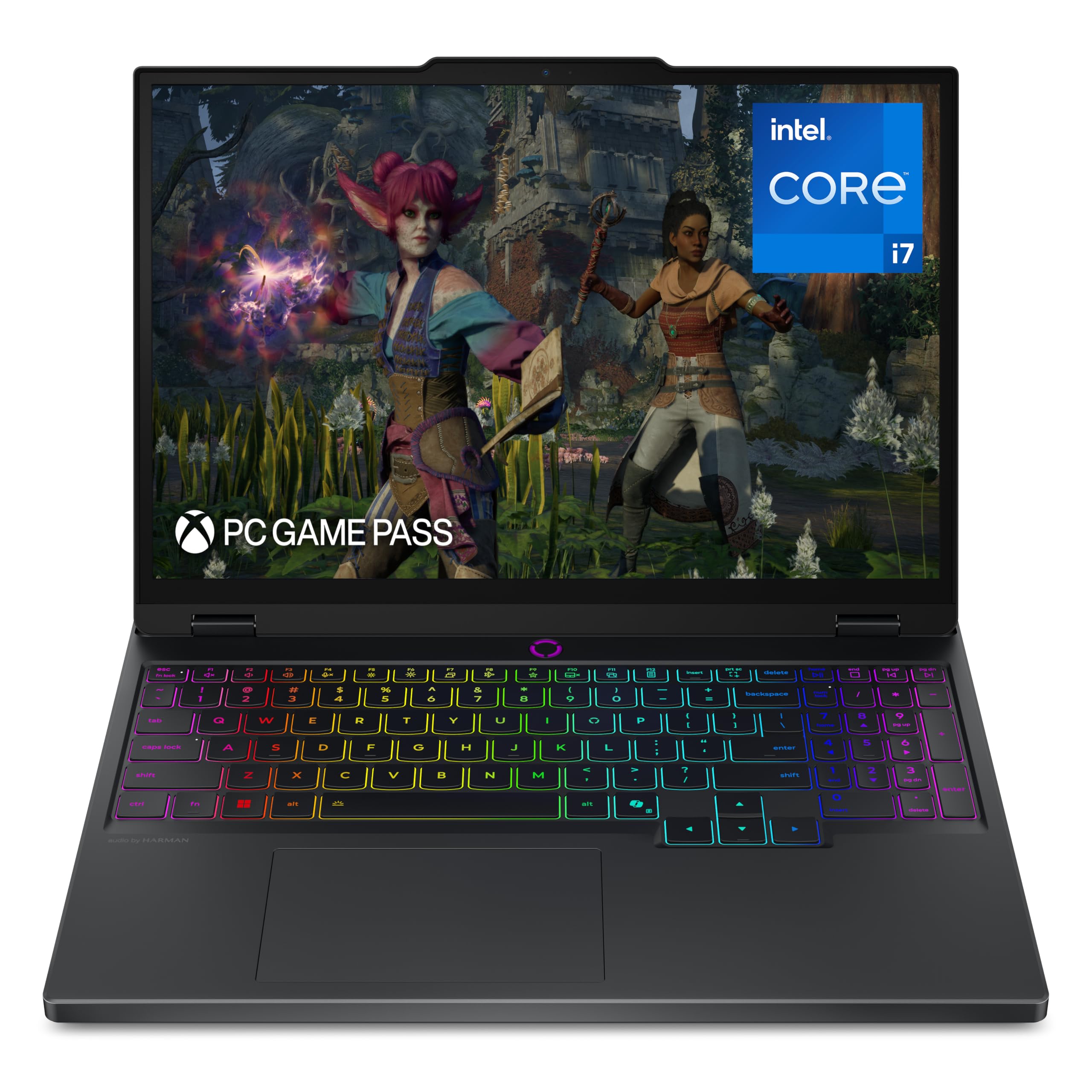
An OLED screen transforms every game into a visual spectacle, backed by RTX 5070 performance.
The Lenovo Legion 5i is the laptop for gamers who care as much about how games look as how fast they run. Its 15-inch 2.5K WQXGA PureSight OLED display delivers true-to-life colors and deep blacks at a 165Hz refresh rate — a combination that makes games, streaming, and creative work look stunning. The Intel Core i7-14700HX processor boosts up to 5.4 GHz, pairing with the NVIDIA GeForce RTX 5070 for high-fidelity gaming.
The Legion 5i is designed for university gamers who need portability, with a thinner, lighter build that still packs serious power. The Legion Coldfront: Hyper cooling system uses turbo-charged stealth fans to keep things quiet, and fast-charging tech boosts the battery from 0 to 70% in under 30 minutes via USB Type-C. Battery life is rated at 9 hours, which is excellent for a gaming laptop, though real-world gaming will drain it faster.
Gaming performance is what owners praise most, with buyers noting it handles high-end games beautifully and the OLED screen is a genuine highlight. It runs quietly until heavy tasks, when the fans get loud, and it’s light enough for a backpack. The 16GB of RAM feels pricey to upgrade, there’s no fingerprint reader or Windows Hello, and the keyboard layout is offset by a numpad. A rare durability complaint mentions rubber feet falling off after months, so treat the chassis gently.
solid build quality: an OLED screen with 165Hz refresh at this price is the best-looking panel in the lineup.
heavy to carry: anyone who wants guaranteed long-term ruggedness — a minority of owners mention build issues over time.
9. MSI Crosshair 18 HX AI

An 18-inch screen that refreshes 240 times per second (240Hz) makes this a station for rich gaming and creation work.
The MSI Crosshair 18 HX AI delivers the biggest, fastest display in the mid-premium segment: an 18-inch QHD+ panel at 2560 x 1600 with a 240Hz refresh rate and 100% DCI-P3 color gamut. That means incredibly smooth, vibrant visuals whether you’re gaming, editing video, or doing professional work. Inside sits the Intel Core Ultra 9 Processor 275HX with 24 cores boosting from 2.1 to 5.4 GHz, paired with the NVIDIA GeForce RTX 5070 with 8GB of GDDR7 memory.
You get 32GB of DDR5 5600MHz RAM (fast, current-generation memory) and a 1TB NVMe SSD (a solid-state drive that loads games quickly), so heavy multitasking and big game installs won’t slow you down. The SteelSeries 24-zone RGB backlit keyboard has 99 anti-ghost keys, meaning you can press many keys at once during intense gaming and every input registers. Audio comes from 2x Dynaudio 2W speakers plus 2x 2W woofers, delivering rich, rich sound that’s rare in gaming laptops.
Customers note it handles demanding games like ARK with great graphics, and the crisp screen surpasses even old curved monitors. The build quality earns praise as compact and slim — smaller than a 17-inch Lenovo one owner used previously — with a high-quality feel. It runs quietly and needs a cooling pad only for sessions lasting 4+ hours. At 6.83 lbs, it’s not ultraportable, but the 18-inch screen makes it a desktop replacement that travels when needed.
big screen: gamers and creators who want a massive, color-accurate screen with buttery 240Hz motion in one machine.
small desks: at 18 inches, this is physically huge — confirm you have the desk space and backpack capacity.
10. Thunderobot Storm 17

A 17.3-inch desktop replacer with a ludicrous 64GB of RAM and a 2TB SSD for the ultimate game library.
The Thunderobot Storm 17 answers a simple question: what if you never had to worry about storage or memory again? It comes with a massive 64GB of DDR5 RAM and a 2TB PCIe M.2 SSD, so your entire game library can live on the machine with room to spare. That’s double the RAM of most gaming laptops and double the storage of most rivals, making it a genuine desktop replacement for power users.
Power comes from the Intel Core i7-13620H (a laptop CPU with 10 cores and 16 threads) boosting up to 4.9 GHz, paired with the GeForce RTX 5070 (a high-end graphics card). One buyer reports running Cyberpunk 2077 on Ultra High settings at 550 fps with the RTX 5070 — an extraordinary number that shows this machine’s raw capability. The 17.3-inch QHD display (a high-resolution screen at 2560 x 1440) runs at 165Hz (refreshing 165 times per second) with pro-grade color accuracy, so fast action stays smooth and colors look true.
The cooling system is a highlight, using ultra-thin 0.2mm copper fins and dual 12V turbofans with a one-click forced cooling mode to keep temperatures low under heavy load. Buyers praise the build quality and describe it as amazing for the price, with specs that are accurate and no issues so far. The catch is battery life — one owner calls it “hell,” so this is unapologetically a plugged-in machine. The touchpad is also a weak point, and the proprietary charger is worth keeping track of.
aggressive price tag: you want maximum RAM and storage without paying flagship prices — 64GB of RAM and a 2TB SSD is class-leading here.
unknown brand support: you need portability or battery life, as this 53Wh unit is strictly a desk dweller.
11. ASUS ROG Strix G16 (RTX 5070 Ti)

Top-tier RTX 5070 Ti power meets a brilliant 2.5K 240Hz ROG Nebula display for premium 1440p gaming.
The ASUS ROG Strix G16 in its RTX 5070 Ti configuration is the laptop for gamers who want high-refresh 1440p performance without jumping to a desktop. It pairs the Intel Core Ultra 9 Processor 275HX, boosting up to 5.4 GHz, with the NVIDIA GeForce RTX 5070 Ti Laptop GPU. Reviewers point out excellent 1440p ultra performance at 60-90+ fps, with strong VR capability in titles like Quest 3, MSFS24, and Cyberpunk with ray tracing.
The ROG Nebula display is the star: a 16-inch 2.5K panel at 2560 x 1600 with a 240Hz refresh rate and 3ms response time. It features an ACR film that enhances contrast and reduces glare, making games look crisp and colors accurate. With 32GB of DDR5-5600MHz memory and a 1TB PCIe Gen 4 SSD, you have plenty of headroom for gaming while streaming or running creative applications like CAD software.
The cooling system is a highlight, using a vapor chamber, tri-fan technology, and Conductonaut extreme liquid metal to keep the system cool even during long sessions. Shoppers say the GPU stays at 65-70°C during gaming, which is impressively cool. It handles architectural work in Lumion, SketchUp, and Blender smoothly, making it a true work-and-play machine. Battery life allows about 4.5 hours off the charger, but gaming needs the adapter. The main gripes are heavy pre-installed bloatware like McAfee and a value proposition that only makes sense when discounted.
top tier: among the most complete premium gaming laptops — fast, cool, and gorgeous — best bought when you can catch a discount.
budget buyers: value becomes a harder sell, so time your purchase around sales events.
12. Alienware 18 Area-51

An 18-inch, 300Hz monster that pushes graphics and processor power limits further than almost anything else.
The Alienware 18 Area-51 is unapologetically built for maximum performance, with a design that enables higher graphics and processor power limits than typical laptops. Inside sits the Intel Core Ultra 9 275HX, boosting up to 5.4 GHz, paired with the NVIDIA GeForce RTX 5080 with NVIDIA Max-Q for tune battery life and jaw-dropping graphics fidelity. This is a machine for those who demand the extraordinary.
The 18-inch WQXGA display runs at a blistering 300Hz refresh rate with a 3ms response time, making it the fastest panel in this entire lineup. The Cryo-Chamber cooling system props up the laptop for increased airflow and features a clear Gorilla Glass panel showing off the AlienFX fans. The 2TB SSD and 32GB of DDR5 RAM provide ample storage and memory for the most demanding games and applications.
Buyers describe it as a “tank” with a rock-solid, rugged feel that feels indestructible, praising its fast performance and amazing heat dissipation. It handles multiple screens and runs updates while you game in the background. The honest trade-offs are size and weight — it’s absolutely not portable, and one owner notes it runs hot in performance mode, which is expected at this power level. A minority report audio issues, and the Battlenet interface frustrates some, but performance is what owners praise most.
extreme performance: if you want desktop-class RTX 5080 power and a 300Hz screen in a laptop, there’s nothing else like it here.
massive footprint: this is a heavy, desk-bound machine — “slim and lightweight” it is not.
13. Lenovo Legion Pro 7i Gen 10

The complete flagship: RTX 5080 power, a 64GB memory fortress, and a stunning OLED display in one refined package.
The Lenovo Legion Pro 7i Gen 10 is the most complete gaming laptop money can buy, combining flagship performance with premium build quality. The NVIDIA GeForce RTX 5080 with 16GB of GDDR7 memory and 1334 AI TOPS delivers extraordinary gaming performance — buyers report it outperforms some RTX 5090s at 65-100 fps on ultra settings without DLSS and without throttling. The Intel Ultra 9 275HX processor with 24 cores boosts up to 5.4 GHz.
The 16-inch WQXGA OLED display is a masterpiece: 2560 x 1600 resolution at 500 nits with 100% DCI-P3 color gamut, 240Hz refresh rate, and DisplayHDR True Black 1000 certification. Colors are vibrant, blacks are truly black, and motion is buttery smooth. With 64GB of DDR5-6400MHz RAM and a 2TB SSD configured as two 1TB drives, this machine handles absolutely anything you throw at it — gaming, 3D rendering, video editing, or running dozens of applications at once.
The cooling keeps things impressively quiet and cool even under sustained load, which is a rare feat at this performance level. The per-key RGB backlit keyboard is comfortable for long sessions, and the 5.0MP camera with E-shutter adds modern convenience. Buyers call it the best gaming laptop of its generation, with gorgeous screen and fast performance — one owner sums it up as “blows everything else out of the water.”
The trade-offs are few but real: the smooth finish can cause slipping on cooling mats, the trackpad is mediocre, and there’s no Windows Hello for quick logins. Some owners mention the initial setup requires technical expertise — the Wi-Fi adapter may need a driver update and the second SSD arrives unformatted. Battery life is rated at 6.5 hours, which is respectable for a machine this powerful, though you’ll want the 400W adapter nearby for serious gaming.
tinkerer: if budget is no object and you want the best-performing, best-looking gaming laptop available, this is the one to beat — build quality is what owners praise most.
plug-and-play: the initial setup can require driver updates and formatting the second drive, so some technical comfort is helpful.
Understanding the Specs
GPU Tiers Explained
The graphics card determines how many frames per second you’ll get and at what resolution. RTX 4050 and RTX 2050 handle 1080p gaming well, while RTX 5060 and RTX 5070 open up higher refresh rates and 1440p. RTX 5070 Ti and RTX 5080 are for those who want maximum detail at high resolutions or future-proofing for years to come.
Refresh Rate and Response Time
Refresh rate, measured in hertz (Hz), tells you how many times the screen updates each second — 144Hz is smooth, 240Hz is ultra-fluid, and 300Hz is elite. Response time, measured in milliseconds (ms), is how fast pixels change color. A lower response time means less ghosting in fast motion, which is why competitive gamers value both numbers together.
FAQ
How much RAM do I really need in a gaming laptop?
Is a 240Hz display worth the extra cost over 165Hz?
Can I use a gaming laptop on battery without plugging it in?
How hot do gaming laptops get, and is that normal?
What’s the difference between an OLED and IPS display on a gaming laptop?
Is the RTX 5060 a big upgrade over the RTX 4050?
How much storage do I need for gaming?
What is DLSS and why does it matter for gaming laptops?
Final Thoughts: The Verdict
For most gamers, the clear winner among the 5 gaming laptops is the Acer Nitro V 15 because it balances RTX 4050 performance, a 165Hz display, and generous 1TB storage at a price that makes sense. If you want buttery 240Hz motion on a sharp QHD+ panel, the MSI Crosshair 16 HX is the speedster to grab. And for those who want the absolute best visuals with RTX 5080 power, the Lenovo Legion Pro 7i delivers a stunning OLED experience that justifies its premium position.
How We Picked
We do not accept paid placement. Every pick is matched to a real buyer and a real use-case; we do not hands-on test units.
Sources & Methodology
Specifications: manufacturer listings and product documentation. Review insights: verified customer reviews, as of September 2026. Pricing: not shown on this page (it changes often); check the current price via the retailer link.
As an Amazon Associate, Gadgets Feed earns from qualifying purchases. This does not affect which products we feature.