
Finding a prebuilt that pairs the blistering RTX 5070 Ti with a capable CPU and fast RAM, all while respecting a strict budget ceiling, is the single hardest challenge in the current GPU market. The card alone often commands a premium that pushes entire system costs into uncomfortable territory, forcing buyers to make trade-offs on storage, cooling, or processor generation that can bottleneck the core experience.
I’m Min — the co-founder and writer behind Gadgets Feed. I’ve spent hundreds of hours combing through technical spec sheets, customer feedback patterns, and pricing history to separate the genuinely well-built machines from those that cut corners in ways that hurt real-world performance.
After analyzing over a dozen competing configurations, this guide identifies the six prebuilt desktops that deliver legitimate value without sacrificing the core GPU and CPU combo. This is the definitive resource for anyone searching for the 5070 ti computer under $2000.
How To Choose The Best 5070 Ti Computer Under $2000
The RTX 5070 Ti is a 1440p and entry-level 4K powerhouse, but pairing it with the wrong components creates a bottleneck. Here’s what to check before you buy.
Balancing CPU and GPU Generations
A Ryzen 7 7700X or 9700X, or an Intel Core Ultra 7 265F, is the minimum to feed the 5070 Ti enough data. Older processors like the 12th-gen Intel or Ryzen 5000 series will leave performance on the table, especially in CPU-bound titles at 1080p and 1440p.
Memory Speed and Capacity Floor
32GB of DDR5 is the new standard for this GPU tier. 16GB causes page-file stuttering in modern simulations like Star Citizen or Microsoft Flight Simulator. Aim for 6000MHz CL30-36 on AMD or 5600MHz on Intel to keep the Infinity Fabric and memory controller synced.
Power Supply Headroom
The RTX 5070 Ti has high transient spikes. An 850W 80+ Gold PSU with ATX 3.0 certification and a native 12V-2×6 connector is non-negotiable for stability. Systems with 750W units can trip overcurrent protection during heavy loads.
Cooling Configuration Matters
A 360mm AIO liquid cooler is ideal for sustained all-core loads, but a quality 240mm or a dual-tower air cooler like the Noctua NH-D15 is sufficient for the Ryzen 7 and Core Ultra 7 chips listed here. Avoid single-fan air coolers or 120mm AIOs — they will cause thermal throttling.
Quick Comparison
On smaller screens, swipe sideways to see the full table.
| Model | Category | Best For | Key Spec | Amazon |
|---|---|---|---|---|
| Lenovo Legion Tower 5i | Premium | Balanced Performance | RTX 5070 Ti 16GB GDDR6 | Amazon |
| iBUYPOWER Y40 PRO | Premium | High-FPS 1440p Gaming | Ryzen 9 7900X + 5070 Ti | Amazon |
| Skytech King 95 (9850X3D) | Premium | Max 1440p FPS | R7 9850X3D + 360mm AIO | Amazon |
| Skytech King 95 (9800X3D) | Premium | 2TB Storage + X3D CPU | R7 9800X3D + 5070 Ti 16GB | Amazon |
| Skytech O11 Vision | Premium | Showcase Aesthetic Build | R7 9850X3D + Lian Li O11 Case | Amazon |
| Cooler Master NR2 Pro | Premium | Compact ITX Powerhouse | Mini ITX + 280mm AIO | Amazon |
In‑Depth Reviews
1. Lenovo Legion Tower 5i

The Lenovo Legion Tower 5i strikes the hardest balance between build quality, thermals, and raw performance in this class. The Intel Core Ultra 7 265F combined with the RTX 5070 Ti 16GB delivers predictable 1440p frame rates above 120 FPS in titles like Cyberpunk 2077 and Alan Wake 2 with DLSS 4 enabled. The 32GB of 5600MHz DDR5 gives breathing room for multitasking while streaming or running background Discord and Chrome tabs.
What sets this unit apart is the cooling system: the tool-less side panel reveals a high-quality air duct that keeps the GPU in the mid-60s Celsius and the CPU in the high-50s during extended sessions. The 2.5G Ethernet and WiFi 6E are welcome upgrades over the typical 1GbE and WiFi 5 found in many competitors at this tier. Multiple buyers report zero crashes after months of daily use, which is rare for a prebuilt at this price point.
The chassis is clean and understated with customizable RGB lighting, avoiding the aggressive gamer aesthetic that some may dislike. The included 3-month Xbox Game Pass is a nice bonus, but the real value is the reliability and the fact that upgrade paths remain open for future GPU and storage swaps.
Why it’s great
- Tool-less side panels make future upgrades effortless
- 2.5G Ethernet and WiFi 6E for fast networking
- Stays whisper-quiet even under sustained gaming load
Good to know
- GPU “GEFORCE” text lacks RGB lighting
- RAM is 5600MHz, not the faster 6000MHz found on AMD rivals
2. iBUYPOWER Y40 PRO

The iBUYPOWER Y40 PRO is built around the Ryzen 9 7900X, a 12-core/24-thread monster that pushes the RTX 5070 Ti to its limits in both gaming and creator workloads. At 1440p with ray tracing maxed out, this system delivers silky-smooth frame pacing without the micro-stutter that plagues less balanced builds. The 32GB of 5200MHz DDR5 is slightly slower than ideal, but the 2TB NVMe SSD provides ample storage for a modern game library.
The Y40 chassis is a standout feature: the tempered glass panel showcases the 16-color RGB lighting, and the included iBUYPOWER gaming keyboard and mouse reduce initial setup costs. Multiple verified purchasers note that this system significantly outperformed their previous custom builds, with one reporting over 120 FPS on ultra settings across demanding titles after a CPU upgrade from the 7900X to a 9800X3D. The build is remarkably cool and quiet thanks to the liquid cooling loop.
There are some caveats: one customer reported a RAM diagnostic test running for days before a return was initiated, indicating potential quality control variance. The 5200MHz RAM is a noticeable step down from the 6000MHz that AMD recommends for optimal Infinity Fabric performance. Still, for raw CPU and GPU combo power, this is a top contender.
Why it’s great
- 12-core Ryzen 9 provides unmatched multitasking headroom
- 2TB NVMe storage eliminates storage anxiety
- Excellent RGB showcase with tempered glass side
Good to know
- RAM speed is 5200MHz, leaving some CPU performance on the table
- Quality control on component seating varies between units
3. Skytech Gaming King 95 (9850X3D)
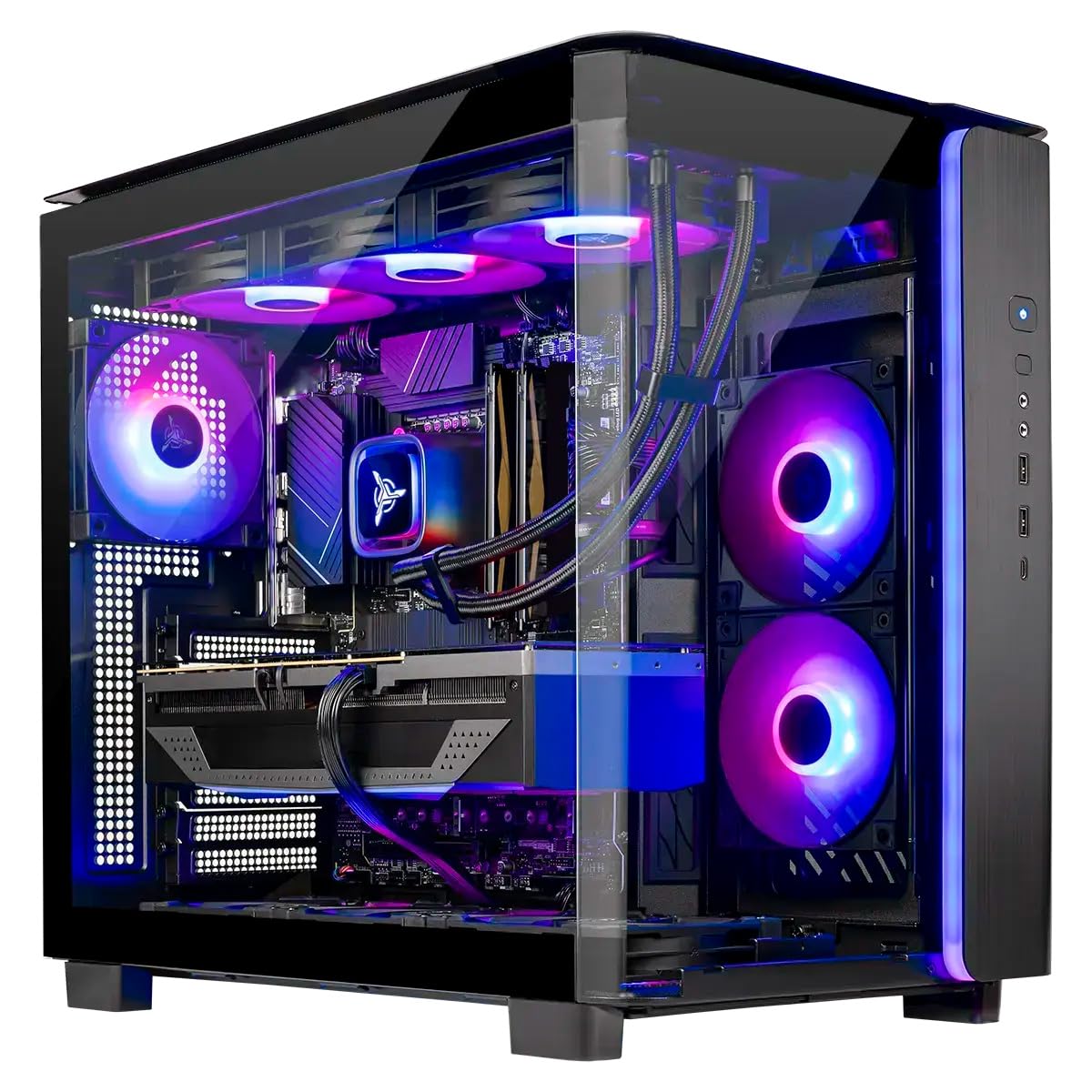
The Skytech King 95 with the Ryzen 7 9850X3D is the closest you can get to a top-tier gaming CPU without crossing into the 9800X3D’s price bracket. The 3D V-Cache technology provides a massive boost in cache-sensitive games like Escape from Tarkov and Factorio, effectively reducing 1% and 0.1% lows that cause perceived stutter. The RTX 5070 Ti 16GB pairs perfectly with this CPU, delivering well over 120 FPS at 1440p ultra in almost any title.
The 360mm AIO liquid cooler is a critical inclusion — it keeps the 9850X3D well below 80°C even during all-core workloads, preventing thermal throttling that could undermine the V-Cache advantage. The 850W Gold ATX 3.0 PSU provides clean power delivery, and the King 95 case features a stunning wraparound glass design with magnetic dust filters. Customers praise the build quality and the included RGB keyboard and mouse as better than typical OEM peripherals.
One buyer described it as an “absolute beast,” noting that it exceeded benchmarks and left good overclocking headroom. The 1TB Gen4 NVMe SSD is the only potential bottleneck for heavy users, but the motherboard offers an additional M.2 slot for expansion. The WiFi 5 connectivity is a slight disappointment in a system of this caliber.
Why it’s great
- 3D V-Cache delivers exceptional 1% low FPS in CPU-bound games
- 360mm AIO maintains superior thermal headroom
- King 95 case offers excellent airflow and visual appeal
Good to know
- WiFi 5 is outdated; consider a USB WiFi 6E adapter
- Only 1TB of storage included for the base price
4. Skytech King 95 (9800X3D)

The Skytech King 95 rocking the Ryzen 7 9800X3D is the ultimate gaming CPU pairing for the RTX 5070 Ti. The 9800X3D’s 3D V-Cache technology delivers single-digit 1% low FPS values in demanding simulations, eliminating the micro-stutter that plagues standard cache processors. The RTX 5070 Ti 16GB GDDR7 memory bandwidth ensures high-resolution textures stream without hitch, making this the smoothest 1440p experience in the lineup.
The 2TB Gen4 NVMe SSD is a critical upgrade over the 1TB models, giving you room for 15-20 modern AAA titles without juggling uninstalls. The 360mm AIO and King 95 case with its wraparound glass panel create a showpiece that also performs thermally. Buyers report exceptional performance in Rust at over 200 FPS, and the system runs quiet despite the nine-fan configuration. The 32GB of 6000MHz DDR5 is the sweet spot for the Zen 5 architecture.
Some buyers have noted that the RGB/fan control is locked behind paid third-party software, which feels unnecessary for a premium prebuilt. The included keyboard and mouse are serviceable but cheap, and the Gigabyte B650M motherboard has fewer USB ports than expected. Despite these minor quibbles, this is the most capable gaming machine available at this price tier.
Why it’s great
- 9800X3D offers best-in-class 1% low FPS for smooth gameplay
- 2TB NVMe provides ample storage for large game libraries
- 6000MHz DDR5 RAM optimizes Zen 5 performance
Good to know
- RGB/fan control requires third-party paid software
- B650M motherboard has limited rear I/O connectivity
5. Skytech O11 Vision

The Skytech O11 Vision is built for those who want a centerpiece on their desk. The Lian Li PC-O11 Vision case in white features a distinctive dual-chamber design that separates the PSU and storage from the main motherboard area, creating an unobstructed view of the Ryzen 7 9850X3D and RTX 5070 Ti 16GB. The 360mm AIO and front fans provide exceptional airflow, keeping the system cool even during extended streaming sessions.
Performance is on par with the King 95 config, delivering 120+ FPS at 1440p ultra in demanding titles like Elden Ring Nightreign and Alan Wake 2. The 2TB NVMe SSD and 32GB of 5600MHz DDR5 ensure fast load times and smooth multitasking. The WiFi 5 connectivity is a notable omission at this price point, but the included gaming keyboard and mouse are decent for a prebuilt.
One key advantage of the O11 Vision is its upgrade potential — the dual-chamber design makes swapping PSUs or adding storage drives trivial. The tool-less glass panels are easy to remove for cleaning. Buyers have praised the build quality and the stunning white aesthetic, though some have reported minor software issues with the included peripherals. The 850W Gold PSU provides ample headroom for future GPU upgrades.
Why it’s great
- Lian Li O11 Vision case is a showcase masterpiece
- Dual-chamber design offers excellent cooling and easy upgrades
- 2TB NVMe storage provides generous game capacity
Good to know
- WiFi 5 is outdated; wired Ethernet is recommended for stable gaming
- 5600MHz RAM is not the optimal speed for AMD Infinity Fabric
6. Cooler Master NR2 Pro

The Cooler Master NR2 Pro is the only small-form-factor (SFF) option on this list, cramming a Ryzen 7 9800X3D and RTX 5070 Ti 16GB into an 18.25-liter chassis about the size of a large shoebox. The 280mm AIO radiator is unusual for SFF builds but essential for taming the 9800X3D’s heat output. The Gigabyte B850I AORUS PRO motherboard is a high-quality ITX board with support for PCIe 5.0 SSDs and GPUs.
Performance is exceptional for the size: the 9800X3D combined with the 5070 Ti delivers over 300 FPS at 1080p and 120+ FPS at 1440p in competitive titles like Valorant and Overwatch 2. The 32GB of 6000MHz DDR5 and 2TB Gen4 NVMe SSD ensure fast load times and smooth multitasking. The package includes both a glass panel and a mesh panel, giving users the option between aesthetics and airflow.
The SFF form factor does come with trade-offs. One buyer reported a dead front USB-C port, and another had to reseat the GPU riser cable to get the system to post. The system runs warm but stays within safe limits. For college students or those with limited desk space, the NR2 Pro is an engineering marvel that fits a full-power desktop in a small bag.
Why it’s great
- Incredibly compact 18.25L footprint saves desk space
- 280mm AIO keeps the 9800X3D cool in a tight chassis
- Includes both glass and mesh side panels
Good to know
- GPU riser cable can come loose during shipping, causing no-POST issues
- Non-technical users may find the SFF build tricky to troubleshoot
FAQ
Is the RTX 5070 Ti worth it over the standard RTX 5070?
Can a 750W power supply handle an RTX 5070 Ti build?
Should I choose AMD or Intel for a 5070 Ti build?
What is the ideal RAM speed for an AMD Ryzen 7 with the 5070 Ti?
Final Thoughts: The Verdict
For most users, the 5070 ti computer under $2000 winner is the Lenovo Legion Tower 5i because it combines a reliable Core Ultra 7 processor, the full 16GB 5070 Ti, and excellent thermal management in a tool-less chassis that’s easy to upgrade. If you want the absolute best gaming CPU for the 5070 Ti, grab the Skytech King 95 (9850X3D) for its 3D V-Cache advantage in stutter-prone titles. And for a compact powerhouse that fits on any desk, nothing beats the Cooler Master NR2 Pro.