
Every desktop gamer, remote worker, and home office user eventually hits the wall that a weak internal Wi-Fi card creates — buffering streams, dropped Zoom calls, and multiplayer lag that makes you the punchline. A dedicated USB adapter bypasses that bottleneck entirely, bringing external antennas and protocol upgrades like Wi-Fi 6 and Wi-Fi 7 to systems that shipped with outdated or broken wireless hardware.
I’m Min — the co-founder and writer behind Gadgets Feed. For this guide I analyzed seven top-shelf adapters, comparing chipset generations, antenna configurations, band support, and real-world throughput reports to separate genuine upgrades from spec-sheet hype.
Most desktops and older laptops lack proper multi-gigabit wireless. Adding a 5g wifi adapter with external antennas and modern protocol support fixes latency, range, and bandwidth in one plug-and-play step.
How To Choose The Best 5G WiFi Adapter
The right adapter depends on your router generation, your PC’s operating system, and how far your desk sits from the access point. Prioritize adapter protocol over raw speed numbers — a Wi-Fi 7 adapter plugged into a Wi-Fi 5 router will negotiate at your router’s max, not the adapter’s ceiling. Match the adapter’s generation to your router’s for optimal link rates.
Wi-Fi Generation and Protocol
Wi-Fi 6 (802.11ax) brings OFDMA and MU-MIMO to handle multiple devices simultaneously, reducing latency in busy households. Wi-Fi 7 (802.11be) adds 320 MHz channels and 4K-QAM for theoretical speeds beyond 5 Gbps, but requires a Wi-Fi 7 router and Windows 11 for 6 GHz band access. If your router is Wi-Fi 5 or older, a Wi-Fi 6 adapter is the practical sweet spot with better power efficiency and OS compatibility.
Antenna Design and Gain
External antennas with 5 dBi gain or higher dramatically improve signal capture compared to internal PCB traces inside a nano dongle. Two external antennas provide beamforming and spatial stream diversity, which matters when your PC lives in a basement office or two floors away from the router. Nano adapters trade range for portability — choose based on your physical distance to the access point.
USB Interface and Compatibility
A USB 3.0 port delivers up to 5 Gbps, enough headroom for any current Wi-Fi generation. Adapters with built-in drivers (presented as a virtual CD drive) simplify setup on Windows 10 and 11, but some require manual driver installation when the auto-run fails. Verify the adapter explicitly supports your OS — Linux compatibility varies widely, and macOS support is rare among these USB dongles.
Quick Comparison
On smaller screens, swipe sideways to see the full table.
| Model | Category | Best For | Key Spec | Amazon |
|---|---|---|---|---|
| NETGEAR Nighthawk A7500 | Wi-Fi 6 | Reliable high-end desktop use | AX1800 dual-band, 1.8 Gbps | Amazon |
| BrosTrend BE6500 | Wi-Fi 7 | Future-proofing on 6 GHz | Tri-band, 6.5 Gbps | Amazon |
| WAVLINK BE6500 | Wi-Fi 7 | Maximum range and antennas | 4×5 dBi antennas, MLO | Amazon |
| Nineplus AX1800 (N18) | Wi-Fi 6 | Budget-friendly Wi-Fi 6 upgrade | AX1800, 2×5 dBi antennas | Amazon |
| TP-Link Archer TX20U Nano | Wi-Fi 6 | Ultra-portable travel adapter | AX1800 nano, USB 2.0 | Amazon |
| UGREEN AX1800 | Wi-Fi 6 | Compact low-cost Wi-Fi 6 | AX1800, WPA3-SAE | Amazon |
| Nineplus 1300Mbps | Wi-Fi 5 | Entry-level value pick | AC1300, 2×5 dBi antennas | Amazon |
In‑Depth Reviews
1. NETGEAR Nighthawk WiFi 6 USB 3.0 Adapter (A7500)

The Nighthawk A7500 is the definitive mid-range-to-premium Wi-Fi 6 adapter, built around a proven chipset that delivers consistent 1.8 Gbps aggregate throughput. Users migrating from internal Wi-Fi 5 adapters report download speed jumps from 190 Mbps to over 500 Mbps when paired with a Wi-Fi 6 router, making this a genuine bottleneck-buster for older hardware. The flexible external antenna swivels to catch the strongest signal, and WPA3 encryption comes standard without any setup fuss.
Installation is straightforward on Windows 10 and 11: plug into a USB 3.0 port, run the included thumb drive for drivers, and disable your internal Wi-Fi adapter in Device Manager to avoid duplicate network entries. The adapter body is wide enough that it may block an adjacent USB port on tightly spaced rear I/O panels, so plan ahead on mini-ITX or slim desktop builds. The bright LED stays on constantly during operation — some users find it distracting in dark rooms.
Customer feedback highlights rock-solid connection stability even during long gaming sessions and 4K video conferences, with no random disconnects reported across hundreds of verified purchases. The A7500 works with any Wi-Fi 6 or Wi-Fi 5 router, so you don’t need a matching NETGEAR mesh system to benefit. For a desktop user who wants maximum reliability without jumping to the Wi-Fi 7 premium, this is the safest, highest-rated bet on the list.
Why it’s great
- Proven NETGEAR build quality with stable long-term drivers
- Flexible high-gain antenna improves range over nano designs
- Delivers genuine multi-hundred Mbps speed uplift from legacy Wi-Fi 5 cards
Good to know
- Wide USB body crowds adjacent ports on compact motherboards
- Bright always-on LED cannot be dimmed or disabled
2. BrosTrend BE6500 USB WiFi 7 Adapter

The BrosTrend BE6500 is one of the first truly mass-market Wi-Fi 7 USB adapters, pumping theoretical aggregate throughput up to 6.5 Gbps across the 6 GHz, 5 GHz, and 2.4 GHz bands. On the 6 GHz band with a Wi-Fi 7 router and Windows 11 version 21H2 or later, users report matching their wired gigabit Ethernet speeds from 75 feet away through multiple walls — a breakthrough for dead-zone desktops. The adapter includes 4K-QAM and preamble puncturing to dodge congestion on crowded channels.
Installation requires a careful sequence: plug into USB 3.0, run the setup.exe from the virtual CD drive that appears in File Explorer, then disable the PC’s built-in Wi-Fi adapter in Device Manager. Skipping these steps can leave both adapters active with duplicate network lists, causing intermittent drops. The adapter lacks MLO (Multi-Link Operation) support despite being Wi-Fi 7 certified, which limits peak speed aggregation on compatible routers.
User reviews consistently praise the range improvement: one verified buyer went from 0.06 Mbps in a dead zone to a stable 75 Mbps on 2.4 GHz alone. The adapter runs warm but not hot during extended use, and the dual external antennas offer good flexibility for positioning. This is the ideal adapter for Windows 11 users who already own a Wi-Fi 7 router and want to future-proof their desktop without replacing the whole motherboard.
Why it’s great
- True tri-band with 6 GHz support for uncongested channels
- Delivers near-wired speeds across long distances
- Built-in driver eliminates CD or download requirements
Good to know
- MLO (Multi-Link Operation) not supported despite Wi-Fi 7 branding
- Windows 11 required to access the 6 GHz band
3. WAVLINK Tri-Band BE6500 WiFi 7 Adapter
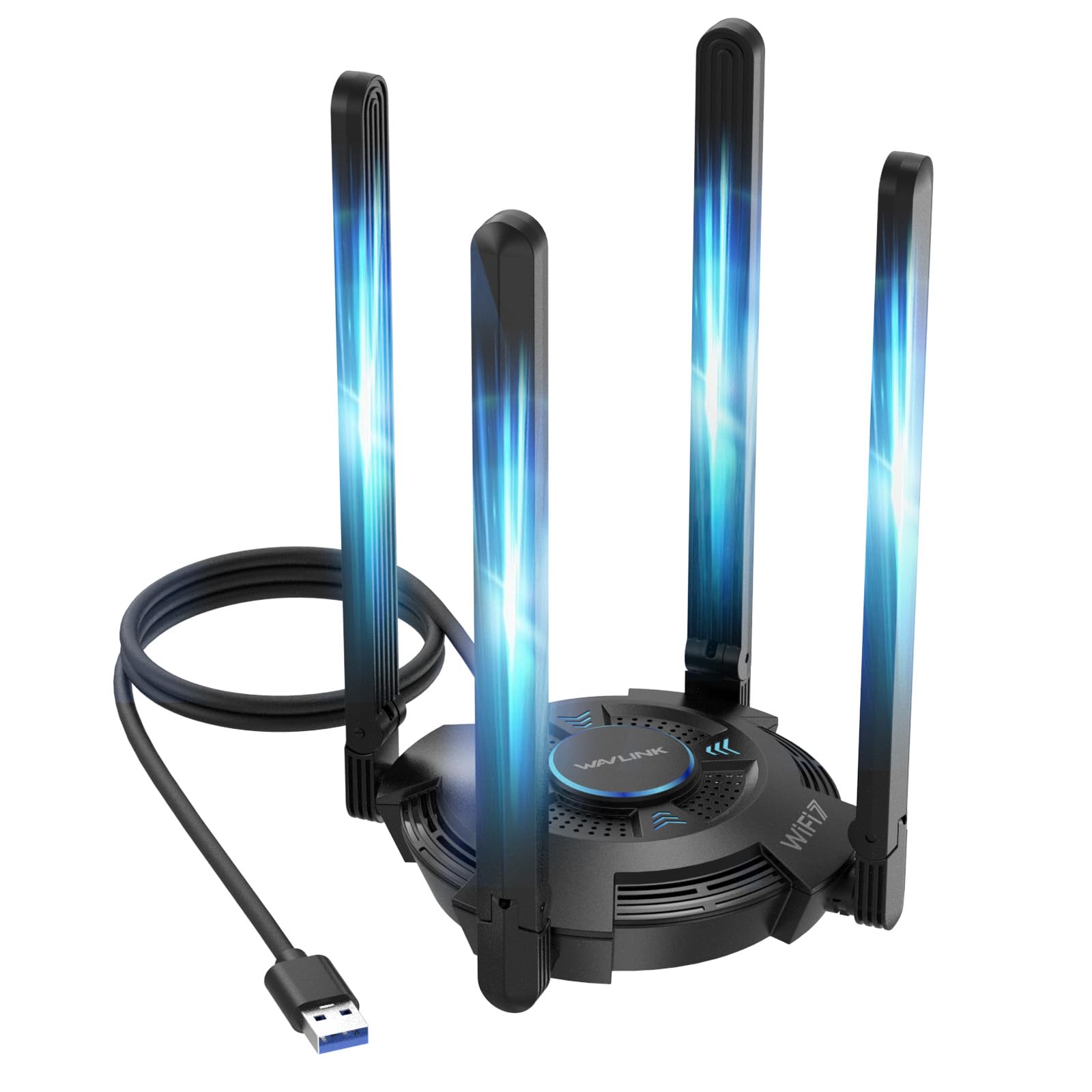
The WAVLINK BE6500 is the most antenna-dense USB adapter on this list, packing four adjustable 5 dBi high-gain antennas in a foldable design that covers 360-degree signal capture. It supports full Wi-Fi 7 features including MLO (Multi-Link Operation), Multi-RU, and 4K-QAM, with tri-band speeds up to 6.5 Gbps. The multicolor LED (blue, pink, red) provides instant visual feedback on network status, and the responsive touch switch on the housing lets you toggle lighting without software.
Installation is Windows 10/11 only, with the built-in driver loading automatically via a virtual CD drive in File Explorer. Users report the adapter recognizing immediately on systems with no prior Wi-Fi hardware, and the four-antenna array pulls in signals from two floors away where nano adapters fail completely. The included USB 3.0 cable lets you position the adapter away from the chassis to reduce RF interference from the PC case. The WAVLINK also supports Hotspot Mode for sharing a wired connection as a Wi-Fi access point.
Verified buyers consistently mention “like wired Cat-5” performance and massive improvement over internal laptop adapters. One reviewer noted their son’s multiplayer lag complaints stopped entirely after installation. The adapter runs warm due to the 4-antenna radio, and the body is larger than any other adapter here — make sure you have enough desk space. For users with a Wi-Fi 7 router who need maximum physical range on a desktop across multiple floors, this is the top performer.
Why it’s great
- Four 5 dBi antennas provide unmatched range through walls and floors
- Supports MLO for true Wi-Fi 7 multi-link aggregation
- Multicolor status LED with touch switch for customization
Good to know
- Large form factor requires desk space or a long USB cable
- Windows 11 21H2 or later required for 6 GHz band usage
4. Nineplus AX1800 USB WiFi 6 Adapter (N18)

The Nineplus N18 is the best entry point into Wi-Fi 6 for desktop users on a budget, offering dual-band AX1800 throughput (1201 Mbps on 5 GHz, 567 Mbps on 2.4 GHz) with two 5 dBi external antennas and beamforming for focused signal direction. It connects via USB 3.0 and supports plug-and-play on Windows 10 and 11 with no driver download — the system automatically detects and installs the required drivers when plugged into a USB 3.0 port. WPA3 encryption is included for modern security protocols.
The adapter draws power directly from USB, so no external power brick is needed, and the dual antennas fold flat for transport. One verified user on Fedora 42 Linux got it working with a minor udev configuration, though official support is Windows-only. The included flash drive carries drivers for offline installation on systems without internet access — a thoughtful inclusion for troubleshooting builds. The 2-year replacement warranty adds peace of mind at this price bracket.
Customer feedback is overwhelmingly positive for the value, with users praising the elimination of buffering on older Windows 10 PCs and seamless compatibility with Dell Optiplex systems. A small number of long-term reviews (one year in) report intermittent disconnect issues that worsen over time, so heavier users may prefer a more established brand. For a cost-conscious Wi-Fi 6 upgrade that still delivers proper antenna gain and beamforming, this is the best deal on the list.
Why it’s great
- Excellent price-to-performance ratio for Wi-Fi 6 entry
- Dual 5 dBi antennas with beamforming for focused range
- Includes flash drive for offline driver installation
Good to know
- Some long-term users report intermittent disconnects after extended use
- Windows 10/11 only — no official support for Linux or macOS
5. TP-Link Archer TX20U Nano

The Archer TX20U Nano is TP-Link’s tiniest Wi-Fi 6 USB adapter, measuring just 1.06 x 0.62 x 0.3 inches — roughly the size of a standard USB flash drive tail. Despite the small footprint, it supports AX1800 speeds (1201 Mbps on 5 GHz, 574 Mbps on 2.4 GHz) with OFDMA and MU-MIMO for efficient multi-device handling. It uses USB 2.0 rather than USB 3.0, which creates a real-world throughput bottleneck: tested users cap out around 240-270 Mbps on a 1200 Mbps internet plan, far below the adapter’s theoretical limit.
Installation is straightforward on Windows 10 and 11 with the pre-loaded driver presenting as a CD drive. Linux users on Fedora 43 report plug-and-play recognition without additional configuration. The adapter lacks Bluetooth, which some users expected given TP-Link’s naming convention, and there is no external antenna, so range is limited to direct line of sight or one thin wall. Router compatibility can be finicky — some ASUS routers in auto mode caused the adapter to drop every 15-20 seconds until the 5 GHz wireless mode was manually set to N/AC/AX mixed.
Customers appreciate the invisible profile that stays flush in a laptop port for travel, and the build quality feels solid for a nano adapter. For a secondary laptop or a desktop where the router sits in the same room and you prioritize zero footprint, this works well. For anyone needing range through multiple rooms or full gigabit throughput, the USB 2.0 bottleneck and lack of antenna make the larger alternatives a better fit.
Why it’s great
- Nearly invisible form factor stays permanently in a USB port
- Linux plug-and-play compatibility out of the box
- OFDMA and MU-MIMO for crowded network environments
Good to know
- USB 2.0 interface limits real-world throughput to ~270 Mbps
- No external antenna restricts range to same-room operation
6. UGREEN AX1800 WiFi 6 Adapter
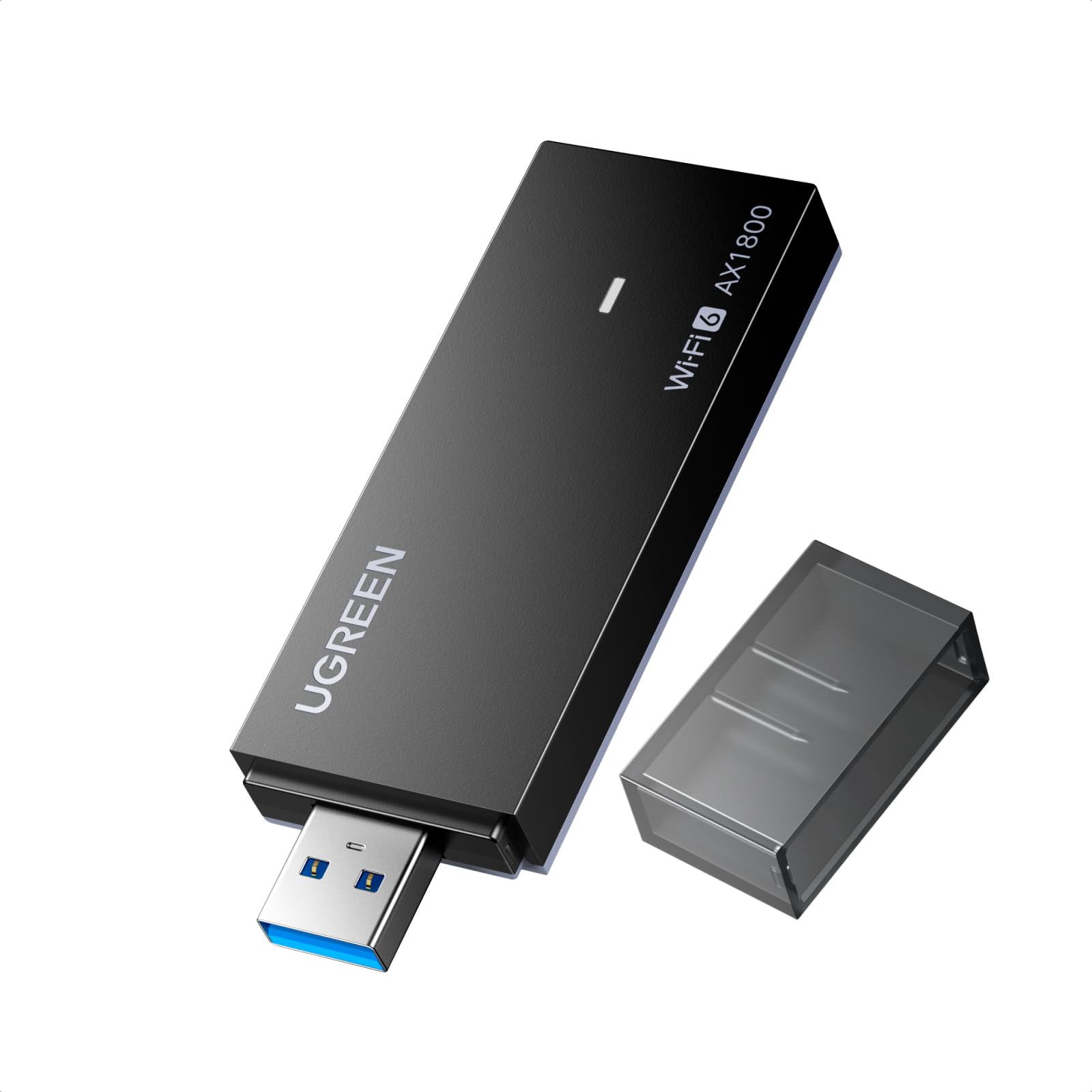
The UGREEN AX1800 brings Wi-Fi 6 to a compact, vented body at the lowest price point in the Wi-Fi 6 tier. It supports dual-band AX1800 speeds (1201 Mbps on 5 GHz, 574 Mbps on 2.4 GHz) with WPA3-SAE encryption and includes back ventilation holes for heat dissipation during long sessions — a thoughtful detail missing from many budget competitors. The adapter works as both a Wi-Fi receiver and a mobile hotspot via AP mode, which is useful for sharing a wired connection with nearby devices.
Installation is Windows 10/11 only, with the built-in driver sometimes misidentifying the adapter as a USB mass storage device. When that happens, a manual driver update via Device Manager resolves the issue, selecting the compatible Realtek driver that Windows finds automatically. This initial hiccup frustrates less technical users, but once configured, the adapter stays stable. Verified users report download speed jumps from 75-150 Mbps to nearly 300 Mbps after installation on the 5 GHz band.
The compact body fits in tight port arrays without blocking adjacent USB slots, and the matte black finish looks clean on any setup. Customer reviews are consistently positive for the value proposition, with no reports of the long-term disconnect issues seen on some ultra-budget adapters. For a simple, low-cost Wi-Fi 6 upgrade on a secondary PC or a media center, the UGREEN hits the right balance of price and reliability.
Why it’s great
- Lowest-cost Wi-Fi 6 adapter with reliable real-world performance
- Vented chassis for thermal management during continuous use
- AP mode for sharing internet as a mobile hotspot
Good to know
- Driver may be misidentified as USB mass storage, requiring manual update
- Windows 10/11 only — no macOS or Linux support
7. Nineplus 1300Mbps USB WiFi Adapter (N16)

The Nineplus N16 is the only Wi-Fi 5 (802.11ac) adapter on this list, offering AC1300 dual-band speeds (867 Mbps on 5.8 GHz, 400 Mbps on 2.4 GHz) with two 5 dBi external antennas. It is the most affordable entry point for reviving a desktop or laptop with a dead internal Wi-Fi card, and it supports the widest OS compatibility — Windows 7 through 11, plus Linux — making it the go-to pick for legacy systems that Wi-Fi 6 adapters deliberately exclude.
Installation is truly plug-and-play on Windows 10 and 11 with automatic driver detection via Windows Update. On Windows 7 and older systems, the included driver flash drive handles installation manually. The adapter uses USB 3.0 for full throughput and includes WPA3 encryption, which is rare for a Wi-Fi 5 adapter. The dual antennas fold flat for storage and provide better range than any nano or integrated solution, pulling in signals through one or two walls reliably.
Customer reviews highlight the adapter’s ability to eliminate buffering on older PCs, with one verified buyer calling it a “budget option for gaming PC without Wi-Fi” that provides decently stable connection. Some users report a brief connection cut every 1-2 days during extended gaming sessions, consistent with the lower-end chipset. For a PC that only needs basic web browsing, streaming, and light online gaming — especially on older Windows versions — this adapter delivers the most compatibility per dollar.
Why it’s great
- Widest OS compatibility including Windows 7 and Linux
- Dual 5 dBi antennas provide solid range for Wi-Fi 5
- Includes WPA3 security despite being a Wi-Fi 5 adapter
Good to know
- AC1300 speeds are a generation behind Wi-Fi 6 options
- Occasional short disconnects reported during long gaming sessions
FAQ
Can I use a Wi-Fi 7 adapter with a Wi-Fi 5 router?
Why does my adapter show as a CD drive when I plug it in?
Does a USB 3.0 Wi-Fi adapter work in a USB 2.0 port?
Final Thoughts: The Verdict
For most users, the 5g wifi adapter winner is the NETGEAR Nighthawk A7500 because it combines proven driver stability, genuine Wi-Fi 6 speed uplift, and a flexible high-gain antenna in a package that works with any router generation. If you want to step into Wi-Fi 7 with 6 GHz band support, grab the BrosTrend BE6500. And for maximum range across a multi-story home, nothing beats the WAVLINK BE6500 with its four external 5 dBi antennas.