
For creative professionals and discerning enthusiasts, the display is the single most critical component of a workstation. Standard 4K monitors deliver excellent detail, but a true 5K OLED panel operates on a different level entirely, offering a pixel density that makes individual pixels virtually invisible and contrast ratios that make content leap off the screen. This is the display technology you choose when sub-millimeter precision in photo editing, color grading, or code reading is non-negotiable, or when you simply want the most visually immersive desktop experience money can buy.
I’m Min — the co-founder and writer behind Gadgets Feed. For this guide, I’ve spent dozens of hours cross-referencing datasheets, analyzing customer feedback for real-world burn-in and reliability patterns, and mapping the specific connectivity and color accuracy requirements that matter most to Mac Studio and high-end PC users who demand the absolute best pixel density and color volume.
Whether you’re building a professional color-grading suite or upgrading your home office for unmatched clarity, finding the very best 5k oled monitor means balancing true 5120×2880 resolution with OLED contrast, accurate color reproduction, and the right connectivity for your workflow.
How To Choose The Best 5K OLED Monitor
Selecting a 5K OLED monitor requires a shift in focus from standard displays. You are paying a premium for extreme pixel density and perfect black levels, so you must verify that the panel delivers on both fronts. Consider your primary use case: professional color work demands factory calibration and wide gamut coverage, while a mixed-use workflow might prioritize ergonomics and connectivity. The table stakes are a 5120×2880 resolution and an OLED panel; the differentiators are build quality, thermal management, and the specific specs of the interface.
Pixel Density and Subpixel Layout
A 27-inch 5K display yields a pixel density of about 218 PPI, which is the magic number that makes text appear as sharp as printed type, eliminating the need for scaling compromises. However, not all OLED panels use the same subpixel structure. Some older OLED layouts can cause text fringing, particularly on white backgrounds with black characters. Newer QD-OLED and WOLED panels have largely solved this with updated pixel arrangements, making them far more suitable for productivity tasks like coding or document editing.
Connectivity and Power Delivery
For a modern professional setup, especially with a Mac, the monitor’s port selection is paramount. A Thunderbolt 4 or USB-C port that delivers at least 90W of power to your laptop is the ideal for a single-cable setup, handling video, data, and charging simultaneously. While HDMI 2.1 and DisplayPort 2.1 are excellent for high-bandwidth video, the integrated USB hub with high-speed data ports and KVM functionality can dramatically simplify a multi-device desk.
Quick Comparison
On smaller screens, swipe sideways to see the full table.
| Model | Category | Best For | Key Spec | Amazon |
|---|---|---|---|---|
| LG 45GX950A-B | Ultra-Wide Gaming | Immersive Sim & Gaming | 5120×2160 OLED, 800R Curve | Amazon |
| Apple Studio Display | Mac Ecosystem | Seamless Mac Integration | 27″ 5K Retina, 600 nits | Amazon |
| LG 27MD5KL-B | Mac Productivity | Classic Mac 5K Setup | 27″ 5K IPS, Thunderbolt 3 | Amazon |
| Dell UltraSharp U4025QW | Productivity Ultra-Wide | Multi-Window Professional | 40″ 5K2K IPS Black, 120Hz | Amazon |
| Kuycon G32P | 6K Alternative | Cost-Effective 6K Clarity | 32″ 6K IPS, 223 PPI | Amazon |
| BenQ PD2730S | Color Professional | VFX & Photo Editing | 27″ 5K IPS, 98% P3 | Amazon |
| Samsung M9 M90SF | Smart OLED | All-in-One Entertainment | 32″ 4K QD-OLED, 165Hz | Amazon |
| ViewSonic VP2788-5K | Mac-Ready IPS | Sharp 5K for Mac Studio | 27″ 5K IPS, Thunderbolt 4 | Amazon |
| ASUS PG32UCDM | QD-OLED Gaming | Elite 4K Gaming | 32″ 4K QD-OLED, 240Hz | Amazon |
| MSI MPG 322URX | High-Bandwidth Gaming | Top-Tier 4K Competitive | 32″ 4K QD-OLED, DP 2.1a | Amazon |
| INNOCN GA27W1Q | Value QD-OLED | Budget Gaming OLED | 27″ 4K QD-OLED, 240Hz | Amazon |
| ASUS PG32UCDP | Dual-Mode WOLED | Hybrid Gaming & Work | 32″ 4K WOLED, 240Hz/480Hz | Amazon |
| GIGABYTE AORUS CO49DQ | Super-Ultra-Wide | Sim Racing & Immersion | 49″ DQHD OLED, 144Hz | Amazon |
In‑Depth Reviews
1. LG 45GX950A-B

The LG 45GX950A-B is the current champion for anyone who wants a true 5K-class OLED experience with no compromises. It packs a massive 45-inch 21:9 WUHD (5120×2160) OLED panel with an 800R curve, delivering an expansive field of view that is perfect for both immersive gaming and complex productivity timelines. Its 125 PPI, achieved with an updated subpixel layout, significantly reduces the color fringing that plagued earlier OLEDs, making text exceptionally sharp for a monitor of this size.
The gaming performance here is elite, featuring a 165Hz native refresh rate and a Dual Mode function that lets you switch to Wide Full HD at 330Hz for competitive shooters. Combined with a 0.03ms response time and support for both NVIDIA G-Sync and AMD FreeSync Premium Pro, motion clarity is flawless. Connectivity is future-proof with DisplayPort 2.1, dual HDMI 2.1, and a USB-C port that delivers 90W of power, all while maintaining a peak brightness of 1300 nits for stunning HDR highlights.
User feedback consistently praises the immersive curve and deep black levels, though some note the Dual Mode scaling can be a bit rough for non-native resolutions. Firmware updates are also required to resolve a known HDR flicker issue on HDMI, but the USB-C connection works flawlessly. For its sheer size, resolution, and OLED contrast, this monitor is a powerhouse that sets the standard for high-end desktop displays.
Why it’s great
- World’s first 5K2K OLED with immersive 800R curve
- Dual Mode (165Hz native / 330Hz WFHD) for versatility
- Strong 1300-nit peak brightness and DisplayHDR True Black 400
Good to know
- Requires a powerful GPU (RTX 5080 or better) to drive effectively
- HDR flicker reported on HDMI, best via USB-C
- Firmware update process is not user-friendly
2. Apple Studio Display

The Apple Studio Display is the benchmark for Mac-centric 5K monitors, delivering a flawless 27-inch Retina experience with 14.7 million pixels and 600 nits of brightness. It is the standard against which all other 5K displays are measured, offering P3 wide color support for 1 billion colors, a 12MP Center Stage camera with Desk View, and a six-speaker system with Spatial Audio that is in a completely different league from typical monitor speakers.
For users deeply embedded in the Apple ecosystem, the integration is seamless. The display connects via a single Thunderbolt 5 cable, providing 96W of charging to a MacBook Pro, while two additional USB-C ports handle peripherals. The build quality is premium, with an aluminum enclosure and an anti-reflective coating that significantly reduces glare in most lighting conditions. This is the monitor you buy when you want zero hassle and perfect out-of-the-box color accuracy.
Customer feedback highlights the sharpness and excellent built-in audio and camera as major selling points. The primary drawback is the 60Hz refresh rate, which feels sluggish after using a 120Hz ProMotion display, and the high cost, especially when adding the tilt- and height-adjustable stand. For Mac users prioritizing workflow simplicity and build quality over raw refresh rate, it remains an unbeatable choice.
Why it’s great
- Perfect out-of-box color accuracy for macOS
- Best-in-class built-in speakers and mic array for a monitor
- Premium build with seamless Thunderbolt 5 connectivity
Good to know
- 60Hz refresh rate is a downgrade from 120Hz laptops
- The adjustable stand is expensive and sold separately
- Lacks true OLED black levels (uses IPS panel)
3. Dell UltraSharp U4025QW

The Dell UltraSharp U4025QW is the definitive monitor for professionals who need an immense canvas without the compromises of a TV-sized display. Its 40-inch 21:9 screen with a 5K2K (5120×2160) resolution provides more vertical space than a standard 32-inch 16:9 monitor, making it extraordinary for code, timelines, and large spreadsheets. The IPS Black technology delivers a 2000:1 contrast ratio—double that of standard IPS—providing noticeably deeper blacks while maintaining excellent viewing angles and color accuracy.
This display is a productivity powerhouse, featuring a 120Hz refresh rate for smooth scrolling, a comprehensive built-in KVM switch for seamless control of two systems, and a Thunderbolt 4 port delivering up to 140W of power. The 600-nit peak brightness ensures it performs well in brightly lit offices, and the anti-glare coating is excellent. For multi-tasking professionals who spend all day in windows, the 5K2K resolution is a genuine upgrade over 4K.
User reviews confirm its exceptional clarity and color fidelity, with many noting it is the best monitor they have owned for productivity. The primary downside is cost and a few ergonomic quirks: the ports face downward, making reconnections difficult, and the plastic chassis feels less premium than its price suggests. The mediocre contrast ratio compared to OLED is also a trade-off for its zero burn-in risk and text clarity.
Why it’s great
- Massive 40″ 5K2K workspace with incredible screen real estate
- IPS Black technology for 2000:1 contrast and deep blacks
- Built-in KVM and 140W Thunderbolt 4 charging
Good to know
- High price point for a non-OLED display
- Plastic build feels less premium than competitors
- Downward-facing ports complicate cable management
4. LG 27MD5KL-B
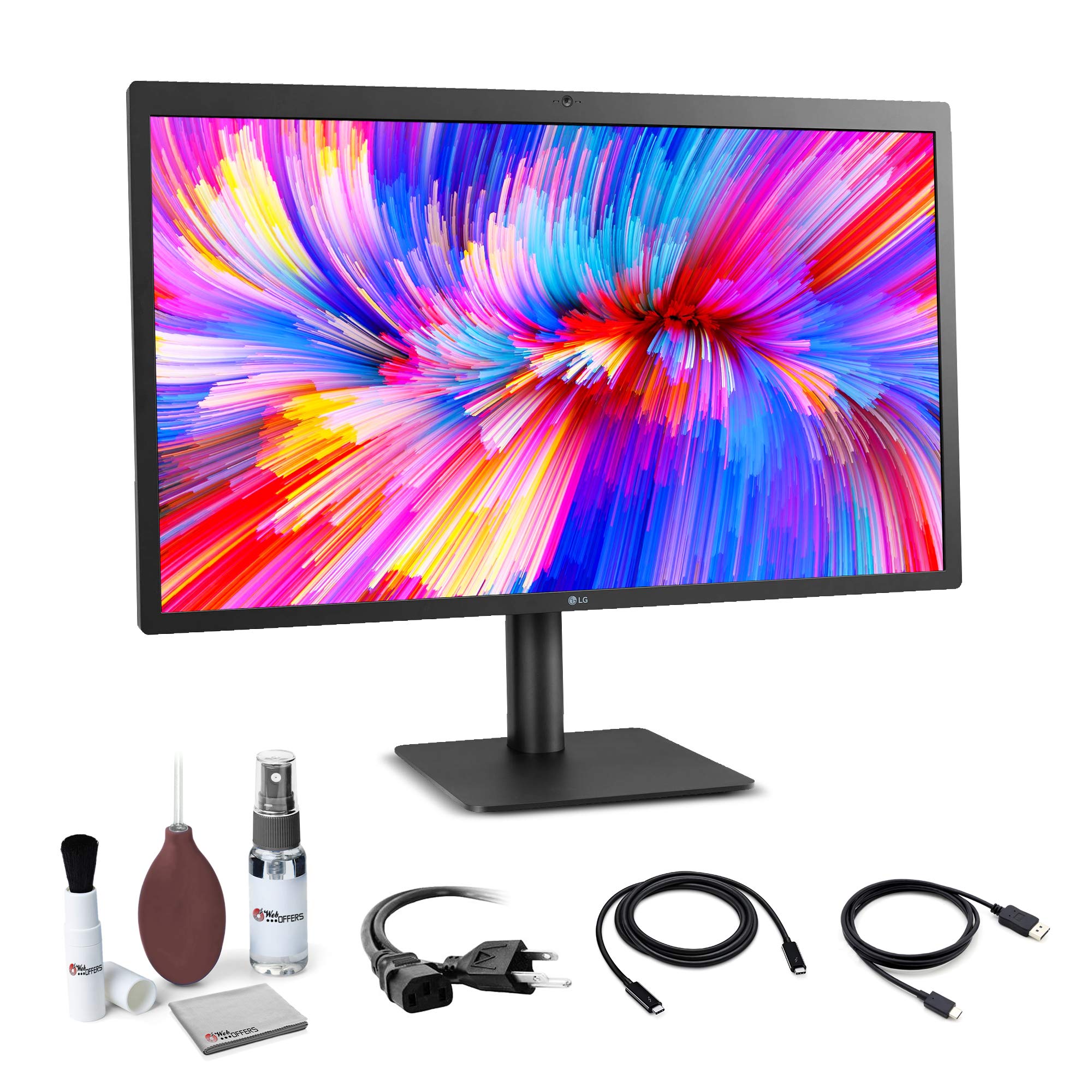
The LG UltraFine 27MD5KL-B was the original reference for Mac 5K displays, and it remains a strong choice for those seeking a pure, no-frills 5K experience. It is a 27-inch IPS panel with a 5120×2880 resolution, 500 nits of brightness, and a P3 wide color gamut, designed to pair perfectly with MacBooks and Mac Minis. Its primary feature is the Thunderbolt 3 connection, which supports full 5K video, audio, data, and 94W of power delivery over a single cable.
This monitor is all about convenience and clarity. The ambient light sensor automatically adjusts brightness, and the built-in camera and stereo speakers provide a functional all-in-one solution for video calls and media consumption. For users who previously owned an iMac 5K, this display offers a nearly identical viewing experience, making it an ideal companion for a Mac Mini or Mac Studio.
Customer feedback is positive overall, praising the image quality and seamless integration. However, complaints about the monitor’s aggressive glare are common, requiring careful lighting in the room. The 1080p webcam is also considered poor by modern standards. It is a solid performer, but its age and the 60Hz refresh rate make it less compelling against newer, more affordable 5K alternatives.
Why it’s great
- True 5K resolution that perfectly matches the iMac experience
- Thunderbolt 3 with 94W charging for a single-cable setup
- Integrated camera and speakers for a clean workspace
Good to know
- Glossy screen has aggressive glare compared to newer options
- 60Hz refresh rate and 1080p camera feel dated
- Periodic vertical tearing requires cable re-plugging
5. BenQ PD2730S

The BenQ PD2730S is a professional 5K monitor designed for color-critical workflows, targeting VFX animators, 3D artists, and video editors. It features a 27-inch IPS panel with 218 PPI and a 2000:1 contrast ratio, providing deep blacks and excellent uniformity across the screen. Its color credentials are backed by 98% DCI-P3 coverage and a factory-calibrated Delta E of less than 1, ensuring that the colors you see are accurate out of the box.
This monitor is loaded with workflow-enhancing features. The Thunderbolt 4 port delivers 90W of power, supports daisy-chaining two 5K displays, and includes a built-in KVM switch that can be controlled via a wireless Hotkey Puck. The Nano Matte Panel is a standout feature for professionals, diffusing ambient light to reduce reflections while maintaining high contrast, a combination that is rare in matte displays. For those who stare at screens for long hours, its TÜV-certified eye-comfort features are a major benefit.
User reviews highlight the phenomenal clarity of the 5K resolution and the excellent color performance, especially for photo editing. The KVM functionality works well, and the build quality is solid. Criticisms include the lack of decent built-in speakers and a camera, and some users have reported defective USB-C/Thunderbolt ports. For a pure color-accurate 5K professional tool, the PD2730S is a top contender.
Why it’s great
- Excellent 98% DCI-P3 coverage with factory calibration
- Nano Matte Panel effectively handles glare without loss of contrast
- Thunderbolt 4 with daisy chain and KVM for complex setups
Good to know
- No built-in camera or speakers
- Some reports of defective Thunderbolt 4 ports
- Premium price, competitive with the Apple Studio Display
6. Kuycon G32P

The Kuycon G32P is an intriguing alternative that pushes beyond 5K into 6K resolution (6144×3456) on a 32-inch screen, achieving a staggering 223 PPI. This is the only monitor besides the Apple Pro Display XDR to offer such a pixel density at a 16:9 aspect ratio, making it a fantastic option for Mac users who want even more screen real estate and sharper text than a standard 5K. It uses a high-quality IPS panel with 99% DCI-P3 coverage and a 2000:1 contrast ratio.
The build quality is surprisingly premium for a non-Apple product, featuring a CNC-machined aluminum body with a honeycomb cooling design. It includes a flexible ergonomic stand (on models with a stand) and offers versatile connectivity with high-speed video interfaces. The single-cable USB-C port can deliver 100W of power and handle the 6K video signal, making for a clean desk setup. For the price, you get a significant resolution and size increase over a standard 5K 27-inch monitor.
User feedback is overwhelmingly positive regarding its build quality and visual performance, with many noting it matches or exceeds the Apple Studio Display’s clarity. The glossy display is bright and sharp, but it is extremely reflective, making it unsuitable for bright rooms. The remote control is needed for initial setup and can be flaky, and some users have reported receiving units with defective ports. It is a high-risk, high-reward option for the pixel-hungry.
Why it’s great
- Exceptional 223 PPI on a 32″ 6K glossy panel
- Premium CNC aluminum build quality
- 100W USB-C power delivery for single-cable 6K
Good to know
- Glossy screen is highly reflective in bright rooms
- No integrated Thunderbolt dock; limited high-speed ports
- Quality control can be inconsistent (dead pixels, port failures)
7. ASUS PG32UCDM

The ASUS ROG Swift PG32UCDM is a masterclass in 4K QD-OLED gaming, offering a stunning 32-inch panel with 3840×2160 resolution, a blistering 240Hz refresh rate, and a 0.03ms response time. It uses a custom heatsink and graphene film to manage heat, reducing the risk of burn-in. The QD-OLED technology produces incredible color volume with 99% DCI-P3 coverage and a 1,500,000:1 contrast ratio, making HDR content in games and movies truly pop.
Beyond its raw performance, ASUS has loaded this monitor with thoughtful features. It supports Dolby Vision, giving it an edge over many competitors in HDR content playback. The DisplayWidget Center software allows for easy tweaking of OLED Care features like pixel cleaning and brightness limiting. The build quality is premium, and the glossy panel handles reflections better than most, though it is still a concern in very bright rooms. The 3-year warranty with burn-in coverage provides peace of mind for this long-term investment.
Users report that the PG32UCDM is the best monitor they have ever used, with zero-nit blacks and brilliant highlights. The glossy screen is praised for its vibrant colors but is noted to be reflective. The 0.03ms response time and 240Hz refresh rate are considered future-proof for 4K gaming. It is a top-tier choice for anyone wanting the ultimate visual experience in gaming and media.
Why it’s great
- Superb QD-OLED panel with deep blacks and vibrant colors
- 240Hz, 0.03ms response with excellent pixel response time
- Dolby Vision support and robust 3-year burn-in warranty
Good to know
- Glossy screen can be reflective in direct light
- Premium price point for a 4K gaming monitor
- Requires powerful GPU for high frame rate 4K gaming
8. MSI MPG 322URX

The MSI MPG 322URX is a direct competitor to the ASUS PG32UCDM, using the same 3rd Gen Samsung QD-OLED panel to deliver a stellar 32-inch 4K 240Hz experience. Its key differentiator is the inclusion of DisplayPort 2.1a (UHBR20), which offers up to 80Gbps of bandwidth. This is a future-proofing feature that allows for native, lossless 4K at 240Hz without the need for Display Stream Compression (DSC), which some users find important for flawless HDR and feature parity.
Beyond the DP 2.1a port, the MSI offers a well-rounded package with QD-Premium Color ensuring Delta E ≤ 2, VESA DisplayHDR True Black 400, and a comprehensive OLED Care 2.0 suite that includes a 3-year burn-in warranty. The design is sleek and gamer-friendly, with an ergonomic stand that offers tilt, swivel, and height adjustment. The 0.03ms GtG response time eliminates ghosting, making it a dream for competitive gaming.
Customer reviews are overwhelmingly positive, with users praising the stunning colors, deep contrast, and zero ghosting. The 32-inch size is considered a sweet spot for 4K. Criticisms are primarily about quality control, with a few users reporting receiving units with dents or that appeared refurbished. When you get a perfect unit, the MPG 322URX is a top-tier gaming monitor that is hard to beat for its feature set.
Why it’s great
- Future-proof DisplayPort 2.1a with 80Gbps bandwidth
- Stunning 3rd Gen QD-OLED with 240Hz and 0.03ms response
- 3-year burn-in warranty for peace of mind
Good to know
- Quality control can be inconsistent on arrival
- Requires a very powerful GPU for 4K gaming
- Built-in speakers are basic and mediocre
9. Samsung M9 M90SF
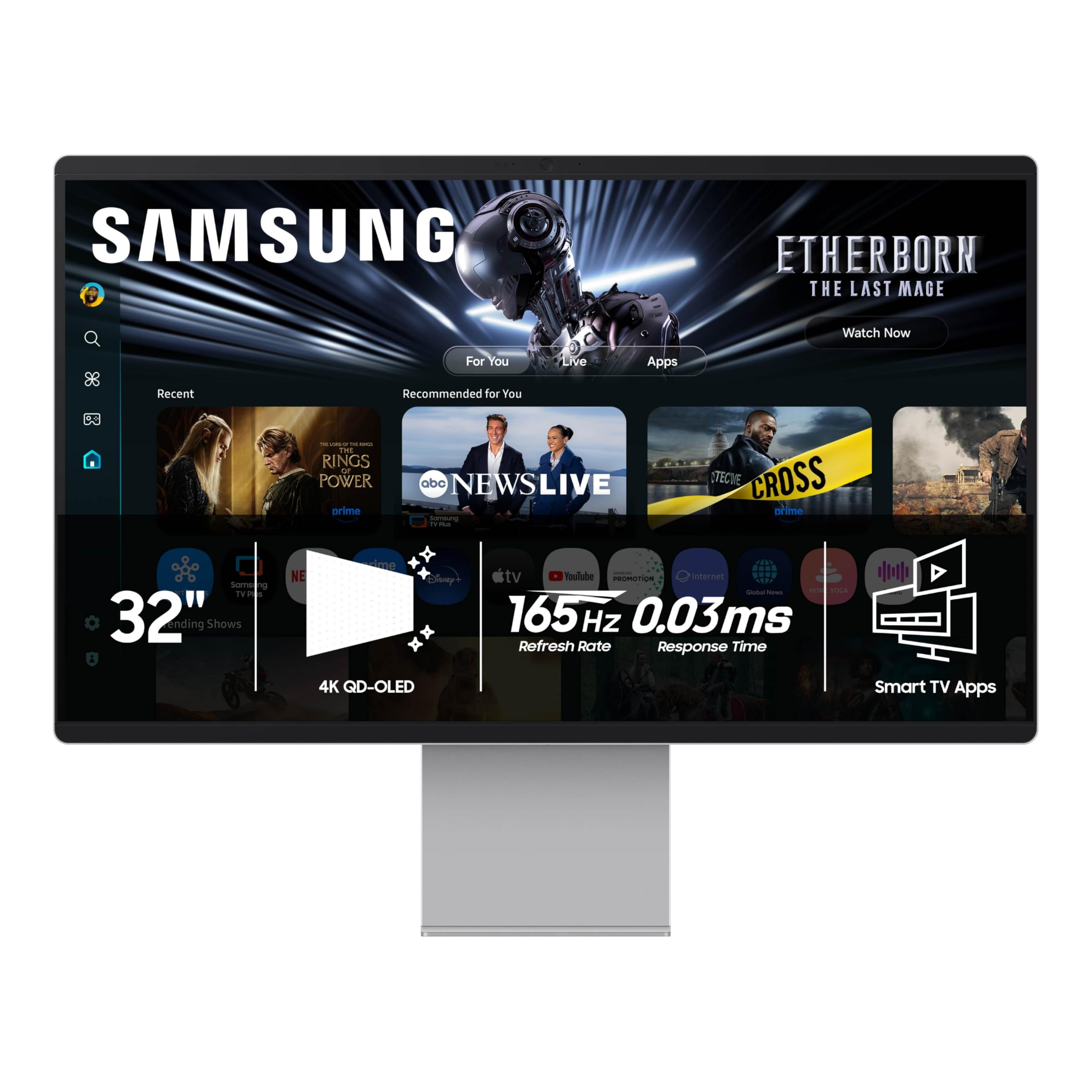
The Samsung Smart Monitor M9 (M90SF) is a unique entry in the high-end monitor space, blending a premium 32-inch QD-OLED panel with the functionality of a smart TV. It offers a true 4K (3840×2160) resolution with deep blacks and vibrant colors, a 165Hz refresh rate, and a 0.03ms response time, making it excellent for both console and PC gaming. The inclusion of Samsung Gaming Hub and Samsung TV Plus allows you to stream games and content without a PC or console.
The versatility is its main draw. It has a Thermal Modulation System to help prevent overheating and burn-in, along with Logo and Taskbar Detection to reduce brightness on static elements. The built-in speakers are decent for a monitor, and it comes with a remote control. The stand is solid and adjustable, adding to its all-in-one appeal. For a user who wants a high-quality OLED screen for gaming, work, and entertainment in a single package, this is a strong contender.
User reviews are mixed, reflecting its dual nature. While many love the picture quality and the convenience of smart features, others find the smart OS intrusive and annoying for a monitor. The plastic chassis feels less premium than its price suggests, and the USB-C auto-detection can be finicky. It is a niche product that delivers well on its promise of an all-in-one solution, but it sacrifices some traditional monitor simplicity and build quality to do so.
Why it’s great
- Excellent 4K QD-OLED with deep blacks and great HDR
- Built-in smart TV OS with Gaming Hub and streaming apps
- Good for a variety of content without external devices
Good to know
- Plastic build feels less premium than the price tag
- Smart OS requires Samsung account setup
- USB-C connectivity and device switching can be buggy
10. ViewSonic VP2788-5K

The ViewSonic VP2788-5K is a purpose-built 5K monitor designed to be a perfect companion for the Mac Studio and Mac Mini. It features a 27-inch IPS panel with a 5120×2880 resolution, offering 100% sRGB and 99% DCI-P3 color accuracy. It is Pantone Validated, ensuring that the colors match the Pantone Matching System, a critical requirement for graphic designers and print professionals. The 2000:1 contrast ratio provides better black levels than standard IPS.
Connectivity is a major strength, with Thunderbolt 4 ports providing 40 Gbps data transfer and 100W of power delivery. It also supports daisy chaining for a clean dual 5K monitor setup. The ergonomic stand is excellent, offering tilt, swivel, pivot, and height adjustment. ViewSonic has positioned this as a no-compromise solution for Mac users who want 5K clarity without going the Apple route, offering a competitive feature set.
Customer feedback is positive regarding the picture sharpness and color accuracy, with many users stating it is a great match for the Mac Mini M4 Pro. However, there are notable software and hardware bugs. Several users report that USB devices fail to reconnect after sleep, and the power delivery can be weak, causing warnings on some Macs. The OSD is also confusing. While the image is great, the firmware and connectivity issues make it a risky purchase at this price.
Why it’s great
- True 5K resolution perfect for macOS scaling
- Thunderbolt 4 with 100W power and daisy chain support
- Pantone Validated for accurate color reproduction
Good to know
- Buggy USB connectivity after sleep mode
- Weak Thunderbolt power delivery can cause macOS warnings
- Confusing OSD and hard-to-access ports
11. INNOCN GA27W1Q

The INNOCN GA27W1Q is a disruptor in the OLED space, offering high-end QD-OLED specs at a budget-friendly price point. It packs a 27-inch 4K (3840×2160) QD-OLED panel with a 240Hz refresh rate and 0.03ms response time, aiming to deliver the core gaming experience of premium monitors like the ASUS and MSI options for significantly less money. It also includes a dedicated MAC-View mode for color matching with Mac devices.
For the money, the core panel is excellent, offering deep blacks, vibrant colors, and a high contrast ratio that is instantly impressive. It includes a height/tilt/swivel adjustable stand, VESA mounting support, and even LED atmosphere lights for a more immersive gaming aesthetic. Connectivity is decent with DP and HDMI ports. This monitor is a fantastic entry point into the world of QD-OLED gaming for those on a tighter budget.
User reviews highlight the incredible picture quality for the price, with many calling it a flagship experience at a budget cost. However, the build quality is a compromise. The housing feels cheap and flimsy, the OSD is poor, and the speakers are terrible. Some users have also reported a lack of instructions. You trade premium build and software for the panel quality, making it a perfect choice if you care more about image than chassis material.
Why it’s great
- Incredible QD-OLED panel quality for a low price
- Full 4K 240Hz 0.03ms gaming performance
- Includes a full adjustable stand and MAC-View mode
Good to know
- Build quality feels cheap and flimsy
- Poor OSD and no included instructions
- Terrible built-in speakers
12. ASUS PG32UCDP

The ASUS ROG Swift PG32UCDP is a unique monitor that uses a WOLED panel from LG Display, offering a different visual signature compared to QD-OLEDs. Its standout feature is a hardware Dual-Mode system that allows you to switch between 4K at 240Hz and 1080p at a blistering 480Hz. This makes it the ultimate hybrid monitor for users who need both stunning visual fidelity for single-player games and extreme motion clarity for competitive esports.
The WOLED panel provides exceptional contrast and deep blacks, similar to QD-OLED, but with a different color volume approach. The PG32UCDP’s anti-glare matte coating is one of the best in the industry, making it ideal for bright rooms where a glossy screen would be unusable. It includes all the high-end connectivity you’d expect: HDMI 2.1, DP 2.1, and USB-C. The auto burn-in protection features are robust, giving you peace of mind.
User reviews in other languages praise it as a “dream monitor” for its flawless HDR and fluid motion. The 480Hz mode is a game-changer for competitive play. However, some users have reported that it does not work with laptops and that the power button can be unresponsive. The ASUS lighting app for Mac is also not compatible, making it less ideal for a Mac-centric setup. For a pure PC gaming powerhouse, it is an incredible, versatile tool.
Why it’s great
- Unique Dual-Mode: 4K 240Hz or 1080p 480Hz
- Excellent WOLED contrast with the best anti-glare matte coating
- Future-proof connectivity with DP 2.1 and HDMI 2.1
Good to know
- Does not work well with high-end laptops (RTX 4090 folding)
- No Mac compatibility for the Asus lighting app
- Lacks built-in speakers and easy speaker mount
13. GIGABYTE AORUS CO49DQ

The GIGABYTE AORUS CO49DQ is a super-ultra-wide monitor that pushes the boundaries of screen immersion. It features a massive 49-inch DQHD (5120×1440) OLED panel with a steep 1800R curve, effectively replacing two 27-inch QHD monitors without a bezel in the middle. With a 144Hz refresh rate and 0.03ms response time, it is exceptionally responsive for its size, making it a top choice for flight and racing simulators where a wide field of view is critical.
The OLED panel delivers the expected deep blacks and vibrant colors, with a dynamic contrast ratio of 1,500,000:1. The 21:9 aspect ratio is excellent for multitasking, allowing you to have multiple full-size windows open side-by-side. It supports AMD FreeSync Premium Pro for tear-free gaming and comes with GIGABYTE’s OSD Sidekick software for easy control. For users who want a single-screen solution for both productivity and immersion, this is a powerful option.
Feedback from customers is very positive, with many blown away by the clarity and color. Sim racers in particular find it ideal. The primary drawback is the lack of a VESA 100×100 mounting plate in the box, which is disappointing for a monitor of this size. Some users also report minor Windows flickering. For the asking price, it offers a massive, immersive OLED canvas that is hard to beat for the right use case.
Why it’s great
- Immense 49″ DQHD OLED is perfect for simulators and multitasking
- Excellent color and contrast from the OLED panel
- FreeSync Premium Pro for smooth, tear-free gaming
Good to know
- No VESA 100×100 mounting plate included
- 144Hz is lower refresh rate compared to 240Hz 4K alternatives
- Can cause Windows flickering in some configurations
FAQ
Is a 5K OLED monitor better for my eyes than a 4K monitor?
Can I run a 5K OLED monitor for gaming?
Do 5K OLED monitors have text fringing issues?
Final Thoughts: The Verdict
For most users, the best 5k oled monitor winner is the LG 45GX950A-B because it delivers a true 5K2K resolution on a massive OLED panel with a high 165Hz refresh rate and immersive curvature, making it the ultimate do-everything display. If you want a dedicated professional tool for a Mac studio, grab the BenQ PD2730S for its superior color accuracy and matte panel. And for the purest gaming performance with a focus on motion clarity, nothing beats the ASUS PG32UCDP and its unique dual-mode 480Hz capability.