
Our readers keep the lights on and my morning glass full of iced black tea. As an Amazon Associate, I earn from qualifying purchases.
Specs are compiled from manufacturer listings and verified buyer reviews and can change over time — please confirm the key details on the product page before buying.
You want a printer that delivers sharp, true-to-life colors on every 5×7 sheet, and the right pick depends on whether you print a few photos a month or hundreds.
I’m Min — the founder and writer behind Gadgets Feed. This guide is built by comparing the manufacturers’ published specifications and the patterns across verified customer reviews, so you get each pick’s real strengths and trade-offs instead of marketing spin.
For most people, the 5×7 photo printer that balances everyday use and photo quality is the Epson Expression Premium XP-7100. If you print high volumes and want the lowest ink costs, choose the Canon PIXMA G620 MegaTank. For gallery-quality prints with archival inks that last decades, the Epson Stylus Photo R2000 is the specialist.
Quick Picks
- Epson Expression Premium XP-7100 Wireless — Best Overall
- Canon PIXMA G620 Wireless MegaTank Photo — Best Value
- Epson Stylus Photo R2000 Wireless Wide-Format — Pro Grade
How To Choose The Best 5X7 Photo Printer
Picking a photo printer involves more than just matching the paper size. You need to think about how often you print, the quality you expect, and how much you are willing to spend on ink over time. Here are the main things to consider before you buy.
Ink System: Cartridge vs. MegaTank
The biggest long-term cost is ink. Standard cartridge printers are cheaper upfront, but each replacement cartridge adds up fast. MegaTank printers use refillable ink reservoirs that lower the cost per print dramatically. If you print more than a few photos a month, the higher initial price of a MegaTank model pays off quickly.
Number of Ink Colors
More ink colors usually mean smoother gradients and more accurate skin tones. A basic four-color printer (CMYK) can produce good photos, but a six-color system with additional shades like red or gray gives you a wider color gamut and finer detail in highlights and shadows. This matters most for portrait and landscape photography.
Connectivity and Convenience
Look at how you plan to send photos to the printer. Wi-Fi and mobile app support let you print directly from your phone or tablet. A built-in touchscreen makes navigation easy. Some models also have SD card slots or USB ports so you can print without a computer at all.
Quick Comparison
| Model | Best For | Max Media Size | Ink Colors | Print Speed (Color) | Amazon |
|---|---|---|---|---|---|
| Epson Expression Premium XP-7100 | Versatile Home Use | 8 x 10 in (borderless) | 5 (Claria Premium) | 1 ppm | Amazon |
| Canon PIXMA G620 MegaTank | High-Volume, Low-Cost Prints | 5×7 inch | 6 (Cyan, Magenta, Yellow, Black, Red, Gray) | — | Amazon |
| Epson Stylus Photo R2000 | Professional & Wide-Format | 13″ wide (roll & sheet) | 8 (UltraChrome Hi-Gloss 2) | 3.2 ppm | Amazon |
In‑Depth Reviews
1. Epson Expression Premium XP-7100 Wireless All-in-One
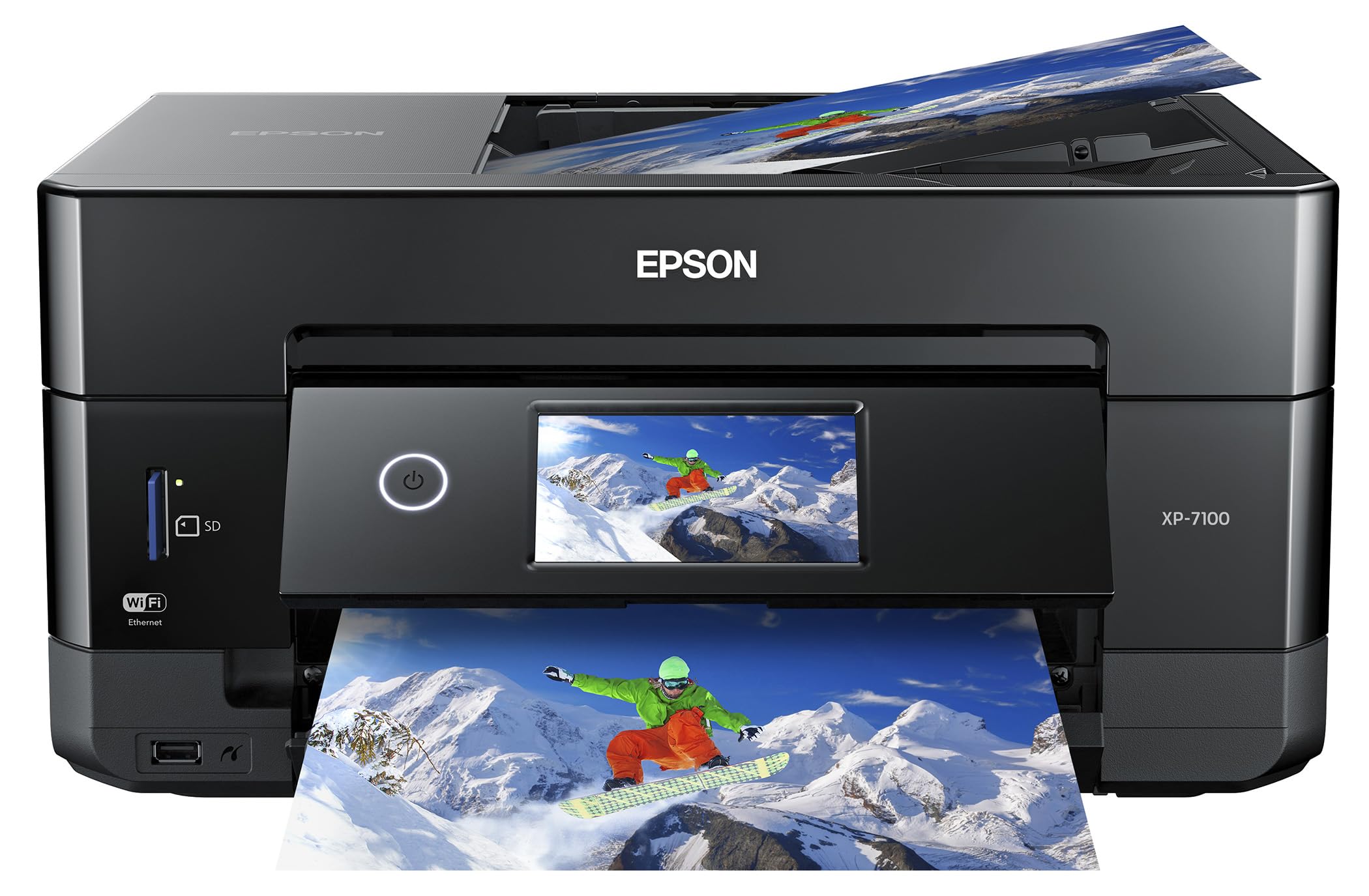
The home-office champion that prints photos, scans, copies, and even labels CDs without breaking a sweat.
This Epson is built for the person who needs one machine to do everything. It prints, scans, and copies, with an auto-duplex feature that flips pages automatically for two-sided documents. You can print borderless photos up to 8 x 10 inches, which means 5×7 prints look clean with no white margins. The 4.3-inch touchscreen makes it easy to edit and print directly from a USB drive or an SD card, so you do not always need a computer.
Buyers report that the setup is easy and that the printer is “fast at ~35 sec for 8.5×11 high-quality print.” They also appreciate how it handles specialty tasks like printing on DVDs and CDs with impressive quality. The 5-color Claria Premium ink system (which includes a dedicated Photo Black cartridge) helps produce vivid colors and sharp text on glossy paper.
Where it falls short is long-term ink cost. Buyers warn that the genuine Epson 410XL cartridges are expensive, and the printer often refuses to print in black-and-white if a color cartridge is empty. Over years of use, the ink costs can add up quickly, and some users report unreliable wireless performance after a couple of years.
What Stands Out
- Versatile all-in-one: prints, scans, copies, and handles CDs/DVDs
- Large 4.3-inch color touchscreen for easy navigation
- Auto duplex printing saves paper on two-sided jobs
- Borderless photo printing up to 8×10 inches
The Trade-Offs
- High cost of genuine Epson ink cartridges
- May not print B&W when color cartridge is low, per some reviews
- Wireless connectivity can become unreliable over time
- Paper trays feel a bit flimsy, according to users
The Smart All-Rounder: You get one printer that handles occasional 5×7 photos, homework, bills, and creative projects — the XP-7100 does all of it without needing a second machine.
The Catch: If you print dozens of photos every month, the per-page ink cost will hurt your wallet compared to a MegaTank model.
2. Canon PIXMA G620 Wireless MegaTank Photo All-in-One

The frugal photographer’s dream — ultra-low ink costs for high-volume 5×7 printing.
This Canon is built for one thing: cranking out lots of photos without draining your bank account on ink. It uses a MegaTank system, which means you pour ink from bottles into refillable tanks instead of swapping expensive cartridges. Canon claims you can print up to 3,800 4×6-inch color photos on a single fill. For a 5×7 printer, that is a standout if you print in bulk.
The G620 uses a 6-color dye-based ink system, adding red and gray inks to the usual cyan, magenta, yellow, and black. These extra colors help produce a wider color gamut, which should give your sunsets and skin tones more depth. The printer also comes bundled with some Canon glossy photo paper to get you started. One buyer summed it up honestly: “great value printer for the money,” but also noted that “prints lack sharpness and have limited color range due to cost-cutting.”
The main limitation is that this is a simplex printer — it cannot automatically print on both sides of a page. It also lacks built-in Wi-Fi, relying on a USB connection to your computer. If you want to print wirelessly from your phone, you will need to use the Canon app and print through your PC. For its core mission of affordable photo printing, though, the value proposition is strong.
Why It Wins on Value
- Incredibly low ink cost per print with the MegaTank system
- 6-color ink system (includes red and gray) for better color range
- High page yield — up to 3,800 4×6 prints per fill
- Includes starter paper bundle for immediate use
What to Consider
- No duplex printing for automatic two-sided prints
- USB-only connection — no built-in Wi-Fi
- Print quality may lack sharpness compared to premium models, per reviews
- Max media size is capped at 5×7 inches
Budget-Minded Workhorse: Go for this if you print hundreds of 5×7 photos a year and want the lowest possible ink cost without switching to a third-party system.
skip it if: You need a wireless all-in-one for scanning, copying, and double-sided document printing alongside your photos.
3. Epson Stylus Photo R2000 Wireless Wide-Format Printer

The professional’s choice for gallery-quality prints on both sheets and rolls up to 13 inches wide.
This Epson is a serious tool for serious photography. It uses an 8-color Epson UltraChrome Hi-Gloss 2 pigment ink set, which includes specific photo black and matte black inks as well as red, orange, and a gloss optimizer. Pigment inks resist fading, making prints last for decades. It handles cut-sheet paper and roll paper up to 13 inches wide, giving you flexibility for panoramas alongside your 5×7 prints.
for speed, the R2000 outpaces the XP-7100 by a wide margin. It delivers color pages at 3.2 ppm (pages per minute), while the XP-7100 manages 1 ppm. Owners mention it “prints full-coverage DVD labels in 2-3 min at high quality” and that the print quality is “outstanding.” One long-time user switched from a Canon Pro 9000 specifically for the pigment inks (inks with solid particles that resist fading), noting the colors are “as vivid as dye inks” with no clogging issues on factory inks.
This is a print-only device — no scanner, no copier. It also lacks duplex printing. A recurring theme in reviews is that the print driver software is complex and can be temperamental with non-Epson paper, requiring constant adjustments. Some users report that the gloss optimizer cartridge empties quickly and that the printer can mis-feed paper, dumping ink on the rollers.
Print Quality King: The 8-color pigment ink system delivers archival-quality prints with exceptional detail and color accuracy that rivals lab prints.
For Serious Users Only: The high price, complex software, and lack of scanning make this a poor choice for casual home use — it is built for the dedicated photographer or artist.
For the Purist: Reach for this if print quality, wide media support, and fade-resistant pigment inks are non-negotiable for your work.
Look Elsewhere If: You need an all-in-one, want a simple setup, or are not ready to invest heavily in a printer that requires some technical patience.
Understanding the Specs
Ink System: Dye vs. Pigment
Ink comes in two main types for photo printers. Dye-based inks are common in consumer models. They produce very vibrant colors and smooth gradients, but they can fade faster over time when exposed to sunlight. Pigment-based inks use tiny color particles suspended in the ink. They are much more resistant to fading and water, making them the choice for archival prints that need to last decades. The trade-off is that pigment inks can be more expensive and sometimes require special paper to look their best.
Color Gamut and Number of Inks
The color gamut is the range of colors a printer can reproduce. A standard four-color printer (cyan, magenta, yellow, black) covers a basic gamut. Adding extra inks, like light cyan, light magenta, red, or gray, extends that gamut. This means smoother transitions in skies, more accurate skin tones, and finer detail in shadows. For 5×7 photo printing, a 5- or 6-color system will usually produce noticeably better results than a basic 4-color setup, especially for portraits and landscapes.
FAQ
Can any inkjet printer print on 5×7 paper?
What is the difference between a 4-color and a 6-color photo printer?
Are MegaTank printers good for photo quality?
How long do photo prints last from an inkjet printer?
Can I print 5×7 photos wirelessly from my phone?
What is borderless printing and do I need it for 5×7 photos?
Will a wide-format printer like the Epson R2000 print standard 5×7 paper?
Why is my photo printer not printing accurate colors?
How much does it cost per 5×7 print with a standard cartridge printer?
Final Thoughts: The Verdict
If you want one dependable pick, the 5×7 photo printer winner is the Epson Expression Premium XP-7100 because it offers the best balance of features, print quality, and everyday versatility without stepping into pro-level pricing. If you want the absolute lowest ink costs for high-volume 5×7 printing, grab the Canon PIXMA G620 MegaTank. And for gallery-quality prints with archival pigment inks and wide-format flexibility up to 13×19 inches, the Epson Stylus Photo R2000 is the specialist that serious photographers choose over the XP-7100.
How We Picked
We do not accept paid placement. Every pick is matched to a real buyer and a real use-case; we do not hands-on test units.
Sources & Methodology
Specifications: manufacturer listings and product documentation. Review insights: verified customer reviews, as of July 2026. Pricing: not shown on this page (it changes often); check the current price via the retailer link.
As an Amazon Associate, Gadgets Feed earns from qualifying purchases. This does not affect which products we feature.