
A shipping label that smudges, a barcode that won’t scan, or a printer that jams mid-batch can stop your packing line cold. The right thermal printer eliminates that friction, turning label output into a silent, reliable part of your workflow rather than a bottleneck you manage around.
I’m Min — the co-founder and writer behind Gadgets Feed. This guide is built on weeks of cross-referencing print resolutions, connectivity options, media compatibility, and real user feedback to pinpoint exactly which 6 inch label printer fits your specific volume and workspace.
Whether you are a home-based seller or managing a warehouse floor, finding the best 6 inch label printer means matching speed and connectivity to your daily output without overspending on features you won’t use.
How To Choose The Best 6 Inch Label Printer
A label printer with a 4-inch print width handles the standard 4×6 shipping label used by most carriers and e-commerce platforms. The real differences come down to how you connect, how fast it prints, and how it fits your volume. Focus on these key areas to avoid buying a machine that either overwhelms your workflow with complexity or bottlenecks it with slow output.
Print Resolution: 203 DPI vs. 300 DPI
203 DPI is the baseline for shipping labels. It produces clear, scannable barcodes and readable text for logistics purposes. 300 DPI, found on premium models, delivers sharper detail for small fonts and high-density barcodes used in medical, industrial, or retail inventory tagging. If you print only shipping labels for carriers like UPS or USPS, 203 DPI is sufficient. If you need crisper small text or industrial-grade barcodes, the upgrade to 300 DPI is worth the premium.
Connectivity: Wired vs. Wireless
USB remains the most reliable connection for high-volume label printing — it eliminates dropouts and driver conflicts. Ethernet adds network accessibility for shared workspaces. Bluetooth (especially 5.0) is ideal for mobile printing from phones or tablets, useful for sellers who pack and ship away from a desk. Wi-Fi gives you cable-free printing from any computer on the same network. Choose based on your workspace: a static packing station benefits from USB or Ethernet, while a dynamic workflow with multiple packing spots calls for Bluetooth or Wi-Fi.
Print Speed and Volume Handling
Speed is measured in inches per second (IPS) or millimeters per second (mm/s). A 150mm/s printer does about one 4×6 label per second, which handles moderate daily volumes. At 6 IPS (around 152mm/s), you are in the same ballpark. The critical difference is thermal printhead endurance and built-in cutter quality for high-volume runs. A printer rated for thousands of labels per day, like the Zebra ZT230, uses industrial components that hold up better than compact desktop units meant for a few dozen labels daily.
Media Compatibility and Label Costs
Not all printers accept non-proprietary labels. Some require genuine cartridges or specific roll dimensions. Check the supported label width — most 4-inch printers handle labels from 1.5 to 4.1 inches wide — and whether they accept fanfold labels in addition to rolls. Printers that accept any brand of thermal label save money over time compared to locked-in consumables. Roll outer diameter and core size also matter; a larger roll capacity means fewer changes during long packing sessions.
Quick Comparison
On smaller screens, swipe sideways to see the full table.
| Model | Category | Best For | Key Spec | Amazon |
|---|---|---|---|---|
| Brother TD-4550DNWB | Premium | High-volume multi-platform | 300 DPI, 6 IPS, Wi-Fi + BT | Amazon |
| Zebra ZT230 | Industrial | Warehouse/continuous runs | 203 DPI, 6 IPS, Ethernet | Amazon |
| Brother QL-1100 | Mid-Range | Wide format plus barcodes | 300 DPI, auto-cutter | Amazon |
| Rollo USB | Mid-Range | Reliable USB desktop | 203 DPI, 150mm/s, USB | Amazon |
| Westinghouse Thermal | Mid-Range | ZPL compatibility | 203 DPI, 6 IPS, Ethernet | Amazon |
| HP Shipping Label Printer | Mid-Range | Simple plug-and-play setup | 203 DPI, 7 IPS, USB 2.0 | Amazon |
| Makeid D50 | Specialty | Industrial labeling on battery | 300 DPI, 2600mAh, auto-cutter | Amazon |
| Nelko PL70E | Entry-Level | Budget wireless printing | 203 DPI, 150mm/s, BT+USB | Amazon |
| Phomemo PM64D | Entry-Level | Compact with touch display | 203 DPI, 150mm/s, BT 5.0 | Amazon |
In‑Depth Reviews
1. Brother TD-4550DNWB

The TD-4550DNWB is a networking powerhouse among desktop label printers. It offers USB 2.0, Serial, Ethernet, built-in Wi-Fi, and Bluetooth — covering every connection scenario a growing business might need. At 300 DPI and 6 IPS, its output is crisp enough for small-font barcodes and retail tags, not just carrier labels. The drop-in spindle-less media loading reduces downtime when swapping rolls or fanfold stacks.
It accepts non-proprietary thermal labels, which means you are not locked into expensive Brother-branded consumables. That alone saves money over the printer’s lifespan. Users report reliable wireless performance on both Mac and Windows, and AirPrint support simplifies iOS label printing. The dual-sided printing option, though rarely used for labels, is available if your workflow ever shifts.
The main drawbacks are the learning curve during initial setup and the occasional wireless receiving error that requires manual clearing. The internal printhead can develop a dead line over time, and replacement cost is high. For a medium to high-volume operation that needs multi-device access, the TD-4550DNWB delivers excellent speed and flexibility.
Why it’s great
- 300 DPI resolution for sharp, small barcodes and text
- Full connectivity suite: USB, Ethernet, Wi-Fi, and Bluetooth
- Accepts any brand of thermal labels
Good to know
- Setup requires calibration and driver attention
- Wireless errors can pause workflows
- Printhead replacement is costly
2. Zebra ZT230
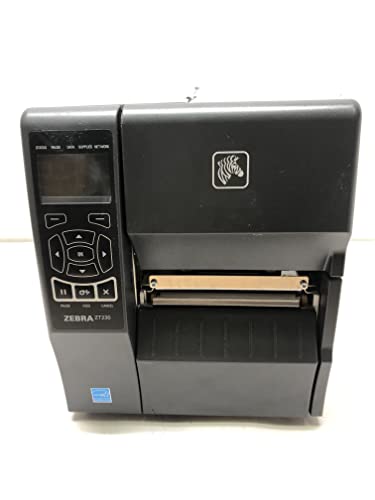
The ZT230 is built for continuous, high-volume label production in warehouses and distribution centers. It prints at 6 IPS with 203 DPI, which is the standard for pallet labels and large shipping barcodes. The all-metal construction and LCD display set it apart from plastic desktop units — it is designed to run for thousands of labels without degradation.
Connectivity relies on 10/100 Ethernet, making it easy to integrate into networked shipping stations. The label sensor requires precise placement because its position is offset to the left, but once calibrated, the printer handles consistent runs. Users run multiple ZT230s across operations and report few mechanical failures compared to lighter-duty alternatives.
The primary caution is that this model ships without the gear kit and ribbon holding kit needed for thermal transfer printing. If you only need direct thermal, the printer works as shipped. Also, because it is a commercial-grade unit, verifying all components on arrival is critical — some units have arrived missing internal parts. For a dedicated warehouse environment where uptime matters, the ZT230 justifies its footprint.
Why it’s great
- Industrial metal build handles high daily volumes
- Ethernet networking for multi-station setups
- Uses ZPL for integration with shipping systems
Good to know
- Requires separate gear/ribbon kits for thermal transfer
- Label sensor placement needs careful alignment
- Heavier and bulkier than desktop models
3. Brother QL-1100

The QL-1100 punches above its size by supporting wide-format labels up to 4 inches wide with a 300 DPI printhead. That resolution makes it a strong option for sellers who need clean product barcodes or postage labels. The automatic cutter is faster and more consistent than manual tearing, which saves time during batch printing.
Its USB host interface lets you connect a barcode scanner directly for cropping and printing from templates — a feature that speeds up relabeling tasks. The plug-and-label feature on Windows bypasses software installation, getting you to first print quickly. Many users run it with generic labels like BETCKEY at reduced operating cost, though Brother recommends its own media.
On the downside, the built-in cutter can fail after heavy use — some users report dying around the 10,000-label mark, leaving the printer unusable. The design requires that labels pass over a sensor on the right side, so paper path alignment takes a moment to learn. It is also a wired-only printer with no Bluetooth or Wi-Fi. For a seller printing up to a few hundred labels weekly, the QL-1100 offers sharp output at a reasonable entry point.
Why it’s great
- 300 DPI for crisp text and barcode printing
- Automatic cutter speeds up label separation
- Works with generic thermal labels
Good to know
- Cutter can fail after thousands of labels
- Paper path requires precise alignment
- No wireless connectivity
4. Rollo USB Shipping Label Printer

The Rollo USB has become a default recommendation for small to medium e-commerce sellers because it simply works. It prints at 150mm/s with 203 DPI — fast enough for a label per second with clear, scannable results. Setup involves plugging in the USB cable and downloading drivers, taking most users under 15 minutes from box to first label.
It handles labels from 1.57 to 4.1 inches wide, covering standard shipping labels, return labels, and product stickers. The adjustable paper sliders let you switch sizes without fiddling with settings. Users report thousands of labels without jams or misprints, and the compact footprint fits tight packing stations. The Rollo Ship app provides discounted carrier rates, bundling shipping functionality into the purchase.
The limitation is USB-only connectivity — no Bluetooth, Wi-Fi, or Ethernet. That makes it a single-station solution, so you cannot share it across a team or print from a phone. It is also a 203 DPI printer, so if you need ultra-fine detail for tiny barcodes, you will want a 300 DPI model. For a dedicated wired desk printer that just works, the Rollo is hard to beat.
Why it’s great
- 15-minute setup with USB plug-and-play
- Prints one 4×6 label per second
- Adjustable paper guides for flexible label sizing
Good to know
- USB-only connectivity limits placement
- 203 DPI may not suit micro-barcode needs
- No wireless printing from mobile devices
5. Westinghouse Thermal Shipping Label Printer

The Westinghouse direct thermal printer balances commercial-grade construction with a price that undercuts much of the competition. It prints at 6 IPS with 203 DPI and supports ZPL, making it compatible with the same software that runs Zebra printers. The straight paper path minimizes jams, a common complaint with cheaper rolled-label printers.
Connectivity options include USB and Ethernet, which lets you wire it into a network for shared access across multiple workstations. The included sample labels and USB flash drive with drivers simplify the initial setup — users report being up and running in under 30 minutes. It handles fanfold and roll labels with adjustable media holders, supporting widths from 0.78 to 4.6 inches.
The trade-offs are a bulky footprint and the lack of Bluetooth. It is not a printer you move around the workspace easily. The Ethernet port works best with routers under 1GHz, which may be a limitation in very old IT infrastructure. For a small business that wants ZPL compatibility without paying Zebra prices, the Westinghouse is a strong middle-ground solution.
Why it’s great
- ZPL support for integration into shipping workflows
- Ethernet networking for shared access
- Straight paper path prevents jams
Good to know
- No Bluetooth for mobile printing
- Larger footprint than desktop alternatives
- Ethernet requirement for router speeds under 1GHz
6. HP Shipping Label Printer

HP’s entry into the direct thermal label market focuses on simplicity and speed. It prints at 7 IPS — one of the faster speeds in its class — with 203 DPI. The adjustable media holders accept label widths up to 4 inches, making it versatile for shipping, product, and warehouse labels. Low noise operation is a bonus if the printer sits near a workspace.
The setup is straightforward: plug in the USB cable, load the driver, and print. It is compatible with major e-commerce platforms like Amazon, Shopify, and ShipStation out of the box. Early users who printed around 1,000 labels report zero mechanical issues, and the print quality stays consistent across the run. The direct thermal design means no ink cartridges to replace.
The biggest complaints center on driver detection. Some Windows machines faced a conflict with existing HP software that prevented the printer from being recognized. The printer also lacks any wireless connectivity — it is strictly USB 2.0. HP recommends using its own label rolls for best results. For a seller who wants a familiar brand with fast wired output, the HP is a clean, no-frills option.
Why it’s great
- Fast 7 IPS print speed
- Simple plug-and-play USB setup
- Low noise during operation
Good to know
- Driver conflicts can occur on Windows
- No Bluetooth or Wi-Fi
- HP recommends proprietary labels
7. Makeid D50 Industrial Label Printer
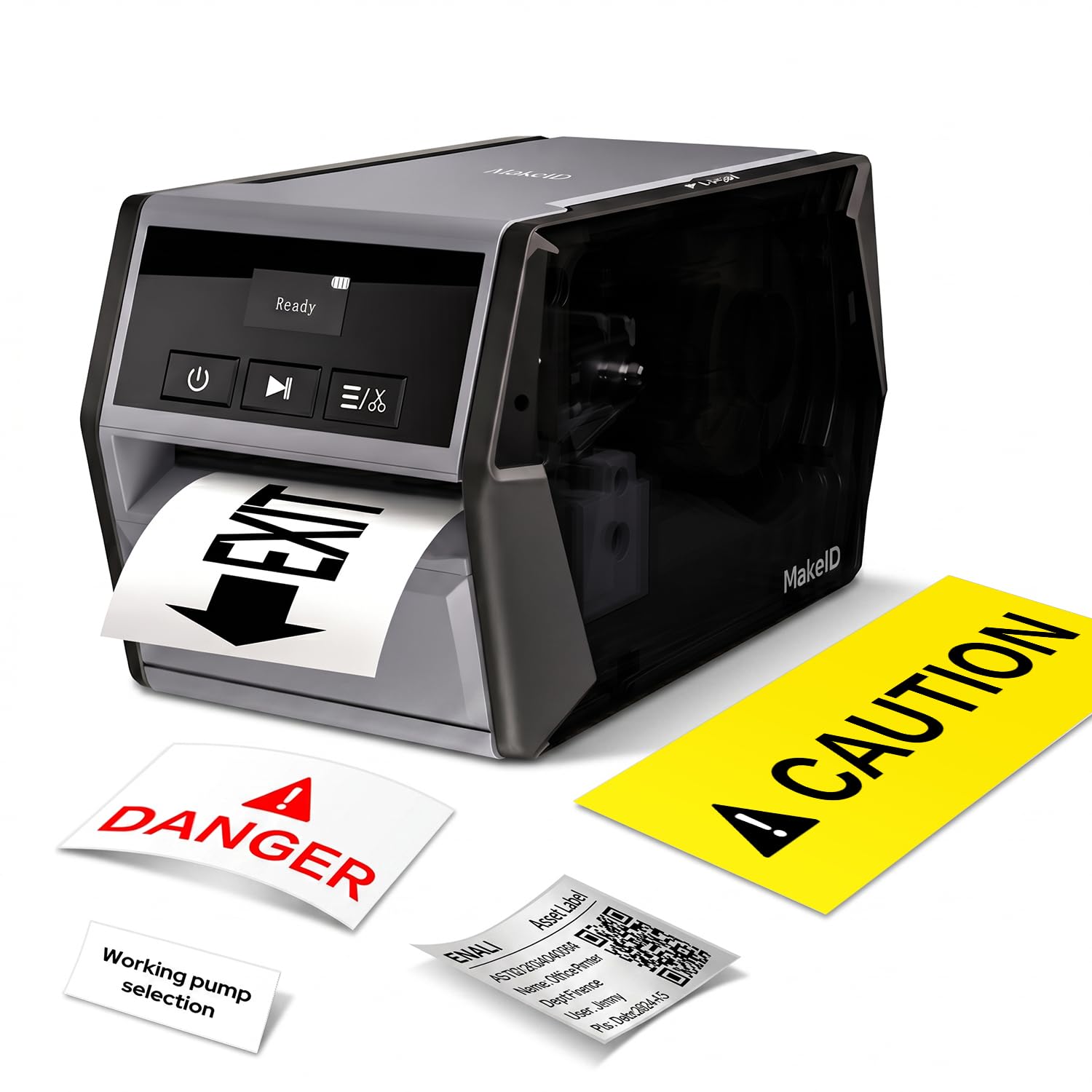
The Makeid D50 takes a different approach from the shipping-label focus of most competitors. It is a thermal transfer printer with a 2-inch printhead that delivers 300 DPI resolution, designed for industrial labeling tasks like cable marking, asset tagging, and safety identification. The 2600mAh Li-ion battery provides 90 days of standby, making it genuinely portable for job sites without a power outlet.
The integrated cartridge system combines label and ribbon in one snap-in unit that takes about 5 seconds to replace. The auto-cutter handles bulk runs without manual tearing. Users report sharp print on labels as narrow as 10mm, and the acrylic adhesive withstands oil, low temperatures, and rough surfaces. The mobile app and PC software both offer templates, barcode generation, and Excel data import.
The D50 is not designed for 4×6 shipping labels — its maximum label width is around 2 inches. High cost per label compared to direct thermal shipping printers is another consideration. The software interface is functional but less polished than dedicated labeling suites. For electricians, IT technicians, or warehouse managers who need durable portable labeling, the D50 is a specialized tool that outperforms general-purpose alternatives.
Why it’s great
- 300 DPI thermal transfer for durable, fade-resistant labels
- 2600mAh battery enables portable use
- Quick 5-second cartridge replacement
Good to know
- Maximum label width is 2 inches — not for 4×6 shipping
- High per-label cost with cartridge system
- No Bluetooth for laptop connection
8. Nelko PL70E Bluetooth Thermal Printer

The Nelko PL70E brings Bluetooth connectivity to a price point that undercuts most wireless label printers. It prints at 150mm/s with 203 DPI, producing sharp shipping labels that scan reliably. Setup is managed through the Nelko app for iOS, Android, or Windows, and the printer supports USB connection for PC users who prefer a wired link.
It handles label widths from 1.57 to 4.1 inches, covering standard 4×6 shipping labels. Users consistently report stable Bluetooth performance without frequent disconnections, a common issue in budget wireless printers. The compact white body fits easily on a small desk, and the straight paper path prevents jams. A 2-year warranty backs the purchase, which is generous at this price tier.
The MAC app is less functional than its Windows counterpart, which is a concern if you work primarily on macOS. The phone app, while easy to set up, offers limited design flexibility compared to desktop software. For a seller who wants wireless label printing without a high upfront investment, the Nelko delivers core functionality with minimal friction.
Why it’s great
- Bluetooth connectivity for mobile printing
- Stable 150mm/s print speed
- 2-year warranty for budget peace of mind
Good to know
- MAC app has limited functionality
- Phone app design options are basic
- Not suitable for high-volume continuous runs
9. Phomemo PM64D Thermal Label Printer
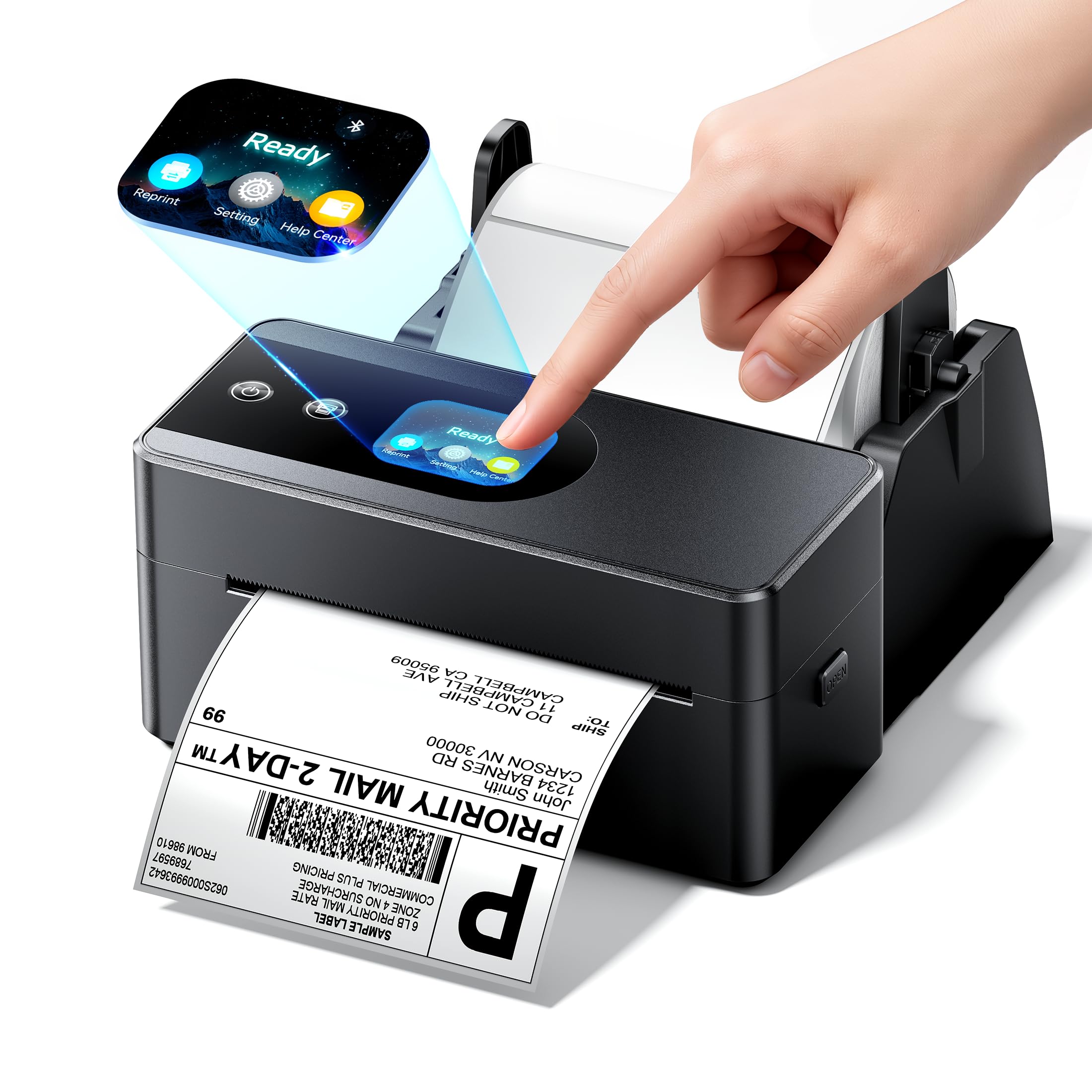
The Phomemo PM64D stands out for its compact dimensions and built-in touchscreen, a rare feature at its price tier. At just 2.94 x 6.63 x 3.25 inches, it saves about 30 percent more space than typical desktop label printers. The touchscreen provides one-click printing and status checks without needing to open an app on your phone. Bluetooth 5.0 ensures a stable connection to Android and iOS devices.
It prints at 150mm/s with 203 DPI and supports label widths from 0.79 to 4.53 inches. That makes it compatible with everything from small price tags to 4×6 shipping labels. The print quality is clear enough for carrier scanning, and the auto-alignment feature reduces misprints. It integrates with major platforms including Amazon, Shopify, USPS, and Etsy.
The Labellife app required for design has poor image sizing, leading to trial-and-error setup for custom labels. The subscription fee for advanced features feels steep for an otherwise budget-oriented printer. Some units arrived dead on arrival, which suggests quality control inconsistency. For a seller with limited desk space who wants the convenience of a touchscreen interface, the Phomemo is an intriguing but imperfect option.
Why it’s great
- Ultra-compact design saves desk space
- Built-in touchscreen for direct control
- Bluetooth 5.0 for reliable wireless printing
Good to know
- Labellife app has image sizing issues
- Advanced features require paid subscription
- Some units arrive with defects
FAQ
Can I use any brand of thermal labels with these printers?
What is the difference between 203 DPI and 300 DPI for shipping labels?
Does a 4-inch label printer handle 4×6 shipping labels?
Why does my label printer need Bluetooth if I have a desktop computer?
How long does a direct thermal label last before fading?
Final Thoughts: The Verdict
For most users, the 6 inch label printer winner is the Brother TD-4550DNWB because its 300 DPI resolution, multi-connectivity options, and ability to use any brand of thermal label make it the most versatile and future-proof desktop label printer. If you want straightforward USB printing without the complexity of network setup, grab the Rollo USB. And for high-volume warehouse environments where uptime matters most, nothing beats the Zebra ZT230.