
Our readers keep the lights on and my morning glass full of iced black tea. As an Amazon Associate, I earn from qualifying purchases.
Specs are compiled from manufacturer listings and verified buyer reviews and can change over time — please confirm the key details on the product page before buying.
That sixth button — usually a pair of side keys for forward and back — is the difference between flying through tabs and hunting for the back arrow. This guide cuts through the wireless-versus-wired debate, the DPI marketing wars, and the ergonomic hype to land on the nine mice actually worth your desk space.
I’m Min — the founder and writer behind Gadgets Feed. This guide is built by comparing the manufacturers’ published specifications and the patterns across verified customer reviews, so you get each pick’s real strengths and trade-offs instead of marketing spin.
Here is the short version: 6 side button mouse options fall into three camps — ergonomic verticals for wrist relief, lightweight honeycombs for esports, and balanced all-rounders for daily drivers.
Our Picks at a Glance


How To Choose The Best 6 Button Mouse
Before you click buy, know that the “6 buttons” headline almost always includes your left click, right click, and the scroll wheel press. That leaves three truly extra inputs — usually two side buttons and a DPI switcher. The real decision starts with how your hand sits on the mouse all day.
Wired, Wireless, or Both — Pick Your Freedom
Wired mice never need charging and shave off a few grams, which is why competitive players still favor them. Wireless options today track just as fast, but battery strategy splits them into two camps: replaceable AAs that last months, or built-in rechargeables you top up like your phone.
Shape Comes Before Specs
A vertical mouse tilts your palm like a handshake, easing wrist strain but requiring a few days of adjustment. A flat ambidextrous shell feels instantly normal but offers less wrist relief. The right choice matches your grip — palm grippers need a fuller hump, claw grippers a shorter body.
DPI Numbers Are Not Bragging Rights
DPI measures how many pixels the cursor moves per inch of physical travel. High numbers sound impressive, but anything past 4,000 DPI is mostly marketing headroom. What matters is whether the sensor tracks cleanly on your desk surface and whether you can switch sensitivity on the fly.
Quick Comparison
| Model | Best For | DPI | Battery Life | Connectivity | Amazon |
|---|---|---|---|---|---|
| Logitech G305★ Best Overall | Wireless value champion | 12,000 | 250 hours | LIGHTSPEED 2.4GHz | Amazon |
| TECKNET VerticalBudget Comfort Champ | Wrist relief on a budget | 4,800 | 24 months | Bluetooth / 2.4GHz | Amazon |
| TMKB Falcon M1SELightest Pick | Featherweight esports | 12,800 | Wired | USB Wired | Amazon |
| Lekvey Vertical | Rechargeable ergonomics | 1,600 | 150 hours | 2.4GHz USB | Amazon |
| Logitech G203 | Wired all-rounder | 8,000 | Wired | USB Wired | Amazon |
| TMKB M1 Wireless | Max DPI flexibility | 24,000 | 180 hours | 2.4GHz / BT 5.2 / USB-C | Amazon |
| Lenovo Legion M410 | Palm-grip gamers | 16,000 | 53 hours | 2.4GHz Wireless | Amazon |
| Corsair Harpoon Wireless | Multi-platform play | 10,000 | 60 hours | Slipstream / BT / USB | Amazon |
| DELUX M618XSD | Office productivity lab | 7,200 | 14 days | BT / 2.4G / Wired | Amazon |
In‑Depth Reviews
1. Logitech G305 Lightspeed Wireless Gaming Mouse
Our pick — over 4.5★ from 36,500+ verified ratings; the strongest balance of quality and price.
The wireless that ends the recharge-tethered life — 250 hours on one AA.
For most buyers, the G305 is the whole package: a lag-free wireless link with a 1 ms report rate (the time between your click and the PC registering it), a feathery 3.4 oz shell, and six programmable buttons. The HERO sensor reaches 12,000 DPI with 400 IPS precision, meaning even a violent flick across the pad lands exactly where your brain aimed it.
The battery is the quiet win — 250 hours on one AA, or Endurance mode in Logitech G HUB stretches it toward 9 months. Owners who log long sessions praise the ergonomic shape that fits comfortably in hand, and the thing has survived slams and heavy daily use without breaking. The build quality wins people over — owners call it great value, a mouse that outlasts its price class.
The one recurring complaint is reliability over time, with some units developing tired internals. As buyers report, an old unit had wheel direction issues after heavy use — so treat the scroll wheel gently and it will likely outlive your laptop.
Why It Leads the Market
- 250 hours on one AA — months of use before a battery swap
- 3.4 oz wireless build feels lighter than most wired mice
- On-board memory + nano receiver storage for travel
Real-World Trade-Offs
- Scroll wheel can develop direction issues after heavy use
- No RGB lighting for buyers who want desk flair
Reach for it if: you want the best balance of wireless freedom, battery stamina, and proven quality from the crowd favorite — 4.6 stars across 36,000+ owners.
Look elsewhere if: you demand flashy RGB illumination on your desk.
2. TECKNET Ergonomic Vertical Mouse
A near-vertical palm angle that talks your aching wrist out of quitting.
This TECKNET tilts your hand into a handshake position, which is exactly the geometry that eases the strain of a flat desk mouse. It connects to three devices — two over Bluetooth and one via the 2.4GHz receiver stashed in the base — so you can hop between a work PC, a MacBook, and a tablet without unplugging anything. Six adjustable DPI levels (4800/3200/2400/1600/1200/800) let you match cursor speed to the task at hand.
The quiet clicks are a genuine office superpower — only the left and right buttons are silent, enough to keep library and cubicle neighbors happy. Owners switching from flat mice report zero learning curve and all-day comfort with no fatigue. A 36-month warranty (registered only) backs the ABS build, and the 4.74″ length is a touch longer than the G305’s 4.59″, giving larger hands more to grab.
The honest catch: one owner’s scroll wheel began malfunctioning after 6 months, and a battery change didn’t fix it. It is a budget-tier unit, so treat the wheel gently and you’ll likely dodge that outlier.
Who it beats: every flat mouse on your desk for wrist relief at this price — 4.4 stars across 12,000+ owners, with ergonomics the most-praised feature.
Who it doesn’t: left-handed users (right-hand only) and buyers who want RGB gaming flair.
3. TMKB Falcon M1SE Wired Gaming Mouse
At 75 grams, your hand forgets it’s holding anything at all.
The M1SE is a honeycomb shell built for speed — the open-weave design drops the weight to 75g while the high-precision optical sensor tracks from 200 to 12,800 DPI with a polling rate of 125-1000Hz (how often the mouse reports position to your PC). That is a 2.7x DPI gap over the TECKNET’s 4,800, so twitch shooters get the headroom to dial in pixel-perfect flicks.
The drag-free paracord cable feels wireless in practice, and the PTFE skates slide so smoothly the cursor glides rather than crawls. TMKB’s driver software lets you remap all six buttons, record macros, and build editing layers — a level of customization that punches above the price. Owners running it 8+ hours daily praise the air holes, which keep the palm cool and the grip secure.
The ergonomics draw mixed feedback — some find the shell perfect for their grip, others wish for more contour. The 4.5-star crowd is clearly happy; just know the shape is a medium that suits average-to-smaller hands best.
Best for: competitive players who want a wired, featherlight mouse with 16.8 million RGB colors.
Skip if: you need wrist-relief ergonomics — this flat shell is about speed, not posture.
4. Lekvey Ergonomic Rechargeable Vertical Mouse

The vertical that ditches batteries entirely — 3 hours of charging buys 150 of use.
Some buyers want wrist relief without buying AAs forever, and this Lekvey answers with a built-in rechargeable battery that goes 3 hours of charging and delivers up to 150 hours of use. The 2.4GHz USB receiver is plug-and-play — no Bluetooth pairing menus, just insert and go. For a MacBook that only has USB-C ports, you’ll need an adapter since it connects via USB-A.
Three DPI levels (800/1200/1600) cover browsing, spreadsheets, and lighter creative work, while the quiet left and right buttons keep shared spaces peaceful. A faint red side light and matte finish add polish without screaming gamer. Owners with arthritis and hand strain report the “handshake” position cuts tension fast — one even noted no adjustment period.
Just know the shape runs large: at 5.0″ long and 95g, it is not suited to small hands and is strictly right-handed. The back-button placement also takes a day to find by feel.
Best for: anyone with wrist or hand pain who wants a rechargeable, no-fuss vertical at 4.5 stars.
Look elsewhere if: your hands are small or you rely on Bluetooth — this one is receiver-only.
5. Logitech G203 Wired Gaming Mouse

The wired classic that proves you don’t need wireless to feel untethered.
If you hate charging anything, the G203’s 8,000 DPI optical sensor delivers zero-filtering tracking with no smoothing — raw, honest cursor control that standard office mice blur away. The metal-spring tensioned buttons give crisp, tactile clicks that land with satisfying feedback, and the 6.89 ft cable gives you room to roam without a bungee. Six programmable buttons and LIGHTSYNC RGB mean the Logitech G HUB software can remap controls and sync colors to your screen or music.
The design is compact — 4.59″ long and 5.53 ounces — so it suits claw and fingertip grips better than full palm rests. Owners call it the best cheap mouse you can buy, praising the smooth glide and the subtle blue-pink-lilac lighting that doesn’t assault sensitive eyes. It is heavier than premium ultralights, which actually lends it a solid, planted feel.
The known trade-off: after roughly 1.5 years of daily use, some scroll wheels fail — a common wear point on budget Logitech units. At 4.6 stars with 19,000+ owners, it is still a top-tier value; just know the wheel is the first thing to age.
The Wired Case
- 8,000 DPI with zero filtering — honest, precise tracking
- Metal-spring buttons with crisp, reliable clicks
- 6.89 ft cable length for desk freedom
The Aging Caveat
- Scroll wheel can wear out after ~18 months of heavy daily use
- Compact shell is tight for large palm grippers
Grab it for: a drop-dead reliable wired daily driver with pretty lights — 4.6 stars across 19,000+ owners.
Think twice if: you want a mouse that never needs a software login — G Hub requires an account.
6. TMKB M1 Wireless Gaming Mouse
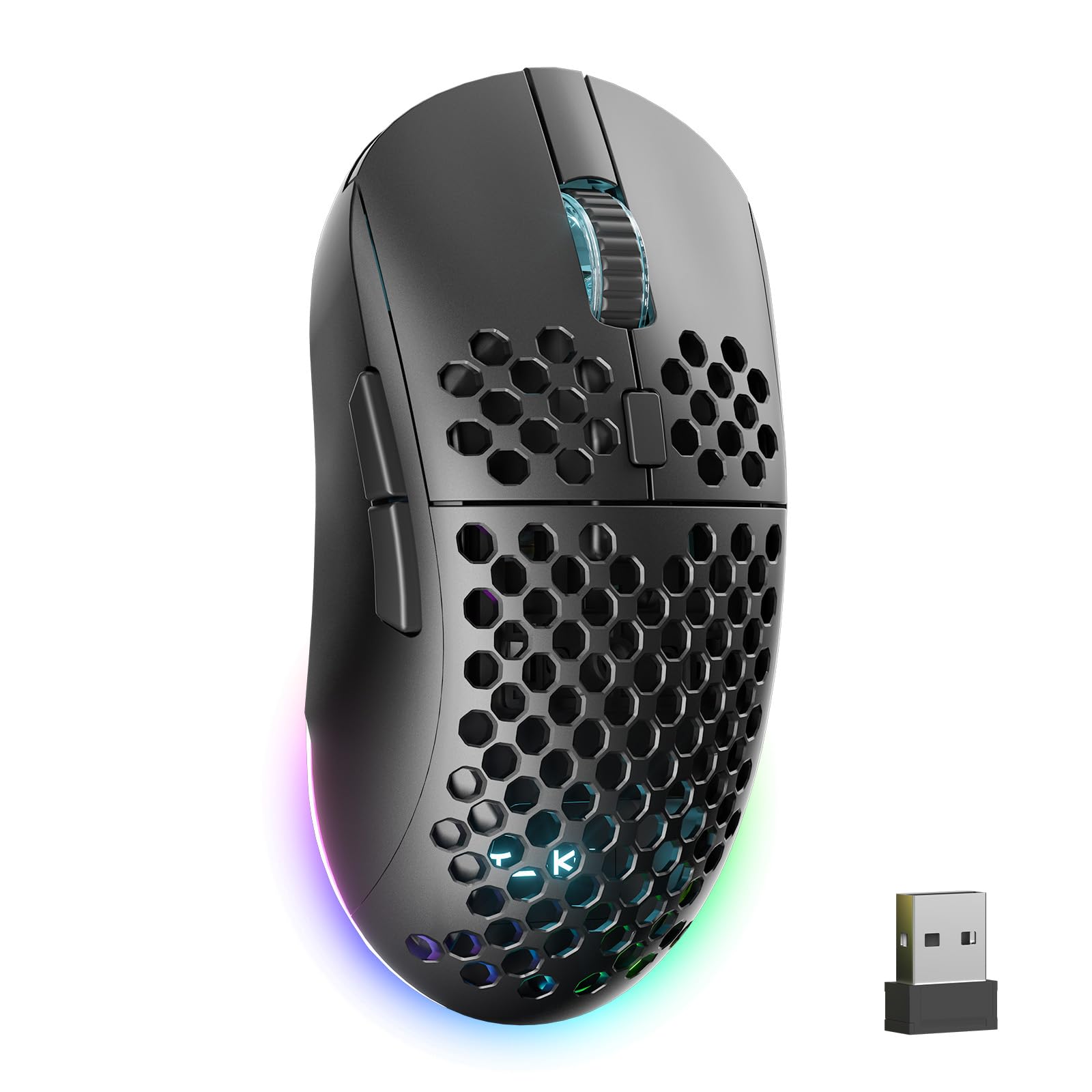
A 24,000 DPI ceiling and 180-hour tank that dares you to find its limit.
This TMKB is the spec sheet that makes spreadsheets boring — adjustable DPI up to 24,000 with 300 IPS speed and 35G acceleration, numbers that only extreme esports setups will ever touch. The 1,000mAh battery delivers up to 180 hours on a charge and refills in just 1 hour over USB-C, so a coffee-break top-up is genuinely useful. Tri-mode connectivity (2.4GHz, BT 5.2 for two devices, and wired USB-C) makes it a one-mouse fleet.
The 90g honeycomb design with a matte, sweat-resistant grip keeps hands dry through long sessions, and a dual LED system — wheel plus RGB strip — color-codes your active DPI so you never guess settings mid-match. All six buttons remap for macros and rapid-fire commands through the driver. Owners mention it is easy to use and genuinely smooth, with kids and adults alike grabbing it for daily play.
With just 65 ratings so far, this is the least-proven pick on the list — the few owners are ecstatic, but there is no long-term reliability data yet. Buy it for the spec headroom; just know it’s an early-adopter gamble.
Best for: spec-hungry gamers who want max DPI, tri-mode flexibility, and a 180-hour battery in one 90g shell.
Skip if: you want a track record — this one is too new to have one.
7. Lenovo Legion M410 Wireless RGB Gaming Mouse

A symmetrical medium-large shell built for palm grippers who play all night.
The Legion M410 is tuned for a specific player: the palm gripper who wants a full-hand rest and on-the-fly DPI switching up to 16,000 with 400 IPS and 40G acceleration. The 5-level DPI switch means you can drop sensitivity for sniping and crank it for fast flicks without opening software. At 100 grams it sits squarely between featherweight and brick — a weight owners call “dead on” for FPS tracking.
NVIDIA Reflex compatibility reduces system latency for quicker reactions, and the 2-zone RGB lighting syncs with Microsoft Dynamic Lighting or Lenovo’s LADM software. The 800mAh battery delivers up to 53 hours of play with RGB off, topping up via the bundled 180cm USB-A to USB-C cable. The PTFE feet glide smoothly on any pad.
Battery reality is split: some owners get fantastic life, others feel they’re plugging it in almost daily — RGB on drains fast. The translucent shell and symmetrical shape also read as medium-large, so smaller hands may find it a stretch.
Best for: palm-grip competitive players who want NVIDIA Reflex support and RGB customization — 4.4 stars.
Who it isn’t for: claw grippers or anyone planning to run RGB at max brightness on long battery stretches.
8. Corsair Harpoon Wireless RGB Gaming Mouse
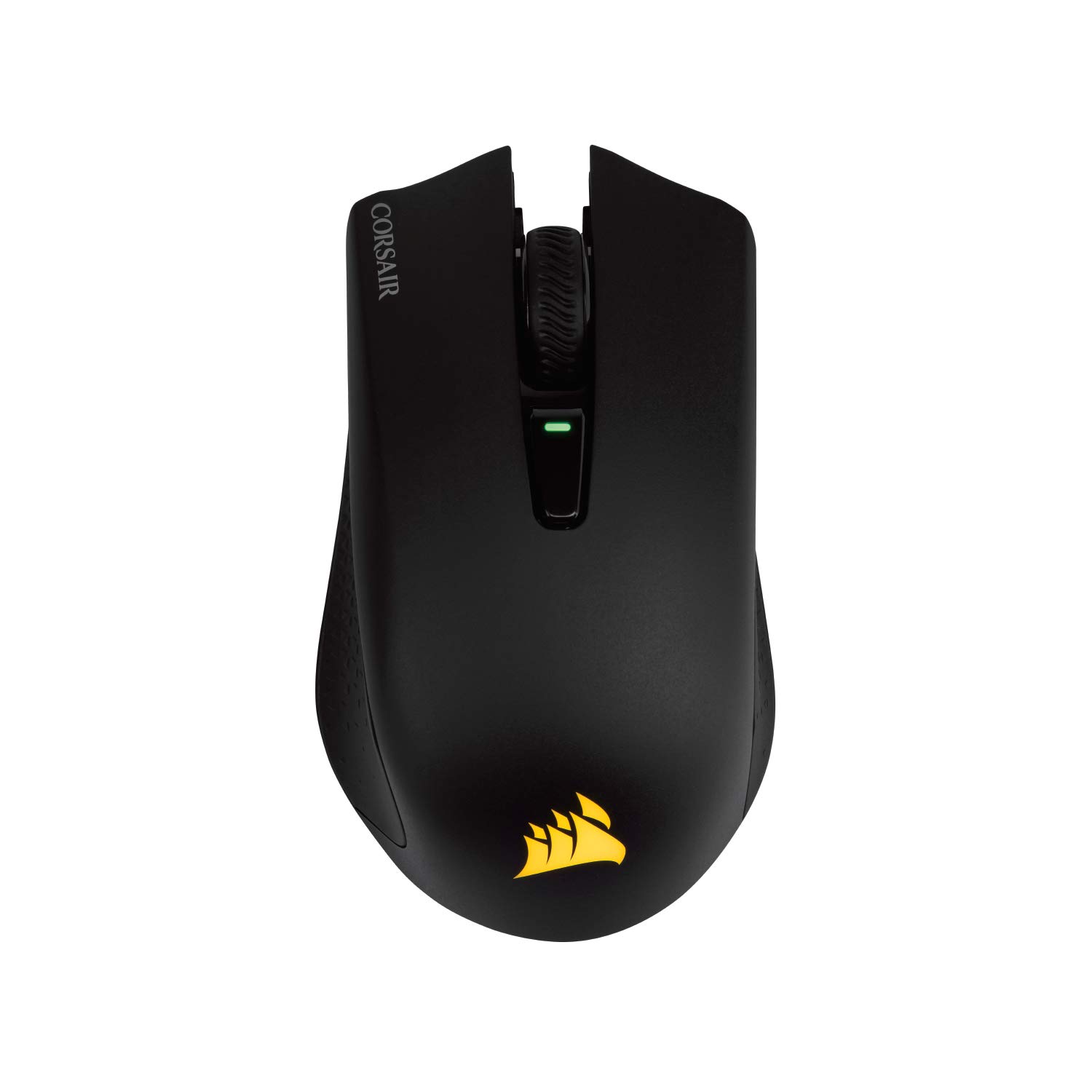
The mouse that hops from your PC to a PS5 without missing a beat.
Few mice bridge desktop and console, but the Harpoon Wireless does exactly that — owners plug it into a PS5 for Battlefield and it just works. Sub-1ms Slipstream wireless (Corsair’s low-latency protocol) keeps pace with wired mice, while low-latency Bluetooth and USB wired modes cover every other connection. The 99-gram build and rubber side grips mean long sessions don’t tire your hand or slip your grip.
Ten thousand DPI with six programmable buttons and iCUE software support make it a genuine all-rounder for FPS and MOBA alike. The 60-hour battery lasts days between charges, and you can keep playing while the USB cable tops it up. Owners call it “best mouse I’ve owned” and praise its light feel and affordable build quality.
The catch is the battery: it is built-in and rechargeable, not swappable, so you’re tethered to the cable when the charge dies mid-match. It also runs compact, so large-palm players may want more mouse than 4.55″ provides.
Multi-Platform Edge
- Works on PC, Mac, PS5, PS4, and Xbox
- Sub-1ms Slipstream wireless for lag-free play
- 60-hour battery with wired play-while-charging
The Limits
- Built-in battery means no quick AA swap mid-session
- Compact shell is small for large hands
Pick it for: a one-mouse-does-all setup spanning PC and consoles at 4.4 stars.
Pass if: you prefer swappable batteries or need a full-size palm rest.
9. DELUX Seeker Ergonomic Vertical Mouse

An OLED screen and thumb wheel turn a mouse into a tiny productivity dashboard.
For the spreadsheet warrior, the DELUX M618XSD is the most feature-dense option here: a built-in OLED display shows your DPI, remaining power, connection mode, and charging status at a glance — no software needed to check battery. The thumb wheel adds 4-way scrolling, letting you pan left and right through wide documents without touching the scroll bar. A rubber-coated surface with a magnetic detachable wrist rest lifts your forearm into one comfortable unit.
Tri-mode connection (wired, 2.4G, and Bluetooth 5.0) with a 1,000mAh battery delivers up to 2 weeks of use per charge, and the included 1.6m braided cable lets you work while charging. Five DPI gears — 800/1200/1600/2400/4000 — switch on the fly, with up to 7200 DPI open up via the driver. Heavy daily users report wrist and finger pain relief within a week, crediting the vertical handshake grip.
The size is the catch — recommended for medium to large hands up to 7.5″ long, but several owners find it too small for a comfortable grip. Bluetooth reliability is also mixed, with occasional disconnections, so wired mode is the safer default for critical work.
Best for: productivity power users who want OLED telemetry, a thumb wheel, and wrist relief in one device.
Look elsewhere if: you have small hands or need rock-solid Bluetooth above all — 4.0 stars reflects some mixed connectivity feedback.
Understanding the Specs
DPI — Sensitivity, Not Speed
DPI (dots per inch) measures how far the cursor travels for every inch you move the mouse. Higher DPI means faster cursor movement at the same hand speed, which is why gamers crank it for flicks. At 800-1600 DPI, everyday productivity feels natural; only competitive shooters need the 12,000-24,000 headroom. The real test is whether the sensor tracks cleanly on your desk surface, not the peak number on the box.
Wireless Protocol & Polling Rate
Wireless mice use either Bluetooth or a proprietary 2.4GHz receiver (often called a dongle). Bluetooth is convenient for multi-device setups but adds slight latency; 2.4GHz is faster and more stable. Polling rate — measured in Hz — is how often the mouse reports its position to your PC, with 1000Hz being the gold standard for competitive play. Wireless battery life ranges wildly from 53 hours to 250 hours depending on the sensor and battery.
FAQ
What does the sixth button on a 6-button mouse actually do?
Is a vertical mouse better for wrist pain?
How many DPI do I actually need for everyday work?
Which has better battery life — replaceable AA or built-in rechargeable?
Will these 6-button mice work on a Mac?
Can I use a gaming mouse with a PS5 or Xbox console?
What is the difference between 2.4GHz wireless and Bluetooth?
How long does a 6-button mouse typically last?
Final Thoughts: The Verdict
For the majority of shoppers, the 6 side button mouse winner is the Logitech G305 because it pairs 250-hour battery life with a proven, crowd-favorite design at 4.6 stars across 36,000+ owners. If you want wrist relief on a budget, the TECKNET Vertical delivers a handshake grip for less. And for competitive players chasing featherweight speed, the TMKB Falcon M1SE at 75g with 12,800 DPI is the one to reach for — the crowd’s near-unanimous praise makes it the safest bet if you’re torn.
How We Picked
We do not accept paid placement. Every pick is matched to a real buyer and a real use-case; we do not hands-on test units.
Sources & Methodology
Specifications: manufacturer listings and product documentation. Review insights: verified customer reviews, as of August 2026. Pricing: not shown on this page (it changes often); check the current price via the retailer link.
As an Amazon Associate, Gadgets Feed earns from qualifying purchases. This does not affect which products we feature.