
A webcam that delivers a true 60 frames per second isn’t just about a number on a spec sheet — it’s the difference between a stream that feels natural and one that stutters under movement. For anyone who moves on camera, whether you’re demonstrating a desk setup, playing a fast-paced game, or presenting body language in a meeting, hitting that 60fps threshold turns a choppy feed into fluid, lifelike motion. The wrong camera at this level introduces ghosting, judder, and motion blur that undermines your entire presence.
I’m Min — the co-founder and writer behind Gadgets Feed. For this guide, I’ve spent countless hours parsing sensor sizes, frame rate claims, autofocus systems, and low-light performance metrics across the current field of webcams that legitimately hit 60fps without interpolation or dropped frames.
Whether you’re upgrading from a clunky 30fps laptop cam or building a dedicated streaming rig from scratch, pulling the trigger on the right 60 fps webcam means understanding which sensors, lenses, and software actually deliver smooth motion rather than just promising it on paper.
How To Choose The Best 60 FPS Webcam
A 60fps webcam buys you fluidity, but not every model delivers the same motion quality. You need to look past the headline frame rate and understand the sensor, the processing pipeline, and the lighting conditions under which that frame rate actually holds up.
Sensor Size and Pixel Size
The sensor is the heart of any 60fps webcam. A larger sensor, like a 1/2.55″ or bigger, captures more light per pixel, which means the camera doesn’t have to sacrifice frame rate when the room gets dim. Smaller sensors often drop to 30fps or introduce noise to maintain light levels, which defeats the purpose of a high frame rate camera. Look for models that specify their sensor size and pixel pitch — anything under 2μm per pixel will struggle in low light at 60fps.
Autofocus Performance
At 60fps, autofocus has to work faster and more accurately to keep up with movement. Some webcams use contrast detection, which hunts back and forth and produces visible pulsing on screen. Phase detection or hybrid systems are preferable because they lock focus without the search pattern. If you plan to move around in your frame — leaning in, gesturing, standing up — a webcam with reliable autofocus is non-negotiable for maintaining the smooth, sharp look that 60fps promises.
USB Bandwidth and Compression
Running video at 1080p and 60fps requires significant USB bandwidth. Many webcams use M-JPEG compression to squeeze that data through a USB 2.0 or 3.0 connection, but M-JPEG introduces artifacts and color banding in fast motion. Webcams that support YUY2 or uncompressed video at 60fps produce cleaner, more accurate frames but require a USB 3.0 or higher port. Always check the supported video formats in the technical specs before assuming your current USB port will handle 60fps without stuttering.
Quick Comparison
On smaller screens, swipe sideways to see the full table.
| Model | Category | Best For | Key Spec | Amazon |
|---|---|---|---|---|
| Logitech MX Brio | Premium 4K | Crisp conferencing & streaming | 8.5MP STARVIS sensor, 1080p@60fps | Amazon |
| Elgato Facecam 4K | Studio Webcam | Creative control & filters | 4K60, Sony STARVIS 2, manual focus | Amazon |
| Insta360 Link 2 Pro | AI PTZ | Physical tracking & meetings | 4K PTZ, 1/1.3″ sensor, AI tracking | Amazon |
| Razer Kiyo V2 X | 1440p Streamer | High-refresh streaming | 1440p@60fps, wide-angle lens | Amazon |
| OBSBOT Tiny SE | AI PTZ | Tracking on a budget | 1080p@100fps, 1/2.8″ stacked CMOS | Amazon |
| NexiGo N660P Pro | Budget 1080p | Versatile entry-level streaming | 1080p@60fps, distortion-free lens | Amazon |
| UGREEN FineCam 4K | Value 4K | Prosumer hybrid use | 1080p@60fps, 1/2.55″ Sony sensor | Amazon |
In‑Depth Reviews
1. Logitech MX Brio (Renewed Premium)

The Logitech MX Brio packs an 8.5-megapixel STARVIS sensor and delivers 1080p at a true 60fps with excellent color accuracy. The large sensor handles dynamic lighting better than most competitors, keeping motion smooth without washing out highlights or crushing shadows in mixed-room conditions. This is a webcam built for professionals who need reliable frame rates in variable environments — home offices, call centers, and hybrid workspaces.
At 60fps, the autofocus tracks movement cleanly without the hunting or pulsing that plagues contrast-detect systems. The Logitech software allows fine control over exposure and color temperature, which matters when you are trying to match your video feed to ambient lighting throughout the day. The built-in privacy cover is a practical add, and the USB-C connection ensures enough bandwidth for the full 60fps stream without compression artifacts.
The renewed variant offers the same sensor and frame rate capabilities at a mid-range price point, making premium 60fps performance accessible without the premium cost. For anyone whose primary need is locked-in, consistent 60fps video for meetings or streaming, the MX Brio is the most technically capable pick in its tier.
Why it’s great
- Large STARVIS sensor delivers clean 60fps in dim light
- Accurate autofocus without pulsing
- Full software suite for fine-tuning image
Good to know
- Renewed unit availability can be inconsistent
- No PTZ or AI tracking features
2. Elgato Facecam 4K

The Elgato Facecam 4K is built for creators who want DSLR-like control in a webcam form factor. It uses a premium Sony STARVIS 2 CMOS sensor and supports native 4K at 60fps — one of the few webcams that delivers full 4K60 without downscaling. The manual focus ring gives you consistent focus depth for setups where autofocus is more trouble than it is worth, such as fixed streaming positions or green screen work.
At 1080p60, the video output is uncompressed, meaning there is no M-JPEG artifact banding in motion. The integrated flash memory stores your settings directly on the camera, so plugging into a different computer doesn’t reset your white balance, zoom, or exposure preferences. The 49mm filter thread is a unique advantage — attaching a diffusion or ND filter changes what this camera can do in direct light.
This webcam requires USB 3.0 to run its full frame rate, and it will not function properly on a USB hub that limits bandwidth. For streamers who value precise image control and want the highest possible frame rate resolution combination, the Facecam 4K is a focused tool that does exactly one job well.
Why it’s great
- True 4K60 without compression artifacts
- Manual focus provides consistent depth
- 49mm filter support for advanced lighting
Good to know
- Requires USB 3.0; no hub compatibility
- Software feels basic compared to competitors
3. Insta360 Link 2 Pro

The Insta360 Link 2 Pro combines a large 1/1.3-inch sensor with physical pan-tilt-zoom tracking, making it the only webcam on this list that actively follows you at 60fps. The sensor size gives it an advantage in low-light conditions, maintaining fluid motion without introducing noise. The AI tracking is responsive enough to keep a moving presenter centered in the frame, while the directional microphones cut down background chatter during calls.
At 1080p60, the Link 2 Pro uses a staggered HDR mode to balance exposure during motion, which prevents flickering when you move between light and shadow. The natural bokeh effect, applied through software rather than a lens aperture, creates separation from the background without the computational artifacts common in other webcams. The integration with Elgato Stream Deck is a practical bonus for multi-camera setups.
The only real limitation is the short USB-C cable included in the box, which can be restrictive for larger rooms. For anyone who moves during presentations or wants a webcam that physically adjusts to them, the Link 2 Pro delivers 60fps tracking that no fixed-lens camera can match.
Why it’s great
- Large sensor maintains 60fps in low light
- Physical PTZ tracking at full frame rate
- Effective directional audio isolation
Good to know
- Short USB cable out of the box
- No Windows Hello support on ARM
4. Razer Kiyo V2 X

The Razer Kiyo V2 X hits a sweet spot that few webcams attempt: native 1440p at 60fps. This resolution sits between standard 1080p and full 4K, giving streamers sharper image detail without the bandwidth or processing demands of 4K. The wide-angle lens offers flexibility for showing off a full desk setup while still keeping facial detail sharp at normal distance.
Autofocus at 60fps is responsive, though in very dim environments the camera may introduce digital grain rather than dropping the frame rate, which is an acceptable trade-off for maintaining smooth motion. The integrated privacy shutter is a twist-to-close design that feels robust, unlike the flimsy plastic covers found on budget models. Razer Synapse software allows granular control over color, contrast, and saturation.
For streamers who want a higher-resolution canvas than 1080p but aren’t ready to invest in a 4K pipeline, the Kiyo V2 X provides that middle ground at a reasonable price. The 60fps performance at 1440p is legitimate, provided your USB port and software settings are configured correctly.
Why it’s great
- Rare 1440p60 resolution for sharper streams
- Wide-angle lens offers flexible framing
- Robust mechanical privacy shutter
Good to know
- Can struggle with grain in dim lighting
- Synapse software required for full control
5. OBSBOT Tiny SE

The OBSBOT Tiny SE pushes frame rate boundaries with 1080p at 100fps, which is overkill for most use cases but guarantees buttery smooth motion even in fast-moving scenarios like game streaming or physical demonstrations. The 1/2.8-inch stacked CMOS sensor and dual native ISO allow it to maintain that high frame rate in challenging light without dropping into noise territory.
AI tracking is the headline feature here, with zone tracking and body-part tracking that let you define specific areas of the frame for the camera to follow. The physical gimbal rotates smoothly to keep you centered, and gesture controls allow zoom and lock without touching the software. The low-light performance is genuinely good for a webcam under premium pricing, though the small form factor means the onboard microphones are adequate but not exceptional.
If you move around a lot during streams or presentations and want a camera that can physically follow you without needing a premium budget, the Tiny SE delivers frame rates that exceed standard 60fps monitors. The 100fps capability also makes it future-proof for monitors and recording setups that support higher refresh rates.
Why it’s great
- 1080p at 100fps for ultra-smooth motion
- Advanced AI zone and body-part tracking
- Strong low-light sensor performance
Good to know
- Microphones are basic compared to competitors
- Occasional gimbal reset bug reported
6. NexiGo N660P Pro 4K

The NexiGo N660P Pro is an entry-level 4K webcam that delivers 1080p at a stable 60fps, making it one of the most affordable ways to get smooth motion video without buying used or refurbished. The distortion-free lens is a real benefit — many budget webcams warp faces and straight lines at the edges of the frame, but the N660P Pro preserves natural proportions even with an 80-degree field of view.
The 3DNR noise reduction works well enough to keep grain under control in standard office lighting, though pushing the frame rate in very dim conditions will reveal the sensor’s budget origins. Dual noise-canceling microphones are serviceable for meetings and casual streaming, and the sliding privacy cover is a straightforward physical block. The 360-degree swivel mount and 1/4-inch tripod thread provide mounting flexibility that competitors in the same price bracket often omit.
For anyone who needs 60fps video for professional calls or light streaming but cannot justify a premium webcam budget, the N660P Pro delivers the core motion-smoothness benefit without sacrificing essential features like autofocus and noise reduction. It is the pragmatic choice for budget-conscious buyers.
Why it’s great
- Distortion-free lens preserves natural geometry
- Stable 60fps at 1080p for entry price
- Includes tripod thread and swivel mount
Good to know
- 4K mode limited to 30fps
- Sensor struggles in very dim light at 60fps
7. UGREEN FineCam 4K
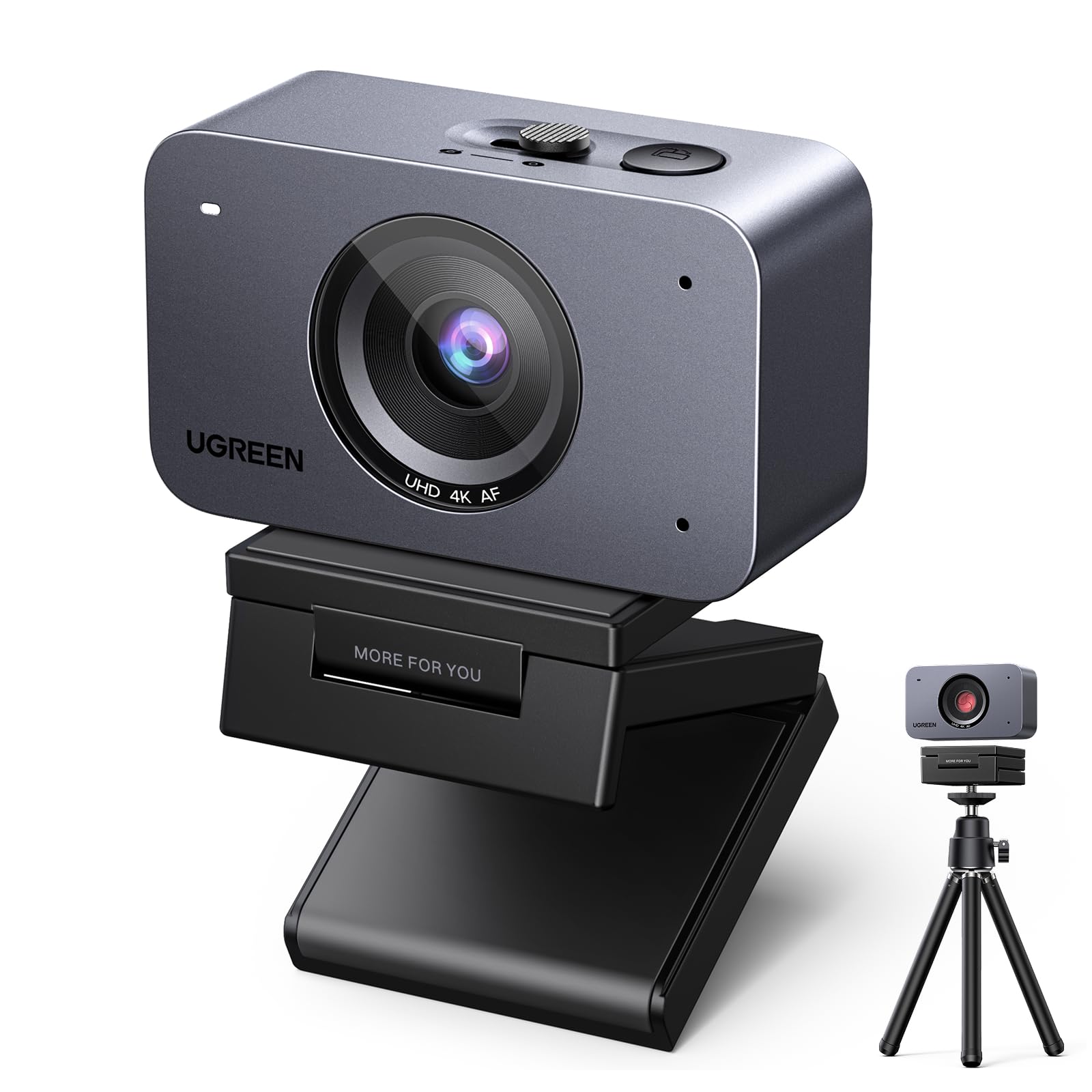
The UGREEN FineCam 4K uses a 1/2.55-inch Sony sensor that punches above its price tier for color accuracy and dynamic range. At 1080p60, the video is clean and well-exposed, with face AE that automatically adjusts brightness to keep your face visible even when sitting against a sunlit window. The portrait mode switch — rotating the camera 90 degrees — gives vertical streamers a native 9:16 feed at 2K resolution.
The inclusion of a magnetic mount and tripod in the box adds real value, though the magnetic base can shift if the cable is bumped. AI dual-mic noise reduction effectively filters keyboard clicks and ambient chatter, making the FineCam a solid all-in-one package for hybrid streaming and conferencing. The sliding privacy cover is physically smooth and completely blocks the lens.
For those who want a built-in tripod and magnetic flexibility without buying extras, the FineCam 4K pairs solid Sony sensor performance with practical accessories. It maintains 60fps consistently, provided you are in reasonable lighting, and the autofocus locks within two seconds — adequate for most streaming scenarios.
Why it’s great
- Sony sensor delivers accurate color at 60fps
- Native portrait mode for vertical streaming
- Includes tripod and magnetic mount
Good to know
- Magnetic mount can shift on cable bump
- No companion software; needs OBS for tuning
FAQ
Why does my 60fps webcam look choppy in dim lighting?
Can I get 60fps through a USB hub or extension cable?
Final Thoughts: The Verdict
For most users, the 60 fps webcam winner is the Logitech MX Brio because its STARVIS sensor reliably delivers clean, smooth 1080p60 in the variable lighting conditions that define real-world streaming and meetings. If you want complete creative control over every frame, grab the Elgato Facecam 4K. And for active presenters who need physical tracking at full frame rate, nothing beats the Insta360 Link 2 Pro.