
Our readers keep the lights on and my morning glass full of iced black tea. As an Amazon Associate, I earn from qualifying purchases.
Specs are compiled from manufacturer listings and verified buyer reviews and can change over time — please confirm the key details on the product page before buying.
You get the speed you want for a new build at 6000MHz, and the capacity that keeps everything running smoothly is 32GB. But within that simple spec lives a huge range of performance, from loose timings that leave performance on the table to tight CL30 kits that let your CPU breathe. The real difference between a good kit and a great one depends on the CAS latency (the number of clock cycles it takes for the RAM to respond), so this guide cuts through the noise to show you which kits actually deliver the speed you paid for.
I’m Min — the founder and writer behind Gadgets Feed. This guide is built by comparing the manufacturers’ published specifications and the patterns across verified customer reviews, so you get each pick’s real strengths and trade-offs instead of marketing spin.
Below you will find the seven best 6000MHz DDR5 32GB RAM kits on the market, ranked by how well they balance real-world gaming performance, overclocking stability, and overall value for your next PC build. You will see why a kit’s CAS latency (CL30 vs CL38) matters more than you think, and which modules are actually worth your money.
Quick Picks
- Corsair Vengeance RGB DDR5 32GB — Best Overall
- KLEVV Urbane V RGB DDR5 32GB — Overclocker’s Pick
- Lexar ARES Gen2 RGB DDR5 32GB — Best Thermal Design
- Acer Predator Vesta II RGB DDR5 32GB — Best RGB Execution
- Patriot Memory Viper Elite 5 RGB DDR5 32GB — Lightest Build
- TEAMGROUP T-Force Vulcan DDR5 32GB — Budget Entry Point
- PUSKILL 32GB DDR5 RAM (2x16GB) 6000MHz CL30 — Budget CL30
How To Choose The Best 6000MHz DDR5 32GB RAM
Picking the right RAM kit for your PC is less about the brand name and more about three specific specs that define its real-world performance. Understanding these will save you from buying a kit that leaves performance on the table or refuses to run at its advertised speed.
CAS Latency (CL) — The Number That Determines Responsiveness
CAS latency (the number of clock cycles the RAM needs to start sending data after being asked) is the single most important performance spec after speed. A 6000MHz kit at CL30 is noticeably more responsive in games and productivity than a 6000MHz kit at CL38, because the CPU spends fewer cycles just waiting for the first data burst. Lower is always better, and CL30 is the current gold standard for this speed class.
XMP 3.0 vs AMD EXPO — Which Platform You Are On
Intel XMP 3.0 and AMD EXPO (Extended Profiles for Overclocking) are pre-set overclocking profiles stored on the RAM. EXPO is AMD’s open-standard profile that is often preferred on Ryzen platforms for better compatibility, while XMP 3.0 works on both, but may require tweaking on an AMD board. Most modern kits support both, but if you are building on an AM5 board, a kit with native EXPO support is a safer bet for hitting the 6000MHz target without instability.
Die Type and PCB Layers — The Foundations of Overclocking Headroom
The actual memory chips (ICs) on a stick matter. Kits using SK Hynix A-die (a type of memory chip known for its strong overclocking potential and tight timings) are widely considered the best for enthusiasts because they can often run tighter timings or higher frequencies than rated. A 10-layer PCB (the circuit board the memory chips are soldered to) also helps with signal integrity, meaning your system is less likely to crash when the RAM is under load.
Quick Comparison
| Model | Best For | CAS Latency | Timings | Voltage | Amazon |
|---|---|---|---|---|---|
| Corsair Vengeance RGB | Build Quality & Ecosystem | CL30 | 30-36-36-76 | 1.40V | Amazon |
| KLEVV Urbane V RGB | Overclocking Headroom | CL30 | 30-36-36-76 | 1.35V | Amazon |
| Lexar ARES Gen2 RGB | Thermal Performance | CL30 | 30-38-38-76 | 1.40V | Amazon |
| Acer Predator Vesta II RGB | RGB & Build Quality | CL30 | 30-36-36-76 | 1.35V | Amazon |
| Patriot Viper Elite 5 RGB | Lightest Dual-Stick Kit | CL30 | 30-40-40-76 | 1.35V | Amazon |
| TEAMGROUP T-Force Vulcan | Budget Entry Point | CL38 | 38-38-38-78 | 1.25V | Amazon |
| PUSKILL 32GB DDR5 | Ultra-Low Budget CL30 | CL30 | 30-36-36-76 | 1.35V | Amazon |
In‑Depth Reviews
1. Corsair Vengeance RGB DDR5 32GB (2x16GB) 6000MHz CL30

The premium champion that delivers both performance and polish right from the start.
This kit is the one most builders reach for when they want to avoid headaches. It runs at 6000MHz with tight CL30-36-36-76 timings at 1.40V, and it comes with a sturdy heat spreader that keeps the modules cool even during long sessions. The onboard voltage regulation (which moves power control from the motherboard to the stick itself) means you get cleaner, more stable overclocking through Corsair’s iCUE software—a big step up from older generations where the motherboard handled everything.
The ten individually addressable RGB LEDs per module are bright, vivid, and sync smoothly with any iCUE-compatible build. Reviewers report that AMD EXPO worked perfectly on the first try with an X670 board, and the system stayed rock-stable under heavy loads.
Unlike the lighter Patriot Viper Elite (46 grams per stick), the Corsair Vengeance feels substantial and well-constructed. It is also notably heavier than the skinny kits, but that weight comes from a high-quality aluminum heat sink that buyers confirm keeps temperatures low. For a high-end build where you want the RAM to just work and look great, this is the kit.
Vengeance premium tuning
- Flagship 6000MHz CL30 speed with 30-36-36-76 timings from the start
- Ten individually addressable RGB LEDs per module for deep customization
- Onboard voltage regulation enables cleaner overclocking through iCUE software
Premium price premium
- Premium price reflects the build quality and brand reputation
- Requires BIOS overclocking to hit the rated 6000MHz speed
Corsair flagship: If you want the most reliable 6000MHz CL30 kit with a great software ecosystem and bulletproof build quality, this is the one to get.
Budget seekers: You are on a tight budget and cannot justify the premium over a CL38 kit — the TEAMGROUP Vulcan will save you money and still run fine.
2. KLEVV Urbane V RGB DDR5 32GB (2x16GB) 6000MHz CL30

The enthusiast’s choice built on SK Hynix A-die with genuine overclocking headroom.
KLEVV packs this kit with SK Hynix A-die ICs (the same chips found in many of the most overclockable RAM kits on the market) on a premium 10-layer PCB. That combination means this 6000MHz CL30 kit at 1.35V often runs beyond its rated specs—one reviewer confirmed pushing it to 6400MHz on an AMD 9800X3D system. The 42.5mm height is also a thoughtful detail, leaving clearance for bulky CPU air coolers that taller sticks might block.
Buyers rave about the stability, with one noting it “clocked at 6000MHz with no problem” on a Gigabyte Aorus X670E motherboard. The dual-beam RGB lighting looks sharp through the aluminum heat sink. The built-in thermal sensor, which lets you monitor memory temperature in real time, is a nice bonus for anyone who pushes their system hard during long rendering sessions or gaming marathons.
Compared to the Lexar ARES Gen2, the KLEVV Urbane V also uses a 10-layer PCB and A-die chips, but buyers report it has slightly better overclocking margin. If you like to tweak your settings, this kit gives you more room to grow than the locked-down entry options.
Urbane value RGB
- Uses premium SK Hynix A-die ICs for strong overclocking potential
- Compact 42.5mm height fits under large CPU coolers
- Built-in thermal sensor for real-time temperature monitoring
Limited overclocking
- More expensive than entry-level CL30 kits like the PUSKILL
- RGB control may require compatible motherboard software
Budget RGB: You are building a high-end AM5 system and want headroom to push the RAM beyond 6000MHz.
Enthusiast tuners: You just need plug-and-play 6000MHz with no intention of overclocking—the PUSKILL or Corsair are simpler choices.
3. Lexar ARES Gen2 RGB DDR5 32GB (2x16GB) 6000MHz CL30

The ARES Gen2 brings serious cooling hardware to a 6000MHz CL30 package.
Lexar equips this kit with a premium 1.88mm aluminum heat spreader (the thickest in this lineup) to boost heat dissipation during sustained loads. Combined with a built-in Power Management IC (PMIC) and on-die ECC (error correction code that fixes single-bit memory errors on the chip itself), this kit is built for stability. The rated 6000MT/s CL30-38-38-76 at 1.40V puts it right in the balance for both Intel and AMD systems.
Reviewers consistently note that this RAM runs cool and stable. One buyer successfully pushed it to 6000MHz CL26 on a 9950X3D—a huge underclock of the latency—and also hit 8000MHz CL34 in 2:1 mode, which demonstrates how capable the Hynix A-die chips are. Another buyer says “super solid if you can get your hands on it.” The only downside: its price is on the higher end, and you really need to enable XMP or EXPO manually to get the full performance.
Compared to the KLEVV Urbane V, the Lexar has a thicker heat spreader but slightly looser secondary timings (30-38-38-76 vs 30-36-36-76). For most gamers, this difference is negligible, but if you are chasing benchmark records, the KLEVV may have a tiny edge.
Lexar cost efficiency
- 1.88mm aluminum heat spreader is the thickest in this roundup for thermal performance
- On-die ECC improves stability during heavy workloads
- Users report excellent overclocking headroom with Hynix A-die
Basic performance
- Premium price tag
- Requires XMP/EXPO activation to run at rated speed
Value pick: Enthusiasts who want maximum thermal headroom and the ability to push timings well below the rated spec.
High overclockers: Budget builders who are happy with out-of-the-box speeds and do not plan on tweaking BIOS settings.
4. Acer Predator Vesta II RGB DDR5 32GB (16GBx2) 6000MHz CL30

Hand-screened memory chips meet stylish aluminum cooling for a high-end aesthetic.
Acer says the Vesta II uses hand-screened DDR5 ICs, which means each chip is individually tested for quality before being assembled. The result is a kit that runs 6000MHz CL30 at 1.35V with rock-solid stability. The metallic aluminum alloy heat sink helps with heat dissipation, and the sleek light bar design produces a smooth, programmable RGB glow compatible with ASUS, Gigabyte, ASRock, and MSI software.
This is the heaviest kit in the lineup at 141 grams, while the Patriot Viper Elite 5 weighs 46 grams per stick. That weight comes from the metal heat sink, which helps keep the RAM cool under load. Owners mention it “works perfectly” and “runs at 6000MHz with EXPO enabled.” One reviewer noted that the RGB has a “smoky tint” that is not overly bright, giving it a premium look. Like most high-performance kits, you need to go into the BIOS and enable XMP or EXPO to hit the rated speed—otherwise, it defaults to 4800MHz.
Compared to the Corsair Vengeance, the Acer uses hand-screened ICs which may offer better consistency, but it lacks the deep iCUE ecosystem. If you value motherboard-based RGB control over a separate software suite, this is the better pick.
Predator aggressive styling
- Hand-screened DDR5 ICs offer above-average quality assurance
- Heavy 141-gram build with aluminum alloy heat sink for thermal performance
- Subtle, stylish RGB design compatible with major motherboard software
Higher latency
- Significantly heavier than any other kit—check clearance with your CPU cooler
- Premium pricing puts it near the top of the range
Aesthetic build: You want a uniquely constructed kit with hand-screened chips and a heavy-duty heat sink that looks as good as it performs.
Low latency fans: You prefer a lighter kit for easier installation or need iCUE ecosystem support.
5. Patriot Memory Viper Elite 5 RGB DDR5 32GB (2X16GB) 6000MT/s CL30

The featherweight dual-stick kit that fits tight builds and still hits CL30.
The Patriot Viper Elite 5 weighs 46 grams per stick, making it one of the lightest options in this roundup. The Acer Predator Vesta II weighs 141 grams for the kit. That makes it a fantastic choice for mini-ITX builds or any system where you are worried about socket stress or CPU cooler clearance. Despite the slim weight, it delivers the full 6000MT/s at CL30-40-40-76 timings at 1.35V, and supports both Intel XMP 3.0 and AMD EXPO for one-click overclocking.
Reviewers generally agree the RAM works well, with one calling it “pretty good” and confirming compatibility with an ASUS B850 Tuf Gaming Plus Wi-Fi board. However, there are some durability concerns: one buyer mentioned that after a month, the plastic on one stick’s RGB strip peeled off and was hanging onto the GPU, requiring glue to fix. Another buyer received a defective kit that failed to POST on a compatible AM5 system, triggering a DRAM error—so quality control may be less consistent than on the more expensive options.
The Viper Elite 5 has CL30 latency and the TEAMGROUP Vulcan has CL38 latency, which can affect latency-sensitive games and tasks. The trade-off is the build quality, which feels less premium than the Corsair or Acer options.
Viper Elite speed
- Extremely lightweight 46 grams per stick—easy on motherboard sockets and tight spaces
- CL30 timings at 1.35V for strong gaming performance
- Supports both XMP 3.0 and EXPO for simple overclocking
No RGB
- Plastic RGB strip durability is questionable based on buyer feedback
- Quality control appears inconsistent with some DOA reports
Performance focus: Small-form-factor builders who need the lightest possible kit without sacrificing CL30 performance.
RGB lovers: You want a more sturdy build quality or cannot risk a DOA kit—the Corsair or Acer are more reliable.
6. TEAMGROUP T-Force Vulcan DDR5 32GB (2x16GB) 6000MHz CL38

A no-frills 6000MHz kit that keeps the cost down by loosening the timings.
The TEAMGROUP Vulcan sticks to the essentials. It runs 6000MHz at CL38-38-38-78 and stays cool with a reinforced structure and integrated Power Management ICs (PMICs), which regulate voltage directly on the stick for stable power. The 0.1-kilogram (roughly 100-gram) weight is moderate, and the black heat spreaders are clean and understated. This is a DIMM (Dual Inline Memory Module) designed for Intel 600 and 700 series chipsets with XMP 3.0 support.
Buyers are very happy with the value proposition. One reviewer says the RAM “works amazing” and has “a fantastic amount of power for higher RAM intensive games.” Another notes that installation was easy and the system recognized the memory immediately. However, you have to remember that CL38 is noticeably looser than the CL30 kits in this list—you are leaving some responsiveness on the table in latency-sensitive workloads like competitive shooters and certain productivity tasks.
Compared to the PUSKILL CL30 kit, the TEAMGROUP is slower in real-world latency, but it is a more established brand with a strong track record of reliability. If you are on a tight build budget and the lower price matters more than squeezing out every last frame, this is a solid choice.
Vulcan budget friendly
- Budget-friendly price point for a 6000MHz DDR5 kit
- PMIC equipped for stable power delivery
- Strong user reviews—customers note reliable, low-maintenance operation
CL38 latency
- CL38 latency is significantly looser than the CL30 competition
- No RGB—plain black design only
Entry level: Your budget is tight and you need a reliable 6000MHz foundation without paying for lower latency you may not notice.
Performance seekers: You play competitive esports titles or do any latency-sensitive work—the PUSKILL or Lexar CL30 kits will feel noticeably snappier.
7. PUSKILL 32GB DDR5 RAM (2x16GB) 6000MHz CL30
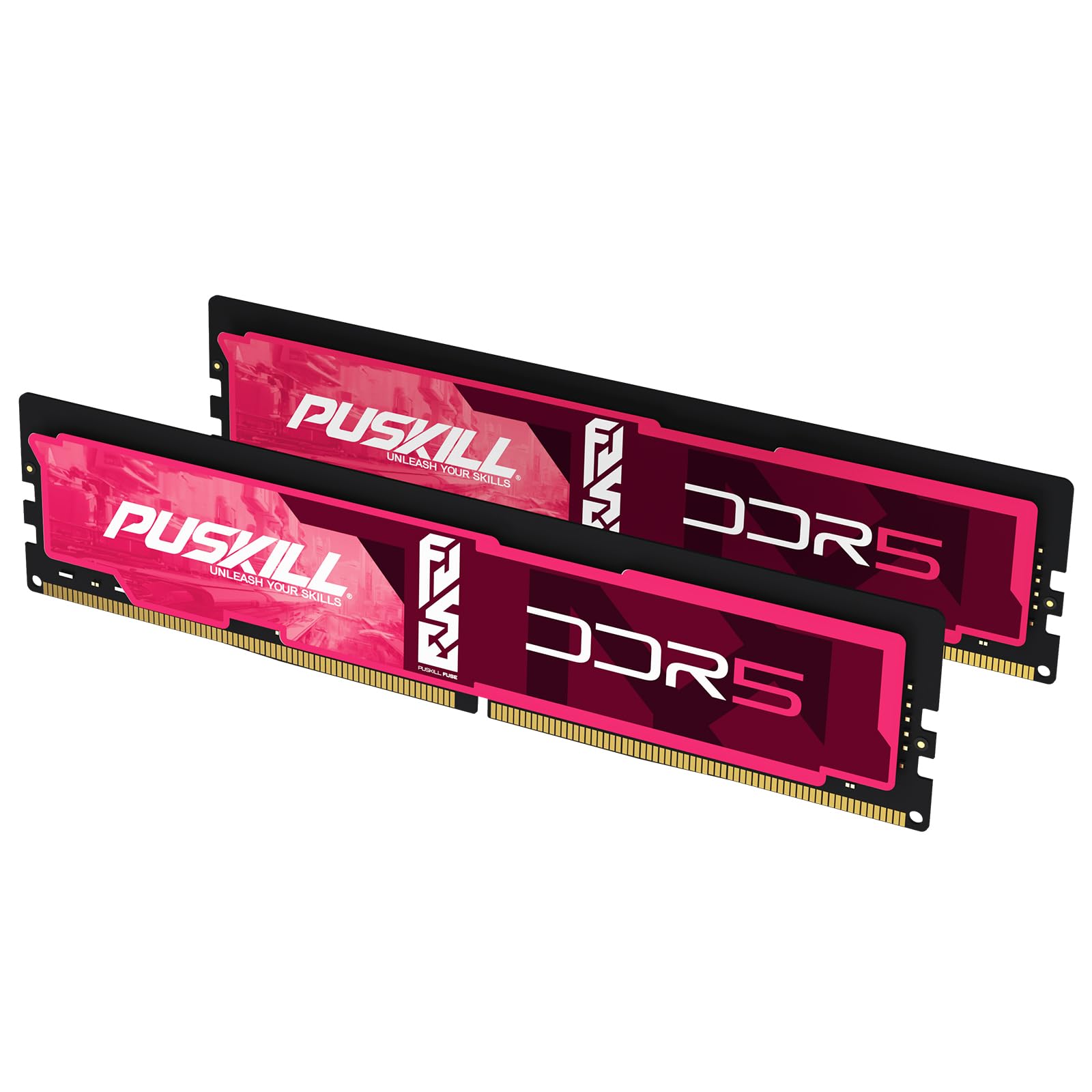
The most affordable way to get true CL30 6000MHz performance into your build.
PUSKILL brings the tight CL30-36-36-76 timings at 1.35V that enthusiasts love, but at a price point that undercuts most of the big-name competitors. The kit supports both Intel XMP 3.0 and AMD EXPO for one-click overclocking, and is tested for compatibility across Intel LGA1700 (12th/13th/14th Gen) and AMD AM5 (Ryzen 7000/8000 series) platforms. The advanced PMIC (Power Management IC) is rated for the same 1.35V, keeping heat in check during long gaming sessions.
Reviewers point out that “they look cheap but work perfectly fine,” which is a fair summary. The modules themselves are plain without RGB—just basic black PCBs with standard heat spreaders. A few reviews mention it is “not a 32GB kit; two separate 16GB modules,” which is actually expected for a 2x16GB configuration. One buyer did report receiving a faulty module that was refunded, but most others confirm they run at 6000MHz with EXPO enabled and perform excellently.
Compared to the TEAMGROUP Vulcan (CL38), the PUSKILL offers a huge advantage in latency at a similar price tier. However, TEAMGROUP is a more established brand with a longer warranty track record. If you are willing to take a small chance on a newer brand for better performance, the PUSKILL is a fantastic deal.
PUSKILL affordability
- True CL30-36-36-76 timings at a budget-friendly price point
- Supports both Intel XMP 3.0 and AMD EXPO for easy setup
- Advanced PMIC helps manage thermals during gaming
Unknown brand
- Build quality feels cheap—no RGB, basic heat spreaders
- Some shoppers say DOA or faulty modules, indicating variable quality control
Budget build: You want genuine CL30 6000MHz performance on a tight budget and do not mind a plain-looking kit.
Consider a more established brand if: You want a longer warranty and better quality assurance—the Corsair Vengeance or TEAMGROUP Vulcan are safer bets.
Understanding the Specs
CAS Latency (CL) — Why Lower Is Faster
CAS latency is the number of clock cycles it takes for the RAM to deliver data after the memory controller asks for it. A 6000MHz kit at CL30 delivers its first burst in 30 cycles, while a CL38 kit takes 38 cycles. In real-world terms, that means a CL30 kit feels snappier in games and applications because the CPU spends less time waiting. The difference can be felt in 1% low framerates (the dips during intense action), where tighter timings help prevent micro-stutter.
XMP 3.0 and EXPO — One-Click Overclocking
XMP 3.0 (Intel’s Extreme Memory Profile) and AMD EXPO (Extended Profiles for Overclocking) are pre-configured overclocking profiles stored on the RAM itself. When you enable them in the BIOS, the motherboard automatically sets the speed, timings, and voltage to the rated spec. Without this, most DDR5 kits default to a slower speed (like 4800MHz). Always enable XMP or EXPO after installation—if you do not, you are paying for performance you are not using.
FAQ
What does 6000MHz actually mean for gaming?
Will any 6000MHz 32GB kit work with my motherboard?
What is the difference between 6000MHz CL30 and CL38 in real-world use?
Do I need to enable XMP or EXPO to get 6000MHz?
Is 32GB (2x16GB) enough for gaming and streaming in 2025?
Can I mix 6000MHz and 4800MHz RAM sticks together?
How do I know if my CPU supports 6000MHz DDR5?
What is the difference between single-rank and dual-rank DDR5 kits?
Final Thoughts: The Verdict
Across the board, the 6000mhz ddr5 32gb ram winner is the Corsair Vengeance RGB because it combines rock-solid stability, tight CL30 timings, and a mature software ecosystem into a kit that simply works. If you want maximum overclocking headroom from premium Hynix A-die chips, grab the KLEVV Urbane V RGB. And for the best value on a tight budget without sacrificing CL30 performance, the PUSKILL 32GB DDR5 delivers the core spec at the lowest price.
How We Picked
We do not accept paid placement. Every pick is matched to a real buyer and a real use-case; we do not hands-on test units.
Sources & Methodology
Specifications: manufacturer listings and product documentation. Review insights: verified customer reviews, as of July 2026. Pricing: not shown on this page (it changes often); check the current price via the retailer link.
As an Amazon Associate, Gadgets Feed earns from qualifying purchases. This does not affect which products we feature.