
Our readers keep the lights on and my morning glass full of iced black tea. As an Amazon Associate, I earn from qualifying purchases.
Specs are compiled from manufacturer listings and verified buyer reviews and can change over time — please confirm the key details on the product page before buying.
Stepping up to a 61-key board is the moment learning an instrument starts to feel real — you finally have enough room for two-handed chords, bass lines, and actual songs. The best pick for most beginners is the one that makes practice feel like play, not homework, and in this range that means the light-up The ONE keyboard, which pairs a gentle learning curve with genuinely rich tones.
I’m Min — the founder and writer behind Gadgets Feed. This guide is built by comparing the manufacturers’ published specifications and the patterns across verified customer reviews, so you get each pick’s real strengths and trade-offs instead of marketing spin.
Crowd favorite for beginners is the light-guided The ONE — a playful way to learn the ropes, with a 4.6-star crowd behind it. 61 key synthesizer choices span smart learning boards to studio-grade MIDI controllers, so your pick depends on how you plan to play.
Our Picks at a Glance


How To Choose The Best 61 Key Synthesizer
A 61-key board is a balance — big enough for real two-hand playing yet small enough to live in a bedroom corner. Before you pull the trigger, three distinctions will sort the field for you: how the keys feel, if you need self-contained sound or a computer, and how you actually want to learn.
Key action: semi-weighted vs. touch-sensitive vs. unweighted
This decision shapes your playing more than any other spec. Touch-sensitive keys respond to how hard you press, giving you expressive volume control — essential for any real musicality. Semi-weighted keys (what the Native Instruments A61 uses) add physical heft that mimics an acoustic piano, helping your fingers build strength and accuracy. Unweighted, springy keys are fine for quick synth leads and portability but won’t prepare you for a grand piano.
Learning tools vs. deep production features
Are you a beginner who wants guiding lights and app lessons, or a producer who needs knobs, pads, and DAW control? Beginner boards like The ONE light up individual keys to show finger placement, while controllers like the Arturia KeyLab give you a bank of faders and transport buttons. Choose the tool that matches your goal — a studio controller with no built-in speakers will frustrate someone who just wants to sit down and play.
Connection and power
All boards here offer some form of MIDI (the language computers and instruments use to talk to each other), but the delivery varies. Modern boards use USB, while older styles might rely on a 5-pin DIN cable. Consider if you want Bluetooth wireless pairing (The ONE and Eastar offer it), a simple USB plug-and-play hookup, or battery power for busking — the Casio LK-S250 runs on batteries with a built-in handle, while the Native Instruments A61 is strictly USB bus-powered and needs a laptop to make a sound.
Quick Comparison
| Model | Best For | Touch Response | Learning Tools | Weight | Amazon |
|---|---|---|---|---|---|
| The ONE Smart Keyboard★ Best Overall | App-guided beginners | Semi-weighted keys | LED keys, 4000+ songs | 7.7 lbs | Amazon |
| RockJam RJ761 KitBest Value Kit | Families buying a full kit | — | Simply Piano + stickers | 19.8 lbs | Amazon |
| Yamaha PSR-E283Reliable Performer | Classic brand reliability | — | Quiz Mode, Smart Chord | 8.8 lbs | Amazon |
| Eastar EK-10S | Wood-cabinet aesthetics | — | 500 tones, teaching app | 28.4 lbs | Amazon |
| Yamaha PSR-E383 | Technique development | Touch-sensitive | Touch Tutor, Smart Chord | 9.7 lbs | Amazon |
| Casio LK-S250 | Portable light-up fun | Touch-responsive | Key Lighting, 4-Stage Lessons | 4.98 kg | Amazon |
| NI Komplete Kontrol A61 | NI software composers | Semi-weighted | NKS integration | — | Amazon |
| Arturia KeyLab Essential mk3 | DAW production pros | Velocity-sensitive | Scale/Chord Mode | — | Amazon |
| Casio CT-X3000 | Songwriting all-rounders | Touch-responsive | 17-track recorder | 15.2 lbs | Amazon |
In‑Depth Reviews
1. The ONE 61 Key Piano Keyboard with Lighted Keys
Our pick — over 4.5★ from 600+ verified ratings; the strongest balance of quality and price.
The light-up teacher that turns 4000 songs into your personal lesson plan.
Learning an instrument is 90% motivation, and this board weaponizes fun. The built-in red LED lights on the keys show you exactly which note to press, feeding into more than 4000 pieces of sheet music, 100 instructional videos, and games inside the companion app — a format that lets you learn one hand at a time at your own pace. Reviewers consistently praise the grand-piano-sampled tone for its dynamic, acoustic-like voice at this price.
Under the hood you get 256 timbres (instrument sounds), 64-note polyphony (the number of notes that can ring out at once), and 61 full-sized keys in your choice of 7 colors — the mint green is a crowd favorite for its looks. It’s light enough to carry anywhere at just 7.7 lbs, and runs on either the included power supply or 4 AA batteries that last up to 6 hours, so camping trips and travel sessions are genuinely practical. Two 3-watt speakers push the sound, with a 3.5mm headphone jack for private practice.
The honest catch is the app ecosystem. Buyers report that it works, but pairing takes patience: “It takes a few minutes for the device to find Bluetooth, another few minutes to find the internet,” and some songs advertised in the app come with extra charges. The Bluetooth pairs with iOS 10.0+ and Android 7.0+ devices, so check your phone’s age before you commit.
Why It Wins Beginners Over
- LED key lighting with app lessons makes self-teaching genuinely engaging
- 256 timbres and grand-piano-sampled sound punch far above the entry tier
- 7.7 lbs with battery option means genuinely portable practice
Where It Tests Patience
- Bluetooth pairing can be slow and finicky on first setup
- App song library includes content that costs extra money
- Speakers are average — headphones or an amp will sound better
Reach for this: adults and kids who want a patient, visual teacher that makes daily practice feel like a game rather than a chore.
Look elsewhere: if you refuse to depend on a phone app and want a purely self-contained board with no setup friction.
2. RockJam RJ761 61 Key Keyboard Piano Kit
One box with everything — stand, stool, headphones, and a sustain pedal.
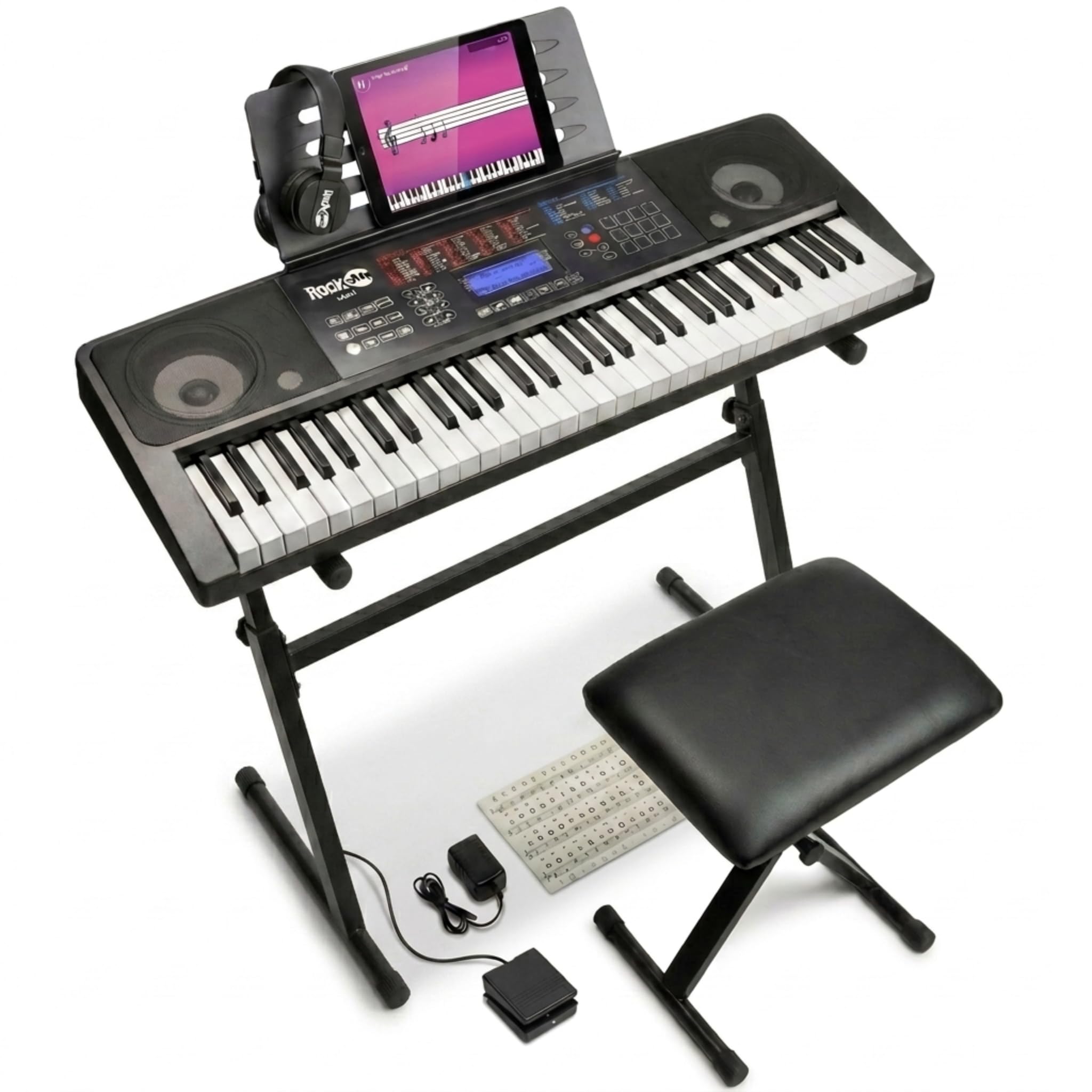
This is the gift that keeps a family room from turning into a storage closet of half-bought accessories. The RJ761 bundles a 61-key piano with a keyboard stand, a padded piano bench, headphones, a sustain pedal, and keynote stickers — everything needed to start playing minutes after the box lands. The enormous owner base praises its value, with kids and relatives gravitating to it.
The touch display panel gives you immediate control across tones, rhythms, and functions, while the included keynote stickers and Simply Piano lessons support both kids and adult beginners. The sustain pedal enables expressive piano-style phrasing — holding notes the way an acoustic piano does — and the headphones keep those practice sessions private in shared spaces. Buyers sum up the setup simply: “It’s great for small spaces,” and it was easy to assemble.
The trade-off is physical. At 19.8 pounds with the included furniture, it’s a stationary instrument rather than a portable one — a full 11 pounds heavier than the Yamaha PSR-E283, and owners freely admit the included stand can feel “a little unstable.” As the family board that lives in one corner, it earns its place; as a travel partner, it won’t.
Family-room ready: every accessory you’d otherwise buy separately arrives in the box, which is why the kit concept wins over so many households.
Know the limits: the stand’s stability is the recurring note — fine for gentle practice, not for energetic performance.
Who it beats: any bare keyboard where you’d still need to hunt down a stand, stool, and pedal at extra cost.
Who it doesn’t: musicians who need a featherweight board they can throw in the car — look at the Yamaha PSR-E283 instead.
3. Yamaha PSR-E283 61-Key Portable Keyboard
The name that still works after two decades of play.
Buy a Yamaha and you’re betting on longevity, a wager owners say pays off — reports mention a previous Yamaha still going strong after 20+ years of use. The PSR-E283 delivers that durability at just 8.8 pounds, the featherweight of the bunch, which is a 2.2x gap versus the 19.8-pound RockJam kit sitting on a stand. For practice at a desk or a moveable home studio, that lightness is a daily gift.
Learning features here are built into the hardware instead of a phone. Quiz Mode runs two ear-training games that connect sounds with keys to strengthen melodic memory, while Smart Chord lets you play rich chords — from simple pop triads to complex jazz voicings — with just one finger. The Portable Grand button instantly summons Yamaha’s signature expressive piano tone, and hundreds of built-in songs span popular hits, children’s classics, and more for play-along practice.
Buyers praise the build quality and full-sized keys for solid technique practice. Just know the audio output uses a 6.35mm headphone jack rather than the common 3.5mm, so you’ll want an adapter for standard earbuds.
The Case For It
- Proven Yamaha reliability with a decades-long owner track record
- 8.8 lbs makes it the easiest board here to move room to room
- Built-in ear-training and one-finger chords need no external app
Before You Buy
- Keys are not touch-sensitive, so no expressive volume control
- 6.35mm headphone jack needs an adapter for standard headphones
- No light-up keys or Bluetooth — learning tools are audio-based
Confident verdict: the smart pick for anyone who wants a trusted, ultra-portable practice instrument without app dependency.
Single caveat: aspiring pianists who want dynamic, expressive keys should step up to the touch-sensitive PSR-E383.
4. Eastar EK-10S 61 Key Wooden Piano

An upright piano look without the upright piano footprint.
If the black plastic slab aesthetic leaves you cold, this is the board that changes the conversation. The EK-10S dresses its 61 keys in a classic wooden frame with a wood-grain finish that evokes a proper music hall, making practice feel more like a ritual and less like typing on a toy. Its wooden cabinet and quick, minutes-long assembly get you playing fast.
Functionally it’s stacked with 500 tones, 300 rhythms, and 40 famous demo songs, all controlled from a simple front panel. The full-range speakers pair with the wooden cabinet to soften the sound, protecting beginner ears, and the jack panel is unusually complete: MP3 input, USB MIDI, sustain pedal, audio in and out, plus headphone and microphone ports, so you can hook up a teaching app or sing along.
At 12.88 kg (roughly 28 pounds), this is furniture-grade gear — the heaviest board in this guide, meant to stay put. And the reviews carry one recurring warning: a small number of units have stopped working after about a month of use, so while many owners mention two years of happy playing, the reliability track record here is more mixed than the Yamahas above. Handle the purchase as a value pick with a possible quality lottery.
Showpiece appeal: the wooden frame and gentle sound make it feel like a real instrument in the room, not a piece of tech.
Fair warning: the occasional unit failing within the first month is the documented pattern — keep your proof of purchase close.
Reach for this: if the look of your space matters as much as the sound and you want a full jack panel including a mic input.
Choose another: if you need a board you can move or want maximum confidence on long-term reliability.
5. Yamaha PSR-E383 61 Key Touch Sensitive Keyboard

The step-up that teaches your fingers to whisper and shout.
This is the Yamaha to buy when you’ve decided to take playing seriously. The 61 touch-sensitive keys respond to how hard you press, giving you dynamic control over volume — the difference between mechanical note-bashing and actual expression. It’s the defining upgrade over the PSR-E283 below it, and the quality is what buyers praise most across the board.
Learning tools here are unusually thoughtful. Touch Tutor teaches you to play at different volumes based on touch, building that expressive control deliberately rather than expecting you to figure it out alone. Keys to Success guides you through songs step by step, one hand at a time, at your own pace. Smart Chord again delivers one-finger complex chords, and hundreds of built-in songs span pop hits, children’s tunes, and classics. Owners love making beats and recording with it, too.
At 9.7 pounds it stays genuinely portable, and the realistic tones draw consistent praise. The honest limits: one buyer notes the onboard speaker isn’t loud enough for outdoor use, and connectivity is limited to a 6.35mm audio jack — there’s no Bluetooth for wireless app control.
Why It’s Worth The Step Up
- Touch-sensitive keys build real expressive technique from day one
- Touch Tutor makes dynamic volume control an explicit lesson
- Quality build and realistic tones draw consistent owner praise
What It Lacks
- Speaker volume fades outdoors — keep it for indoor practice
- 6.35mm jack only, no Bluetooth wireless connectivity
- Not weighted like a true acoustic piano action
Standout spec, tiny caveat: touch sensitivity is the single best skill investment in this guide, capped only by the limited connection options.
skip it if: your priority is wireless app pairing more than developing proper playing dynamics.
6. Casio Casiotone LK-S250 Lighted Keyboard

A grab-and-go board with light-up keys and a neat extra built in.
This is the board that leaves the house. A built-in handle and battery operation (with an included power supply for home) make the LK-S250 genuinely portable, and Casio’s Key Lighting System lights up the 61 full-size, touch-responsive keys to guide finger placement. The 4-Stage Lessons break learning into digestible steps, which owners say helps beginners build skills quickly — the light-up keys get consistent praise for making finger placement obvious.
The a neat extra is Dance Music Mode: you get 400 tones and 77 rhythms, and you can create or remix EDM tracks live using interactive key controls. That’s a delightful hook for kids and teens who might not otherwise touch a piano. It also connects via USB-MIDI with no drivers needed, plus an audio-in jack to play along with your favorite tracks, and it includes a tablet-ready music rest.
The quirks emerge with deeper use: the light-up keys primarily work with Casio’s own lesson software (or apps like Synthesia), and only up to 4 keys light at once in that mode. It uses an older micro-USB connector, and the keys are velocity-sensitive rather than weighted. For a self-taught beginner who wants guided, portable practice, it’s a strong fit.
Built for motion: the integrated handle and battery power mean practice happens anywhere, not just at a desk.
Feature reality check: the LED guide works within Casio’s software ecosystem, so expect to engage with their lesson app.
Reach for this: younger learners or anyone who wants a self-contained, carryable keyboard with a fun EDM side.
Think twice if: you want deep DAW integration or weighted piano feel — this is a learning instrument, not a studio controller.
7. Native Instruments Komplete Kontrol A61

A premium keybed and 8 knobs built to command Native Instruments software.
This is not a self-contained keyboard — it’s a controller with no speakers, designed to drive the software on your computer, and it’s superb at that job if you live inside the Native Instruments ecosystem. The semi-weighted custom NI keybed offers physical resistance that mimics an acoustic piano, and experienced players rank the feel among the very best controllers they’ve used, with key latency that mirrors a real piano.
An informative OLED display gives at-a-glance navigation, while 8 touch-sensitive control knobs give hands-on tweaking of your virtual instruments and effects. It’s USB 2.0 bus-powered (no wall adapter needed) and works as a standard MIDI controller, with smooth plug-and-play into Komplete Kontrol and Kontakt. The bundled software — including Ableton Live Lite — adds real value beyond the hardware itself.
The trade-offs are clear: there are no drum pads, no faders, and only 8 knobs, so it’s a focused instrument rather than an all-in-one studio surface. The key feel also gets mixed feedback from some owners, and one buyer notes the lack of a transpose button. And because there are no built-in speakers, you need a computer and DAW (digital audio workstation — your recording software) to hear anything at all.
The Case For It
- Semi-weighted keybed praised as among the best-feeling in its class
- Flawless integration with Komplete Kontrol and Kontakt instruments
- Bundled software suite adds genuine value beyond the hardware
The Honest Limits
- No pads, faders, or aftertouch — just 8 knobs for control
- Requires a computer and DAW; no built-in speakers at all
- No transpose button, an occasional workflow frustration
Who it’s for: producers already invested in Native Instruments software who want premium key feel without the premium price tag.
Who it’s not: beginners seeking a standalone instrument — this is a studio tool, not a practice companion.
8. Arturia KeyLab Essential mk3 61 Key Controller

A full production surface with pads, faders, and a massive sound library.
Where the Native Instruments A61 focuses on keys and knobs, the Arturia KeyLab Essential mk3 goes wider — it’s a complete studio control surface. You get 8 velocity- and pressure-sensitive RGB-backlit pads for finger drumming, 9 faders, 9 encoders, and a bright 2.5-inch LCD screen for real-time feedback. Owners praise the deep DAW control and bundled software as exceptional value.
The included Analog Lab V software open up 2000 presets spanning vintage keyboards, modern synths, unique hybrids, and orchestral sounds — well beyond typical starter packs. The package also adds two premium piano libraries (UVI Model D and NI’s The Gentleman), plus subscriptions to Loopcloud and Melodics. New creative features like Scale Mode, Chord Mode, and an Arpeggiator make songwriting and beat-making more intuitive, and custom scripts give deep control inside Ableton Live, Logic Pro X, and FL Studio.
Setup earns consistent praise — owners describe flawless out-of-the-box operation with PCs, Macs, and even iPads running GarageBand. The key action draws some mixed notes: it’s light and not heavily weighted, so it won’t replicate acoustic piano resistance, and one owner notes an occasional Amazon delivery arrives as a used unit despite being sold as new. For production-focused players, though, the control and software value are exceptional.
Why Producers Love It
- 8 pads, 9 faders, and 9 encoders offer hands-on control no other pick here matches
- Analog Lab V’s 2000 presets plus extra piano libraries is enormous included value
- Plug-and-play across PC, Mac, and iPad with flawless DAW integration
The Trade-Offs
- Light key action won’t satisfy those wanting a piano-like weighted feel
- Some Amazon orders arrive as used units despite buying new
- Best used with a computer — no built-in speakers for standalone play
Reach for this: beat-makers and DAW producers who want pads, faders, and a huge sound library in one box.
Look elsewhere: if your goal is acoustic-piano-style practice — the light key action won’t build the same finger strength.
9. Casio CT-X3000 Portable Arranger Keyboard
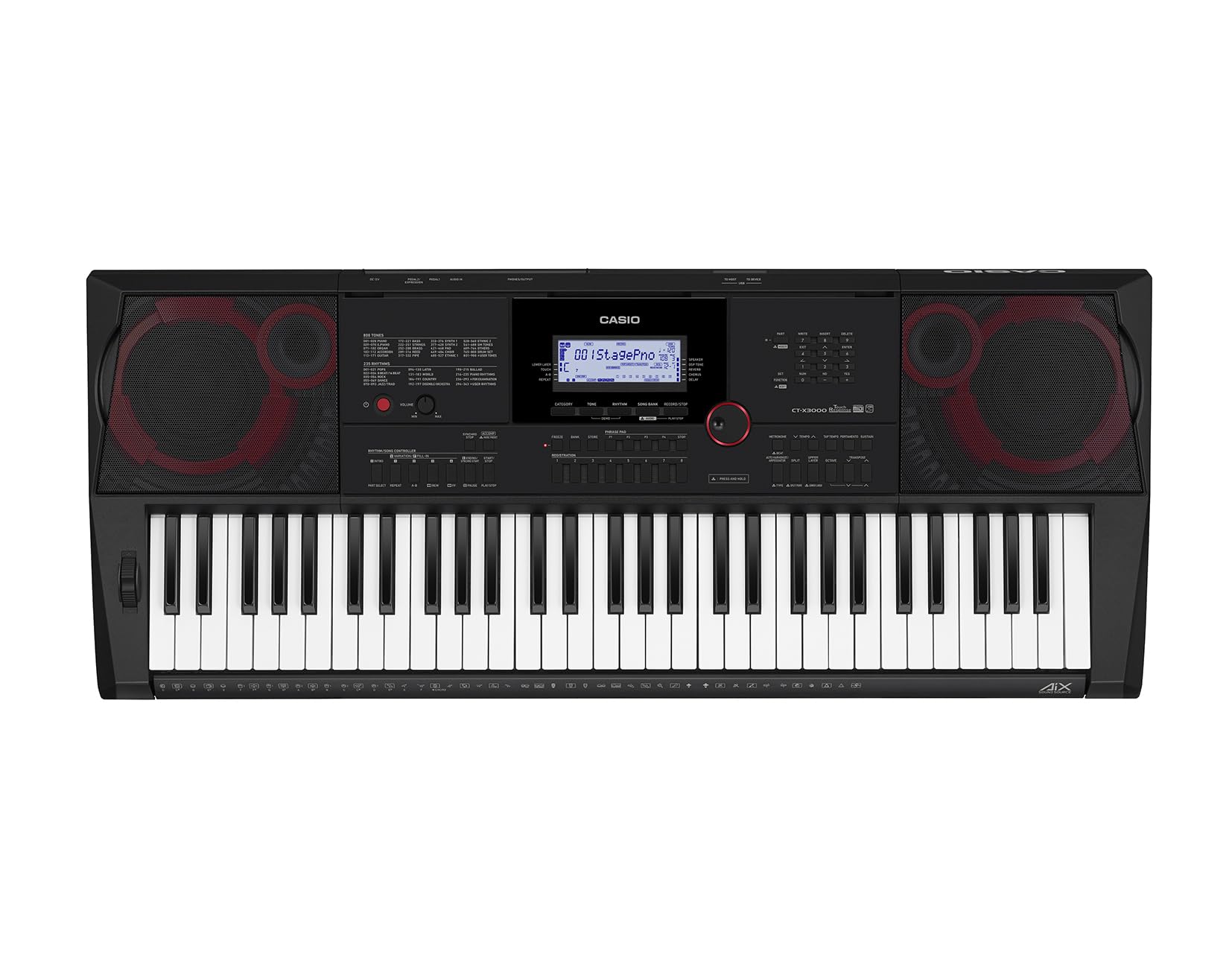
The arranger workstation that records full songs without touching a computer.
The CT-X3000 is the most serious standalone instrument here, a self-contained songwriting studio. Its AiX Sound Source engine delivers pro-level realism from grand pianos to vintage synths, and the sound quality is the thing owners rave about most — with one noting it even helps novices create great-sounding music as they learn. The 12W stereo speakers are the most powerful in this guide.
Creativity runs deep: 800 editable tones, 235 rhythms, 100 editable DSP effects (digital signal processing — effects like reverb and delay), and a 17-track recorder that lets you layer and edit a full arrangement with copy, quantize, and punch-in functions. Registration memory saves your custom sounds and setups, and phrase pads trigger musical ideas live. It works as a MIDI controller over USB too, making it a bridge between standalone playing and computer production.
At 15.2 pounds it’s transportable but not backpack-friendly, and the 6.35mm headphone jack needs an adapter for standard headphones. The feature depth is both its strength and its learning curve — one long-time owner (age 86) finds it “somewhat complicated to learn,” though the payoff is a board that suits every level from novice to advanced. The ease-of-use feedback is mixed, but the capability is class-leading in this list.
Deepest feature set: 800 tones, a 17-track recorder, and editable effects make this a production powerhouse with no computer required.
Know before you buy: the complexity is real — plan to spend time with the manual, and budget for a headphone adapter.
Who it suits: songwriters and arrangers who want to compose, record, and perform full arrangements on one portable instrument.
Who it doesn’t: absolute beginners who want a simple, immediate experience — the learning curve here is steeper than the light-up boards.
Understanding the Specs
Touch Sensitivity & Weighted Keys
Touch-sensitive keys respond to how hard you press, letting you control volume and expression by touch alone — essential for any musical dynamic. Semi-weighted keys add physical resistance that mimics an acoustic piano action, helping your fingers build strength. Unweighted, springy keys are lighter and cheaper but won’t teach proper technique. If you only take one spec seriously, make it this one.
Polyphony and Tone Count
Polyphony is the number of notes that can sound at once — 64-note polyphony means a chord plus pedal-held notes won’t cut off early. Tone count refers to the variety of instrument sounds (guitar, strings, synth, drums) on board. Higher numbers give you more creative range, but for a beginner, 256 tones is already far more than you’ll use in year one.
MIDI and Connectivity
MIDI is the language computers and keyboards use to communicate — it sends note data, not audio. USB-MIDI plugs straight into a computer for recording software, while Bluetooth MIDI pairs wirelessly with phones and tablets. Audio jacks (3.5mm or 6.35mm) carry the actual sound to headphones or an amp. Always check which jack size you need before buying headphones.
Built-in Speakers vs. Controller
A standalone keyboard has built-in speakers, so it makes sound the moment you press a key. A MIDI controller produces no sound on its own — it needs a computer, tablet, or external sound module running software instruments. If you want to sit down and play without a setup ritual, choose a board with speakers; if you’re building a studio, a controller makes sense.
FAQ
Is a 61-key keyboard enough to learn piano?
What is the difference between touch-sensitive and weighted keys?
Do I need a MIDI controller or a keyboard with built-in speakers?
Will light-up keys actually teach me to play?
Can I connect these keyboards to my phone or tablet?
What does 64-note polyphony actually mean for me?
How portable are these keyboards really?
Do I need to buy any accessories separately?
Can these keyboards be used for recording music on a computer?
What is the difference between a synthesizer and a keyboard?
Final Thoughts: The Verdict
For the majority of new players, the best 61 key synthesizer is the The ONE Smart Keyboard because the LED-guided lessons and app integration remove the biggest barrier — knowing where to put your fingers — while the grand-piano-sampled sound keeps you engaged. If you want the classic reliability of a trusted name with a featherlight 8.8-pound frame, grab the Yamaha PSR-E283. And if you’re producing music in software rather than just playing, the Arturia KeyLab Essential mk3 packs a massive 2000-preset sound library and full production controls — the kind of bundle value that’s tough to top at this level.
How We Picked
We do not accept paid placement. Every pick is matched to a real buyer and a real use-case; we do not hands-on test units.
Sources & Methodology
Specifications: manufacturer listings and product documentation. Review insights: verified customer reviews, as of August 2026. Pricing: not shown on this page (it changes often); check the current price via the retailer link.
As an Amazon Associate, Gadgets Feed earns from qualifying purchases. This does not affect which products we feature.