
Our readers keep the lights on and my morning glass full of iced black tea. As an Amazon Associate, I earn from qualifying purchases.
Specs are compiled from manufacturer listings and verified buyer reviews and can change over time — please confirm the key details on the product page before buying.
You have two paths when picking a 65% keyboard case: a barebones frame you build yourself or a complete board ready to type on. Decide between a barebones frame for full customization or a prebuilt board for plug-and-play convenience. These six picks range from aluminum frames to hard-shell travel cases, matching different desk setups and typing preferences.
I’m Min — the founder and writer behind Gadgets Feed. This guide is built by comparing the manufacturers’ published specifications and the patterns across verified customer reviews, so you get each pick’s real strengths and trade-offs instead of marketing spin.
If you want a full-aluminum hot-swap frame or a protective shell for travel, this look at 65 keyboard case options focuses on build quality, layout, and the features that change how your board feels and sounds.
Our Picks at a Glance

How To Choose The Best 65 Keyboard Case
Before you buy, decide if you want a complete keyboard or just the frame. A barebones kit skips the switches and keycaps, so you install your own. A prebuilt board comes ready to type on, so you plug in and play without extra parts.
Barebones frame or ready-to-use board?
Barebones frames appeal to modders who already own switches or want a specific feel. They usually cost less upfront, but you must budget for switches and keycaps separately. Prebuilt boards cost more but include everything, which suits first-time buyers who want a working keyboard from the start.
Why hot-swap sockets matter
Hot-swap sockets let you pull out a switch and push in a new one without any soldering. This lets you test linear, tactile, or clicky switches to find your preferred sound and feel. It also makes fixing a broken key a quick job instead of a repair project.
Quick Comparison
| Model | Best For | Frame Material | Hot-Swap | Key Count | Amazon |
|---|---|---|---|---|---|
| Glorious GMMK 2 Compact★ Best Overall | Custom Builders | Aluminum | Yes | 65% | Amazon |
| Ranked G65 GuardianSlim Profile Pick | Low-Profile Fans | Aluminum | Yes | 68 | Amazon |
| LTGEM Hard Case | Travel Protection | EVA Shell | — | — | Amazon |
| Geekria Combo Case | Keyboard Plus Mouse | EVA Shell | — | — | Amazon |
| SK68 Wired | Budget Gamers | Aluminum Alloy | Yes | 68 | Amazon |
| HyperX Alloy Origins 65 | Gaming & Typing | Aluminum | No | 65% | Amazon |
In‑Depth Reviews
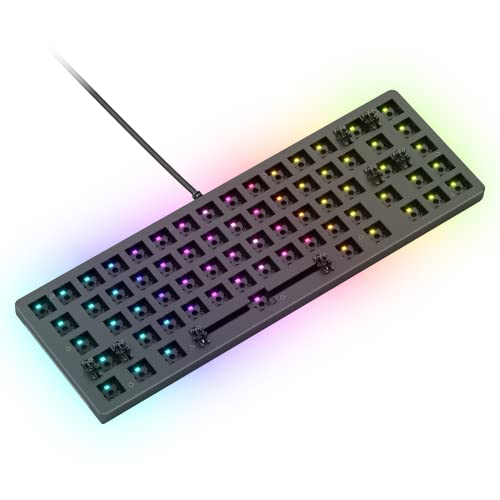
1. GLORIOUS Gaming GMMK 2 Compact 65%
Our pick — 4.5★ from 400+ verified ratings; the strongest balance of quality and price.
The aluminum-shell barebones frame that gives you total control over every switch and keycap.
This is the crowd favorite — 4.5 stars across 400+ ratings — and the reason is clear once you hold it. The aluminum top shell gives the board serious rigidity, while the anodized finish resists scratches and corrosion. The grippy rubber feet keep it planted on your desk during intense gaming sessions, so it won’t slide around mid-match.
The hot-swap sockets accept any 5-pin switch without soldering, meaning you can install Glorious, Cherry, Kailh, or Gateron switches in minutes. The pre-lubed stabilizers deliver a smooth, rattle-free press, and thick interior foam dampens case ping for a cleaner sound. It ships as a frame only, so you provide your own switches and keycaps.
One buyer hit a snag with two dead keys on the first unit — likely rain damage — but the replacement worked perfectly. Others report the software can be finicky, with some noting the RGB lights run dim and the color is slightly off. The north-facing sockets work great with non-Cherry keycaps, which expands your keycap options considerably.
What wins people over
- Solid aluminum build with a matte metallic feel
- Tool-free hot-swap for any 5-pin switch
- Lubricated stabilizers and dampening foam for clean sound
- Compact 65% layout keeps arrow keys intact
The honest trade-offs
- Barebones only — switches and keycaps cost extra
- Software can be tricky and RGB dims at times
- North-facing sockets may clash with some Cherry-profile caps
Reach for this if: you want a sturdy foundation for a custom build and enjoy picking your own switches and keycaps.
Think twice if: you want a ready-to-type board straight from the start — this frame needs your parts first.
2. Ranked G65 Guardian 65%
A feather-thin full-aluminum board with near-zero flex and a deep, clean acoustic profile.
This low-profile keyboard is only 0.7 inches thick, so it slides into a backpack easily, and it is dramatically slimmer than the Glorious frame’s 2.9-inch depth. The full-aluminum body feels solid with zero flex, and the pre-lubed stabilizers (the clips that hold larger keys steady) keep wire rattle to a minimum for a clean typing sound.
The 68-key layout runs on Gateron low-profile red switches that feel smooth and fast, ideal for high-speed typing and gaming. The multicolor RGB system offers 16.8 million colors arranged into five backlight patterns, plus a customizable side underglow ring. Doubleshot keycaps keep their legends sharp even after heavy use.
The magnetic feet are easy to lose, and the ABS keycaps attract oils over time. Some buyers noted the photos show a gray finish when the actual unit is bone white with an electroplated look. It has no official QMK or VIA support, so remapping relies entirely on the Ranked Utility software.
Owner consensus: the thing everyone raves about is the premium full-aluminum feel at a price that undercuts most rivals — 4.4 stars across a small but enthusiastic owner base.
Fit note: the slim 12.2-inch width leaves over 4 inches of extra gap compared to the Glorious case, so it slides into tighter bags and drawers with ease.
3. LTGEM Hard EVA Case
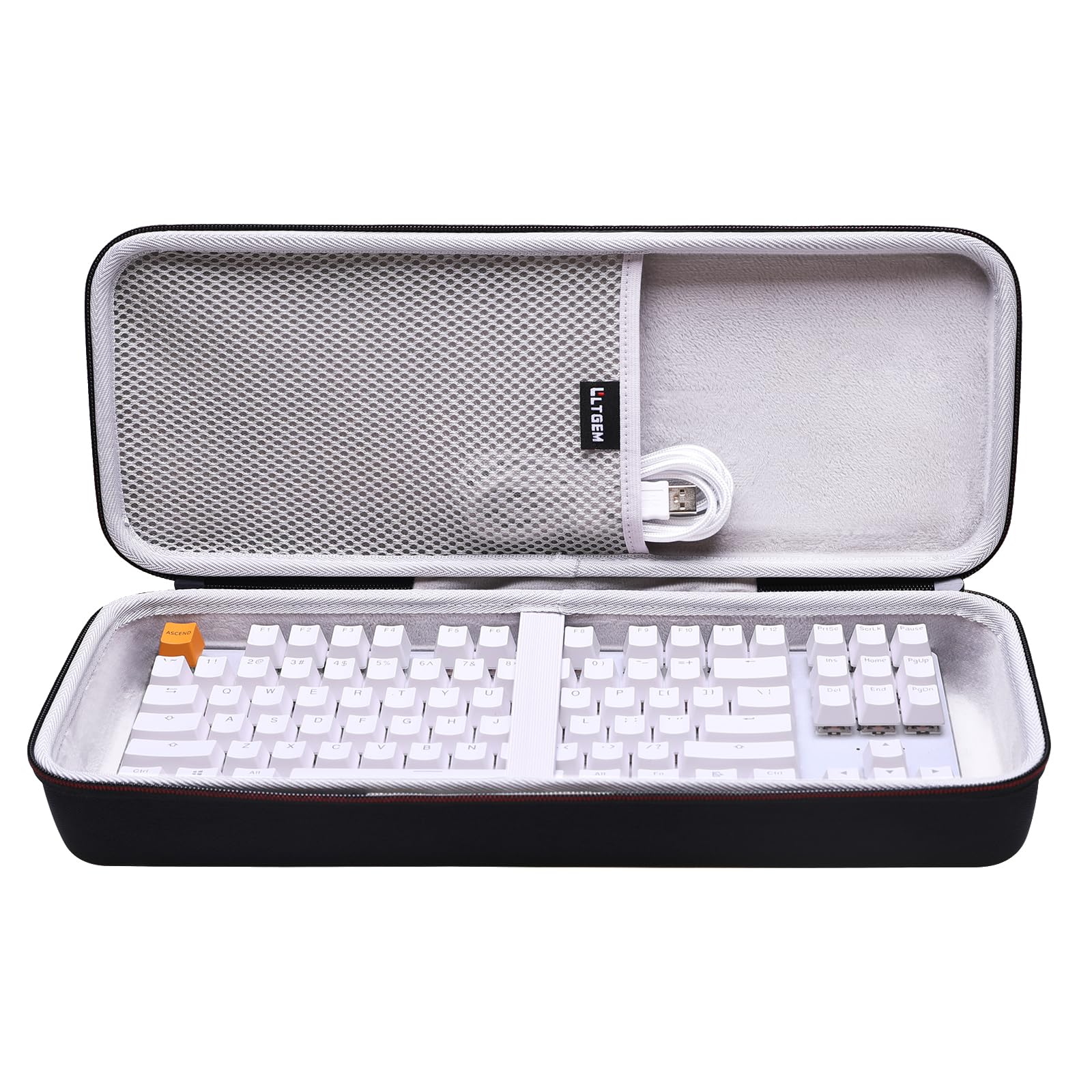
A rugged EVA shell that shields your 65% board from dust, drops, and backpack smashes.
This isn’t a keyboard — it’s the armor that keeps your keyboard safe when you travel. The hard EVA material is semi-waterproof, shockproof, and durable, protecting your board from impacts and splashes. A holding belt keeps your keyboard fixed in place, so it won’t shift around inside during transit.
The strong rubber handle makes it easy to grab and go, while the inner mesh pocket stores your cables, keycaps, and accessories. The 360-degree zipper opens smoothly for quick access, and the soft anti-scratch interior protects your keycaps from scuffs. At 16.4 inches long, the outer case fits the Glorious GMMK 2 65% and GMMK 3 65% with room to spare.
Buyers report the case works great for other compact devices too — one owner uses it for an Arturia Microlab midi controller. However, the interior fit is specific; a YUNZII X98 at 15.37 inches didn’t match the stated dimensions, so measure your board before ordering. The case is sold alone, so your keyboard is not included.
Best for: commuters and students who toss their board into a backpack and want hard-shell protection.
Look elsewhere if: your keyboard exceeds the designed interior space — check your board’s exact length first.
4. Geekria 65% Keyboard and Mouse Combo Case

One hard shell that carries your 68-key board, mouse, and cables together in a single trip.
This is the rare case designed for the whole setup, not just the keyboard. The ultra-hard EVA shell protects your board from drops and crushes, while the internal mesh pocket stores cables, chargers, and other accessories. The top handle makes it easy to carry everything at once.
The interior handles a keyboard up to 13.9 x 5.1 x 2.1 inches and a mouse up to 3.3 x 5.1 x 2.1 inches. That covers a long list of popular boards including the YUNZII AL66, RK Royal Kludge R65, Keychron K6 V2, and ASUS ROG Falchion. The adjustable straps adapt to your board’s actual size, so even a split ergo Alice board fits despite the central bump.
Owners consistently praise how roomy it feels — one fit a keyboard, mouse, wrist rest, and cables with space left over. The included keycap puller and cleaning brush are nice freebies. A few note the case runs small for certain boards, so double-check your dimensions if you own a larger 65% model. It comes with a 1-year manufacturer warranty.
The roomy read: reviewers report the case holds a keyboard, mouse, and wrist rest all at once — and the straps adapt to fit a split ergo Alice board without trouble.
Watch out for: anything bigger than the stated interior limits, since the fit is snug for oversized boards.
5. SK68 65% Gaming Keyboard
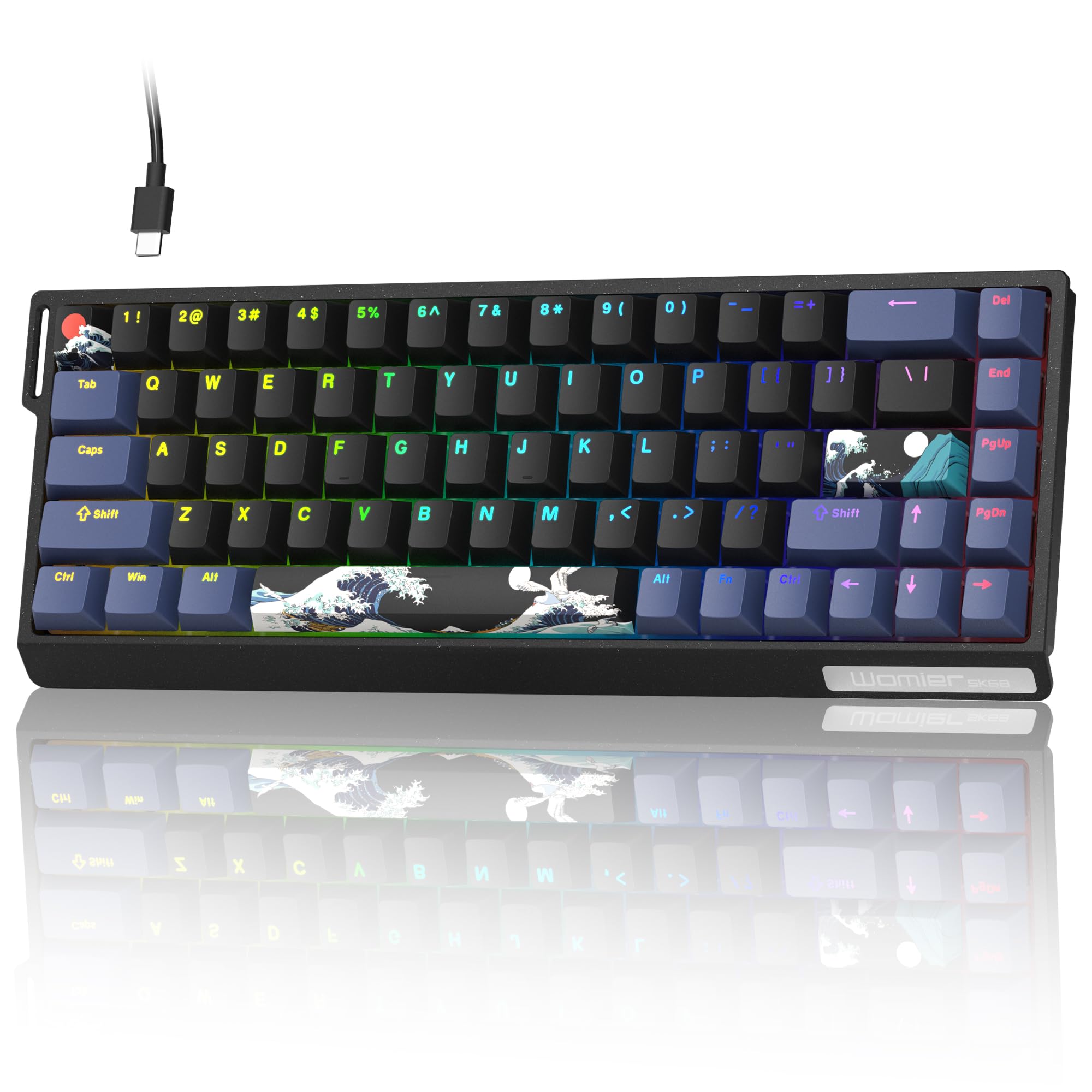
A budget aluminum board with 100% hot-swap sockets and a space-saving 68-key layout.
This wired keyboard has a sturdy aluminum alloy frame with a 100% hot-swap socket, so you can swap switches instantly without soldering. The RGB backlight offers 46 lighting effects, and the switches are rated for over 50 million presses, so they last for years of heavy typing. It works with both Windows and Mac, with full-key non-interference on Windows (every keypress registers even when you press many at once) and 6-key support on Mac.
The 68% form factor keeps all the commonly used keys while trimming excess, making it ideal for cramped setups. FN shortcut keys give you quick access to media controls, lighting, and macros. The aluminum alloy top plate reduces vibration and adds stability, giving the board a premium feel that matches its metal chassis.
The recurring gripes are the missing volume button and no dedicated F keys, which makes full-screen gaming difficult on a PC. A few owners mention the board suits laptops better than desktops for that reason. The tray mount is stiffer than expected despite the marketing, and the VIA JSON file isn’t readily available, so configuration can take effort.
Where it shines
- True hot-swap sockets for tool-free switch changes
- Aluminum alloy frame with reduced vibration
- 46 RGB lighting effects for visual variety
- Compact enough for a pull-out desk drawer
Where it falls short
- No volume button or F-row keys
- Stiffer tray-mount typing than advertised
- VIA config lacks an official JSON file
Pick this for: a budget-friendly hot-swap board that fits in tight spaces and lets you customize the feel later.
skip it if: you need F keys or a volume knob for desktop gaming — this one is better suited to laptops.
6. HyperX Alloy Origins 65

The prebuilt board with a rock-solid aluminum body and the most praised sound in its class.
This is the ready-to-type choice that skips the DIY work entirely. The full aircraft-grade aluminum casing keeps the board structurally sound even during intense gaming sessions, and the compact 65% form factor frees up serious desk space for your mouse. The double-shot PBT keycaps have side-printed functions, so you can quickly locate secondary keypresses without memorizing layers.
The HyperX mechanical switches use an exposed LED design that delivers brighter, more luminous RGB lighting. Tactile Aqua switches balance speed and accuracy, with a satisfying click that owners consistently praise. The flat design is easy to clean, and the grippy keycap texture adds a premium touch. NGENUITY software saves your profiles onboard, so your settings persist even when you unplug the detachable USB-C cable.
The build quality earns the second-most praise, with 9 owners calling it out. Reliability gets mixed feedback, with some reporting issues with the CMD key, and a few wish for an ‘end’ button. The side-printed legends take some adjustment if you’re used to top-printed caps.
The standout: the aqua switches are described as super clicky and satisfying, great for both gaming and everyday typing.
The known quirk: Windows 11 Dynamic Lighting can lock the RGB to a static color — a quick setting toggle fixes it.
Understanding the Specs
65% Form Factor
This layout keeps the arrow keys and a few navigation keys while dropping the F-row and number pad. You get a board that’s about 60% of a full-size keyboard’s width, freeing up desk space for your mouse. The 68-key version is the most common, retaining the essential keys without the bulk.
Hot-Swap Sockets
These sockets let you remove a switch with a puller and push in a new one with zero soldering. This lets you experiment with linear, tactile, or clicky switches to dial in your ideal feel. It also simplifies repairs — a broken switch takes seconds to replace instead of minutes.
FAQ
Will a 65% keyboard case fit my 68-key board?
What is the difference between a barebones frame and a prebuilt keyboard?
Can I use any switch with a hot-swap 65% board?
How do I keep my 65% keyboard clean?
Does a 65% keyboard need software to work?
Is an aluminum frame worth the extra cost?
Can I carry a mouse in a 65% keyboard case?
What does low-profile mean on a 65% keyboard?
Final Thoughts: The Verdict
Across the board, the 65 keyboard case winner is the Glorious GMMK 2 Compact because the aluminum shell, tool-free hot-swap sockets, and dampened acoustics give you a premium foundation for any custom build. If you want a slim low-profile board that slides into tight spaces, the Ranked G65 Guardian delivers a solid full-aluminum frame at just 0.7 inches thick. And for the highest owner satisfaction among prebuilt boards, the HyperX Alloy Origins 65 earns its reputation with praised sound quality and a rock-solid build.
How We Picked
We do not accept paid placement. Every pick is matched to a real buyer and a real use-case; we do not hands-on test units.
Sources & Methodology
Specifications: manufacturer listings and product documentation. Review insights: verified customer reviews, as of July 2026. Pricing: not shown on this page (it changes often); check the current price via the retailer link.
As an Amazon Associate, Gadgets Feed earns from qualifying purchases. This does not affect which products we feature.