
Our readers keep the lights on and my morning glass full of iced black tea. As an Amazon Associate, I earn from qualifying purchases.
Specs are compiled from manufacturer listings and verified buyer reviews and can change over time — please confirm the key details on the product page before buying.
A 6K monitor costs enough that the wrong pick becomes an expensive desk ornament. Every pick below is a real 6K panel, so the deciding factors are brightness, color accuracy, and long-term panel reliability. This guide compares brightness, color accuracy, and long-term panel reliability across all four picks.
I’m Min — the founder and writer behind Gadgets Feed. This guide is built by comparing the manufacturers’ published specifications and the patterns across verified customer reviews, so you get each pick’s real strengths and trade-offs instead of marketing spin.
You will see how pixel density changes a 32-inch screen in daily use, why matte versus glossy matters as much as panel type, and which models hold up to daily creative work. The right choice here is the one that fits your workflow, and this breakdown of the 6k computer monitor field will show you which of these four earns that spot.
Our Picks at a Glance
How To Choose The Best 6K Computer Monitor
The first thing to understand is that 6K is not one number. Some panels run at 6016 x 3384 pixels, others at 6144 x 3456. Both are legitimately 6K, and both put far more detail on screen than a 4K panel of the same size. What you are really shopping for is how that detail reaches your eyes, day after day.
Pixel density is the number your eyes notice
Pixel density is measured in PPI, or pixels per inch. Higher PPI means text edges look cleaner and photos show finer detail. On a 32-inch panel, the picks here land in the 223 to 224 PPI range, which is roughly double what a 4K monitor of the same size delivers. This is why writers and coders say text looks almost like print on a good 6K screen.
Glossy versus matte changes the feel of the panel
A glossy coating lets colors punch harder and makes dark scenes look deeper. Get one direct window behind you and you will see your own reflection instead of your work. A matte coat scatters that light and keeps colors slightly softer — better for bright rooms and long editing sessions, less punchy in a dim studio.
Ports decide how many cables you need
A USB-C port with power delivery lets one cable carry video and charge your laptop at the same time. Thunderbolt and Thunderbolt 5 add faster data and the ability to chain a second monitor through the screen. HDMI and DisplayPort are handy for consoles and second machines. Count the devices you actually own before you pick.
Color accuracy matters if you sell your work
Color gamut coverage is the percentage of a color space a monitor can reproduce — sRGB for the web, DCI-P3 for film and video, Adobe RGB for print. Factory calibration is a per-unit tuning at the factory so colors arrive closer to the target from the start. If your edits go to a client, calibration matters more than extra brightness.
Quick Comparison
| Model | Best For | Resolution | Panel Type | Brightness | Amazon |
|---|---|---|---|---|---|
| Kuycon G32P 32″ UHD 6K★ Best Overall | Studio-grade color on a budget tier | 6144 x 3456 | IPS | 500 cd | Amazon |
| Dell UltraSharp U3224KB | Built-in camera and hub | 6144 x 3456 | IPS Black | 450 Nit | Amazon |
| ASUS ProArt PA32QCV | Mac creators who want value | 6016 x 3384 | IPS (AGLR) | 600 cd/m² | Amazon |
| LG 32U990A-S UltraFine evo | Thunderbolt 5 future-proofing | 6144 x 3456 | Nano IPS Black | 450 cd/m² | Amazon |
In‑Depth Reviews
1. Kuycon G32P 32″ UHD 6K (6144 x 3456) Glossy Monitor
The glossy panel that makes photo work look like it is printed on glass.
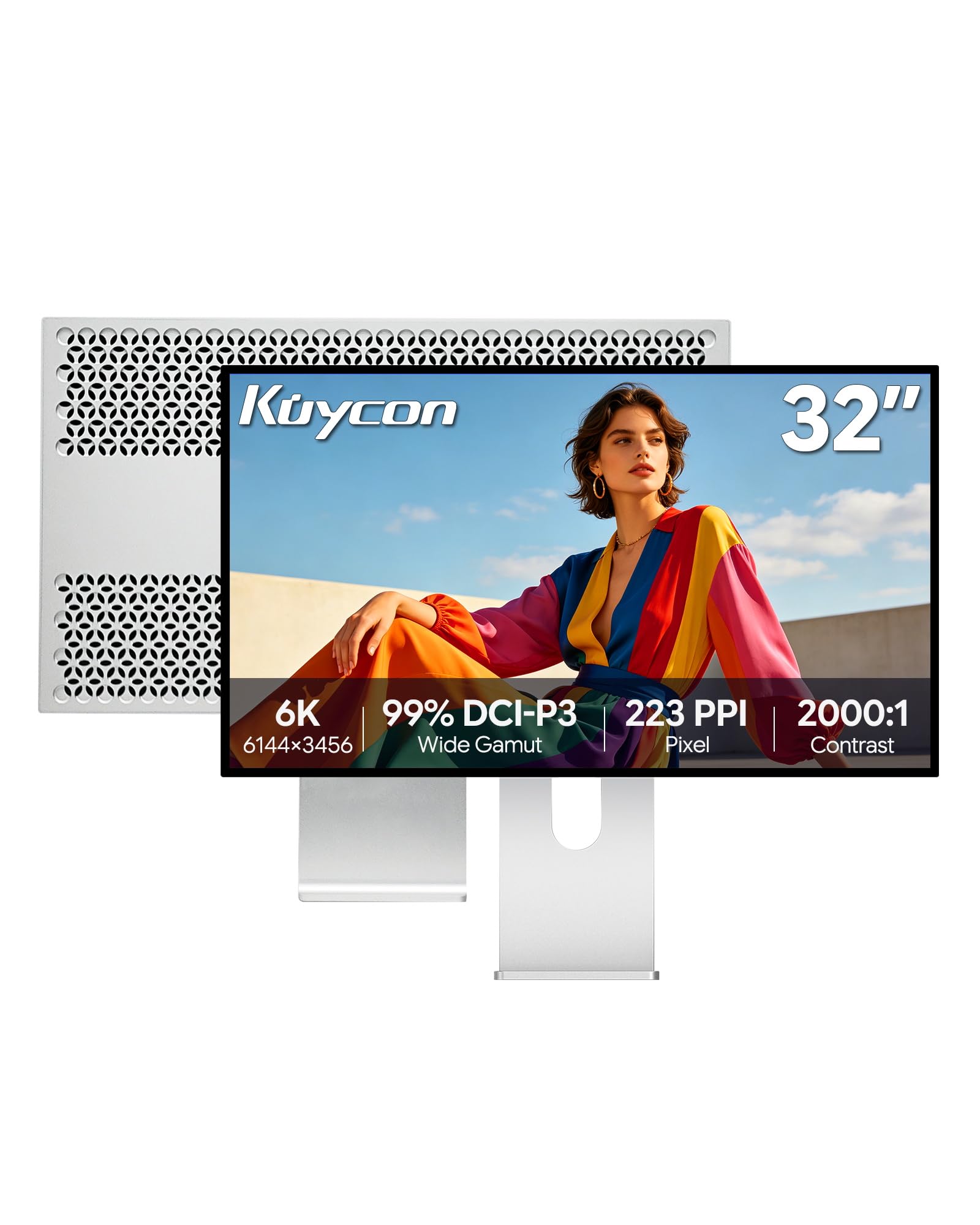
For anyone who edits images or video all day and wants a screen that rivals an Apple Studio Display, the Kuycon G32P leads this list — 4.6 stars across a small but devoted group of owners, and it is the highest-rated pick here. It starts with a 32-inch IPS panel running 6144 x 3456 pixels at 223PPI. That pixel count is what keeps fine text crisp and photos detailed instead of soft. A glossy finish is a deliberate choice here: colors look richer and blacks look deeper, so image editing feels closer to holding a print.
The Kuycon also handles the practical side well. A single USB-C port pushes up to 100W of power to charge your laptop, so your whole desk runs on one cable instead of a tangle of them. The included stand adjusts for height, swivel, tilt, and pivot, letting you flip the screen into portrait for long documents. That 6144 x 3456 panel is also 32 inches wide, wider than the Dell UltraSharp U3224KB at 31.5 inches, so you get a bit more real estate on a panel that sits at the same resolution.
Owners say color pops and sharpness holds up whether they are editing or gaming, and the anti-glare coating plus Low Blue Light mode keeps long sessions easier on your eyes. The catch is quality control — Kuycon is a smaller brand, and some owners have received units with a stuck pixel or a panel defect on the first try. The positive part: the support team moves fast. As buyers report, the company shipped a replacement within days and refunded part of the cost for the trouble. A fast replacement and partial refund matter at this price.
Where it wins
- 32″ IPS at 6144 x 3456 (223PPI) — sharp enough for fine detail work
- 100W USB-C means one cable charges your laptop and drives the screen
- Glossy finish adds color depth and contrast; owners compare it to the Apple Studio Display
- Height, swivel, tilt, and pivot adjustment plus 100x100mm VESA mounting
Where it needs care
- It is a smaller brand, so quality can vary unit to unit
- More ports would help — some owners want an extra Thunderbolt connection
- Glossy panel can reflect a bright window behind you
Your pick if: you are a Mac user who wants near-Apple-Studio-Display color without that premium tier price.
Think twice if: you need a screen with the widest connectivity from the start — that is the LG and ASUS territory.
2. Dell UltraSharp U3224KB 31.5″ Webcam 6K LED Monitor

The conference-room-in-a-monitor that hides a webcam behind a shutter.
If you are on video calls all day and want a 6K desk to double as a self-contained meeting setup, the Dell UltraSharp U3224KB is aimed squarely at you. It runs the same 6144 x 3456 resolution as the Kuycon, on a slightly smaller 31.5-inch panel. The big differentiator is the built-in webcam with a physical shutter — slide it closed and you know for certain your camera is off. Dell also builds in speakers and a full hub, so you skip a separate dock.
You get Ethernet, HDMI, Mini-DisplayPort, Thunderbolt, USB, and USB Type-C connectivity, plus a stand that adjusts for height, swivel, and tilt. Owners do call the software and connectivity setup fiddly and the webcam color a touch off, though a 4K webcam with AI frame tracking is more than most webcams in a monitor offer. The taller 61.4-pixel-wide-format panel wins on text density compared to 5K displays of the same class.
Here is the honest side of this pick: reliability is the weak spot. Owners mention panel problems in the form of a backlight failure on the lower right corner, an issue severe enough to make a screen unusable, and transport durability is flagged too, with units that broke after being moved. Some of that is documented through warranty friction rather than the monitor itself, so a 6K monitor this fragile is worth buying only if it stays put on your desk. Its 450 Nit brightness is similar to the LG and lower than both the Kuycon (500 cd) and the ASUS (600 candela per square meter).
What buyers get: a 6K hub with a 4K webcam, built-in speakers, and about as many ports as you will ever own devices to plug into.
Worth knowing: the fit is for a fixed desk setup — this panel does not want to be carried between offices.
Reach for this one if a built-in 4K webcam and a full port hub save you from buying accessories separately.
Pass if you need a monitor that travels or you want proven long-term reliability on the panel itself.
3. ASUS ProArt PA32QCV 32 Inch 6K DCI-P3 Thunderbolt 4 Monitor

The Mac-matched panel that photographers keep recommending after two months of daily use.
For photographers and illustrators who need a 6K panel that matches their MacBook’s color without spending a premium-tier budget, the ASUS ProArt PA32QCV is the crowd favorite here. It has the most owner history of these picks, and the picture quality and display quality earn most of the praise — sharp text, rich colors, and clarity that holds up for long Premiere Pro sessions. The panel runs 6016 x 3384 pixels at 31.5 inches with a matte AGLR finish, which reduces reflections while keeping colors reasonably saturated.
What makes the ProArt stand out is factory tuning. It arrives Calman Verified with Delta E < 2 color accuracy, meaning each unit is measured before it ships so color lands close to target without a separate calibration kit. Coverage sits at 98% DCI-P3 and 100% sRGB, and the M Model-P3 preset matches MacBook displays for a consistent workflow. Dual Thunderbolt 4 ports handle up to 96W power delivery and daisy-chaining, plus HDMI and DisplayPort for other gear. A built-in Auto KVM switch lets you run two computers from one keyboard and mouse. The Auto KVM switch lets one keyboard and mouse control a Mac and a PC without replugging cables.
The trade-offs are worth stating plainly. Wake time runs three to five seconds, which feels slow if you power your screen off between tasks, and the built-in speakers are weak enough that most owners add their own. A small number of units arrived with dead pixels or backlight bleed at a corner. Still, ASUS backs it with a five-year warranty once you register, so replacement is straightforward. That combination — factory-calibrated color, Thunderbolt 4, and a five-year safety net — is why creators keep coming back to this model.
Big wins
- Calman Verified factory calibration with Delta E < 2 from the start
- Dual Thunderbolt 4 with 96W power delivery and daisy-chaining
- Built-in Auto KVM handles two computers with one keyboard and mouse
- Registered buyers get a 5-year warranty (3 years plus 2 years extension)
Small drawbacks
- Slow wake — three to five seconds from sleep to picture
- Speakers are weak and best replaced with desk audio
- Some units ship with a dead pixel or slight backlight bleed
Made for: photographers and Mac creatives who want calibrated color and Thunderbolt in one screen.
Not the one for: anyone who wants the fastest wake-up or built-in speakers they will actually use.
4. LG 32U990A-S 32-Inch UltraFine 6K Nano IPS Black Thunderbolt 5 Monitor

The only Thunderbolt 5 6K on this list, and the sharpest pixels per inch of the four.
If you want the newest connections and the tightest pixel density, the LG 32U990A-S UltraFine evo goes there first. It is the only panel here with Thunderbolt 5, which LG rates at 2x the speed of Thunderbolt 4, and it packs 6144 x 3456 pixels into a 32-inch frame — the highest PPI of all four picks. LG also ships every cable you need in the box (HDMI, Thunderbolt, DisplayPort, and USB-C), plus a Tilt, Height, and Pivot stand. Picture quality is what most owners rave about, and the 2000:1 contrast from the Nano IPS Black panel gives deeper blacks than a standard IPS.
For creative work, the color side is serious. LG lists up to 99.5% Adobe RGB, 98% DCI-P3, and Real 10-bit color depth, then adds DisplayHDR 600 and TÜV Rheinland Eye Comfort certification for longer sessions. One cable handles video, data, and up to 96W of laptop charging. That single port carries video, data, and 96W of laptop charging, and it supports daisy-chaining a second monitor later.
Now the reminder: connectivity is praised here, but display quality across the whole panel draws a mixed read, and color accuracy is the sticking point. Customers note light and color uniformity issues, a sparkly matte coating on some units that muddies text clarity, and one panel that arrived damaged in transit. Some units arrive with these flaws, others are fine — this is a panel with real variability. If you plan on design or color grading work, you will want a calibration kit. The two-year macOS software quirks — LG’s utility hijacking function keys — are a smaller annoyance but a real one.
What stands out: Thunderbolt 5, the tightest pixel density of the group, and a full cable bundle that saves you accessory shopping.
The honest trade-off: panel-to-panel consistency is the concern — verify color uniformity early so you can return inside the window.
Choose this one if you want Thunderbolt 5, the highest pixel density, and cables included in the box.
Look past it if consistent color from the start is critical and you do not plan to calibrate.
Understanding the Specs
Pixel density (PPI) — why it decides how sharp everything looks
PPI stands for pixels per inch, and it measures how tightly the pixels are packed on the screen. More pixels in the same space means smoother curves, cleaner text edges, and photos that reveal finer detail. A 32-inch 6K panel lands near 224 PPI, while a 4K panel of the same size sits far lower. You feel the difference every time you read text or zoom into an image.
Color gamut — what percentage coverage actually means
Color gamut is the range of colors a monitor can display, expressed as a percentage of a standard color space. A higher percentage means the panel can reproduce more of the intended color, which matters most if you deliver work to a client. Coverage of both DCI-P3 and sRGB is worth checking, since web content tends to live in sRGB while cinematic work uses DCI-P3.
Contrast ratio — the gap between the blackest black and the brightest white
Contrast ratio describes how much brighter the brightest part of the image is than the darkest. A higher figure tends to mean deeper blacks and shadows that keep their detail instead of crushing into flat gray. IPS panels commonly fall around 1000:1, while IPS Black and Nano IPS panels push higher. In a dim room, that difference shows up in the moody scenes of film and photo work.
Brightness — a spec you feel in daylight, not in numbers
Brightness is measured in nits, or candela per square meter — the more, the better the fight against a sunny room. A monitor at 450 to 600 nits handles most office lighting without trouble. Higher brightness also helps HDR content, which uses the extra headroom to make highlights pop. If your desk sits under a bright window, tilt toward the brighter panels.
FAQ
Is a 6K monitor worth it over a 4K monitor for creative work?
Do I need Thunderbolt 5 or is Thunderbolt 4 enough?
Will one USB-C cable really power my laptop and drive the screen?
Is a glossy or matte screen better for a bright room?
How much desk space does a 32-inch 6K monitor take up?
How long does a 6K monitor typically last?
Do I need to calibrate a 6K monitor for accurate color?
Can a 6K monitor work with both Mac and Windows?
What causes backlight bleed and should I worry about it?
Is 60Hz fast enough for gaming on a 6K monitor?
Which ports should I check before buying?
Final Thoughts: The Verdict
For most people shopping for the best 6k computer monitor, the Kuycon G32P 32″ UHD 6K is the one to order because it pairs 6144 x 3456 resolution with 223PPI, 100W USB-C charging, and glossy color that competes with the Apple Studio Display. If factory-calibrated color and Thunderbolt 4 matter more, the ASUS ProArt PA32QCV delivers Calman Verified Delta E < 2 accuracy, dual Thunderbolt 4, and a 5-year registered warranty. And if you want the newest connection standard, the LG 32U990A-S UltraFine evo is the only Thunderbolt 5 pick here — with the highest pixel density of the group.
How We Picked
We do not accept paid placement. Every pick is matched to a real buyer and a real use-case; we do not hands-on test units.
Sources & Methodology
Specifications: manufacturer listings and product documentation. Review insights: verified customer reviews, as of September 2026. Pricing: not shown on this page (it changes often); check the current price via the retailer link.
As an Amazon Associate, Gadgets Feed earns from qualifying purchases. This does not affect which products we feature.