
Our readers keep the lights on and my morning glass full of iced black tea. As an Amazon Associate, I earn from qualifying purchases.
Specs are compiled from manufacturer listings and verified buyer reviews and can change over time — please confirm the key details on the product page before buying.
Upgrading from 4K to 6K makes text razor-sharp and lets you fit four windows on screen without squinting. Each 6K panel is a serious investment, so the right choice depends on your workflow—color-critical Mac editing or all-day PC coding.
I’m Min — the founder and writer behind Gadgets Feed. This guide is built by comparing the manufacturers’ published specifications and the patterns across verified customer reviews, so you get each pick’s real strengths and trade-offs instead of marketing spin.
I’ve compared the top 6K monitors by resolution, connectivity, and verified owner feedback to help you spend wisely.
Our Picks at a Glance
How To Choose The Best 6K Monitor
When buying a 6K monitor, focus on four factors that impact daily use rather than marketing claims. Every panel in this list hits the 6K resolution bar, but they differ sharply in color accuracy, ports, and build reliability.
Match the panel to your work, not the hype
For photo and video editors, color gamut coverage is everything—look for high DCI-P3 and Adobe RGB percentages and a low Delta E (a number measuring how far a screen’s colors stray from perfect). For coders and office work, a matte anti-glare finish and high pixel density matter more than having the widest color space.
Check the ports before you check out
Your monitor is also a dock. A single Thunderbolt cable can carry video and charge your laptop, but the wattage varies a lot—some deliver up to 96W, enough for a MacBook Pro, while others fall short. If you run two computers, a built-in KVM switch (a feature letting one keyboard and mouse control both machines) saves you from cable-swapping chaos.
Quick Comparison
| Model | Best For | Resolution | Contrast Ratio | Peak Brightness | Amazon |
|---|---|---|---|---|---|
| Kuycon G32P★ Best Overall | Mac users wanting Apple-level clarity | 6144 x 3456 | 2000:1 | 500 cd | Amazon |
| ASUS ProArt PA32QCV | Color-accurate pro workflows | 6016 x 3384 | 3000:1 | 600 cd | Amazon |
| LG 32U990A-S | Future-proof Thunderbolt 5 setups | 6144 x 3456 | 2000:1 | 450 cd | Amazon |
| Dell UltraSharp U3224KB | All-in-one desk hubs | 6144 x 3456 | 2000:1 | 450 Nit | Amazon |
In‑Depth Reviews
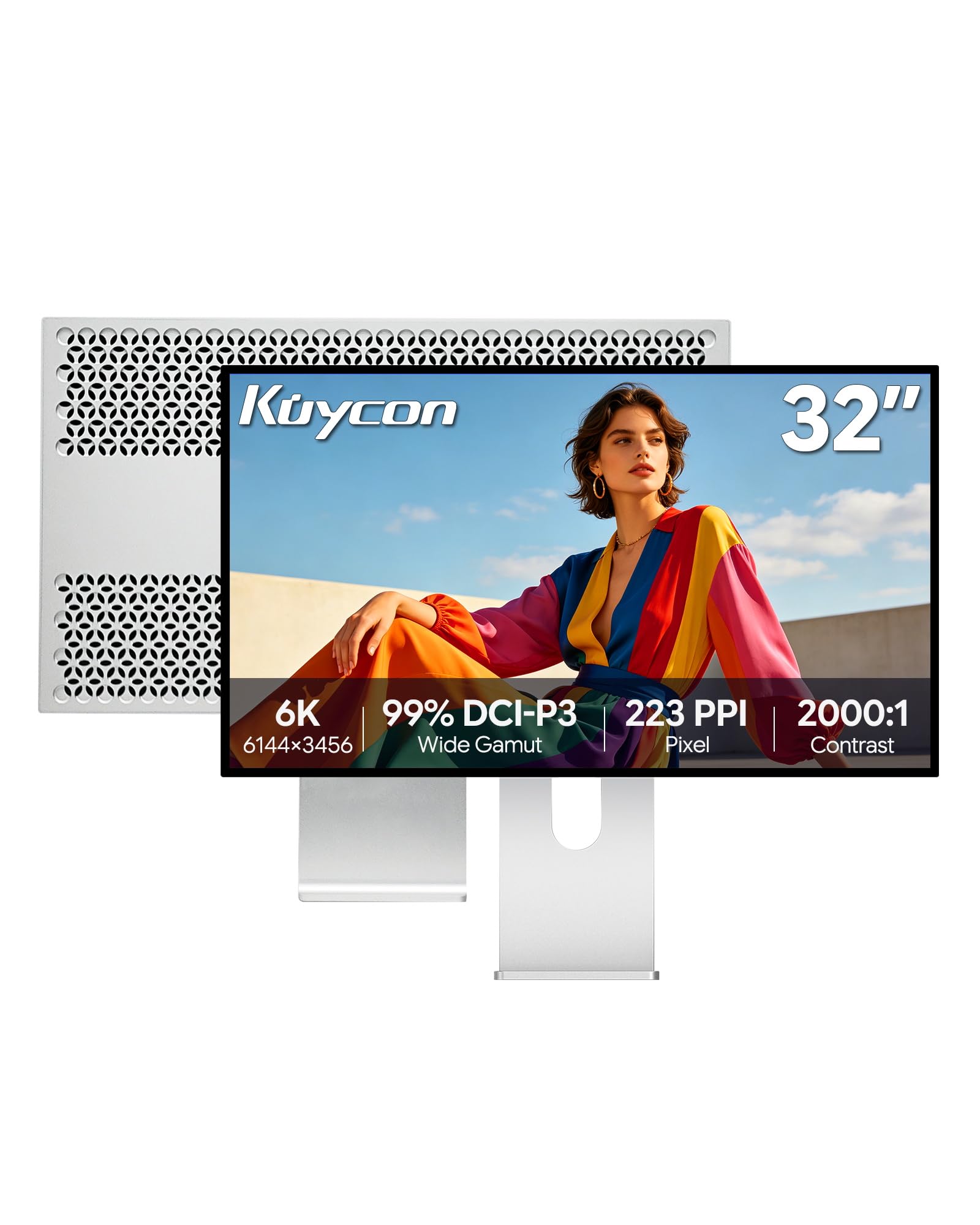
1. Kuycon G32P 32″ UHD 6K
Our pick — 4.5★ from 20+ verified ratings; the strongest balance of quality and price.
The Kuycon G32P delivers Apple Studio Display-level sharpness and build at a lower price.
This panel is the crowd favorite here — the one owners compare directly to the Apple Studio Display and walk away impressed. The core appeal is pixel density: at 223 PPI on a 32-inch screen (6144 x 3456 resolution), text looks Retina-sharp and Mac scaling feels native, which owners say makes it perfect for running four windows side by side. The glossy glass and 500-nit brightness deliver the same punchy, high-contrast look Apple fans love, right down to the aluminum body that reviewers call “tank-like.”
Connectivity is where you need to plan ahead. It handles a 100W single-cable charge to your laptop while streaming 6K video, and it works with Mac and PC over Thunderbolt, HDMI, and DisplayPort. But the fine print from owners: Thunderbolt-to-Thunderbolt can have intermittent handshake issues, while Thunderbolt-to-DisplayPort works flawlessly — and you need DisplayPort 2.1 selected for full 6K. The remote arrives without a battery, and there is no English instruction manual, minor quirks against an otherwise premium experience. As buyers report, “First unit had red panel defect; seller shipped replacement in 5 days plus refund” — proof of support quality when a unit falls short.
The color work here is serious: 99% sRGB and 99% DCI-P3 with a Delta E under 2 (a measure of color accuracy where lower is better), plus a 2000:1 contrast ratio. A 178-degree viewing angle keeps the picture consistent whether you are head-on or off to the side. For creative professionals and Mac users who want Studio Display clarity without the Apple price, this is the pick that keeps coming out on top.
What wins people over
- Sharp 223 PPI makes Mac text and UI look Retina-crisp
- Premium CNC-machined aluminum build with honeycomb cooling
- 100W single-cable power delivery charges laptops while streaming 6K
Read this before buying
- Thunderbolt-to-Thunderbolt handshake can be finicky; use DisplayPort for reliability
- No English manual and remote ships without a battery
- Heavy stand means you will want the included VESA mount for flexibility
the balance is: a Studio Display alternative that nails sharpness, color, and build for less — ideal for Mac creatives. If you want a 6K panel without Apple’s price tag, this is the one to start with.
The honest catch is: you trade a little setup patience (cable choice and a missing remote battery) for that value.
2. ASUS ProArt PA32QCV

The ASUS ProArt PA32QCV is factory-calibrated for print and video color accuracy.
If your work lives in Lightroom, Final Cut Pro, or print color proofing, this is the panel owners single out for outstanding text sharpness and accurate color. That extra contrast shows up as deeper blacks and more punch in HDR footage, which owners mention makes it excellent for video editing.
It is built for multi-machine setups. Dual Thunderbolt 4 ports deliver up to 96W power delivery with daisy-chaining, plus HDMI 2.1, DisplayPort 1.4, and a built-in USB hub. An Auto KVM switch lets you control two connected laptops with a single keyboard and mouse, and the M Model-P3 preset matches MacBook color for a smooth transition between screens. Owners say it pairs perfectly with a MacBook M4 Air, and the matte anti-glare finish earns praise for long coding sessions.
The honest trade-offs are the weak built-in speakers and a slow wake time of 3-5 seconds, plus a default brightness that reviewers found too high from the start. One owner also flagged that the KVM works only over HDMI and DisplayPort, not Thunderbolt. Register the panel online and you get a 5-year warranty — 3 years plus a 2-year extension — which is rare confidence at this level.
Color-first verdict: the highest contrast ratio in this lineup (3000:1) and Calman-verified accuracy make this the safest bet for print and video pros who need consistent color, with a 5-year warranty to back it.
Who should look elsewhere: if you want a single-cable Thunderbolt KVM or good speakers, the port layout and audio here will leave you wanting.
3. LG 32U990A-S UltraFine 6K

The LG 32U990A-S is the first 6K monitor with Thunderbolt 5 for future-proof connectivity.
This is the panel to pick if you are building a setup that will still feel current in five years. It is the first 6K monitor with Thunderbolt 5, which delivers transfer speeds 2x faster than Thunderbolt 4 (per the maker’s specs) and supports 6K daisy-chaining over a single cable — meaning you can run multiple monitors from one laptop port. The 32-inch panel packs 224 PPI at 6144 x 3456, delivering over 21 million pixels, which LG notes is 156% more than standard 4K for visibly sharper photo and video work.
For color work, the Nano IPS Black panel reaches a 2000:1 contrast ratio for deeper blacks and richer shadows, covering up to 99.5% Adobe RGB, 98% DCI-P3, and real 10-bit color depth (a color depth that avoids banding in gradients). It also carries VESA DisplayHDR 600 certification for bright, crisp highlights, and a TÜV Rheinland Eye Comfort certification for long editing sessions. Owners who love it call the picture quality “incredible” and say it shines for 4K HDR editing.
The catch is consistency — this panel divides opinion more than any other here. Some customers note a grainy sparkle on white backgrounds that ruins sharp text, plus color uniformity issues that need calibration to fix, while others find it flawless. The 450-nit brightness is the lowest of the four, and one reviewer found the LG Switch software buggy on macOS. It is brilliant when you get a good unit and a gamble when you do not, so buy from a seller with a straightforward return policy.
Leading on speed: no other 6K here offers Thunderbolt 5 with dual-6K daisy-chaining and 96W power delivery over one cable — it is the most future-proof hub in this list.
The fit note: if you demand perfect uniformity from the start for print-critical color, budget time for calibration or consider the ASUS instead.
4. Dell UltraSharp U3224KB

The Dell UltraSharp U3224KB integrates a webcam, USB-C hub, and Ethernet into its stand.
This Dell is the desktop hub for people who want one cable to rule them all. Beyond the 31.5-inch 6K panel (6144 x 3456), it packs a built-in webcam with a physical shutter, a USB-C hub, and Ethernet connectivity — so you can dock a laptop and a camera and get wired internet without a separate adapter. The 5 ms GTG response time (a measure of how fast pixels change color) makes it the best of these four for motion, and the 450-nit brightness keeps content visible in bright rooms.
Owners who use it with an Apple Silicon MacBook Pro call it an “amazing monitor,” noting the matte panel is a genuine alternative to Apple’s XDR for everyday work. On the specs side, the 6K resolution matches the LG at 6144 x 3456, with a 2000:1 contrast ratio and 99% color gamut. It supports both FreeSync and G-Sync adaptive sync, which is a nod to gamers who also need a productivity screen.
The reliability reports give real pause, though. Multiple owners describe random half-screen green outages that require a 30-minute power-off reset, and one found the screen fragile enough to break from a 1-foot fall. The webcam also casts a pinkish hue on faces, and the color leans warm until adjusted. This is the most capable dock, but the glass and driver behavior demand gentler treatment than the rest of this list.
The hub appeal
- Built-in webcam with physical shutter and Ethernet save desk clutter
- 5 ms GTG response time handles action films and games smoothly
- FreeSync and G-Sync support broaden its appeal beyond office work
Handle with care
- Recurring reports of half-screen green outages on Mac setups
- Fragile panel — owners advise against moving it once mounted
- Webcam color skews pink, and the screen leans warm until calibrated
Reach for this if: you value one-cable desk organization with a webcam, Ethernet, and hub all included in a 6K panel.
Think twice if: you are on a Mac and need bulletproof reliability — the driver hiccups here are the most reported of the four.
Understanding the Specs
Resolution and Pixel Density
All four monitors deliver 6K resolution, but the exact pixel counts differ. The Kuycon, LG, and Dell all hit 6144 x 3456, while the ASUS uses 6016 x 3384 — a roughly 2% difference you will not notice in daily use. What you will notice is pixel density (PPI): the Kuycon’s 223 PPI and the LG’s 224 PPI make text look printed rather than pixelated, which is why Mac users describe the experience as Retina-like.
Contrast Ratio and Brightness
Contrast ratio tells you how deep the blacks can go. The ASUS leads this group at 3000:1, a full 50% more than the 2000:1 on the Kuycon, LG, and Dell — meaning richer shadows and more pop in dark HDR scenes. Brightness matters for bright rooms: the ASUS hits 600 cd, the Kuycon 500 cd, and the LG and Dell 450 cd, so the ASUS is the safer bet if your desk faces a window.
FAQ
Will a 6K monitor work with my MacBook?
Do I need a special cable for full 6K output?
Can I charge my laptop through these monitors?
What is the difference between Thunderbolt 4 and Thunderbolt 5?
Which monitor has the most accurate colors for printing?
Can I use two monitors with one laptop?
Are these monitors good for gaming?
Do these monitors have built-in speakers?
What does a KVM switch on a monitor do?
How long is the warranty on these monitors?
Final Thoughts: The Verdict
For most buyers, the 6k monitor winner is the Kuycon G32P because it delivers Apple Studio Display-level sharpness and build for significantly less, with a loyal owner base praising its 223 PPI clarity. If you need factory-calibrated color and the deepest blacks for print and video work, grab the ASUS ProArt PA32QCV with its 3000:1 contrast and 5-year warranty. And for a future-proof Thunderbolt 5 setup that can daisy-chain multiple 6K screens, the LG 32U990A-S is the one to reach for.
How We Picked
We do not accept paid placement. Every pick is matched to a real buyer and a real use-case; we do not hands-on test units.
Sources & Methodology
Specifications: manufacturer listings and product documentation. Review insights: verified customer reviews, as of August 2026. Pricing: not shown on this page (it changes often); check the current price via the retailer link.
As an Amazon Associate, Gadgets Feed earns from qualifying purchases. This does not affect which products we feature.