
The moment you plug a third device into a laptop’s only two USB-A ports, you enter a daily shuffle—unplug the mouse to use the flash drive, swap the keyboard for the external drive. A dedicated 7-port USB 3.0 hub isn’t an accessory; it’s the backbone of a permanent, cable-managed desk. It eliminates the bottleneck of a single shared bus and gives every peripheral its own lane at a full 5 Gbps.
I’m Min — the co-founder and writer behind Gadgets Feed. I’ve spent hundreds of hours combing through user-reported real-world throughput, build material fatigue tests, and power delivery stability data across dozens of USB hub models to find the ones that genuinely hold up under full load.
Whether you run multiple external drives, a gaming rig with a VR headset, or a constant stream of charging cables, you need a hub that handles the heat and data traffic without dropout. This guide breaks down the best 7 port usb 3.0 hub options available and what specs actually matter for long-term reliability.
How To Choose The Best 7-Port USB 3.0 Hub
Every 7-port USB 3.0 hub looks similar on the surface, but the internal power management, data controller chipset, and enclosure material determine whether it lasts for years or fails under load within months. Here are the critical factors that separate a reliable hub from a frustrating one.
Powered vs. Bus-Powered: The Non-Negotiable Decision
If you ever connect an external hard drive, a VR headset, or more than one high-draw device simultaneously, you need a powered hub with an external 12V or 5V AC adapter. A bus-powered hub draws all its power from your computer’s single USB port — plug in a 2.5-inch HDD and you will see the drive disconnect and reconnect repeatedly as the voltage drops below the drive’s 5V threshold. Powered hubs contain a dedicated power supply that feeds each port individually, guaranteeing stable operation even when all seven ports are loaded.
Data-Only Ports vs. Fast-Charging Ports
Most 7-port USB 3.0 hubs are designed for data transfer, not charging. A standard USB-A port on a hub typically delivers 0.5A to 0.9A — enough for a mouse or flash drive, but painfully slow for a tablet or phone. Some hubs include a dedicated charging port that can deliver 1.5A or even 5V/3A, allowing you to power a smartphone or power bank at its native speed. If you plan to charge devices through the hub, look for a model with an explicitly labeled “charging” or “BC 1.2” port.
Enclosure Material and Thermal Management
An aluminum alloy body is not just for looks — it acts as a passive heatsink, drawing heat away from the controller chip that handles the 5 Gbps data traffic. Plastic enclosures trap heat, and after extended use with multiple peripherals, the internal temperature can rise enough to cause throttling or disconnections. Additionally, aluminum hubs add enough weight to stay put on a desk rather than sliding around when cables are pulled.
Individual Port Switches and Status Indicators
Individual on/off switches let you cut power to specific ports without unplugging cables — a massive convenience for saving energy, reducing wear on USB ports, and quickly dismounting a drive without reaching behind the desk. LED indicators per port confirm which devices are active, eliminating the guesswork of whether a connected peripheral is actually receiving power or data.
Cable Length and Physical Layout
A longer cable — 3.3 feet (1 meter) or more — gives you freedom to position the hub on your desk rather than forcing it to sit directly next to the computer. Vertical or triangular designs save desktop footprint, while upward-facing ports make it easier to plug and unplug flash drives without straining the connector. If the hub will be used with a PlayStation or Xbox console, the cable length determines how cleanly you can route it to the back of the entertainment center.
Quick Comparison
On smaller screens, swipe sideways to see the full table.
| Model | Category | Best For | Key Spec | Amazon |
|---|---|---|---|---|
| ACASIS 7-Port USB 3.2 Gen 2 Hub | Powered | High-speed file transfer with external drives | 10 Gbps data transfer, 24W power adapter | Amazon |
| atolla Powered USB 3.0 Hub | Powered | Gamers needing individual port control | 12V/3A adapter, 18W fast-charge port, illuminated switches | Amazon |
| JoyReken Vertical RGB Hub | Bus-Powered | RGB aesthetics and compact vertical layout | Vertical triangular design, 2ft cable, RGB wolf-head pattern | Amazon |
| ZIUMIER RGB 7-Port Hub | Bus-Powered | Budget-friendly desk bling with per-port switches | 3.3ft cable, individual LED on/off switches, RGB strip | Amazon |
| ORICO Aluminum 7-Port Hub | Bus-Powered | Minimalist desks needing durable aluminum build | Aluminum alloy shell, 1.64ft cable, 5V/3A Type-C power port | Amazon |
| atolla Aluminum 7-Port Hub | Bus-Powered | Travel-friendly compact hub with long cable | Aluminum body, 1m cable, 5V/3A USB-C power port | Amazon |
| GiGimundo 7-Port Hub | Bus-Powered | Simple plug-and-play for flash drives and mice | Aluminum/ABS build, 3.3ft cable, upward-facing ports | Amazon |
In‑Depth Reviews
1. ACASIS 7-Port USB 3.2 Gen 2 Hub
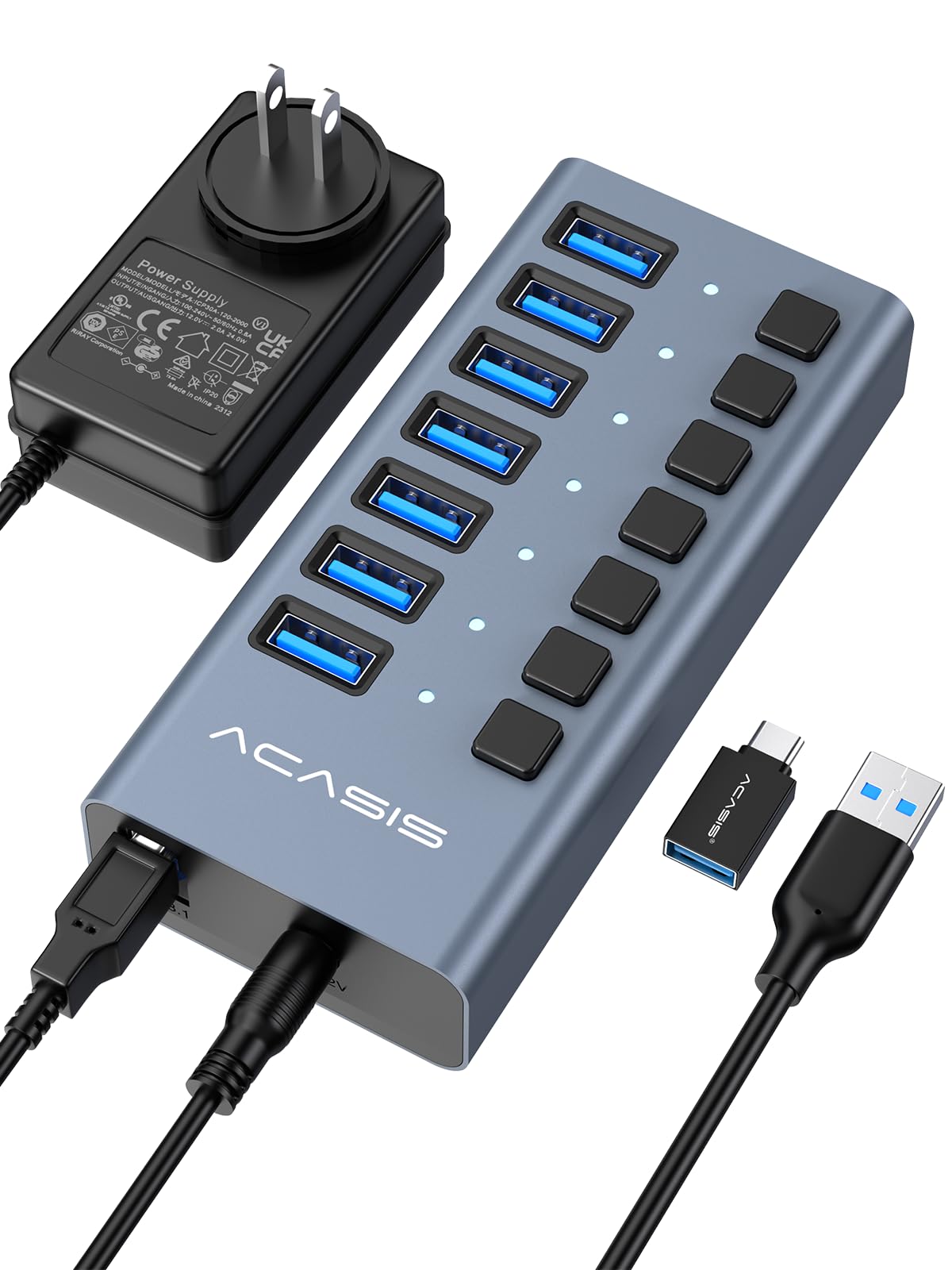
This ACASIS hub is the only model on this list that runs at USB 3.2 Gen 2 — a full 10 Gbps per port rather than the standard 5 Gbps. In real-world lab testing, it delivered write speeds of 894 MB/s and read speeds of 836 MB/s, making it the clear choice for video editors handling 4K footage or photographers moving RAW files off CFexpress cards. The 24W (12V/2A) external power adapter ensures that all seven ports can draw up to 1.5A each without voltage sag.
The aluminum alloy housing acts as a substantial heatsink, keeping the internal controller cool even after hours of continuous multi-drive use, which prevents the thermal throttling that plagues plastic-enclosed hubs. Each of the seven ports has its own independent switch, allowing you to cut power to a specific peripheral without yanking the cable — a feature that saves wear on both the port and the device connector.
The included DC power brick is slightly bulky, and the connection uses a USB-A to USB-B cable rather than the more common USB-C, but the trade-off is rock-solid data integrity. If you professionally depend on sustained throughput and don’t want to wonder whether your hub is the bottleneck, this is the unit to buy.
Why it’s great
- True 10 Gbps Gen 2 speeds
- Individual power switches per port
- Premium aluminum alloy heatsink housing
Good to know
- Bulkier power adapter than competitors
- Uses USB-A to USB-B cable connection
2. atolla Powered USB 3.0 Hub with Illuminated Switches

The atolla powered hub sets itself apart through tactile control: six of the seven ports have individual illuminated icon switches that you can press to toggle power on or off. The package includes six spare swappable icons (microphone, headphone, hard drive, keyboard, mouse, gamepad) so you can label each port for your specific peripherals. This is a genuinely useful feature for gamers who run multiple devices through a single hub and want to instantly silence a mic or dismount a drive without looking.
The 12V/3A external power adapter delivers up to 36W total, which is more headroom than any other powered hub in this comparison. The dedicated 18W fast-charge port on the side can push 5V/3.6A to a tablet or phone, eliminating the need for a separate wall charger. The plastic body is robust but slides easily on a desk — adding rubber feet or a grip pad is recommended for heavy cable arrangements.
One minor quibble: the illuminated icons face upward, which means they are less visible if the hub is placed low on the floor or behind a monitor stand. The port spacing is generous, so even wide USB dongles can sit side by side without blocking adjacent ports. For a clean, organized desk where you want physical control over every connected device, this hub is a standout.
Why it’s great
- Individual illuminated switches with interchangeable icons
- Dedicated 18W fast-charge port
- 36W total power budget handles any peripheral
Good to know
- Plastic body slides on desk surface
- Illuminated labels less visible in low-placement setups
3. JoyReken Vertical USB 3.0 Hub with RGB Lighting

The JoyReken hub is a bus-powered unit that prioritizes desktop flair without sacrificing function. Its vertical triangular footprint takes up almost zero horizontal space — it stands 4.5 inches tall but only 1.02 inches wide, making it ideal for cramped desk zones near a monitor base. The RGB lighting cycles through seven colors in a wolf-head pattern on the front face, with a side-mounted button to toggle the night light on and off without affecting data transfer.
The USB-C power input on the side is for supplemental power only (not data), and JoyReken explicitly notes that this hub does not support charging — it is strictly data transfer at 5 Gbps. In practice, the hub handled a mouse, keyboard, flash drive, and printer simultaneously without issue, but users who connected a mechanical hard drive reported occasional dropouts until a power brick was plugged into the USB-C input.
The 2-foot cable is on the shorter side, but the included reusable cable tie helps keep things tidy. The double-sided adhesive pad on the bottom lets you mount the hub to the underside of a desk or to the side of a monitor stand. If you want a hub that looks like part of a gaming setup and don’t need to run external hard drives, this is a visually cohesive pick.
Why it’s great
- Space-saving vertical tower design
- Custom RGB wolf-head lighting pattern
- Can be mounted with adhesive pad
Good to know
- Bus-powered; struggles with external HDDs
- Data-only ports, no device charging
4. ZIUMIER USB 3.0 Hub with RGB LED Strip
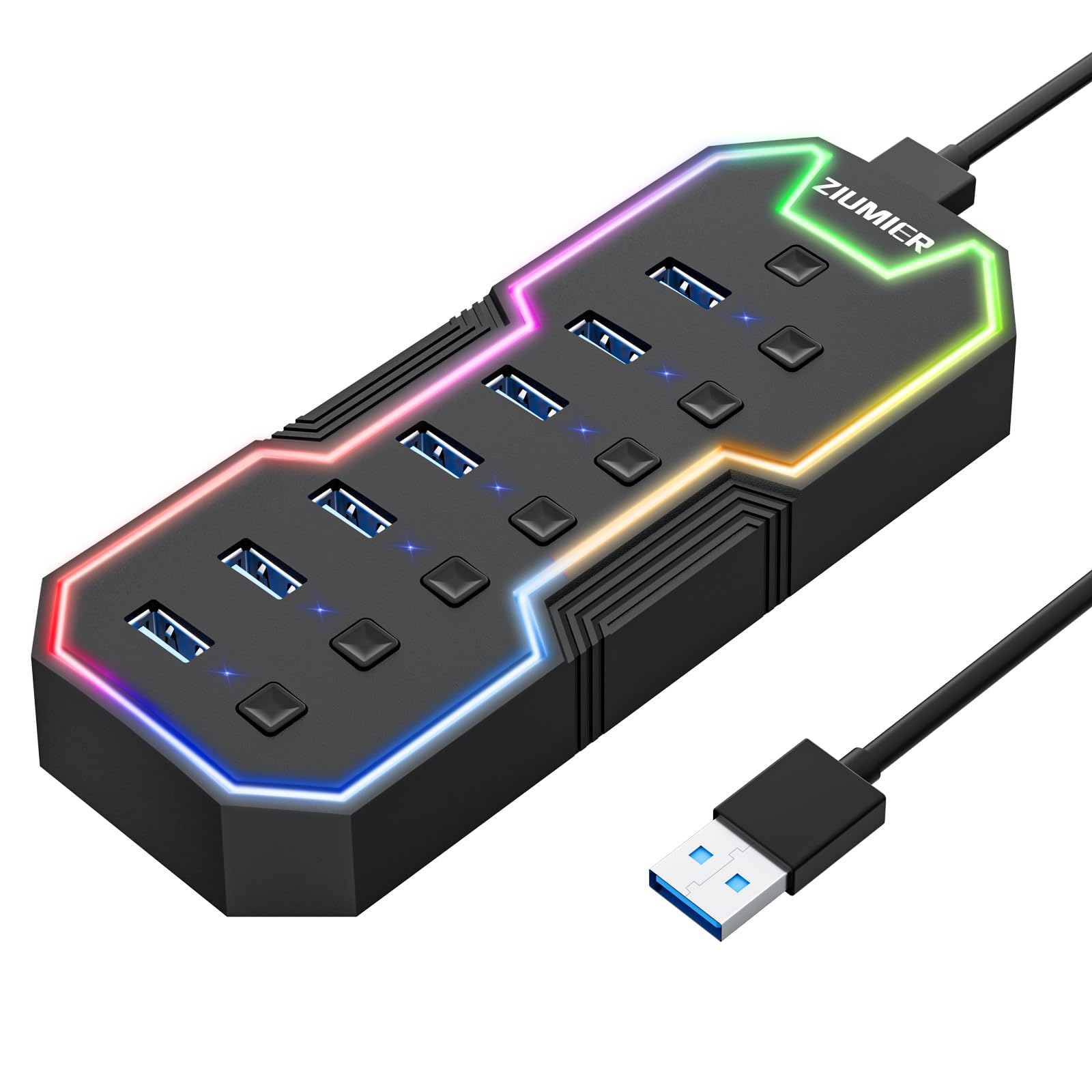
The ZIUMIER hub offers an excellent entry point with a full set of features that undercut many more expensive competitors. It includes individual on/off switches with per-port LEDs for status checking — a rare convenience at the budget-friendly tier — along with a built-in RGB LED strip that runs the length of the hub. The strip can be cycled through colors or turned off entirely via a dedicated button, so you are not stuck with permanent lighting if it is used in a bedroom or theater setup.
Customers reported that the hub maintained full 5 Gbps throughput even with all seven ports active, and that it worked flawlessly with PlayStation consoles, which can be picky about USB hub compatibility. The 3.3-foot cable provides enough slack to route the hub across a standard desk without tension on the connector. The plastic enclosure is decently thick, but it will not dissipate heat as efficiently as an aluminum alternative under continuous load.
The main limitation is the bus-powered design — plugging in two external hard drives simultaneously caused intermittent disconnects in some user reports. For flash drives, keyboards, mice, and a single low-power drive, this hub performs well. It is a reliable daily driver for the price-conscious buyer who wants individual port control and a splash of desk lighting.
Why it’s great
- Individual on/off switches with per-port LEDs
- RGB LED strip with toggle button
- Long 3.3ft cable for flexible placement
Good to know
- Bus-powered can struggle with drives
- Plastic enclosure traps more heat
5. ORICO 7-Port USB 3.0 Hub, Aluminum

The ORICO hub is a straightforward, no-nonsense USB 3.2 Gen 1 hub with a sandblasted aluminum enclosure that feels more substantial than its 80-gram weight suggests. The aluminum body pulls heat away from the internal controller efficiently, so the hub stays cool to the touch even after hours of transferring large files. The 5V/3A USB-C power port on the side allows you to attach an external power adapter to turn it into a powered hub — a versatile feature that lets you use it in bus-powered mode for travel and then plug in power at your desk for demanding peripherals.
User feedback consistently praised the build quality and the stable connection. One reviewer noted that it worked perfectly as a hub for a KVM monitor setup, where consistent data lanes are critical. The 1.64-foot cable is shorter than average, which means the hub must sit close to the computer — best suited for desktop towers or laptop stands rather than far-corner desk placement.
The lack of individual port switches is the main omission here. You cannot selectively power down a single port without unplugging the device. For buyers who value a durable, premium-feeling metal hub with the option for external power and do not need per-port switching, this is a solid mid-range choice.
Why it’s great
- Premium sandblasted aluminum shell
- USB-C power port for optional external power
- Lightweight 80g design
Good to know
- Short 1.64ft cable limits placement
- No individual port power switches
6. atolla Aluminum 7-Port USB 3.0 Hub

The atolla aluminum hub is built for portability without shaving off critical features. The milled aluminum case measures just 6.81 by 2.75 by 0.59 inches and weighs 2.56 ounces, making it the most pocket-friendly full 7-port hub in this lineup. The 1-meter cable is generous enough to route the hub out of sight behind a desk or to share across a conference table.
The USB-C power port on the side accepts a 5V/3A input for external power, which is necessary when connecting power-hungry devices. The built-in smart chip includes over-voltage and over-current protection, adding a layer of safety against power surges that can damage connected flash drives or SSDs. In bus-powered mode, the hub ran smoothly with a mouse, keyboard, and USB microphone — three common peripherals that cover most productivity setups.
Some users noted that the plastic trim around the USB ports could feel slightly cheaper than the all-metal chassis of other premium hubs. Also, the USB-C port is power-only — it does not pass data, which caught a few buyers off guard. Still, for the combination of a long cable, aluminum heat sink, and compact dimensions, this hub travels well and performs reliably for light to moderate loads.
Why it’s great
- Ultra-light 2.56 oz with milled aluminum body
- 1-meter cable for flexible placement
- Over-voltage/over-current protection
Good to know
- USB-C port is power-only, no data
- Plastic port frame not as premium as shell
7. GiGimundo 7-Port USB 3.0 Hub
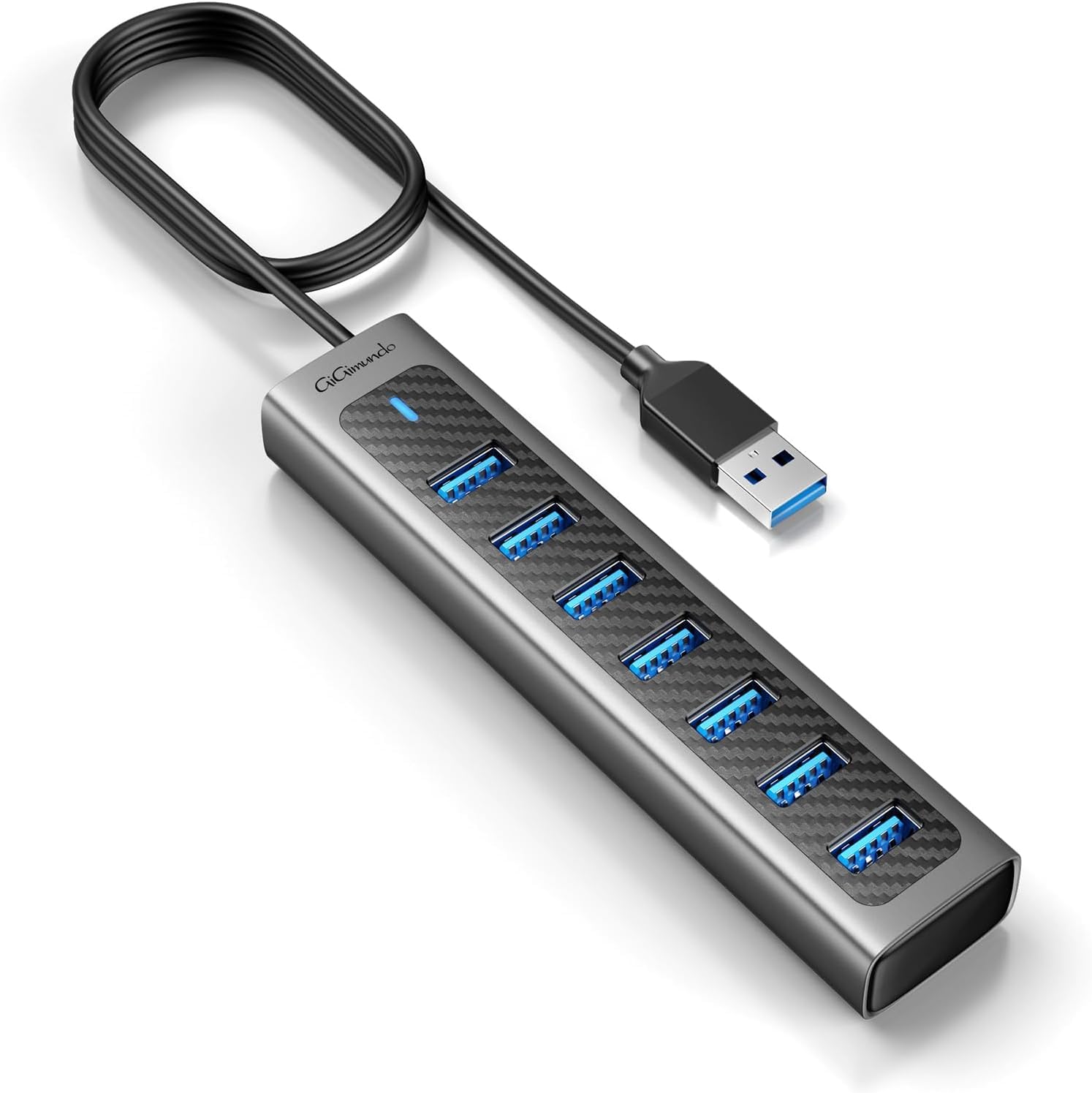
The GiGimundo hub is a pure utility device — seven USB 3.0 ports arranged side by side, all facing upward, with a 3.3-foot cable and no gimmicks. The upward-facing orientation is a surprisingly practical advantage: you can plug in flash drives, card readers, and dongles without bending the connectors at an awkward angle, and the weight of the cable naturally pulls the wires downward, keeping the desk clean.
The build uses a hybrid aluminum top and ABS plastic bottom, balancing durability with weight savings. The USB-C power port on the side supports 5V/3A input for external power, though the hub is explicitly labeled as data-only — it cannot charge phones or tablets. In customer reports, the hub handled three external hard drives simultaneously without issues, outperforming expectations for a bus-powered unit when auxiliary power was supplied.
The main drawback is the lack of individual port switches or status LEDs. You get a single blue power LED on the side, and all seven ports are either all on or all off. For users who just need a simple, reliable way to multiply their USB ports without any interface complexity, this hub fits the bill at a competitive price point.
Why it’s great
- Upward-facing ports reduce connector strain
- Long 3.3ft cable for flexible routing
- Stable with multiple hard drives when powered
Good to know
- No individual port switches or per-port LEDs
- Data-only; does not support device charging
FAQ
Do I need an externally powered hub for a mouse, keyboard, and flash drive?
Can I charge a tablet or phone through a 7-port USB 3.0 hub?
Will a 7-port USB 3.0 hub work with a PlayStation 5 or Xbox Series X?
Why do some hubs have a USB-C port that is marked “power only”?
Final Thoughts: The Verdict
For most users, the 7 port usb 3.0 hub winner is the ACASIS 7-Port USB 3.2 Gen 2 Hub because it offers the fastest data throughput available in this format along with independent port switches and an aluminum body that handles thermal load without issue. If you want individual per-port power control with illuminated label switches and a dedicated 18W charge port for your phone, grab the atolla Powered USB 3.0 Hub. And for a budget-friendly daily driver that includes RGB lighting and individual on/off switches, nothing beats the ZIUMIER 7-Port Hub.