
The 75% keyboard with a screen has quietly become the centerpiece of the enthusiast desktop — a compact layout that trades nothing for a full function row and arrow cluster while adding a pixel-real estate for system stats, custom GIFs, or just a tiny dose of personality. But not every screen-equipped board delivers the crisp tactile feedback, low wireless latency, and deep acoustic tuning that justify the premium over a standard mechanical.
I’m Min — the co-founder and writer behind Gadgets Feed. I’ve spent countless hours dissecting the interplay between gasket mount structures, plate materials, screen firmware, and battery capacity across this specific subcategory to separate boards that add real utility from those that just slap on a display for marketing.
Whether you are after creamy thocky switches, a full aluminum chassis, or a programmable OLED that shows more than just the time, this guide dissects the nine best options on Amazon right now to help you pick the best 75% keyboard with screen for your exact needs and budget.
How To Choose The Best 75% Keyboard With Screen
Not all screens on a 75% keyboard serve the same purpose — some are simple battery indicators, while others are full-color OLED panels capable of displaying animated GIFs, CPU load, or media playback. Pair that with switch type, build material, and wireless stability, and the decision tree gets dense quickly.
Screen Capability & Software Ecosystem
The most common mistake is assuming any screen is a good screen. A basic monochrome LCD that only shows connection status and battery level offers limited utility, while a 1.47-inch color OLED touchscreen with full QMK/VIA or proprietary driver support unlocks custom GIF uploads, real-time system monitoring, and even adjustable RGB previews without opening a separate app. Check whether the firmware runs smoothly under your operating system — several boards require Windows in wired mode to upload GIFs, which kills the wireless convenience for Mac or Linux users.
Battery Life vs. Screen Drain
A 75% keyboard with screen has to balance battery capacity against the constant power draw of an active display. Budget-friendly models pair a small 4000mAh cell with a low-power LCD that barely sips energy, letting you go weeks between charges. Premium boards with bigger, brighter OLED screens demand a larger battery — think 6000mAh to 8000mAh — to deliver comparable wireless runtime. If you plan to keep the screen on all day, look for a battery above 5000mAh; if you mainly use it wired, the trade-off matters less.
Build Material & Acoustic Tuning
The material of the case and plate directly changes how keystrokes feel and sound. A full CNC aluminum chassis adds heft, resonance control, and a premium cold touch, but also adds weight that makes it less portable. Plastic boards with polycarbonate plates are lighter and often produce a deeper, creamier “thock” when paired with five layers of sound-dampening foam. Gasket mount construction is now standard at this price tier, but the stiffness of the gaskets and the thickness of the foam layers vary enormously between models, so reading specific layer counts — PORON, IXPE, PET, silicone — gives you a better sense of the acoustic profile than the word “creamy” alone.
Hot-Swappable Sockets & Switch Compatibility
Every board on this list supports hot-swappable switches, but the socket type matters. 5-pin compatible sockets let you install any mechanical switch on the market, including factory five-pin variants that offer better alignment stability. 3-pin-only sockets restrict you to switches with two plastic alignment pins, which cuts off access to many enthusiast-grade options like Gateron Magnetic Jades or Cherry MX Clears. If you plan to experiment with switch feel down the road, a 5-pin hot-swap PCB is the only future-proof choice.
Quick Comparison
On smaller screens, swipe sideways to see the full table.
| Model | Category | Best For | Key Spec | Amazon |
|---|---|---|---|---|
| ASUS ROG Azoth Extreme | Premium | Ultimate build & 8K Hz polling | 1.47″ OLED touchscreen | Amazon |
| Razer BlackWidow V4 Pro 75% | Premium | True 4K Hz wireless, Command Dial | OLED display + 2-side underglow | Amazon |
| ASUS ROG Azoth | Premium | DIY enthusiast kit with lube station | 2″ OLED screen + 2000h battery | Amazon |
| KEEBMONKEY Wave 75 | Mid-Range | 8000mAh battery & quick-release | CNC aluminum, tool-less assembly | Amazon |
| Chilkey ND75 | Mid-Range | 3 mounting systems in one board | Full aluminum, ball-catch assembly | Amazon |
| YUNZII AL80 | Mid-Range | QMK/VIA + 6000mAh battery | Full aluminum, 80-key layout | Amazon |
| nuphy Air75 V3 | Mid-Range | Ultra-slim low-profile with knob | 13.2mm thin, 4000mAh battery | Amazon |
| AULA S98 Pro | Budget | 5000mAh + numpad in 75% form | LCD screen, side-printed PBT | Amazon |
| MechLands Aula F75 MAX | Budget | Entry-level creamy gasket feel | LCD screen + knob, 4000mAh | Amazon |
In‑Depth Reviews
1. ASUS ROG Azoth Extreme

The Azoth Extreme is the current ceiling for a 75% keyboard with screen. Its 1.47-inch color OLED touchscreen is the most interactive display on this list — you can swipe through system stats, battery level, connection mode, and even custom animations without touching a single key. Under the hood, a carbon-fiber positioning plate paired with dual PORON foams and a silicone pad delivers a crisp yet controlled keystroke that avoids the mushy bottom-out of pure plastic builds.
Build quality is uncompromising: a solid aluminum-alloy chassis machined through a 12-step CNC process gives it a 4.9-pound heft that sits rock-solid on any desk. The ROG Polling Rate Booster pushes wired and wireless polling to 8K Hz, making it the fastest board here for competitive FPS. Battery life reaches a staggering 1600 hours with the screen and RGB off, and the included silicone wrist rest with an aluminum base adds comfort without feeling like an afterthought.
The tradeoffs are real — Armoury Crate software remains finicky, the braided cable feels basic at this tier, and the gasket adjustment mechanism is subtle to the point of being unnoticeable. You are paying a premium for the absolute best materials and the most capable screen, but if you want the flagship experience in a 75% form factor, this is it.
Why it’s great
- 1.47-inch OLED touchscreen with swipe gestures and custom GIF support
- 8K Hz polling rate in wired and wireless modes via ROG Polling Rate Booster
- Carbon-fiber plate and triple-layer dampening for a refined, controlled sound
- 1600-hour battery life with screen and RGB off
- CNC aluminum chassis with magnetic feet and premium silicone wrist rest
Good to know
- Armoury Crate software is slow and unreliable for firmware updates
- Gasket adjustment knob is subtle and doesn’t dramatically change feel
- Braided USB-C cable feels basic for a flagship keyboard
- At full price, it’s a significant investment; discounts make it a better value
2. Razer BlackWidow V4 Pro 75%

Razer enters the 75% screen keyboard arena with a board that prioritizes wireless performance above all else. The BlackWidow V4 Pro 75% delivers True 4K Hz polling over Razer HyperSpeed wireless — a spec that beats every other wireless board here except the Azoth Extreme’s 8K Hz mode. Its OLED display sits above the arrow cluster and shows system metrics, custom GIFs, and media info, with the Razer Command Dial adding up to 100 customizable functions beyond simple volume control.
The typing experience is refined by a gasket-mounted FR4 plate, tape-enhanced PCB, lubricated screw-in stabilizers, and two layers of sound-dampening foam. Out of the box, the Razer Orange Tactile Switches Gen-3 provide a quiet but distinct bump with minimal wobble, and the 5-pin hot-swap socket lets you drop in any switch you prefer. The two-side underglow combined with per-key RGB creates a lighting profile that syncs seamlessly with the rest of a Razer setup.
Long-term reliability has been divisive — some users report key failures after months of moderate use, and Razer’s warranty process can be inconvenient. The Synapse software has improved significantly, but still requires occasional recalibration. If you value absolute wireless speed and a rich control wheel experience, this is the best wireless performer on the list.
Why it’s great
- True 4K Hz wireless polling with Razer HyperSpeed technology
- Razer Command Dial with up to 100 custom modes
- Gasket-mounted FR4 plate and tape-enhanced PCB for clean acoustics
- Two-side underglow with per-key Chroma RGB
- Hot-swappable 5-pin socket design
Good to know
- Some users report key switch failures after 9-12 months of moderate use
- Razer Synapse software can be obtrusive and requires occasional re-syncing
- Build uses plastic bottom with aluminum top plate, not full metal
- Warranty process requires mail-in repair
3. ASUS ROG Azoth

The original ROG Azoth set the standard for what a premium 75% keyboard with screen should include. Its 2-inch OLED display is larger than the Extreme’s and shows system stats, media info, and custom images with crisp clarity. The multi-function control knob lets you adjust volume, lighting, and settings on the fly without reaching for software.
What truly sets the Azoth apart is the complete DIY kit in the box — Krytox GPL-205-GD0 lubricant, a switch opener, keycap and switch pullers, a lube station, and a brush. This makes it the perfect platform for first-time modders who want to fine-tune their switch feel. The pre-lubed ROG NX Snow linear switches are already buttery smooth and thocky out of the box, but the lube kit encourages deeper customization. Battery life reaches over 2000 hours with the OLED and RGB off, and the gasket-mounted silicone design with three layers of dampening foam eliminates pinging and reverberation.
The build uses a plastic bottom with a metal top plate, which makes it lighter than the Extreme but less premium-feeling. Armoury Crate remains a weak point — some users find it buggy and intrusive. If you want the OLED experience with room to grow into switch modification, the Azoth is the enthusiast’s choice.
Why it’s great
- 2-inch OLED screen with system monitoring and custom GIF support
- Includes full DIY lube kit: Krytox 205g0, opener, pullers, lube station
- 2000+ hour battery life with OLED and RGB off
- Pre-lubed ROG NX Snow linear switches are smooth and thocky
- Gasket mount with three-layer dampening for refined acoustics
Good to know
- Plastic bottom case reduces perceived premium feel
- Armoury Crate software is buggy and intrusive
- OLED screen is not touchscreen — relies on knob and buttons
- Some users report double-typing issues on NX Snow switches
4. KEEBMONKEY PMOKEY Wave 75
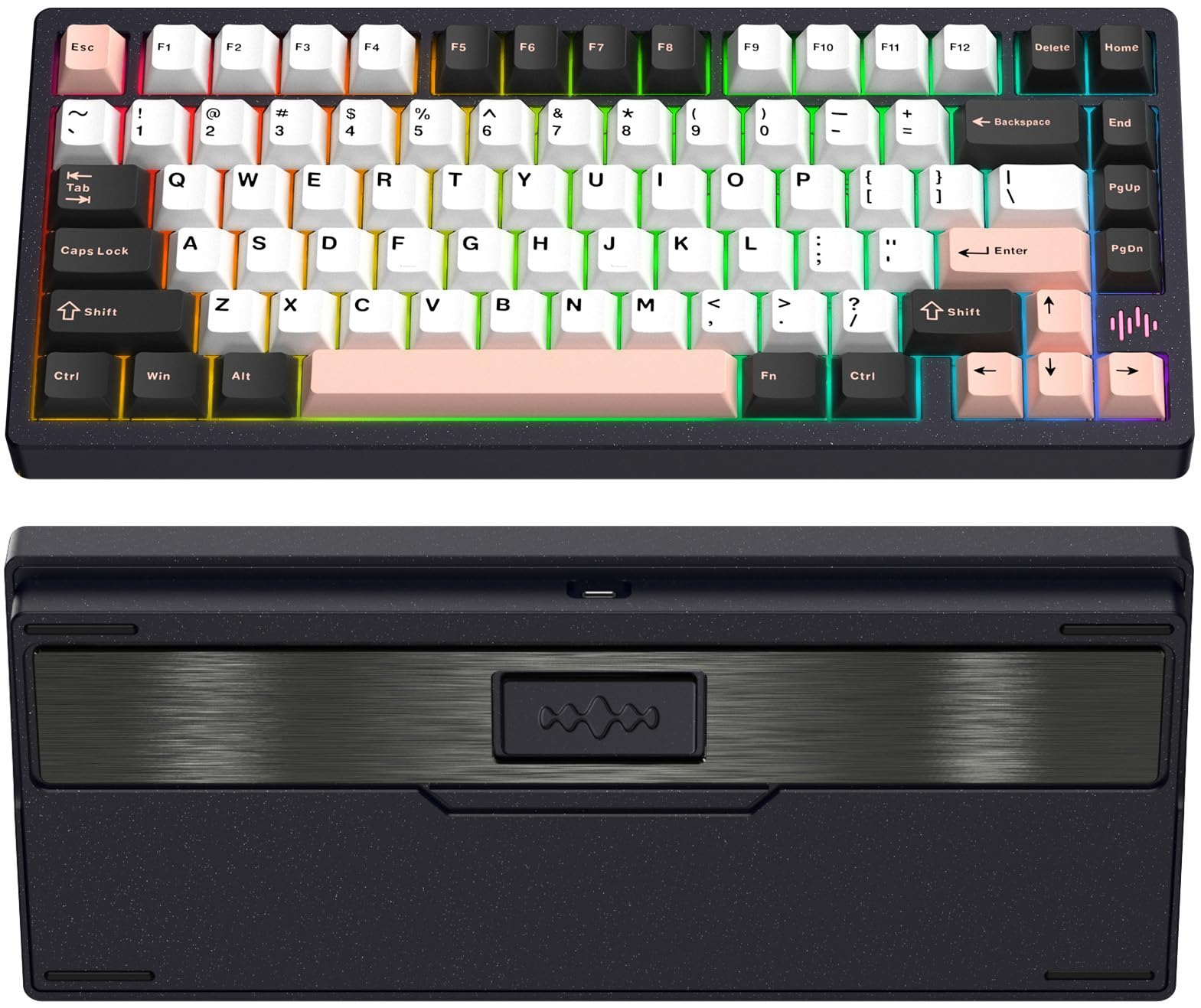
The Wave 75 competes at a higher level than its mid-range price suggests, thanks to an 8000mAh battery that doubles the capacity of most boards in this class. That massive cell supports weeks of heavy wireless use even with the screen active — you will charge this keyboard less than your phone. The full CNC aluminum case gives it a dense, premium weight that keeps it planted during intense gaming sessions.
The tool-less quick-release design is a standout feature for tinkerers: you can pop open the top case in seconds to access the internal foam layout, plate, or PCB without searching for a screwdriver. Lilac linear switches come pre-lubed from the factory and deliver a smooth, controlled sound profile with minimal spring ping. QMK and VIA support means you can remap every key, including the knob, without relying on proprietary software.
The main downsides are the lackluster setup instructions and occasional battery indicator quirks — some users report the meter showing 5% even when fully charged. VIA compatibility has been hit-or-miss depending on firmware version, and the on/off switch is inconveniently placed under the caps lock. Still, for pure battery life and aluminium build quality at this price, the Wave 75 is hard to beat.
Why it’s great
- Massive 8000mAh battery for weeks of wireless use
- Full CNC aluminum case with premium heft
- Tool-less quick-release design for easy internal access
- QMK and VIA support for full key remapping
- Pre-lubed Lilac linear switches with smooth controlled sound
Good to know
- Battery indicator can show 5% when fully charged
- Setup instructions are poorly structured and lack detail
- On/off switch is located under the caps lock key
- VIA compatibility is inconsistent depending on firmware version
5. Chilkey ND75

The Chilkey ND75 is a rare beast in the 75% keyboard with screen category: a board that lets you switch between three different mounting systems without any soldering or major disassembly. You can choose Split O-Ring Mounting for a bouncy, cushioned feel, Silica Gel Particle Mounting for a denser response, or Top Mounting for a stiff, traditional typing experience. This makes the ND75 an ideal learning platform for new enthusiasts wanting to understand how mounting changes sound and feel.
The full CNC aluminum case with anodized surface treatment gives it a sleek, minimalist look that works on any desk. The four-layer sound insulation stack — PORON plate foam, IXPE switch foam, PET acoustic pad, and PORON PCB foam — produces a satisfying Hi-Fi “thwack” that is clean without being overly loud. The screen is basic compared to the higher-tier boards here but shows battery status, connection mode, and supports custom images through the Yunzii driver.
Software availability is the ND75’s biggest hurdle. The official drivers have been removed from the website, and users must hunt through forums or Google Drive links to find them. Battery life is notably poor — some users report 5% drain every five minutes in wireless mode, making this board best used wired most of the time. If you prioritize build versatility over wireless endurance, the ND75 delivers.
Why it’s great
- Three interchangeable mounting systems (O-Ring, Silica Gel, Top Mount)
- Full CNC aluminum case with anodized finish
- Four-layer sound-dampening stack for Hi-Fi acoustics
- Quick ball-catch assembly for tool-free disassembly
- Doubleshot PBT keycaps with cherry profile
Good to know
- Official software drivers removed from website; must find via Reddit
- Battery drain is excessive — drains 5% every 5 minutes in wireless mode
- Screen is basic compared to OLED-equipped competitors
- RGB brightness is underwhelming
6. YUNZII AL80

The YUNZII AL80 brings QMK and VIA support to the mid-range price point, giving you full control over key mapping, macro programming, and RGB effects through an open-source ecosystem rather than a proprietary driver. The 6000mAh battery is generous for a 75% keyboard with screen, and the CNC anodized aluminum frame gives it a dense, premium feel that rivals boards costing much more.
The customizable LCD screen displays time, GIFs, photos, battery status, and connection mode — and VIA integration means you can adjust screen behavior alongside key functions in a single interface. The hot-swappable PCB supports both 3-pin and 5-pin switches, including all Gateron and Cherry MX variants. Pre-lubed Cocoa Cream V2 linear switches deliver a creamy, smooth sound profile straight out of the box, though some users find them louder than expected with a high-pitched ring.
The biggest caveat is the software translation — the OLED configuration utility is poorly translated to the point of being confusing. The knob lacks knurling, making it feel less tactile than competitors. If you are comfortable navigating slightly rough software edges in exchange for VIA freedom, the AL80 is a strong performer for the price.
Why it’s great
- Full QMK and VIA support for key remapping and macros
- 6000mAh battery lasts through extended wireless sessions
- CNC anodized aluminum frame with premium weight
- Customizable LCD screen with GIF and photo display
- 5-pin hot-swap socket compatible with all MX switches
Good to know
- OLED configuration software is poorly translated
- Knob lacks knurling and feels less tactile
- Cocoa Cream V2 switches can have a high-pitched ring
- Keycaps are not shine-through, limiting RGB visibility
7. nuphy Air75 V3
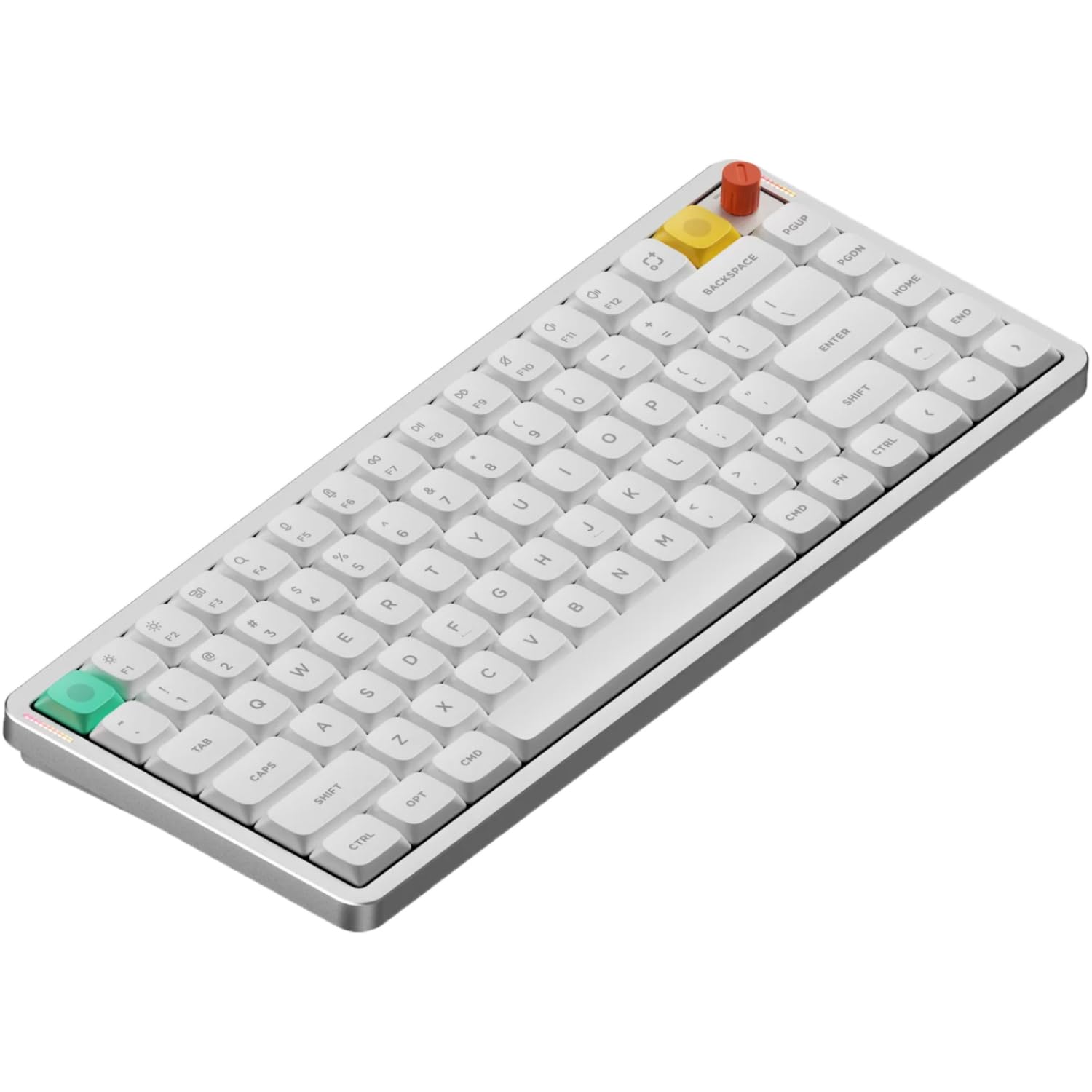
The nuphy Air75 V3 is the outlier among 75% keyboards with screen because it opts for a low-profile design — only 13.2mm thick — while still squeezing in a screen and a removable knob module. This makes it the most portable option here, sliding easily into a laptop bag. The gasket mount design uses silicone gaskets to absorb vibration, delivering a surprisingly refined sound signature for a board this thin.
Tri-mode connectivity includes Bluetooth 5.0, 2.4GHz wireless, and USB-C wired, with a 4000mAh battery that supports extended wireless use. The NuPhyIO customization software allows full key remapping, RGB control, and knob configuration — you can set the knob as volume, zoom, or tap-action key. The included high-profile and low-profile knob modules let you choose the look and feel that fits your setup.
Quality control has been inconsistent — some users report spacebar sticking or key registration failures after months of gaming use. The Brown switches are quiet enough for an office but may feel less tactile than some enthusiasts want. If portability and a low-profile typing angle are your priorities, the Air75 V3 is a unique package, but it is not built for heavy gaming abuse.
Why it’s great
- Ultra-slim 13.2mm profile for maximum portability
- Removable knob module with high-profile and low-profile options
- NuPhyIO software for full key remapping and RGB customization
- Gasket mount design with silicone gaskets for quiet, refined typing
- Doubleshot PBT keycaps with excellent durability
Good to know
- Quality control inconsistent — some units have key registration issues
- Brown switches are quiet but may lack tactile feedback for enthusiasts
- Only one Windows keycap included in the box
- Not designed for heavy, long-session competitive gaming
8. AULA S98 Pro
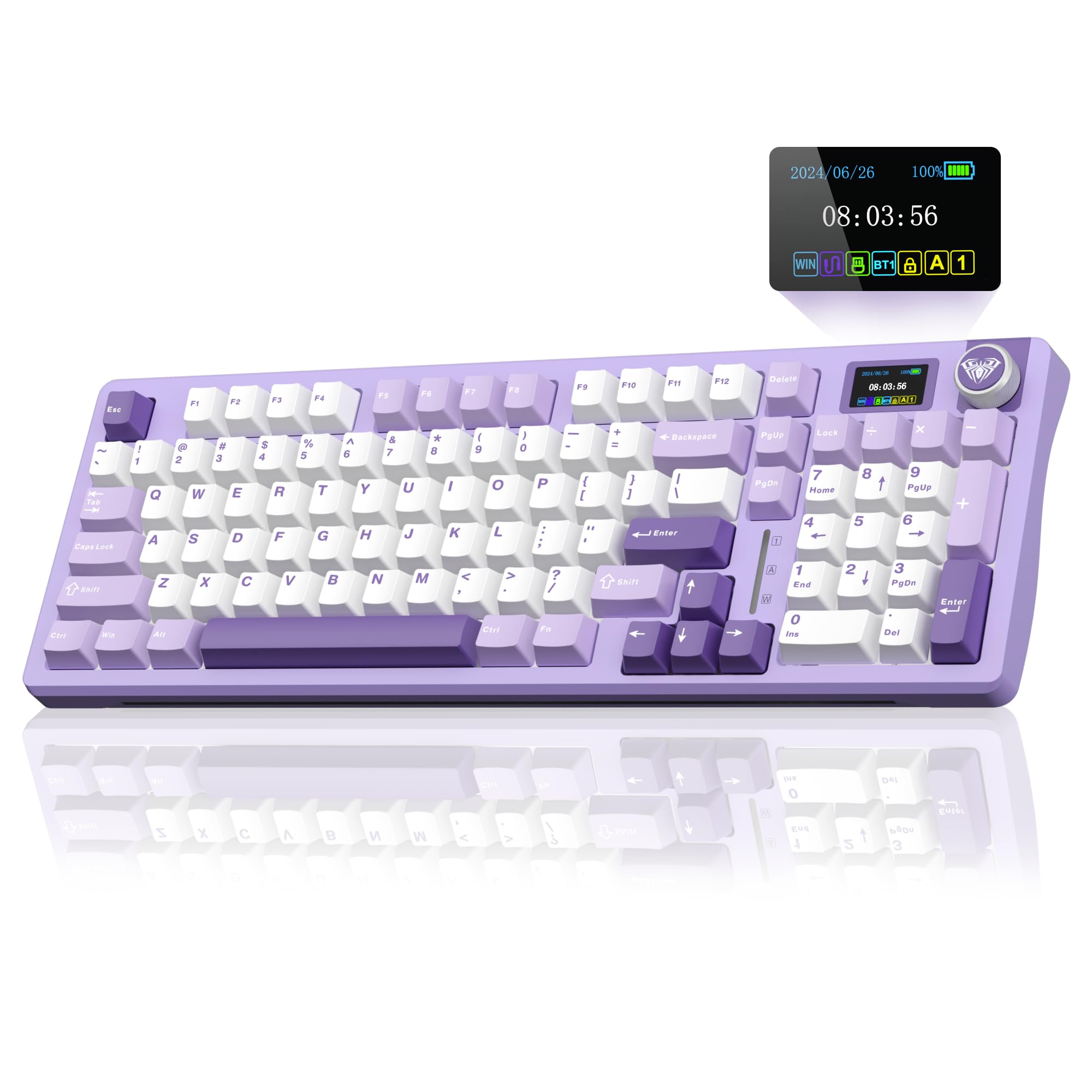
The AULA S98 Pro offers the rare combination of a 75% layout with a dedicated numpad — a configuration that appeals to number crunchers and data entry workers who cannot live without the number row but want a compact footprint. Its 1.2-inch TFT screen shows time, date, battery level, connection mode, and supports custom GIF uploads through the AULA software. The multi-function knob lets you adjust system settings, volume, and RGB modes without reaching for the keyboard.
The typing experience is anchored by a gasket mount with five layers of sound-dampening material, producing a deep, creamy sound profile that reviewers consistently call “thocky.” Pre-lubed linear switches are buttery smooth out of the box, and the 5-pin hot-swap socket gives you room to upgrade later. The 5000mAh battery delivers weeks of battery life with moderate use, and the side-printed PBT keycaps add a clean look that avoids the abrasion problems of top-printed legends.
Software support is the weak link — half of uploaded GIFs may render as static images, and the knob requires multiple steps to navigate volume control instead of simple rotation. The plastic case feels lighter than the aluminum options above it, but for the price, the feature set is unmatched.
Why it’s great
- 75% layout with a full numpad — rare and practical for number-heavy work
- Five-layer sound-dampening delivers deep, creamy thocky acoustics
- 5000mAh battery supports weeks of wireless use
- Side-printed PBT keycaps resist wear and look clean
- 5-pin hot-swap socket for future switch upgrades
Good to know
- Software has issues — some GIFs render as static images
- Knob requires multiple steps for volume adjustment
- Plastic case feels less premium than aluminum alternatives
- Software only works under Windows in wired mode
9. MechLands Aula F75 MAX
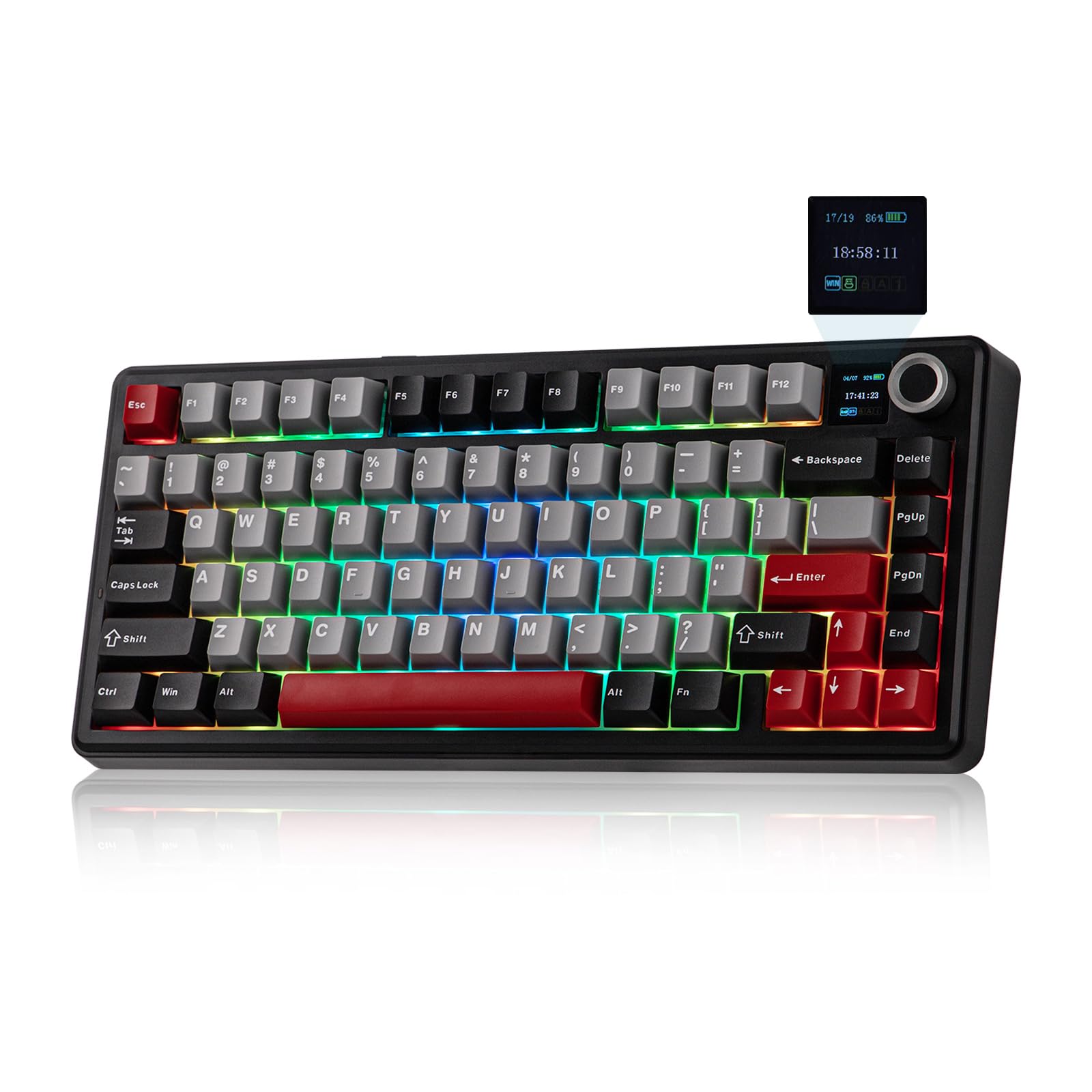
The Aula F75 MAX proves that a 75% keyboard with screen does not have to cost a lot to deliver a genuinely satisfying typing experience. Its creamy gasket mount structure, paired with a flex-cut PCB and five layers of sound-dampening materials, produces a soft, elastic “thocky” feel that rivals boards costing twice as much. The smart LCD screen shows battery status, connectivity mode, and RGB settings, and supports custom GIF uploads for a personal touch.
The multi-function knob provides intuitive control over volume, RGB effects, and on-screen settings, and the tri-mode connectivity (Bluetooth 5.0, 2.4GHz, and USB-C wired) works reliably across PC, Mac, and Linux. The 4000mAh battery is adequate for this price tier, and the hot-swappable PCB accepts both 3-pin and 5-pin switches, giving entry-level enthusiasts room to explore different switch types without soldering. South-facing per-key RGB LEDs ensure the backlighting stays bright and vibrant even with opaque keycaps.
Build quality is budget-conscious — the plastic enclosure lacks the weight of aluminum alternatives, and the stock keycaps, while functional, are not as durable as doubleshot PBT. The LCD screen is basic compared to the OLED panels on higher-end boards. But for a first-time buyer or someone building a secondary setup who wants the screen and knob experience without spending heavily, the F75 MAX delivers remarkable value.
Why it’s great
- Remarkable creamy gasket feel at a budget-friendly price
- LCD screen with custom GIF support and multi-function knob
- Hot-swappable PCB supports 3-pin and 5-pin switches
- Tri-mode connectivity (BT 5.0, 2.4GHz, USB-C)
- South-facing per-key RGB with bright, even illumination
Good to know
- Plastic enclosure lacks the premium heft of aluminum boards
- Stock keycaps are not doubleshot PBT — may show wear over time
- LCD screen is basic compared to OLED on premium models
- 4000mAh battery is fine for the price but not class-leading
FAQ
Can I upload my own GIFs to the screen on a 75% keyboard with screen?
How much battery life should I expect with the screen always on?
Is a CNC aluminum case worth the extra weight and cost for a 75% keyboard?
Final Thoughts: The Verdict
For most users, the best 75% keyboard with screen winner is the ASUS ROG Azoth Extreme because it delivers the most advanced OLED touchscreen, the fastest 8K Hz polling, and a premium CNC aluminum build that justifies its position at the top. If you want true 4K Hz wireless performance and a deep control wheel ecosystem, grab the Razer BlackWidow V4 Pro 75%. And for a complete DIY experience with a roomy OLED and a full lube kit, nothing beats the ASUS ROG Azoth.