
Pairing the AMD Ryzen 7 7800X3D with the wrong motherboard is the single fastest way to leave serious gaming performance on the table. This chip’s 3D V-Cache is a marvel of memory latency reduction, but its 120W TDP means the VRM quality and BIOS maturity of your AM5 board is just as critical as the CPU itself.
I’m Min — the co-founder and writer behind Gadgets Feed. After hours of cross-referencing phase counts, memory topology, and user-reported stability data for eight different B650, X870, and X870E boards, I’ve built a clear picture of which combinations actually unlock the 7800X3D’s potential without wasting budget on superfluous features.
Every buyer needs a strategy, not just a spreadsheet, to find the right 7800x3d motherboard combo that delivers peak frame rates without bottlenecking future GPU upgrades.
How To Choose The Best 7800X3D Motherboard Combo
Selecting a motherboard for the 7800X3D is different from building around any other AM5 chip. The 3D V-Cache die sits on top of the CCD, which alters heat dissipation patterns. A board with robust VRM cooling and a well-tested BIOS is not a luxury — it is a prerequisite for sustained boost clocks in CPU-bound titles.
VRM Power Delivery
Look for at least a 12+2 phase design with 50A or higher DrMOS stages. The 7800X3D’s 120W TDP is modest, but the voltage regulation transient response determines whether the chip holds 5.0 GHz boost during heavy shader compilation or drops clocks. Boards with 14+2+1 or 16+2+1 configurations provide overhead for Ryzen 9000 series future upgrades.
Memory Support and EXPO Compatibility
The 7800X3D’s large L3 cache reduces sensitivity to memory latency, but DDR5-6000 CL30 remains the sweet spot. Verify the motherboard’s QVL includes 2x16GB or 2x24GB kits at that speed. Boards with SMD DIMM slots and optimized trace routing (2DPC 1R support) yield better signal integrity for high-frequency EXPO profiles.
Chipset Selection: B650 vs X870 vs X870E
B650 boards offer PCIe 5.0 GPU and NVMe support at a lower entry cost, making them ideal for pure gaming rigs. X870 adds mandatory USB4 and Wi-Fi 7, while X870E doubles the PCIe lanes from the Promontory 21 bridge for multi-GPU or multiple Gen5 storage. For a single-GPU gaming system, B650 or X870 is typically sufficient.
Quick Comparison
On smaller screens, swipe sideways to see the full table.
| Model | Category | Best For | Key Spec | Amazon |
|---|---|---|---|---|
| ASUS ROG Strix B850-A Gaming WiFi | Mid-Range | Balanced Gaming Build | 14+2+2 80A DrMOS | Amazon |
| MSI MAG X870 Tomahawk WiFi | Premium | High-End Enthusiast | USB4 40Gbps, 5G LAN | Amazon |
| TUF Gaming X870E-PLUS WIFI7 | Premium | Future-Proofing | 16+2+1 80A power stages | Amazon |
| GIGABYTE X870E AORUS PRO ICE | Premium | All-White Aesthetic Build | 16+2+2 80A Smart Power Stage | Amazon |
| ASUS Prime X870-P WiFi | Premium | DIY-Friendly Features | 14+2+1 80A DrMOS | Amazon |
| GIGABYTE B650 Eagle AX | Mid-Range | Value Performance | 12+2+2 digital VRM phases | Amazon |
| MSI PRO B650-S WiFi V1 | Budget-Friendly | Entry-Level Gaming | 12 Duet Rail Power System | Amazon |
| ASRock B650 PRO RS | Budget-Friendly | Lowest Entry Cost | 14+2+1 power phase design | Amazon |
| Micro Center 7800X3D + ASUS Strix B650-A Kit | Combo Bundle | One-Box Convenience | CPU + B650 board pre-matched | Amazon |
In‑Depth Reviews
1. ASUS ROG Strix B850-A Gaming WiFi AMD AM5 B850 ATX Motherboard

The B850 chipset sits between B650 and X870 in the AM5 hierarchy, and ASUS loaded the Strix B850-A with a 14+2+2 power solution rated for 80A per stage. This configuration handles the 7800X3D’s transient loads without breaking a sweat, and the dual 8-pin ProCool connectors ensure clean power delivery even during extended gaming sessions.
Memory support extends to DDR5-8000 via AEMP (ASUS Enhanced Memory Profiles), though the 7800X3D performs best at DDR5-6000 CL30. The board includes four M.2 slots — one PCIe 5.0 and three PCIe 4.0 — with dedicated heatsinks on all of them. The silver-white aesthetic matches well with modern chassis themes, and the Q-Antenna for WiFi 7 simplifies setup.
User reviews highlight flawless QVL RAM compatibility with Corsair Vengeance 64GB kits, though one builder noted the top VRM heatsink requires routing CPU power cables before mounting the cooler. The onboard AI Advisor and AI Networking II features are useful but not essential for gamers focused on raw frame rates.
Why it’s great
- 14+2+2 80A phase design exceeds VRM needs for 7800X3D
- Four M.2 slots with individual heatsinks
- WiFi 7 and 2.5G LAN at a mid-range price point
Good to know
- Silver color may not match all-white builds
- Limited rear USB ports compared to higher-tier X870E boards
2. MSI MAG X870 Tomahawk WiFi Gaming Motherboard

The Tomahawk line has a reputation for blending premium features with sensible pricing, and the X870 version continues that tradition. The built-in USB4 port delivers a full 40Gbps throughput, making this board future-proof for high-speed external storage or single-cable docking solutions. The extended PWM heatsink design keeps VRM temperatures low even when the 7800X3D is pushed during multi-threaded workloads.
Memory overclocking reaches 7800 MHz, and the board includes four M.2 slots — all with dedicated heatsinks. The Audio Boost 5 isolation layer provides cleaner signal paths for headphone users, though the board only includes two SATA ports, which may frustrate users with legacy drives. The 5G LAN port is a meaningful upgrade over standard 2.5G for local network transfers.
A reviewer noted the board pushed a Ryzen 9 9900X to 95°C under stock load but remained stable after tweaking the cooling curve. Another user reported WiFi 7 packet drops every few minutes with the default antenna, requiring a return — a potential edge case. The debug LED and BIOS Flashback button are welcome additions for troubleshooting.
Why it’s great
- USB4 40Gbps port for future expansion
- 5G LAN for high-speed networking
- Tool-free M.2 heatsink design
Good to know
- Only two SATA ports available
- Some users reported WiFi 7 instability
3. TUF Gaming X870E-PLUS WIFI7 AMD X870E ATX Motherboard
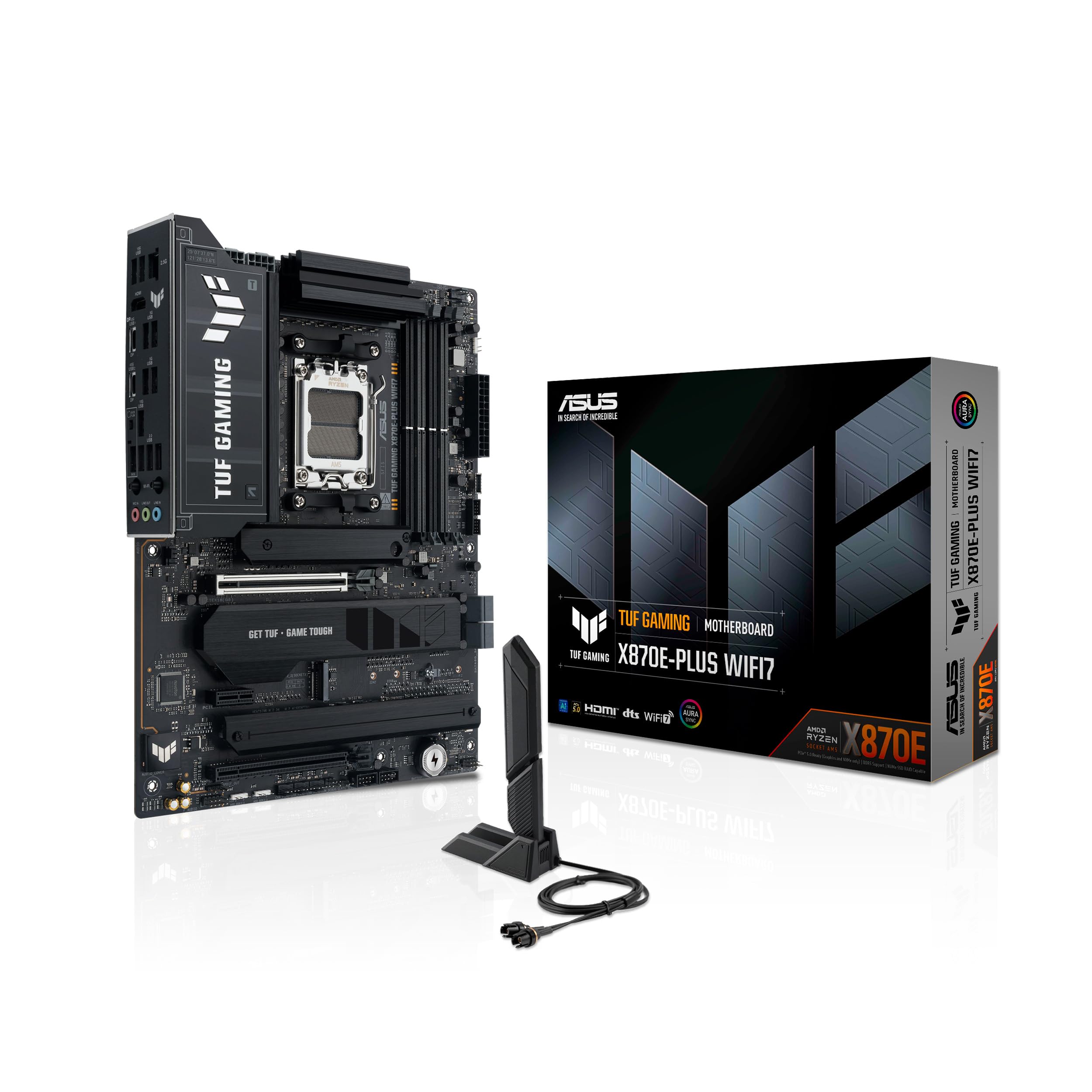
The X870E chipset is AMD’s top-tier AM5 platform, and the TUF Gaming implementation brings 16+2+1 power stages rated for 80A each. This level of VRM overhead is overkill for the 7800X3D today, but it means the board can drop in a future Ryzen 9000 X3D chip without requiring a platform swap. The 8-layer PCB and alloy chokes contribute to cleaner power delivery under sustained load.
The board includes two onboard PCIe 5.0 M.2 slots and two PCIe 4.0 M.2 slots, supporting up to 256 GB of DDR5 memory via four DIMM slots. The ASUS-exclusive AI Overclocking and AI Cooling II features automate tuning for users who want performance without manual BIOS tinkering. The PCIe Slot Q-Release Slim mechanism simplifies GPU removal compared to traditional latches.
User feedback is positive overall, with most builders praising the robust build quality and dependable performance. One reviewer mentioned the board felt “bulky” due to the large VRM heatsinks — a minor concern for full-tower cases but worth noting for compact ATX builds. The lack of Intel LAN was a minor complaint from one user, though the Realtek controller works fine for most gaming scenarios.
Why it’s great
- 16+2+1 DrMOS provides massive VRM headroom
- Dual PCIe 5.0 M.2 slots for Gen5 storage
- 256 GB memory capacity support
Good to know
- Large VRM heatsinks may interfere with tight CPU cooler installations
- Premium price tag for casual gaming builds
4. GIGABYTE X870E AORUS PRO ICE AMD AM5 Motherboard

The AORUS PRO ICE is one of the few true white-PCB AM5 boards on the market, making it the definitive choice for all-white theme builds. The 16+2+2 smart power stage configuration with 80A per stage is identical in capability to the TUF Gaming X870E, but GIGABYTE adds dual USB4 ports on the rear I/O and a Sensor Panel Link header for secondary displays.
Thermal management is handled by extensive VRM heatsinks and an M.2 Thermal Guard for each of the four M.2 slots. The PCIe 5.0 x16 slot shares bandwidth with the primary M.2 slots, so users should consult the manual before populating all four drives to avoid lane conflicts. The EZ-Latch system enables tool-free M.2 installation and GPU release, though one reviewer noted the GPU latch is partially blocked by the primary M.2 heatsink.
User sentiment is overwhelmingly positive, with builders praising the flawless performance and aesthetic excellence. One negative review cited RAM detection issues and a failed BIOS update, but Gigabyte’s 5-year warranty provides recourse for such rare defects. The Gen5 NVMe heatsink dropped temperatures by 10°C in one user’s testing, proving the thermal design is more than cosmetic.
Why it’s great
- True white PCB for themed builds
- Dual USB4 40Gbps ports
- 5-year warranty for peace of mind
Good to know
- GPU release latch obstructed by top M.2 heatsink
- Bandwidth sharing between PCIe slots and M.2
5. ASUS Prime X870-P WiFi AMD AM5 X870 ATX Motherboard
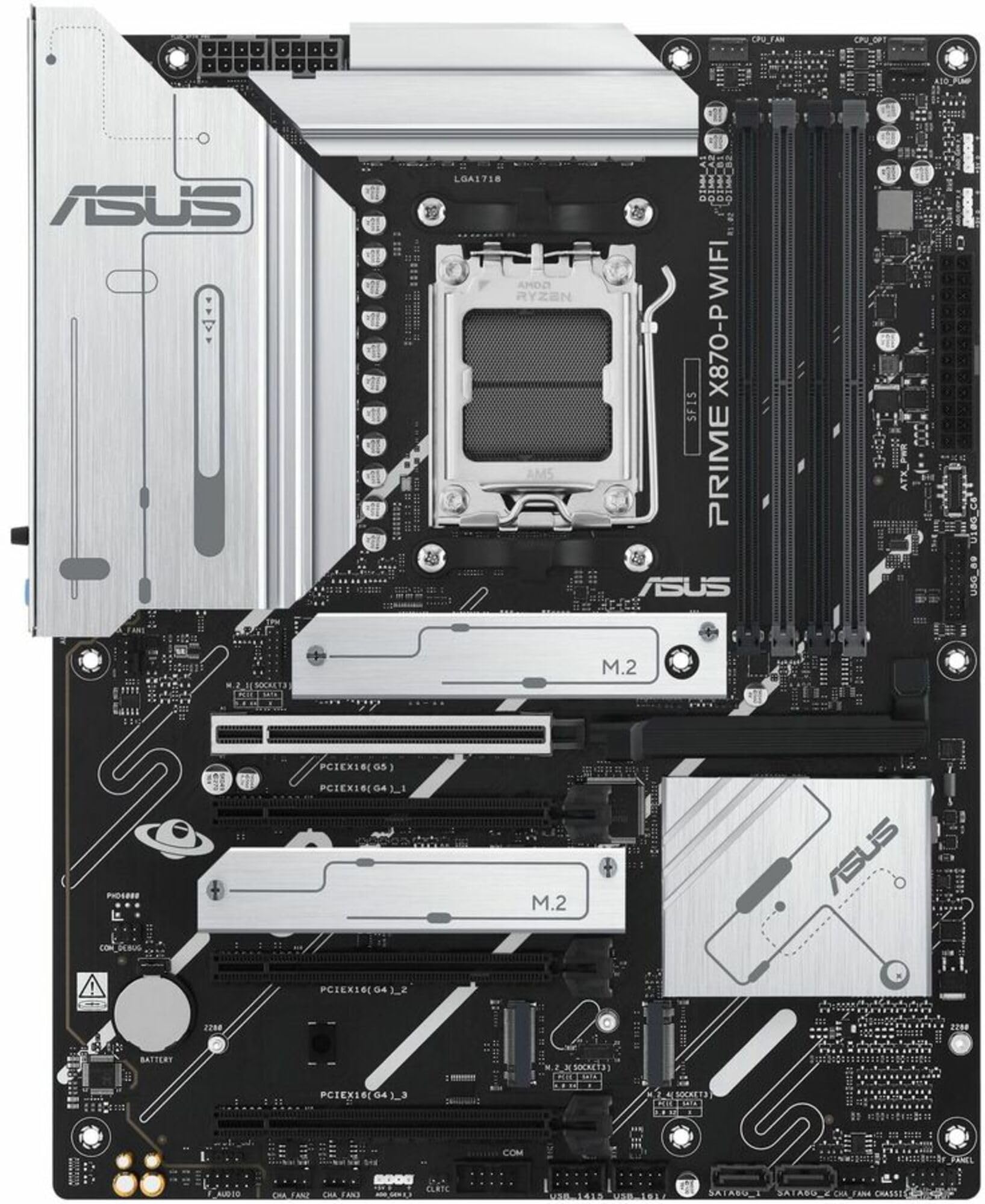
The Prime X870-P strips away unnecessary RGB and gamer aesthetics to focus on core functionality, making it an excellent choice for builders who prioritize reliability over flash. The 14+2+1 DrMOS power solution with 80A stages is more than adequate for the 7800X3D, and the 8-layer PCB ensures signal integrity for high-speed DDR5 memory up to the board’s rated limits.
Connectivity includes Wi-Fi 7 with the Q-Antenna, Realtek 2.5Gb Ethernet, and two USB4 Type-C ports delivering 40Gbps each. The board also features four M.2 slots — one PCIe 5.0 and three PCIe 4.0 — with dual M.2 heatsinks covering the primary slots. The DIY-friendly touches include a pre-mounted I/O shield, M.2 Q-Latch, and BIOS FlashBack for CPU-less BIOS updates.
One reviewer reported that the WiFi drivers are only compatible with Windows 11, causing issues for Linux or Windows 10 users who need wired Ethernet as a fallback. Another builder successfully used the board with a Ryzen 7 9700X and 6000 MHz DDR5, praising the fast setup process and stable out-of-box performance. The AI Cooling II fan control is a nice bonus for quieter operation.
Why it’s great
- USB4 40Gbps Type-C on rear I/O
- Pre-mounted I/O shield and tool-free M.2 latches
- Stable power delivery for 7800X3D boost clocks
Good to know
- WiFi drivers require Windows 11
- Limited front-panel USB-C bandwidth (10Gbps)
6. GIGABYTE B650 Eagle AX AM5 LGA 1718 ATX Motherboard

The B650 Eagle AX is a well-rounded mid-range board that offers a compelling feature set for the 7800X3D without the premium of X870 chipsets. The 12+2+2 digital VRM solution is not the highest phase count in this lineup, but it handles the 120W TDP of the 7800X3D without thermal throttling in standard gaming scenarios. The PCIe 5.0 M.2 slot is a standout feature at this price position.
The board includes three M.2 slots — one Gen5 and two Gen4 — with a dedicated M.2 Thermal Guard for the primary slot. The rear I/O provides six USB-A ports, HDMI and DisplayPort outputs, and AMD Wi-Fi 6E for wireless connectivity. Q-Flash Plus allows BIOS updates without a CPU installed, which is critical for users pairing a B650 board with an early-batch 7800X3D that may need a BIOS update.
User reviews consistently praise the build quality and value proposition. One builder successfully paired it with a Ryzen 5 9600X and noted the abundance of ARGB headers and fan connectors. A minor complaint involves the manual providing incorrect instructions for the BIOS update process, though a quick YouTube tutorial solves this. The board lacks PS/2 ports, which may matter to some legacy peripheral users.
Why it’s great
- PCIe 5.0 M.2 slot for next-gen storage
- Q-Flash Plus for CPU-less BIOS updates
- WiFi 6E included at a competitive price
Good to know
- Manual contains incorrect BIOS update instructions
- 12-phase VRM may limit extreme overclocking potential
7. MSI PRO B650-S WiFi V1 Motherboard

The PRO B650-S WiFi V1 is MSI’s budget-conscious B650 offering that still delivers the essentials for a strong 7800X3D pairing. The 12 Duet Rail power system is rated for handling Ryzen 9000 series CPUs, which means it comfortably manages the 7800X3D’s power demands. The board includes a dedicated pump-fan header and a 6-layer PCB with 2 oz thickened copper for improved thermal performance.
Memory support officially reaches 6000+ MHz with 1DPC 1R configuration, matching the ideal sweet spot for the 7800X3D. The two M.2 Gen4 slots provide enough storage bandwidth for most gamers, though users who need three or four NVMe drives will feel constrained. The Wi-Fi 6E module with Bluetooth 5.3 and the 2.5Gbps LAN port cover networking needs adequately.
User feedback is generally positive, with one reviewer calling it “good for what it is” and noting the clear BIOS interface. A common complaint is the lack of an M.2 slot heatsink for the secondary slot, though thermal throttling is unlikely with standard Gen4 drives. The rear I/O includes USB 3.2 Gen 2×2 Type-C at 20Gbps and HDMI 2.1 for integrated graphics fallback. The stamped metal I/O shield feels dated compared to integrated shields on pricier boards.
Why it’s great
- 6-layer PCB with 2 oz copper for signal integrity
- WiFi 6E and 2.5G LAN at entry-level pricing
- Dedicated pump-fan header for liquid cooling
Good to know
- Only two M.2 slots total
- Secondary M.2 slot lacks dedicated heatsink
8. ASRock B650 PRO RS AMD Ryzen 7000 Series Motherboard
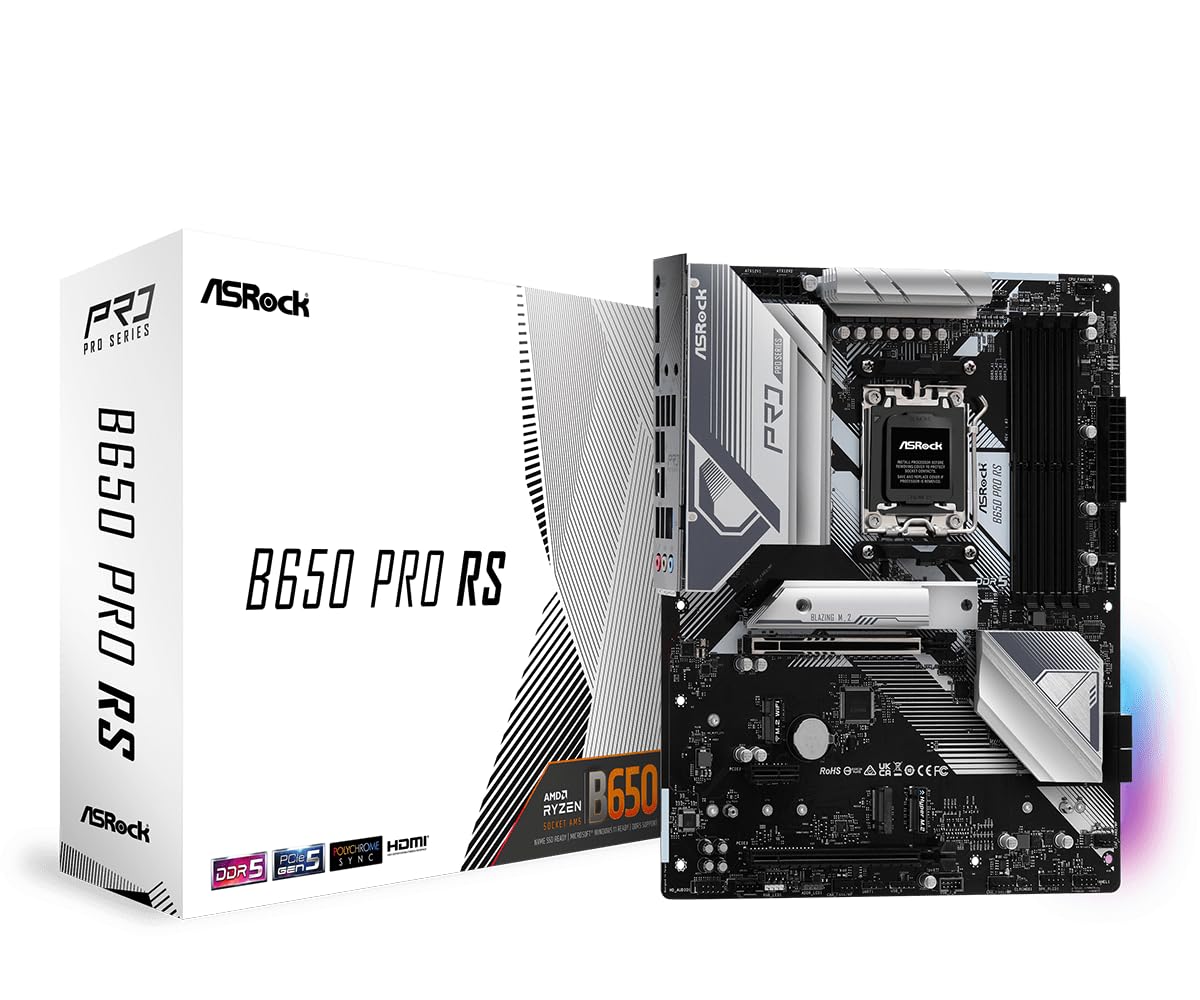
The ASRock B650 PRO RS is the most affordable AM5 board in this lineup, yet it still offers a 14+2+1 power phase design that surprises given its price. When paired with a 7800X3D at stock settings, this board delivers stable performance in all gaming workloads. The silver heatsinks (which appear white in product photos) provide adequate thermal mass for the VRM components.
The board supports up to 128 GB of DDR5 memory across four DIMM slots with speeds reaching 6200 MHz via overclocking. It provides one PCIe 4.0 x16 slot for the GPU and two additional PCIe slots for expansion cards. The single M.2 Key-E slot supports WiFi modules, but the board does not include an onboard WiFi controller — users will need to add their own adapter. Graphics output includes one HDMI and one DisplayPort.
A verified buyer reported using this board with a Ryzen 7800X3D, Team Group 6000 MHz DDR5, and Thermalright 240mm AIO for nearly a year without issues. Another user noted the abundance of USB ports, including a USB-C port on the rear I/O. The lack of onboard WiFi and Bluetooth is the biggest compromise, but for users who plan to use wired Ethernet, this board offers unbeatable value for the 7800X3D.
Why it’s great
- 14+2+1 phase design at the lowest price point
- Four DDR5 slots support 128 GB capacity
- Stable with 7800X3D for nearly a year (verified)
Good to know
- No onboard WiFi or Bluetooth
- PCIe 4.0 x16 slot only, not PCIe 5.0
9. Micro Center CPU Motherboard Kit AMD Ryzen 7 7800X3D with ASUS ROG Strix B650-A

This Micro Center bundle pre-selects the 7800X3D CPU with an ASUS ROG Strix B650-A Gaming WiFi motherboard, taking the guesswork out of compatibility. The ROG Strix B650-A features a 12+2 power stage design with 8+4 pin ProCool connectors, providing clean power delivery for the 7800X3D. The board includes one PCIe 5.0 M.2 slot and two PCIe 4.0 M.2 slots, all with dedicated heatsinks.
The CPU itself is the star — an 8-core, 16-thread processor with 104 MB of total cache (L2+L3) and a 5.0 GHz max boost clock. The 3D V-Cache technology provides significant gaming performance uplifts in cache-sensitive titles. The motherboard includes Wi-Fi 6E, Bluetooth 5.2, and a comprehensive rear I/O section with USB 3.2 Gen 2×2 Type-C and multiple USB 3.2 Gen 2 ports.
User feedback is positive, with one reviewer calling it a “perfect bundle deal” and another describing the build as a “beast.” One buyer expressed concern about the packaging — the CPU and motherboard arrived in a single box without adequate padding — though the components worked fine after installation. The ASUS BIOS interface is user-friendly for both beginners and experienced overclockers. Note that this kit includes only the board and CPU; a separate cooler, RAM, and GPU are still required.
Why it’s great
- Pre-matched CPU and board guarantee compatibility
- 7800X3D with 104 MB cache for gaming dominance
- ASUS ROG BIOS with industry-leading stability
Good to know
- Packaging may lack internal padding for shipping
- Only two DDR5 DIMM slots on the B650-A board
FAQ
Does the 7800X3D benefit from PCIe 5.0 GPU slots?
Is a B650 motherboard enough for the 7800X3D or do I need X870?
Will any AM5 motherboard work with the 7800X3D out of the box?
What memory speed and capacity should I pair with the 7800X3D?
Final Thoughts: The Verdict
For most users, the 7800x3d motherboard combo winner is the ASUS ROG Strix B850-A Gaming WiFi because it blends a robust 14+2+2 VRM with WiFi 7 and four M.2 slots at a mid-range price that complements the 7800X3D without overspending. If you want USB4 connectivity and 5G LAN for content creation workflows, grab the MSI MAG X870 Tomahawk WiFi. And for the ultimate budget-conscious build where every dollar matters, nothing beats the ASRock B650 PRO RS — it delivers stable 7800X3D performance at the lowest entry cost on the AM5 platform.