
Our readers keep the lights on and my morning glass full of iced black tea. As an Amazon Associate, I earn from qualifying purchases.
Specs are compiled from manufacturer listings and verified buyer reviews and can change over time — please confirm the key details on the product page before buying.
If you are building a home server or media vault, the single biggest headache with an 8-bay NAS case is keeping all those drives from cooking themselves to death. This guide cuts through the noise to show you which cases actually move enough air to keep your data safe, which ones need a fan swap on day one, and where the real trade-offs live between a compact build and a full-tower that breathes.
I’m Min — the founder and writer behind Gadgets Feed. This guide is built by comparing the manufacturers’ published specifications and the patterns across verified customer reviews, so you get each pick’s real strengths and trade-offs instead of marketing spin.
If you want a storage chassis that can handle eight drives without turning your office into a furnace, you need the 8 bay nas case that balances airflow, drive cooling, and build quality for your specific setup.
Quick Picks
- Silverstone Technology CS382 — Top Performer
- Silverstone Technology CS380 — ATX Ready
- Silverstone Technology CS383 — Best Value
- JONSBO N4 — Compact & Stylish
- AUDHEID K7 — Budget Pick
How To Choose The Best 8 Bay NAS Case
Picking the right chassis for your NAS means balancing drive cooling, motherboard support, noise, and physical size. This section walks you through the four specs that matter most for an eight-drive build.
Drive Cooling: The Make-or-Break Spec
The single question every buyer should answer first is whether the case has dedicated intake fans blowing directly over the hard drive cage. Without that focused airflow, 7200 RPM drives can hit 60°C or higher under sustained load — well into the worry zone for drive lifespan. Look for cases with at least two fans aimed at the drive bay, and check buyer reports for real-world temperatures.
Hot-Swap vs. Internal Mounts
A hot-swap backplane lets you swap a failed drive or add new storage without shutting down the whole server. It also cuts down on a rat’s nest of SATA cables inside the case. Some budget cases mix hot-swap and fixed bays, while premium chassis give you eight hot-swap trays for every slot.
Motherboard and PSU Support
8-bay NAS cases come in sizes that fit Mini-ITX, Micro-ATX, or full ATX boards. A Micro-ATX board gives you more expansion slots for a RAID controller card, but it needs a case with enough depth. PSU size is just as important — some compact cases require a smaller SFX power supply instead of a standard ATX unit, which limits your choices and adds cost.
Build Materials and Noise
Steel panels dampen vibration and fan noise better than thin aluminum. A flimsy case can amplify drive hum and make a server room feel louder than it should. Check whether the stock fans are speed-controlled or fixed-speed models, because fixed-speed fans often run at full blast and create unnecessary noise.
Quick Comparison
On smaller screens, swipe sideways to see the full table.
| Model | Best For | Form Factor Support | Fans Included | Drive Configuration | Amazon |
|---|---|---|---|---|---|
| Silverstone CS382 | Custom cooling builds | Micro-ATX / Mini-ITX | 3 (2×92mm, 1×120mm) | 8 hot-swap + 2×2.5″ + 5.25″ | Amazon |
| Silverstone CS380 | Compact ATX builds | ATX / Micro-ATX | 3×120mm | 8 hot-swap + 2×5.25″ | Amazon |
| Silverstone CS383 | Full tower with E-ATX | E-ATX / SSI-EEB / ATX | — | 8 hot-swap + 4×5.25″ | Amazon |
| JONSBO N4 | Compact quiet desk builds | Micro-ATX / Mini-ITX | 1×120mm | 4 hot-swap + 2 fixed 3.5″ + 2×2.5″ | Amazon |
| AUDHEID K7 | Budget rack-style builds | Micro-ATX / Mini-ITX | 3 (2×90mm, 1×60mm) | 8 hot-swap 3.5″/2.5″ | Amazon |
In‑Depth Reviews
1. Silverstone Technology CS382

The NAS chassis that gives you eight hot-swap bays and room to dial in the cooling exactly how you want it.
This case makes drive temperature management its priority — it comes with 3 stock fans (two 92mm slim PWM fans in the cage and one 120mm rear fan), while the JONSBO N4 below has 1×120mm fan. Buyers report that the stock 92mm slim PWM fans are loud because the backplane lacks PWM control and runs them at full speed, so many owners swap them for quieter 92mm models and wire them to the motherboard instead. After the swap, bottom drives sit in the high 30s or low 40s under load, while top drives stay in the mid-30s, according to one detailed build review.
Unlike the CS380 or the budget AUDHEID K7, this chassis supports Micro-ATX and Mini-ITX boards alongside an ATX power supply, so you are not stuck hunting for a specialty SFX unit. You also get room for a 240mm or 280mm liquid cooling radiator, plus a 9.5mm slim optical drive bay — rare for an 8-bay form factor. The flip side is that you must remove the drive cage to install the motherboard, and the case uses an inverted layout that can make a heavy GPU sag.
Why it’s great
- 8 hot-swap trays with LED indicators for drive status
- Compatible with ATX PSU, Micro-ATX, and liquid cooling
- Extra bays: 2×2.5″ SSD, 1×3.5″ under cage, 5.25″ slim ODD
Good to know
- Stock cage fans are loud at full speed; swap recommended
- Must remove drive cage for motherboard installation
- Drive sleds feel flimsy per some buyers
Best for: Builders who plan to swap fans for custom cooling and need the most expansion options in a mid-tower.
Skip if: You want a quiet out-of-the-box experience without replacing any fans on day one.
2. Silverstone Technology CS380

A compact ATX tower that squeezes eight hot-swap bays and a full-size motherboard into a small footprint.
If you want a standard ATX board without going up to a full-tower like the CS383, this is the just-right pick. It includes three 120mm fans with filtered intake vents from the start, and the fans are quiet according to multiple buyers. One reviewer running an 8-drive ZFS RaidZ2 array said the case stays cool without any extra work. Another buyer added push fans to lower drive temperatures from 46°C to 36°C under load.
It also gives you two flexible 5.25-inch drive bays on top of the eight hot-swap trays, something the compact JONSBO N4 and the AUDHEID K7 cannot match. A few owners mention the build quality is just OK — the aluminum side panels feel thin for a case in the mid range, and one unit arrived missing a motherboard standoff. The lockable front door adds security for office or shared spaces.
The case for it: Three quiet 120mm fans from the start plus the ability to run a full ATX board in a compact chassis that is 19.19 inches deep, versus the CS382’s 25.9-inch depth.
The catch: Build materials feel less premium than the price suggests, and the two 5.25-inch bays take up space you might not need.
Best for: Anyone who needs ATX motherboard compatibility and wants decent cooling without replacing fans immediately.
Skip if: Premium build quality or thick steel panels matter more to you than raw function.
3. Silverstone Technology CS383
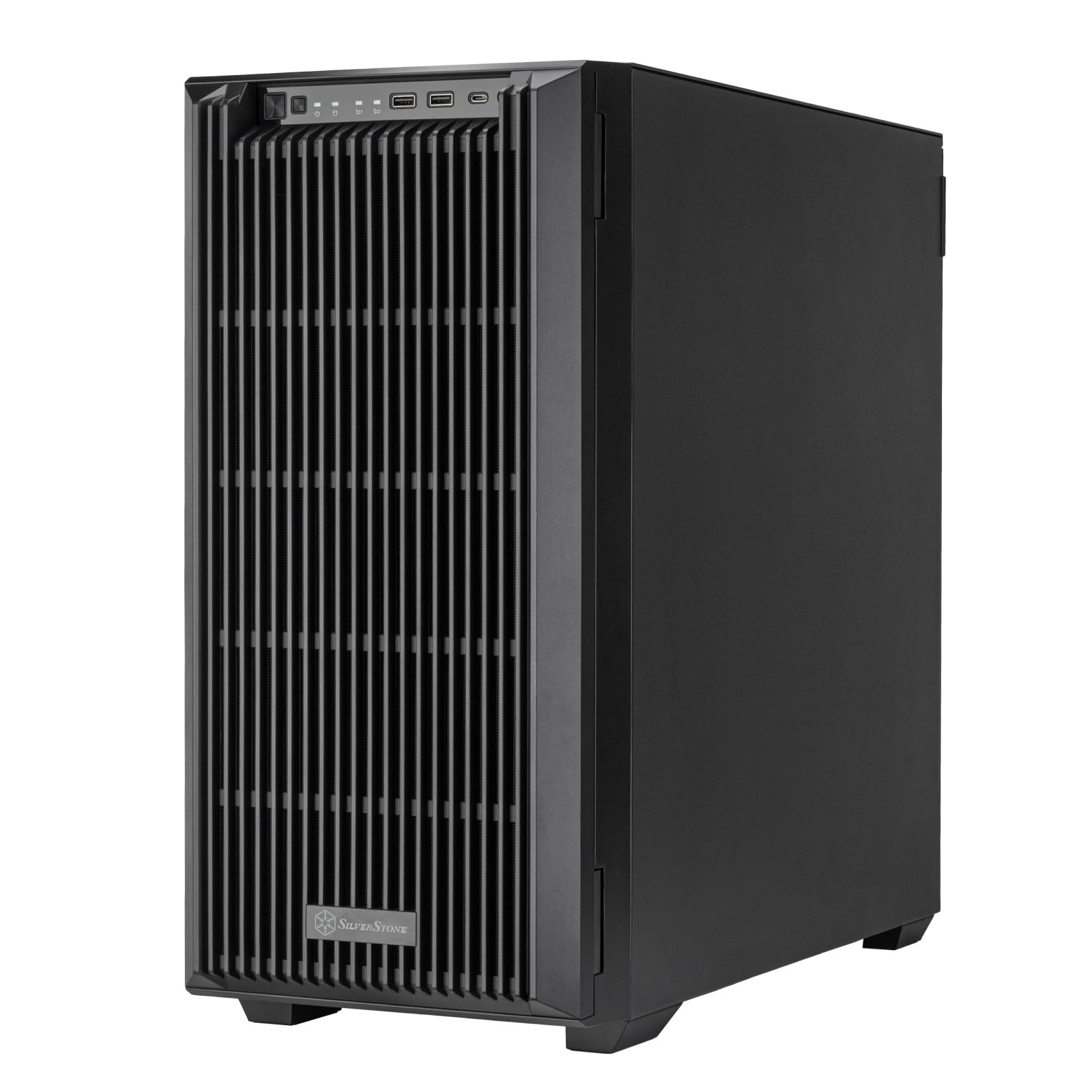
The full-tower workhorse that fits an E-ATX server board plus eight hot-swap drives with room to spare.
This is the largest chassis in this roundup at 23.15 inches deep, and it is the only one that supports motherboards up to E-ATX and SSI-EEB — so if you are building a server with a dual-socket board or need maximum PCIe expansion, this is your pick. It supports up to a 420mm liquid cooling radiator or a 186mm tall air cooler, plus graphics cards up to 340mm long. By comparison, the JONSBO N4 tops out at 230mm GPUs and 70mm CPU coolers.
Despite its size, buyers are split on value. One owner calls it a good price for a quiet tower server and notes that adding 140mm top fans improves airflow. Others point out that the hot-swap drive trays are all plastic with no metal reinforcement, and the cooling fans are loud (“3x louder than everything else combined,” per one review). The case has no included fans listed in the specs, so you will likely need to add your own. A buyer who 3D-printed a 120mm fan adapter for the 5.25-inch bay helped keep drives cooler, suggesting the case needs a custom touch to reach its potential.
Why it’s great
- Supports the largest motherboards (E-ATX, SSI-EEB)
- Room for 420mm radiator or 186mm air cooler
- 8 hot-swap trays plus 4 additional 5.25-inch bays for growth
Good to know
- No included fans, adding cost to a premium-priced chassis
- Plastic hot-swap trays feel cheap per multiple reviews
- Stock fans are not included and aftermarket cooling needs planning
Best for: Power users building a dual-socket or E-ATX server who want maximum expansion and radiator support.
Skip if: You expect premium build quality at the price point — the plastic drive trays and thin materials disappoint at this tier.
4. JONSBO N4

A stunning walnut-finished case that looks like furniture but has a serious drive cooling problem.
The N4 is the best-looking chassis in this list by far, with an 8mm thick North American black walnut solid wood front panel that integrates into a living room or office without screaming “server rack.” It fits Micro-ATX or Mini-ITX boards, an SFX power supply, and gives you 6x 3.5-inch drive bays (4 hot-swap on the left, 2 non-hot-swap on the right) plus 2x 2.5-inch SSD slots. That is 8 drives total in a very compact 14-inch depth, versus the AUDHEID K7 at 12.2 inches and the Silverstone CS382 at 25.9 inches.
The downside is severe: customers note a “major design flaw: no drive cooling (drives >70°C)” and that an external fan ruins the aesthetics. With only a single 120mm fan built in, fully loading all 6 hard drive bays pushes temperatures into the danger zone. One reviewer notes the included fan has wobble and noise, recommending an immediate Noctua swap. The mixed hot-swap and fixed bay layout is also limiting — only the left bay is truly hot-swap, while the right bay requires manual SATA cabling each time you swap.
The case for it: This is the only 8-bay case you would willingly put on a desk in your living room. The 8mm solid walnut panel, compact 14-inch depth, and USB 3.2 Gen 2 Type-C front port make it a design-forward choice that fits an Ikea Kallax shelf.
The trade-off: Without serious cooling mods (replacing the fan and adding external airflow), drives can exceed 70°C — well above the safe operating range for most hard drives.
Best for: Aesthetics-first builders with low-power SSDs or who run only 2-3 drives and value looks over raw cooling capacity.
Skip if: You plan to fill all 8 bays with high-capacity 7200 RPM drives — the cooling just is not there.
5. AUDHEID K7

The budget 8-bay that works — if you can handle sharp edges, tight tolerances, and adding your own cable extenders.
The K7 undercuts every other case here on price while still offering three stock fans (two 90mm, one 60mm), while the JONSBO N4 has a single 120mm fan. Reviewers point out that with 8x 7200 RPM HDDs loaded, drives sit between 47°C and 51°C under load — warm but manageable, versus the N4 reports of drives exceeding 70°C. That said, the same reviewer notes that drives can reach 60°C under load, so a custom fan solution (like a 3D-printed adapter from Thingiverse) helps a lot.
Some assembly frustrations are real. Multiple buyers call it “miserable to build in” due to razor-sharp edges inside the chassis. It needs 24-pin and 8-pin ATX power extension cables because the PSU (a standard 1U or FLEX unit) sits far from the motherboard. The backplane works for both SATA and SAS, which is a nice bonus at this price, but one unit arrived with a non-functional drive tray LED. At 12.2 inches deep, it is the second-shallowest case in this roundup after the JONSBO N4, making it a decent fit for tight shelves.
Why it’s great
- Most affordable 8-bay chassis with hot-swap backplane
- Three fans included for better-than-budget cooling
- Supports both SATA and SAS drives
Good to know
- Sharp interior edges make assembly painful
- Needs PSU cable extension (24-pin + 8-pin) not included
- Stock cooling struggles under sustained load without mods
Best for: Budget-focused builders comfortable with minor mods (cable extenders, optional fan upgrades) who need 8 hot-swap bays.
Skip if: You want an easy, painless build experience and are not OK with sharp metal edges or sourcing extra parts.
Understanding the Specs
Fan Count & Airflow
The number of fans and where they point is the single most important spec for drive health. A case with 1 fan (like the JONSBO N4) cannot push enough air past six or eight spinning hard drives, leading to temperatures over 70°C. A case with 3 fans (like the Silverstone CS382 or AUDHEID K7) has a much better chance of keeping drives in the safe 35-50°C range. Pay attention to whether the fans are PWM or fixed-speed models, because fixed-speed fans often run loud at all times.
Hot-Swap Backplane
A backplane is a circuit board that the drives plug into, giving you one power-and-data connection point instead of running individual cables to each drive. Hot-swap means you can pull a drive out and insert a new one while the system is running — essential for RAID arrays where you replace a failed drive without downtime. Some cases mix hot-swap bays with fixed internal bays, which is cheaper but limits your flexibility during a drive failure.
FAQ
What is a safe temperature range for 3.5-inch hard drives in a NAS case?
Can I use a standard ATX power supply in a Micro-ATX NAS case?
Will a full-size graphics card fit in an 8-bay NAS case?
What is the difference between hot-swap and non-hot-swap drive bays?
Do I need a separate RAID controller card for an 8-bay NAS case?
How many fans do I really need for 8 hard drives?
Is it worth replacing the stock fans in a NAS case?
Can I fit an 8-bay NAS case into a standard 19-inch server rack?
What is the real-world noise difference between 120mm and 80mm fans?
Should I choose a full tower or a compact NAS case for my first build?
Final Thoughts: The Verdict
If you want one dependable pick, the 8 bay nas case winner is the Silverstone CS382 because it gives you eight hot-swap bays, Micro-ATX support, ATX PSU compatibility, and the room to swap in quiet fans for a near-silent 8-drive server. If you want a standard ATX board without a full tower grab the Silverstone CS380. And if you need E-ATX support and maximum expansion for a true server build, the Silverstone CS383 is your only real option in this class.
How We Picked
We do not accept paid placement, and we did not hands-on test every unit. Instead, we match each pick to a real buyer and use-case by comparing the manufacturers’ published specifications against the patterns in verified customer reviews — so you get each pick’s real strengths and trade-offs instead of marketing copy.
Sources & Methodology
Specifications: manufacturer listings and product documentation. Review insights: verified customer reviews, as of July 2026. Pricing: not shown on this page (it changes often); check the current price via the retailer link.
As an Amazon Associate, Gadgets Feed earns from qualifying purchases. This does not affect which products we feature.