
Our readers keep the lights on and my morning glass full of iced black tea. As an Amazon Associate, I earn from qualifying purchases.
Specs are compiled from manufacturer listings and verified buyer reviews and can change over time — please confirm the key details on the product page before buying.
If you run a rack of servers or juggle eight machines from one desk, the feature that decides your happiness is EDID handling — the signal a KVM sends so your computer believes a monitor is still attached. Get that wrong and every switch blacks out your screen or shuffles your open windows to a new corner. Get it right and switching between machines never blanks your screen or moves your windows.
I’m Min — the founder and writer behind Gadgets Feed. This guide is built by comparing the manufacturers’ published specifications and the patterns across verified customer reviews, so you get each pick’s real strengths and trade-offs instead of marketing spin.
Port count is only the start — video standard, USB generation, and switching method decide whether an 8-Port KVM Switch survives your daily workflow. That trio is what this guide sorts out for you.
Our Picks at a Glance
How To Choose The Best 8-Port KVM Switch
Buying an 8-port KVM is really four decisions stacked on top of each other. Nail all four and the switch runs without you thinking about it. Miss one and you’ll be crawling behind the rack to re-cable every week.
Match the video standard to the machines you already own
VGA still dominates server rooms because rack hardware often ships with it. HDMI covers desktops, laptops, and consoles. DisplayPort is what you want for ultrawide monitors and high-refresh work. If your fleet is mixed, an HDMI switch with an adapter is usually the simpler path than buying a second KVM.
Decide if you need EDID simulation
EDID stands for Extended Display Identification Data — the handshake that tells your computer what the monitor can display. Without EDID simulation, switching inputs can make a PC think the monitor unplugged, which blanks your screen and scatters your windows. If you keep eight sessions open all day, EDID support matters more than resolution bragging rights.
Check the USB generation and port count
USB 2.0 sharing is fine for keyboards, mice, and the occasional flash drive. USB 3.0 ports handle external drives and printers at faster transfer speeds. Count how many shared peripherals you actually plug in — scanners, dongles, and license keys eat ports fast.
Pick your switching method and mounting
Front-panel buttons suit a desktop. A wired remote or IR controller helps when the box lives in a rack. Hotkeys keep your hands on the keyboard. RS232 is the automation route for labs and server rooms that script their own switching. If you’re mounting in a 19-inch rack, verify the actual height claim before you buy — some “1U” listings are closer to a half-U.
Quick Comparison
| Model | Best For | Video Standard | Max Resolution | Switching Method | Amazon |
|---|---|---|---|---|---|
| MT-VIKI 801UK-L★ Best Overall | Rack server rooms on a budget | VGA + USB 2.0 | — | Push button + wired remote | Amazon |
| GREATHTEK 8 Port HDMI KVMMost Versatile | Mixed-OS desks and labs | HDMI 1.4 + USB 2.0 | 4K@30Hz | Push button + hotkeys | Amazon |
| TCNEWCL 4K@60Hz HDMI KVM | Desktop control at a distance | HDMI 2.0/2.1 + USB | 4K@60Hz | Buttons + wired controller + IR remote | Amazon |
| GREATHTEK S7811H-B | Big fleets with automation needs | HDMI 1.4 + USB 2.0 | 4K@30Hz | Button + hotkey + RS232 | Amazon |
| KCEVE 8 Port USB 3.0 KVM | Shared USB 3.0 peripherals | HDMI + USB 3.0 | 4K@60Hz | Hotkey + TTL control | Amazon |
| Camgeet 8 Port DisplayPort KVM | Ultrawide and high-refresh desks | DisplayPort + USB 3.0 | 4K@60Hz | Buttons + wired remote + RS232 | Amazon |
In‑Depth Reviews
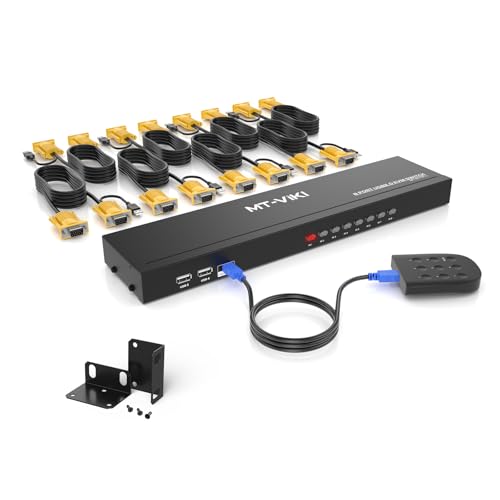
1. MT-VIKI KVM Switch 8 Port Rackmount VGA
Our pick — over 4★ from 250+ verified ratings; the strongest balance of quality and price.
The no-drama workhorse for server racks — one box, eight machines, cables in the box.
Buy this if your fleet is servers. The 801UK-L lets one set of USB 2.0 keyboard and mouse plus a monitor drive eight computers, and it arrives with eight 2-in-1 KVM cables and a power adapter already in the box. That’s the whole reason it sits at the top of this list — you plug USB and VGA into each machine and the box draws its power straight from that connection, so there’s nothing extra to wire up.
You get two ways to switch. Press the button on the front, or use the 2M wire-extended desktop selector so the control lives out of the way. Buyers running Supermicro, Dell R210 II, and HP servers in a 17-inch rack report it working as advertised, alongside Reolink NVRs and surveillance systems. One owner’s report, in their own words: “Works as. Great KVM switch controlling all my servers and Reolink NVR.” The connectors claim an IP56 rating (a dust- and water-resistance score where higher numbers mean more protection), and it plays nicely with Windows 9X through Windows 7, Linux, and Novell.
The recurring catch is the beep — the switching tone is loud for some ears and fine for others, and a handful of buyers would prefer it went away entirely. The other honest note is the height: it’s billed as fitting a 1U 19-inch rack, and owners say it lands closer to a half-U when it’s actually bolted in, so measure your rail space before you commit. If your rack is tight or your office is quiet, plan for both.
What earns it the crown
- Includes 8 KVM cables and a power adapter — nothing extra to buy
- Two switching paths: front button or 2M wire-extended desktop selector
- Works with the servers people actually rack — Supermicro, Dell, HP, plus NVRs
- Plug-and-play with no power supply needed for the switch itself
Where it asks patience
- The switching beep is genuinely loud — some buyers find it grating
- Buyers report the height lands closer to a half-U than a true 1U
- USB 2.0 only, so no fast drive transfers
Settled for: Anyone running a small server room or a home lab with older VGA-equipped machines who wants cables included and a remote that reaches the edge of the rack.
Keep shopping if: You need HDMI or DisplayPort, silent switching, or USB 3.0 transfer speeds — none of those live here.
2. GREATHTEK 8 Ports HDMI KVM Switch
One keyboard, one monitor, eight machines — and it doesn’t care which OS each one runs.
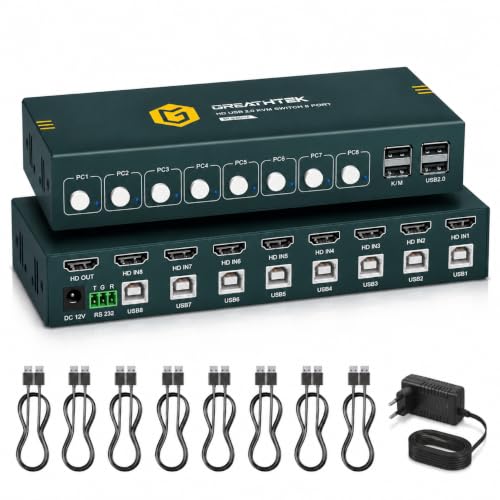
This is the pick for a desk with mixed operating systems. The unit runs HDMI 1.4 with resolution up to 4K@30Hz, controls eight computers from a single keyboard, mouse, and monitor, and shares USB 2.0 peripherals — keyboards, mice, printers, scanners, and USB drives — through its own ports. EDID Adaptive technology is built in, so display settings hold steady as you switch, and it works across Windows, macOS, Linux, and ChromeOS.
Switching comes two ways: physical buttons on the front panel, or keyboard hotkeys — and here’s the caveat worth tattooing on your wrist, hotkey switching only works if your keyboard and mouse are plugged into the dedicated K/M ports. USB storage sharing works out of the front hub. For buyers who want one keyboard and one monitor spanning machines that never agree on anything else, that’s the win.
The honest fine print is the Mac situation. Owners mention 2021 MacBook Pro and Mac Mini units not recognizing the keyboard and mouse through the switch, with both devices working again the moment they’re plugged in directly — a replacement didn’t change it, though monitors were fine throughout. Support was responsive and offered a refund. If your whole fleet is Apple silicon, know that going in.
What wins people over: The setup is genuinely easy — power it, cable it, and physical buttons or hotkeys take it from there, with EDID adapting automatically so your display keeps its settings.
The Mac asterisk: Older Intel Macs and plenty of PC setups run clean, but the newer MacBook Pro and Mac Mini have been a sticking point, so PC-first buyers get the smoother ride.
Reach for this if: You’re switching between Windows, Linux, and ChromeOS machines and want a keyboard that just follows you across the desk.
Look elsewhere if: Your primary machines are recent Macs, or you need wireless dongle support — that’s not on the menu.
3. TCNEWCL 4K@60Hz HDMI KVM Switch 8 Port

Eight computers, three ways to switch, and cables that split at the machine instead of your desk.
Three controllers in one box is what sets this apart. You get front-panel buttons, a wired desktop controller, and an IR remote control — so you can switch from your chair, from across the room, or from the rack itself. It drives eight PCs from one keyboard, mouse, and 4K monitor at 4K@60Hz with HDMI 2.0/2.1 support and 3D, and the LED indicator shows which input is live at a glance.
The wiring story is the other strong point. This KVM combines HDMI and USB into a single cable until it splits at the PC side, which collapses the usual spaghetti behind your desk. Buyers call that the best feature of the unit — less cable, less mess. You also get eight 150cm HDMI cables, the wired controller, an IR remote, two AAA batteries, and a manual in the box, and the whole thing plays with Windows 11 through XP, Mac OS, Linux, and DOS. HDMI 2.0/2.1 runs should stay under 3 meters.
The trade-off is the indicator lights. The button glows blue to show your selection, but there’s no per-port light telling you which machines are on or connected, which a few owners find genuinely annoying mid-switch. There’s also a reliability corner to watch: a small share of customers note individual proprietary cable failures and occasional Linux switching quirks, and spare cables aren’t sold separately — so treat the supplied cables with some care.
What it does best: The combined HDMI/USB cable design is the standout — it simplifies routing in a way single-cable-per-connection boxes simply don’t, and buyers consistently name it as the reason to keep it.
Assume this going in: You’ll be squinting at a single blue button light rather than a full port map, and if a cable ever fails you’re replacing a cable with no official spare to order.
Fits best: A desk where you switch constantly and want a compact remote within arm’s reach, plus 4K@60Hz for daily work on one shared display.
Not your fit: If you need per-port status lights or a long-run Linux-heavy setup where switching reliability is non-negotiable.
4. GREATHTEK S7811H-B HDMI KVM Switch 8 Port

Eight computers, three switching routes, and an RS232 port for setups that run themselves.
RS232 is the reason a lab buys this one. The S7811H-B lets eight computers share one monitor, keyboard, and mouse, and it switches three ways: front-panel buttons, keyboard hotkeys, or RS232 commands (a serial control standard that lets software drive the switch for you). It’s built for the buyer who scripts their environment rather than reaching for a button.
The display side handles up to 4K@30Hz on HDMI 1.4, with backward compatibility for 2K and 1080P, plus Adaptive EDID so your monitor keeps its identity across switches. USB 2.0 ports let all eight computers share scanners and USB drives, and there’s no driver to install. In the box: eight USB-B cables, a power adapter, and an RS232 terminal. The metal case and rack-mount design suit a growing fleet. Owners doing heavy switching report no keyboard recognition dropouts and no blank monitor on boot over months of use, and they lean on the remote button to tidy cable management.
Here’s the catch nobody mentions on the box: one powered USB port per connected device is required — usually a USB 3 port — or the switch won’t behave as expected. Dell users specifically need Wake on USB and USB Power Share enabled. There’s also a slight delay on every switch, and the box is light enough to slide on a shelf if you don’t mount it. A small number of units reportedly fail early, so early testing pays off.
What makes it earn its name: The combination of hotkey, button, and RS232 control covers everyone from the desktop tinkerer to the automation engineer, and the included cables and terminal mean you can go straight to setup.
Don’t skip this: Powered USB ports per device aren’t optional — plan your port map before you plug in, or you’ll be troubleshooting a switch that’s working exactly as designed.
Built for: Lab and IT buyers running scripted switching sessions who want RS232 in the box and a metal chassis they can rack.
Skip if: You want a zero-config desk unit — the powered-port requirement and per-switch delay ask for a little planning.
5. KCEVE 8 Port USB 3.0 HDMI KVM Switch
Four shared USB 3.0 ports and hotkeys your fingers will memorize after a day.
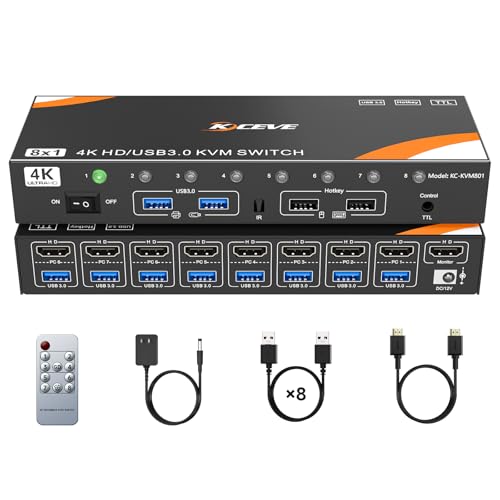
Sharing drives and printers without USB 2.0 drag is the point of this one. It moves eight computers onto one monitor, keyboard, and mouse over USB 3.0, with four shared USB ports for hard drives, printers, and scanners — plus support for wireless keyboards and mice. Video runs up to 4K@60Hz, with backward compatibility to 4K@30Hz, 3D, and 1080P.
Hotkey switching is the headline act here. Tap Scroll Lock twice plus the port number, or Ctrl twice plus the number if your keyboard has no Scroll Lock key. You can even swap the hotkey trigger from Scroll Lock to Control using the [old][old][new] sequence. There’s also TTL control (a low-voltage serial protocol used by technicians) if you supply your own TTL cable. Just remember the rule: your keyboard and mouse must live in the two USB ports marked with their logos, or hotkeys won’t fire. It works across Windows 10 down to Vista, Mac OS, Linux, and even consoles like the PS4, PS3, and Nintendo Switch.
Where the risk sits: some units ship with ports that don’t all work — one buyer found only HDMI ports 1 through 3 functioning, with 5 through 8 dead. Another hit a keyboard connection loss that traced back to a motherboard BIOS setting rather than the switch. You may also see a brief monitor disconnect on each switch as the screen re-initializes. A one-month home-lab test across Windows 11, Linux Mint, and Windows 7 came back clean, so the odds are good — but test all eight ports the day it arrives.
Best thing about it: Hotkeys that actually respond quickly and can be reassigned to whatever key your keyboard already loves make this the smoothest switcher for keyboard-first users.
Plan for this: Run a full eight-port check in the first week, and if you’re not seeing all four shared USB ports cooperate, start the return early.
Fine choice for: Anyone sharing external drives, printers, or scanners across several PCs who wants USB 3.0 speed and keyboard-driven switching.
Consider the alternatives if: You can’t tolerate a QA gamble, or you’re all-in on Mac — this one’s tuning was reported to trip up on a motherboard BIOS, not its own hardware.
6. Camgeet Displayport 8 Port KVM Switch 4K@60Hz
The DisplayPort switcher that remembers where your windows were the whole time.
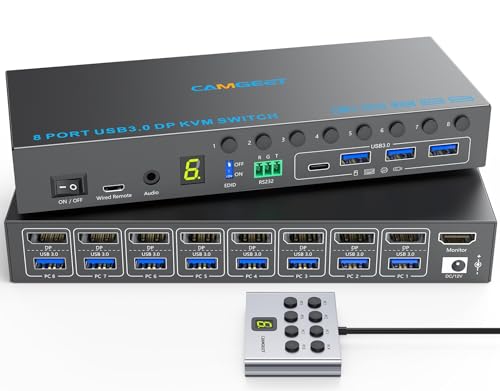
If your monitor is an ultrawide and you hate re-arranging windows after every switch, this is the one. The Camgeet runs DisplayPort with EDID simulation — it pretends the display is always attached, so when you move between your eight computers, your original window positions don’t move. EDID emulation can be turned on or off as needed. Resolution tops out at 4K@60Hz, backward compatible with 4K@30Hz and 2560×1440@120Hz, and it plays with ultrawide monitors as well.
Sharing runs through USB 3.0 — four ports (one USB-C, three USB-A) for keyboards, mice, printers, and USB drives — at data speeds up to 5Gbps, so a large file transfer takes seconds rather than a coffee break. You also get three switching paths: panel buttons 1 through 8, a wired remote with a digital screen and 1.5m cord, and RS232 at a 115200 baud rate. The package includes eight 1.5M USB 3.0 cables, a 12V/2A power adapter, and a manual. Compatibility covers Windows, Mac OS, Linux, and Chrome, with support for desktops, laptops, TV boxes, and USB-C or mini-DP to DP adapters.
Setup has three real traps: the front-panel EDID switch, thin documentation, and the included A-to-A cables. If your ultrawide doesn’t show up, check the front-panel EDID switch — it may be set to 2K instead of 4K, and that one toggle is the difference. Docs are thin. Newer Macs reportedly need external EDID emulators. And the included A-to-A cables reportedly cap at USB 2.0 speeds despite the USB 3.0 ports, so serious transfer needs may warrant better cabling. Clear those three and the EDID simulation and 4K@60Hz DisplayPort switching work as advertised.
Why it’s worth buying: EDID simulation preserves your window layout across switches — a genuine everyday win for anyone who juggles eight desktops and hates rebuilding their workspace.
The setup cost: Budget time to hunt the hidden EDID switch and swap in better cables, and don’t expect the manual to walk you through either.
Worth it for: Ultrawide and high-refresh desk setups where window layout continuity is worth a fiddly first-day setup.
Steer clear if: You want plug-and-play from the start, or your primary hardware is a recent Mac that needs extra emulation hardware to cooperate.
Understanding the Specs
Video standard and resolution
VGA carries analog signal and is what server racks still use. HDMI and DisplayPort carry digital and are what desktops, laptops, and consoles speak. The resolution figure — 4K@30Hz or 4K@60Hz — tells you how much detail and how smooth the picture runs; 4K@60Hz doubles the refresh cadence of 4K@30Hz, which matters for cursor tracking and video work. Cables matter too: pushing 4K@60Hz over HDMI usually calls for runs under 3 meters.
EDID simulation and switching method
EDID is the handshake that tells your computer what the monitor can do. EDID simulation keeps that handshake alive even when you switch away, so your PC doesn’t panic and blank the screen or shuffle your windows. Switching methods run from simple to advanced: front-panel buttons, a wired or IR remote, keyboard hotkeys, and RS232 for scripted control. The more paths you have, the easier it is to fit the switch into whatever your desk or rack already looks like.
FAQ
What actually happens to my screen when I switch between computers?
Why does hotkey switching not work on my 8-port KVM switch?
Is USB 2.0 good enough for sharing drives on a KVM?
Do I need a separate power supply for an 8-port KVM switch?
Can an 8-port KVM switch work with my Mac?
What is RS232 and do I need it on a KVM switch?
Will my 1U rack mount actually fit an 8-port KVM switch?
Why does my monitor flicker or go black after switching inputs?
Final Thoughts: The Verdict
For most buyers, the 8-port kvm switch winner is the MT-VIKI 801UK-L because it arrives with everything needed — eight KVM cables, a power adapter, and a desk selector — and works with the servers people actually run, all without needing a separate power supply. If you want DisplayPort, EDID simulation, and window-position retention, the Camgeet 8 Port DisplayPort KVM is the one to reach for. And for a scripted lab with RS232 control and hotkey switching over HDMI, the GREATHTEK S7811H-B is the box that keeps up.
How We Picked
We do not accept paid placement. Every pick is matched to a real buyer and a real use-case; we do not hands-on test units.
Sources & Methodology
Specifications: manufacturer listings and product documentation. Review insights: verified customer reviews, as of September 2026. Pricing: not shown on this page (it changes often); check the current price via the retailer link.
As an Amazon Associate, Gadgets Feed earns from qualifying purchases. This does not affect which products we feature.