
Our readers keep the lights on and my morning glass full of iced black tea. As an Amazon Associate, I earn from qualifying purchases.
Specs are compiled from manufacturer listings and verified buyer reviews and can change over time — please confirm the key details on the product page before buying.
Your network has outgrown a simple plug-and-play switch. You need to separate traffic for security cameras, VoIP (Voice over Internet Protocol) phones, or guest Wi-Fi — but the term “managed” sounds intimidating when you just want a web interface to log in, set up a few VLANs (virtual local area networks that keep different traffic types separate), and get back to work. This guide shows you which 8-port managed switch gives you that control without demanding a networking degree.
I’m Min — the founder and writer behind Gadgets Feed. This guide is built by comparing the manufacturers’ published specifications and the patterns across verified customer reviews, so you get each pick’s real strengths and trade-offs instead of marketing spin.
If you are kitting out a home lab, wiring a small office, or just want to power your access points and cameras from one box, the right 8-port managed switch can save you hours of headache. The picks below balance features, power delivery, and price for different needs.
Quick Picks
- NETGEAR 8 Port PoE Gigabit Ethernet Easy Smart Managed Essentials Switch (GS308EPP) — Top Performer
- HPE Networking Instant On Switch Series 1830 8-Port Gb Smart-Managed Layer 2 Ethernet Switch with PoE (JL811A#ABA) — Premium Pick
- Zyxel 8-Port PoE Switch | Web Managed Gigabit Network Ethernet Splitter (GS1200-8HPv3) — Highest Value
- D-Link 8-Port Gigabit Smart Managed PoE+ Ethernet Switch (DGS-1100-08PV2) — Best Overall
- NETGEAR 8 Port PoE Gigabit Ethernet Easy Smart Managed Essentials Switch (GS308EP) — Compact Pick
- SODOLA 8 Port 10G L3 Managed Switch, 8X10G SFP+ Interface — Future-Proof Pick
- MokerLink 8 Port 10G Managed Ethernet Switch, 10G/5G/2.5G/1G Auto-Adaptive, L3 Web/CLI Managed — Premium 10G Pick
How To Choose The Best 8-Port Managed Switch
Choosing a switch depends on three factors: your total PoE power needs, the management features you’ll actually use, and whether the switch sits in a quiet room or a noisy rack.
PoE Budget — The Power Behind the Ports
Every PoE (Power over Ethernet, the technology that sends electricity down the same Ethernet cable as data) switch has a total power budget measured in watts. That 62W or 123W figure dictates how many cameras, access points, or phones you can run without extra power adapters. If you are powering four power-hungry pan-tilt-zoom cameras, a 62W budget might leave you short; a 123W budget gives you room. Add up each device’s wattage before buying to ensure your switch’s PoE budget is sufficient.
Management Layer — What You Actually Need
Managed switches fall into a few tiers. A web-managed or smart-managed switch gives you a browser interface to set up VLANs (to isolate guest Wi-Fi from your main network), QoS (Quality of Service, which prioritizes important traffic like video calls over downloads), and IGMP snooping (a feature that makes multicast video streams more efficient). Full Layer 3 switches can do routing between subnets, but for most small offices and home labs, a good Layer 2 smart-managed switch is plenty. Layer 3 adds routing between subnets but increases setup complexity.
Fanless vs. Active Cooling
A fanless switch runs silently and never collects dust, making it ideal for a desk or living room. Active cooling with a fan lets the switch handle higher power loads without overheating, but it adds noise. If your switch goes in a closet or basement, fan noise may not matter. If it goes on your desk, a fanless design is a must. A fanless rating is a concrete spec, not a marketing claim.
Form Factor and Mounting
Most 8-port switches are compact metal boxes that can sit on a desktop or be wall-mounted. Some come with rack-mount brackets. Check mounting options before buying if installing in a server rack or structured wiring cabinet. Physical dimensions and weight affect where you can place the switch.
Quick Comparison
| Model | Best For | PoE Budget | Management | Weight | Amazon |
|---|---|---|---|---|---|
| NETGEAR GS308EPP | Powering many high-draw devices | 123W | Web Smart Managed | 3.15 Pounds | Amazon |
| HPE Aruba Instant On 1830 | Zero-config business networks | 65W (4 ports) | Smart Managed (App/Web) | 1 Pound | Amazon |
| Zyxel GS1200-8HPv3 | Feature-rich on a budget | 68W (4 ports) | Web Managed | 1.4 Pounds | Amazon |
| D-Link DGS-1100-08PV2 | Reliable L2 features + NDAA/TAA | 64W | Smart Managed (Web) | 0.8 Pounds | Amazon |
| NETGEAR GS308EP | Budget-friendly entry | 62W | Web Smart Managed | 1.1 Kilograms | Amazon |
| SODOLA 8-Port 10G SFP+ | High-speed fiber backbone | N/A | Layer 3 (Web/CLI) | 0.91 kg | Amazon |
| MokerLink 8-Port 10G | Multi-gig copper local network | N/A | Layer 3 (Web/CLI) | 1.82 kg | $275.99Amazon |
In-Depth Reviews
1. NETGEAR 8 Port PoE Gigabit Ethernet Easy Smart Managed Essentials Switch (GS308EPP)

The NETGEAR GS308EPP delivers a 123W total PoE budget versus the D-Link DGS-1100-08PV2’s 64W, so you can power four pan-tilt-zoom cameras or a mix of access points and phones without running out of juice.
All 8 ports are PoE+ (802.3at, the standard that delivers up to 30W per port), so each port can deliver individually enough power for high-draw devices. It uses NETGEAR’s Easy Smart Managed Essentials interface, which gives you VLANs (to separate guest Wi-Fi from office traffic), QoS (Quality of Service to prioritize video calls), port monitoring, and security features through a straightforward web GUI. The metal body is compact at 6.2″ x 4″ x 1.1″, and it runs completely fanless — silent operation is a real benefit if this sits on your desk.
One reviewer noted the user interface for VLAN and PVID (Port VLAN ID) setup is not the most intuitive and requires jumping between separate screens. The external power supply is also bulkier than a built-in unit, which is a minor annoyance if you are mounting it on a wall.
The Powerhouse Advantage
- 123W PoE budget powers up to 8 high-draw devices
- Fanless design means zero noise in quiet spaces
- Per-port PoE controls let you cycle power remotely
The Setup Trade-offs
- VLAN setup requires separate screens, which is fiddly
- External power supply is bulky compared to built-in alternatives
Reach for this if: you need to power multiple high-draw PoE devices (PTZ cameras, high-power access points) and want a fanless, quiet switch.
Look elsewhere if: you want a simpler VLAN setup or prefer a built-in power supply for wall-mount applications.
2. HPE Networking Instant On Switch Series 1830 8-Port Gb Smart-Managed Layer 2 Ethernet Switch with PoE (JL811A#ABA)

The HPE Aruba Instant On 1830 sets up from a phone app in under 10 minutes — no IT staff needed, unlike the NETGEAR GS308EPP’s fiddlier VLAN setup.
This switch is smart-managed, which means you can set it up and monitor it from an app on your phone or a web browser — no recurring subscription, no license required. It has 8 gigabit ports, with 4 of them delivering Class 4 PoE (Power over Ethernet) for a total budget of 65W. That is enough to run a handful of access points, IP phones, or security cameras. It is also NDAA/TAA compliant (NDAA stands for National Defense Authorization Act; TAA stands for Trade Agreements Act — together they mean the switch is approved for US government and federally funded projects), which matters for government and educational contracts.
The form factor is compact at just 1 pound, and the fanless design keeps things silent. It comes with mounting brackets for wall or under-table installation, with ports facing up or down, which is a thoughtful touch for tidy wiring. Buyers report the VLAN management GUI is “the best I’ve seen yet” and that setup takes under 10 minutes. One IT pro noted they switched from Ubiquiti to Aruba due to client issues and found the Instant On line highly reliable. The trade-off is that it has no command-line interface (CLI) — all configuration is through the web GUI or mobile app, which some advanced users might find limiting.
There is a caveat from the data: one reviewer experienced a power supply failure after 2 years. While the switch is backed by a limited lifetime warranty, note that hardware failures can occur, even from reputable brands.
The Business Case
- Setup via mobile app in under 10 minutes, no technical expertise needed
- Lifetime limited warranty with no recurring subscription fees
- NDAA/TAA compliant for government and education use
The Advanced User Limit
- No command-line interface (CLI) for advanced scripting
- Rare hardware failure reports, though covered by warranty
Best for non-techies: business owners who need a reliable, easy-to-manage network without IT staff. The mobile app and lifetime warranty are major perks.
Not for power users: if you need CLI access or full Layer 3 routing, this smart-managed switch will feel limited.
3. Zyxel 8-Port PoE Switch | Web Managed Gigabit Network Ethernet Splitter (GS1200-8HPv3)

The Zyxel GS1200-8HPv3 lists a data transfer rate of 2000 Megabits Per Second, while the NETGEAR GS308EP lists 16 Gigabits Per Second.
For a very accessible price, you get 8 gigabit ports, 4 of which are PoE+ with a combined 68W budget — enough to power four standard access points or cameras. It supports VLANs (802.1Q), QoS, IGMP snooping, and link aggregation (LACP, a protocol to combine multiple Ethernet ports for more bandwidth). The web GUI is browser-based, so you do not need to install any software to configure it.
Owners mention it is “affordable, PoE+ capable, VLAN support, fanless, power-efficient, link aggregation support.” The fanless design means it is silent, which is ideal for a home office. The metal case feels solid. One buyer mentioned the web UI is easy for VLAN setup but is HTTP only (no HTTPS) and lacks a username field, which is a minor security concern if you are managing it over the internet. It also lacks STP (Spanning Tree Protocol, which prevents network loops), using proprietary loop detection instead. At just 1.4 pounds, it is notably heavier than the D-Link at 0.8 pounds but still light enough for wall mounting.
One reviewer flagged the power supply as not having a UL listing, which may give you pause if compliance matters in your jurisdiction.
Feature-Dense Budget Star
- 68W PoE budget across 4 ports for powering cameras and APs
- Supports VLAN, QoS, IGMP snooping, and LACP link aggregation
- Fanless design for silent operation in any room
The Hidden Costs
- Web GUI is HTTP only with no HTTPS for secure remote management
- External power supply may lack a UL listing, as per one reviewer
Grab this for: a feature-packed managed switch that does not break the bank. Ideal for a home lab or small office with a few PoE devices.
Think twice if: you need HTTPS for secure web management or require STP (Spanning Tree Protocol) for redundant network paths.
4. D-Link 8-Port Gigabit Smart Managed PoE+ Ethernet Switch (DGS-1100-08PV2)

The D-Link DGS-1100-08PV2 packs a 64W PoE budget and a PD Alive feature that auto-reboots a frozen camera remotely — saving you a trip compared to the Zyxel GS1200-8HPv3’s simpler feature set.
This switch offers 8 gigabit PoE ports with a total budget of 64W, versus the NETGEAR GS308EP’s 62W budget. It supports IEEE 802.3at PoE+ and is packed with traffic management features: bandwidth control, QoS, 802.1Q VLAN support, static MAC, storm control, and IGMP snooping. A standout feature is PD Alive, which automatically detects if a PoE device (like a camera) has frozen and power-cycles it remotely — so you do not have to physically go reboot it.
At just 0.8 pounds, it is the lightest switch in our comparison, while the NETGEAR GS308EP is listed at 1.1 kilograms. Customers note “remote management, VLAN tagging, and MAC address ranges for VOIP phones work well; cheaper than alternatives.” It is also NDAA/TAA compliant, which is a requirement for many US public-sector projects. The metal case and fanless design mean it runs silently and can be wall-mounted or left on a desktop.
One persistent concern in the reviews is a known firmware bug that causes PoE devices to reboot regularly, even with PD Alive disabled. D-Link has not released a fix as of the review dates, so factor that into your decision. Another reviewer reported the web interface and D-Link Smart Console Utility failed to connect, with no response from customer support for over 40 working days.
Feature Highlights
- PD Alive auto-reboots frozen PoE devices without manual intervention
- NDAA/TAA compliant for government and education use
- Fanless, silent, and very lightweight at 0.8 pounds
Red Flags from Buyers
- Known firmware bug causing random PoE device reboots (unresolved)
- Customer support has been unresponsive for some users
Solid pick for: small offices needing NDAA compliance, remote management, and automatic PoE device recovery. The lifetime coverage adds confidence.
Proceed with caution: if you rely on rock-solid PoE stability — the firmware bug reports are concerning and unresolved.
5. NETGEAR 8 Port PoE Gigabit Ethernet Easy Smart Managed Essentials Switch (GS308EP)

The NETGEAR GS308EP delivers a 62W PoE budget from a fanless, metal chassis — enough for two or three PoE devices, but the D-Link DGS-1100-08PV2 offers a 64W budget for the same job.
With 8 PoE+ ports and a 62W total power budget, this switch is perfectly capable of powering a few access points, IP cameras, and VoIP phones. The Easy Smart Managed software gives you access to VLANs, QoS, and port monitoring through a browser interface. It is not as feature-packed as the higher-end models, but for basic traffic separation and power delivery, it hits the mark. Reviewers point out it is a “good value, low-cost PoE switch with web GUI” that allows remote monitoring and per-port PoE power adjustment.
The switch is fanless, so it runs silently. The dimensions are 10.2″ x 10.2″ x 2.2″ and it supports both desktop and wall-mount placement. It weighs 1.1 kilograms. One buyer summed it up: “If you need an 8 port switch — GET THIS ONE.”
The primary limit is the PoE budget itself. At 62W, you cannot run four high-power cameras simultaneously without running into power shortages. If you only need two or three PoE devices, this is a cost-effective choice.
What Makes It Great
- Solid metal build with fanless, silent operation
- Web GUI for VLAN, QoS, and port monitoring
- Reliable plug-and-play with months of trouble-free use
The Power Limit
- 62W budget is tight if you plan to power 4+ PoE devices
- No advanced Layer 3 features for routing between subnets
Choose this for: a straightforward, budget-friendly upgrade from an unmanaged switch. Perfect for a small office with 2–3 PoE devices.
Upgrade if: you need to power 4 or more high-draw devices — the GS308EPP offers a 123W budget, while this model offers 62W.
6. SODOLA 8 Port 10G L3 Managed Switch, 8X10G SFP+ Interface
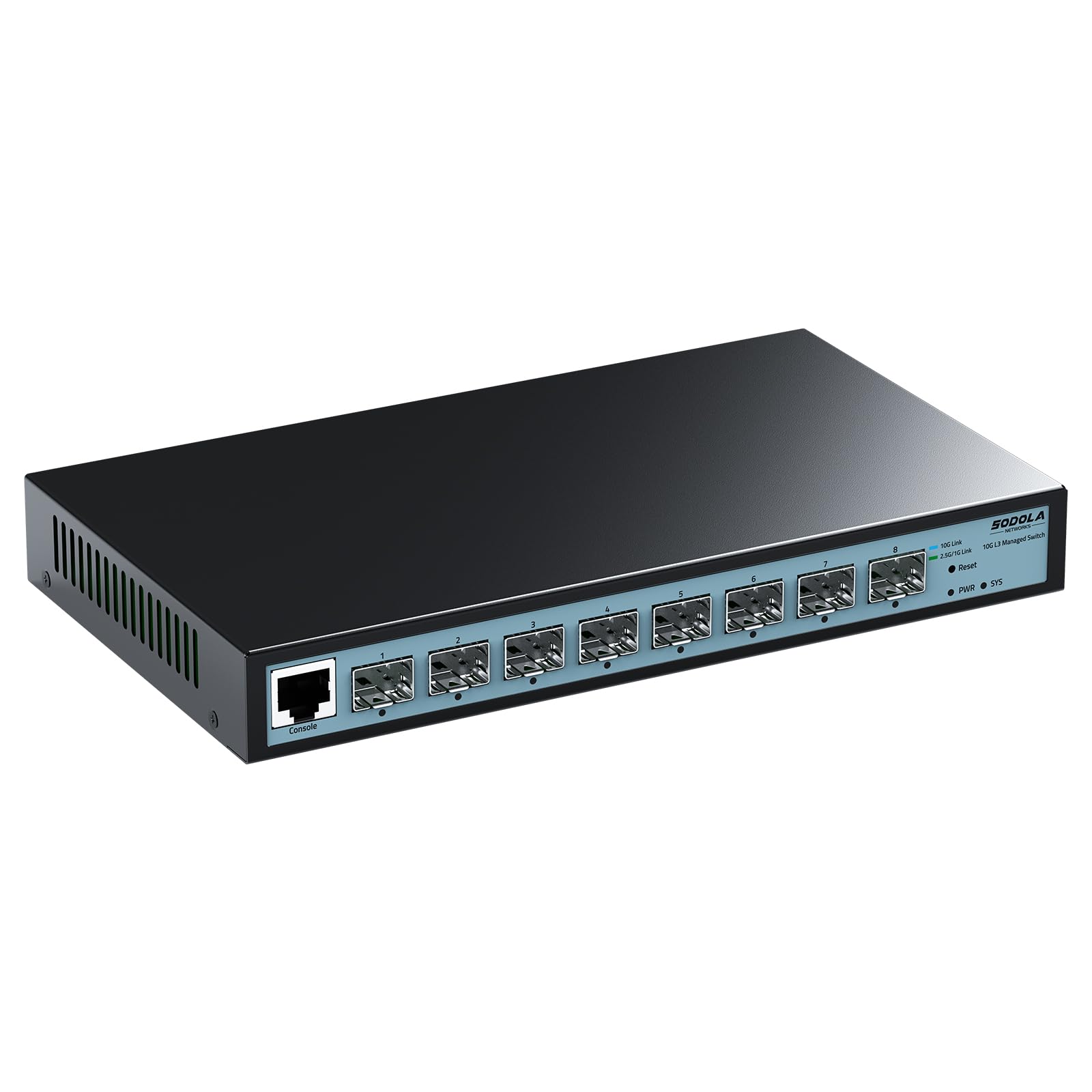
The SODOLA 8-port 10G switch offers 8 SFP+ ports (small form-factor pluggable ports that accept fiber or copper modules) running at 10Gbps each, while the NETGEAR GS308EPP has gigabit ports.
This is a very different kind of managed switch. It has 8 SFP+ ports that accept fiber or copper transceiver modules (not included) running at 10Gbps each. It offers Layer 3 management, meaning it can do routing between subnets, which is advanced for a switch in this price range. The data transfer rate is 10 Gigabits Per Second, versus 1 Gigabit Per Second on the gigabit switches above. This is for file transfers between NAS (Network Attached Storage), servers, or high-performance workstations — not for typical office internet use.
It is fanless with a bilateral cooling design, which is impressive for a 10G switch. It supports wall mounting. Shoppers say it is “inexpensive, no issues” and that it works well as a home backbone switch. One reviewer achieved “8-9 Gbit via iperf3” when linking two of these switches over fiber.
The catch is support. Multiple reviewers mention non-existent customer support from SODOLA — one owner reported they emailed “multiple times and do not even get the courtesy of a ‘go pound sand’ reply.” You are on your own if you hit configuration problems. The initial setup also requires manually setting the PC and switch ports to the same speed (both 1G or both 10G) before you can access the web interface, which is a common gotcha.
The Speed Advantage
- 8x 10G SFP+ ports for high-speed server and NAS connections
- Full Layer 3 routing capabilities at a budget price
- Fanless design despite 10G speeds
The Software Support Risk
- Essentially no customer support from the manufacturer
- SFP+ modules not included — you must buy them separately
- Setup requires manual speed-matching between PC and switch
Perfect for: networking enthusiasts and home-lab owners comfortable with fiber, SFP+ modules, and troubleshooting their own config.
Not for beginners: if you want a plug-and-play experience or phone support, this switch is not it.
7. MokerLink 8 Port 10G Managed Ethernet Switch, 10G/5G/2.5G/1G Auto-Adaptive, L3 Web/CLI Managed
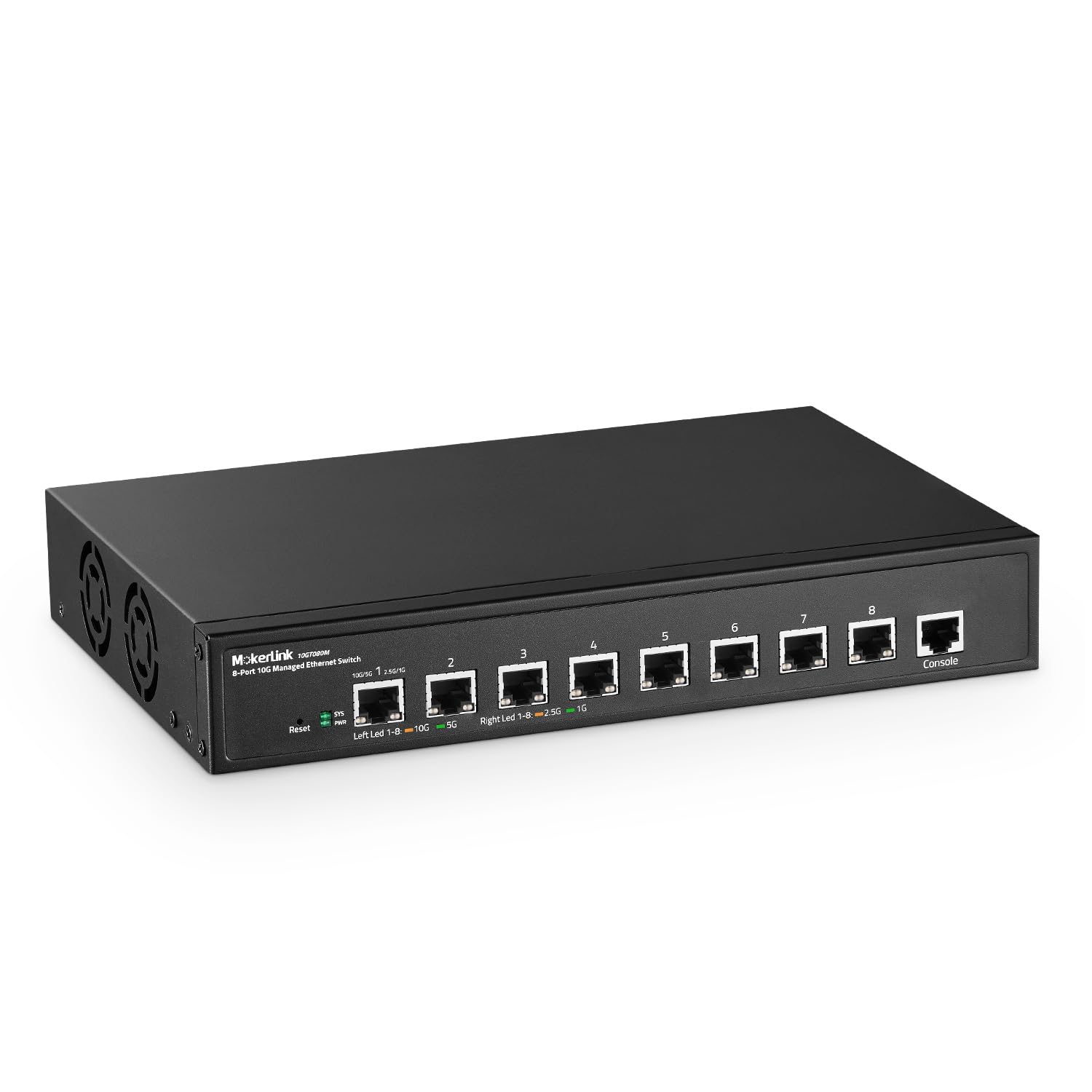
The MokerLink 8-port 10G switch uses standard RJ45 copper ports that auto-adapt between 10G, 5G, 2.5G, and 1G speeds — no SFP+ modules needed, unlike the SODOLA which requires separate transceivers.
This switch has standard RJ45 copper ports that auto-adapt (automatically match the speed of the connected device) between 10G, 5G, 2.5G, and 1G speeds. That means you can plug in any standard Cat6a or Cat7 Ethernet cable and get 10G speeds without buying separate transceivers. It is also a full Layer 3 managed switch with both a web interface and a command-line interface (CLI), giving you maximum control over routing, VLANs, QoS, ACLs (Access Control Lists that filter traffic), and security features like 802.1X authentication (a standard for port-based network access control).
The switch has a metal case and supports desktop or rack-mount placement (rack-mount brackets are included). It uses an “industrial grade fan” for active cooling, so unlike the other fanless picks here, this one does make some noise. One customer observed the fan runs quietly and is “barely audible at 10ft.” Another buyer called it “a more budget solution” for isolating IoT devices on a home network. The switch supports features like DHCP snooping, dynamic ARP inspection, and IP Source Guard, which are enterprise-grade security features.
The downsides are real. One reviewer found a setup guide with an IP configuration error (suggesting 192.168.1.20 for the PC, which conflicts with the switch subnet). The manufacturer’s website is missing firmware updates and a manual, which is concerning. Another reviewer plans to replace the fan due to noise, so if absolute silence is your goal, look at the fanless options above. Two of the five available reviews mention the brand being a relatively unknown Chinese brand, which may give some buyers pause about long-term reliability and support.
The Copper 10G Advantage
- 8 x 10G RJ45 ports auto-adapt to 5G/2.5G/1G — no SFP+ modules needed
- Full Layer 3 management with CLI and web interface
- Enterprise security features: 802.1X, DHCP snooping, ARP inspection
Watch Out For
- Active fan produces audible noise, unlike fanless alternatives
- Minimal manufacturer support — missing firmware updates and manual
- Setup guide contained an IP configuration error
A strong choice for: server racks and home labs requiring 10G copper speeds without fiber. The CLI and advanced security features are a bonus for IT pros.
Consider carefully if: you need a silent switch or want long-term manufacturer support and firmware updates.
Understanding the Specs
PoE Budget (Watts)
Think of the PoE budget as the total power allowance for all your connected devices combined. A camera might use 10W, an access point 15W, and a VoIP phone 6W. Add those up across all 8 ports — if you exceed the switch’s total budget, some ports will simply not power on. A 62W budget handles a mix of phones and a few cameras; a 123W budget lets you run power-hungry pan-tilt-zoom cameras on every port.
Management Layer (L2 vs L3)
Layer 2 switches handle traffic within the same local network — perfect for VLANs (separating guest Wi-Fi from office traffic) and QoS (prioritizing video calls over file downloads). Layer 3 switches add routing, meaning they can send traffic between different subnets without needing a separate router. For most small businesses and home labs, a good Layer 2 smart-managed switch is plenty. Go Layer 3 only if you are building a complex network with multiple subnets and need routing between them.
FAQ
What is the difference between a managed and an unmanaged switch?
Do I need PoE for my switch?
How much PoE budget do I need for cameras and access points?
What is the difference between PoE and PoE+?
Will a managed switch slow down my internet speed?
Can I use a managed switch without configuring it?
What is the advantage of a fanless switch?
What does NDAA/TAA compliance mean for a switch?
Can I power any device with a PoE switch?
Final Thoughts: The Verdict
If you want one dependable pick, the 8-port managed switch winner is the D-Link DGS-1100-08PV2 because it balances a 64W PoE budget, full feature set (VLAN, QoS, IGMP), NDAA compliance, and a lightweight 0.8-pound fanless chassis at a very reasonable price. If you need maximum power for high-draw devices, grab the NETGEAR GS308EPP with its class-leading 123W PoE budget. And for a business network that practically sets itself up, the HPE Aruba Instant On 1830 paired with its mobile app and lifetime warranty is the easiest path to a reliable managed network.
How We Picked
We do not accept paid placement. Every pick is matched to a real buyer and a real use-case; we do not hands-on test units.
Sources & Methodology
Specifications: manufacturer listings and product documentation. Review insights: verified customer reviews, as of July 2026. Pricing: not shown on this page (it changes often); check the current price via the retailer link.
As an Amazon Associate, Gadgets Feed earns from qualifying purchases. This does not affect which products we feature.
Product prices and availability are accurate as of the date/time indicated and are subject to change. Any price and availability information displayed on Amazon at the time of purchase will apply to the purchase of this product. As an Amazon Associate I earn from qualifying purchases.
CERTAIN CONTENT THAT APPEARS ON THIS SITE COMES FROM AMAZON. THIS CONTENT IS PROVIDED "AS IS" AND IS SUBJECT TO CHANGE OR REMOVAL AT ANY TIME.
Amazon and the Amazon logo are trademarks of Amazon.com, Inc. or its affiliates.