
Our readers keep the lights on and my morning glass full of iced black tea. As an Amazon Associate, I earn from qualifying purchases.
Specs are compiled from manufacturer listings and verified buyer reviews and can change over time — please confirm the key details on the product page before buying.
Your laptop has two ports, but your desk has a printer, a mouse, a webcam, and an external drive that all need a permanent home. An 8-port hub ends the daily game of cable roulette—everything stays plugged in and ready the second you sit down. Your choice depends on extras like per-port switches, fast-charging slots, or a built-in card reader.
I’m Min — the founder and writer behind Gadgets Feed. This guide is built by comparing the manufacturers’ published specifications and the patterns across verified customer reviews, so you get each pick’s real strengths and trade-offs instead of marketing spin.
You need ports that actually stay connected and keep your gear powered, which is exactly what this breakdown of the best 8-port usb hub choices delivers.
Our Picks at a Glance
How To Choose The Best 8-Port USB Hub
An 8-port hub looks simple — a box with holes — but the differences between a frustrating one and a flawless one come down to power, speed, and control. Power, speed, and control are what separate a reliable hub from a frustrating one.
Powered vs. Bus-Powered: The Most Important Decision
A powered hub comes with its own wall adapter, so it can deliver full power to every port at once. A bus-powered hub draws everything from your laptop’s single USB port, which often isn’t enough — devices disconnect randomly or fail to register at all. If you’re plugging in hard drives, which draw more juice, a powered unit with an adapter like a 5V/4A or 12V/3A supply is the only reliable route.
Data Speed: 5Gbps vs. 10Gbps
Most hubs run USB 3.0, which tops out at 5Gbps — plenty for moving documents and photos. Newer USB 3.2 Gen 2 hubs double that to 10Gbps, which matters if you’re routinely shuttling large video files. Both are backwards compatible with older USB 2.0 gear, so speed is about your future-proofing, not your current keyboard.
Per-Port Switches and Extra Features
Individual on/off switches let you kill power to a device without yanking the cable — great for a webcam you want off when not in use. Some hubs add a dedicated smart-charging port (often 2.4A) for phones and tablets, or even an SD card reader for camera work. Choose extras that fit your actual desk setup, not the other way around.
Quick Comparison
| Model | Best For | Data Speed | Port Setup | Power Adapter | Amazon |
|---|---|---|---|---|---|
| Atolla Powered Hub★ Best Overall | Per-port control with a long track record | 5 Gbps | 7 data + 1 smart charge | 5V/4A | Amazon |
| Rosonway Powered HubBest Value | Content creators needing SD slots + speed | 10 Gbps | 6 data + SD/TF reader | 12V/2A (24W) | Amazon |
| RAOYI Powered Hub | Budget dual charging ports | 5 Gbps | 6 data + 2 charge | 12V/3A (36W) | Amazon |
| Aiibe Powered Hub | Compact desk organizer with fast charge | 5 Gbps | 6 data + 2 charge | 12V/3A (36W) | Amazon |
| Belkin USB-C Hub | Single-cable laptop docking with 4K | 10 Gbps | USB-C, HDMI, Ethernet on board | 100W PD pass-through | Amazon |
| Lenovo Slim Travel Dock | Travelers wanting a tiny footprint + 4K | 10 Gbps | USB-A/C, HDMI, power-only USB-C | 65W PD pass-through | Amazon |
In-Depth Reviews
1. Atolla Powered USB Hub 3.0
Our pick — over 4.5★ from 21,000+ verified ratings; the strongest balance of quality and price.
The desk command center that gives every cable its own kill switch.
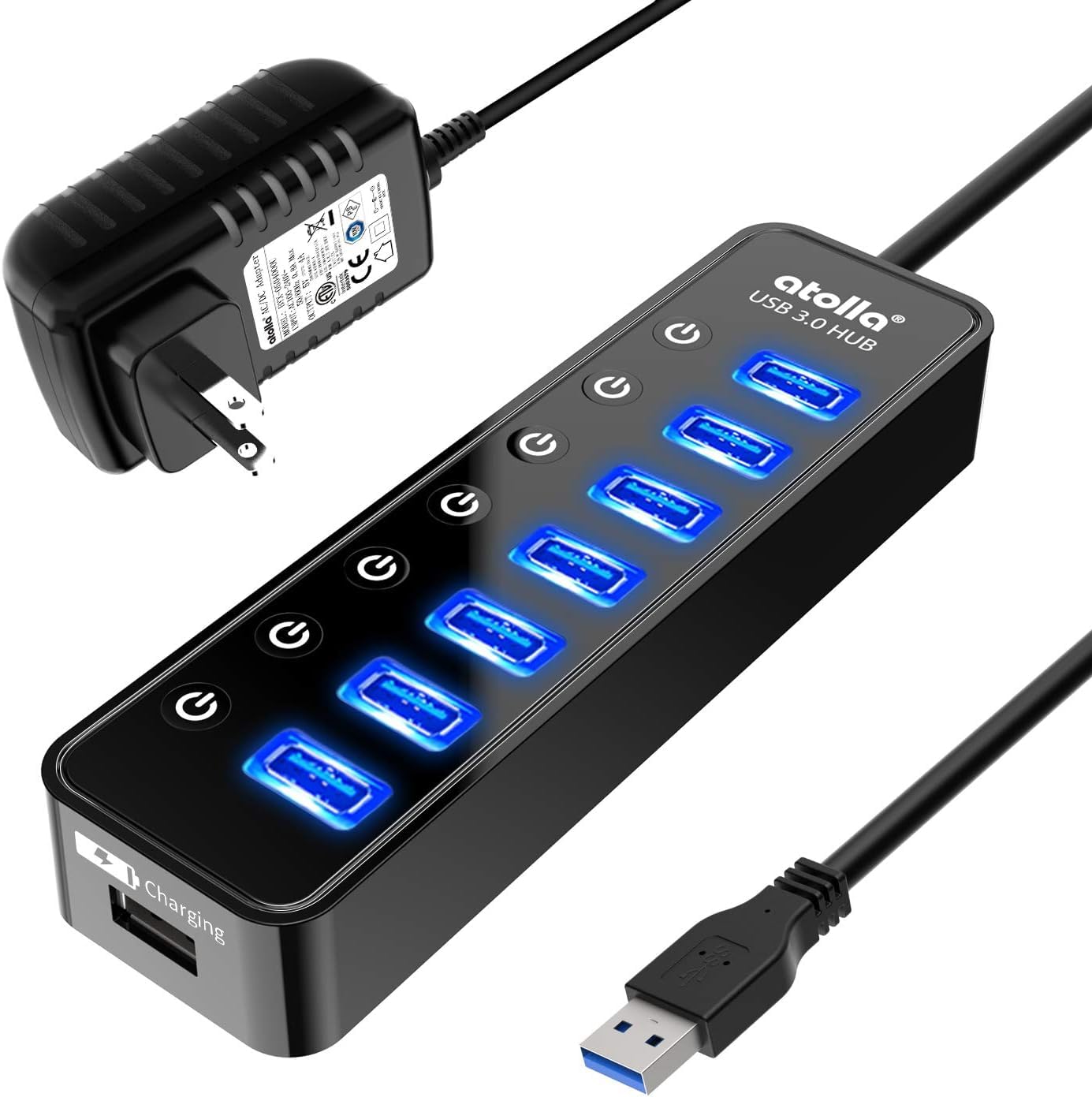
This Atolla turns one USB 3.0 port into seven data ports plus one dedicated smart-charging port, syncing at up to 5Gbps (gigabits per second—fast enough to move a full HD movie in about 10 seconds). What wins people over are the individual on/off switches on every port: instead of unplugging a printer you use twice a day, you just tap its switch off at the base. Owners call it a space-saver that keeps desks tidy.
Power comes from a 5V/4A adapter that outputs up to 2.4A on the charging port, which is enough to keep an iPhone or iPad topped up without robbing juice from your data devices. It holds a 4.6-star rating across 21,000+ owners, who call it “the most useful item on my desk.”
The honest trade-off: it’s built for permanent desktop life, not travel. The plastic body is light and glossy rather than hefty, and folks note the footprint is bulky for a laptop bag. Some long-term buyers report USB 3.0 data speeds degrading after a couple of years, so treat it as a workhorse, not a heirloom.
Why it Earns the Top Spot
- Per-port switches are the standout feature — the thing everyone raves about — saving you from constant cable pulling
- 5V/4A adapter prevents the underpowered disconnects that plague cheap unpowered hubs
- Broad compatibility with Windows, Mac OS, and Linux with zero drivers needed
Where It Won’t Fit
- Dedicated to a desk — not a travel-friendly size
- A minority of owners see USB 3.0 performance fade after extended use
Your desk pick if: you want the best-documented, most-loved powered hub with switches you’ll actually use daily.
Think again if: you need a hub that slips into a laptop bag — this one lives on a desk.
2. Rosonway 8-Port Powered USB 3.2 Hub
The aluminum multitasker that doubles your data speed and reads your camera cards.
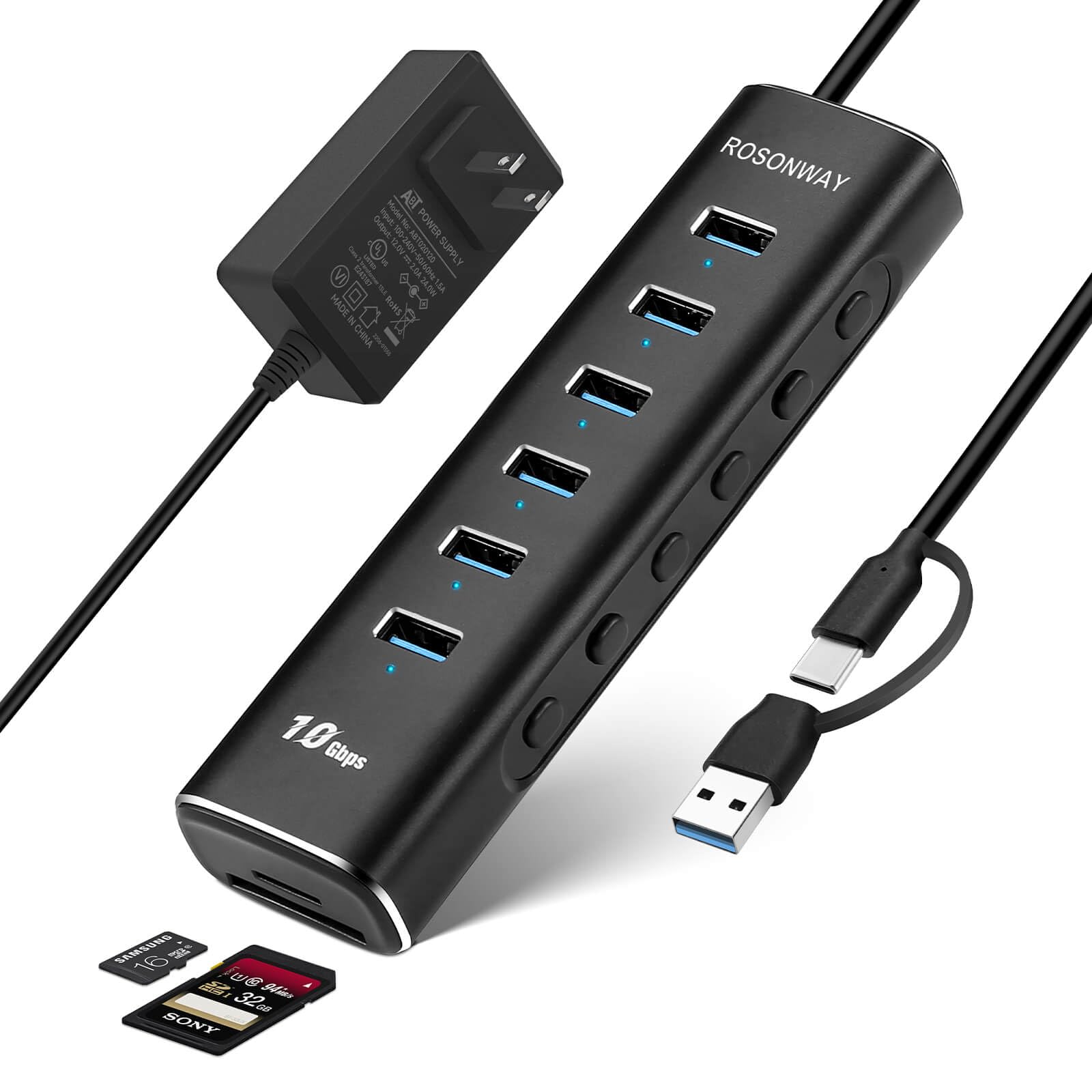
This Rosonway moves data at 10Gbps—twice as fast as the Atolla above—and pairs that speed with six USB-A 3.2 Gen 2 data ports plus dual SD/TF card slots. Photographers and video editors get a real win here: the card reader hits read speeds up to 104MB/s (megabytes per second) and write speeds up to 80MB/s, and it handles two cards at once—SD and microSD—so you’re not hunting for a separate reader.
Owners praise the aluminum shell for staying cool under heavy load, with rubber pads keeping it planted. Each port has its own electronic switch with a blue LED, and the same tap-on, long-press-off logic (hold 2 seconds to kill power) makes webcam privacy a one-thumb job. The 24W (12V/2A) adapter feeds up to 1.5A per port for low-power devices, with surge and over-current protection as a safety net.
This is the pick for creators, and the one genuine caution is reliability — a portion of owners mention the connection cutting out over time, and the blue indicator lights are easy to miss in bright rooms. One frequent workaround note: high-priority gear like a network adapter can interfere with other devices, so plug that directly into your computer if you notice hiccups.
Creator’s Toolkit
- 10Gbps transfer speed is double the USB 3.0 baseline, so large video files move noticeably faster
- Built-in SD/TF reader with simultaneous dual-card support is rare at this level
- Aluminum body stays cool and feels far more solid than plastic rivals
Watch Outs
- Reliability gets mixed feedback — occasional units lose stable connection
- PD fast charging is not supported, so don’t expect laptop charging here
Reach for this if: you move big files and memory cards daily and want faster-than-USB-3.0 throughput.
Look elsewhere if: you need to charge your laptop — this hub powers devices, not laptops.
3. Aiibe 8-Port Powered USB Hub 3.0

A small, sturdy hub whose two fast-charging ports punch above their weight.
The Aiibe gives you six USB 3.0 data ports humming at 5Gbps, but its defining feature is a pair of dedicated charging ports backed by Quick Charge 3.0 and BC 1.2 technology. Plug a modern phone into one and it draws from the 12V/3A (36W) wall adapter, so your battery climbs while your external drives keep spinning — no juggling which device gets power.
Owners most praise the build quality and how compact this powered eight-port unit is. The detachable USB 3.0 cable is a quiet hero feature: you can swap in a USB-C adapter, and critically, it prevents power from backfeeding into your PC—a real safeguard against the crashes that cheap hubs cause. One owner ran a bootable USB, 4TB HDD, and 500GB SSD simultaneously without issues.
The frank caveats: durability is the recurring theme in the negative feedback, with some units failing after a few months, and customers note the AC adapter is large. It’s also not truly portable — this is a desk-dweller, not a travel companion. And note the quick-charge capability lives on just one of the two charging ports.
Solid and Speedy: owners consistently call the build quality and compact size the highlights, with fast transfers and a stable connection for high-capacity drives.
Know the Limits: the bigger AC brick and a durability question mark mean this is best for a permanent desk setup where you can keep an eye on it.
Pick this if: you want fast phone charging and data on one compact, well-made hub.
skip it if: you need guaranteed years-long reliability — a minority of owners see failures in the first months.
4. RAOYI Powered USB 3.0 Hub

The budget-friendly port expander that adds two dedicated charging lanes to your setup.
Most budget hubs force you to choose between data and charging. This RAOYI sidesteps that with six USB 3.0 data ports at 5Gbps plus two smart fast-charging ports, all fed by a 36W (12V/3A) power adapter. Owners specifically like using it to add USB 3.0 ports to a desktop and to keep backup drives running — it handles the job without drama.
The 3.3ft USB 3.0 A-to-A cable gives you real reach across a desk, and the reinforced cord plus heat-resistant connectors are the durability touches that justify the pick. It’s backwards compatible with USB 2.0/1.1, and every port supports hot plugging, so you can swap devices without rebooting your machine.
The honest reality check: this is the value pick, and the reliability data is where it shows. Connectivity is the most-discussed aspect and it leans mixed — a portion of reviewers point out the hub stopping work after a few months, sometimes refusing to run even with a known-good power supply. It’s a fine budget entry, but if you need something that outlasts a year of heavy daily use, the higher-priced options above earn their keep.
What You Get: six data ports, two charge ports, and a hefty 36W adapter for a budget-friendly price — genuine versatility for the money.
What’s the Catch: the recurring complaint is longevity, with some units failing after about 8 months of use.
Best for: a light user who wants data plus dedicated charging without spending much.
Not for: anyone who needs a hub that survives years of constant plugging and unplugging.
5. Belkin USB-C Hub 8-Port
The one-cable docking answer that turns a laptop into a full desktop rig.
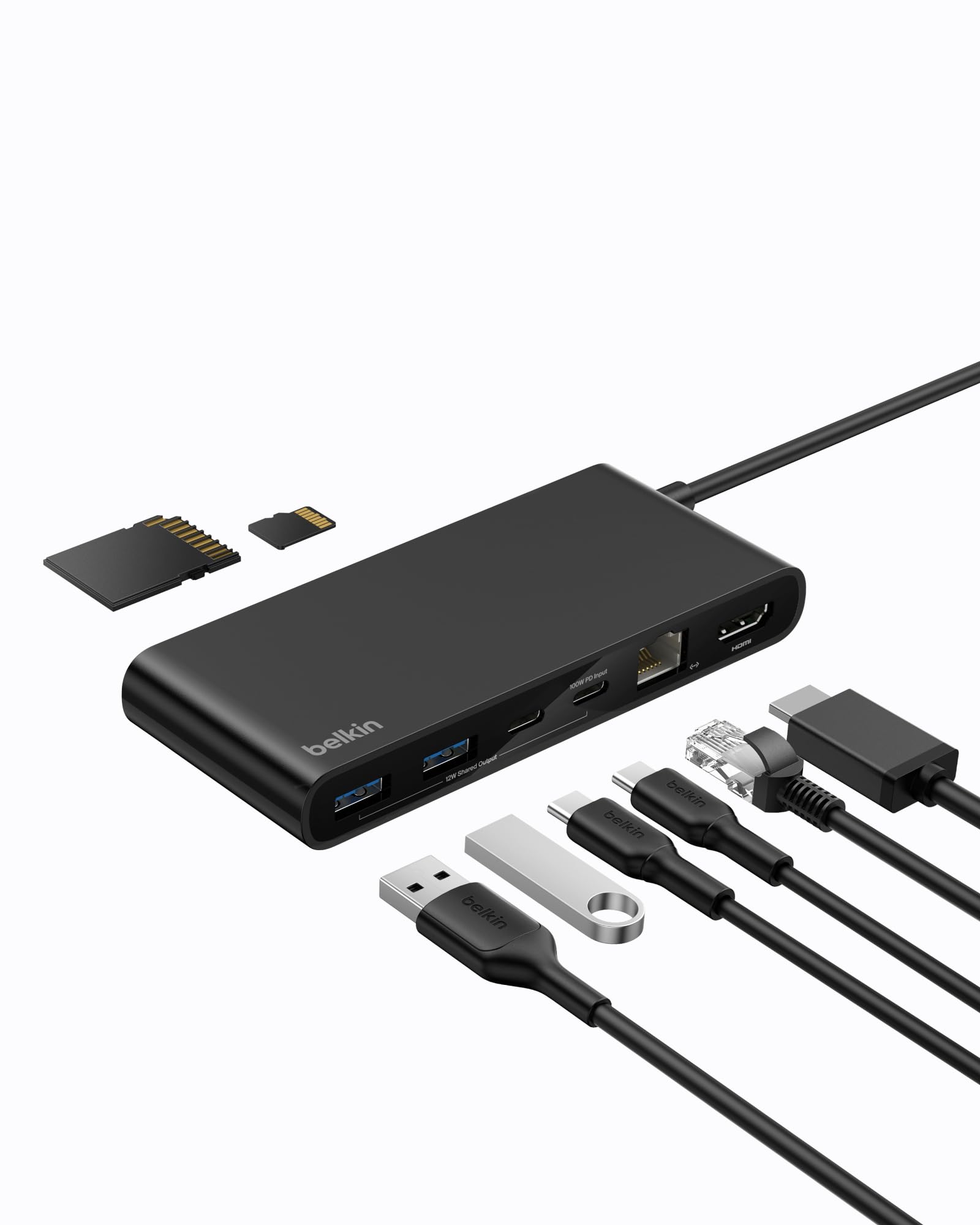
This Belkin is a different animal from the powered bricks above — it’s a USB-C dock that collapses your entire desk setup into a single connection. Plug in one USB-C cable and you get an HDMI port pushing 4K at 60Hz, a 2.5-Gigabit Ethernet jack, and high-speed data ports that move files at up to 10Gbps. Owners who dock a laptop daily describe the relief of going from four separate plugs to one: Ethernet, HDMI, power, and a whole USB-A hub full of peripherals all worked on the first try with zero configuring.
The headline spec is 100W power delivery pass-through, which keeps a MacBook Pro M4 or iPhone 16 Pro charging while you work. Belkin backs it with a six-point safety system covering over-voltage, overload, overcurrent, and over-temperature protection plus short-circuit defense and fire-resistant materials, and the housing is made with 75% PCR (post-consumer recycled) materials. It’s also the most travel-friendly premium pick here at just 0.15 kg.
Two honest catches keep it from the top spot. Reliability feedback is decidedly mixed — while many owners get flawless performance, a small but vocal group report the hub causing repeated system crashes (BSODs) they couldn’t resolve, which is a serious red flag for critical work. And the box doesn’t include a charger or a USB-C cable rated for the 100W load, so factor that into your setup cost. Owners also note it behaves best with a right-side USB-C port for cable routing.
The Desk Simplifier
- 4K at 60Hz HDMI output is crisp for external monitors
- 2.5-Gigabit Ethernet is up to 2.5x faster than standard gigabit for dependable wired networking
- 100W PD keeps a power-hungry laptop charged through the hub
Proceed With Eyes Open
- Connectivity and stability get mixed reviews — some units cause system crashes on certain machines
- Charger and power-rated cable sold separately
Choose it if: you want one-cable docking with 4K video and fast wired internet on a Mac or Windows laptop.
Be cautious if: you rely on your machine for critical work — the crash reports, though a minority, are worth weighing.
6. Lenovo USB-C Slim Travel Dock

A featherlight dock that slips into a pocket yet still drives a 4K monitor.
At 4.8 ounces and smaller than a smartphone (4.72 x 2.17 x 0.79 inches), this Lenovo is the grab-and-go answer for the modern remote worker. Despite the tiny frame, it pushes 4K at 60Hz over a single HDMI 2.1 port and supports any USB-C laptop up to 65W of power delivery pass-through through its integrated cable. Owners fitting it to an IdeaPad 3 report a perfect match, and the small footprint makes it as useful on a cramped desk as in a travel bag.
Port selection is thoughtfully split: two USB-A 3.2 Gen 2 ports at 10 Gbps, three USB-C 3.2 Gen 2 ports also at 10 Gbps (one of which is power-only), plus the HDMI output. Lenovo also leans into sustainability here — the Eclipse Black exterior uses 66% Post-Consumer Recycled Content, which the company calls its greenest dock yet.
The recurring gripe is the integrated USB-C cable itself: owners call it “ridiculously short,” essentially useless without an extension unless your laptop sits within inches of the dock. It’s a genuine design flaw for a product aimed at travelers who often can’t control where the port lands. For most buyers, a short USB-C extension cable solves it, but it’s an extra purchase you shouldn’t have to make.
Why It Travels Well
- Ultra-compact and light at 4.8 oz, ideal for a laptop sleeve
- 10 Gbps on both USB-A and USB-C ports keeps file transfers quick
- 65W PD pass-through charges most USB-C laptops via one cable
The Travel Catch
- Integrated USB-C cable is very short — plan for an extension
- Fewer USB-A ports than the powered hubs, so legacy gear needs adapters
Best suited for: laptop-first users who want 4K output and charging on the move in the smallest possible package.
Reconsider if: you have lots of older USB-A peripherals or want a cable long enough to reach across a desk.
Understanding the Specs
Data Speed: 5Gbps vs 10Gbps
This number tells you how fast files move between your devices. A 5Gbps hub (USB 3.0) is ample for documents, music, and photos — you’ll barely notice the transfer. A 10Gbps hub (USB 3.2 Gen 2) moves large video files and backups roughly twice as fast, which is why editors and photographers gravitate to it. Both accept older USB 2.0 devices, just at slower speeds.
Power Delivery and Charging Ports
A powered hub needs its own wall adapter, and the adapter’s rating (like 5V/4A or 12V/3A) determines how much power reaches your devices. Look for a dedicated smart-charging port if you want to charge phones and tablets fast — these often deliver up to 2.4A. For laptop charging, you need a USB-C dock with power delivery (PD) pass-through, typically rated at 65W to 100W.
FAQ
Do I really need a powered 8-port hub or will a simple one work?
Why do my devices keep disconnecting from my USB hub?
What does 5 Gbps mean in real-world terms?
Can I charge my laptop through an 8-port USB hub?
What is a smart charging port and why do I want one?
Are per-port on/off switches worth it?
Will an 8-port hub work with my Mac or Windows laptop?
How long should a good USB hub last?
Is a USB-C dock better than a traditional powered hub?
Final Thoughts: The Verdict
If you want one dependable pick, the 8-port usb hub winner is the Atolla Powered Hub because it pairs per-port switches with a proven, decade-long track record that most owners never need to replace. If you’re a content creator moving big files and memory cards, the Rosonway justifies itself with 10Gbps speed and a built-in SD reader. And for the traveler who wants 4K output in a pocket-sized dock, the Lenovo Slim Travel Dock is the one to reach for.
How We Picked
We do not accept paid placement. Every pick is matched to a real buyer and a real use-case; we do not hands-on test units.
Sources & Methodology
Specifications: manufacturer listings and product documentation. Review insights: verified customer reviews, as of September 2026. Pricing: not shown on this page (it changes often); check the current price via the retailer link.
As an Amazon Associate, Gadgets Feed earns from qualifying purchases. This does not affect which products we feature.