
Our readers keep the lights on and my morning glass full of iced black tea. As an Amazon Associate, I earn from qualifying purchases.
Specs are compiled from manufacturer listings and verified buyer reviews and can change over time — please confirm the key details on the product page before buying.
If your desktop or laptop keeps dropping Wi-Fi, the fix is usually a small USB stick, not a new computer. An 802.11n USB wireless LAN card plugs into a spare USB port and gives your machine a fresh Wi-Fi radio — the part that actually talks to your router. The trick is picking one whose chipset, speed rating, and driver support match your operating system, because a great adapter on the wrong OS behaves like a bad one. This guide walks you through nine solid picks, from plug-and-play Linux favorites to long-range models with external antennas, and explains in plain words what each spec means for your daily browsing, streaming, and gaming.
I’m Min — the founder and writer behind Gadgets Feed. This guide is built by comparing the manufacturers’ published specifications and the patterns across verified customer reviews, so you get each pick’s real strengths and trade-offs instead of marketing spin.
You will also learn why the 150Mbps and 300Mbps numbers on the box rarely match what you feel, how antenna count changes range through walls, and which models skip driver headaches entirely. Every pick below earns its place for a specific kind of buyer, so you can match one to your machine instead of guessing. The right 802.11n usb wireless lan card installs in about five minutes and holds a stable link where your internal card drops it.
Our Picks at a Glance


How To Choose The Best 802.11n USB Wireless LAN Card
Buying a USB Wi-Fi adapter is really three decisions stacked on top of each other: which wireless standard it speaks, which chips and drivers it needs, and whether it has antennas strong enough to punch through your walls. Get those three right and the adapter disappears into your setup: plug it into a free USB port, and Windows or Linux recognizes it. Get one wrong and you will spend an evening hunting down drivers.
Speed ratings are link ceilings, not promises
A 150Mbps adapter does not mean you will download at 150. That figure is the maximum link speed between the adapter and your router under ideal conditions — the actual throughput is usually lower once overhead, distance, and interference get involved. A 300Mbps adapter has a higher ceiling, so it holds up better when the signal is weak or the room is crowded with other networks. Neither number magically raises the internet speed your provider delivers.
Antennas and gain decide your range
Antenna gain, measured in dBi (the unit for how strongly an antenna focuses a signal), is the honest number for range. A single 2dBi antenna is fine for the same room as the router. Two 5dBi antennas push much farther and hold a stable link through multiple walls, which is why long-range models look like they have rabbit ears. More antennas also help in a busy house where several devices compete for the same airwaves.
Chipsets, drivers, and the plug-and-play question
Two adapters can share the exact same 300Mbps label and behave completely differently, because the chip inside — the small processor that runs the Wi-Fi radio — decides whether your operating system needs a driver download. Chips with native Linux support install the moment you plug in. Others hand you a mini CD you may not be able to read on a modern laptop. If your OS is older, check that the manufacturer still publishes a driver for it before you commit.
Matching the adapter to your machine
A tiny nano adapter is perfect for a laptop you carry around, because it barely sticks out. A full-size adapter with a cable and antennas is better for a desktop that never moves, since you can park the antennas where the signal is strongest. Machines from the USB 2.0 era work fine with a USB 2.0 adapter, and a 2.4GHz-only card is often the most compatible choice for older hardware.
Quick Comparison
Every row below lists the same three decision-making specs, so you can scan the trade-offs at a glance instead of reading nine reviews first.
| Model | Best For | Max Speed | Antennas | OS Support | Amazon |
|---|---|---|---|---|---|
| Panda Wireless Mid Range 150Mbps★ Best Overall | Older machines and Pi projects | 150Mbps | 1 x 2dBi adjustable | Windows, Mac, Linux | Amazon |
| Netis Wireless N 300Mbps Long-RangeLongest Reach | Reaching a far-away router | 300Mbps | 2 x 5dBi external | Windows, MacOS | Amazon |
| AR9271 802.11n 150MbpsLinux Specialist | Kali Linux and monitor mode | 150Mbps | None (fixed) | Linux, Windows | Amazon |
| Edimax EW-7611ULB Wi-Fi + BT 4.0 | Tiny laptops needing Wi-Fi and Bluetooth | 150Mbps | None (nano) | Windows, Mac, Linux | Amazon |
| Linksys AE1200-NP Wireless-N | Bumping an old laptop up to N speeds | 300Mbps | None (internal MIMO) | Windows | Amazon |
| TP-Link TL-WN823N N300 Mini | Small laptops and Raspberry Pi | 300Mbps | None (internal) | Windows, Mac, Linux | Amazon |
| StarTech.com USB300WN2X2C | Leaving plugged into a laptop | 300Mbps | None (2×2 internal) | Windows, Mac, Linux, Unix | Amazon |
| TP-Link TL-WN822N High Gain | Long-range desktop connections | 300Mbps | 2 x external | Windows, Mac, Linux | Amazon |
| NETGEAR Wireless-N 300 USB | Trouble-free plug-and-play on Windows | 300Mbps | None (internal) | Windows | Amazon |
In‑Depth Reviews
1. Panda Wireless Mid Range 150Mbps Wireless N USB Adapter w/ 2dBi Antenna
Our pick — over 4★ from 300+ verified ratings; the strongest balance of quality and price.
The adapter that wakes up antique machines without a driver hunt
This is the pick for anyone resurrecting an old desktop, a Raspberry Pi, or a laptop with a dead internal Wi-Fi card. It runs at 150Mbps on the 802.11n standard (the wireless generation most routers still broadcast) and carries an adjustable 2dBi antenna you can angle toward your router. The headline reason to choose this one, though, is the install: it comes up plug-and-play on Lubuntu, Xubuntu, Raspbian, and modern Windows 10 machines with nothing to download.
What wins people over is the sheer breadth of older systems it covers — the listing reaches all the way back to Windows 2000, PowerPC G3 and G4 Macs, and Fedora 15. Buyers on Linux Mint confirm it works straight from the start, with one reporting on Linux Kernel 5.15.0-170-generic. On security it lines up with WEP 64/128bit, WPA, WPA2, 802.1x and 802.11i, plus Cisco CCX compliance, so it slots into business networks as well as home ones.
The recurring gripe among longtime owners is speed. On a busy network the 150Mbps ceiling can leave high-bandwidth transfers feeling slow, and a few buyers feel the RT5370 chipset is pricey for what it is. Compatibility is where it gets very good, easily outranking the Edimax EW-7611ULB above for Linux users who want a clean install. This is the crowd favorite here, holding 4.4 stars across 300+ ratings while the budget-tier Netis below sits at 4.0 stars across more reviews.
Why people keep it plugged in
- Plug-and-play on Linux, Mac, and Windows machines as old as Windows 2000
- Adjustable 2dBi antenna you can aim at the router
- Covers WEP 64/128bit, WPA, WPA2, 802.1x, and 802.11i security
Where it asks patience
- 150Mbps ceiling shows its limits on busy or distant networks
- RT5370 chipset is not listed on the product page, so buyers digging for specifics come up empty
- Backed by a one-year limited warranty
Made for: anyone reviving an older Windows, Mac, or Linux machine who values a no-drama install above raw speed.
Pass it over: if you pull large files across a loaded network and want the higher 300Mbps ceiling.
2. Netis Wireless N 300Mbps Long-Range USB Adapter with Two 5dBi Antennas and USB 2.0 Cradle (WF-2116)
Two fencepost antennas for the router three rooms away
Picture a desktop in a back bedroom with the router parked on the far side of the house. That is exactly the job this adapter was built for. It carries a 300Mbps rating (the maximum link speed it can reach), which is double the link ceiling of the Panda above, and pairs it with two 5dBi external antennas (5dBi measures how much the antenna focuses the signal) on a weighted cradle so you can stand the whole rig up wherever the signal is strongest. Netis also adds Access Point mode, so the card can broadcast a hotspot instead of just receiving one.
The antenna arrangement is the reason buyers pick this one over a nano stick. Buyers report holding a link through several walls in a normal home, and picking up signals well over a hundred yards in open air. The bundled USB cable matters here too — you can move the antenna away from the metal case of your PC, which itself blocks Wi-Fi.
The honest catch is connectivity. Some units link up the second they are plugged in, while others drop out repeatedly and need a replug, and the bundled driver CD is out of date enough that you may have to pull a fresh driver from the internet. That split experience is worth knowing before you buy, even though most users never touch it.
The real seller: two 5dBi external antennas on a weighted cradle, plus a long USB cable so you can mount the antenna away from the PC case.
The fine print: connectivity is the most discussed trade-off in owner reports — some cards link instantly, others need a replug, and the bundled CD driver is outdated, so be ready to download the current one.
Reach for this if: your machine sits far from the router and the problem is signal, not speed.
Look elsewhere if: you want a set-and-forget install with zero troubleshooting.
3. AR9271 802.11n 150Mbps Wireless USB WiFi Adapter WLAN Network Card
The pocket-sized card that speaks fluent Kali Linux
This one exists for a very specific crowd: Linux users who need packet injection, monitor mode, or wireless testing tools, not just everyday browsing. It runs at 150Mbps on the 802.11n standard and only on 2.4GHz — there is no 5GHz support here, so don’t buy it expecting modern dual-band performance. What it does carry is native support across Kali Linux, Ubuntu, CentOS, and Archlinux Manjaro, meaning no driver hunt on those distros.
Owners lean on it for Raspberry Pi projects, cybersecurity training, and reviving older hardware. The AR9271 chipset itself is a proven Wi-Fi radio, widely praised in the Linux community for behaving predictably with network tools. It also works as an access point, which is handy for embedded device testing.
The trade-off is physical. It is flash-drive sized, so a short USB extension cable keeps it from straining on a laptop port or snapping off in a bag. Download speeds are also modest — a few buyers who tested it against a distant hotspot saw bit rates well below what a modern card would deliver.
Who it’s built for: tinkerers running Kali Linux or building Raspberry Pi setups, where native support and packet-level tools matter more than raw throughput.
The honest limit: 2.4GHz only, no 5GHz, and modest download speeds — fine for testing, less ideal for streaming-heavy use.
Go for it if: you need a Linux-native adapter with monitor mode and packet injection for network work.
Think twice if: you want a general-purpose card for a Windows laptop and don’t need the specialty features.
4. Edimax 2-in-1 Wi-Fi 4 802.11n N150 + Bluetooth Low Energy (BLE) 4.0 Combination Adapter

A single nano dongle that adds Wi-Fi and Bluetooth at once
If your laptop needs both a Wi-Fi connection and Bluetooth for a mouse, keyboard, or speaker, this saves a USB port by giving you both in one stick. It carries 150Mbps on the 802.11n standard and pulls Bluetooth 4.0 with Low Energy on top, so you can pair accessories without buying two separate dongles. The build is nano-sized, meaning it barely peeks out of a laptop port — a real advantage if you leave it plugged in while you travel.
The story here is more mixed than the rest of the list, and buyers should know that before committing. Owners rave about the compact size, with one noting it fits perfectly for an original Raspberry Pi 1. On Windows, it installs automatically once the right driver is in place. Bluetooth works reliably for file transfers and audio on supported systems.
The catch is compatibility, and it is the single most discussed trait in the owner reports. Signal quality and speed also fall behind the rest of the list — several owners mention Wi-Fi running at only a fraction of the 150Mbps rating at modest distances. On Linux you may need to blacklist the built-in driver to wake it up. On Mac, Bluetooth is not supported at all.
The standout spec: a 2-in-1 nano dongle giving you both Wi-Fi 4 802.11n N150 and dual-mode Bluetooth 4.0 LE in one USB port.
What owners flag most: compatibility swings from smooth to fiddly depending on your OS (operating system) — Windows machines tend to behave, older Linux setups need a blacklist tweak, and Bluetooth itself is not available under macOS.
Worth it if: you need Wi-Fi and Bluetooth from one tiny dongle and are running Windows or a modern Linux build.
skip it if: you rely on macOS Bluetooth or expect full 150Mbps speeds from a nano design.
5. Linksys AE1200-NP Wireless-N USB Adapter

A house-brand Wi-Fi stick that behaves once it is set up
For Windows users who just want their old laptop to stop dropping Wi-Fi, this adapter has a long track record of doing the job. It runs at 300Mbps on the 802.11n standard and pairs it with built-in MIMO antennas, which use multiple signal streams to hold onto a connection where a single-antenna card would falter.
The setup path is where buyers split. Owners on Windows 10 report easy installs, and one buyer whose laptop dropped Wi-Fi for weeks had it fixed the same day with a simple CD-and-USB install. Others downloaded the driver from the Linksys support site and were running in minutes. Either path gets you connected without drama.
The real caution is age. This model first shipped around 2012 or 2013, so its driver support stops at Windows 10 and it sticks to 2.4GHz networks only. On a Windows 11 machine, you will likely need to install the older Windows driver manually. Signal strength is also mixed in owner reports — some buyers get a rock-solid connection, while a few find the adapter struggles at longer distances without an extension cable.
Why people still buy it: 300Mbps speeds with internal MIMO antennas, and a proven record on Windows 10 machines that simply refuse to stay connected.
The honest caveat: this is a legacy model — no Windows 11 driver support and no 5GHz, so it works best on older Windows laptops you plan to keep for a while.
Perfect match for: an older Windows 7 or Windows 10 laptop that keeps losing its Wi-Fi signal.
Skip if: you need 5GHz band support or you are running Windows 11 from the start.
6. TP-Link TL-WN823N N300 Mini USB Wireless WiFi Network Adapter

The mini adapter that quietly became the go-to for Raspberry Pi builds
There is a reason this one keeps showing up next to Raspberry Pi projects and home servers: it is small, it runs 300Mbps on the 802.11n standard, and it comes up without a fight on most systems. The form factor is roughly the size of a large coin, so it hardly sticks out of a laptop or a tower. Two-year warranty coverage and 24/7 technical support round out the package.
Owners appreciate the wide OS reach — Windows (XP through 10), Mac OS 10.9 to 10.13, and Linux kernels 2.6.24 through 4.9.60 all get coverage. It also includes a 3-foot USB extension cable, which matters if you want to move the adapter away from a metal case. Customers note strong signal in a two-story home running Peppermint OS without a driver install.
The most-discussed trade-off is the driver situation on certain Linux builds. The stock Realtek 8192CU driver occasionally delivers low speeds and drops, and users who compile a modified driver from GitHub report excellent throughput. Windows and Mac users rarely hit this snag, so it mainly affects Linux tinkerers.
The mini advantage: a coin-sized 300Mbps adapter with a bundled 3-foot USB extension cable, designed to sit out of the way on small machines.
The Linux asterisk: certain Linux installs run better with a modified Realtek driver instead of the stock one — Windows and Mac setups typically avoid the issue entirely.
balance: a Raspberry Pi or compact laptop where you want a 300Mbps link with minimal bulk.
Do not choose this: if you are on a Linux system and want truly zero-touch drivers.
7. StarTech.com USB 2.0 300 Mbps Mini Wireless-N Network Adapter (USB300WN2X2C)

A leave-it-in adapter that vanishes against the laptop chassis
Buying this one is a decision about size as much as speed. The StarTech.com card runs 300Mbps on the 802.11n standard with a 2×2:2 antenna configuration built inside the housing, meaning two transmitting and two receiving streams share the workarounds of small-form Wi-Fi. You can leave it plugged into a laptop without worrying about snapping it off, and it still connects cleanly to older 802.11b/g networks.
The simplest praise for it is how invisible the setup is. Reviewers point out working from the start on Windows 10 with no driver install at all. One buyer slotted it into a Samsung laptop with a broken internal Wi-Fi card and roughly doubled the prior speed. USB 2.0 is enough to deliver the full 300Mbps link, so you do not need a newer port to benefit from it.
The real caveat is where you use it. A few owners say it is fine for reviving an older laptop but slows down under heavy load, so it is not the right choice for a power-user desktop that streams 4K on a gigabit connection. There are also occasional disconnections, though those reports are rare.
The core appeal: a 300Mbps 2×2 adapter compact enough to leave in a laptop port without a fuss.
The trade-off: best as a replacement for a dead internal card, not for high-bandwidth work on a fast desktop connection.
Great for: laptop owners who want a nearly invisible 300Mbps fix for a dead Wi-Fi card.
Skip for: desktops that push large files constantly — a model with external antennas will handle that load better.
8. TP-Link USB WiFi Dongle 300Mbps High Gain Wireless Network Adapter (TL-WN822N)
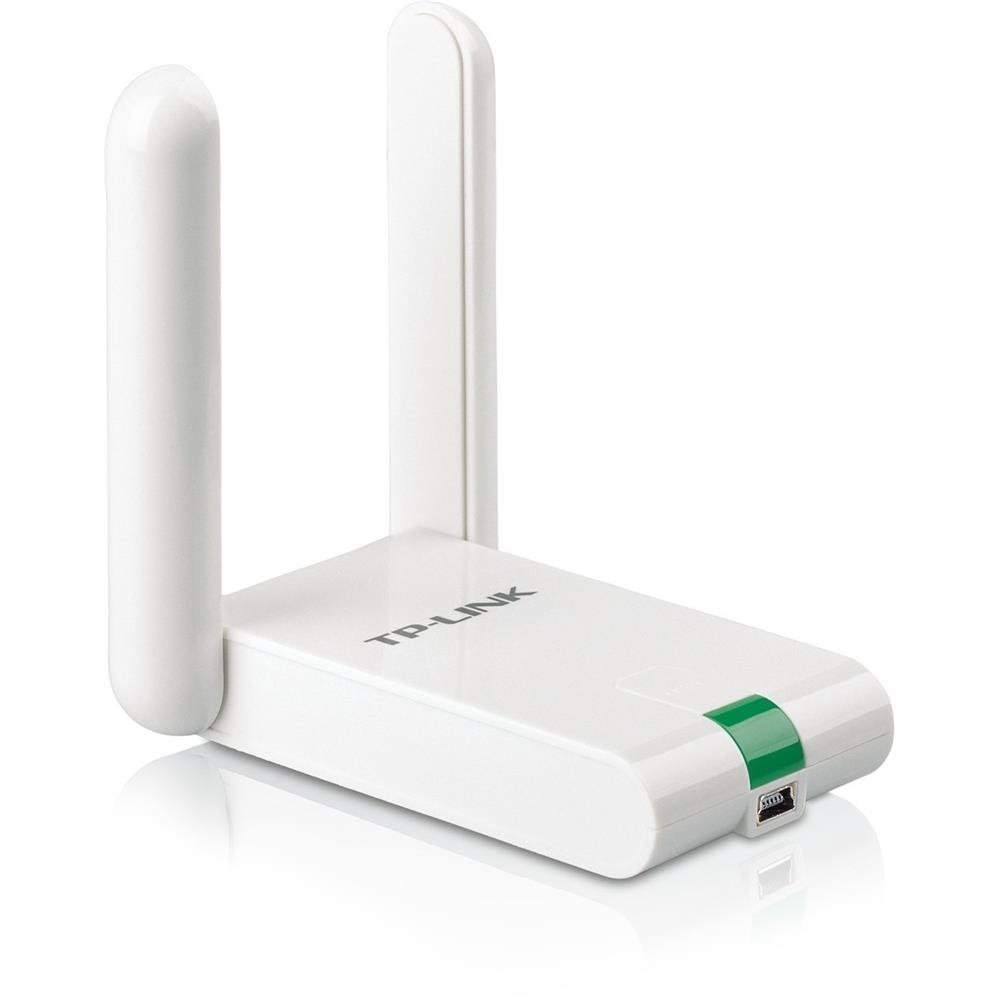
The dual-antenna workhorse for pulling Wi-Fi out of thin air
When the challenge is distance rather than speed, this is the adapter that shows up. It carries a 300Mbps rating on the 802.11n standard, backed by two external antennas and a 1.5-meter extension cable included in the box, so you can park the antennas in a better spot than the PC. Shoppers say full signal bars from hotspots up to 500 feet away, unusual for a USB-powered card.
Buyers who replaced failing internal cards on laptops and desktops report faster network speeds and noticeably quicker business apps. The one-touch Wi-Fi Protected Setup button handles security encryption without typing a long password, and the card is a natural fit for a desktop sitting in a home office far from the router.
The most-discussed issue in buyer reports is disconnection, and it is worth knowing before you commit. Some cards stay locked in for months without trouble, while others drop the link periodically and need a driver reinstall to recover. The bundled software is dated — one buyer notes it has not been refreshed since 2010 — so plan on a manual driver update from TP-Link.
What earns the spot
- Dual external antennas with a 1.5-meter extension cable for flexible placement
- 300Mbps 802.11n speeds, with the Quick Security Setup button for easy encryption
- Works with Windows, Mac, and Linux, backed by a 2-year warranty and 24/7 support
What to weigh up
- Connectivity is the top reported trade-off — some cards drop the link and need a driver reinstall
- Bundled software driver is dated, so plan to update it manually
- 2.4GHz only, so it will not reach 5GHz networks
The right call for: a desktop or laptop far from the router where range and signal strength are the deciding factors.
Better to avoid if: you need 5GHz support or want a driver that never needs a manual update.
9. NETGEAR Wireless-N 300 USB Adapter (WNA3100-100PES)

The straightforward card for anyone who wants to plug in and forget
Some buyers do not want to think about drivers or antennas, and this is the pick for them. It runs at 300Mbps on the 802.11n standard, sits on a standard USB interface, and relies on built-in antennas rather than external ones. The install story is the simplest on this list — buyers describe it as easy to set up and ready to use within minutes of unboxing.
Owner reports read like a chorus of quiet satisfaction. Laptops that struggled to pick up signal in a bedroom suddenly stay connected, and repeated buyers keep ordering more of them for family machines. The bundled software helps make the setup painless. For a desktop or a laptop in an average-sized home, it holds a connection without fuss.
The real limitation is form factor. Because the antennas live inside the case, range suffers a bit compared to the dual-antenna models above — a house with thick walls or many rooms may find the signal weaker at the far end. Since it takes up a USB port too, laptops with only two ports may feel the pinch.
The pitch: a 300Mbps 802.11n card with built-in antennas and a reputation for painless setup.
The honest limit: internal antennas mean shorter range than an external-antenna model, so it fits a normal-sized home rather than a rambling one.
Best fit: a straightforward replacement for a desktop or laptop with a flaky Wi-Fi card in an average home.
Head elsewhere if: you need maximum range through thick walls, or you are short on free USB ports.
Understanding the Specs
Data Transfer Rate (150Mbps vs 300Mbps)
These numbers describe the link ceiling, meaning the very best connection your adapter and router can negotiate. In real life, the throughput you see during downloads is lower because of network overhead, distance, and interference. A 300Mbps card gives you a taller ceiling, so it holds up better when the signal weakens — but the higher rating does not by itself make your internet faster.
Antenna Gain (dBi)
dBi is the unit for how strongly an antenna focuses a wireless signal. A higher number means the same radio can push a link farther or through heavier obstacles. Cards with 5dBi external antennas routinely out-reach nano stick adapters with internal antennas, which is why long-range picks look like they carry rabbit ears.
Hardware Interface (USB 2.0 vs USB 3.0)
USB 2.0 is enough to carry a 300Mbps wireless-N link, so a 300Mbps adapter does not need a newer port to hit its rating. USB 3.0 ports come into play mainly with Wi-Fi 5 and Wi-Fi 6 adapters, which move far more data. If you own a USB 2.0-era machine, a 300Mbps adapter is the balance.
Security Support (WPA3, WPA2, WEP)
WPA3 is the newest encryption for Wi-Fi, WPA2 is the standard most networks still use, and WEP is the oldest and least secure. A modern adapter will typically support WPA3 and stay backwards compatible with WPA and WPA2, so it locks onto whatever your router is broadcasting. Older adapters may cap out at WPA2, which is still safe for most home use.
FAQ
Will an 802.11n USB adapter make my internet faster?
Do these adapters need driver downloads to work?
Should I pick 150Mbps or 300Mbps?
Can an 802.11n USB adapter connect to a Wi-Fi 6 router?
Are these adapters compatible with Raspberry Pi and Linux?
Do I need an external antenna for a good connection?
How long does one of these USB Wi-Fi adapters last?
Should I get a 2-in-1 Wi-Fi and Bluetooth adapter instead of two separate dongles?
Will a 300Mbps adapter give me full speed on a gigabit fiber connection?
Can I use these adapters on a desktop without a Wi-Fi card?
Final Thoughts: The Verdict
For most people, the 802.11n usb wireless lan card winner is the Panda Wireless Mid Range 150Mbps because it installs without a driver hunt on Windows, Mac, and a long list of Linux distros, which is exactly what reviving an older machine calls for. If long-range signal through walls is your priority, grab the Netis Wireless N 300Mbps Long-Range for its twin 5dBi antennas and one-touch setup. And for a Raspberry Pi or a compact laptop build, the TP-Link TL-WN823N N300 Mini remains the safest bet. Match the adapter to your machine, your OS, and your router distance, and your Wi-Fi stops dropping.
How We Picked
We do not accept paid placement. Every pick is matched to a real buyer and a real use-case; we do not hands-on test units.
Sources & Methodology
Specifications: manufacturer listings and product documentation. Review insights: verified customer reviews, as of September 2026. Pricing: not shown on this page (it changes often); check the current price via the retailer link.
As an Amazon Associate, Gadgets Feed earns from qualifying purchases. This does not affect which products we feature.