
Our readers keep the lights on and my morning glass full of iced black tea. As an Amazon Associate, I earn from qualifying purchases.
Specs are compiled from manufacturer listings and verified buyer reviews and can change over time — please confirm the key details on the product page before buying.
Upgrading your system memory is the single most effective way to stop game stutter, slow load times, and laggy multitasking without buying a whole new PC. A single 8GB stick of gaming RAM can breathe new life into an older desktop, letting you run modern titles and demanding apps side by side with far less frustration. This guide breaks down three solid DDR4 picks to help you choose the right one for your rig and your budget.
I’m Min — the founder and writer behind Gadgets Feed. This guide is built by comparing the manufacturers’ published specifications and the patterns across verified customer reviews, so you get each pick’s real strengths and trade-offs instead of marketing spin.
On a tight upgrade budget or want the best speed your motherboard can handle? The KingBank 8GB 3200MHz stick gives you the fastest off-the-shelf speed (3200 MHz) and low CL16 latency without the name-brand markup. That makes it the top overall pick. For an even better cost-to-latency ratio, the OLOy 8GB 3000MHz delivers the same CL16 response at 3000 MHz. And if you want a drop-in upgrade with no BIOS settings to touch, the G.SKILL Ripjaws V 2666MHz runs at its full speed from the start at a lower 1.20V.
Our Picks at a Glance

How To Choose The Best 8GB Gaming RAM
Picking the right single 8GB stick depends on three things: whether your motherboard supports the speed, how quickly the RAM responds to requests, and how much power it needs to run stable. Here is what to look for.
Memory Speed (MHz) and Bandwidth
Higher megahertz numbers mean the RAM can move data to your processor faster, which directly helps your games load textures and assets with less delay. A stick rated at 3200 MHz (3.2 billion cycles per second), for example, can shift data quicker than one at 2666 MHz, but only if your motherboard and CPU support those higher speeds through a setting called XMP (Extreme Memory Profile — a pre-set overclock stored on the RAM).
CAS Latency (CL)
CAS latency (Column Address Strobe latency, or CL) is the number of clock cycles the RAM takes to start responding to a request. A lower number (like CL16) is snappier than a higher number (like CL19), meaning it can start delivering data just a little faster each time your processor asks for it. For gaming, balancing a high MHz with a low CL gives you the best real-world performance, so textures load with less wait.
Voltage and XMP Support
Most DDR4 RAM runs at a default 1.20V, but sticks rated for higher speeds often need 1.35V to stay stable under load. XMP is a one-click setting in your BIOS (Basic Input/Output System — your motherboard’s built-in settings menu) that tells the motherboard to run the RAM at its advertised speed and voltage rather than the slower default. Make sure your motherboard supports XMP before buying a higher-speed kit.
Quick Comparison
| Model | Best For | Speed | CAS Latency | Voltage | Amazon |
|---|---|---|---|---|---|
| G.SKILL Ripjaws V 8GB 2666MHz★ Best Overall | Rock-solid reliability and ease | 2666 MT/s | CL19 | 1.20V | Amazon |
| KingBank DDR4 8GB 3200MHz | Peak speed on a budget | 3200 MHz | CL16 | 1.35V | Amazon |
| OLOy DDR4 8GB 3000MHz | Best value with low latency | 3000 MHz | CL16 | 1.35V | Amazon |
In‑Depth Reviews
1. G.SKILL Ripjaws V 8GB 2666MT/s
Our pick — over 4.5★ from 350+ verified ratings; the strongest balance of quality and price.
The reliable workhorse that boots at its rated speed every time.
If you want RAM that just works without tweaking BIOS settings, this G.SKILL Ripjaws V stick runs at 2666 MT/s and 1.20V straight from the start using its JEDEC default profile — no XMP to enable, no voltage adjustments needed. That lower voltage also makes it easier on older motherboards and power supplies. It is heavier than the OLOy at 69 grams, which comes from the thick red heatsink that protects the chips and adds a splash of color inside your case.
The trade-off is that 2666 MT/s is the slowest speed in this group, and the CL19-19-19-43 latency is noticeably higher than the CL16 timings on the OLOy and KingBank. In real-world gaming that means it may not push quite as many frames per second in CPU-bound titles, but for light gaming and everyday desktop use the difference is minor. One buyer mentioned that “adding just 8G increased speed dramatically,” which shows how much a single stick can wake up an older system even at this lower speed.
G.SKILL warns against mixing memory kits, so if you plan to add a second stick later, buy an identical match to avoid stability issues. The brand’s reputation for quality is strong — reviewers consistently note it is “stable, reliable performance” and “great RAM” with easy installation. This stick is best for a simple drop-in upgrade where you do not want to mess with BIOS settings and reliability is your top priority. Avoid it if you are chasing every last frame in competitive games and your motherboard supports XMP for higher speeds.
Why It Wins Trust
- No BIOS tweaking needed — runs at full speed from the start
- Lower 1.20V voltage is compatible with more motherboards
- Solid heatsink build quality from a trusted name
The Speed Cost
- Slower 2666 MT/s speed compared to 3000/3200 MHz alternatives
- Higher CL19 latency reduces responsiveness versus CL16 sticks
Best for: a simple drop-in upgrade where you do not want to mess with BIOS settings and reliability is your top priority.
Not ideal if: you are chasing every last frame in competitive games and your motherboard supports XMP for higher speeds.
2. KingBank DDR4 8GB 3200MHz
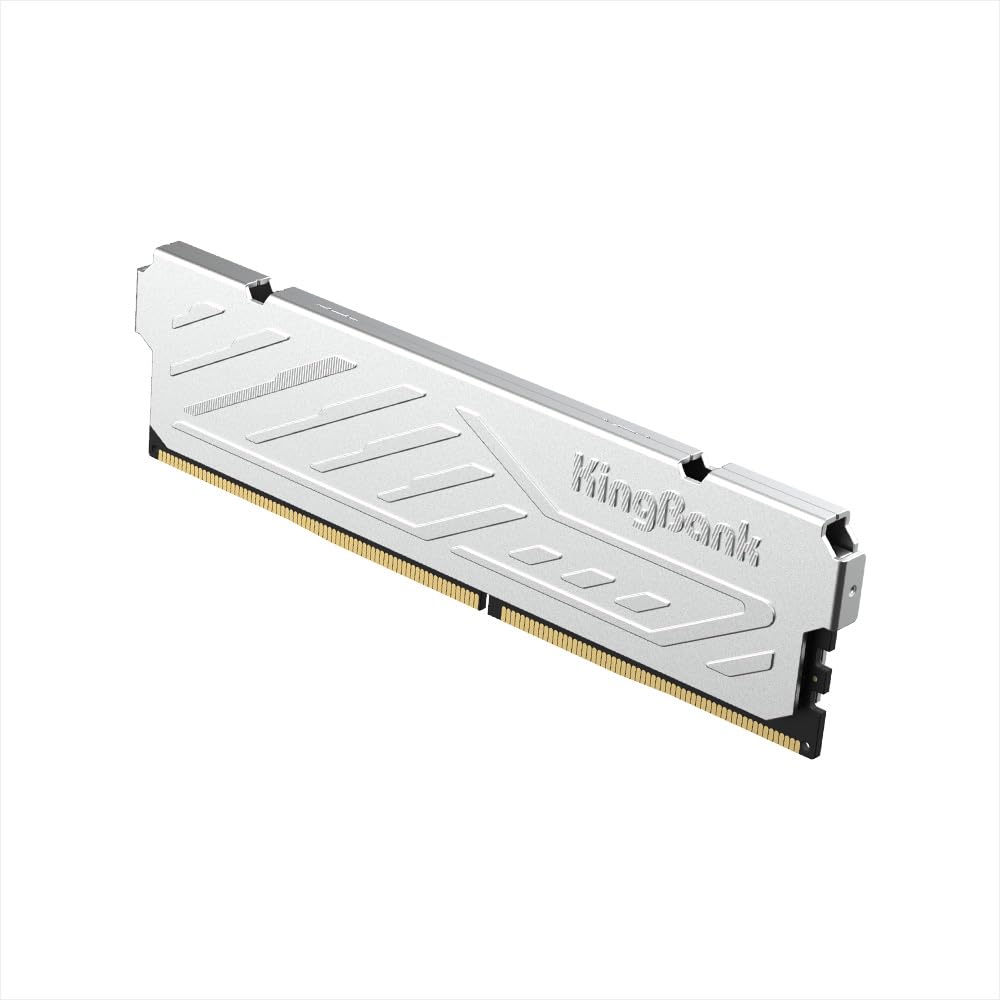
The speed king that hits 3200 MHz without blowing your budget.
This KingBank stick gives you the highest base speed in this lineup — 3200 MHz — which means it can feed data to your processor faster than most entry-level options. That higher bandwidth is exactly what helps your games load new areas and assets with less stutter. It edges past the OLOy stick (3000 MHz) by about 7% on paper, making it the clear pick if your motherboard supports XMP 2.0 and you want the fastest off-the-shelf 8GB stick available.
To reach that 3200 MHz speed you need to enable XMP in the BIOS, a one-click overclocking profile that raises the voltage to 1.35V and tightens the timings. The module also comes with a metal heatsink (what the maker calls a “vest”) to keep temperatures in check during long gaming sessions. However, at 1.35V it draws a little more power than the G.SKILL 2666 MHz module (which runs at just 1.20V), so older motherboards may need a quick BIOS update first. One reviewer noted their unit died after a week, though most owners call it a great deal for the price.
Buyers report that the metal heatsink looks great inside the case and the price is “simple unbeatable” compared to pricier name brands offering the same specs. If your motherboard does not support XMP 2.0, skip this stick — it will not reach its full speed without that profile.
Speed Advantage
- Fastest speed in the group at 3200 MHz
- Low CL16 latency for snappy response
- Metal heatsink keeps it cool under load
Watch Out For
- Needs XMP enabled in BIOS to hit full speed
- Runs at higher 1.35V, not compatible with every old board
Reach for this if: you have a modern motherboard that supports XMP and you want the highest memory speed without paying a premium.
Look elsewhere if: your older board does not support XMP 2.0 or you prefer the proven reliability of a long-established brand.
3. OLOy DDR4 8GB 3000 MHz CL16

The featherweight stick that punches above its price with CL16 speed.
This OLOy module weighs just 29.4 grams, making it less than half the weight of the G.SKILL Ripjaws V (69 grams), but it delivers a better latency profile at CL16-18-18-36 compared to the G.SKILL’s CL19. In plain terms, the OLOy can start responding to your processor’s requests faster — a roughly 19% gap in CL timing — which means snappier feel in games and everyday apps. At 3000 MHz it is also quicker than the 2666 MT/s G.SKILL, so you get a genuine boost in data transfer without moving to the top-tier 3200 MHz bracket.
Like the KingBank, it runs at 1.35V and uses Intel XMP 2.0, so you will need to enable the overclocking profile in your BIOS to reach the full 3000 MHz. One owner noted that their RAM booted at 2800 MHz by default, which is typical behavior — the stick runs at a slower JEDEC speed (Joint Electron Device Engineering Council — the industry standard safe speed) until you activate XMP. Once they overclocked it to 3300 MHz, it ran stable with no noticeable heat difference. The manufacturer backs it with a lifetime warranty, which adds confidence for a budget-friendly pick.
Owners mention it works as a direct match for Skytech Blaze prebuilts and gave one owner a “boosted performance” in games, VR, and graphics apps. If you need the absolute fastest 3200 MHz speed, pick the KingBank instead. But for the same CL16 latency at a lower speed and lower cost, this OLOy stick is the smarter buy for most budgets.
Value Highlights
- Faster CL16 latency beats the CL19 alternative
- Ultra-light at 29.4 grams
- Lifetime warranty for long-term assurance
Consider This
- May boot at a lower speed (2800 MHz) until XMP is enabled
- 1.35V voltage may not suit every older motherboard
Pick this for: a tight budget that still wants low latency and a noticeable speed upgrade over standard 2666 MHz RAM.
Pass if: you need the absolute fastest 3200 MHz speed or you prefer a heavier, more traditional heatsink design.
Understanding the Specs
Memory Speed (MHz)
Measured in megahertz (millions of cycles per second), this is how fast the RAM can transfer data to your CPU. Higher numbers like 3200 MHz mean the stick can move more data every second, which helps games load textures quickly and reduces stutter. But the speed only works if your motherboard supports it, often requiring an XMP profile to be enabled in the BIOS (your motherboard’s settings menu).
CAS Latency (CL)
CAS Latency (Column Address Strobe latency, or CL) is the delay in clock cycles before the RAM can start answering a request from the processor. A CL16 stick responds 3 cycles faster than a CL19 stick at the same speed, so it feels snappier in games and apps. Lower CL at the same or higher MHz is usually the balance for gaming performance, meaning less wait time for your game to respond.
Voltage (V)
Standard DDR4 voltage is 1.20V, but sticks that run at 3000 MHz or higher often need 1.35V to stay stable. Higher voltage draws more power and can generate a little more heat, but modern motherboards handle it fine — just check that your board’s BIOS supports 1.35V memory before buying a high-speed kit.
XMP (Extreme Memory Profile)
XMP is a factory-tested overclock profile stored on the RAM stick. When you enable it in the BIOS, the motherboard automatically sets the correct speed, voltage, and timings so the RAM runs at its advertised rate instead of the slower JEDEC default (the safe, industry-standard speed). Without XMP, a 3200 MHz stick may only run at 2133 MHz or 2666 MHz.
FAQ
Will any 8GB DDR4 stick work in my motherboard?
What is the difference between 2666 MHz and 3200 MHz for gaming?
Can I mix an 8GB stick from one brand with another?
Do I need to enable XMP to get the advertised speed?
Is 1.35V safe for my motherboard?
What does CL16 mean in simple terms?
Will 8GB of RAM be enough for modern gaming?
Does a single 8GB stick perform worse than two 4GB sticks?
Final Thoughts: The Verdict
For the majority of shoppers, the 8gb gaming ram winner is the KingBank 8GB 3200MHz because it provides the fastest stock speed and a low CL16 latency at a price that undercuts the bigger brands. If you want an even better value with the same low latency and a lifetime warranty, grab the OLOy 8GB 3000MHz. And for a drop-in upgrade where you want to avoid BIOS settings entirely, the standout is the proven reliability of the G.SKILL Ripjaws V 2666MHz.
How We Picked
We do not accept paid placement. Every pick is matched to a real buyer and a real use-case; we do not hands-on test units.
Sources & Methodology
Specifications: manufacturer listings and product documentation. Review insights: verified customer reviews, as of July 2026. Pricing: not shown on this page (it changes often); check the current price via the retailer link.
As an Amazon Associate, Gadgets Feed earns from qualifying purchases. This does not affect which products we feature.