
An 8K curved monitor isn’t just a screen; it’s a window into a level of detail most displays can’t touch. With a pixel density that makes text look printed and curve ratios that wrap the image around your peripheral vision, the category demands serious attention to specs like panel technology, refresh rate, and connectivity bandwidth. This is the tier where a poorly chosen monitor wastes both desk space and budget.
I’m Min — the co-founder and writer behind Gadgets Feed. I’ve spent hundreds of hours cross-referencing panel types, resolution standards, and real-world user reports to separate genuine 8K-curved performers from marketing-driven compromises in this ultra-high-end space.
This guide breaks down the seven best monitors spanning pseudo-8K ultrawides to true 6K panels with curve support, helping you confidently choose the best 8k curved monitor for your specific setup and workload.
How To Choose The Best 8K Curved Monitor
Stepping into the world of 8K-curved monitors means navigating a landscape where resolution nomenclature can be misleading. A monitor marketed as “Dual 4K” essentially delivers the pixel count of two 4K screens side-by-side (7680 x 2160), which is wider but not taller than a standard 16:9 8K display. Your choice hinges on understanding panel type, curve radius, and the graphics hardware needed to drive such enormous pixel counts.
Panel Technology: OLED vs. Mini-LED vs. VA
OLED panels deliver perfect blacks and near-instantaneous 0.03ms response times, making them ideal for both immersive gaming and HDR content creation. Mini-LED backlit VA panels, like the Samsung Odyssey Neo G9, use thousands of local dimming zones to approach OLED contrast levels without the burn-in risk during static productivity tasks. Traditional VA panels offer deep blacks at lower cost but suffer from slower pixel response and more pronounced black smearing in fast-moving scenes.
Curve Radius and Viewing Distance
Curve radius is measured in millimeters (R value). A 1000R curve matches the human eye’s natural field of view, providing the most immersive wrap-around effect. An 800R curve, found on premium OLED panels, offers an even tighter arc that pulls the screen edges into your periphery — ideal for gaming but potentially fatiguing for spreadsheet work. The deeper the curve, the closer you need to sit to maintain uniform focus distance across the entire panel.
Bandwidth Requirements for High Refresh Rates
Driving a 7680 x 2160 display at 240Hz requires DisplayPort 2.1 with UHBR20 bandwidth (80 Gbps). HDMI 2.1 is capped at 48 Gbps, which limits refresh rates to roughly 120Hz at this resolution. Older DisplayPort 1.4 connections force the monitor to run at 60Hz or use Display Stream Compression (DSC), which some users report introduces occasional visual artifacts. Always verify your graphics card has a native DisplayPort 2.1 port before purchasing these monitors.
Quick Comparison
On smaller screens, swipe sideways to see the full table.
| Model | Category | Best For | Key Spec | Amazon |
|---|---|---|---|---|
| LG 45GX950A-B | OLED | Immersive gaming & HDR | 5120×2160 OLED, 0.03ms, 800R | Amazon |
| Samsung 57″ Odyssey Neo G9 | Mini-LED | Dual UHD productivity & sim racing | 7680×2160 VA, 240Hz, 1000R | Amazon |
| Dell UltraSharp U4025QW | IPS Black | Professional editing & coding | 5120×2160 IPS, 120Hz, 2000:1 | Amazon |
| Samsung 57″ Odyssey Neo G9 Bundle | Mini-LED | Budget Dual UHD with warranty | 7680×2160 VA, 240Hz, 1000R | Amazon |
| Dell UltraSharp U4924DW | LCD | Multi-window productivity | 5120×1440 LCD, 60Hz, 3800R | Amazon |
| Kuycon G32P 6K | IPS | Mac-centric creative work | 6144×3456 IPS, 60Hz, 223 PPI | Amazon |
| ASUS ROG Strix XG43UQ | LED | Console gaming at 4K | 3840×2160 LED, 60Hz, flat | Amazon |
In‑Depth Reviews
1. LG 45GX950A-B 45-inch Ultragear 5K2K OLED

The LG 45GX950A-B is the world’s first 5K2K OLED gaming monitor, packing 5120 x 2160 pixels into a massive 45-inch 21:9 panel. Its 800R curvature is the tightest on this list, wrapping the image around your field of view so aggressively that peripheral vision is fully engaged during flight sims or open-world RPGs. At 0.03ms GtG response time, motion clarity is essentially instantaneous — no ghosting, no smearing, just buttery transitions.
Dual-Mode functionality lets you toggle between 5K2K at 165Hz and Wide Full HD at 330Hz with a hotkey, a clever workaround for competitive shooters that demand extreme frame rates. The updated subpixel layout achieves 125 PPI, reducing color fringing on text compared to earlier OLED ultrawides. HDR performance hits 1300 nits peak brightness with DisplayHDR True Black 400 certification, delivering punchy highlights that still respect deep, inky blacks.
Connectivity is future-proofed with DisplayPort 2.1, two HDMI 2.1 ports, and a USB-C port delivering 90W power delivery to a laptop. The anti-glare coating is UL-certified and genuinely effective in bright rooms. The main drawback is that the 800R curve can feel claustrophobic for productivity tasks like spreadsheet layouts, and the aggressive curve makes wall mounting tricky without a heavy-duty arm.
Why it’s great
- World’s first 5K2K OLED with 0.03ms response
- 800R curve provides unmatched peripheral immersion
- Dual-Mode hotkey switches 165Hz to 330Hz instantly
Good to know
- 800R curve can feel too tight for productivity work
- USB-A ports are tied to USB-C input only
- Requires RTX 5080 or equivalent for native DP2.1 bandwidth
2. Samsung 57″ Odyssey Neo G9 (G95NC) Dual 4K

The Samsung 57″ Odyssey Neo G9 is the only monitor on this list that delivers a true 7680 x 2160 resolution, effectively combining two 4K monitors into a single 32:9 panel. With 2,392 local dimming zones using Quantum Mini-LED technology, it achieves a 1,000,000:1 dynamic contrast ratio and 1,000 nits peak brightness for DisplayHDR 1000 certification. The 1000R curve matches the human eye’s natural focal arc, making the massive width feel natural rather than distorted.
The 240Hz refresh rate and 1ms GtG response time are impressive for a panel this large, though hitting that refresh rate at native resolution requires DisplayPort 2.1 with UHBR20 bandwidth. Users running older GPUs will be capped at 120Hz over HDMI 2.1 using DSC. Picture-by-Picture mode allows viewing two sources simultaneously at their native resolution, a killer feature for multi-system setups or live streaming. The monitor weighs approximately 40 pounds, so a sturdy desk and heavy-duty arm are mandatory.
Build quality feels slightly plasticky given the premium price point, and the included DP cable is only three feet long — too short for most tower placements. The aggressive 1000R curve combined with the 57-inch width means you need at least 30 inches of desk depth to sit at the ideal focal distance. Users report wake-from-sleep firmware bugs that occasionally require a full power cycle to resolve.
Why it’s great
- True Dual UHD (7680×2160) with 2,392 dimming zones
- 240Hz with DP 2.1 support for smooth motion
- PBP mode runs two native-resolution sources simultaneously
Good to know
- Very heavy (~40 lbs); requires reinforced desk
- Firmware has wake-from-sleep stability issues
- Included DP cable is only 3 feet long
3. Dell UltraSharp U4025QW 40″ 5K2K

The Dell UltraSharp U4025QW targets professionals who need 5K2K resolution (5120 x 2160) with color accuracy rather than raw gaming speed. Its IPS Black technology achieves a 2000:1 contrast ratio — double that of standard IPS panels — delivering noticeably deeper blacks while maintaining wide 178-degree viewing angles. The 600 nits brightness and 99% DCI-P3 coverage make it suitable for color-graded video work and photo editing where Delta E under 2 is expected.
The 120Hz refresh rate is a major upgrade from the 60Hz found on earlier UltraSharp models, making UI navigation and scrolling feel significantly smoother. The built-in KVM switch lets you control two computers with a single keyboard and mouse, and the Thunderbolt 4 hub with 140W charging simplifies cable management for MacBook Pro users. Users report the 2500R curve provides a gentle wrap that reduces eye strain during 10-hour coding sessions without distorting straight lines in design software.
The premium price is partially justified by the 3-year Advanced Exchange warranty, but the 5ms GtG response time and lack of FreeSync Premium certification mean this is not a gaming monitor. The menu system can be cumbersome, and the integrated network switch mode can create connectivity conflicts if not properly configured. Some users find the 5K2K resolution requires 150% scaling in Windows, reducing effective workspace compared to a dual-monitor setup.
Why it’s great
- IPS Black panel delivers 2000:1 contrast for deep blacks
- Thunderbolt 4 hub with 140W charging for MacBooks
- 3-year Advanced Exchange warranty included
Good to know
- 5ms response time limits gaming viability
- Requires 150% scaling on Windows
- Menu system requires Dell Display Manager for full control
4. Samsung 57″ Odyssey Neo G9 Bundle with Software & Warranty

This bundle pairs the same Samsung 57″ Odyssey Neo G9 monitor with a Tech Smart USA Elite Suite 18 software bundle and a 2-year extended protection plan. The monitor itself is identical to the standalone version — a 7680 x 2160 VA panel with Quantum Mini-LED backlighting, 240Hz refresh rate, and DisplayPort 2.1 connectivity. The software bundle includes Movavi Photo Editor, Movavi PDF Editor, Office Suite Pro, and Laplink PCmover Pro, which may be useful for users migrating from older systems.
The extended warranty adds peace of mind for a monitor in this price tier, where panel defects or firmware issues can be costly to address out of pocket. The 2,500:1 contrast ratio and 420 nits typical brightness are slightly lower than the standalone G95NC, but real-world HDR performance with DisplayHDR 1000 certification remains identical. The 1000R curve and 32:9 aspect ratio make it equally suitable for flight sim setups and multi-window financial trading desks.
The bundle carries a premium over the standalone version, and some third-party sellers have been reported to deliver the software bundle inconsistently. Users should verify the extended warranty is valid by registering directly with Samsung after purchase. The firmware issues present in the standalone unit — wake-from-sleep bugs and occasional DSC handshake failures — persist in this bundle, as the panel hardware is unchanged.
Why it’s great
- Includes 2-year extended protection plan
- Software bundle for photo/PDF editing
- Same 240Hz Dual UHD panel as standalone
Good to know
- Bundle premium may not justify software value
- Warranty must be registered separately with Samsung
- Firmware issues identical to standalone version
5. Dell UltraSharp U4924DW 49″ Dual QHD
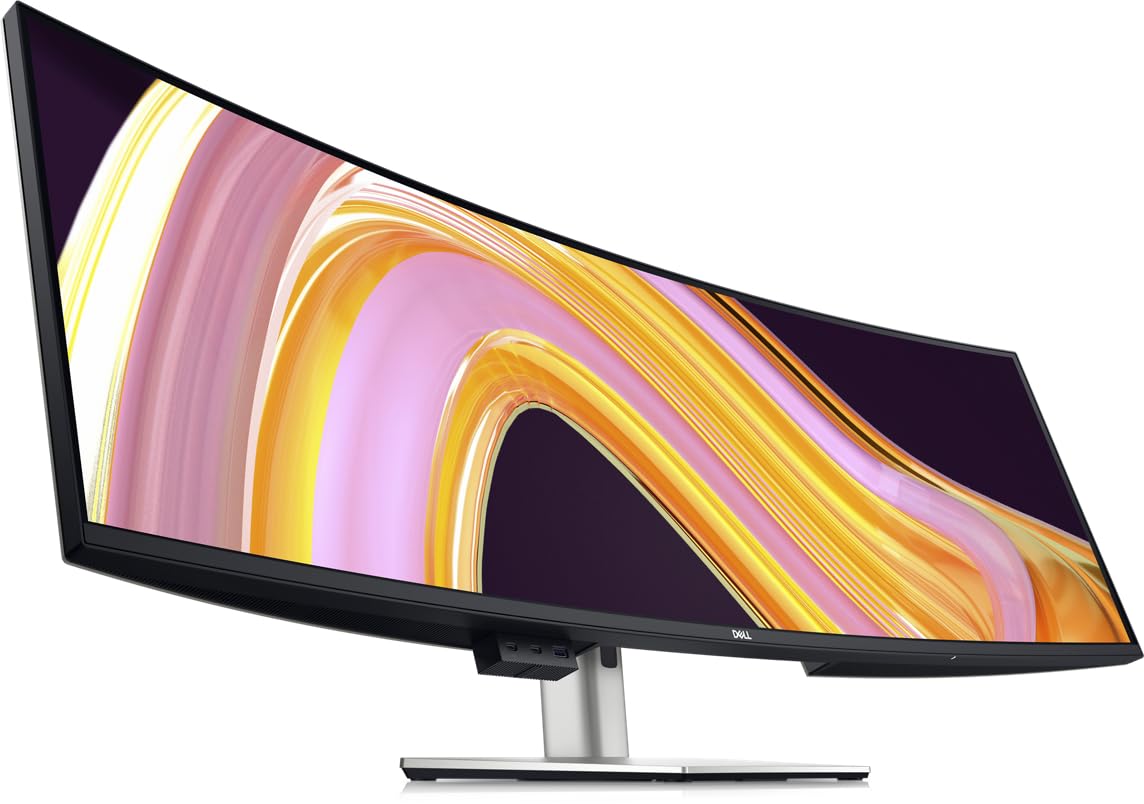
The Dell UltraSharp U4924DW is a 49-inch Dual QHD (5120 x 1440) curved monitor built for productivity-focused users who need maximum screen real estate without the pixel density that demands top-tier graphics hardware. Its 32:9 aspect ratio effectively replaces two 27-inch QHD monitors, and the 3800R curve is gentle enough to avoid geometric distortion when working with precision layout tools like CAD software or video editing timelines.
The built-in KVM switch supports up to two connected systems, and the drop-down USB ports on the bottom bezel are convenient for plugging in peripherals. The 2000:1 contrast ratio from the VA panel provides decent depth, and the 350-nit brightness is adequate for indoor environments. The 5ms GtG response time with FreeSync support makes casual gaming viable, though the 60Hz refresh rate will feel sluggish for competitive titles.
The 3800R curvature is the shallowest on this list, meaning it won’t wrap around your field of vision like an 800R or 1000R panel. Users report the KVM switch has a noticeable 5-second delay when swapping sources, and the monitor always defaults to USB-C input over HDMI, requiring manual menu intervention. The 5120 x 1440 resolution also means it does not qualify as an 8K-curved monitor in the pixel-count sense — it is a Dual QHD panel best suited for productivity rather than cinematic immersion.
Why it’s great
- Replaces dual 27-inch QHD monitors seamlessly
- Built-in KVM with drop-down USB ports
- Gentle 3800R curve ideal for precision work
Good to know
- Only 60Hz; not suitable for fast-paced gaming
- KVM has ~5 second switch delay
- 5120×1440 is Dual QHD, not 8K-class resolution
6. Kuycon G32P 32” UHD 6K Glossy Monitor
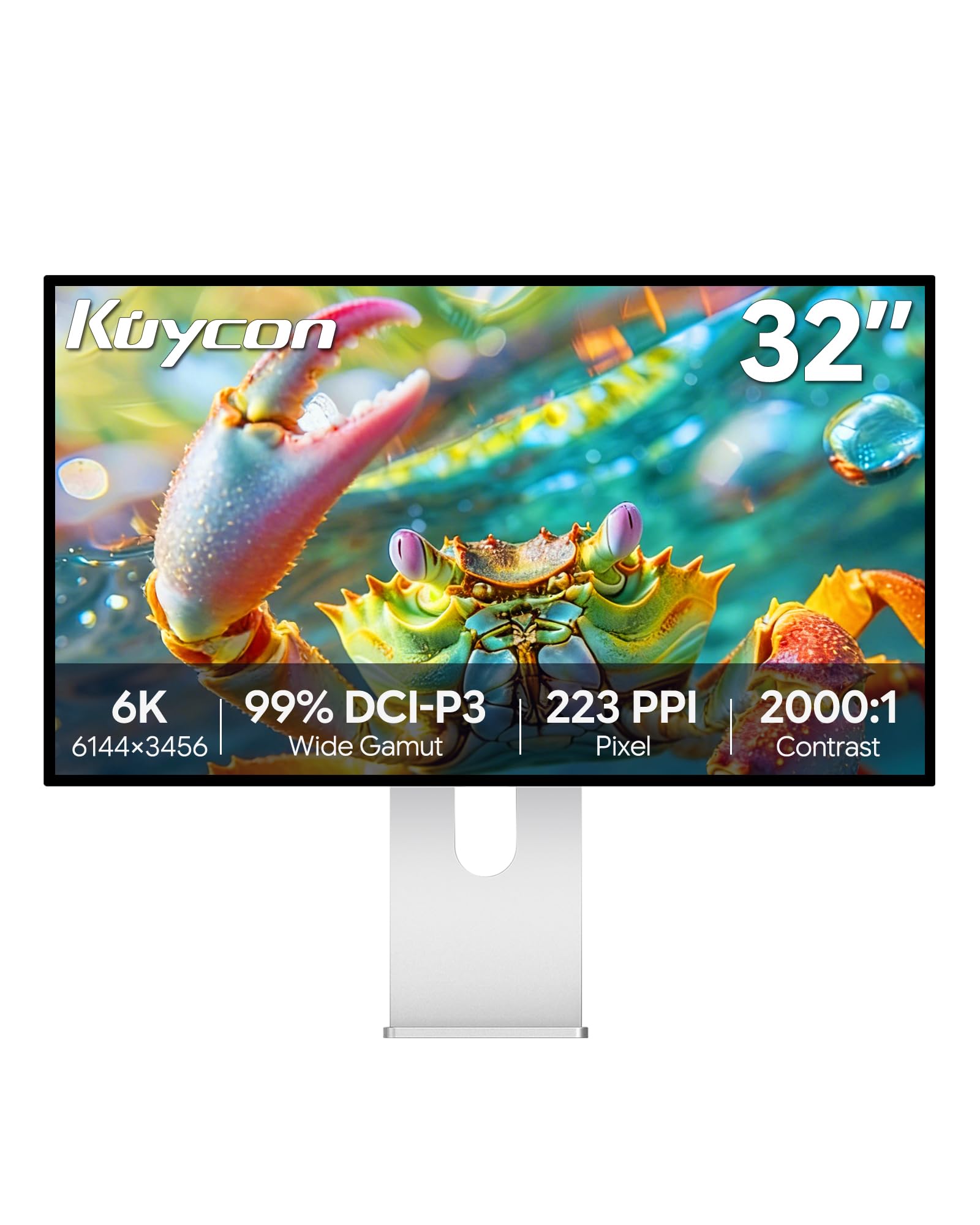
The Kuycon G32P delivers a true 6144 x 3456 6K resolution on a 32-inch 16:9 IPS panel, achieving 223 PPI — Retina-class sharpness that rivals the Apple Pro Display XDR. The glossy screen coating produces vibrant, punchy colors with 99% DCI-P3 coverage and a Delta E under 2, making it an excellent choice for color-critical photo editing and video color grading. The 500-nit brightness is sufficient for HDR previews, though it lacks the peak brightness of Mini-LED competitors.
The 2000:1 contrast ratio from the IPS panel is better than typical IPS displays, providing deeper blacks without the color shift issues of VA panels at off-center angles. The CNC-machined aluminum body with honeycomb cooling channels gives it a premium build quality reminiscent of Apple’s display lineup. The VESA 100x100mm mount compatibility and ergonomic stand with tilt, swivel, pivot, and height adjustment provide flexible positioning options.
The 60Hz refresh rate limits both gaming and smooth scrolling compared to alternatives in this price range. Users report that the remote control is required to power on the monitor, and some units arrived without a battery. There are also reports of sporadic “no signal” issues when waking from sleep on Mac systems, requiring a full power cycle. The panel is flat rather than curved, which means it doesn’t offer the immersive wrap-around feel of the ultrawide options on this list.
Why it’s great
- 6K (6144×3456) resolution at 223 PPI for Retina clarity
- 99% DCI-P3 with Delta E under 2 color accuracy
- Premium CNC-machined aluminum build quality
Good to know
- 60Hz refresh rate only; no high-refresh gaming
- Remote required for power; may arrive without battery
- Flat panel; lacks curved immersive experience
7. ASUS ROG Strix XG43UQ 43″ 4K

The ASUS ROG Strix XG43UQ is a 43-inch 4K (3840 x 2160) monitor designed primarily for console gaming, supporting 4K at 120Hz over HDMI 2.1 on PS5 and Xbox Series X. Its 16:9 aspect ratio ensures full-screen compatibility with console titles without the black bars common on ultrawide panels. The VA panel delivers a 3000:1 contrast ratio for deep blacks, and the 1000-nit peak brightness with DisplayHDR 1000 certification provides impactful highlight details in HDR games.
The built-in speakers are surprisingly capable for a monitor, rivaling entry-level desktop speakers in volume and clarity. The FreeSync Premium support ensures tear-free gameplay across a 48-120Hz VRR range. The large 43-inch size at 4K resolution means pixel density is roughly 103 PPI, which is lower than the 125-223 PPI found on smaller high-resolution panels, but the trade-off is excellent visibility from couch-distance seating typical of console gaming setups.
The 60Hz ceiling when not using HDMI 2.1 means PC gaming at higher frame rates is capped, and the lack of DisplayPort 2.1 limits future-proofing. The 43-inch size at 16:9 can be overwhelming on a standard desk, requiring at least 80cm of depth for comfortable viewing. Users note the monitor’s large footprint and 15.3 kg weight make VESA mounting with a heavy-duty arm almost mandatory for ergonomic positioning.
Why it’s great
- 4K 120Hz via HDMI 2.1 for full-screen console gaming
- Excellent built-in speakers for a monitor
- 1000-nit peak brightness with DisplayHDR 1000
Good to know
- 16:9 flat panel; not a curved ultrawide
- 103 PPI is lower than premium 4K monitors
- Large footprint requires deep desk or monitor arm
FAQ
Is there a true 8K curved monitor available?
What GPU do I need to run a Dual UHD curved monitor at 240Hz?
Does a 1000R or 800R curve cause distortion for productivity work?
What is the difference between Quantum Mini-LED and OLED for curved monitors?
Final Thoughts: The Verdict
For most users, the best 8k curved monitor winner is the LG 45GX950A-B because its 5K2K OLED panel with an 800R curve delivers the most immersive gaming and cinematic experience with near-instantaneous 0.03ms response and true HDR black levels. If you want the maximum horizontal screen real estate for multitasking and sim racing, grab the Samsung 57″ Odyssey Neo G9 for its true Dual UHD resolution and 240Hz refresh rate. And for professional creative work where color accuracy and text clarity matter more than curve aggression, nothing beats the Dell UltraSharp U4025QW with its IPS Black technology and Thunderbolt 4 hub.