
The magnetic particles on your old 8mm, Hi8, and Video8 tapes are literally shedding, decaying, and becoming unreadable with every passing season. That birthday party, that graduation, that first wobbly step — these are analog moments trapped on a deteriorating medium, and without a proper conversion bridge, they will vanish. The right capture device extracts every frame before the oxide layer crumbles, pulling the video signal through composite or S-Video inputs and encoding it into a stable MP4 container at a resolution that actually matches the source.
I’m Min — the co-founder and writer behind Gadgets Feed. I’ve spent hundreds of hours cross-referencing technical datasheets and real-world user reports on analog-to-digital converters, analyzing how each unit handles the NTSC/PAL color space, bitrate ceilings, and the subtle sync issues that plague 8mm transfers.
Whether you are pulling footage from a Sony Handycam or a standalone 8mm deck, this guide breaks down the best converters for the job. After months of spec-level research, I’ve narrowed the market to the most reliable models — here is your definitive resource for the best 8mm player video converters that deliver clean, playable digital files without introducing extra noise or dropped frames.
How To Choose The Best 8mm Player Video Converter
Not every converter treats an 8mm signal equally. The biggest mistake is buying a unit designed only for VHS — those often lack the proper input sensitivity for the smaller, higher-density tape tracks of 8mm and Hi8, resulting in washed-out colors or audio sync drift. You need a device with composite (RCA yellow) or, ideally, S-Video input that can lock onto the luminance and chrominance channels separately for a cleaner transfer.
Chipset and Encoding Quality
The digitization chip inside the converter determines whether your 8mm footage comes out blocky or clean. A cheap chipset will drop frames or apply aggressive compression that artifacts on motion — bad news for panning shots. Look for units that boast dedicated real-time encoders and adjustable bitrate settings. Higher bitrates (15–20 Mbps) preserve the organic grain of 8mm film without introducing macro-blocking.
Preview Screen and Standalone Operation
Many buyers want a no-PC solution. A built-in screen, ideally 4 to 5 inches, lets you monitor the capture in real time. Without a screen, you are blind-recording, which risks capturing a black screen or a distorted signal. A standalone unit also simplifies the workflow for non-technical family members — plug in the camcorder, press record, and walk away.
Quick Comparison
On smaller screens, swipe sideways to see the full table.
| Model | Category | Best For | Key Spec | Amazon |
|---|---|---|---|---|
| ClearClick Video2Digital 3.0 | Converter | Reliability + 8mm bundle | 720×480 native, 5″ screen | Amazon |
| Portta VD22P | Converter | Full HD resolution | 1080p 60fps, 5″ screen | Amazon |
| DigitPro VHS to Digital 3.0 | Converter | Highest capture resolution | 4K recording, 5″ screen | Amazon |
| Qonakism VHS to Digital | Converter | Budget-friendly transfer | 1080p, 4″ screen | Amazon |
| Wolverine Titan 8-in-1 | Film Scanner | Photo film digitization | 20MP, 4.3″ screen | Amazon |
| HP FilmScan 5” Touch | Film Scanner | Slide/negative scanning | 13MP CMOS, 5″ touch | Amazon |
| eyesen 8mm Film Scanner | Film Scanner | 8mm/Super 8 reels digitizer | 1080p, 2.4″ screen | Amazon |
| Magnasonic FS81 | Film Scanner | Dedicated Super 8/8mm scanning | 1080p, 2.3″ screen | Amazon |
| KODAK REELS | Film Scanner | Large reel capacity | 1080p, 5″ screen | Amazon |
In‑Depth Reviews
1. ClearClick Video2Digital 3.0

The ClearClick Video2Digital 3.0 is the benchmark for 8mm tape conversion because it prioritizes reliable capture over flashy specs. It records at native 720×480 resolution — the exact resolution of standard 8mm tape — meaning it does not artificially upscale and introduce artifacts. The included 128GB USB drive gives you hours of recording capacity right out of the box, and the 5-inch screen provides a clear, real-time preview of your Hi8 or Video8 source.
User reports consistently highlight its rock-solid sync, especially important for 8mm camcorders where the aging transport mechanism may introduce jitter. The custom auto-stop timer lets you set exact minutes per recording session, so you can digitize a whole shelf of tapes unattended. Multiple reviewers successfully transferred over 50 tapes without a single corrupted file — a testament to its encoding stability.
The trade-off is that it does not upscale to 1080p, so your digital file will match the source resolution exactly. This is actually desirable for archival purposes — upscaling a 480p signal to 1080p adds no new detail and often introduces compression noise. For pure, frame-accurate preservation, this unit delivers the most consistent results in its class.
Why it’s great
- Exceptionally reliable encoding with zero dropped frames across long sessions
- Large 5-inch preview screen for accurate monitoring
- Includes 128GB USB drive and video editing software
Good to know
- Records at native 720×480, not upscaled to 1080p
- Requires a working 8mm player or camcorder
2. Portta VD22P
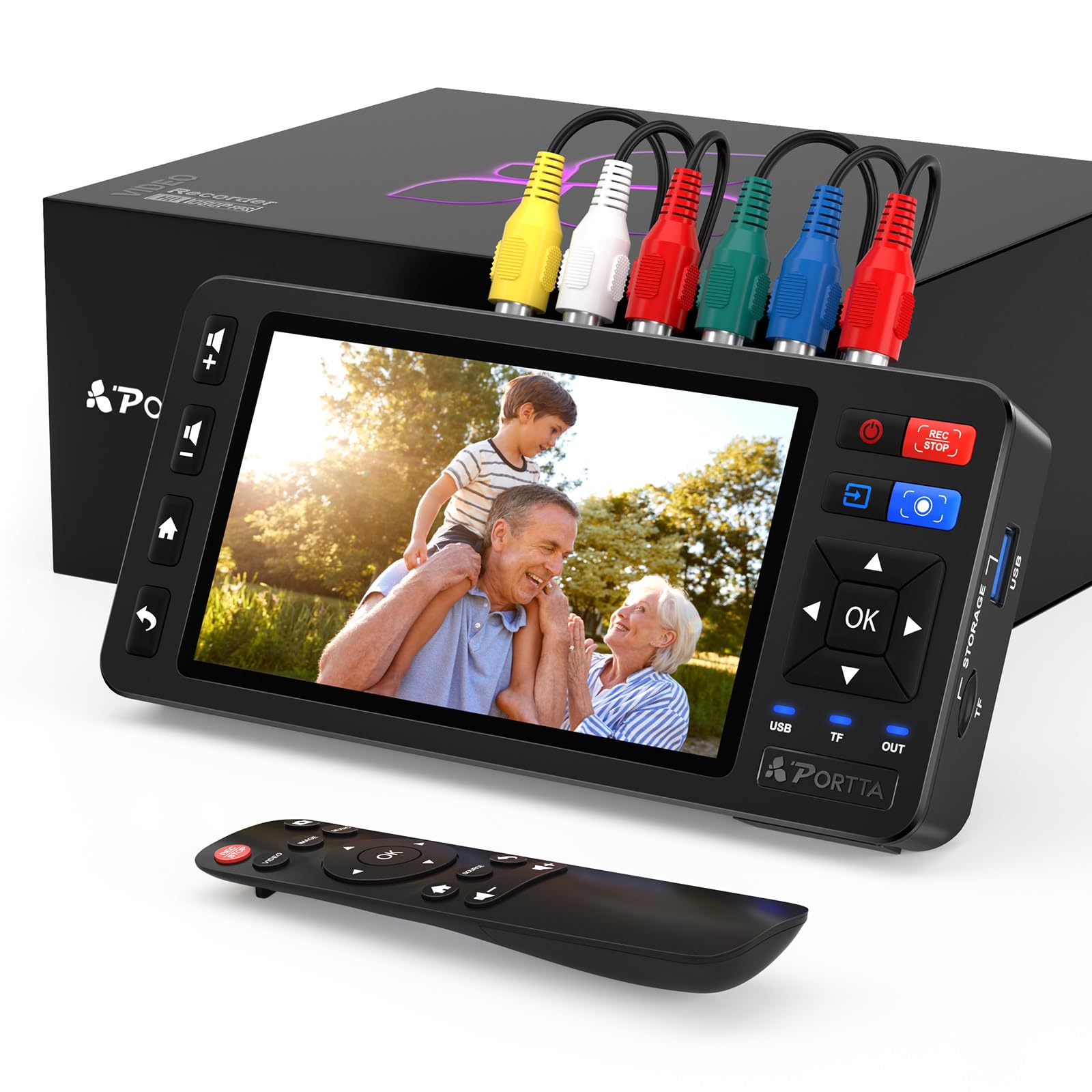
The Portta VD22P takes a different approach by capturing at Full HD 1080p at 60 frames per second. While your 8mm source is likely 480i or 576i at 25 or 30 fps, the VD22P’s de-interlacer and upscaler work together to produce a much cleaner, smoother final file than units that simply record the raw analog signal. The 5-inch HD LCD screen offers excellent color accuracy for monitoring your playback in real time.
Where this unit shines is its component video input (YPbPr) in addition to standard composite. If your Hi8 camcorder has S-Video output, the VD22P can accept that too, giving you a noticeably sharper luminance channel compared to the all-in-one composite signal. Adjustable brightness, contrast, and saturation let you compensate for faded tapes right at the capture stage, reducing post-processing work.
Reviewers praised its ease of setup — under 15 minutes from unboxing to recording — and its ability to handle long sessions without overheating. The 2-year warranty provides added confidence for what is likely a one-time digitization project. If you want the highest resolution output from your 8mm source, this is the converter to choose.
Why it’s great
- Full 1080p 60fps capture with real-time upscaling
- Component and S-Video inputs for superior signal quality
- Adjustable image settings for faded tapes
Good to know
- Requires a separate 8mm player or camcorder
- Upscaling may exaggerate grain on very old tapes
3. DigitPro VHS to Digital Converter 3.0
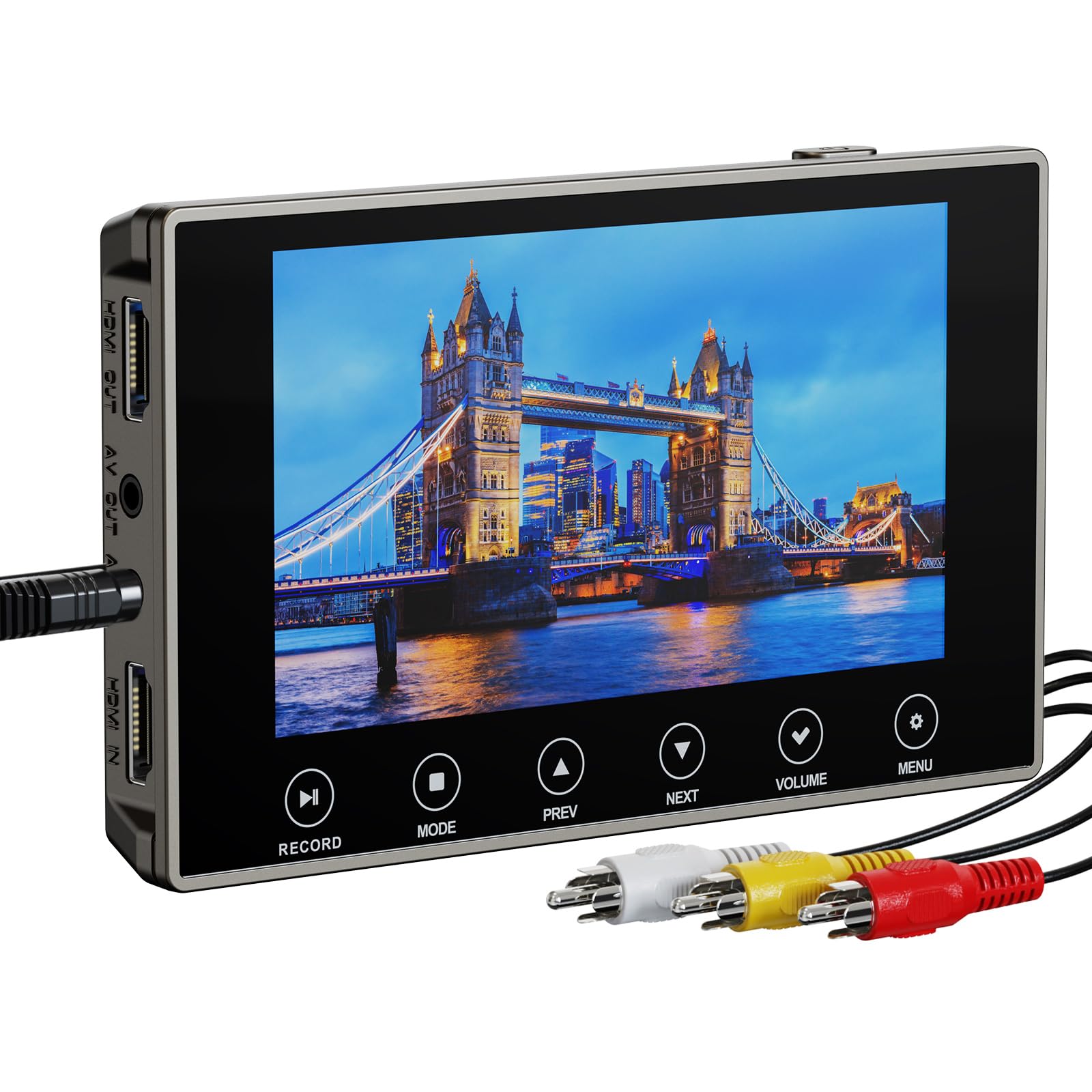
The DigitPro 3.0 pushes the envelope with a 4K recording resolution — the highest in this roundup. While your 8mm source will not benefit from 4K detail, the higher bitrate ceiling means exceptionally clean encoding with minimal compression artifacts. The built-in 2000mAh battery provides up to 3 hours of playback, making this the only truly portable standalone converter in this list, ideal for digitizing at a relative’s house or in multiple locations.
The 5-inch screen is OLED-grade, offering deep blacks and accurate color that helps you spot playback issues like head clog or tracking errors before committing the capture. The 3.5mm mic jack adds live commentary while recording, a feature archivists will appreciate for narrating family footage in real time. The touch interface, however, drew mixed feedback — some users found it unresponsive, with the tactile-button units being more reliable.
The unit includes a microSD card and supports USB flash drives up to 1TB. The lifetime warranty is a strong statement of confidence, though some users reported difficulty reaching customer support. For portable, high-bitrate captures where you value battery operation over button feel, the DigitPro is a compelling choice.
Why it’s great
- 4K recording resolution with highest bitrate in this comparison
- Built-in rechargeable battery for true portable operation
- OLED 5-inch screen for accurate monitoring
Good to know
- Touch screen can be unresponsive; tactile buttons preferred
- Customer support response can be slow
4. Qonakism VHS to Digital Converter
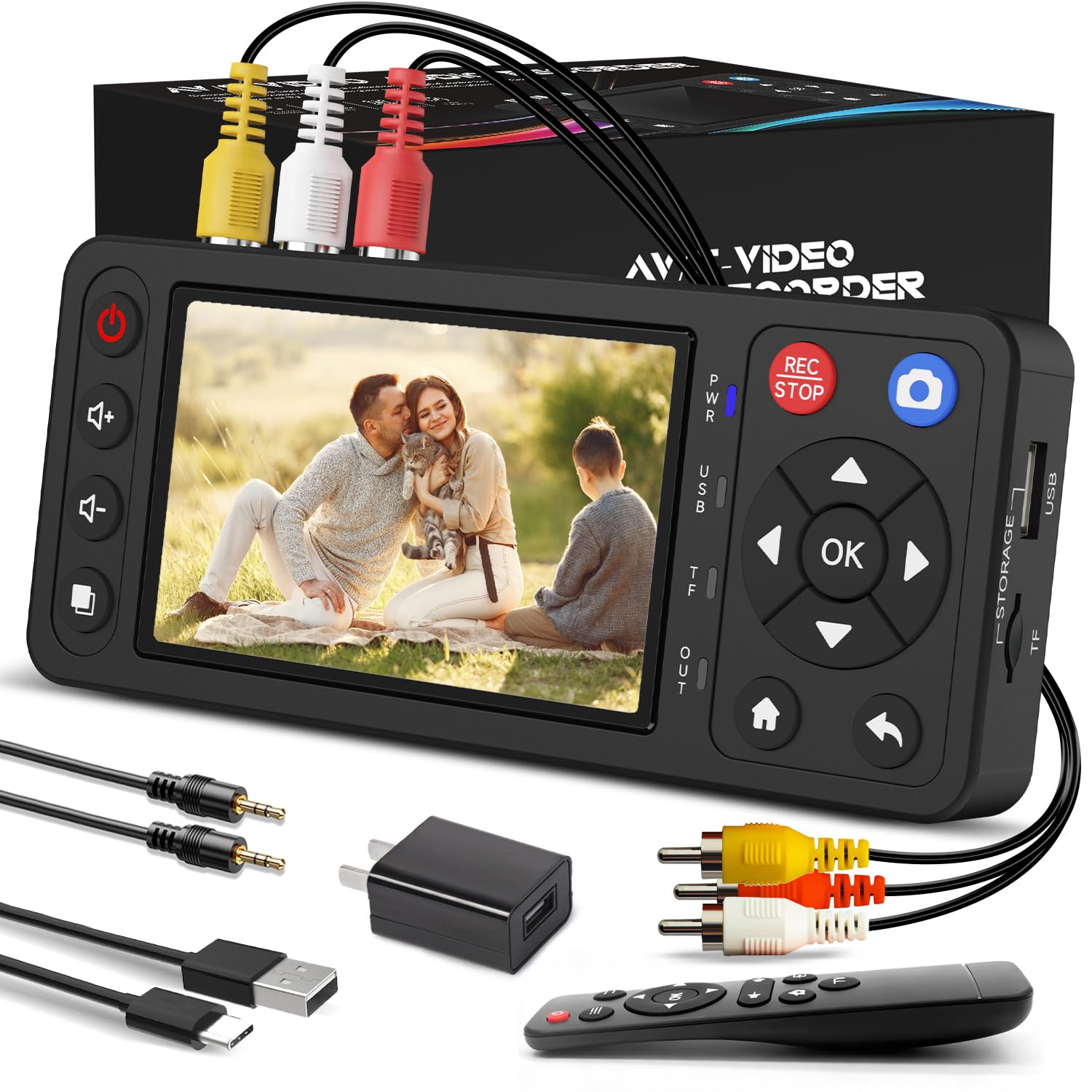
For the budget-conscious, the Qonakism converter delivers the essential functionality of a standalone capture device at the lowest entry point. It features a 4-inch preview screen, HDMI output for monitoring on a TV, and flexible storage via USB or TF card up to 1TB. The maximum recording resolution is 1080p, though like most budget units, the actual encoding bitrate is lower than premium competitors.
The unit supports both S-Video and composite input, which is uncommon at this price level. Users reported successful transfers of VHS, Hi8, and even retro game console footage with no software required. The included remote control makes it easy to start and stop recordings from across the room. The small form factor (6.3 x 2.76 x 1.02 inches) fits easily alongside your playback deck.
The trade-offs are predictable: the screen is smaller and lower resolution than mid-range options, and the plastic build feels less substantial. Some users noted that the auto-split function for large files can be confusing if you are not expecting it, but the captured files play back perfectly once reassembled. For a single-project digitization, this is the most affordable reliable option.
Why it’s great
- Most affordable standalone converter with S-Video input
- Includes remote control for convenient operation
- Compact footprint ideal for temporary setups
Good to know
- Smaller 4-inch screen with lower resolution
- Plastic build feels less rugged
5. HP FilmScan 5” Touch

The HP FilmScan 5 is not a video tape converter — it is a dedicated film and slide digitizer — but it earns its place here because many 8mm enthusiasts also have boxes of 35mm slides and negatives from the same era. Its 13MP CMOS sensor captures 22MP interpolated images, producing detailed JPEGs that preserve the grain structure of 35mm film. The 5-inch touch screen allows pinch-to-zoom preview and editing directly on the device.
The quick-load tray accepts 135, 126, and 110 film strips as well as mounted slides, swapping between formats in seconds. The USB-C power and data connection simplifies transfer to a PC, and the gallery mode turns the scanner into a digital picture frame for sharing. Users who scanned over 2,000 slides reported consistent quality and no mechanical issues after heavy use.
Color balance can be slightly oversaturated out of the box, particularly in red tones, but this is easily corrected in free editing software. For the money, you get a polished, brand-backed scanning solution that handles high-volume digitization projects without a computer. If your 8mm project is paired with photo film preservation, this is the complementary tool you need.
Why it’s great
- High 13MP sensor with 22MP interpolation for detailed scans
- Intuitive touch screen with gallery mode for previewing
- Accepts 135, 126, 110 formats plus slides
Good to know
- Red saturation can be excessive; needs color correction
- For slides and negatives only, not video tape
6. Wolverine Titan 8-in-1

The Wolverine Titan is the most versatile film scanner for those with mixed media from the 8mm era — it handles 35mm, 127, 126, 110, and APS formats in both slides and negatives. The 20MP sensor captures scans in about 3 seconds per frame, making it one of the fastest options for batch digitization. The 4.3-inch screen provides adequate preview, though the color balance leans warm and oversaturated.
The bundle includes a 32GB SD card and a 6ft HDMI cable, so you are ready to scan immediately. The unit’s standalone design means no computer required — just insert the media, press scan, and save to the SD card. Users who scanned several hundred slides praised the quick-load adapters that snap into place without fiddling.
The Achilles’ heel is reliability: multiple user reports describe units failing after 200–300 scans, with the device freezing on the startup screen. Amazon’s return policy handles this, but it is a concern for large projects. For smaller batches or as a secondary scanner, the speed and format flexibility are hard to beat at this price point.
Why it’s great
- Supports 8 different film formats in one device
- Fast 3-second scan speed per frame
- Includes 32GB SD card and HDMI cable
Good to know
- Reliability concerns with units freezing after heavy use
- Color balance oversaturated; needs post-processing
7. eyesen 8mm Film Scanner

The eyesen 8mm Film Scanner is built specifically for 8mm and Super 8 movie reels, not video tape. It accepts reels up to 9 inches in diameter and converts them frame by frame into 1080p MP4 files at 20 fps. The automated transport mechanism feeds the film through an LED-lit CMOS sensor, capturing each frame individually before assembling the digital video.
The 2.4-inch LCD screen is small but functional for framing adjustments. The included 32GB SD card stores approximately 8–10 hours of digitized footage. Users recommend babysitting the machine due to occasional jams at splice points, and the SD card may need reformatting every 10 or so conversions to prevent corruption. The scan speed is roughly 30 minutes for a 3-minute reel, so factor that into your project timeline.
Video output runs at 20 fps, which is faster than the native 16–18 fps of most 8mm film, so you will need post-processing software to slow playback to the original speed. This is a minor inconvenience for an otherwise dedicated film scanner that costs a fraction of professional services. For families with boxes of old cine film, it is a practical investment.
Why it’s great
- Accepts reels up to 9 inches in diameter
- Fully automated transport with 1080p capture
- Includes 32GB SD card for immediate storage
Good to know
- SD card can corrupt after frequent use; needs reformatting
- Requires babysitting for splices and jams
8. Magnasonic FS81

The Magnasonic FS81 is another dedicated Super 8/8mm film scanner, but its thoughtful design and reliable mechanics set it apart. The auto-frame alignment feature uses a light sensor to detect the frame boundaries, which dramatically reduces the manual adjustments needed on most competitors. It accepts 3-inch, 5-inch, and 7-inch reels and outputs MP4 files at 1080p resolution.
The 2.3-inch screen is small, but the RCA video output lets you connect to a TV for a much larger preview. Users who scanned over 100 reels reported the unit handled splices better than the eyesen, with fewer jams and stops. The scan speed is slower — about 35–40 minutes for a 3-inch reel — but the resulting footage is clean, with good color accuracy straight from the default settings.
Like all film scanners in this class, it does not capture audio — 8mm home movies were silent. The manual rewind is slow but reliable. A few users reported glitchy transport mechanisms that required multiple attempts per reel, though this appears to be less common than with other scanners. For the premium price, you get a more polished user experience and consistent scan quality.
Why it’s great
- Auto frame alignment reduces manual adjustments
- RCA video output for external TV monitoring
- Better splice handling than competing scanners
Good to know
- Slow scan speed; 35 minutes per 3-inch reel
- No audio capture (silent film only)
9. KODAK REELS Digitizer

The KODAK REELS digitizer is the most expensive dedicated 8mm scanner in this roundup, and it targets users with large reels — up to 9 inches in diameter. The standout feature is the 5-inch LCD screen with touch buttons, offering the largest and most detailed preview of any dedicated film scanner here. The 8.08-megapixel sensor captures each frame with good sharpness, and the adjustable exposure, sharpness, and tint settings reduce the need for post-processing.
The universal supply reel adapts to 3-inch through 9-inch reels without additional parts, and the automated transport runs quietly. Users who processed 30+ reels reported the interface is intuitive, with on-screen prompts guiding each step. However, the default bitrate is low, producing blocky video in complex scenes — a firmware modification to boost bitrate is a popular community tweak, though it carries risk of bricking the unit.
The biggest complaints center on flicker issues during bright-to-dark scene transitions, which some units exhibit more severely than others. The capture speed is 2 frames per second, so a 3-minute reel takes about 30 minutes. For the price, you are paying for the large screen and brand reliability, but the software tweaks required for optimal quality may deter less technical users.
Why it’s great
- Large 5-inch LCD with touch buttons for easy navigation
- Accepts reels up to 9 inches without extra adapters
- Adjustable exposure, sharpness, and tint settings
Good to know
- Default bitrate causes blocky artifacts; may need firmware tweak
- Flicker issues reported in high-contrast scenes
FAQ
Can I convert 8mm tape without a working camcorder or deck?
Why does my digitized 8mm video look sped up?
Should I choose a converter with upscaling?
Final Thoughts: The Verdict
For most users, the best 8mm player video converter is the ClearClick Video2Digital 3.0 because it delivers the most reliable, frame-accurate captures with a generous 128GB USB drive and a large preview screen. If you want the highest possible resolution from your source, grab the Portta VD22P for its 1080p 60fps capture and component input. And for portable, high-bitrate digitization with battery operation, nothing beats the DigitPro VHS to Digital Converter 3.0.