
The RDNA 4 architecture changes the calculus for high-refresh-rate gaming. With 16 GB of GDDR6 VRAM across a 256-bit bus, the fastest 9070 XT models push boost clocks past 3.0 GHz, delivering rasterization performance that challenges NVIDIA’s RTX 5070 Ti at a significantly lower price point. The real question is which partner card balances thermal headroom, noise, and out-of-box boost clocks for your specific build.
I’m Min — the co-founder and writer behind Gadgets Feed. I’ve spent hundreds of hours analyzing GPU benchmarks, voltage curves, and cooler designs across the entire 9070 XT lineup to find the models that actually deliver on their spec sheets.
After parsing real customer data, thermal testing results, and build quality reports, this guide identifies the best 9070 XT model for every scenario, from silent 4K rigs to compact white-themed workstations.
How To Choose The Best 9070 XT Model
Every 9070 XT uses the same Navi 48 silicon, but partner cards vary dramatically in cooler design, factory clocks, and power delivery. The difference between a budget model and a premium one can be 10°C on the GPU hotspot and 5 dBA of fan noise under load.
Cooler Design and Fan Count
Triple-fan designs with larger fin stacks and heat pipes dissipate heat more efficiently, allowing sustained boost clocks above 2.9 GHz. Dual-fan cards often hit thermal limits faster, triggering fan ramps past 2500 RPM that produce audible noise. Look for models with 0dB fan stop technology for silent idle operation.
Factory Boost Clock and Overclocking Headroom
Base boost clocks range from 2.9 GHz to over 3.0 GHz across different models. Higher factory clocks mean better out-of-box performance, but the real value lies in undervolting headroom — cards with robust VRM phases and power limits tolerate -75 mV to -100 mV undervolts, dropping power draw by 30W while maintaining peak frequencies.
Physical Dimensions and Case Compatibility
Model lengths span from 11 inches to over 13 inches, and thickness ranges from 2.5 slots to 3.125 slots. Measure your case clearance carefully — some premium coolers are too wide for compact ATX builds and nearly all require you to remove the front fan for installation.
Quick Comparison
On smaller screens, swipe sideways to see the full table.
| Model | Category | Best For | Key Spec | Amazon |
|---|---|---|---|---|
| Sapphire Nitro+ RX 9070 XT | Premium | 4K Ultra Settings | 3060 MHz Boost | Amazon |
| ASUS Prime RX 9070 XT | Mid-Range | Silent Builds | 2.5-Slot Design | Amazon |
| PowerColor Hellhound RX 9070 XT | Mid-Range | Workstation & Gaming | 2.5 Slot, 2.6 lbs | Amazon |
| Sapphire Pure RX 9070 XT | Premium | White Themed Builds | 2460 MHz Game Clock | Amazon |
| ASRock Steel Legend RX 9070 XT | Mid-Range | RGB Focused Builds | 2970 MHz Boost | Amazon |
| GIGABYTE Gaming OC ICE RX 9070 XT | Premium | White Aesthetic Builds | Hawk Fan Cooling | Amazon |
| ASRock Challenger RX 9070 XT | Value | 1440p Max Settings | 2970 MHz Boost | Amazon |
| XFX Swift RX 9070 XT | Value | High FPS 1440p | 2970 MHz Boost | Amazon |
| Sapphire Pulse RX 9070 XT | Value | Bang for Buck | No RGB, Lightweight | Amazon |
| GIGABYTE Gaming OC RX 9070 XT | Mid-Range | Dual BIOS Switching | 3060 MHz Boost | Amazon |
| ASUS TUF Gaming RTX 5070 | Mid-Range | NVIDIA Ecosystem | 2610 MHz Boost | Amazon |
| GIGABYTE RTX 5070 AERO OC | Mid-Range | White NVIDIA Build | 2600 MHz Boost | Amazon |
| ASRock Steel Legend RX 9070 XT (Amazon Limited) | Mid-Range | Plug and Play | 2970 MHz Boost | Amazon |
In‑Depth Reviews
1. Sapphire Nitro+ AMD Radeon RX 9070 XT Gaming OC 16GB

The Sapphire Nitro+ is the complete package. Its boost clock reaches 3060 MHz out of the box, and the triple-fan cooler keeps the GPU under 65°C during extended 4K sessions with hotspot temperatures staying well below 80°C. Users report zero coil whine, which is rare for a card pulling over 300W under load.
The build quality stands out — the metal backplate, the robust 3-slot cooler, and the clean 12V cable routing under the backplate make installation straightforward. The card offers dual HDMI outputs alongside dual DisplayPort, which is helpful for multi-monitor setups that include a TV. It is large at over 300 mm and requires an 850W power supply.
Performance scales linearly with the silicon’s potential. Undervolting by -75 mV with a +10% power limit pushes boost clocks past 3.4 GHz while dropping power draw by roughly 30W, making it both the fastest and one of the most efficient 9070 XT models available.
Why it’s great
- Highest factory boost clock at 3060 MHz
- Excellent cooling with low noise under load
- No coil whine reported by multiple users
Good to know
- Requires 850W PSU and a case with 3+ slot clearance
- Fragile inner power and RGB connectors
2. ASUS Prime AMD Radeon RX 9070 XT 16GB GDDR6 OC Edition

The ASUS Prime RX 9070 XT is engineered for silent operation. Its 2.5-slot design with axial-tech fans and a phase-change GPU thermal pad keeps idle temperatures at 28-32°C, while under stress the card stays between 55-59°C with fans barely audible at 75% speed. Users confirm it consumes only 180-190W during gaming workloads, which is remarkably efficient.
This card works out of the box with Linux, making it a versatile choice for dual-boot workstations. The dual-ball fan bearings are rated for twice the lifespan of sleeve bearing designs, and the 0dB technology stops fans entirely during light gaming. There is no RGB lighting, which suits minimalistic builds.
The build quality is solid but the shroud has a plasticky feel that some premium buyers may notice. At 311 mm length, it fits most mid-tower cases, but you will need to verify clearance. The three PCIe power connectors may require a PSU upgrade if you are coming from an older system with two 8-pin rails.
Why it’s great
- Extremely low power draw at 180-190W under stress
- 0dB fan mode for silent light gaming
- Works with Linux out of the box
Good to know
- Requires three PCIe power connectors
- Plasticky shroud feel on an otherwise premium card
3. PowerColor Hellhound AMD Radeon RX 9070 XT 16GB GDDR6

The PowerColor Hellhound excels in mixed-use scenarios. It maintains a GPU temperature in the low 50s and a hotspot of 80-84°C under full load, which is excellent for a 2.5-slot card. Users report zero coil whine and near-silent fan operation even during 100% HEVC encoding workloads.
At 2.6 pounds and 327 mm, it is relatively lightweight for its class, which reduces PCIe slot sag without requiring a support bracket. The blue LED indicator is subtle and adds a touch of personality without overwhelming RGB. The dual 8-pin power connectors are compatible with standard PSU cables.
Gaming performance is 19-30% faster than a 7900 GRE depending on the title, and the card handles 4K Cyberpunk 2077 solidly. The Hellhound is the go-to choice if you need a GPU that transitions seamlessly from 12-hour rendering sessions to competitive gaming without thermal throttling.
Why it’s great
- Excellent thermal performance for a 2.5-slot card
- No coil whine and near-silent operation
- Lightweight design reduces PCIe slot sag
Good to know
- At 327 mm, it may not fit smaller cases
- No RGB for those wanting customizable lighting
4. Sapphire Pure AMD Radeon RX 9070 XT Gaming OC 16GB

The Sapphire Pure is the definitive white-themed 9070 XT. The white PCB extends through the entire card, so no dark corners peek out from beneath the backplate. Users report whisper-quiet operation even at 4K max settings, with Cyberpunk 2077 delivering over 75 FPS undervolted with ray tracing enabled.
Performance is superb for the price. In Assassin’s Creed Shadows with ray tracing on, the Pure actually outpaces the RTX 5070 Ti. The triple-fan cooling solution keeps the GPU at a maximum of 68°C under load, and the fans are inaudible during normal gaming. The dual 8-pin power connectors make PSU upgrades simple.
The Adrenalin software suite provides comprehensive control for undervolting and overclocking without requiring an account. Undervolting by 75 mV is stable and drops power consumption noticeably while maintaining peak boost clocks. Amazon shipping packaging has been reported as minimal, so inspect the box upon arrival.
Why it’s great
- True white PCB for clean themed builds
- Whisper quiet fan operation at 4K settings
- Outperforms RTX 5070 Ti in select RT titles
Good to know
- Amazon shipping protection is minimal
- Premium pricing over entry-level 9070 XT models
5. ASRock Radeon RX 9070 XT Steel Legend 16GB

The Steel Legend combines ASRock’s signature silver-and-white aesthetic with Polychrome SYNC RGB lighting that can be synchronized with other ASRock components. The triple-fan cooling solution with striped ring fans and ultra-fit heatpipes maintains GPU temperatures in the 65-75°C range during extended gaming sessions.
Users praise the card’s stability when undervolted via Adrenalin, with a -100 mV undervolt and VRAM overclock to 2700 MHz dropping hotspot temperatures below 75°C while maintaining over 100 FPS in all games at 1440p ultrawide. The reinforced metal frame and stylish metal backplate provide excellent structural rigidity.
The RGB control software has been noted as finicky, occasionally freezing the lighting to one setting until a system restart. The 2.9-slot design at 298 mm length requires careful case measurement, and the 800W PSU recommendation should be taken seriously for peak boost stability.
Why it’s great
- Stunning RGB lighting with Polychrome SYNC
- Reinforced metal frame for long-term durability
- Stable undervolting with significant temp drops
Good to know
- RGB control software can be buggy
- 2.9-slot design reduces case compatibility
6. GIGABYTE Radeon RX 9070 XT Gaming OC ICE 16G
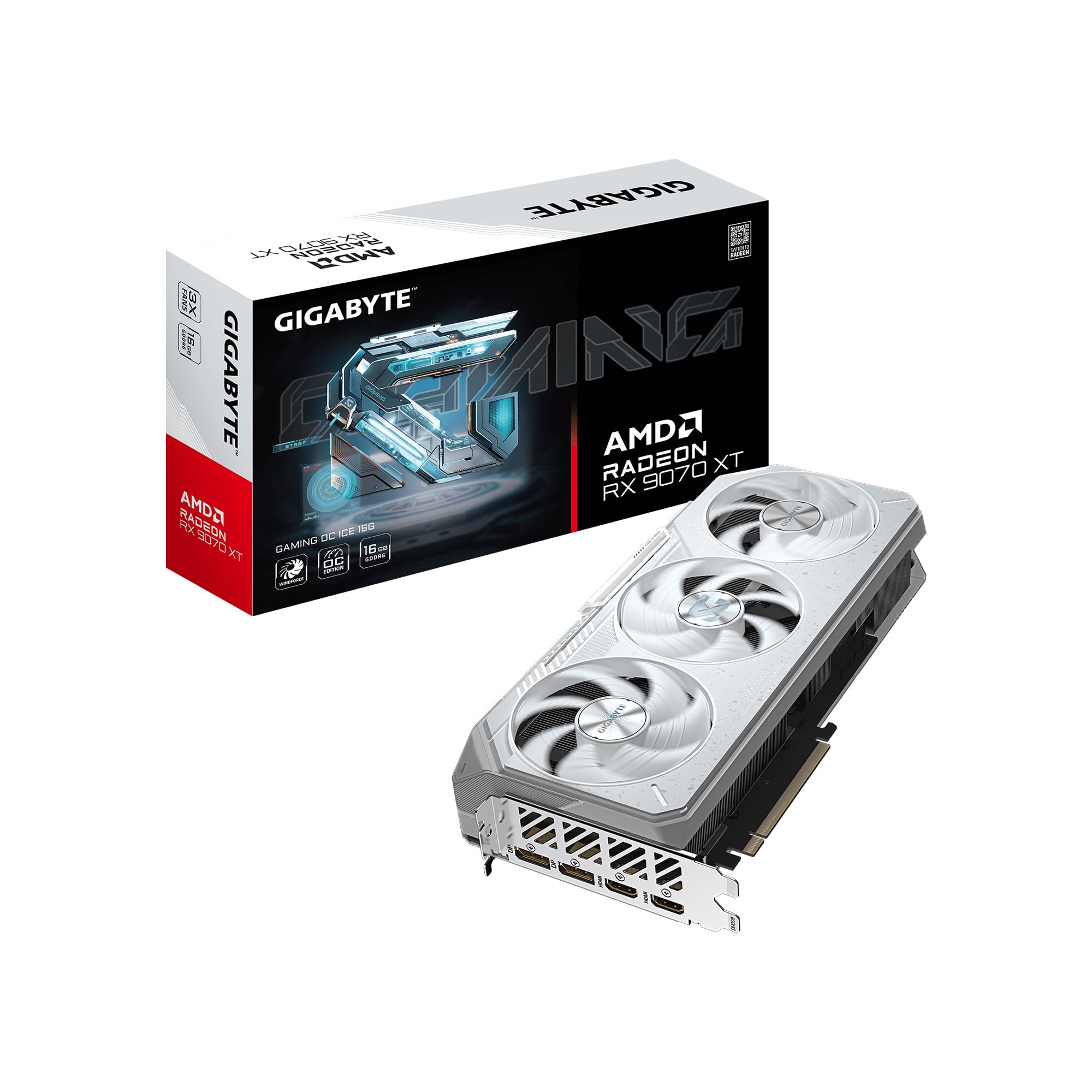
The GIGABYTE Gaming OC ICE version uses the WINDFORCE cooling system with Hawk fans and server-grade thermal gel instead of traditional thermal paste. This combination keeps the GPU under 65°C even during demanding 1440p sessions, with users reporting 300+ FPS in Call of Duty with a 9800X3D processor.
The white aesthetic is subtle — the card has a clean silver-white shroud with gentle RGB accents that can be customized through the GIGABYTE CONTROL CENTER. The Dual BIOS switch lets you toggle between Performance and Silent modes. At 11.34 inches, it is more compact than many premium 9070 XT models.
One user noted that this card runs slightly hotter than competing 9070 XT models, with a higher edge-to-junction temperature delta. Undervolting helps in hot environments. For Linux gamers, the card works well with open-source drivers, offering excellent performance without driver headaches.
Why it’s great
- Server-grade thermal gel for improved heat transfer
- Compact size for a premium 9070 XT
- Dual BIOS for quiet vs performance tuning
Good to know
- Runs slightly hotter than some competitors
- Subtle RGB may not satisfy those wanting bright lighting
7. ASRock Radeon RX 9070 XT Challenger 16GB OC

The Challenger is ASRock’s entry-level 9070 XT, but it sacrifices nothing where it counts. The 2970 MHz boost clock and 16 GB GDDR6 on a 256-bit bus deliver maxed-out 1440p settings with ease. Users pairing it with a 7600X3D report a massive uplift from older cards like the RX 5700 XT.
The triple-fan design with striped axial fan technology and 0dB silent cooling keeps noise levels low during desktop use. The LED indicator with a physical switch lets you control lighting without software. The metal backplate adds structural reinforcement without adding excessive weight.
Build quality is solid for the price tier, though the RGB software from ASRock has been noted as buggy — the lighting settings persist but the control app loses connection during use. For users who set the lighting once and forget it, this is a minor inconvenience given the raw performance on offer.
Why it’s great
- Excellent 1440p max settings performance
- 0dB silent cooling for low-load scenarios
- Physical LED switch for easy lighting control
Good to know
- RGB software can lose connection during use
- Requires 750W+ PSU for stable operation
8. XFX Swift AMD Radeon RX 9070 XT Triple Fan 16GB

The XFX Swift delivers raw gaming performance with a factory boost clock of 2970 MHz. Users report 180+ FPS in Helldivers 2 at 1440p and solid 4K gaming at 85 FPS in Crimson Desert with FSR set to Quality. The card comfortably handles Cyberpunk 2077 at 4K with medium to high settings.
XFX has built a strong reputation for support and build quality since EVGA exited the GPU market. The SWFT triple-fan cooling solution runs quiet when undervolted and underclocked slightly. One user reported running fans silent at 65°C after a modest undervolt, with performance equivalent to an RTX 5070 Ti.
The card uses two 8-pin power connectors rather than the problematic 12VHPWR connector, which many users cite as a reliability advantage. AMD’s Adrenalin software can be janky compared to NVIDIA’s control panel, but the price-to-performance ratio makes this an easy recommendation for value-focused builders.
Why it’s great
- Performance rivals RTX 5070 Ti at lower cost
- Uses standard 8-pin PCIe power connectors
- XFX has strong customer support reputation
Good to know
- AMD Adrenalin software can be frustrating
- Ray tracing performance trails high-end NVIDIA
9. Sapphire Pulse AMD Radeon RX 9070 XT Gaming 16GB

The Sapphire Pulse is the no-nonsense 9070 XT. It strips away RGB and cosmetic frills to deliver pure performance at the most accessible price point. The card achieves over 200 FPS at 1440p in most titles and handles 4K gaming well, offering 60+ FPS in AAA games with FSR enabled.
Undervolting the Pulse by -75 mV with a +10 power limit pushes boost clocks past 3440 MHz while keeping fan noise lower than the 6700 XT it commonly replaces. The card is lighter than most 9070 XT models, which minimizes PCIe slot sag. Sapphire’s build quality is excellent, with a clean aesthetic that fits into any build.
For buyers who prioritize frame rates over flash, the Pulse is the smartest financial decision in the 9070 XT lineup. One caveat: AMD game redemption codes may not be included with Amazon purchases, so check the listing details if promotional bundles matter to you.
Why it’s great
- Best price-to-performance ratio in the 9070 XT lineup
- Lightweight design reduces PCIe slot sag
- Excellent undervolting headroom past 3.4 GHz
Good to know
- No RGB lighting for those wanting customizable aesthetics
- Game codes often excluded from Amazon purchases
10. Gigabyte Radeon RX 9070 XT Gaming OC 16G

The GIGABYTE Gaming OC offers a 3060 MHz boost clock out of the box, placing it among the fastest 9070 XT models. Users report excellent 4K gaming performance with frame rates exceeding 100 FPS on high settings when paired with an AMD 9 9900X. The WINDFORCE cooling system delivers robust thermal performance.
The Dual BIOS switch is the standout feature, letting you toggle between Performance and Quiet modes depending on your priority. In Performance mode, the card pushes maximum boost clocks. Switching to Silent mode reduces fan speed for a quieter experience during less demanding titles.
One common user complaint is fan noise at 2800 RPM — the fans produce a grinding sound at full speed. Setting a custom fan curve to cap at 60% with a slight undervolt eliminates the noise while only losing about 50 MHz of boost clock. At stock settings, the card can hit 3.4 GHz but will be audibly loud.
Why it’s great
- High factory boost clock at 3060 MHz
- Dual BIOS for performance vs quiet switching
- Excellent 4K gaming performance
Good to know
- Fan noise becomes noticeable above 2800 RPM
- Requires manual fan curve tuning for silent operation
11. ASUS TUF Gaming NVIDIA GeForce RTX 5070 12GB GDDR7 OC

The ASUS TUF Gaming RTX 5070 is worth considering if you need NVIDIA’s CUDA ecosystem or DLSS 4 for specific workloads. The 12 GB GDDR7 memory on a 192-bit bus delivers solid 1440p performance with ray tracing enabled, and the military-grade components with protective PCB coating offer durability against moisture and dust.
The 3.125-slot cooler is massive, measuring 13 inches long with a large fin array optimized for airflow from three Axial-tech fans. It includes an anti-sag support stand that doubles as a screwdriver — a thoughtful inclusion for such a large card. Users report temperatures around 65°C under load with quiet fan operation.
The 12 GB VRAM is the main concern for future-proofing. Some modern titles already recommend 16 GB, and Monster Hunter Wilds specifically hits VRAM limits on 12 GB cards. For pure gaming value, the 16 GB 9070 XT models offer better longevity at a similar or lower price point.
Why it’s great
- Military-grade components and protective PCB coating
- DLSS 4 for superior upscaling quality
- Includes anti-sag support stand
Good to know
- 12 GB VRAM may be insufficient future games
- Large card requires careful case measurement
12. GIGABYTE GeForce RTX 5070 AERO OC 12G

The GIGABYTE AERO OC is the white-themed NVIDIA alternative with a premium all-white design. The 12 GB GDDR7 memory and PCIe 5.0 interface deliver excellent 1440p gaming performance, with users reporting 300 Hz on Overwatch and smooth ray tracing in demanding titles. The WINDFORCE cooling system keeps the card near-silent under load.
The card supports up to 7680×4320 resolution and includes a sag bracket for structural support. Upgrading from an RTX 3060 yields transformative results, with Microsoft Flight Simulator 2024 running beautifully at 1440p. Idle temperatures sit at 35°C and peak at 60°C during gaming sessions.
For the same price as many 9070 XT models, you get 12 GB VRAM versus 16 GB. The 4-year warranty from GIGABYTE is a redeeming factor, but for pure rasterization performance and VRAM capacity, the 9070 XT lineup offers better value for most gamers.
Why it’s great
- Clean white design for themed builds
- Excellent 1440p gaming performance
- Includes sag bracket for structural support
Good to know
- 12 GB VRAM vs 16 GB on similarly priced 9070 XT models
- PCIe 5.0 requires compatible motherboard for full benefit
13. ASRock Steel Legend RX 9070 XT 16G (Amazon Limited Edition)

This Amazon-exclusive variant of the Steel Legend RX 9070 XT offers the same 2970 MHz boost clock and 16 GB GDDR6 memory in a potentially more accessible purchasing channel. Users report phenomenal performance with temperatures between 65-75°C, calling it the best AMD GPU since 2012 at near-MSRP pricing.
The Infinity Cache architecture enhances data transfer rates, and the PCIe 5.0 interface ensures maximum bandwidth with compatible motherboards. Undervolting by -100 mV with VRAM clocked at 2700 MHz and power reduced by 10% yields GPU temperatures below 50°C and hotspot temperatures under 75°C.
The card does not include headers for connecting external fans, which may disappoint builders looking to control case fans through the GPU. The RGB control app has the same issue as the standard Steel Legend — it can freeze the lighting until a system restart. For a plug-and-play experience, this card excels once initial tuning is complete.
Why it’s great
- Excellent out-of-box performance with good thermals
- PCIe 5.0 ready for future motherboards
- Near plug-and-play installation experience
Good to know
- No headers for connecting external fans
- RGB control app may freeze lighting occasionally
FAQ
What makes 9070 XT models different from each other if they use the same GPU chip?
Can the 9070 XT handle 4K gaming at high refresh rates?
What power supply do I need for a 9070 XT?
Is the 9070 XT good for content creation?
Final Thoughts: The Verdict
For most users, the 9070 xt model winner is the Sapphire Nitro+ because it delivers the highest sustained boost clock at 3060 MHz with exceptional cooling and zero coil whine across a wide sample. If you want the best value with no RGB and a lightweight build, grab the Sapphire Pulse. And for white-themed builds that prioritize silent operation at 4K, nothing beats the Sapphire Pure.