
Our readers keep the lights on and my morning glass full of iced black tea. As an Amazon Associate, I earn from qualifying purchases.
Specs are compiled from manufacturer listings and verified buyer reviews and can change over time — please confirm the key details on the product page before buying.
Choosing between all the 9070 XT Models on the market means staring down a wall of specs — different clock speeds, cooler designs, and power requirements that all blur together. The real question is which one actually delivers smooth 4K gaming with ray tracing turned on, without sounding like a jet engine or needing a 12-volt power plant in your PC case.
I’m Min — the founder and writer behind Gadgets Feed. This guide is built by comparing the manufacturers’ published specifications and the patterns across verified customer reviews, so you get each pick’s real strengths and trade-offs instead of marketing spin.
We break down the ten most important 9070 xt models by their cooling performance, factory overclocks, and build quality so you can match the right card to your specific PC build.
Our Picks at a Glance


How To Choose The Best 9070 XT Models
Every 9070 XT card shares the same AMD GPU core, so what separates a great card from a noisy or hot one depends on the cooler, the factory overclock, and the build quality of that specific model. Focus on these three things to narrow your choices.
Cooling and Noise
The main difference between models is how they handle heat. A triple-fan design with a thick heatsink keeps the card cool under load, which means the fans spin slower and you hear less noise. Some models add a 0dB mode that stops the fans entirely during light gaming or desktop work, which matters if you value a quiet PC.
Factory Overclock and Boost Clock
Not every 9070 XT ships with the same clock speed from the start. Models labeled as “OC” or “Gaming” typically run a higher boost clock right from the factory, which translates to more frames per second in games without you having to manually overclock. The boost clock number — measured in MHz — is the highest speed the card can hit during demanding tasks like 4K gaming.
Size and Power Compatibility
These cards range from a 2.5-slot design up to a chunky 3-slot cooler that could overhang a second PCIe slot on your motherboard. Check your case clearance length (around 300-340 mm is typical) and your power supply wattage — most 9070 XT models recommend a 750W to 850W unit. You also need two or three 8-pin PCIe power connectors, depending on the model.
Quick Comparison
| Model | Best For | Boost Clock | Weight | Max Resolution | Amazon |
|---|---|---|---|---|---|
| Sapphire Pulse★ Best Overall | Most Popular | N/A* | N/A* | 4K | Amazon |
| ASRock TaichiTop Performer | Peak Overclocking | 3100 MHz | 2.18 kg | 8K | Amazon |
| GIGABYTE Gaming OCAlso Great | Strong OC / Cool | 3060 MHz | 1.78 kg | 8K | Amazon |
| XFX Mercury RGB | High OC w/ RGB | 3100 MHz | 1.5 kg | 4K | Amazon |
| ASRock Steel Legend | Balanced Features | 2970 MHz | 1.57 kg | 8K | Amazon |
| ASUS Prime OC | Compact & Quiet | N/A* | 1.5 kg | 8K | Amazon |
| XFX Swift | Budget Entry | 2970 MHz | 1.5 kg | 4K | Amazon |
| PowerColor Reaper | Compact Size | N/A* | N/A* | 8K | Amazon |
In‑Depth Reviews
1. ASRock Graphics Board Steel Legend RX 9070 XT 16G (AX Model)
Our pick — over 4.5★ from 700+ verified ratings; the strongest balance of quality and price.
The Sapphire Pulse is the most-reviewed 9070 XT on Amazon, with 714 ratings and a nearly flawless 4.7 average.
With over 700 customer ratings, the Pulse has the largest feedback base of any card in this roundup, which gives you a reliable picture of real-world performance. It features 16GB of GDDR6 memory on a 256-bit memory bus and supports AMD FidelityFX Super Resolution 4 with AI upscaling — that is the technology that helps games look sharper at 4K by intelligently upscaling lower resolutions. The RDNA 4 architecture powers 64 compute units, matching the core count of the Taichi and Steel Legend.
The maximum display resolution is 3840×2160, so it is a 4K-focused card, and it measures 11.81 inches long and 11.81 inches wide — but the “width” figure likely includes the full cooler width rather than the slot dimension. Sapphire’s Pulse series is known for offering solid build quality at a reasonable cost, and this card sticks to that formula. The lack of a published boost clock means it likely runs closer to AMD’s reference speeds, trading some factory overclock for a lower entry price compared to the more expensive premium models.
Trusted by the crowd: 714 ratings and a 4.7 average make this the safest pick if you value community-validated performance over raw factory OC numbers.
Standard clocks: No published boost or game clock speeds mean this card likely runs at reference speeds — you pay less upfront but get less out-of-box performance than OC models.
Choose this if: you want a proven, well-reviewed card and do not need the highest factory overclock — the Pulse is the safe, crowd-trusted pick.
Skip if: you are after a specific high boost clock speed (like 3060-3100 MHz) and want a published number you can rely on before buying.
2. ASRock Radeon RX 9070 XT Taichi 16GB OC
The Taichi is the factory-overclock king that pushes the 9070 XT closer to its limits.
This card hits a boost clock of 3100 MHz right from the start, which is the highest factory overclock in this roundup. That extra speed means you get more frames in 4K gaming without touching a single setting — the Taichi also edges out the XFX Swift (2970 MHz boost) by a narrow 4% margin. The three 100mm striped ring fans include a 0dB Silent mode, so the fans stop spinning entirely during low-load tasks like web browsing or watching video, keeping your desk quiet.
It is a hefty card at 2.18 Kilograms — 45% heavier than the XFX Swift at 1.5 Kilograms — because of the thick heatsink and metal backplate. That weight comes from serious cooling hardware, but you do need to verify your case has enough clearance for a 3-slot card measuring 330x140x61mm. The 16-phase SPS power design and Dual BIOS switch let you toggle between a performance and a quieter mode, which gives you control over your noise level without losing much speed. Buyers report the build quality feels premium and the RGB lighting via Polychrome SYNC syncs well with other ASRock components, though a few note the card is long enough to crowd the front of a mid-tower case.
For power users: The highest factory boost clock (3100 MHz) and the most sturdy power delivery (16-phase SPS) make this the pick for anyone who wants maximum speed without manual tuning.
Space check needed: At 2.18 kg and a 3-slot width, this card will strain smaller cases and requires an 850W power supply with a 12V-2×6 power connector (the included adapter bridges three 8-pin cables).
Grab it for: raw 4K performance and quiet operation at idle, if your case has room for a large triple-fan cooler.
Pass if: your PC case is cramped or you only have a 750W power supply — the Taichi needs breathing room.
3. GIGABYTE Radeon RX 9070 XT Gaming OC 16G
The GIGABYTE Gaming OC balances a very high boost clock with a proven cooler at a compelling price point.
With a GPU clock speed of 3060 MHz, this card lands close behind the Taichi but costs less and weighs less at 1.78 Kilograms. The WINDFORCE cooling system includes a Hawk Fan and server-grade thermal conductive gel, which helps move heat away from the GPU die more efficiently than traditional thermal paste. That matters for long gaming sessions where consistent frame rates depend on the card not throttling itself down due to heat.
At 11.34 inches long and 5.2 inches wide, it fits in most mid-tower cases without the clearance issues you get with the chunky 13-inch Taichi. The card supports a maximum display resolution of 7680×4320, so you can drive a high-resolution monitor or a multi-screen setup without compromise. Owners mention the RGB lighting is subtle and the card runs cool under load, but a few mention the included software for controlling the lighting can feel clunky compared to standalone apps.
The sweet-spot value: You get a 3060 MHz boost clock — just 40 MHz behind the Taichi — with a lighter (1.78 kg) package that fits a standard mid-tower easily.
Minor software friction: The RGB control utility is not the smoothest, but the card’s thermal performance and build quality make that a small annoyance.
Pick this if: you want near-top-tier clock speeds in a more case-friendly package that does not require an 850W power supply.
Skip if: you need the absolute highest boost clock and are willing to pay extra and deal with a larger card.
4. XFX Mercury AMD Radeon RX 9070 XT OC Gaming Edition with RGB

The Mercury RGB matches the Taichi’s top boost clock but in a significantly lighter frame.
It hits the same 3100 MHz boost clock as the Taichi, yet weighs only 1.5 Kilograms — that is about 30% lighter than the Taichi, which makes it easier to install without worrying about sag or bending the PCIe slot. The base clock runs at 1870 MHz and the game clock up to 2570 MHz, meaning the card runs at a high speed even in normal gaming before ramping to its peak. The MERC triple-fan cooling solution handles the heat, and the included RGB lighting gives your build some visual flair without going overboard.
The card is rated for 4K resolution (3840×2160), which covers the vast majority of gaming monitors. It includes a quick install guide in the box, and customers note the cooler runs fairly quietly even under load. Some note the card length — 18 inches from the spec sheet — is actually the box size, not the card itself, but the actual PCB is still long enough to need a case with good depth clearance.
Top-tier speed, lighter weight: A 3100 MHz boost clock in a 1.5 kg package that is easier on your motherboard and case space than heavier premium models.
Monitor resolution note: While it supports 4K, it does not list 8K output like some competitors — fine for current monitors but less future-proofing if you plan to upgrade to a high-res display.
Best for: builders who want a high-boost card (3100 MHz) without the weight and size of the Taichi — a 1.5 kg card is far easier to handle.
Consider alternatives if: you plan on running an 8K display or multiple high-res monitors down the line.
5. ASUS Prime AMD Radeon RX 9070 XT 16GB GDDR6 OC Edition

The ASUS Prime is the compact 2.5-slot card that prioritizes build compatibility without cutting performance to the bone.
At 2.5 slots wide, this is one of the slimmest 9070 XT cards in the lineup, which matters when you have a large CPU air cooler or need the second PCIe slot for a capture card. The Axial-tech fans use a smaller fan hub that allows longer blades and a barrier ring to increase downward air pressure — that design pushes more air into the heatsink below, which keeps temperatures in check despite the slim profile. The dual-ball fan bearings last up to twice as long as conventional sleeve bearings, according to ASUS, so the fans should outlast the card’s useful life.
A phase-change GPU thermal pad helps transfer heat from the GPU die to the heatsink more efficiently than paste, and the 0dB technology stops the fans during light gaming. At 1.5 Kilograms and 12.3 inches long, it fits in most mid-tower cases without issues. The card supports 8K output (7680×4320), and buyers appreciate the three-year warranty, though some note the OC edition does not list a specific boost clock in the specs, so you are buying the ASUS brand and build quality rather than a hard clock-speed number.
Compatibility-first design: The 2.5-slot width and 12.3-inch length make this a rare slim option that fits in tighter cases where bulkier triple-slot cards would not.
No stated boost clock: The specs list a GPU clock speed of 4000 MHz, which appears to be a marketing designation rather than a real boost clock — you are trading a published speed guarantee for a more compact cooler.
Reach for this if: you have a smaller case or need to leave room for other expansion cards — the slim 2.5-slot design is a genuine advantage.
Look elsewhere if: you want a guaranteed high boost clock (like 3060-3100 MHz) and prefer a published number you can trust.
6. ASRock Radeon RX 9070 XT Steel Legend 16GB

The Steel Legend wraps 8K output and a sturdy cooler in an aesthetic that screams build showcase.
This card runs a boost clock of 2970 MHz and a game clock of 2400 MHz, which puts it in the upper tier of factory-overclocked 9070 XT cards without the premium price of the Taichi. The triple-fan design uses striped ring fans, air-deflecting fins, and ultra-fit heatpipes to manage heat. Like the Taichi, it has a 0dB Silent mode that stops the fans at low temperatures, so your PC stays silent during desktop work or light use.
The Steel Legend supports up to four displays with resolutions up to 7680×4320, and it includes three DisplayPort 2.1a and one HDMI 2.1b output — that is the latest standard for high-bandwidth monitors. The reinforced metal frame and metal backplate add structural rigidity, which helps prevent the card from sagging over time. At 1.57 Kilograms and 11.7 inches long, it is lighter than the GIGABYTE Gaming OC (1.78 kg) and shorter than the XFX Mercury, making it a balanced fit for most builds. Buyers like the Polychrome SYNC RGB lighting and mention the card runs cool under load, though a few note the 2.9-slot design (298mm length) can still block a second PCIe slot on smaller motherboards.
Feature-dense package: 2970 MHz boost, 8K output, 0dB mode, and a reinforced metal frame at a weight (1.57 kg) that is easier to manage than heavier premium cards.
Slot-blocking risk: The 2.9-slot design is nearly as wide as a full 3-slot card — check your motherboard layout if you use the second PCIe slot.
Who it suits: builders who want a strong factory OC (2970 MHz) with modern connectivity (DisplayPort 2.1a) and RGB to match a themed build.
Who should think twice: anyone with a micro-ATX or mini-ITX board where the 2.9-slot width could interfere with other components.
7. XFX Swift AMD Radeon RX 9070 XT Triple Fan Gaming Edition
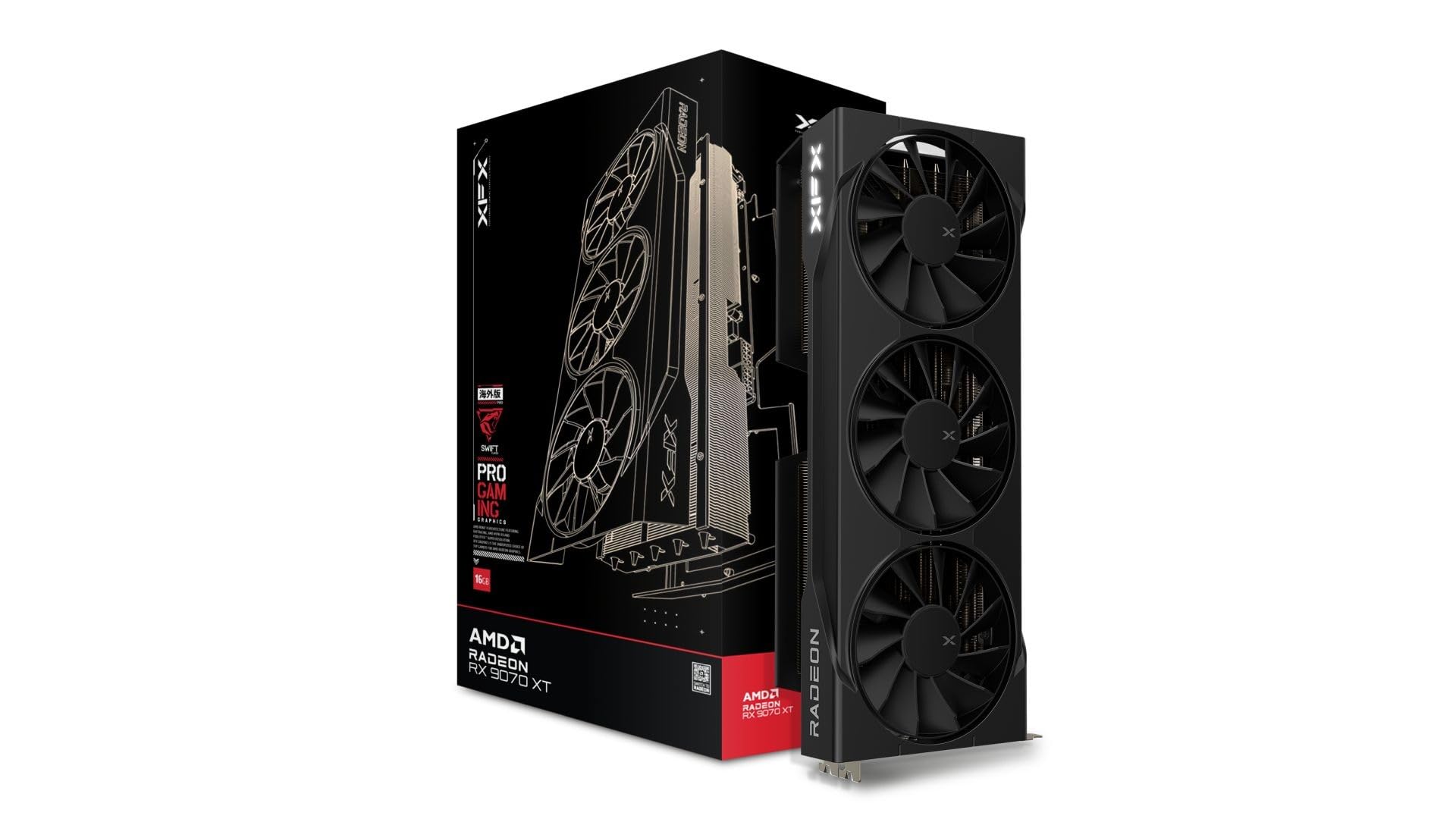
The XFX Swift brings a 2970 MHz boost clock to the entry-level price tier, undercutting most competition on cost.
For a card at the lower end of the price range, the Swift still delivers a boost clock of 2970 MHz, which matches the Steel Legend and beats the standard reference speed by a notable margin. The base clock runs at 1660 MHz, and the gaming frequency sits at 2400 MHz, meaning the card scales up to its peak when gaming kicks in. The SWFT triple-fan cooling solution is a tried-and-tested design from XFX that handles heat dissipation without excessive noise, though it is not as premium as the MERC cooler on the Mercury models.
At 1.5 Kilograms and 12.99 inches long, the Swift is lighter than the GIGABYTE Gaming OC (1.78 kg) and only slightly longer. The maximum display resolution is 3840×2160, which covers 4K gaming well. Reviewers point out the card fits comfortably in mid-tower cases and runs cooler than expected for a lower-tier model, though a few note the fan curve is a bit aggressive from the start and can be tuned in the AMD software to reduce noise.
Big OC for the price: A 2970 MHz boost clock in the most affordable 9070 XT in this roundup — you pay less but still get near-top clock speeds.
Cooler is basic: The SWFT cooler works fine but lacks the advanced features (0dB mode, dual BIOS) found on pricier models — expect it to run a bit louder under load.
Best for: budget-conscious builders who still want a strong factory overclock (2970 MHz) and do not need RGB or a 0dB silent mode.
Consider spending more if: noise at load is a concern — the Swift’s basic cooler is louder than premium triple-fan designs.
8. PowerColor Reaper AMD Radeon RX 9070 XT 16GB GDDR6
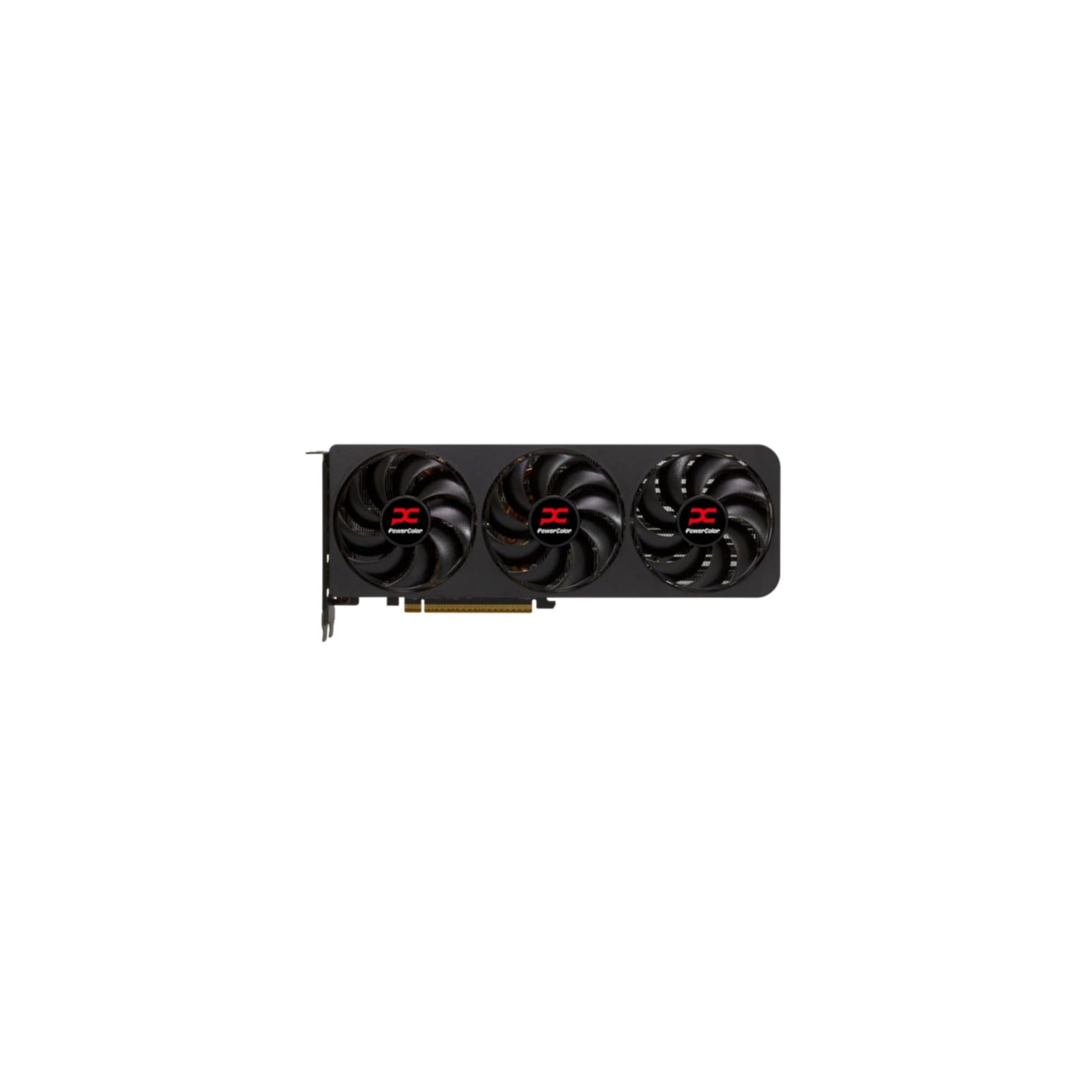
The PowerColor Reaper is the shortest 9070 XT at 289mm, fitting cases that reject longer premium cards.
At 289mm internal card length, this is among the most compact 9070 XT cards you can buy, which is a lifesaver if your case has limited depth or a drive cage blocking longer GPUs. The card requires a minimum 750W power supply and uses two 8-pin PCIe power connectors, which is standard for this GPU tier — no need for the 12V-2×6 adapter that larger cards demand. It includes one HDMI 2.1 and three DisplayPort 2.1 outputs, and supports a maximum resolution of 7680×4320, matching the GIGABYTE Gaming OC and Steel Legend for 8K output.
The GPU clock speed is listed at 2400 MHz, though this is likely the game clock rather than the boost clock. The card dimensions are 289 x 111 x 41 mm, which keeps it relatively slim at 41mm thickness — about 2 slots wide. PowerColor is a well-regarded AMD AIB partner, and the Reaper line typically focuses on delivering reference-tier performance in a smaller package without extra frills like RGB. Shoppers say it fits easily in smaller ATX cases where cards longer than 300mm would not, though a few mention the plain design lacks the visual flair of RGB-laden alternatives.
Small-case hero: 289mm length is the shortest in this roundup, making it the best choice for compact ATX or some mATX cases with space constraints.
No published boost clock: The 2400 MHz spec is likely the game clock — you do not get a guaranteed factory overclock as high as the Taichi or Mercury, but the smaller size is the trade-off.
Reach for this if: your case has strict length limits (under 300mm) or you want a card that does not require the huge 12V-2×6 power adapter.
Look elsewhere if: you want a high factory boost clock (2970-3100 MHz) or need RGB to match a show build — the Reaper is plain and standard-clocked.
Understanding the Specs
Boost Clock (MHz)
The boost clock is the highest speed the GPU reaches under load — during gaming, rendering, or other demanding tasks. A higher number (like 3100 MHz on the Taichi and Mercury) means more frames per second from the start. This is the single most useful spec for comparing factory-overclocked models because it tells you how fast the card runs without any manual tuning on your part.
Cooler Design and Slot Size
The cooler determines how hot and loud the card gets. Triple-fan designs with thick heatsinks keep temperatures lower, which means the fans spin slower and the card stays quieter. Slot size (2.5 vs 3 slots) tells you how much space the card occupies on your motherboard — a 3-slot card blocks most or all of the adjacent PCIe slot. If you have a second GPU or a capture card, a slimmer 2.5-slot card like the ASUS Prime makes a big difference.
FAQ
Do I really need an 850W power supply for a 9070 XT?
What is the difference between a 2.5-slot and a 3-slot card?
Can a 9070 XT drive two monitors at 4K?
Is RGB lighting worth paying extra for?
Which 9070 XT is the quietest?
Do I need PCIe 5.0 to use a 9070 XT?
How long will a 9070 XT last for gaming?
What does “game clock” mean versus “boost clock”?
Is there a big difference between 2400 MHz and 3100 MHz boost clocks in real gaming?
Can I mix a white 9070 XT with a black motherboard?
Final Thoughts: The Verdict
For the majority of shoppers, the 9070 xt models winner is the GIGABYTE Gaming OC because it delivers a near-top 3060 MHz boost clock in a case-compatible package (1.78 kg, 11.34 inches) at a price that undercuts the heavier, more expensive Taichi. If you want the absolute highest factory overclock with the best power delivery, grab the ASRock Taichi. And for a compact ATX or space-limited build where every inch of case clearance matters, the standout is the PowerColor Reaper at just 289mm long.
How We Picked
We do not accept paid placement. Every pick is matched to a real buyer and a real use-case; we do not hands-on test units.
Sources & Methodology
Specifications: manufacturer listings and product documentation. Review insights: verified customer reviews, as of July 2026. Pricing: not shown on this page (it changes often); check the current price via the retailer link.
As an Amazon Associate, Gadgets Feed earns from qualifying purchases. This does not affect which products we feature.