
There is a specific sound a 90s gaming PC makes when it posts — the whir of a mechanical hard drive spinning up, the single beep from the motherboard speaker, the 14-inch CRT monitor humming to life. That experience defined a generation of PC gaming, and recreating it today requires navigating a minefield of dodgy emulation boxes, unreliable refurbished hardware, and overpriced retro cases that look the part but lack the soul. Getting the right mix of authentic feel, period-correct performance, and modern reliability is harder than it ever was back when you were loading a game from a stack of floppy disks.
I’m Min — the co-founder and writer behind Gadgets Feed. For this guide, I spent dozens of hours analyzing spec sheets, customer reviews, and benchmarking data on the current crop of retro-focused towers, mini-PCs, and sleeper cases to find the machines that actually deliver the authentic DOS and early Windows 9x gaming experience without falling apart after a week of use. I have sifted through hundreds of user reports on real-world reliability, compatibility issues with era-specific peripherals, and the actual performance ceilings of these decade-old components in today’s context.
Whether you want to replay classics like Doom, Duke Nukem 3D, and StarCraft on original hardware or build a modern sleeper rig that hides cutting-edge internals inside a beige chassis, finding the perfect 90s gaming pc requires balancing genuine nostalgia with functional long-term ownership.
How To Choose The Best 90s Gaming PC
Buying a 90s gaming PC is not about raw performance — it is about authenticity, reliability, and matching the hardware to the specific era of games you want to play. A machine built to run Windows 95 titles will struggle with pure DOS games from the early 90s, and a modern emulation box cannot replicate the quirks of an ISA sound card or a VGA graphics adapter. Here are the three criteria that matter most when deciding which path to take.
Native DOS Hardware vs. Emulation
The single biggest fork in the road is whether you want to boot into actual MS-DOS 6.22 on period-correct silicon, or whether you are comfortable running a software emulator on a modern processor. Native hardware gives you perfect compatibility with old joystick ports, genuine AdLib and Sound Blaster audio characteristics, and the ability to use CRT monitors at native resolutions. Emulation boxes like the A500 Mini or the C64 Maxi offer convenience and HDMI output but cannot run Windows 98 games or support expansion cards like a Gravis Ultrasound. For the most authentic experience, look for an 80486 or early Pentium system with ISA slots and a working 3.5-inch floppy drive.
The Sleeper Case Option
A sleeper build uses a retro exterior — beige chassis, classic front bezel, beige drives — but packs a modern motherboard, power supply, and GPU inside. This is the only way to get both the vintage look and the reliability of a modern machine, with support for USB, fast SSDs, and HDMI output. The SilverStone FLP02W is currently the gold standard for this approach, offering a genuine Turbo button and 5.25-inch bays in a package that fits standard ATX components. Sleeper builds are ideal if you want to dual-boot Windows 10 for modern tasks while running a DOS emulator in a window for games, but they lack the authentic POST behavior and ISA device support of original hardware.
Refurbished Office PCs and GPU Upgrades
Most of the best-value vintage gaming rigs on the market today are refurbished enterprise desktops from Dell, HP, and Lenovo. These were never gaming machines in their day — they were office workhorses with integrated graphics — but they can be transformed into capable 90s gaming stations by adding a dedicated GPU like a GT 1030 or a GTX 1050 Ti. The key is to verify that the power supply has a spare 6-pin PCIe connector and that the motherboard has a standard 24-pin power header for swapping the PSU. Machines with a 4th-generation or 6th-generation Core i5 or i7 provide enough CPU headroom for running Windows 98-era games natively, and their LGA 1150/1151 sockets leave the door open for future upgrades to a more period-accurate processor if needed.
Quick Comparison
On smaller screens, swipe sideways to see the full table.
| Model | Category | Best For | Key Spec | Amazon |
|---|---|---|---|---|
| SilverStone FLP02W Chassis | Sleeper Case | Custom sleeper builds with modern internals | Turbo button, 360mm rad support | Amazon |
| Dell RGB Gaming Tower | Refurbished | Budget 90s gaming with native Windows 9x support | i7-6700 + GTX 1050 Ti | Amazon |
| HP RGB Desktop i5-6500 + GT 1030 | Refurbished | Plug-and-play entry-level Windows 98 gaming | GT 1030 2GB, 16GB RAM | Amazon |
| Dell Optiplex 9020 i7-4770 | Refurbished | Heavy multitasking and period-accurate projects | 32GB RAM, 1TB SSD | Amazon |
| Retro Pocket 386 Laptop | Native DOS | Portable pure-DOS gaming on original silicon | 386 SX 40MHz, VGA | Amazon |
| Atari VCS All-in Bundle | Hybrid Console/PC | Modern retro indie gaming and emulation | AMD Ryzen, 32GB storage | Amazon |
| The A500 Mini | Emulation Console | Pure Amiga 500 game emulation out of the box | Amiga 500/600/1200 emulation | Amazon |
| The C64 Maxi Console | Emulation Console | Full-size Commodore 64 replica with working keyboard | 720p HDMI, 64 built-in games | Amazon |
| HP ProDesk RGB i5-6500 | Refurbished | Strictly budget-conscious retro gaming starter | i5-6500, 256GB SSD | Amazon |
In‑Depth Reviews
1. SilverStone FLP02W Retro-Inspired Tower Chassis
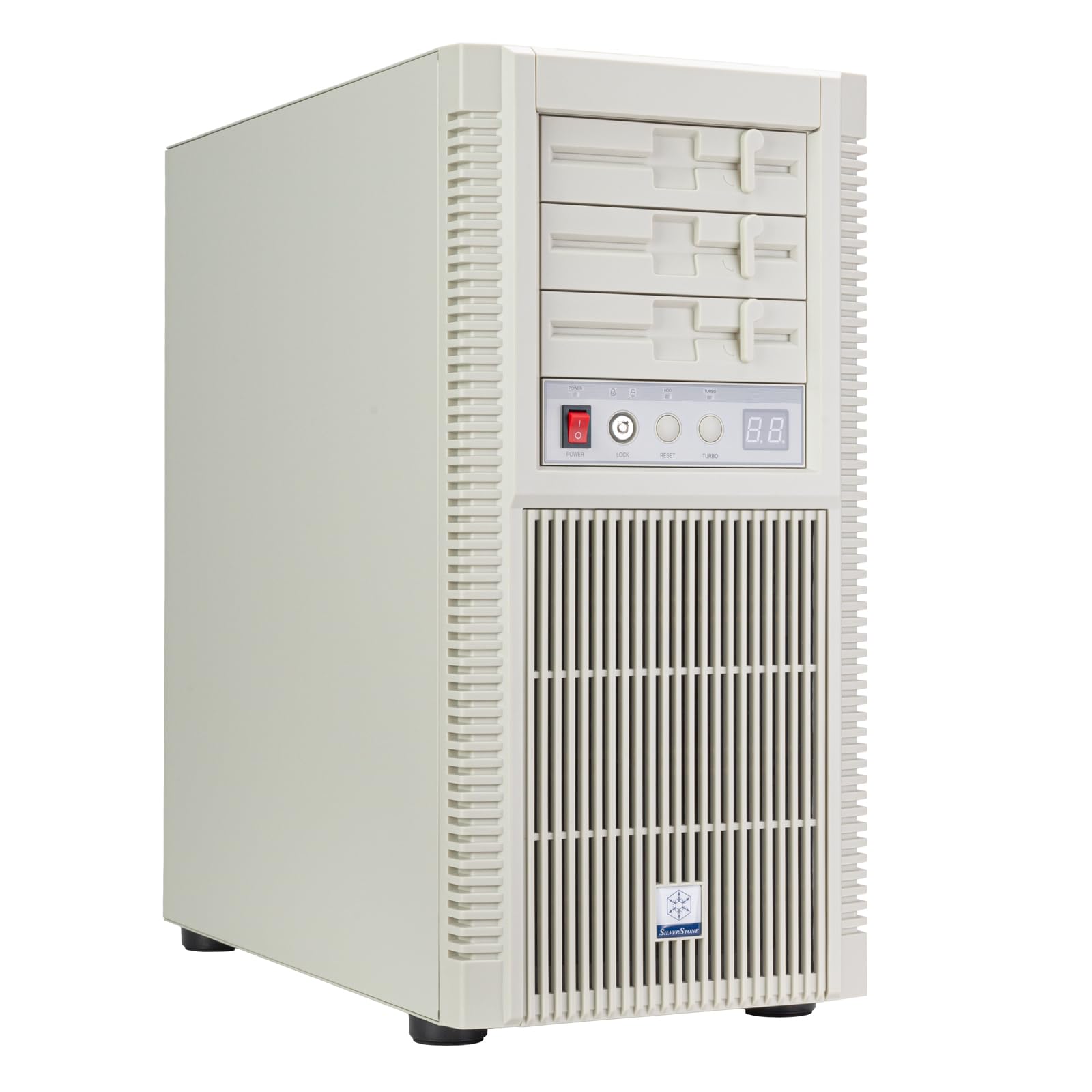
The SilverStone FLP02W is the single most important product on this list because it solves the fundamental problem of building a 90s sleeper PC: finding a beige case that accepts modern hardware without modification. This full-tower chassis is constructed almost entirely from metal, with a genuine retro front bezel that includes three 5.25-inch drive bays for floppy drives, CD-ROM burners, or hot-swap adapter cages. The standout feature is the physical Turbo button on the front panel, which triggers a full-speed cooling mode for all connected fans — a tactile callback to the clock-speed toggle buttons seen on 386 and 486 towers.
Internally, the FLP02W supports standard ATX motherboards, 360mm liquid cooling radiators, and graphics cards up to 386mm long, which means you can drop in a modern Ryzen or Core i5 chip with an RTX 4060 and have it look like a Packard Bell from 1994. The top I/O panel includes a USB Type-C port, two USB 3.0 ports, and a combo audio jack, so you are not sacrificing modern connectivity for the retro aesthetic. Build quality is uniformly excellent — the rounded edges are smooth, the panels fit without sharp gaps, and the all-metal construction keeps the weight manageable for a full tower at roughly 18.6 inches tall.
Customer feedback consistently praises the authenticity of the beige finish and the ease of cable management inside the spacious interior. The only material downside is the high cost relative to a standard modern case, but when you consider that the only alternative for a true beige ATX chassis involves cutting up a salvaged vintage case with a hacksaw, the FLP02W justifies its premium price through convenience and fit-and-finish. Pair it with a set of Noctua redux fans in gray for a visually cohesive sleeper that will fool anyone who remembers the Packard Bell and Compaq towers of the decade.
Why it’s great
- Only mass-produced beige ATX case with full modern support and no cutting required
- Three 5.25-inch bays for period-accurate optical drives or floppy emulators
- Functional Turbo button that toggles high-speed fan cooling on demand
Good to know
- Premium price compared to standard modern full towers
- Interior is slightly narrower than some wide-body ATX cases, requiring careful PSU selection
2. Dell RGB Gaming Tower PC i7-6700 + GTX 1050 Ti

This refurbished Dell OptiPlex tower, outfitted with an Intel Core i7-6700 (6th Gen, 3.4 GHz base) and a dedicated NVIDIA GeForce GTX 1050 Ti with 4GB of GDDR5 memory, represents the best value-to-performance ratio for anyone who wants to play late-90s and early-2000s games natively on Windows 98 SE or Windows XP hardware. The i7-6700 is a quad-core CPU with Hyper-Threading, clocking up to 4.0 GHz in Turbo Boost, which gives it enough headroom to run demanding titles like Half-Life 2, Need for Speed: Hot Pursuit 2, and Max Payne at their maximum settings without any emulation overhead or stuttering. The GTX 1050 Ti is widely supported by legacy drivers from 2018, which avoids the compatibility headaches of newer RTX cards with old AGP and PCI-E 1.0 slot architectures.
The configuration includes 16GB of DDR4 RAM and a 512GB solid-state drive, which is more than sufficient for a period-correct game library. The unit ships with a full RGB lighting kit covering the case, keyboard, mouse, and even a pair of desktop speakers, making it feel like a complete desk setup from the mid-2000s rather than a bare-bones replacement. Real-world performance benchmarks from users show 120+ FPS in Overwatch 2 and Valorant, 60+ FPS in The Witcher 3 on high settings, and completely smooth operation in era-specific titles like Unreal Tournament and Quake III Arena, which rely more on single-threaded performance than modern multi-core scaling.
Buyers should be aware that some units arrive with the graphics card loose inside the case due to shipping, so the first step after unboxing should be to reseat the GPU into the PCI-E slot before powering on. A small number of users reported an initial beep code indicating video card issues, which was resolved by entering the BIOS and switching the primary display adapter setting from PCI to PEG. Once these minor setup quirks are addressed, the unit runs reliably and quietly, with no reported overheating issues even during extended gaming sessions. This is the pick for anyone who wants a turnkey retro gaming machine without building from scratch.
Why it’s great
- GTX 1050 Ti offers broad legacy driver support for Windows 9x and XP native gaming
- 16GB RAM and 512GB SSD provide fast boot times and ample storage for period games
- Full RGB peripherals included — keyboard, mouse, and speakers — for a complete setup
Good to know
- GPU may arrive loose in the PCI-E slot and requires reseating
- Some units require a BIOS display-adapter change to fix initial beep codes
3. HP RGB Gaming Desktop i5-6500 + GT 1030

For buyers who want a 90s-era-capable gaming PC but need to keep the budget under tight control, the HP RGB Desktop with an Intel Core i5-6500 (3.2 GHz base, 3.6 GHz turbo) and a dedicated NVIDIA GeForce GT 1030 with 2GB of GDDR5 memory hits the sweet spot. The i5-6500 is a six-generation Skylake chip that runs Windows 10 natively and supports DirectX 12, but its 4-core/4-thread design also runs Windows 98 SE without issue when dual-booted. The GT 1030 is a 75W PCI-E card that draws all its power from the motherboard slot, eliminating the need to upgrade the power supply on the original HP chassis.
The system comes with 16GB of DDR4 RAM and a 512GB SSD, which is generous for the entry-level price point. Built-in connectivity includes Bluetooth 5.0 and 600Mbps Wi-Fi, making it easy to connect wireless controllers and transfer game files from modern machines. The RGB case lighting and included RGB keyboard and mouse give the machine a gamer aesthetic that fits right into a period-themed setup. Users report that the machine runs World of Warcraft Classic, Starcraft Remastered, and Diablo II: Resurrected smoothly at 1080p, with the GT 1030 handling the 2D sprite-based rendering and early 3D acceleration of late-90s titles without breaking a sweat.
The most common complaint across reviews is that the machine ships without an HDMI cable, so buyers need to supply one themselves — a surprising omission that can cause immediate frustration on setup day. A small but notable subset of users reported complete system failure within the first week, with the machine refusing to power on at all. This appears to be a capacitor or PSU failure rather than a motherboard issue, and it is worth purchasing the extended warranty offered by the refurbisher to mitigate the risk. Overall, if you get a functional unit, this HP delivers performance that far exceeds what a genuine Pentium II or Pentium III machine could offer at a fraction of the cost of a fully restored vintage build.
Why it’s great
- GT 1030 runs on motherboard power — no PSU upgrade required for the OEM chassis
- Built-in Bluetooth 5.0 and Wi-Fi enable wireless modern peripherals and file transfer
- 512GB SSD offers fast boot times and ample room for a full era-specific game library
Good to know
- No HDMI cable included — you must supply your own monitor cable
- Early unit failure rate is higher than average — purchase the extended warranty
4. Dell Optiplex 9020 Mini Tower i7-4770

The Dell Optiplex 9020 Mini Tower is not a traditional gaming PC, but it deserves a spot here because of its unique value proposition for the retro computing enthusiast who also needs a workhorse for modern productivity. Powered by an Intel Core i7-4770 (4th Gen, 3.4 GHz base, 3.9 GHz turbo) and a staggering 32GB of DDR3 RAM, this machine is built for heavy multitasking — loading multiple DOSBox instances, running Blender 3D for asset creation, or editing videos of your retro gaming sessions. The 1TB solid-state drive provides more storage than any of the other refurbished options on this list, allowing you to keep both a modern Windows 11 Pro installation and a complete software library from 1990 to 2005 on the same machine.
The integrated Intel HD Graphics 4600 is not capable of playing demanding 3D titles from the late 90s at acceptable frame rates; users report between 6 and 25 FPS in games like Quake II and Unreal. The real strength of this machine is its upgrade path. The LGA 1150 socket motherboard accepts a standard 24-pin ATX power supply, and the Mini Tower chassis has enough internal space for a single-slot GPU like an AMD RX 5500 or an NVIDIA GTX 1650. With a GPU upgrade and a PSU swap, the Optiplex 9020 transforms into a capable Windows 98/XP gaming machine that runs titles at 50–100 FPS at 1080p. The ten USB ports (four of which are USB 3.0) make it easy to connect vintage peripherals like joysticks and steering wheels without a hub.
The included Wi-Fi adapter is a low-quality USB dongle that tends to overheat and disconnect under load, so you will want to replace it with a PCI-E wireless card or use Ethernet for consistent connectivity. The machine also lacks built-in HDMI output — video is available through VGA and DisplayPort, requiring an adapter for modern monitors. Most importantly, the Haswell-based i7-4770 does not support Windows 11 officially, and the machine will trigger a hardware compatibility warning if you try to upgrade beyond the pre-installed Windows 10 Pro. Despite these quirks, buyers with two or more years of ownership report that the machine remains fast, stable, and highly serviceable for both retro projects and daily office work.
Why it’s great
- 32GB RAM and 1TB SSD offer unmatched multitasking and storage among refurbished options
- Standard ATX PSU header enables easy GPU upgrade to RX 5500 or GTX 1650 for 1080p gaming
- Ten USB ports (4x USB 3.0) eliminate the need for hubs with vintage peripherals
Good to know
- Included USB Wi-Fi adapter is unreliable — plan to replace with PCI-E or use Ethernet
- No built-in HDMI; requires DisplayPort-to-HDMI adapter for modern monitors
5. Retro Pocket 386 CPU XT PC Laptop

The Retro Pocket 386 is a remarkable oddity in the vintage computing world: a fully self-contained laptop running on actual 386 SX silicon (embedded in an Ali M6117 chipset), capable of booting MS-DOS 6.22 and Windows 3.1 natively without any software emulation. This is a true 16-bit machine with a VGA graphics adapter compatible with CL-GD542X and CHIPS F655xx chipsets, plus a sound card that supports AdLib and an optional Yamaha YMF262-M OPL3 FM synthesis chip for genuine era-accurate audio. The 5-inch LCD screen displays at 640×480 resolution in a 4:3 aspect ratio, and you can switch to 16:9 with an OSD menu via Fn+F4, though native DOS games look best in the original aspect ratio.
The unit includes a built-in PS/2-style physical keyboard with authentic IBM-style key caps, and an integrated mouse control system that maps keyboard directional keys to cursor movement with the Shift and Question Mark keys acting as left and right mouse buttons. Storage is handled by a 4GB CompactFlash card, which users can format and partition themselves — one buyer successfully installed DOS 6.22 and set up a dual-boot configuration with Windows 3.11 and OS/2 Warp 3. The transparent casing design is a modern addition that shows off the motherboard, but the overall form factor is small enough to fit in a jacket pocket, making it the only truly portable option for on-the-go DOS gaming at coffee shops or retro computing meetups.
Performance is strictly limited by the 386 SX architecture — this is not a DX, so the CPU lacks the math coprocessor found in full 386DX chips. Early DOS titles like Commander Keen, Duke Nukem, and Wolfenstein 3D run well, but games from the mid-90s that expect a 486 or Pentium chip will struggle or be entirely unplayable. Battery life is approximately 1.5 hours under gaming load and 3 hours for lighter tasks like typing in DOS. The BIOS resets when the battery drains completely, which disables the built-in mouse and enables the floppy controller — a fix requires pressing the Delete key on startup to re-enter the BIOS setup. Some units have arrived dead on arrival with no POST beeps, suggesting a quality control issue with the BIOS or CPU socket that is worth checking immediately upon delivery.
Why it’s great
- Actual 386 SX hardware with native MS-DOS boot — no emulation layer or latency
- Built-in OPL3 sound card delivers authentic AdLib and Sound Blaster audio
- Compact, portable form factor fits in a jacket pocket for on-the-go DOS gaming
Good to know
- 386 SX lacks a math coprocessor — mid-90s titles and 486-era games will not run well
- Some units arrive dead with no POST; test immediately and return if bricked
6. Atari VCS All-in Bundle (Walnut)

The Atari VCS is a hybrid device that blurs the line between a retro game console and a mini-PC, powered by an AMD Ryzen processor with Radeon Vega graphics. It outputs at 4K resolution through HDMI, making it one of the most visually capable retro-oriented devices on the market. The bundle includes a wireless controller and a wireless joystick that doubles as a spinner controller for games like Tempest, plus access to 100 free Atari Vault titles and thousands of Antstream Arcade games. The Walnut wood finish version has a premium retro-modern aesthetic that looks more like a piece of furniture than a game console, fitting naturally into a 90s-themed entertainment setup.
The real power of the Atari VCS lies in its PC Mode, which allows you to install Windows 11 or Linux (via microSD or USB) and run full PC game libraries from Steam, GOG, and other launchers. Users have successfully set up ChimeraOS for a console-like interface and Batocera for multi-system emulation, turning the VCS into a comprehensive retro gaming hub that covers everything from the Atari 2600 to the PlayStation 1. The built-in 32GB of storage is only sufficient for the operating system and a handful of modern indie games, so you will want to add an external SSD or at least a high-speed microSD card for any substantial library.
The Atari VCS is not powerful enough for AAA modern gaming — its Ryzen architecture is closer to a low-power laptop than a desktop gaming rig — but it handles indie PC games, emulated retro titles, and streaming services like Netflix and YouTube without issue. The two included controllers feel slightly flimsy in the hand, and many users prefer to use a wired Xbox controller for daily use to avoid input lag. The future of the platform is uncertain — Atari has not committed to a long-term firmware support roadmap — but the open nature of the device means that even if the official storefront goes dark, the VCS will remain functional as a Windows-based mini-PC for retro gaming and light desktop tasks.
Why it’s great
- 4K HDMI output with Radeon Vega graphics — best picture quality of any retro-oriented device
- PC Mode allows Windows or Linux install for full Steam and GOG library access
- Joystick spinner function provides authentic arcade control for classic Atari titles
Good to know
- 32GB onboard storage is very limited; an external drive or high-speed microSD is essential
- Included controllers feel flimsy — many users switch to a wired Xbox controller for daily use
7. The A500 Mini

The A500 Mini is a dedicated emulation console that recreates the Commodore Amiga 500, 600, and 1200 experience in a compact, plug-and-play package. It ships with 25 pre-installed classic Amiga games, including Alien Breed 3D, Another World, Speedball 2: Brutal Deluxe, Worms: The Director’s Cut, and Zool: Ninja Of The Nth Dimension, all accessible through a user-friendly carousel interface. The HDMI output supports 720p at 50 or 60 Hz with multiple scaling options and a CRT filter that adds scanlines to mimic the look of a 15kHz CRT monitor, which is essential for the authentic Amiga visual experience where every pixel was designed for a specific interlaced display mode.
What elevates the A500 Mini beyond a simple plug-and-play toy is its expandability. The unit runs on the same WHDLoad platform that powers most modern Amiga emulation setups, and you can add your own legally obtained Amiga games via a USB memory stick. It also supports USB keyboards and mice, and the included eight-button precision gamepad and authentic two-button mouse give you the full range of input options that Amiga games were designed for. The save and resume function lets you pause any game and come back later — a feature that the original Amiga hardware could never offer, and one that makes 30-year-old action games with no level passwords significantly more playable.
The main criticism of the A500 Mini is its price relative to a DIY Raspberry Pi solution running Amiberry. For the cost of the Mini, you could build a Pi 4 or Pi 5 setup with an aluminum case and a better power supply, and have access to a much larger game library. However, the Mini offers a completely polished, zero-configuration experience that a Pi setup cannot match — you plug in the HDMI cable, turn it on, and you are playing Pinball Dreams within 20 seconds. The included game selection leans heavily toward late-80s and early-90s titles, and the three-dimensional games (Alien Breed 3D) show the limitations of the Amiga architecture with low frame rates, but the 2D titles run flawlessly. If you remember the long loading times from floppy disks on a real Amiga 500, the instant loading here alone is worth the premium.
Why it’s great
- Completely plug-and-play — zero configuration required for authentic Amiga emulation
- Supports adding your own WHDLoad games via USB memory stick for an expanded library
- Save and resume feature eliminates the need for passwords or long loading sessions
Good to know
- More expensive than a DIY Raspberry Pi emulation setup with the same WHDLoad engine
- 3D games like Alien Breed 3D show the Amiga hardware limitations with lower frame rates
8. The C64 Maxi Micro Console

The C64 Maxi is not a mini console — it is a full-size replica of the Commodore 64, exactly matching the dimensions and keyboard layout of the original 1982 machine. This is the most physically authentic retro product on the list, because it is not just a visual shell: the keyboard is fully functional, with mechanical key switches that replicate the feel of the original Commodore 64 keyboard, right down to the key cap legends for PETSCII characters and BASIC commands. You can type LOAD”*”,8,1 and hit RETURN just like you did in the 80s, and the machine will load a game from the internal emulator. It connects to any modern TV via HDMI at 720p 50/60Hz.
Inside the Maxi is a software emulator running 64 pre-installed games, accessible through a carousel interface. Each game supports four save slots, allowing you to save your progress and return later — a massive quality-of-life improvement over the original hardware, where games could take 15 minutes to load from a Commodore 1541 disk drive only to lose all progress when you turned the machine off. The unit includes a single joystick and multiple USB ports for connecting additional gamepads, mice, keyboards, and USB storage drives for loading your own disk and tape images via the included file browser.
The keyboard has been a point of mixed feedback among enthusiasts. While it looks and acts like a C64 keyboard, the membrane design means the keys require a firmer press than the original, and some buyers report missed keystrokes when typing quickly. The included game selection is average — many of the 64 titles are lesser-known releases, and classics like Impossible Mission, Summer Games II, and Bard’s Tale are conspicuously absent. If you are buying this purely for the curated game library, you may be disappointed. However, if you want the physical experience of typing on a C64 keyboard while running VICE under the hood, the Maxi is the only product on the market that delivers that specific tactile nostalgia at this scale.
Why it’s great
- Full-size C64 replica with working keyboard and authentic PETSCII key cap legends
- Four save-game slots per title improve playability of classic 80s games
- USB ports allow loading of external disk and tape images for a near-unlimited library
Good to know
- Keyboard requires harder key presses than the original C64 — missed keystrokes are common
- Curated 64-game library has many filler titles and misses several undeniable classics
9. HP ProDesk RGB Desktop i5-6500

The HP ProDesk Desktop is the entry-level option for anyone who wants to dip their toes into 90s PC gaming without a significant financial commitment. The unit features an Intel Core i5-6500 (3.2 GHz base) with 8GB of DDR4 RAM and a 256GB SSD, running Windows 10 Pro. The i5-6500 is a Skylake chip from 2015, meaning it is fully compatible with Windows 98 and Windows 2000 drivers for native gaming if you choose to dual-boot, and its integrated Intel HD Graphics 530 can handle 2D sprite-based games from the early-to-mid 90s without issue. The front panel includes RGB lighting controlled by a remote, plus a set of USB and audio ports for connecting vintage peripherals.
The package includes a new gaming keyboard and mouse combo, a USB Wi-Fi adapter, and a power cord, so you can be up and running immediately with just a monitor. Users report that the machine runs World of Warcraft Classic smoothly on low settings, handles streaming video without stuttering, and serves as a capable daily driver for office tasks alongside its retro gaming duties. The 256GB SSD is on the small side — you will have room for Windows 10 and a curated collection of about 30–40 era-specific game installs before you need to start juggling files — but the SATA III port leaves room for a secondary drive upgrade down the line.
The biggest risk with this unit is reliability: a small but loud subset of customer reviews report units that arrived dead, or that shut down repeatedly under any gaming load before completely bricking. One review describes a unit that emitted a strange smell on first boot and then began cycling on and off every time a game was launched, suggesting a PSU or motherboard failure. The unit also does not include an HDMI cable — the video output requires a DisplayPort-to-HDMI adapter that is not in the box. If you are willing to gamble on a unit that passes the initial burn-in test, the ProDesk offers the lowest barrier to entry for retro gaming on original silicon, but you should budget for a replacement PSU and a dedicated GPU if you want to play anything beyond 2D DOS games.
Why it’s great
- Lowest entry price point for a full Windows-based retro gaming PC with a modern CPU
- Includes keyboard, mouse, and Wi-Fi adapter — only a monitor is needed
- i5-6500 supports native dual-boot with Windows 98/2000 for period-correct gaming
Good to know
- Higher-than-average failure rate — some units arrive dead or brick under load
- 256GB SSD fills quickly; plan for a secondary drive or external storage from day one
FAQ
What is the difference between a 386 DX and a 386 SX, and which do I need for 90s games?
Can I play Windows 98 games on a refurbished office PC from the mid-2010s?
Why do some retro gaming consoles output in 720p instead of 1080p or 4K?
Final Thoughts: The Verdict
For most users, the 90s gaming pc winner is the SilverStone FLP02W Chassis because it is the only mass-produced beige case that fully supports modern ATX components, giving you the visual authenticity of a 1994 tower with the reliability and performance of a 2025 build. If you want a turnkey solution that runs late-90s Windows games on real hardware without any assembly, grab the Dell RGB Gaming Tower with the GTX 1050 Ti. And for the purest DOS gaming experience on original silicon that you can take anywhere, nothing beats the Retro Pocket 386.