
Our readers keep the lights on and my morning glass full of iced black tea. As an Amazon Associate, I earn from qualifying purchases.
Specs are compiled from manufacturer listings and verified buyer reviews and can change over time — please confirm the key details on the product page before buying.
You have a 9800X3D that runs hot enough to cook dinner, and every cooler on the shelf claims it is the savior — but the real test is whether you see 40°C in a game or 85°C throttling back into last gen. The difference between a well-matched cooler and a mismatch is not a few degrees — it is a full tier of performance you either open up or lose. This guide walks through nine options that actually handle the 3D V-Cache heat density, from whisper-quiet air towers to 360mm liquid monsters, each rated on how it works with your specific case and budget.
I’m Min — the founder and writer behind Gadgets Feed. This guide is built by comparing the manufacturers’ published specifications and the patterns across verified customer reviews, so you get each pick’s real strengths and trade-offs instead of marketing spin.
The picks here all share one trait — they handle the heavy thermal load without sounding like a server rack. if you want air silence or liquid headroom, these are the coolers to pair with your chip: 9800x3d cooler options that turn heat into a non-issue.
Our Picks at a Glance

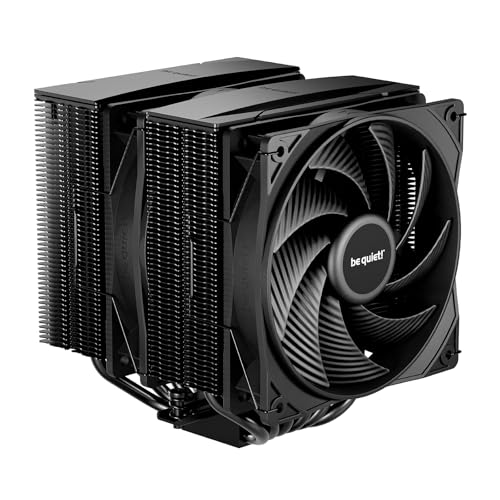

How To Choose The Best 9800X3D Cooler
The 9800X3D runs differently than standard Ryzen chips. The 3D V-Cache sits physically on top of the cores, trapping heat, so a cooler that works great on a standard 7700X might struggle to pull heat away from this chip’s dense hotspot. That changes what you look for.
Air vs Liquid: The Real Trade-Off
High-end dual-tower air coolers (like the Thermalright Phantom Spirit 120 EVO and the Noctua NH-D15 G2) move enough air to keep the 9800X3D in the 40-50°C range during gaming, matching most 240mm and entry 360mm AIOs. The advantage of air is zero pump noise, zero leak risk, and years of reliability without maintenance. The downside is size — both are over 6 inches tall and may block the top PCIe slot or tall RAM. Liquid cooling, especially 360mm radiators, adds headroom for overclocking and sustained all-core loads, and it shifts the heat away from the CPU socket entirely, keeping the motherboard VRMs cooler. But every pump makes some sound, and the thick 38mm radiator on the Arctic Liquid Freezer III Pro needs case depth.
Sound Matters More Than You Think
At 50-60°C load, most coolers are barely audible. The difference is in the fan curve and pump pitch at idle — some AIOs produce a low hum that sensitive ears pick up in a quiet room. Air coolers with good fans (Noctua, be quiet!) often sit at near-silent idle. If the PC lives on your desk or in a bedroom, decibel ratings in the 24-30 dBA range make a real difference over 35 dBA+ models.
Case Compatibility Is the Final Filter
A 360mm radiator needs three top or front fan mounts. A tower air cooler over 157mm tall may not fit a compact mid-tower. The best standalone cooler is no good if it does not physically fit your case. Measure the space above the CPU socket (height for air) and the radiator mount length before buying. Also check RAM clearance — some offset dual-tower designs, like the be quiet! Pure Rock Pro 3, let you adjust the front fan height to clear tall memory heat spreaders.
Quick Comparison
| Model | Best For | Noise Level | Max Fan Speed | Cooling Method | Amazon |
|---|---|---|---|---|---|
| Thermalright Phantom Spirit 120 EVO★ Best Overall | Gaming on a budget (air) | 27 dB | 2150 RPM | Air (dual tower) | Amazon |
| be quiet! Pure Rock Pro 3Quietest Air | Silent workstation | 34.8 dB | 2000 RPM | Air (dual tower) | Amazon |
| Cooler Master 360L Core AIOBudget Liquid | Entry-level 360mm liquid | 27.2 dB | 1800 RPM | Liquid (360mm) | Amazon |
| ARCTIC Liquid Freezer III Pro 360 | Best value high-end liquid | — | 3000 RPM | Liquid (360mm) | Amazon |
| CORSAIR Nautilus 360 RS | Quiet daisy-chain build | 36 dB | 2100 RPM | Liquid (360mm) | Amazon |
| MSI MAG Coreliquid A13 360 | Simple reliable 360mm AIO | — | — | Liquid (360mm) | Amazon |
| Noctua NH-D15 G2 | Premium quiet air | 24.8 dB | 1500 RPM | Air (dual tower) | Amazon |
| NZXT Kraken Elite 360 RGB 2024 | Custom LCD aesthetics | 33.88 dB | 2800 RPM | Liquid (360mm) | Amazon |
| ASUS ROG RYUJIN III 360 ARGB Extreme | Maximum performance & LCD screen | 16 dB | — | Liquid (360mm) | Amazon |
In‑Depth Reviews
1. Thermalright Phantom Spirit 120 EVO
Our pick — over 4.5★ from 450+ verified ratings; the strongest balance of quality and price.
The dual-tower air cooler that makes the 9800X3D run at game temps most AIOs cannot touch.
This is the cooler the review pages keep coming back to — and for good reason. Buyers report that the 9800X3D hits just 40°C during gaming and tops out at 50°C, compared to the 85-96°C they saw with their previous AIO. That drop is not subtle: it completely changes what the chip feels like in a mid-tower. The 7 heat pipes (the heat-transporting copper tubes connecting the CPU base to the cooling fins) and the dual 120mm fans spinning up to 2150 RPM move 69 CFM of air, which is enough to handle a 253W Intel 14700K load without throttling, according to builders. At 27 dB, the sound signature is whisper-level — owners say it is inaudible during normal use and only barely perceptible under full stress.
Installation is straightforward for an AMD AM5 board: you reuse the stock AM4 standoffs (the threaded posts that hold the cooler in place), and no backplate removal is needed. The anodized black finish and subtle aRGB lighting on one fan give it a clean look without shouting. The only real caution is size — at 157mm tall, it clears most mid-towers, but you should double-check case width. Unlike the be quiet! Pure Rock Pro 3 at 34.8 dB, this one is noticeably quieter (27 dB vs 34.8 dB), while the be quiet! spins slower at 2000 RPM compared to 2150 RPM here, so the Thermalright has more airflow headroom on paper.
The crowd favorite lands on a simple truth: this cooler matches the performance of expensive 360mm AIOs and the Noctua NH-D15 in real-world gaming, at a fraction of the cost. If you want the quietest 9800X3D air build without spending half the budget on cooling, this is the one.
The 40°C game-chiller: Owners see gaming temps drop to 40°C on the 9800X3D, a full 40-50°C lower than their previous AIO — from throttling to silence in one swap.
The size reality check: At 157mm tall, it demands a wide case; measure your CPU cooler clearance before buying, and check that the dual fans clear your RAM sticks (front fan sits over the memory slots).
Reach for it if: You game on a 9800X3D and want AIO-level thermals with zero pump noise and a nearly silent fan profile — all for a price that leaves room for faster RAM or a bigger SSD.
Look elsewhere if: You need low-profile RAM clearance (taller heat spreaders may interfere) or you plan to overclock in a case that gets hot inside, where a 360mm AIO’s heat-dumping advantage matters.
2. be quiet! Pure Rock Pro 3
A dual-tower air cooler that prioritizes silence without sacrificing the thermal headroom the 9800X3D needs.
Be quiet! lives up to the name. This cooler uses 6 high-performance copper heat pipes with direct-touch technology (the heat pipes sit flush against the CPU, transferring heat directly without an intermediate plate) and a 120mm Pure Wings 3 fan that tops out at 2000 RPM. At 34.8 dB, it is not the quietest on the list — the Thermalright Phantom Spirit 120 EVO runs at 27 dB — but owners consistently describe it as a whisper at idle and quiet enough that they forget the computer is on. The offset design is what makes this shine: the front fan height can be adjusted upward, clearing tall RAM sticks that would block a fixed-fan dual tower. That is a big deal for anyone who bought RGB memory and wants to see it.
On a 5900XT (16-core, 32-thread chip), owners mention it runs cool and never throttles, even in demanding workstation loads. The AM5 offset mounting option shifts the base plate slightly to center it over the CPU’s hotspot, which is particularly useful for the 9800X3D’s dense heat pocket. The included mounting kit is self-explanatory, though a few note that bracket orientation needs care. The size is substantial — 5.47 inches wide and 6.1 inches tall — so it will not fit a compact case; check both height and whether the heat pipes overhang your top PCIe slot. Unlike the thicker Arctic Liquid Freezer III Pro 360 (38mm radiator), this air cooler keeps the noise floor lower because there is no pump. The trade-off is that at 34.8 dB, the fan is audible under full load, where the Noctua NH-D15 G2 runs at 24.8 dB — a noticeable difference for noise-sensitive users.
The build quality is what owners praise most, with the 11 mentions of “build quality” being the second-highest positive aspect. This is the cooler to get if you want a reliable, silent air setup and need the RAM clearance flexibility that the offset design provides.
The adjustable RAM saver: The front fan can be raised to clear tall memory heat spreaders, a rare feature among dual-tower air coolers.
The clear case warning: At 5.47 x 4.88 x 6.1 inches, it is large — measure your case width to ensure the side panel closes, and check that the heat pipe bend does not press against the GPU backplate.
Ideal if: You run a silent build and want a cooler that handles heavy multi-core loads without spinning up audibly — the offset mounting and adjustable fan give it an edge over most dual towers.
Skip it when: You need the absolute lowest decibel level (the Noctua NH-D15 G2 is quieter at 24.8 dB) or you have a small-form-factor case where the 6.1″ height is a hard limit.
3. Cooler Master 360L Core AIO
A 360mm liquid cooler that brings the radiator headroom at a price that undercuts most dual-tower air options.
This is the coolest entry point into 360mm AIO liquid cooling. The 360L Core uses a Gen S dual-chamber pump (a pump design with separate water and motor chambers, reducing vibration and extending life) and three 120mm ARGB PWM fans spinning at 1800 RPM, moving 71.93 CFM of air through a standard 360mm radiator. At 27.2 dB, it runs quieter than the be quiet! Pure Rock Pro 3 by a healthy margin (27.2 vs 34.8 dB) and the CORSAIR Nautilus 360 RS (36 dB). The included CryoFuze thermal paste has a 14W/mK conductivity (how well it transfers heat from the CPU to the cooler base), which is a meaningful step up from stock pastes — owners note a noticeable temp drop after applying it.
The radiator measures 15.5 inches long and 4.7 inches wide, which is a standard fit for most mid-tower top or front mounts, but some owners flag that the end reservoirs add a bit of length — check that your case has enough depth. On a Ryzen 9, customers note CPU temps stay cool even at max settings with a 5070ti GPU dumping heat into the case, and the 8-screw installation is straightforward. The ARGB lighting syncs with motherboard software, which gives a clean, unified look without needing a separate controller. The recurring caveat is that the tubes feel a little short for extra-large cases — measure the distance from CPU socket to the radiator mount before buying.
What wins people over here is the combination of quiet 360mm cooling and a low entry price. For the same cost as a premium dual-tower air cooler, you get the heat-dumping advantage of a full-size radiator, which keeps the 9800X3D several degrees cooler than any air solution can in a warm case.
The 360mm entry ticket: You get a full-size radiator and three ARGB fans for less than most 240mm AIOs, with quiet 27.2 dB operation.
The fitment heads-up: The radiator is a bit longer than a standard 360mm due to integrated reservoirs; measure your case’s radiator mount length to avoid a night-before-return situation.
Best for: A first-time AIO buyer moving from air cooling who wants the headroom of a 360mm radiator without spending more on the cooler than the case.
Consider the alternative if: Your case has limited front-to-back depth for the radiator, or you want a pump with a higher flow rate — the Arctic Liquid Freezer III Pro 360 moves more water (3000 RPM pump) and has a thicker 38mm radiator for heavy overclocking.
4. ARCTIC Liquid Freezer III Pro 360

The thickest radiator in the lineup delivers 9800X3D gaming temps of 60-65°C while being quieter than the competition at idle.
Arctic stuffed a 38mm thick radiator into this AIO (most 360mm radiators are 27mm thin), which gives it more surface area to shed heat — and it shows. Owners running a 9800X3D report max temps of 82°C, down from 95°C on their previous 240mm AIO, with idle sitting around 40°C and gaming workloads in the 60-65°C range. The three P12 Pro fans push 77 CFM of air, and the pump spins up to 3000 RPM, moving water aggressively through the loop. The included VRM fan (a small fan in the pump housing that blows on the motherboard voltage regulators) is a unique addition — it keeps the power delivery components around the CPU socket cooler, which helps maintain stable boost clocks during long gaming sessions.
The offset mounting is native for both Intel and AMD, shifting the cold plate center toward the hotspot where the 9800X3D’s 3D V-Cache sits. That is a design detail most AIOs do not address. The integrated cable management routes all three fan cables through the tube sleeve, so only a single visible cable heads to the motherboard — a clean look for anyone who spent time on cable routing. The caveat most owners mention is the included MX-6 thermal paste, which sometimes arrives dried out and solid like putty; replacing it with fresh paste dropped one owner’s idle from 40-50°C down to 29°C and gaming temps from the upper 80s to 60°C. Buy a separate tube of quality paste for this one. The 88 mentions of noise level are mixed — the fans move serious air under heavy load, but at idle the system is quiet.
At this price range, the Arctic offers more pure cooling metal than anything else — the thicker radiator and higher airflow push it past the Cooler Master 360L Core and CORSAIR Nautilus 360 RS in raw thermal performance, making it the pick for anyone who runs all-core workloads or overclocks.
The thermal headroom king: The 38mm radiator and offset cold plate design pull the 9800X3D down to 60-65°C gaming temps, beating most standard-thickness 360mm AIOs by 5-8°C.
The paste prep note: The pre-applied MX-6 paste can arrive dry; swapping it with fresh thermal paste immediately fixes idle temps by over 10°C — factor in a tube of your preferred brand.
Choose this if: You run a 9800X3D in a large case and want the best raw thermal performance per dollar — the thick radiator and VRM fan make it ideal for sustained all-core loads and overclocking.
Pass on it if: Your case has a tight radiator mount (the 38mm thickness plus fans may not fit with a tall GPU in the bottom slot) or you dislike the extra mounting complexity — the two-screw bracket is less stable than the standard four-screw design.
5. CORSAIR Nautilus 360 RS
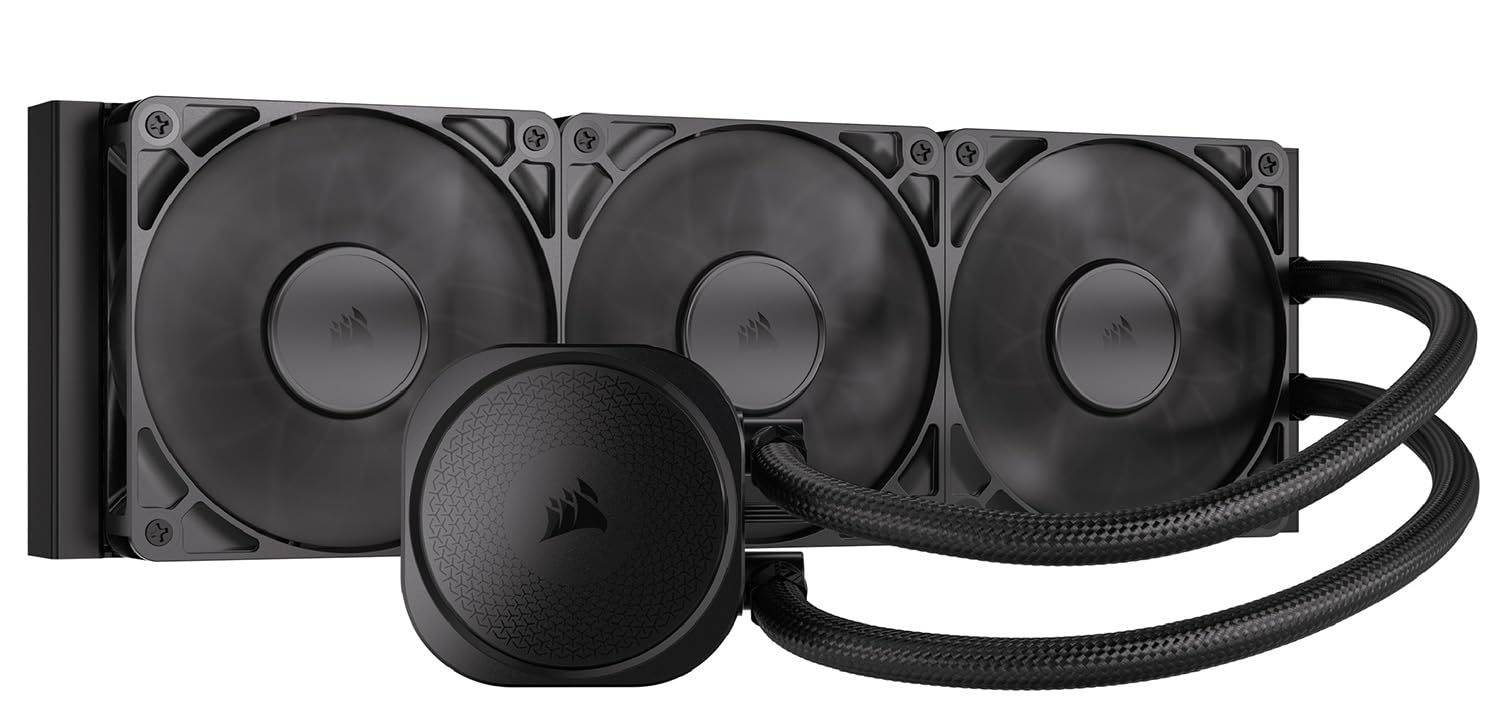
A 360mm AIO that cuts wiring clutter with daisy-chained fans and a near-silent 20 dBA pump.
Corsair engineered this cooler around a low-noise philosophy. The pump runs at 20 dBA — practically inaudible in a closed case — and the three RS120 fans use Magnetic Dome bearings (a bearing design that uses a magnetic ring to reduce friction and extend fan life) that spin up to 2100 RPM. The convex cold plate (a cold plate that is slightly domed outward, so it presses evenly into the CPU’s center where the heat is densest) comes with pre-applied thermal paste in an tune pattern, speeding up installation. Reviewers point out that replacing the pre-applied paste with quality aftermarket thermal paste dropped gaming temps from 75°C down to 65°C on chips like the i9-13900K, so there is thermal headroom to open up by swapping paste.
The daisy-chain design is the standout feature here: each fan connects to the next with short cables, and the whole array plugs into a single 4-pin PWM header on the motherboard. That means four fewer cables to manage compared to a standard three-fan setup. The radiator is 15.59 inches long and 4.72 inches wide, which is a standard 360mm fit. Noise level is 36 dB, which is louder than the Cooler Master 360L Core (27.2 dB) and the ARCTIC Liquid Freezer III Pro — but owners describe it as near-silent under light loads and acceptable under gaming loads. The 42 mentions of noise level carry a mixed verdict, with some owners reporting a low grinding noise from the pump at low RPMs, which is note if you plan to run a quiet fan curve. Compared to the asus ROG RYUJIN III 360 ARGB Extreme (16 dB), this is significantly louder, but the price difference reflects a completely different tier.
What gives this cooler its following is the Corsair ecosystem fit — if you already have Corsair fans, iCUE, or other RGB gear, the Nautilus slots in without software conflicts. The clean look and reduced cabling make it a strong pick for builders who value wire management.
The cable-cutter: Daisy-chained fans reduce the wiring to a single motherboard header — cleaner build, less back-panel clutter.
The pump pitch check: At 36 dB, the fans are noticeable under load, and some owners hear a low pump whine at low RPM — test your unit early to decide if the sound signature works for your room.
Ideal for: A builder who values a clean, low-cable liquid cooler and already owns Corsair peripherals or fans — the ecosystem integration saves setup time.
Skip if: You are sensitive to pump noise below 30 dB (the Arctic LF III Pro is quieter under load, and the Cooler Master 360L Core is quieter overall at 27.2 dB) or you need the highest thermal headroom for overclocking a 9800X3D.
6. MSI MAG Coreliquid A13 360

A 360mm AIO that keeps the build simple with pre-installed fans and a ceramic-bearing pump known for durability.
MSI designed this cooler for the “install and forget” crowd. The split-flow radiator uses an integrated three-phase pump with a ceramic bearing (a pump bearing made of ceramic material that resists wear and runs quieter than metal bearings) that spins at up to 3800 RPM. That is faster than most AIO pumps, translating to higher water flow through the 390mm reinforced tubes. Owners replacing older air coolers on AMD chips report the Coreliquid A13 stopped thermal throttling in games — a 5800X3D that was pushing 90°C under load dropped to 75°C max in stress tests. The fans are pre-installed and daisy-chained, so the setup time is about 15 minutes. The included thermal paste is decent, but a few owners note that the adhesive residue on the copper base required a 30-minute cleanup before installation — check the base when you open the box.
The noise level is a strong point, with 18 mentions of positive noise performance. The pump uses a ceramic bearing which produces less resonance than standard steel bearings, and the fans are quiet enough at idle that owners describe them as barely audible. The MSI logo on the pump can be misaligned with AMD AM4/5 brackets, according to some owners — a cosmetic gripe, not a functional one. At 2 pounds, it is lighter than the ARCTIC Liquid Freezer III Pro (2020 grams), making it easier to handle during installation. The biggest difference versus the Cooler Master 360L Core is the faster pump speed (3800 vs 1800 RPM), which gives the MSI a slight edge in water flow rate, though the Cooler Master is quieter at 27.2 dB vs the MSI’s unspecified but owner-reported “quiet” level.
This is the pick for someone who wants the headroom of a 360mm AIO but does not want to spend time wiring fans or orienting brackets. It works right from the start with both Intel LGA 1851/1700 and AMD AM5/AM4.
The plug-and-play cooler: Pre-installed fans, daisy-chained wiring, and included paste mean you can install this in under 20 minutes without watching a video — the 17 positive installation mentions confirm it.
The logo alignment note: The MSI logo on the pump head may not line up perfectly horizontal on AMD AM4/5 boards — cosmetic only, does not affect cooling.
Great for: A builder who wants 360mm liquid cooling with minimal setup time and a pump designed for long-term durability — the ceramic bearing should outlast most steel-bearing pumps.
Consider another if: You want the absolute lowest noise floor (the Cooler Master 360L Core at 27.2 dB is quieter, and the ARCTIC LF III Pro has a thicker radiator for lower fan speeds) or you need the heavily offset mounting of the Arctic for hotspot targeting.
7. Noctua NH-D15 G2

The legendary dual-tower air cooler gets a second generation with 20% more surface area and fans so quiet you will check if they are spinning.
The NH-D15 G2 is the reference standard for air cooling. It packs 8 heat pipes (up from 6 in the previous generation), 20% more fin surface area, and two NF-A14x25r G2 140mm fans that are speed-offset (one fan runs at a slightly different speed than the other to cancel out harmonic noise). At 24.8 dB, it is one of the quietest coolers in existence under normal operation — quieter than the be quiet! Pure Rock Pro 3 (34.8 dB) by a full 10 decibels, which is a huge difference in perceived loudness. Shoppers say it handles a 250W Intel Core Ultra 9 285K at 80-81°C under full load, and the fans never ramp up audibly during gaming. The included SecuFirm2+ mounting system comes with a Torx screwdriver and NT-H2 thermal paste — you do not need to buy anything extra.
The trade-off is size. At 5.98 x 5.91 x 6.61 inches, it is the tallest and widest cooler on this list, and it will not fit anything smaller than a full-size mid-tower. RAM clearance is a real issue: with both fans installed, you get only 32mm of clearance above the motherboard, which rules out most tall RGB memory sticks. You can run the front fan higher (single-fan mode gives 59mm of clearance), but that costs some cooling performance. The offset design clears the top PCIe slot on most current boards, so the GPU installs without obstruction. The G2 uses the standard AM5 offset mount to center the cold plate over the chip hotspot, which is ideal for the 9800X3D.
The value-for-money aspect is mixed, with 15 mentions — some owners say it is worth every penny, others note that cheaper AIOs offer similar thermals. The cold truth is that this cooler trades on long-term reliability (no pump to fail, 6-year warranty) and absolute silence. For a 9800X3D build where noise matters more than anything else, this is the cooler that all others are compared to.
The silence benchmark: At 24.8 dB with the two NF-A14x25r G2 fans, it is quieter than the be quiet! Pure Rock Pro 3 (34.8 dB) by a noticeable margin, making it ideal for a bedroom or office PC.
The case size ultimatum: At 6.61 inches tall, it demands a full-size case — check that your side panel closes and that your RAM heat spreaders are under 32mm if running both fans.
Choose this if: You want air cooling that rivals 280mm AIO performance with zero pump noise and a six-year warranty — and your case is large enough to fit the 168mm height.
Not for you if: You have a compact mid-tower or RAM with large heat spreaders — the 32mm dual-fan limit kills compatibility with most Vengeance and Trident Z kits, and you would need to run single-fan mode.
8. NZXT Kraken Elite 360 RGB 2024

A 360mm AIO with a bright 2.72-inch LCD display and a turbine pump that pushes more water per minute than standard designs.
The Kraken Elite sits at the intersection of cooling performance and visual display. The NZXT Turbine pump (a custom pump design with a high-flow impeller that moves more coolant per revolution) delivers a 10% performance boost over the previous generation with less noise, according to the brand. The three F360 RGB Core fans spin at 2800 RPM, forcing air through a dense 360mm radiator. On the pump head, a 2.72-inch IPS LCD panel runs at 640 x 640 resolution, 60 Hz refresh rate, and 690 cd/m² brightness — crisp enough for detailed GIFs or live system monitoring. Owners running a Ryzen 9 9950X3D report idle temps around 44-45°C, with the system staying cool under sustained loads. The adjustable RGB LED ring around the display can sync with on-screen content for a cohesive look.
Installation uses tool-free mounting brackets for AM5 and LGA 1851/1700. The pre-applied thermal paste and single breakout cable simplify the wiring. The NZXT CAM software handles fan curves, pump speed, and LCD content, and buyers report it is stable and responsive. Noise level is 33.88 dB, which is audible under heavy load but described as moderate by most users. The recurring complaint is reliability: one owner reported the 6th NZXT AIO failing within 4 months, with previous units also failing within a year via RMA — though this is a single anecdote among hundreds of positive reviews. The 22 mentions of noise level are split between “quiet enough” and “noticeable pump whine at 100% RPM,” which is worth testing at your target fan curve.
The big difference between this and the ASUS ROG RYUJIN III 360 ARGB Extreme is the screen size (2.72″ vs 3.5″) and the pump design. The ASUS uses an Asetek Gen8 V2 pump with a 3-phase motor, while the NZXT uses its own Turbine pump design. Both are excellent, but the ASUS runs much quieter at 16 dB vs 33.88 dB. The Kraken wins on display resolution (640×640 vs 640×480) and the ability to integrate with Spotify and YouTube for reactive visuals.
The screen that sells itself: The 2.72″ IPS LCD at 640×640 resolution with 60 Hz refresh is bright and sharp enough for animated GIFs, and the 690 cd/m² backlight makes it visible even in a glass-side case on a sunny desk.
The pump durability concern: The 22 mixed noise mentions include owner reports of pump whine at high RPM — and the anecdotal failure rate (one owner’s 6th NZXT AIO failed within 4 months) is note for a long-term investment.
Reach for it when: You want a cooler that doubles as a PC status screen — the display quality and NZXT CAM integration make it a showpiece for a desk-facing build.
Look at the ASUS ROG RYUJIN III instead if: You need the lowest noise floor (16 dB vs 33.88 dB) or a larger 3.5-inch LCD screen with AIDA64 integration — the RYUJIN is the quieter, bigger-display alternative.
9. ASUS ROG RYUJIN III 360 ARGB Extreme

The most advanced AIO on the market combines an Asetek Gen8 V2 pump with a 3.5-inch LCD screen and noise levels so low they defy the category.
At 16 dB, this AIO is quieter than the Noctua NH-D15 G2 air cooler (24.8 dB). That is almost unbelievable for a liquid cooler with three fans and a pump — but the Asetek Emma Gen8 V2 pump with a 3-phase motor achieves it by reducing impedance and smoothing water flow. The three magnetic ARGB fans snap together for tool-less daisy-chain installation, and the 3.5-inch LCD screen runs at 640×480 resolution for animated GIFs or live monitoring of clock speed, voltage, temperature, and coolant flow. Owners mention the 9950X3D idles at 42°C and stays under 70°C during gaming, with the embedded VRM fan (a small fan inside the pump housing) keeping motherboard power stages cool. The pump housing itself includes an embedded fan that cools motherboard VRMs — a feature only the ARCTIC Liquid Freezer III Pro shares on this list, though the ASUS version is likely more efficient at directing airflow.
Installation includes pre-applied thermal paste, and the magnetic fans snap together with a satisfying click, reducing wiring to a single cable for the whole radiator array. The Armoury Crate software handles fan curves, pump speed, and LCD content, though some owners note it uses 12% or more CPU time on adaptive color mode — you may want to set a static GIF instead of reactive lighting. The AIDA64 integration offers special ROG themes that display real-time system data in a polished interface. The build quality is exceptional, with a copper cold plate and glass-topped pump housing. The 45 positive mentions of cooling performance are the top aspect, followed by 14 mentions of the screen quality.
This is the no-compromise cooler. The price is well above everything else on this list, but you get the quietest AIO operation, the largest LCD screen, the magnetic fan installation, and the VRM cooling fan. For a 9800X3D build where budget is secondary to performance and presentation, this is the undisputed top choice.
The silence record: At 16 dB, this is quieter than the Noctua NH-D15 G2 air cooler (24.8 dB) — nearly inaudible in any room, even under load.
The software tax: Armoury Crate can consume 12%+ CPU time on adaptive color mode — set a static GIF or a fixed logo on the LCD to free up CPU cycles for games.
Ideal for: The enthusiast who wants the biggest LCD (3.5 inches), the quietest pump noise floor (16 dB), and the best thermal performance AIO money can buy, with a 6-year warranty for confidence.
Pass if: You do not care about an LCD display (the Arctic Liquid Freezer III Pro offers nearly identical cooling for significantly less) or you prefer to avoid Armoury Crate bloatware in your system.
Understanding the Specs
Noise Level (dB)
The decibel rating tells you how loud the cooler will sound in a quiet room. Every 3 dB jump is a doubling of perceived loudness. A cooler at 24.8 dB (Noctua NH-D15 G2) sounds half as loud as one at 27.8 dB, and the difference between 16 dB (ASUS ROG RYUJIN III Extreme) and 34.8 dB (be quiet! Pure Rock Pro 3) is the difference between a whisper and a running bathroom fan. For a PC on your desk, aim for 30 dB or lower at idle. The pump in AIOs can produce a low hum that static decibel readings do not fully capture — listen to owner reviews for real-world notes on pitch.
Fan Speed (RPM) vs Airflow (CFM)
RPM (revolutions per minute) tells you how fast the fan spins, but CFM (cubic feet per minute) tells you how much air it actually moves. A 120mm fan spinning at 2150 RPM moving 69 CFM (like the Thermalright Phantom Spirit 120 EVO) is more efficient than a fan spinning at 2800 RPM because it moves similar air at lower RPM, producing less noise. For a 9800X3D, you want a cooler with at least 65 CFM of airflow, because the 3D V-Cache traps heat and needs a steady stream of air to pull that heat off the fins. Higher RPM fans also tend to produce a higher-pitched whine, so CFM-per-RPM ratio matters more than raw RPM.
Radiator ThThickness (mm)
A standard 360mm radiator is about 27mm thick. The Arctic Liquid Freezer III Pro uses a 38mm radiator, which is roughly 40% thicker — more metal means more surface area to shed heat. That extra thickness gives it about a 5-8°C advantage over standard-thickness AIOs under sustained load, but it also means you need a case with enough clearance between the radiator mount and the GPU or motherboard tray. Most mid-tower cases fit a standard 27mm radiator with 25mm fans (total ~52mm), but the 38mm Arctic plus 25mm fans (total ~63mm) can conflict with tall GPU backplates or top-mounted RAM if the radiator sits at the top of the case.
Offset Mounting
Modern high-end CPU coolers offer offset mounting — a bracket design that shifts the cold plate slightly toward the hot spot of the CPU die. For AMD AM5 chips like the 9800X3D, the hot spot is in the lower-left quadrant where the 3D V-Cache sits on top of the cores. Offset mounting can drop load temperatures by 2-5°C without changing the fan speed. Both the Noctua NH-D15 G2 and the Arctic Liquid Freezer III Pro support native offset mounting. Check the product description for “offset” or “shifted cold plate” — if a cooler does not mention it, it likely uses a standard centered mount that may miss the hot spot by a few millimeters.
FAQ
Will a dual-tower air cooler work for the 9800X3D?
How do I know if a 360mm AIO fits my case?
Do I need offset mounting for the 9800X3D?
Is the 9800X3D harder to cool than a standard Ryzen chip?
What is the quietest cooler for the 9800X3D?
Will a 240mm AIO be enough for the 9800X3D?
How does the Thermalright Phantom Spirit 120 EVO compare to the Noctua NH-D15 G2?
Should I replace the pre-applied thermal paste?
What is the best AIO for overclocking the 9800X3D?
How do I clean or maintain an AIO cooler?
Final Thoughts: The Verdict
For most users looking for a 9800x3d cooler, the winner is the Thermalright Phantom Spirit 120 EVO because it delivers 40°C gaming temps and 27 dB silence at a price that leaves room for faster RAM or a bigger SSD — the clear value champion. If you want the absolute quietest air cooling with a six-year warranty, the Noctua NH-D15 G2 is the premium choice at 24.8 dB. And for liquid cooling enthusiasts who require the best thermal headroom and an LCD screen, the ASUS ROG RYUJIN III 360 ARGB Extreme is the no-compromise option that runs at 16 dB — quieter than any air cooler on the market.
How We Picked
We do not accept paid placement. Every pick is matched to a real buyer and a real use-case; we do not hands-on test units.
Sources & Methodology
Specifications: manufacturer listings and product documentation. Review insights: verified customer reviews, as of July 2026. Pricing: not shown on this page (it changes often); check the current price via the retailer link.
As an Amazon Associate, Gadgets Feed earns from qualifying purchases. This does not affect which products we feature.