
Our readers keep the lights on and my morning glass full of iced black tea. As an Amazon Associate, I earn from qualifying purchases.
Specs are compiled from manufacturer listings and verified buyer reviews and can change over time — please confirm the key details on the product page before buying.
The moment you hear a sizzle or smell that acrid electrical burn from a wall wart, the whole game changes — you need a replacement ac/dc charger that won’t repeat the failure of the last one. The real battle isn’t finding a brick that fits; it’s finding one that delivers its rated power without melting, shutting down, or slowly cooking your device over time. This guide cuts through the spec-sheet noise to focus on the adapters that balance raw output, protection circuits, and real-world reliability for LED strips, routers, laptops, and everything in between.
I’m Min — the founder and writer behind Gadgets Feed. This guide is built by comparing the manufacturers’ published specifications and the patterns across verified customer reviews, so you get each pick’s real strengths and trade-offs instead of marketing spin.
The trade-offs are clear once you know what to look for, and this breakdown of the best AC/DC Charger options helps you match the right voltage, current, and tip set to your exact device.
Our Picks at a Glance


How To Choose The Best AC/DC Charger
Before you buy any replacement power brick, lock down three numbers from your original adapter: the output voltage (like 12V or 19V), the maximum current (like 2.5A or 3A), and the physical size of the DC barrel plug that goes into your device. Get these right and the adapter is just a formality; get the voltage wrong and you risk damaging the gadget entirely.
Fixed Voltage vs. Adjustable Universal
A fixed-voltage adapter, like a dedicated 19V laptop charger, does one job and does it consistently — ideal for a device you use daily where you never want to touch a knob. An adjustable universal, on the other hand, spans a range like 3V to 24V with a dial or buttons, letting one brick power many different gadgets around the house. The catch with universals is that setting the exact voltage can be finicky, and bumping the dial is a constant worry.
Current And Wattage Headroom
Your device only draws as much current as it needs, so a 3A adapter can safely power a device that only pulls 1A. The real danger is the reverse — plugging a device that demands more than the adapter’s rated current. Buy an adapter rated at or above the original’s current output. For wattage, multiply voltage times current; a 24V 3A unit delivers 72W total, so give yourself some headroom rather than running the brick at 100% load.
Safety And Protection Circuits
Don’t just look at output numbers; look for built-in safeguards. You want protection against over-voltage, over-current, short-circuits, and overheating. These protections can shut the adapter down safely instead of letting it burn out or, in the worst cases, become a fire hazard. Certifications like FCC, CE, and UL on the packaging are marks that the adapter has been through compliance testing, which matters more than you’d think for something plugged into mains power.
Quick Comparison
| Model | Best For | Output Power | Max Current | Voltage Range | Amazon |
|---|---|---|---|---|---|
| ALITOVE 24V 3A★ Best Overall | Fixed LED strip & camera power | 72W | 3A | 24V Fixed | Amazon |
| Wefomey 72W LCD AdjustableTop Performer | Hobbyist benches & split power | 72W | 3A | 3V ~ 24V | Amazon |
| Minidodoca 72W Adjustable | Multi-device home electronics | 72W | 3A | 3V ~ 24V | Amazon |
| ALITOVE 30W Universal | Small gadgets & USB power | 30W | 2.5A | 3V ~ 12V | Amazon |
| Gonine 19V 3.42A | 19V laptops & monitors | 65W | 3.42A | 19V Fixed | Amazon |
| Mareisa 19V 3.42A | Universal 19V laptop backup | 65W | 3.42A | 19V Fixed | Amazon |
| GreBed 90W Universal | High-wattage 18.5-20V laptops | 90W | 4.74A | 18.5V ~ 20V | Amazon |
In‑Depth Reviews
1. ALITOVE 24V 3A 72W AC to DC Adapter
Our pick — 4.5★ from 700+ verified ratings; the strongest balance of quality and price.
The set-and-forget brick that quietly powers LED strips and security cameras for months on end.
If your device needs a constant 24V and you never want to touch a knob again, this is the crowd favorite. It delivers a locked 24V DC at up to 3A, which means 72W of total output — enough to drive long runs of 5050 or 3528 LED strip lighting, a router, or a CCTV camera system all at once. Buyers report it hums along fine as a replacement for a dead power supply on LED ribbon lights, holding up over 3 months of regular use.
The build quality is the thing people praise most here, and the included free female DC connector is a genuinely useful touch — you can attach wires without soldering. It also packs the full protection suite: automatic overload cut-off, over-voltage cut-off, thermal cut-off, and short-circuit protection, so your gadgets are shielded from spikes. Pair it with the knowledge that this is the highest-rated, most-discussed unit in this lineup, with a 4.5-star crowd behind it across roughly 700+ ratings.
There is an honest caveat, though, and it’s about reading your device’s draw properly. This supply was never meant to run high-current amplifiers; one buyer who tried to power an amp overloaded it, though the vendor refunded them quickly. The lesson isn’t that the adapter is weak — it’s that a fixed 24V brick demands you match the appliance’s needs, and the instructions are minimal. If your device wants 19V or 12V, this is the wrong tool.
What owners celebrate
- Solid 72W output with stable 24V keeps LED strips bright without flicker
- Overload, over-voltage, thermal, and short-circuit cut-offs protect connected gear
- Free female DC connector means solder-free wiring for DIY installs
Read the fit first
- Fixed 24V only — wrong pick for 12V or 19V devices
- High-current gear like amplifiers can overload it; match the load carefully
- Durability reports are split — handle the connection gently
The pick for: anyone replacing a dead 24V adapter on LED lighting, routers, or camera systems who wants a proven, protection-packed brick.
Think twice if: your device draws heavy current like an amp, or you need adjustable voltage across multiple gadgets.
2. Wefomey 72W Adjustable 3V~24V Universal Power Supply
The workbench hero that feeds multiple cameras or LED strips from one central 72W brick.
This premium universal moves past the basic adjustable adapters by adding serious kit: a real-time LCD voltage readout, 14 DC tips, a polarity reverse converter, alligator test leads, and a 4-way power splitter cable. That splitter is the defining trick — you can power two or more cameras or LED strip lights from this single adapter without adding extra outlets. It pushes 3A max across a 3V to 24V range, so 72W total headroom for most small household electronics.
The reliability here is what wins people over, with one owner running a unit outdoors in the heat for about a year with zero issues. It is certified under FCC, UKCA, CE, and ROHS, and the 6ft power cable gives you real placement flexibility. For sensitive analog gear, owners mention clean, steady power with no hum or drop-offs, which is the difference between a good supply and a noisy one.
The trade-off is that fine-tuning the voltage is fiddly. The knob is sensitive and has no lock, so a bump can shift the voltage by a few tenths of a volt — a real concern if it’s within reach of a stray elbow. Owners also note the output reads slightly high and the fan-out leads are thin. Set the voltage, leave it, and this is a workhorse; treat it as a rapid-switch station and you’ll fight the dial.
A lab-grade option: the 4-way splitter and alligator clips make this the only pick here that doubles as a genuine hobby-bench tool, not just a replacement brick.
Best for: hobbyists and repair folks who need one adapter to feed multiple voltage-hungry devices, plus test leads for breadboards.
Look elsewhere if: you want to set voltage once and never worry — the open up knob is too easy to nudge.
3. Minidodoca 72W Adjustable 3V~24V AC/DC Adapter

A 3V to 24V dial-in supply with 16 tips, an LED readout, and an off switch that saves the outlet tug-of-war.
This adjustable gives you one brick for nearly everything in the house, spanning 3V up to 24V with a 3A (72W) ceiling. The upgraded rotating knob is designed to hit common levels evenly — the maker notes a 50% rotation reaches about 13V to 14V — and the live LED display shows output voltage in real time so you can confirm the setting before plugging in. The off-gear on the knob cuts power without yanking the plug.
It ships with 16 frequently used tips including Micro-USB, Type-C, and a 5.5×2.5mm female-to-alligator clip, which covers routers, CCTV, DVD players, digital pianos, and 3D printers. The quality is the top-praised aspect, and buyers highlight it as a high-quality, versatile workbench addition — one owner used it to replicate a solar power source for testing small solar pieces, replacing a stack of AAs and dedicated chargers.
Here’s the honest catch: dialing in exact voltages is reported as difficult since the knob is continuous, not notched, and some units show inconsistent output. There is also a stark warning buried in the reviews about a unit melting while running a 50W 12V fan overnight — a reminder that this class of adapter needs active supervision and shouldn’t be run unattended at full load. It’s a great multi-tool, but not a plug-and-forget for heavy draws.
Judge by the dial: if you value one adapter replacing five dedicated ones and don’t mind a knob that takes patience, this delivers huge versatility for the money.
Reach for it when: you need one supply covering many voltages (3V–24V) across home electronics and appreciate a live voltage readout.
Pass it by if: you’re powering something demanding unattended overnight — the heat risk is real at heavy loads.
4. Gonine 19V 3.42A 65W Laptop Charger

A 19V rescue kit that revived an Akai MPC, a Toshiba Satellite, and a monitor with one box of tips.
This is the pick when your device wants a steady 19V and you’re juggling several gadgets that share it. It outputs a fixed DC 19V at up to 3.42A for 65W max, and the main 5.5×2.5mm barrel (compatible with 5.5×2.1mm) is the universal workhorse size. Beyond the main plug, you get 10 additional connectors covering 7.4×5.0mm, 6.5×4.4mm, and a range of smaller barrels, so it fits many Acer, Asus, Gateway, Toshiba laptops, JBL speakers, and LG monitors.
The build quality gets consistently positive saves: customers note it works great on an Akai MPC ONE and a 2015 Toshiba Satellite, noting it’s built well and comparable to the original. The cords are generous — a 1.2-meter AC cord and a 1.5-meter DC output cord — so positioning is flexible. An anti-interference magnetic ring suppresses EMI, keeping operation quiet and low-fever during charging.
The fair warning here concerns fit. This is a 19V supply, so it won’t touch 12V or 24V devices, and compatibility reports are mixed for some Gateway laptops specifically. The main barrel likely fits, but the physical collar depth varies by brand, so you should verify both the voltage and the connector size before committing. Reliability is also a mixed bag in the data — most are thrilled, but a fair share report units stopping after a couple of months.
What sells it
- 10 tips in the box make it a genuine universal 19V charger, not a single-device cord
- Long cords keep the brick reachable and the laptop clear of wall warts
- Anti-interference ring and short-circuit, over-voltage, over-current protection
Know the limits
- Only for 19V devices — skip if you need 12V or 24V output
- Physical connector depth varies; check fit for Gateway laptops
- A minority report early failure — inspect the barrel connection
Reach for this if: you need one 19V brick for a few laptops, speakers, or monitors and appreciate carrying a box of tips instead of a closet of chargers.
Look elsewhere if: your device is 19.5V (like many HP and Dell models) or you require adjustable voltage.
5. ALITOVE 30W Universal 3V~12V Adapter with USB Port

The little brick that powers a router, a scale, and a phone from one box thanks to a bonus USB port.
For small 3V to 12V electronics, this 30W universal is the lightweight champion, and it has a trick the bigger bricks lack: a dedicated 5V 2.1A USB port alongside the adjustable DC output. That means one adapter can run a router or scale on the DC side while topping up a power bank or phone on the USB side. It caps at 2.5A on the DC output and spans 3V, 4.5V, 5V, 6V, 7.5V, 9V, and 12V settings.
It ships with 14 interchangeable tips covering Micro-USB, Type-C, and a range of DC barrels, plus a 4cm reverse polarity converter for more applications. The functionality gets the strongest praise — buyers describe it as well-made and note it can power almost anything, with one owner running a solid 12V output and the 5V USB simultaneously for a microcontroller and motorized project, even after three competitor units delivered unstable power.
The genuine highlight is the convex voltage knob — you can adjust it by hand with no tools, unlike the concave knobs on some competitors that need a key you’ll inevitably lose. The honest downside is mixed feedback on size and the fact that the polarity-reverse extension cable isn’t clearly labeled, which can trip up buyers who don’t check polarity first. It also lacks the raw headroom of the 72W units, so it’s not for 19V laptops or heavy 12V draws.
The smart buy for: anyone tired of owning six wall warts for six small gadgets — the USB port alone justifies the swap, and the hand-dial is refreshingly tool-free.
Best for: low-voltage drawers full of routers, scales, speakers, and cameras (3V–12V) plus a phone that needs topping up at the same time.
Not for: anyone needing 19V output or more than 30W — keep it to small electronics.
6. Mareisa 19V 3.42A 65W Universal Power Supply
A 19V multi-tip brick that’s longer than the factory cord and charges as fast as the original.
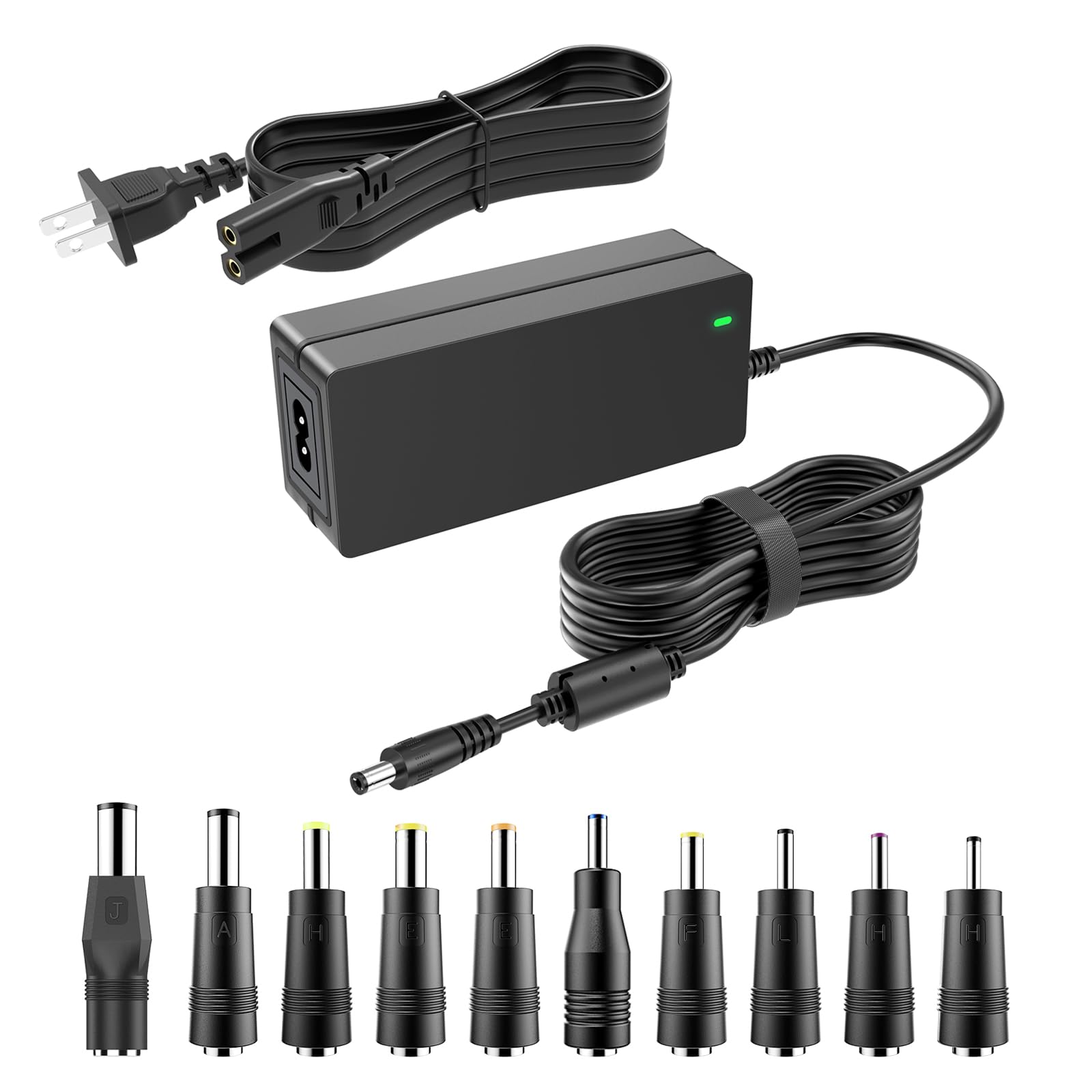
This 19V supply is the understated pick for laptop and monitor owners who want a dependable backup without paying for the brand-name premium. It delivers a fixed DC 19V at up to 3.42A with a 65W max cap, and the main barrel is the standard 5.5×2.5mm center-positive plug. In the box you get 10 replacement terminals, from the 7.4×5.0mm down to the 3.0×1.0mm, so it covers Asus, Acer, Gateway, Toshiba, and Samsung devices, plus JBL speakers and Netgear Nighthawk routers.
The build quality and functionality are the consistent praise points, with buyers describing it as a “great little power brick” that’s much longer than the charger that came with a laptop. It charges as fast as the original, holds steady power, and the tip swap is genuinely easy. Beyond laptops, owners have matched it to JBL Xtreme 2 speakers and a 17″ LG Gram — a broader reach than most fixed-voltage adapters manage.
Certified by UL, FCC, and ETL, the enclosure is ABS flame-retardant plastic with an anti-interference ferrite ring, short-circuit protection, and overvoltage/overcurrent cut-offs. The limitation is scope: it’s strictly a 19V supply, so it won’t work for 19.5V HP or Dell laptops, nor for 24V Samsung soundbars. Slightly fewer owner reports sit behind this one than the other 19V pick, but the positivity is unusually clean with no recurring complaints about early failure.
Why it wins fans
- UL, FCC, and ETL certifications plus flame-retardant ABS shell
- 10 tips make it a practical multi-laptop, multi-speaker backup
- Longer cord than factory chargers and consistent charging speed
Keep it in scope
- Strictly 19V — incompatible with 19.5V HP/Dell and 24V Samsung gear
- No Type-C output for modern USB-C laptops
Best for: a dependable, certified 19V backup for multiple laptops and monitors where the factory brick died or the cord is too short.
Think twice if: your device runs 19.5V or 24V — the voltage mismatch means it simply won’t power them.
7. GreBed 90W Universal Laptop Charger with 15 Tips

The 90W power mover that charges laptops and battery jump boxes, with a smart chip auto-tuning the volts.
The GreBed steps up to a 90W maximum with an output current of 4.74A, and it doesn’t lock you into one voltage — it offers selectable output across 18.5V to 20V. The built-in smart chip automatically adjusts the voltage once you pick a tip, so you just find the right connector and charge. The 15 included tips cover Dell, HP, Acer, Asus, ThinkPad, and a huge list of specific model families.
Charging speed and versatility are what owners tout, with one buyer using it to revive both a battery jump box and a laptop — a sign of how broad the tip coverage really is. It’s a genuinely practical, cost-saving backup when you travel between devices of different brands. The AC input range of 100-240V makes it suitable for global travel with the right plug adapter.
There is one serious caution flag in the data that you shouldn’t ignore: a buyer reported the charger running extremely hot and triggering a laptop’s “too hot, unplug” warning even on the correct setting. Heat is a listed mixed aspect here, so this is best treated as a supervised charger rather than a leave-it-on-the-couch-cushion runner. Also, checking the tip diagram against your model is essential before buying, since fit and compatibility get mixed feedback for some laptops.
The high-output pick: if you need 90W for a demanding notebook, nothing else here matches its wattage ceiling and tip assortment.
Reach for it if: your laptop pulls 90W or you travel across HP, Dell, and ASUS machines and want one cord to rule them all.
Pass it by if: you leave your charger plugged in unattended for hours — the heat reports make frequent supervision the safer play.
Understanding the Specs
Voltage (V) and Matching
Voltage is the “pressure” of electricity, and it must match your device exactly. A 12V gadget needs a 12V adapter; feeding it 19V can damage it, and feeding it 5V simply won’t power it. Fixed-voltage adapters are safest for a single device, while adjustable units (3V–24V) are flexible but require you to set the dial correctly every time — a wrong setting is the top cause of fried gadgets.
Current (A) and Wattage (W)
Current, measured in amps (A), is about how much power the adapter can supply on demand. A 3A adapter can run a device that needs only 1A, but not the reverse — the device will try to pull more than the adapter can give, causing overheating. Wattage is simply voltage times current (like 24V × 3A = 72W), so always confirm the adapter’s wattage meets or exceeds your device’s needs, ideally with headroom for continuous use.
FAQ
Can I use a higher amp adapter on a device that needs lower amps?
What happens if I plug a 19V adapter into a 12V device?
What is the difference between 5.5×2.1mm and 5.5×2.5mm barrel plugs?
What does a center positive (+) barrel plug mean?
How long does an AC/DC charger typically last?
Can an adjustable universal adapter replace a fixed laptop charger?
Why does my adapter get hot during normal use?
What are the important safety certifications to look for?
Final Thoughts: The Verdict
For the majority of shoppers, the best AC/DC Charger is the ALITOVE 24V 3A because it delivers stable, protected 72W power for the most common fixed-voltage jobs — LED strips and cameras — with the strongest owner consensus in this lineup. If you need one brick for many different voltages, the Wefomey 72W Adjustable leads thanks to its LCD readout, 14 tips, and 4-way splitter. And the GreBed 90W is the only one here built for high-wattage laptops that need more than the standard 65W.
How We Picked
We do not accept paid placement. Every pick is matched to a real buyer and a real use-case; we do not hands-on test units.
Sources & Methodology
Specifications: manufacturer listings and product documentation. Review insights: verified customer reviews, as of July 2026. Pricing: not shown on this page (it changes often); check the current price via the retailer link.
As an Amazon Associate, Gadgets Feed earns from qualifying purchases. This does not affect which products we feature.