
Dead zones in a two-story home or detached garage feel like a modern impossibility — your router sits in the living room, but the back patio, the upstairs office, or the hallway bathroom might as well be a Faraday cage. An AC1900 range extender bridges that gap with dual-band speeds up to 1.9 Gbps and enough reach to cover over 2,000 square feet, turning a signal drop-off into a seamless connection for streaming, gaming, and smart home devices.
I’m Min — the co-founder and writer behind Gadgets Feed. I’ve spent countless hours analyzing the technical specifications, real-world throughput reports, and customer performance data across the most popular AC1900 extenders to find the models that actually deliver on their coverage promises without forcing you to reboot them every other day.
Whether you need to cover a sprawling ranch house, a workshop with metal walls, or a multi-story layout with concrete floors, this guide ranks the top contenders to help you find the best ac1900 wifi range extender for your specific layout and device load.
How To Choose The Best AC1900 WiFi Range Extender
AC1900 refers to the combined dual-band speed ceiling: up to 600 Mbps on the 2.4 GHz band and up to 1300 Mbps on the 5 GHz band. That theoretical aggregate matters less than how the extender handles real-world obstacles, client handoff, and wired backhaul options.
Three External Antennas vs. Internal Antennas
External adjustable antennas let you angle the signal around walls, mirrors, and metal appliances. A unit with three external antennas can be rotated to push 5 GHz coverage laterally across a floor or upward to a second story. Internal antennas in compact plug-in designs trade coverage flexibility for a smaller footprint — fine for open floor plans, risky for obstructed layouts.
Ethernet Port for Wired Backhaul or AP Mode
A Gigabit Ethernet port transforms the extender into an access point when wired directly into your router via powerline or long Ethernet. In AP mode, you bypass the wireless hop and get near-full router speeds in the remote room. If your setup allows a cable drop between floors or to a garage, prioritize models with a Gigabit port.
Seamless Roaming vs. Separate SSID
Seamless roaming — where the extender shares your router’s network name (SSID) — lets devices hand off automatically as you move through the house. Separate SSID extenders force you to manually switch networks when the original signal drops. The difference in convenience is massive for homes with multiple floors or frequent movement between rooms.
Quick Comparison
On smaller screens, swipe sideways to see the full table.
| Model | Category | Best For | Key Spec | Amazon |
|---|---|---|---|---|
| NETGEAR EX6400 | Mid-Range | Seamless mesh integration | FastLane dual-band aggregation at 1.9 Gbps | Amazon |
| TP-Link RE550 | Mid-Range | EasyMesh compatibility & app control | Three external antennas with 600/1300 Mbps split | Amazon |
| ASUS RP-AX58 | Premium | AiMesh whole-home mesh network | WiFi 6 backward compatibility & 3000 Mbps aggregate | Amazon |
| TP-Link RE450 | Mid-Range | Budget-friendly 2,000 sq. ft. coverage | Gigabit Ethernet port & smart signal indicator | Amazon |
| WAVLINK AC600 Outdoor | Mid-Range | Outdoor/weatherproof installations | IP67 waterproof & PoE support | Amazon |
| Cyseed WiFi Extender | Budget | Large single-floor coverage | Up to 65 devices & 10,000 sq. ft. claim | Amazon |
| TP-Link RE450 (PCMag) | Budget | Cost-effective bridge with reliability | Three antennas & dual-band 1750 Mbps | Amazon |
In‑Depth Reviews
1. NETGEAR WiFi Mesh Range Extender (EX6400)
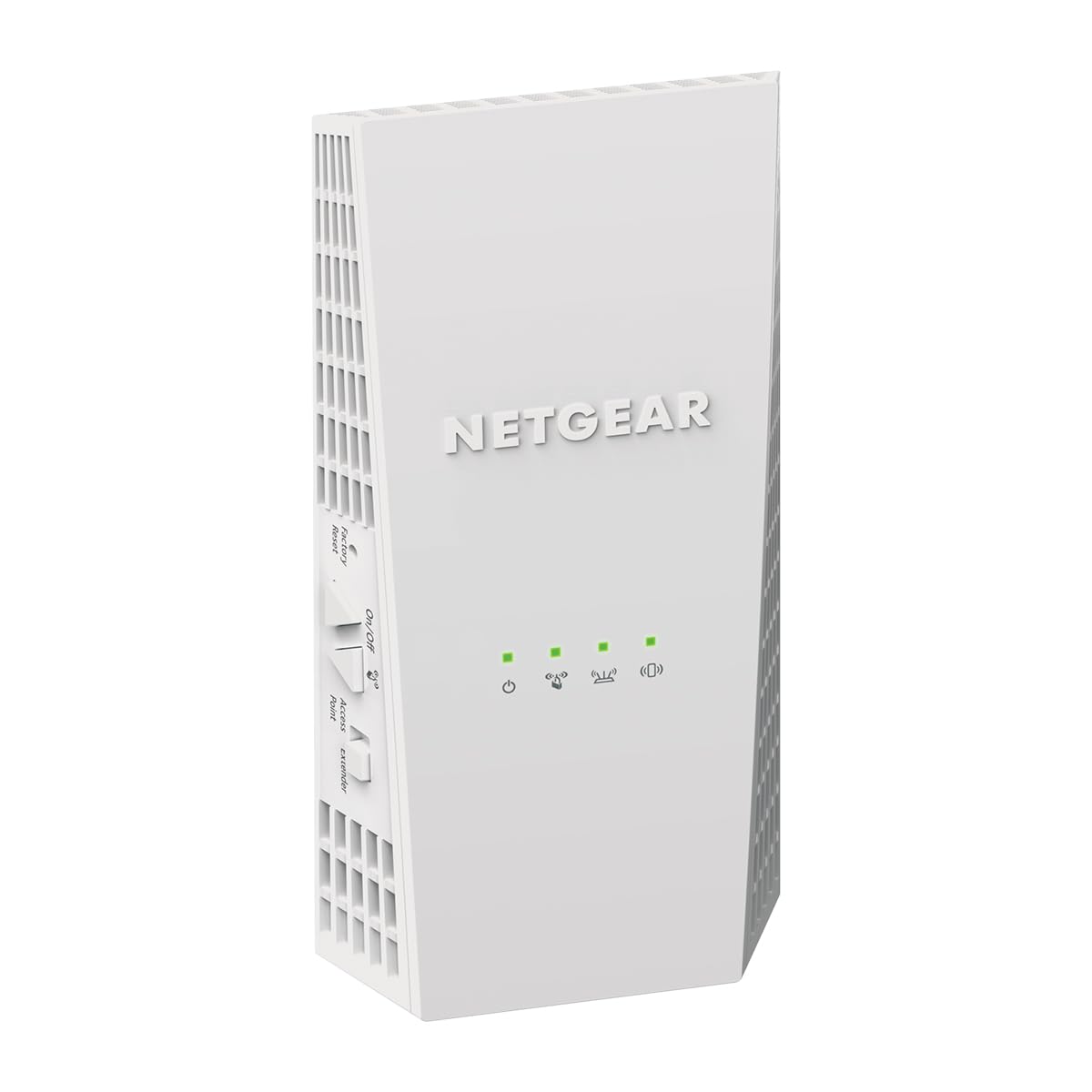
The NETGEAR EX6400 delivers the most reliable combination of coverage and seamless roaming in the AC1900 tier. Its FastLane technology bonds both bands into a single link, delivering up to 1.9 Gbps throughput that handles 4K streaming on multiple TVs without buffering. The unit supports up to 35 devices and uses your existing network SSID so phones, laptops, and cameras roam between the main router and extender automatically — no manual network switching required.
Setup is straightforward via the Nighthawk app, and the single Gigabit Ethernet port lets you wire a game console or streaming player in a remote room for a latency-free connection. Real-world reports show the EX6400 improving weak Ring camera RSSI from -82 to -52, which translates to much clearer video feeds on the perimeter of the property. The 2.4GHz band also handles smart home sensors and outdoor devices without dropping them into dead zones.
The main drawbacks are occasional stability issues requiring a power cycle every few months — some early units showed failure within six months, though warranty support can help if the unit fails. The plug-in design is also somewhat bulky and may block the second outlet on a wall plate. For the price, however, the EX6400 offers the best balance of coverage, speed, and mesh-like roaming of any AC1900 extender on the market.
Why it’s great
- Seamless SSID roaming prevents dropped connections as you move between floors
- FastLane aggregation delivers near-maximum throughput for HD streaming and gaming
- Reliable signal boost for outdoor cameras and IoT devices on the 2.4GHz band
Good to know
- Some units require periodic power cycling after several months of use
- Bulky wall plug design blocks the second outlet on standard wall plates
2. TP-Link AC1900 WiFi Range Extender RE550

The TP-Link RE550 stands out with EasyMesh compatibility, meaning it can join a mesh network alongside an EasyMesh router to create a single unified SSID across the entire home. Its three adjustable external antennas provide superior wall penetration compared to internal-antenna models — users report eliminating dead spots in rear bedrooms and attached garages where previous extenders failed. The dual-band output delivers 600 Mbps on 2.4GHz and 1300 Mbps on 5GHz, with actual speeds of 12 to 15 Mbps in previously dead zones when operating in extender mode.
When connected via Ethernet, the RE550 operates in Access Point mode and can push speeds of 300 to 400 Mbps — effectively behaving as a hardwired access point. The Tether app handles setup and includes a signal indicator to help you find the optimal placement location. Users who struggled with older extenders found the RE550’s setup far simpler, with one account noting it connected immediately and eliminated all previous buffering on streaming apps.
The unit is larger than average at 4.9 x 7.9 x 3.4 inches, so it won’t fit in cramped outlet spaces. Some users found the initial setup required more preparation than expected, especially toggling between extender and AP mode. It’s also worth noting that the RE550 is not compatible with Deco mesh systems, so only pair it with EasyMesh-compatible routers for mesh functionality.
Why it’s great
- EasyMesh compatibility enables a single SSID mesh network with compatible routers
- Three adjustable external antennas improve signal penetration through walls and floors
- Gigabit Ethernet port supports AP mode with near-wired speeds
Good to know
- Bulky size may limit installation options in tight outlet locations
- Not compatible with Deco mesh systems — study EasyMesh requirements before purchase
3. ASUS RP-AX58 AX3000 Dual Band WiFi 6 Range Extender

The ASUS RP-AX58 is not strictly an AC1900 unit — it’s a WiFi 6 extender with 3000 Mbps that also supports AC1900 devices — making it the future-proof option for homes investing in next-gen hardware. Its standout feature is AiMesh integration, which allows it to join an existing ASUS mesh network for seamless whole-home coverage without a separate SSID. Users with ASUS routers report flawless handoffs between the router and extender, with no throughput degradation when using wired backhaul.
The unit includes commercial-grade AiProtection Pro from Trend Micro, offering lifetime free security with WPA3 encryption. The compact wall-plug design is smaller than the RE550, though it still blocks the second outlet. Setup is handled through the ASUS Router app, and the extender can operate in both extender and AP mode. Real-world performance is excellent through brick walls and aluminum-backed insulation, with one user noting it solved dead spots in a garage and sunroom that prior extenders couldn’t touch.
The main limitation is that AiMesh works reliably only with ASUS routers. Users who tried pairing it with non-ASUS hardware or other AiMesh models from different generations reported connection dropouts and red-light failures. The extender also does not extend guest networks, which may be a dealbreaker for households with separate guest SSIDs. For ASUS router owners, this is the best integration you can get; for everyone else, it’s potential frustration.
Why it’s great
- AiMesh integration creates a single SSID mesh with ASUS routers for seamless roaming
- WiFi 6 support future-proofs your network for next-gen devices
- Lifetime AiProtection Pro with WPA3 provides robust security at no extra cost
Good to know
- AiMesh requires an ASUS router — inconsistent with third-party hardware
- Does not extend guest network SSIDs
4. TP-Link AC1750 WiFi Extender RE450

The TP-Link RE450 is a proven performer that earned PCMag’s Editor’s Choice recognition for its reliable AC1750 performance and straightforward setup. While it’s rated at AC1750 rather than AC1900, the difference in real-world speed is negligible for most households — the 5GHz band still delivers 1300 Mbps, which is plenty for 4K streaming and online gaming. The three adjustable external antennas provide excellent signal shaping, with one user reporting a jump from 1-2 bars of 5GHz signal at 120 Mbps to a full 4 bars at 866.5 Mbps after placement.
The feature set includes a Gigabit Ethernet port, a smart signal indicator that helps you find the best placement location, and support for both extender and access point modes. Setup via WPS takes under 30 seconds, and the unit is compatible with any router brand. Users consistently praise the RE450 for its stability as a WiFi-to-Ethernet bridge, noting that it stays connected for months without needing a restart — a significant advantage over cheaper extenders that require frequent rebooting.
The unit is larger than expected at 6.5 inches tall, and the outlet-mounted design blocks the second socket. Some users experienced DNS issues during setup, requiring manual configuration through the 192.168.0.254 interface. The 2.4GHz performance is noticeably weaker than the 5GHz band, so the RE450 works best when you can place it within range of the 5GHz signal. It lacks seamless roaming, so devices will see the extender as a separate network.
Why it’s great
- Proven stability as a WiFi-to-Ethernet bridge with months of uptime between restarts
- Three adjustable antennas provide excellent 5GHz signal amplification
- Smart signal indicator simplifies placement for optimal coverage
Good to know
- 2.4GHz band performance is weak — best used with 5GHz extension
- No seamless roaming; extender creates a separate SSID
5. WAVLINK AC600 Outdoor WiFi Extender

The WAVLINK AC600 Outdoor Extender is purpose-built for a completely different environment: outside the house. With an IP67-rated weatherproof enclosure, Power over Ethernet (PoE) support, and a claimed 150-meter range, it’s the right tool for extending WiFi to a detached garage, shed, RV, or campsite. The unit supports four operating modes — repeater, router, access point, and AP+repeater — giving it flexibility for anything from extending your home WiFi to creating a standalone hotspot in a remote location.
Setup requires more hands-on configuration than a plug-in extender. Users report success using the phone connection method: connect to the Wavlink network, switch to repeater mode, enter the home WiFi password, and place the unit at the boundary of existing coverage. The two 7 dBi high-gain antennas provide solid directional coverage, with one user successfully extending WiFi 30 feet through thick walls to a camper. The PoE feature is particularly useful, letting you run a single Ethernet cable to the unit for both power and data, avoiding the need for an outlet near the mounting point.
However, the AC600 rating means peak speeds are capped at 300 Mbps on 2.4GHz and 300 Mbps on 5GHz — far below the AC1900 tier. This unit is not for high-bandwidth streaming or gaming; it’s for reliable connectivity at longer distances where speed isn’t the priority. Some users report that the IP67 seal doesn’t hold up to direct rainfall if the unit isn’t mounted with the Ethernet port facing downward, so careful installation is essential. Customer service appears responsive, with one user receiving a replacement after improper installation caused water damage.
Why it’s great
- IP67 weatherproof enclosure withstands rain, humidity, and temperature extremes
- PoE support simplifies installation in locations without nearby power outlets
- Multiple operating modes provide flexibility for outdoor networking scenarios
Good to know
- AC600 speeds are not suitable for 4K streaming or online gaming
- Proper mounting orientation is critical to prevent water ingress through the Ethernet port
6. Cyseed WiFi Extender Internet Booster
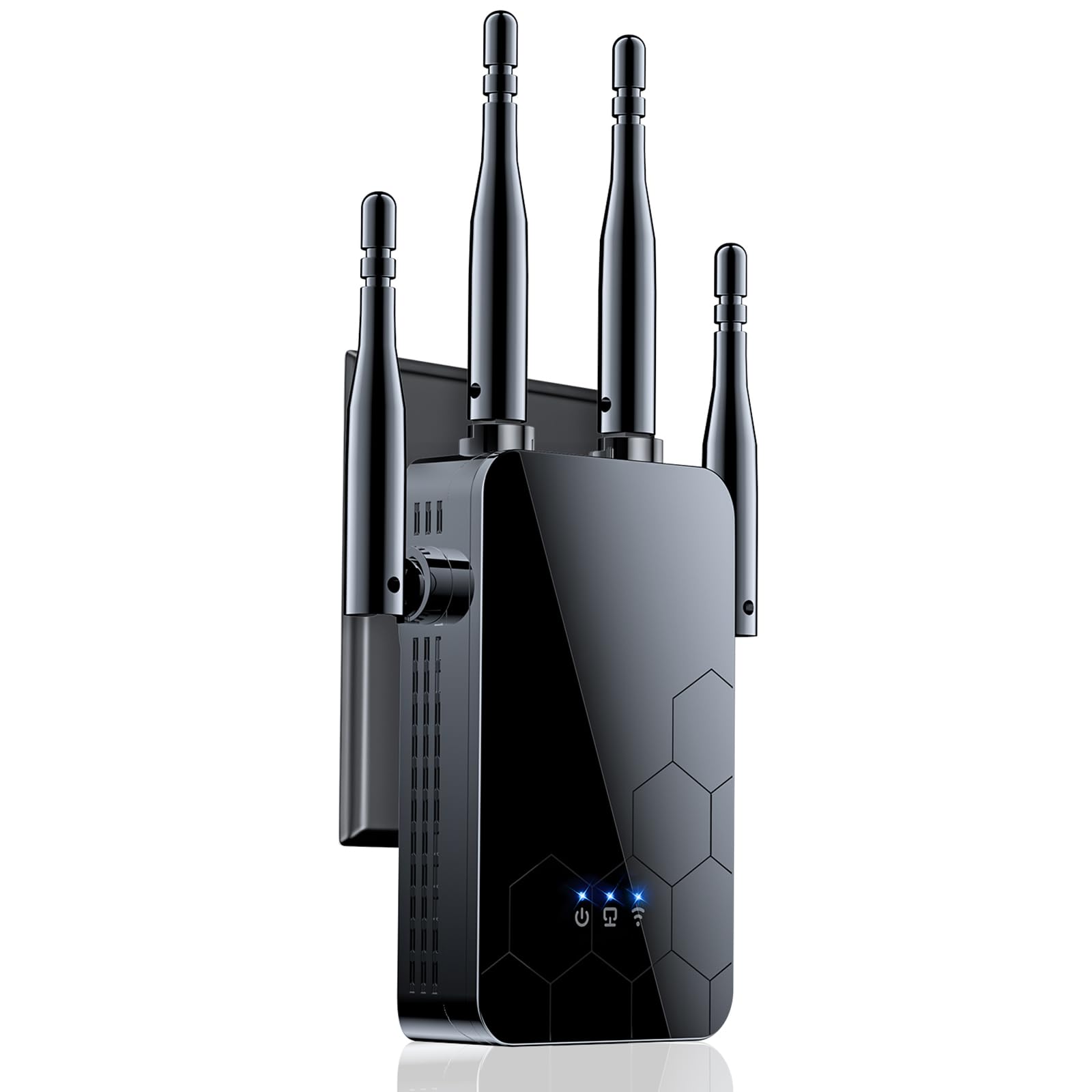
The Cyseed WiFi Extender is an entry-level option that leans hard on coverage claims — up to 10,000 square feet and support for 65 devices. In practice, real-world performance is more modest but still impressive for the price tier. The unit uses four external antennas to push 2.4GHz and 5GHz signals, and users report eliminating dead zones in auto repair shops, three-story homes, and 300-foot outdoor setups. The 1-tap WPS setup is genuinely easy: press the WPS button on your router and then on the extender, and it pairs within seconds.
The extender offers five operating modes: repeater, client, AP, bridge, and router, which is unusual for a budget unit. The QR code-based setup guide in the box gets you online without needing an app, and the extender appends “_EXT” to your existing SSID so you can distinguish the extended network. Users on the second floor of a three-story home reported getting strong, steady connections for Zoom calls and streaming at distances where previous extenders failed entirely.
The biggest compromise is hardware: the unit is 2.4GHz-only despite the marketing. There’s no dual-band simultaneous operation, which means you lose the 5GHz band’s speed advantage. The 10,000 square foot claim is for ideal open-space conditions with minimal interference — expect closer to 3,000 to 4,000 square feet in a typical home with walls. It also blocks the second wall outlet. For the price, it’s a solid entry-level option for basic coverage extension where raw speed isn’t critical.
Why it’s great
- Exceptional value for money with 1-tap WPS setup that works in seconds
- Five operating modes provide flexibility beyond basic repeating
- Four external antennas deliver strong signal penetration through walls and floors
Good to know
- 2.4GHz-only operation means no access to faster 5GHz band speeds
- Real-world coverage is far less than the 10,000 square foot claim
7. TP-Link RE450 AC1900 WiFi Repeater

This second TP-Link RE450 listing is essentially the same hardware as the PCMag favorite, but at a lower price point that makes it a strong budget option for buyers willing to trade the editing endorsement for savings. The unit delivers the same AC1900 dual-band speeds of 600 Mbps on 2.4GHz and 1300 Mbps on 5GHz, with three adjustable external antennas and a single Gigabit Ethernet port. The mounting bracket and wall-plug design are identical to the standard RE450.
Real-world performance is consistent with the more expensive RE450. Users report excellent results as a WiFi-to-Ethernet bridge for devices that lack wireless capability, with one user noting months of uptime without needing a restart — significantly better than cheaper no-name extenders that fail within weeks. The Intelligent Signal Light on the front panel shows signal strength from the router, helping you find the sweet spot for placement. Setup is simple via WPS or the TP-Link Tether app.
The usual trade-offs apply: the unit blocks the second outlet, the 2.4GHz band is noticeably weaker than the 5GHz band, and there’s no seamless roaming. The 12,000 square foot coverage claim is theoretical and assumes open spaces without interference — expect more like 2,000 to 3,000 square feet in typical homes. The lower price point makes this a solid choice for buyers on a tight budget who still want reliable performance from a trusted brand.
Why it’s great
- Budget-friendly price for a dependable AC1900 extender from a trusted brand
- Three adjustable antennas and Gigabit Ethernet port provide solid flexibility
- Long-term stability with months of uptime in bridge mode
Good to know
- No seamless roaming — devices connect to a separate extended SSID
- Blocked second outlet limits installation options in tight spaces
FAQ
Will an AC1900 extender work with a WiFi 6 router?
Do I need seamless roaming or is a separate SSID fine?
Why does my AC1900 extender not reach the claimed square footage?
Can I use an AC1900 extender outdoors?
Final Thoughts: The Verdict
For most users, the best ac1900 wifi range extender winner is the NETGEAR EX6400 because it combines FastLane technology for maximum throughput with seamless SSID roaming that keeps your devices connected as you move from room to room. If you want EasyMesh compatibility and app-based control, grab the TP-Link RE550. For ASUS router owners building a mesh network, the ASUS RP-AX58 delivers the best integration. And for outdoor or weather-exposed installations, nothing beats the WAVLINK AC600.