
A gaming laptop out of the box is only half the setup. Without the right peripherals, you are fighting heat buildup, cramped desk space, and mediocre input lag that directly tanks your K/D ratio and frame-times. The difference between a stock laptop and a fully accessorized rig is measurable in lower CPU die temps, faster reaction clicks, and a clean power layout that keeps your charging brick from shorting out the mouse.
I’m Min — the co-founder and writer behind Gadgets Feed. I have spent hundreds of hours cross-referencing fan curves, USB-C PD wattage, mouse sensor generations, and dust-filter efficiency to isolate the gear that actually moves the needle for serious laptop gamers.
After stacking real-world specs against price-to-performance ratios, this definitive guide pinpoints the seven must-own accessories for a gaming laptop that solve heat, power, input, and portability without wasting a single dollar.
How To Choose The Best Accessories For A Gaming Laptop
Every gaming laptop ships with compromises — limited USB ports, stock thermal paste that dries out quickly, and a single fan that chokes under sustained load. The right accessories close those gaps. Focus on three pillars: active thermal management (cooling pad CFM and static pressure), input latency (mouse sensor generation and polling rate), and power delivery (GaN wattage and surge protection). Ignore RGB gimmicks if the core spec doesn’t hold up.
Prioritize Cooling Over Everything
A mid-range gaming laptop with a premium cooling pad will outperform a high-end laptop suffocating on a desk. Look for a pad with at least a 140mm fan spinning above 2500 RPM and a sealed foam chamber that forces air directly into the laptop intake. The llano V10’s 3500 RPM copper motor is the current benchmark, but Razer’s adaptive smart fan curve offers automated thermal management that responds to real-time CPU load — a feature no <5000 RPM pad matches.
Match Your Mouse Sensor to Your Play Style
Don’t overpay for a mouse with a 26K DPI sensor you’ll never use. The real metric is power efficiency and wireless latency. Logitech’s HERO sensor delivers 250 hours on a single AA at 1ms report rate — enough for months of daily gaming without cable drag. If you prefer the tactile feel of a mechanical click, the Redragon combo gives you membrane quiet keys instead, which is fine for MMOs but loses the crisp actuation needed for competitive shooters.
Power Delivery Layout Determines Desk Clutter
Gaming laptops ship with massive 230W+ bricks. A standard power strip creates cable spaghetti. Choose a desk clamp unit with a 70W USB-C PD port so you can charge the laptop through a single GaN brick while freeing up AC outlets for monitor and peripherals. Anker’s Nano Power Strip is purpose-built for this: its 5ft cord clears the desk edge, and the 10-port layout splits into top/bottom zones so the brick doesn’t block other plugs.
Maintenance Matters More Than You Think
Laptop fans accumulate dust within weeks. A single can of compressed air costs and lasts one cleaning. A rechargeable electric air duster like the Vantrue T150 pays for itself in three months and doesn’t lose pressure mid-blast. Prioritize models with Type-C fast charging and multiple nozzle heads — the flat nozzle reaches keyboard key gaps, while the brush head cleans radiator fins without scratching copper.
Quick Comparison
On smaller screens, swipe sideways to see the full table.
| Model | Category | Best For | Key Spec | Amazon |
|---|---|---|---|---|
| llano V10 | Cooling Pad | Maximum thermal drop | 3500 RPM / 4.72″ fan | Amazon |
| Razer Laptop Cooling Pad | Cooling Pad | Smart adaptive fan curves | 3000 RPM / 140mm fan | Amazon |
| Anker Nano Power Strip | Power Strip | Desk clamp organization | 70W USB-C PD / 10 ports | Amazon |
| Dell Gaming Backpack | Backpack | Portable 17″ protection | Rain cover / reflective design | Amazon |
| Logitech G305 | Mouse | Wireless budget precision | 12,000 DPI / 250h battery | Amazon |
| Vantrue T150 | Air Duster | Rechargeable dust removal | 110,000 RPM / 3 speeds | Amazon |
| Redragon S101-3 PRO | Combo Set | Budget all-in-one kit | RGB membrane / 7200 DPI | Amazon |
In‑Depth Reviews
1. llano V10 Gaming Laptop Cooling Pad

The llano V10 uses a 4.72-inch turbo fan with a pure copper motor that spins at 3500 RPM — enough static pressure to force ambient air through the tightest laptop intake vents. Real-world testing shows CPU die temperature drops of up to 38°C under sustained load, which eliminates thermal throttling completely on laptops like the ASUS ROG Strix and Alienware m16.
The pad supports 13-to-17.3-inch laptops and ships with extra foam inserts to center smaller chassis. A removable dust filter sits behind the fan, catching debris before it recirculates into your system. The 3-level ergonomic stand reduces neck strain during long sessions, and the dual USB ports (1x USB-A, 1x USB-C) let you chain a mouse and headset without consuming laptop ports.
At full speed the V10 produces around 65 dB of noise — noticeable with open-back headphones, but drowned out by closed-back gaming headsets. The RGB offers 12 lighting modes with memory recall, and physical buttons prevent accidental mid-round changes. This is the single most effective thermal upgrade you can buy for a gaming laptop.
Why it’s great
- 38°C max temp drop prevents throttling on high-TDP CPUs
- Removable dust filter keeps internals clean for months
- Dual USB ports pass through connectivity without hub loss
Good to know
- No auto power-down — must be switched off manually
- Loudest at 3500 RPM; quieter at 1500 RPM with 15-20°C drop
2. Razer Laptop Cooling Pad

Razer’s first laptop cooling pad uses an airtight pressure chamber sealed by three magnetic foam frames that accommodate 14-to-18-inch laptops. The 140mm brushless fan reaches 3000 RPM, but the real innovation is the adaptive smart control — via Razer Synapse, the pad reads system CPU temperatures in real time and auto-adjusts fan speed to maintain a target thermal envelope.
In practice, users report a 10-12°C temp drop on high-TDP laptops like the Asus TUF 16, with CPU peaking at 68-72°C during gaming instead of 80°C+. The built-in 3-port USB Type-A hub adds peripheral connectivity, and the two remappable multi-function buttons can trigger volume, speed presets, or Chroma RGB changes without alt-tabbing.
The Razer pad is louder than the llano V10 at full blast — a microwave-like hum that some find distracting — but the quiet fan curve mode is near-silent and still drops temps by 8°C. It only works with Synapse 4, and the front hook can interfere with trackpad use on thinner laptops. Despite the premium cost, the adaptive thermal logic makes this the most intelligent cooling solution on the market.
Why it’s great
- Smart adaptive fan responds to real-time CPU load
- Three magnetic foam frames fit 14″ to 18″ laptops securely
- 3-port USB hub and remappable hotkeys add desk utility
Good to know
- Requires Razer Synapse 4 for dynamic fan control
- Front hook may block trackpad on slim chassis
3. Anker Nano Power Strip
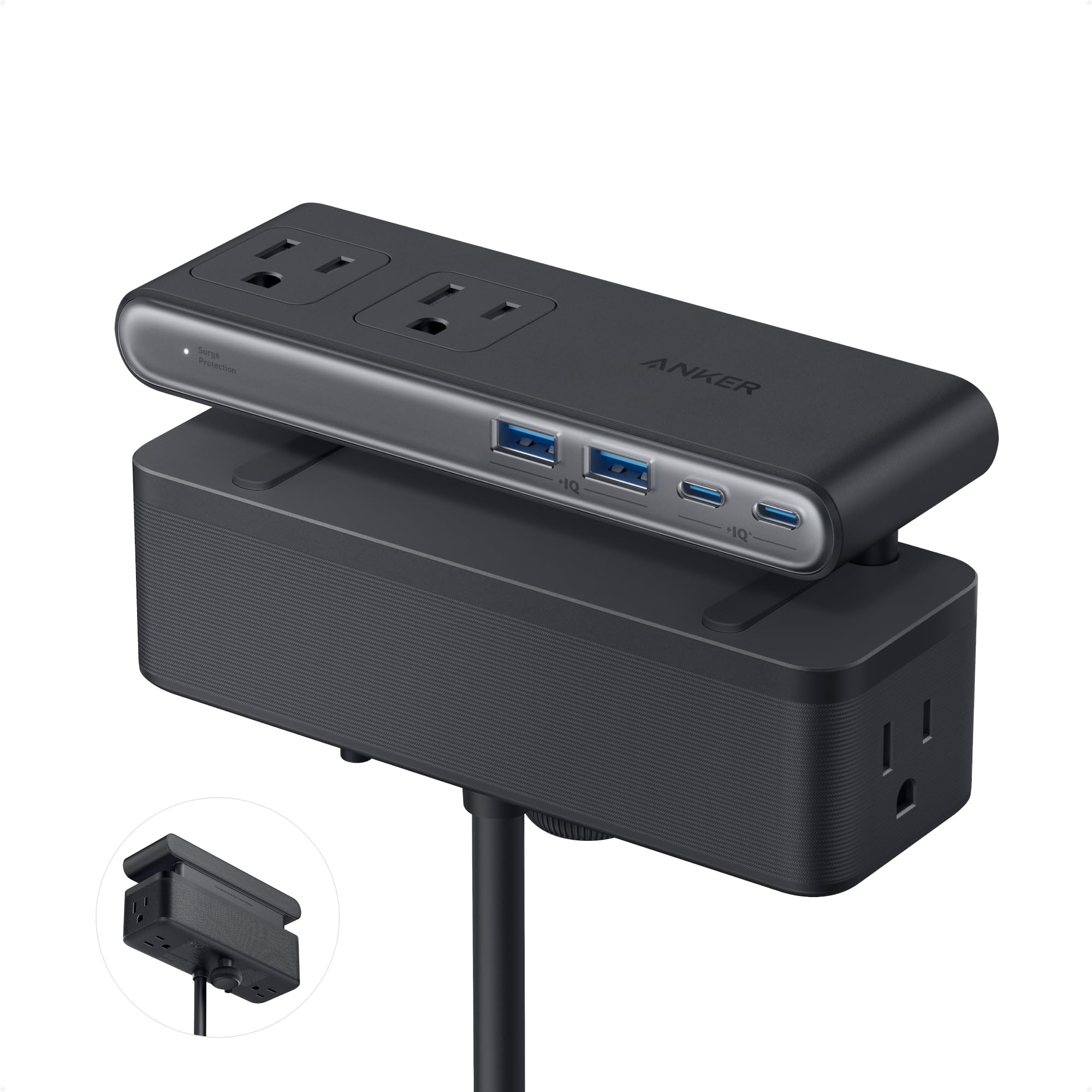
The Anker Nano Power Strip solves the single biggest desk-clutter problem for laptop gamers: a massive 230W power brick that blocks adjacent outlets. Its adjustable desk clamp fits edges 0.6 to 1.8 inches thick, mounting the strip under the table so the brick and cables are completely hidden. The 5-foot extension cord reaches most desks without a wall-hugging adapter.
The upper zone houses 6 AC outlets spread wide enough to fit thick wall warts without blocking adjacent plugs. The lower zone adds 2 USB-C and 2 USB-A ports, with one USB-C delivering 70W of GaN-based PD — enough to charge a 16-inch gaming laptop at full speed while the laptop itself runs on its own brick. The surge protector is rated at 1500J, adequate for protecting a router and monitor from power spikes.
Build quality is excellent: the clamp slides smoothly, the plastic shell has zero creaking, and the weight at 24.7 ounces feels planted. The unit does block the laptop’s own power brick if you try to use it on the same zone as other plugs, but with 70W PD pass-through you mostly won’t need the brick at all. A clean, practical solution that respects real desk geometry.
Why it’s great
- 70W USB-C PD charges most gaming laptops via GaN
- Desk clamp hides brick and cables completely
- 10-port design splits into top/bottom zones
Good to know
- Not compatible with curved or sloped desk edges
- European plugs require adapter — no built-in Type F support
4. Dell Gaming Backpack 17″
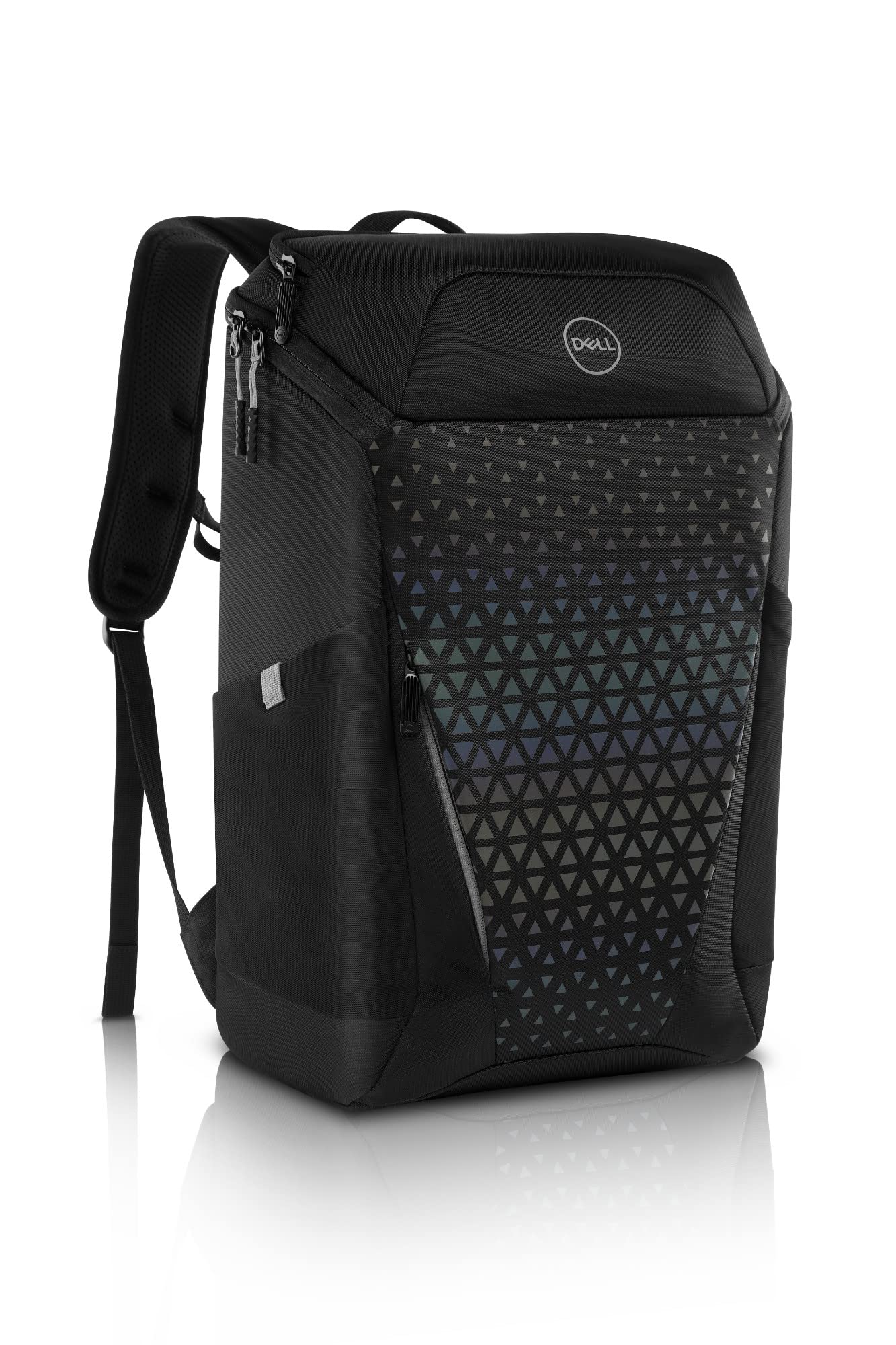
The Dell Gaming Backpack is built for the specific geometry of modern 17-inch gaming laptops. The padded main compartment is top-loading — a deliberate design choice that lets you slide a laptop with a cooling pad attached straight into the bag without bending the lid. The interior foam is heavy-duty and water-resistant, with a coated base material that shrugs off damp surfaces.
The deployable rain cover is attached to the bag’s bottom via a tucked-away elastic pouch. When unfolded, it wraps fully around the backpack and secures with side clips, providing weatherproofing during sudden downpours. The back panel uses airflow mesh and channel grooves to keep your spine dry on hot days, and the reflective surface emits a rainbow hue under headlights for night visibility.
Storage is organized but not infinite: the top flap holds a charger and cables, while an under-flap pocket fits a mouse, phone charger, and sunglasses. The bag is lightweight at just under 2lbs empty, and the padded straps distribute load well for a 17-inch laptop plus brick. No zipper lock or expandable zipper is included, but for daily campus or LAN commutes, this bag is purpose-perfect.
Why it’s great
- Top-loading design fits laptops with attached cooling pads
- Deployable rain cover provides full weather protection
- Reflective panels improve night visibility for commuters
Good to know
- No built-in zipper lock or TSA cable
- Internal volume is tight for a 17″ plus extra gear
5. Logitech G305 Lightspeed Wireless Gaming Mouse

The G305 packs Logitech’s HERO sensor — the same optical core found in the premium G Pro series — into a 99-gram shell that runs for 250 hours on a single AA battery. At 12,000 DPI and 400 IPS, the sensor delivers zero smoothing and no acceleration across cloth, hard, or glass surfaces. The 1ms Lightspeed wireless connection is indistinguishable from a wired cable in blind testing.
Six programmable buttons include two side buttons that are easily clickable without shifting grip. Onboard memory stores DPI settings and macro profiles so they survive a reboot without software. The nano receiver stores inside the mouse body, making it truly portable for laptop bags. The compact ambidextrous shape works for claw and fingertip grip styles but may feel small for palm grippers with large hands.
There is no RGB lighting — a deliberate choice to preserve power. The single AA battery can be swapped instantly when it dies, unlike built-in Li-ion models that require downtime. At this price point, no other mouse matches the HERO sensor’s efficiency and the 250-hour endurance. It is the essential wireless companion for any gaming laptop.
Why it’s great
- HERO sensor delivers 1ms latency with 250-hour battery life
- Onboard memory stores DPI and macro profiles permanently
- Nano receiver stores inside body for true laptop portability
Good to know
- Smaller shape not ideal for palm-grip users with large hands
- No RGB lighting — functionality over flash
6. VANTRUE POWER T150 Compressed Air Duster
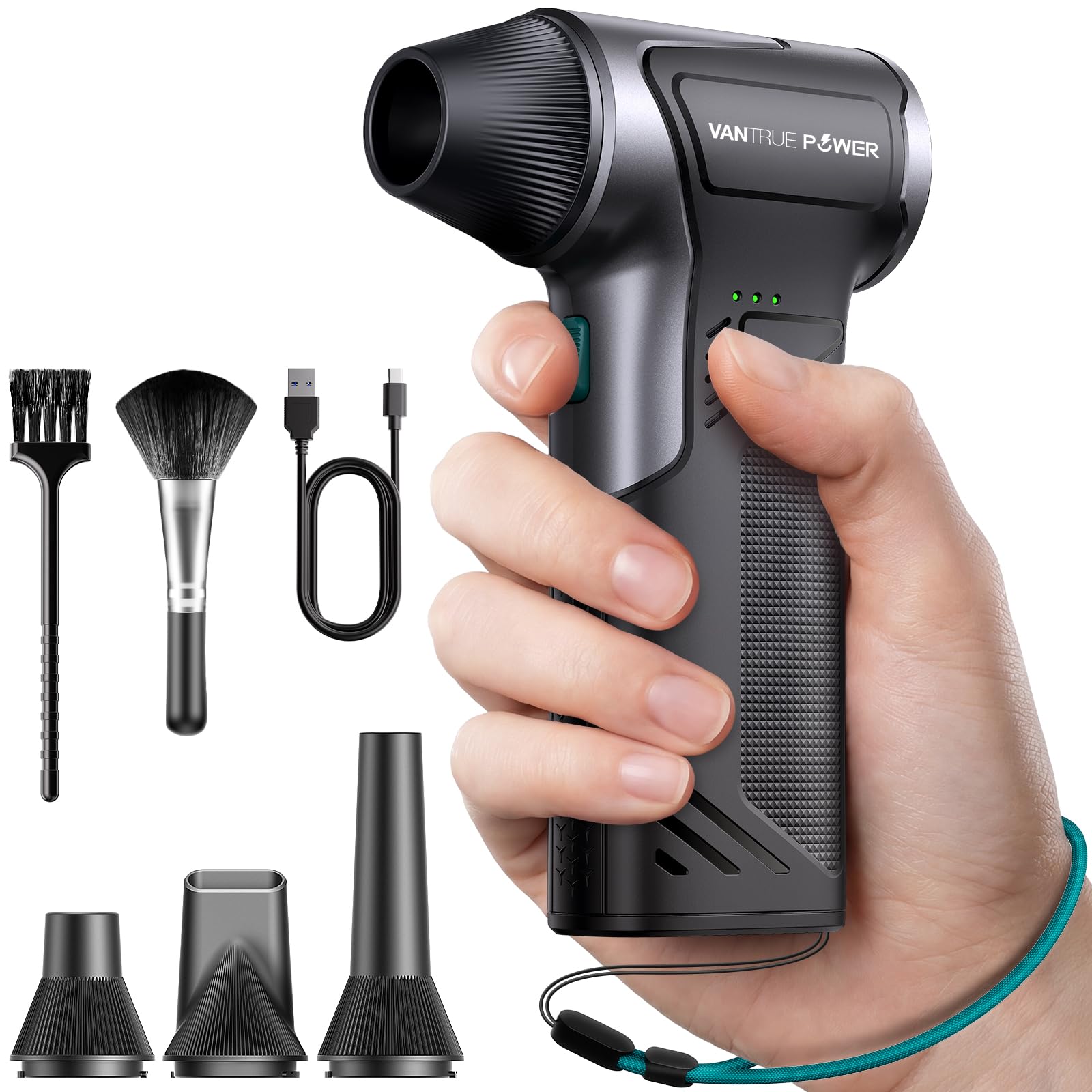
The T150 replaces disposable compressed air cans with a rechargeable motor that hits 110,000 RPM and delivers 45 m/s of airflow at the nozzle. With three speed settings, the low gear is gentle enough for camera sensor cleaning while the high gear blasts dust and debris out of keyboard key gaps, laptop exhaust vents, and radiator fins in seconds. The 45 m/s jet reaches up to 3 inches into narrow crevices.
Type-C fast charging fills the battery in 3.5 hours. On low speed, the T150 runs for up to 240 minutes — enough for dozens of full cleaning sessions. At maximum power, runtime drops to 20 minutes, but the real-world cleaning speed is so fast that a single keyboard blowout takes 10 seconds. Included accessories include a flat nozzle for precision, a brush head for fragile surfaces, and an inflatable nozzle for air beds.
Weighing only 7.36 ounces and small enough to slip into a laptop sleeve, this duster eliminates the recurring cost of canned air cans that lose pressure halfway through. The battery does drain quickly on high gear endurance, but for the price it delivers three seasons of cleaning before a battery replacement. An essential maintenance accessory that keeps your laptop fans running at peak CFM.
Why it’s great
- 110,000 RPM motor replaces dozens of disposable air cans
- Type-C fast charging tops up in 3.5 hours
- Weighs 7.36 oz — fits in a laptop bag pocket
Good to know
- High speed drains battery in ~20 minutes
- No battery-level indicator — requires guesswork on remaining charge
7. Redragon S101-3 PRO Gaming Keyboard and Mouse Combo

The S101-3 PRO is a full-size wired membrane keyboard paired with a 7200 DPI optical mouse — the lowest cost entry point into programmable macro controls. The keyboard features 6 backlight modes and 5 dedicated macro keys that can record complex command sequences for MMO rotations or editing shortcuts. The soft-touch membrane keys provide quieter feedback than mechanical switches, which is a bonus for shared dorm or office spaces.
The mouse offers 10 lighting effects and on-the-fly DPI switching between 800 and 7200, with settings saved to onboard hardware. The included ergonomic wrist rest reduces fatigue during long sessions, and 26-key anti-ghosting on the keyboard ensures every press registers during fast typing. The wired USB connection means zero latency and no battery worries — plug and play on Windows 10/11, Linux, and macOS.
Build quality is better than budget expectations: the keys don’t stick after months of use, and the paint on the keycaps doesn’t rub off quickly. The mouse does not remember DPI settings after sleep, requiring a button press to cycle back to your preferred speed. The lighting effects are colorful but the mouse’s monochrome red LEDs mismatch the keyboard’s RGB. For the price, this combo delivers programmable macro support and decent build that beats any stock laptop keyboard/trackpad pairing.
Why it’s great
- Fully programmable macro keys for in-game commands
- 26-key anti-ghosting ensures every press registers
- Ergonomic wrist rest included for extended gaming sessions
Good to know
- Mouse loses DPI memory after sleep — must re-cycle
- Membrane keys feel softer than mechanical switch alternatives
FAQ
Will a cooling pad fit my laptop if I use a laptop stand?
Why does the Anker Nano Power Strip have only 2 USB-A ports?
Is the Logitech G305 good for competitive FPS gaming?
Final Thoughts: The Verdict
For most users, the accessories for a gaming laptop winner is the llano V10 Cooling Pad because it delivers the highest thermal headroom — up to 38°C drop — which directly prevents CPU throttling and extends component lifespan. If you want smart adaptive control that syncs with system load without manual adjustment, grab the Razer Laptop Cooling Pad. And for a clean desk setup that hides your power brick and adds 70W USB-C pass-through, nothing beats the Anker Nano Power Strip.