
Our readers keep the lights on and my morning glass full of iced black tea. As an Amazon Associate, I earn from qualifying purchases.
Specs are compiled from manufacturer listings and verified buyer reviews and can change over time — please confirm the key details on the product page before buying.
The quick answer: buy the accessory that removes the problem you notice most — the console on the floor, the cable tangle at your feet, or the charger that keeps wandering. For most people that means getting the console, the cables, the charger and the headset off the desktop and onto the frame underneath, because every item you move down is desk space you get back. If your setup is a console on the floor and a tangle of cords at your feet, start with an under-desk mount and a cable tray; if your desk is already clean and you just want the charger and headset to stop wandering, a clamp-on power strip and a stand do more for you. The nine picks below cover both jobs.
I’m Min — the founder and writer behind Gadgets Feed. This guide is built by comparing the manufacturers’ published specifications and the patterns across verified customer reviews, so you get each pick’s real strengths and trade-offs instead of marketing spin.
Below are the under-desk mounts, cable trays and clamp-on power strips that clear the console, cords and chargers off your desktop. This guide to the best accessories for gaming desk sorts every pick by the job it does best.
Our Picks at a Glance


How To Choose The Best Accessories For A Gaming Desk
The best buying decision is deciding which items belong under the desk instead of on top of it.
Start With What Is Actually Bugging You
A console sitting on the carpet blocks the vents and gathers dust. A power brick and a bundle of cables at your ankle make every chair roll a small gamble. A headset that lives on the desk eats the same clean space you want for your mouse arm. Each problem has its own cheap fix — an under-desk mount for the console, a cable tray for the cords, a clamp strip for the charger — and buying the wrong one just moves the clutter around.
Sort your list into three buckets: things that need to move down (console, power strip, cables), things that need a home at the edge (headset, controller, drink), and things that need protection (everything plugged into the wall). That order tells you what to buy first without a big spend.
Check Your Desk Before You Buy Anything
Clamp accessories need a real edge to grab. Before you buy, measure how thick your tabletop is and how much clear space runs along the back edge. If your desk has drawers, a crossbar or a back panel, some clamp and clamp-on trays will not fit at all — that is the most common wasted purchase in this category.
Magnetic accessories need a metal surface to stick to, so a glass or wood desk usually means using the adhesive or screws instead. Fabric trays need a tabletop thick enough to clamp onto, which rules out very thin tops on their own. And anything that hides your cables should still let air reach your console vents — concealment that chokes airflow costs you more than it saves.
Plain Specs Worth Knowing
Joules (J) measure how much energy a surge protector can absorb before it gives up — that is the number you want high if you care about the machine plugged into it. Watts tell you how fast a charger can refill a device, so 30W is meaningfully quicker than a standard port. And outlet spacing decides whether your chunky power bricks actually fit side by side, which is the quiet reason people end up with three half-empty strips.
Quick Comparison
| Model | Best For | What It Holds | Mount Method | Key Spec | Amazon |
|---|---|---|---|---|---|
| Monzlteck Under Desk PS5 Holder★ Best Overall | Console off the floor | PS5 / PS5 Slim / PS5 Pro | Six screws | 2mm thick metal | Amazon |
| ZZM Cable Management NetBest for Cable Chaos | Hiding a whole cable bundle | Cables, hubs, power cords | Elastic loops and buckles | 26 x 10 inches | Amazon |
| KDD 2-in-1 Headphone Hanger + Cup HolderBest Space Saver | Edge space on a small desk | Headset, drink, cables | No-drill clamp | Fits 5mm to 50mm edges | Amazon |
| Aocii Magnetic Cable Raceway Kit | Changing your setup often | Cords in 4 channels | Magnetic, adhesive or screws | 4 pieces, 15.7in each | Amazon |
| Mifaso PD30W Desk Clamp Power Strip | Charging everything at the desk | 4 AC outlets, 2 USB-A, 1 USB-C | Tool-free clamp | 30W USB-C PD, 1080J surge | Amazon |
| KDD Headphone & Controller Stand | Charging gear while you play | 1 headset, 2 to 4 controllers | Tabletop | Wireless charging, 9 light modes | Amazon |
| Univivi No Drill Cable Management Tray | Big capacity, no drilling | Power strips, bricks, wires | Clamp on or screw | 36in long, 600D Oxford fabric | Amazon |
| UPERGO Walnut Headphone Stand | Showing off a tidy setup | Headset, controller, small parts | Weighted base | Solid walnut and metal | Amazon |
| 4000J Gaming Surge Protector | Protecting a full gaming rig | 6 AC outlets, 1 USB-A, 2 USB-C | Tabletop | 4000J surge protection | Amazon |
In‑Depth Reviews
1. Monzlteck Under Desk Holder for PS5/PS5 Slim/Pro, Stealth Mount Compatible with PlayStation 5 Disc & Digital Edition Console, Space Saving, DP-05
Our pick — over 4.5★ from 900+ verified ratings; the strongest balance of quality and price.
Six screws, 2mm of steel, and your console finally leaves the carpet.
If your PlayStation is sitting on the floor under a chair that rolls, this is the fix that actually changes your room. The mount pins the console to the underside of your desk with six screws through a 2mm thick metal bracket, so the whole thing rides out of sight and off your desktop. It fits the PS5, PS5 Slim and PS5 Pro, in both disc and digital versions. The hollow underside is deliberate: your console’s air intake stays open, so cooling is not blocked the way it is with a solid shelf or a fabric pocket.
What wins people over is the build. The metal is thick enough to mount a heavy disc-drive console without flexing, and a security screw locks the bracket to the console so a knee bump does not send it anywhere. Four silicone covers sit between the metal and your console to keep the finish from getting scratched. There is a slotted base, which means you can slide and align before you tighten anything down rather than committing to the first hole you drill.
The honest catch is thin furniture. Screws passing through a hollow-core or very thin tabletop can bulge the surface, and the bracket ships in black only. The stabilizer screw also takes a little patience to seat properly, since the flared vent end of the console is meant to hover. Neither of those is a deal-breaker on a solid wood or thick laminate desk, which is where this thing belongs. If your desk top is genuinely flimsy, the Univivi fabric tray below uses a clamp instead and asks nothing of your tabletop’s core.
Stealth PS5 Mount
- Six screws through 2mm metal hold a heavy disc console firmly in place.
- Slotted base lets you align before you tighten, no wasted holes.
- Open frame keeps the console’s air intake clear instead of smothering it.
- Four silicone covers protect the console shell from scuffs.
Slim Fit Limits
- Screws can bulge a thin or hollow tabletops — solid wood is the safe bet.
- Black is the only finish offered.
- You supply your own drill and anchors; no alignment adhesive is included.
Console Owners: anyone who owns a PS5, a drill, and a solid desk with clear space underneath.
Thick Desks: your tabletop is hollow-core or you want the console visible on a shelf instead.
2. ZZM Cable Management Net Under Desk Kit, Privacy Mesh Cable Manager, Flexible Under Desk Wire Net, Large Capacity Cord Organizer Net for Office, Standing Desk, Home, 26 X 10 Inches
A hammock for your power bricks, and it swallows the heavy ones.
Measuring 26 inches long by 10 inches wide, this is the option for the desk where the cable situation has stopped being funny. It is a stretchy mesh pocket that hangs under the tabletop and catches everything that used to dangle: power cords, USB hubs, network cables, audio and video leads. Flame retardant polyester construction spreads heat rather than trapping it, which matters when a power brick is sitting in the net.
The elastic setup is the smart part. Movable buckles and a visual mesh lets you add or pull a cable without dismantling the whole thing, and you can deliberately give it slack by stretching the spacing between fixers. It clamps onto tabletops 15mm and thicker, so most desks work. Buyers report that the net holds their heavy plugs and cables, and the included alignment template takes the guesswork out of hanging it straight the first time.
Here is the honest bit: the adhesive is the weak link. The mounting glue is the recurring gripe in owner feedback, and a few people have had the sticky pads give up over time, so if you are on a laminate or glass top, plan to use the included hardware rather than trusting the tape alone. It also ships in one fabric size, so a desk with a large motor housing may need two units side by side. The Aocii raceway kit below is the better answer if you would rather run hard channels than a soft pocket.
Mesh Privacy Net: the elastic mesh is adjustable, so you can loosen it for bulky bricks and tighten it for a tidy run of thin cables, then reach in and swap a cord in seconds.
Sagging Risk: it hides the mess but does not organize it into lanes — your cables are contained, not sorted, and you may still want zip ties inside the net.
Cable Hiders: you want maximum clutter removed for a small outlay and your desk edge is at least 15mm thick.
Heavy Loads: your desk surface will not hold tape or screws, or you prefer rigid channels over fabric.
3. KDD 2 in 1 Headphone Hanger with Desk Cup Holder – Under Desk Clamp Rotatable Headset Holder – Suitable for Coffee Cups, Water Cups, Headphone (Black)
Two jobs, one clamp: your headset hangs and your drink rides at the edge.
Small desks have one real problem, and it is not storage — it is that everything wants the same square foot. This clamp attacks that directly by putting a headset hook and a cup holder on the same arm, attached to your desk edge instead of sitting on your desktop. The arm rotates a full 360 degrees and includes a cable organizer, so your headset cord stays looped up rather than dragging across the floor or snagging on a chair leg.
The clamp itself is the quiet hero. It grabs desks as thick as 50mm and as narrow as 5mm, which is a genuinely wide range, and there are no holes to drill, no adhesive to peel and nothing to install — you twist the knobs and go. Rubber pads sit on both ends of the clip so your desk surface does not get scratched, and soft rubber on the headphone arm keeps a heavy headset from sliding off. Owners have run one of these for a year and still describe the durability as holding up.
Two things to know before you buy. The clamp is on the chunky side, so on a shallow desk it can sit higher and stick out further than you expected — this is a functional add-on, not an invisible one. And the cup holder is sized for cans, bottles and standard mugs rather than a wide flask, so if you drink from a big insulated tumbler, measure it first. The plastic body is durable but rewards being handled gently, and it is the second-smallest spend in this list for a reason.
Headphone Users: cramped desks where the headset and the drink are both fighting for mouse room.
Large Mugs: oversized insulated bottles, or desks with a thick beveled edge the clamp cannot bite.
4. Cable Hider Raceway Kit, Magnetic Cable Management Under Desk with Upgraded Aesthetic Large Hole, Cord Organizer Kit for Hiding Computer, Gaming Desk, Network, Power Cord, TV – 4PCS 4×15.7in Black
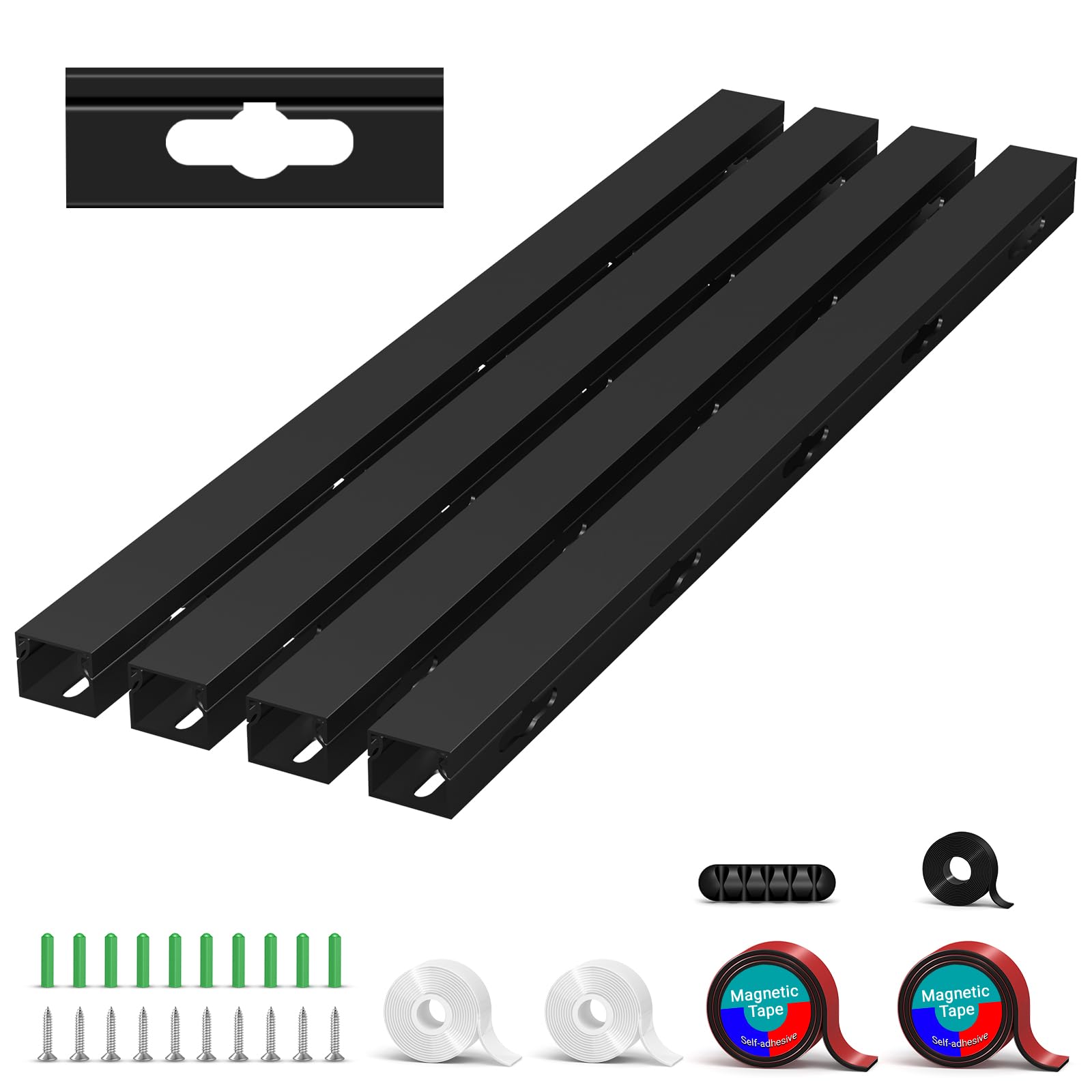
Moves when your setup moves, which almost no other cable hider does.
Four 15.7-inch channels, three different ways to attach them, and one clear advantage: nothing here is permanent unless you want it to be. The kit comes with magnetic backing, double-sided adhesive tape and screws, so a wood desk gets the tape, a steel desk gets the magnet, and a desk you want to be sure about gets the screws. Each raceway is 1.4 inches wide with an enlarged opening, so thick power cords, HDMI leads and Ethernet runs all fit instead of fighting you.
The magnetic option is what owners single out most. You can lift a channel off, add a cable, and click it back without leaving residue or adhesive scars, and the hold is strong enough that the run does not sag or drift once it is in place. One buyer with two desks, eight monitors, three laptops and a desktop reports the tape route holding strong and the cable nest finally tamed. The set also arrives with a lot more hardware than most buyers expect, which means you have spares for the next desk.
The fine print is honesty about materials. These are plastic channels, and the sliding fit means they want to be positioned once and left alone rather than repeatedly yanked apart. Also, the magnet needs a metal surface to work — on wood or glass you are back to tape or screws, and the open-face design conceals your cables from view rather than sealing them in. If you want something you will adjust monthly, that sliding convenience is the feature; if you want a set-and-forget case, the trade is durability.
Magnetic Raceway: three mounting methods in one box means this fits nearly any desk you will ever own, and you can take it with you when you upgrade.
Adhesive Strength: the count of pieces runs high across the four channels, so plan your run before you start sticking things down.
Clean Desks: tinkerers who re-cable their desk, move the PC, or add a monitor every few months.
Rough Surfaces: your desk is glass with no metal nearby and you hate working with adhesive.
5. Mifaso PD30W Desk Clamp Power Strip, Surge Protector, Fast Charging Station

Eight devices, one clamp, zero drilling — and it charges a laptop fast.
Reaching behind a desk to find an outlet is a small annoyance you do thousands of times. This strip ends it by clamping to your desk edge, where you can see and reach every port. It turns a single wall socket into 4 AC outlets, 2 USB-A ports and 1 USB-C port that doubles as a 30W PD (Power Delivery, a fast-charging standard) charger. The USB-C side manages 5V/3A, 9V/3A, 12V/2.5A, 15V/2A and 20V/1.5A, so it can top up a MacBook, iPad or phone at a genuinely quick pace — the maker claims up to 50% faster on compatible devices, and that figure drops when the other USB ports are also in use, sharing a combined maximum of 18W.
What wins people over is the practicality of the layout. Each of the four AC sockets sits 1.9 inches apart, which is generous enough that chunky adapters and oversized bricks do not block their neighbors the way they do on a tight strip. The 5-foot cord uses a 45-degree right-angle plug, so it tucks behind furniture instead of jutting straight out of the wall. Installation needs no tools: the clamp screws on by hand, foam pads protect your desk edge, and the tabletop needs to sit between 0.5 and 1.96 inches thick.
Do check two numbers before ordering. Your desk must sit at least 0.4 to 0.5 inches from the wall for the strip to hang correctly, and the clamp is the one part owners split on — most find it solid and secure, but it is worth tightening properly and re-checking after a few days. On the safety side, the 1080J (joules, a measure of surge energy absorbed) rating and 1875W/15A ceiling protect your gear from spikes, provided your total connected load stays under that limit.
Clamp Power Strip
- 4 AC outlets plus 2 USB-A and a 30W USB-C PD charger, so eight devices share one clamp.
- 1.9-inch outlet spacing fits bulky bricks without blocking neighbors.
- Tool-free clamp with foam pads, no drilling into your desk.
- 45-degree right-angle cord tucks neatly against the wall.
Clamp Thickness
- Needs 0.4 to 0.5 inches of clearance from the wall behind the desk.
- Clamp is the part buyers split on — tighten it and re-check after a few days.
- USB output drops to a shared 18W when you use multiple USB ports at once.
Gamers: a desk with a laptop, a monitor and a stack of accessories that all want power at once.
Thin Desks: your desk edge is thinner than 0.5 inches or thicker than 1.96 inches, or sits flush against the wall.
6. KDD Headphone & Controller Stand with Wireless Charging – Rotatable Headset Stand with 9 Light Modes – Controller Holder with 2 USB and Type C Ports – for Gamers Desktop Accessories

A headset hook, a controller rack and a charging pad stacked into one footprint.
This is the one pick in the list that does three jobs at once, which is why it survives on a desk that has no room for three separate accessories. The headphone arm rotates a full 360 degrees and has its own cable storage, while the detachable hook holds one headset and two controllers — or four gamepads if that is your house. The base is a wireless charging pad, and the stand adds 2 USB ports plus a Type-C port so your phone, tablet or controller cables have somewhere to live.
The lighting is what makes it feel like gaming hardware rather than office furniture: nine modes total, covering 7-colour fast blinking, 7-colour breathing and single-colour options in red, green, blue, purple, light blue, yellow and white, with a memory function so your last setting comes back on power-up. Assembly takes about 30 seconds across three parts, and the housing is fire-proof hardened plastic with protection against overloading, short-circuiting and over-current — worth having when it is charging multiple things overnight.
The one quirk to understand is power. The stand plugs into a wall socket rather than your PC, so the USB ports charge devices but will not pass data from your computer — people who buy it hoping to plug in a wireless dongle end up disappointed. Note too that the Type-C port cannot charge an iPhone, so iPhone owners will lean on the wireless pad instead. If your intent is charging, it delivers; if your intent is a USB hub for peripherals, the Mifaso clamp strip is the correct tool.
Controller Owners: you want headset, controllers and phone handled by a single unit with lights that match your setup.
Fast Chargers: you need data passthrough from your PC or you plan to charge an iPhone over Type-C.
7. Univivi No Drill Under Desk Cable Management Tray, 36 inch Cable Management
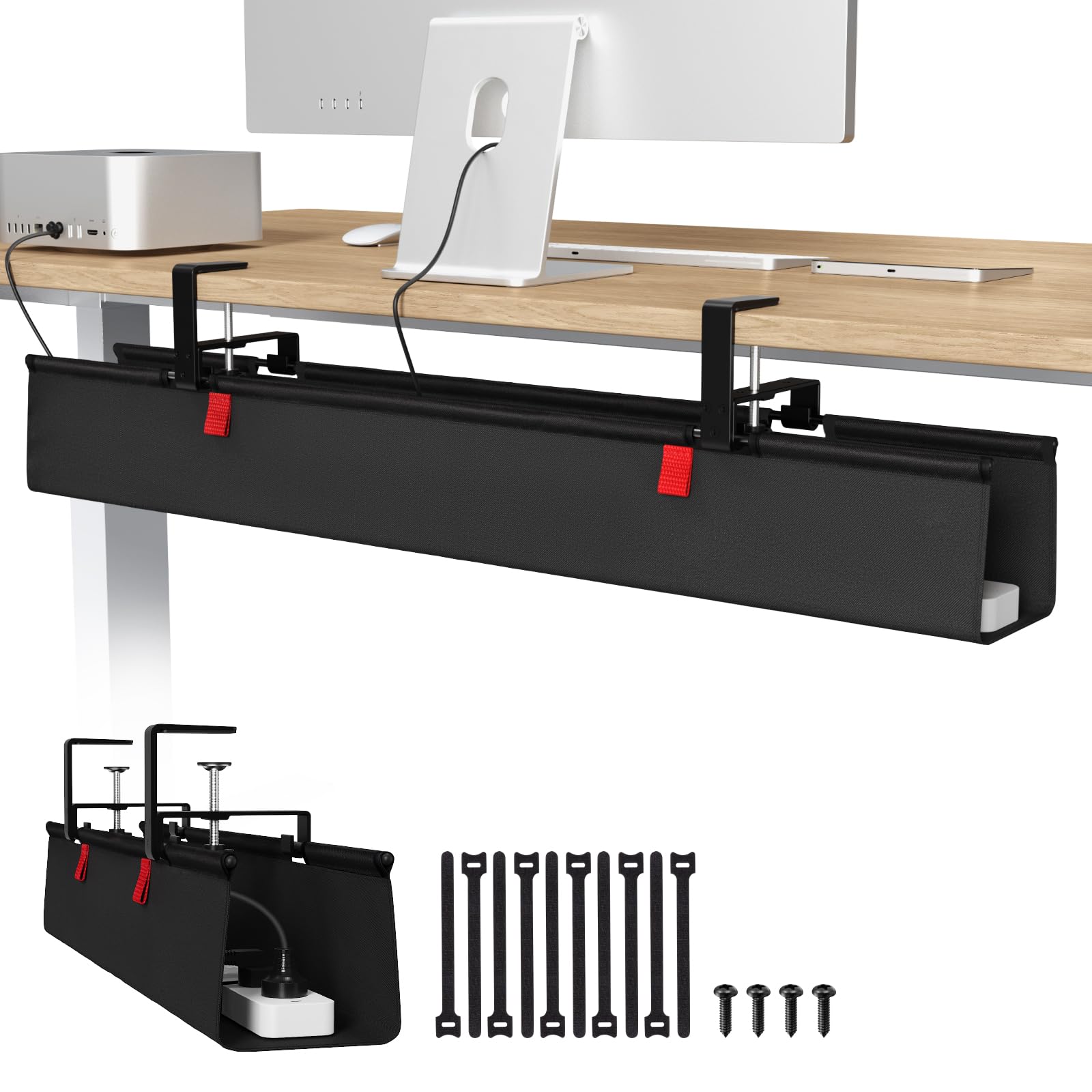
Three feet of fabric tray that swallows power strips whole.
At 36 inches long and 5.5 inches wide, this is the biggest single cable container in the list, and it is built for the desk that has a power strip, several bricks and a bundle of peripheral leads to hide. The 600D Oxford fabric is flame retardant and genuinely thick, and the tray has a bottom support that holds its shape under load rather than sagging in the middle. The whole tray unfolds so you can drop items in and blind-tie them with the built-in ties, which is far less fussy than threading cables into a rigid channel.
Installation runs two ways: a heavy-duty screw-free clamp that needs no tools and no drilling, or screws if you want a firmer hold. That clamp setup handles wood, glass and metal tabletops, and owners specifically note it works on a standing desk — the tray rises and falls with the motor without drama, and it lifts your cables high enough that you can vacuum under the desk. What wins people over is how much the fabric flexes around awkward shapes; a bulky iMac power box or a wide surge protector slides in without a fight, and a high-contrast pull tab gives you quick access when you need it.
Two things to measure first. Your tabletop needs to be able to take the clamp, so a built-in drawer or back-rod setup needs at least 5.3 inches of clear space along the edge or it simply will not mount. And the tray cannot be fully invisible — it clips under the desk, so a small amount of hardware stays visible from below. One owner with an unusually wide outlet found it a tight squeeze, so check the width of your biggest brick against the 5.5-inch tray before committing.
No Drill Tray: the fold-out design and built-in ties mean adding or removing a cable takes seconds and needs no re-drilling or re-taping, which is why it suits setups that keep evolving.
Desk Thickness: at least 5.3 inches of clear edge space on desks with drawers or a back-rod, or the clamp has nowhere to bite.
Renters: a standing desk or large fixed desk loaded with a power strip, multiple bricks and a tangle of peripherals.
Glass Desks: desks with a back-rod or drawer unit flush to the edge, or anyone who needs the underside of their desk to look untouched.
8. UPERGO Walnut Headphone Stand with Controller Holder & Storage Base
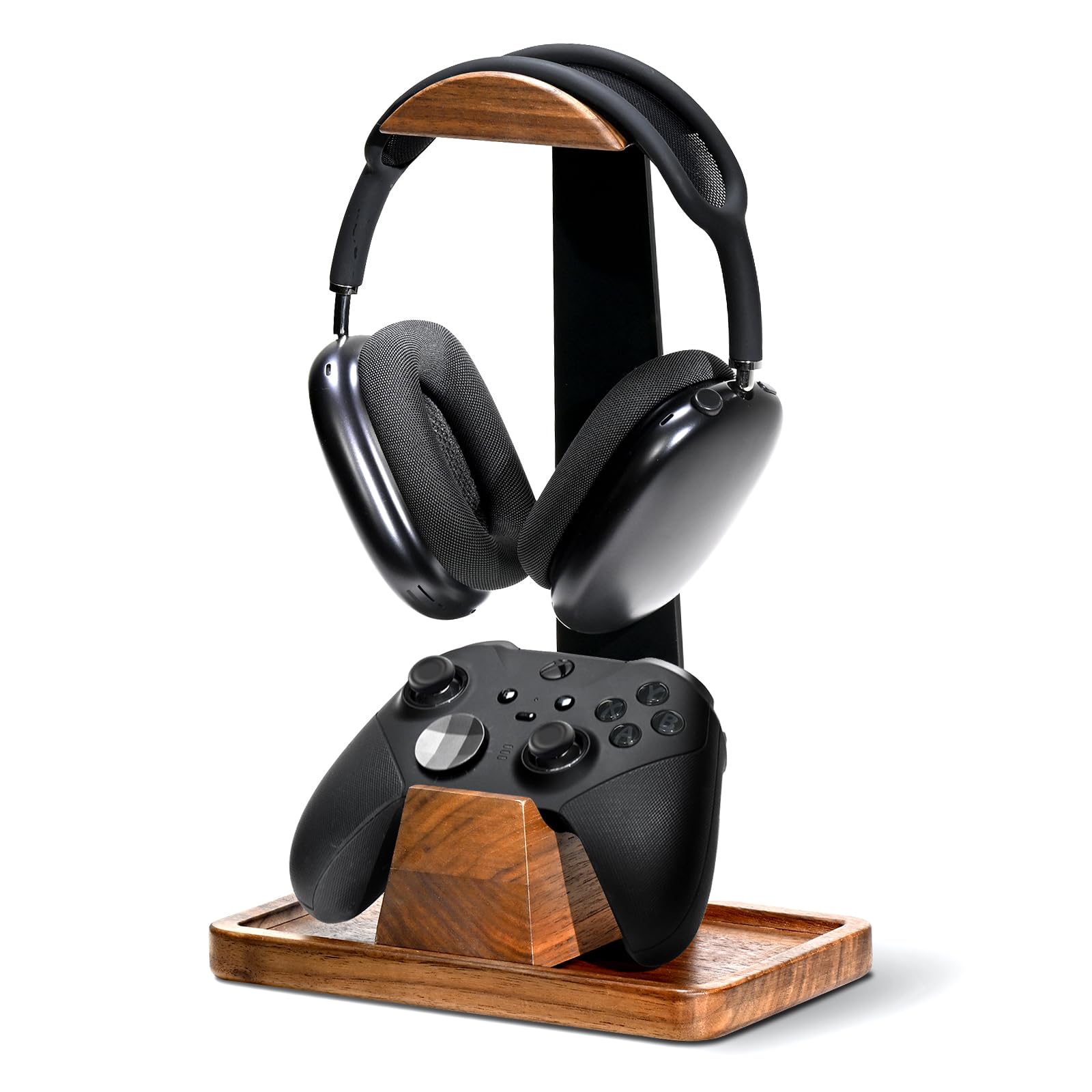
Real walnut instead of black plastic, and heavy enough that it stays put.
Most desk accessories look like desk accessories. This one looks like furniture, which is the entire point: solid walnut wood paired with metal, a curved cradle for your over-ear headset, and a matching dock that stops an Xbox or PS5 controller from sliding off. Underneath, the hollow base doubles as a hidden tray for the small things that normally rattle loose — earpads, charging cables, SD cards — so your clutter has an actual home rather than just a nicer hiding place.
The weighted base is the detail that earns its place. Hanging a heavy mic-equipped headset on a light stand is a tipping risk, and this one is deliberately sturdy with anti-slip silicone pads on the bottom that grip the desk and protect the surface. Assembly takes under two minutes across three snap-together parts, with no extra tools needed. The controller dock seats solidly and slides left to right for positioning, and owners describe the finish as looking exactly like the product photos — enough that it gets bought as a gift more than once.
Two honest limits. There is no height adjustment on the headphone arm, so while the wide arc fits most over-ear headphones including bulky gaming models, a very tall headband could sit close to the base. And the storage tray only takes small items — anything large will not fit because the headset occupies that space. The controller dock sits unattached on the desk rather than locking to the stand, which keeps it flexible but means it can be nudged out of line. For a wooden, tidy, display-friendly setup this is the pick; if you need lights and charging, the KDD charging stand covers that instead.
Audiophiles: a visible desk where the stand is part of the decor, or as a gift for someone whose setup leans tidy.
Minimalists: you need adjustable height, built-in charging, or a home for large accessories.
9. 4000J Gaming Surge Protector Power Strip with USB Ports

Four thousand joules of cushion between your gaming PC and the grid.
The number that matters here is 4000J — joules of surge absorption, the amount of electrical spike energy the strip can soak up before your hardware sees it. Paired with 15A overload protection and a built-in EMI/RFI filter that cuts electrical interference, this is the pick for anyone whose rig is the most expensive thing in the room. It offers 6 AC outlets rated 15A/1875W, plus 1 USB-A and 2 USB-C ports at 20W max driven by an intelligent chip, and the 10-degree angled layout with 1.8-inch spacing means large plugs do not crowd each other out.
The gaming styling is not just decoration. There is RGB ambient lighting with four brightness levels and three lighting modes, a 6-foot heavy-duty cord with a 60-degree angled plug for flexible placement, and an on/off switch. Owners describe the build as solid and heavy, the colors as a genuine upgrade to the setup, and the outlet count as more than sufficient for a console, TV, monitor and speakers on one strip. One buyer reports it absorbing two large utility spikes within three days with an audible pop while the connected PC survived, though that is a single owner’s account rather than a guarantee of any outcome.
Set expectations on two points. The lights cannot be dimmed to off in the way some people expect — one owner wanted a way to darken or cut them entirely and did not find one. And 4000J protection has a ceiling like any surge device; once it absorbs a big enough hit, the protection is spent even though the strip still powers your gear. If you need portability rather than permanent protection, the Mifaso clamp strip is the more versatile option.
PC Builders: wants maximum surge protection and a lit, gaming-styled strip behind a full rig.
Travelers: you need the RGB fully dark at night or you want an under-desk clamp rather than a floor or shelf strip.
Understanding the Specs
Joules (J) — How Much Surge Your Gear Can Take
A joule is a unit of energy, and on a surge protector it tells you how much electrical spike the device can absorb before your electronics see any of it. Higher is better for expensive gear: 1080J is solid everyday protection, while 4000J gives a gaming rig a much bigger cushion against lightning and utility spikes. The important caveat is that surge protection is consumable — after it takes a large enough hit, that protection is used up even if the strip keeps working.
Watts (W) and PD — How Fast Your Devices Refill
Watts measure how quickly a charger can push power into a device, so a 30W USB-C port refills a laptop or tablet noticeably faster than a standard port. PD (Power Delivery) is the handshake standard that lets a charger and device agree on the right voltage, which is why a good PD charger lists several steps like 5V, 9V, 12V, 15V and 20V. Watch the total, though: when several USB ports run at once, the available output is shared rather than doubled.
Mount Methods — Clamp, Screw, Magnet or Fabric
Clamp accessories grip the edge of your desk and need enough thickness and clear space to bite, typically somewhere between 5mm and 50mm depending on the design. Screw mounts are the most permanent and the most secure but can bulge a thin or hollow tabletop. Magnetic mounts need a metal surface and can be repositioned freely without residue. Fabric trays combine a clamp with a soft pocket and flex around bulky power bricks that rigid channels cannot.
Outlet Spacing and Current — Why Plugs Get Blocked
Outlet spacing decides whether chunky adapters actually fit side by side; wide-spaced sockets mean one oversized brick no longer blocks its neighbor. Current ratings matter just as much: a 15A/1875W strip sets the ceiling for how much load you can plug in at once, and going past it is where trips and heat come from. Always add up what you intend to connect before trusting a single strip to run everything.
FAQ
Will an under-desk console mount work if my desk has a back panel or drawers?
Do I need to drill into my desk to hang a cable tray?
How many joules of surge protection do I actually need for a gaming PC?
Will a clamp-on power strip damage my desk surface?
Can a cable management net hold heavy power bricks and adapters?
What is the difference between magnetic cable raceways and adhesive ones?
Do headphone stands with wireless charging work through a phone case?
How much cable can a single under-desk tray hold?
Can I mount a console under a glass or metal desk?
Should a gaming surge protector be clamped to the desk or left on the floor?
Final Thoughts: The Verdict
Final Thoughts: The Verdict
For most gamers, the winning pick among these accessories for gaming desk is the Monzlteck Under Desk PS5 Holder, because it solves the one problem every console owner shares — the hardware sitting on the floor — with six screws through 2mm of metal and zero blocked airflow. If your desk is buried under cords instead, grab the Univivi No Drill Cable Management Tray, whose 36-inch fold-out fabric tray swallows a power strip and every brick feeding it. And for a small desk where the headset and the drink are both stealing mouse room, the KDD 2-in-1 Headphone Hanger with Cup Holder clamps on in seconds and gives you back the space.
Two picks are worth calling out for specific setups. If a chunk of your budget went into the PC itself, the 4000J Gaming Surge Protector puts serious surge absorption between your rig and the grid, plus RGB lighting and 6 outlets with 1.8-inch spacing. And if your desk is the last thing anyone sees on a video call, the UPERGO Walnut Headphone Stand replaces plastic with real wood and metal, adds a controller dock and a hidden tray, and lifts a heavy headset without tipping.
One honest nudge before you close the tab: almost every problem on this list is a below-desk or edge-of-desk fix rather than a money problem, so start with the pick that removes the annoyance you notice most — the console on the carpet, the cord tangle at your ankles, or the hunt for a free outlet — and build from there.
Final Thoughts: The Verdict
For most gamers, the winning pick among these accessories for gaming desk is the Monzlteck Under Desk PS5 Holder, because it solves the one problem every console owner shares — the hardware sitting on the floor — with six screws through 2mm of metal and zero blocked airflow. If your desk is buried under cords instead, grab the Univivi No Drill Cable Management Tray, whose 36-inch fold-out fabric tray swallows a power strip and every brick feeding it. And for a small desk where the headset and the drink are both stealing mouse room, the KDD 2-in-1 Headphone Hanger with Cup Holder clamps on in seconds and gives you back the space.
Two picks are worth calling out for specific setups. If a chunk of your budget went into the PC itself, the 4000J Gaming Surge Protector puts serious surge absorption between your rig and the grid, plus RGB lighting and 6 outlets with 1.8-inch spacing. And if your desk is the last thing anyone sees on a video call, the UPERGO Walnut Headphone Stand replaces plastic with real wood and metal, adds a controller dock and a hidden tray, and lifts a heavy headset without tipping.
One honest nudge before you close the tab: almost every problem on this list is a below-desk or edge-of-desk fix rather than a money problem, so start with the pick that removes the annoyance you notice most — the console on the carpet, the cord tangle at your ankles, or the hunt for a free outlet — and build from there.
How We Picked
We do not accept paid placement. Every pick is matched to a real buyer and a real use-case; we do not hands-on test units.
Sources & Methodology
Specifications: manufacturer listings and product documentation. Review insights: verified customer reviews, as of September 2026. Pricing: not shown on this page (it changes often); check the current price via the retailer link.
As an Amazon Associate, Gadgets Feed earns from qualifying purchases. This does not affect which products we feature.