
Printing with transparent or translucent filament — often called acrylic-style material — introduces a unique challenge: maintaining optical clarity and layer adhesion without sacrificing dimensional accuracy. Standard FDM settings that work for opaque PLA will leave you with hazy, brittle parts that hide the very property you’re chasing.
I’m Min — the co-founder and writer behind Gadgets Feed. I’ve spent countless hours analyzing extruder temperature profiles, layer height optimization, and cooling fan behavior across dozens of FDM and resin printers to isolate which machines actually deliver consistent, glass-like results with clear filaments.
Whether you need clear display stands, functional light guides, or translucent prototypes, this guide isolates the machines that handle the high-temp demands and fine-layer control required by transparent materials to help you find the best acrylic 3d printer.
How To Choose The Best Acrylic 3D Printer
Printing with clear materials — natural PETG, transparent PLA, polycarbonate, or clear resins — demands a printer that can maintain tight thermal control and fine layer resolution. The wrong machine introduces bubbles, layer haze, or brittle walls that ruin the transparent effect entirely. Focus on these three factors to separate capable machines from the rest.
Nozzle Temperature Ceiling and Hotend Design
Optically clear prints require materials that flow evenly and bond completely between layers. Natural PETG prints best between 230°C and 260°C, while polycarbonate requires 270°C to 300°C. A printer with a stock all-metal hotend rated for 300°C, like the Creality K1C or the Flashforge AD5M, eliminates heat-creep issues that cause cloudy layers. Budget printers with PTFE-lined hotends will degrade above 250°C and contaminate the clear material.
Layer Height Precision and Z-Axis Stability
Transparency improves dramatically below 0.12 mm layer heights because thinner layers reduce internal light-scattering surfaces. Machines with dual Z-axis lead screws or linear rails, such as the Longer LK5 Pro or the Bambu Lab P1S, maintain consistent layer registration across the full build volume. A wobbly Z-axis introduces micro-shifts that manifest as visible striations in transparent parts, defeating the purpose of using clear filament.
Controlled Cooling and Enclosed Chamber
Drafty environments cause uneven cooling that leads to internal stress fractures and haze in clear prints. An enclosed printer like the Bambu Lab P1S or the Creality Halot-X1 Combo stabilizes the ambient temperature, allowing the material to cool uniformly. For FDM machines, adjustable part-cooling fans that can be dialed back to 30-50% during the first layers prevent fogging while still supporting overhangs. Resin printers benefit from heated vats — the ELEGOO Saturn 4 Ultra’s tank heating at 30°C reduces resin viscosity, eliminating microbubbles that scatter light.
Quick Comparison
On smaller screens, swipe sideways to see the full table.
| Model | Category | Best For | Key Spec | Amazon |
|---|---|---|---|---|
| Bambu Lab P1S | Premium FDM | Enclosed multi-material clear prints | 500mm/s, 300°C nozzle capable | Amazon |
| Creality K1C | Premium FDM | High-temp polycarbonate clarity | 600mm/s, 300°C all-metal hotend | Amazon |
| ELEGOO Saturn 4 Ultra 16K | Premium Resin | Crystal-clear resin miniatures | 16K LCD, 150mm/h, heated vat | Amazon |
| Creality Halot-X1 Combo | Premium Resin | Ultra-fine detail clear parts | 16K LCD, 14×19 μm pixels | Amazon |
| Anycubic Kobra X | Mid-Range FDM | Multicolor and clear PETG | 600mm/s, 300°C nozzle, 4-color | Amazon |
| Flashforge AD5M | Mid-Range FDM | Beginner PETG with quick-nozzle swap | 600mm/s, CoreXY, 3s nozzle swap | Amazon |
| Bambu Lab A1 mini | Mid-Range FDM | Small clear parts, quiet operation | ≤48 dB, full-auto calibration | Amazon |
| Longer LK5 Pro | Value FDM | Large transparent cosplay pieces | 300x300x400mm build, 180mm/s | Amazon |
| Phrozen Sonic Mini 8K S | Value Resin | Entry-level clear resin prints | 22 μm XY resolution, 8K LCD | Amazon |
In‑Depth Reviews
1. Bambu Lab P1S 3D Printer

The Bambu Lab P1S is the closest thing to a set-and-forget machine for clear PETG and ASA. Its fully enclosed chassis eliminates ambient drafts that cause internal stress cracks in transparent parts, and the CoreXY motion system delivers consistent layer alignment at 0.08 mm resolution — critical for reducing haze lines in optically clear prints. The 300°C capable hotend handles natural polycarbonate without degrading the heatbreak, and auto bed leveling before every print ensures the first layer bonds uniformly across the 256x256x256 mm build plate.
Users report that the P1S produces near-invisible layer lines on clear PETG when sliced at 0.12 mm with the part-cooling fan set to 40%. The integrated AMS compatibility allows purging transparent material between color changes without cross-contamination, a feature unique among enclosed printers at this performance tier. Bambu Studio profiles include pre-tuned settings for transparent filaments, removing the guesswork from temperature and retraction tuning.
Setup takes under 30 minutes from unboxing to first print, and the onboard accelerometer performs input shaping automatically to cancel resonances that smear fine transparent details. The P1S is the only printer in its class that combines a sealed thermal environment, sub-50 dB operation, and multi-material support without requiring aftermarket modifications.
Why it’s great
- Fully enclosed chamber stabilizes temperature for clear filament
- Auto input shaping and bed leveling remove tuning guesswork
- 300°C hotend handles polycarbonate and high-temp PETG
Good to know
- AMS unit required for multi-color, sold separately
- Not recommended for carbon or glass-fiber reinforced materials
2. Creality K1C 3D Printer

The Creality K1C is engineered specifically for high-temperature demanding materials — its all-metal hotend with a titanium alloy heatbreak resists heat creep up to 300°C, making it one of the few stock FDM printers that can reliably print clear polycarbonate without layer fogging. The CoreXY structure supports 20,000 mm/s² acceleration and 600 mm/s travel speeds, but what matters for acrylic work is the rigid gantry that holds Z-axis tolerance to within 0.05 mm across the full 220x220x250 mm build volume.
The three-fan cooling system — hotend fan, part cooling fan, and auxiliary chamber fan — allows independent control of each. For transparent prints, the auxiliary fan can be switched off entirely while the part fan operates at 30-50%, preventing premature solidification that introduces internal micro-cracks. The AI camera detects spaghetti failures and foreign objects, which is especially valuable during long clear-filament prints where a failed first layer could waste hours.
The clog-free direct extruder uses a bolster spring and ball plunger to maintain constant pressure on the filament, eliminating the underextrusion gaps that create visible voids in transparent sections. Creality’s updated firmware includes a pre-configured profile for transparent PETG that sets the retraction distance to 0.8 mm, reducing stringing that would otherwise mar optical clarity. The K1C is plug-and-play with automatic Z-offset and bed leveling completed in under three minutes.
Why it’s great
- 300°C all-metal hotend stock, no upgrade needed for clear polycarbonate
- Triple-zone cooling allows precise heat management for transparent materials
- AI monitoring saves failed clear-print runs
Good to know
- Not fully enclosed — chamber can be drafty in open rooms
- Stock magnetic bed may need occasional replacement after heavy use
3. ELEGOO Saturn 4 Ultra 16K Resin 3D Printer

For applications demanding true optical clarity — light pipes, display lenses, or transparent prototypes — the ELEGOO Saturn 4 Ultra 16K is the resin printer to beat. Its 10-inch monochrome LCD with a native resolution of 14,400 x 8,120 pixels delivers a pixel size of 16.8 x 16.8 μm, eliminating the jagged stepping that scatters light in lower-resolution clear prints. The heated resin tank maintains a constant 30°C environment, reducing viscosity by approximately 40% compared to room-temperature resin, which prevents microbubble entrapment that creates haze.
The tilt-release peeling mechanism applies a peeling force of less than 10N, which allows lighter supports and reduces the risk of stress marks on transparent surfaces. The integrated AI camera monitors the build plate in real time and pauses the print if it detects adhesion failure — a critical safety net for long-duration transparent resin prints that can run eight hours or more. The automatic leveling system uses a mechanical sensor to zero the build plate without manual shimming, ensuring the first layer thickness remains uniform across the 211.68 x 118.37 x 220 mm build area.
ELEGOO’s slicer software includes pre-calibrated profiles for their standard clear resin, setting base layer exposure to 35 seconds and normal layer exposure to 2.8 seconds at 0.05 mm. Users confirm that with these settings, the Saturn 4 Ultra produces parts with negligible yellowing and visible light transmission exceeding 85%. The twist-release build plate allows tool-free removal of finished parts without scraping, preserving the polished surface finish.
Why it’s great
- Heated resin vat eliminates microbubbles that cause haze
- 16K LCD delivers pixel-level precision for light-transmitting parts
- Tilt release reduces peel force, preventing stress cracks
Good to know
- Resin fumes require well-ventilated area or enclosure
- Build plate may need fine sanding for consistent first-layer adhesion
4. Creality Halot-X1 Combo Resin 3D Printer
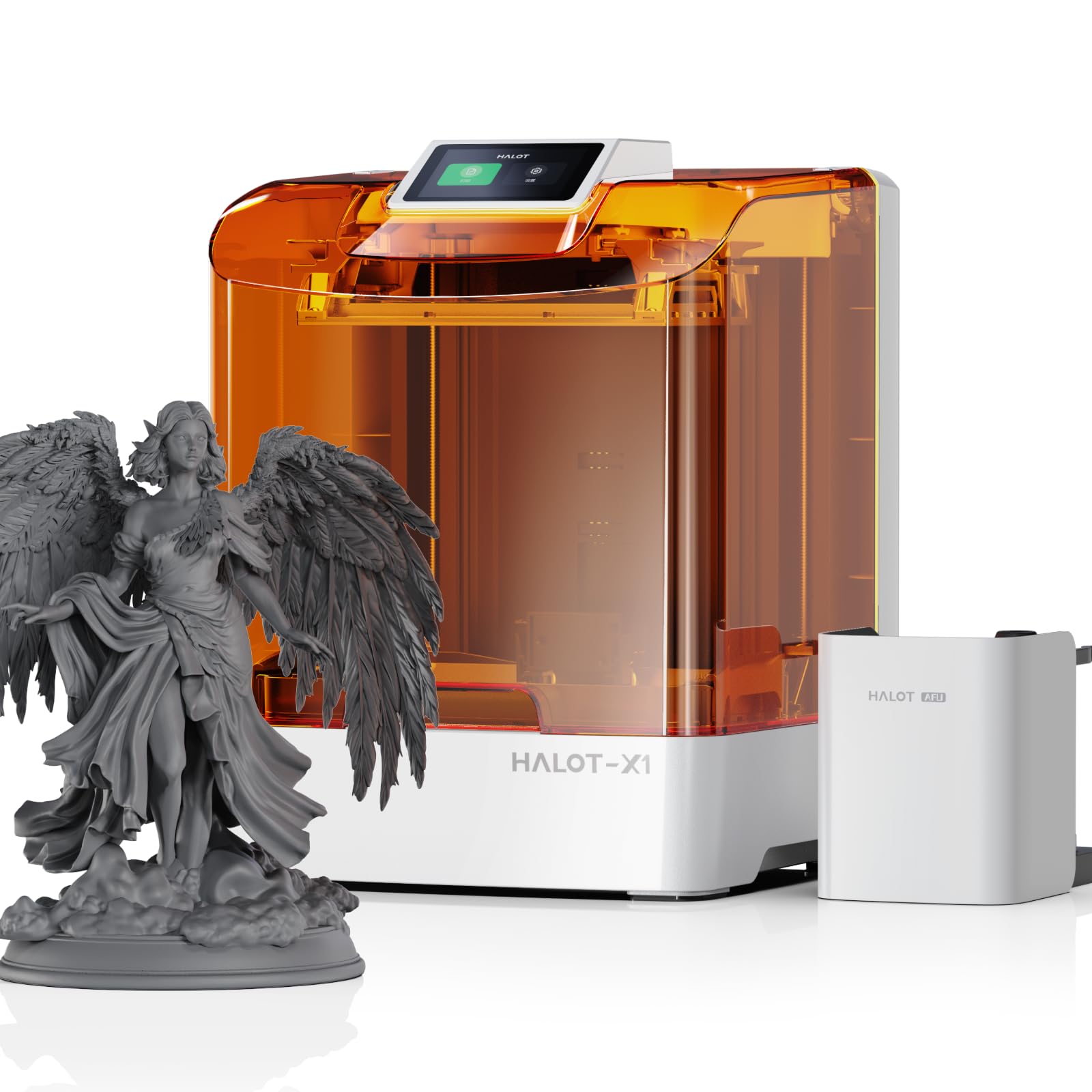
The Creality Halot-X1 Combo pushes resin-based clarity further with a 10.1-inch 16K mono LCD that achieves a pixel size of just 14 x 19 μm — the smallest XY resolution available in a consumer-grade acrylic printer. This pixel density translates to almost invisible layer lines on transparent parts, and the combination of 170 mm/h print speed with the fixed-build-plate design eliminates the levelling drift that can cause banding in clear resins. The build plate does not move during printing; instead, the optical module and vat descend, maintaining sub-micron Z-axis stability throughout the entire 211.68 x 118.37 x 200 mm build volume.
The Intelligent AFU Resin Management System heats the resin to between 30°C and 45°C within three minutes using a ceramic heater, scanning RFID tags on official Creality resin cartridges to auto-load the correct exposure parameters. This closed-loop temperature control ensures that the resin’s viscosity remains stable even in cold workshops, a common cause of inconsistent cure depth in transparent materials. The laser-based residue detection monitors leftover resin weight and triggers an alarm if the tank runs dry mid-print.
The 92-zone independent UV exposure system selectively activates LEDs only where the model requires curing, reducing stray light scatter that could fog adjacent transparent regions. The Halot-X1’s automatic orientation recommendation engine within the slicing software suggests optimal part placement to balance screen wear and minimize support marks on transparent surfaces. Users working with clear castable resins report being able to skip the sanding step for parts under 80 mm tall.
Why it’s great
- Industry-leading 14×19 μm pixel density for ultra-fine clarity
- RFID resin recognition auto-configures exposure settings
- Ceramic resin heating reaches 45°C in 3 minutes
Good to know
- Halot Box slicer has stability issues — may need Chitubox or Lychee as alternative
- Requires thorough firmware update before first use
5. Anycubic Kobra X Multicolor 3D Printer

The Anycubic Kobra X distinguishes itself by integrating native 4-color printing out of the box through its ACE 2 Pro system, which allows purging transparent filament between opaque colors without cross-contamination. This makes it the only mid-range FDM printer that can produce transparent-litography lamps with colored accents without requiring a separate multi-material unit. The hardened steel nozzle rated for 300°C handles clear PETG and polycarbonate without wear, and the 49-point LeviQ 3.0 bed leveling ensures the first layer compresses uniformly — critical for adhesion when using low-tack clear filaments.
At 600 mm/s maximum speed with vibration compensation enabled, the Kobra X can produce a clear calibration cube in approximately 14 minutes, but the real advantage for transparent prints is the ACE 2 Pro’s filament path reduction. The system cuts the filament travel distance by 81.25% compared to bowden-style multi-color setups, reducing the purge volume needed between color changes from 12g to approximately 2g. This minimizes material waste when switching between transparent and opaque materials in the same print.
The top-mount spool holder frees desktop space, and the dual-band 2.4G/5G Wi-Fi with LAN connectivity allows monitoring via the Anycubic app. Users note that the AI camera’s spaghetti detection prevents failed transparent prints from wasting expensive clear filament. The 260x260x260 mm build volume is generous for a printer at this tier, accommodating medium-scale transparent display cases and lamp shades in single pieces.
Why it’s great
- Native 4-color multicolor with minimal filament waste
- 300°C hardened steel nozzle handles clear materials stock
- Large 260mm³ build volume for single-piece transparent designs
Good to know
- ACE 2 Pro not compatible with older ACE Pro units
- Phone app still maturing — occasional connectivity drops
6. Flashforge AD5M 3D Printer

The Flashforge AD5M prioritizes user convenience without sacrificing the thermal performance needed for clear filament printing. Its CoreXY all-metal structure supports 600 mm/s travel speeds and maintains structural rigidity at 0.1 mm layer heights, but the headline feature is the patent quick-release nozzle that swaps in under three seconds — tool-free and with no heat-soak wait. This allows switching between a 0.4 mm nozzle for standard clear PETG and a 0.6 mm nozzle for faster transparent prototypes in seconds, reducing downtime between material changes.
The fully automatic one-click leveling system uses a contact sensor to map the bed at nine points, compensating for warped build plates that would cause uneven first layers on clear materials. The flexible double-sided PEI steel plate provides strong adhesion during printing but can be bent to release finished transparent parts without scraping damage. One side is specifically optimized for PETG, the most common clear filament, with reduced release force to prevent layer delamination.
The Orca-Flashforge slicer supports one-click batch file transmission and multi-printer network monitoring. Users note that the printer operates quietly enough to sit in an office during transparent-print overnight runs. The included start-up guide has users printing within 15-20 minutes of unboxing, and the 220x220x220 mm build volume is adequate for most functional transparent parts like light boxes, display stands, and prototype enclosures.
Why it’s great
- 3-second tool-free nozzle swap for different clear-filament profiles
- CoreXY all-metal frame stays rigid at high speeds for consistent layers
- Double-sided PEI plate with PETG-optimized side
Good to know
- 220mm³ build volume limits large single-piece transparent projects
- Nozzle sizes max out at 0.8 mm, limiting high-flow transparent prints
7. Bambu Lab A1 mini 3D Printer + LED Lamp Kit
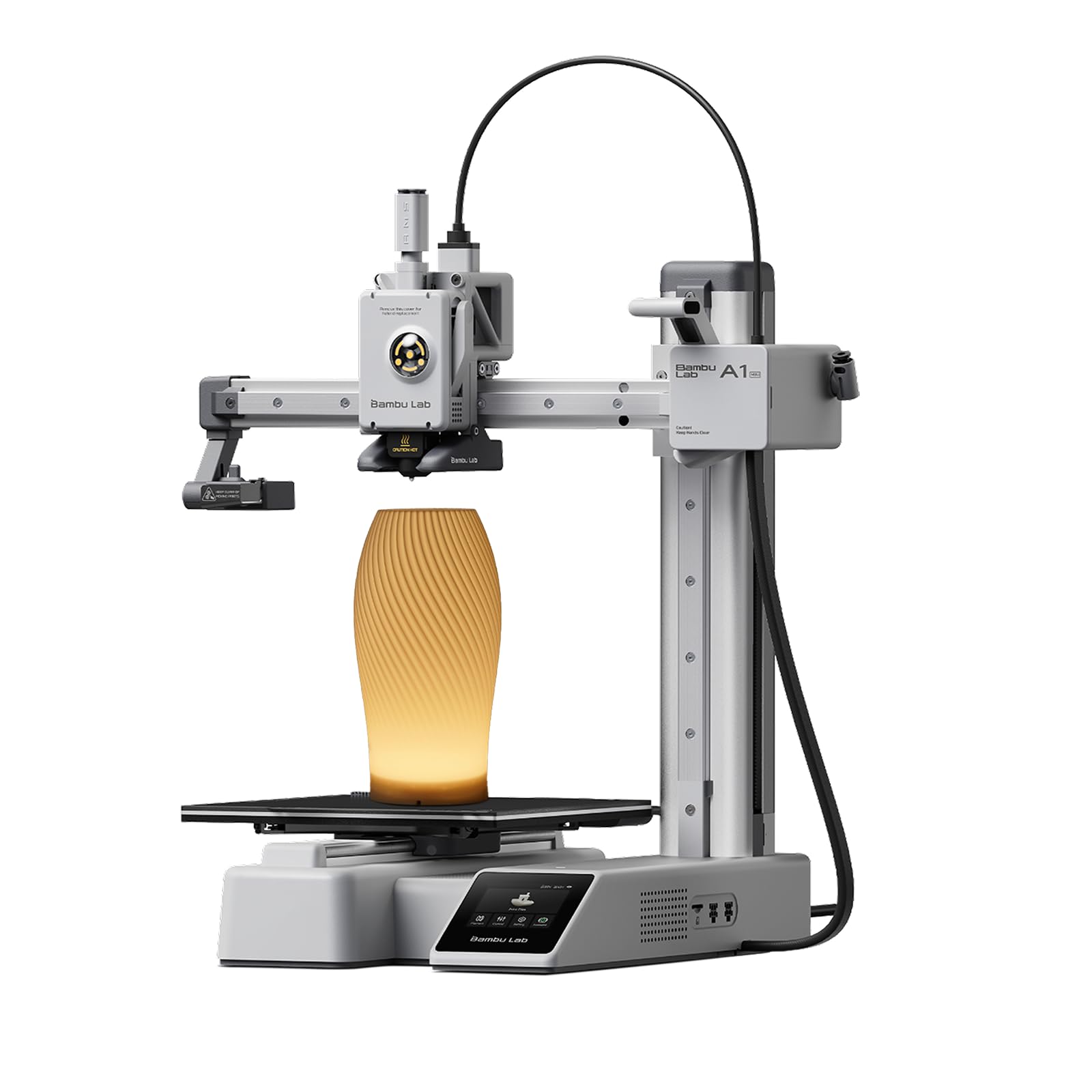
The Bambu Lab A1 mini packs full-auto calibration and active flow rate compensation into a compact frame that operates at or below 48 dB — quiet enough for a bedroom or shared workspace. The Active Flow Rate Compensation system continuously adjusts extrusion during the print, maintaining constant bead width even when printing transparent PETG that tends to be more viscous than standard PLA. This prevents the under-extrusion gaps that create visible voids in translucent parts.
The included LED Lamp Kit is designed specifically for transparent filament applications: the kit provides pre-sliced lamp shade models optimized for 0.16 mm layer height with 15% gyroid infill, producing even light diffusion when printed in clear or translucent material. The entire ecosystem — MakerWorld model library, Bambu Handy app, and cloud connectivity — reduces the learning curve for new users who want to jump straight into printing functional transparent objects without manual profile tuning.
Users highlight that setup takes under 20 minutes from box to first print, and the automatic calibration includes bed mesh leveling, Z-offset, and input shaping in one sequence. The 180x180x180 mm build volume is small but intentional: the printer fits on a standard desk shelf, and the light weight (17.46 pounds) means it can be relocated easily. The A1 mini is best suited for small transparent projects like jewelry displays, miniature light boxes, and educational kits.
Why it’s great
- Active flow rate compensation prevents gaps in transparent layers
- Included LED lamp kit is pre-optimized for clear filament
- Ultra-quiet ≤48 dB operation for overnight prints
Good to know
- Small 180mm³ build volume limits larger transparent projects
- Pre-print calibration is louder than print operation
8. Longer LK5 Pro 3 3D Printer

The Longer LK5 Pro 3 addresses a gap in the budget segment — large-format transparent printing. With a reachable build volume of 300x300x400 mm, it can produce full-size cosplay visors, large light diffuser panels, and tall display cases in a single piece, a capability typically reserved for machines costing nearly twice as much. The open-source 32-bit motherboard with TMC2209 drivers keeps operation quiet while allowing user firmware modifications for fine-tuning temperature profiles specific to clear materials.
The silicon carbide lattice glass platform provides uniform heating across the entire 300×300 mm bed, preventing the cold-edge warping that causes transparent PETG to lift and lose optical alignment. The 180 mm/s maximum speed with 0.1 mm precision is modest compared to CoreXY competitors, but for large transparent parts, the slow, consistent layer deposition reduces internal stress buildup. The filament depletion sensor and auto-resume function are particularly valuable for prints exceeding 24 hours, where a mid-print spool change would create a visible seam in the transparent surface.
Users report that the printer handles PLA, PETG, ABS, and TPU out of the box, with the nozzle rated to 250°C and the heated bed to 90°C — sufficient for clear PETG. The manual bed leveling system with four knobs is functional but requires patience; several users recommend upgrading to a BLTouch for consistent results with transparent filaments. The triangular frame structure with reinforced inclined rods minimizes resonance errors that cause ringing patterns on glossy transparent surfaces.
Why it’s great
- Massive 300x300x400mm build volume for large transparent pieces
- Open-source motherboard allows user-firmware tuning for clear materials
- Auto-resume and filament sensor protect long transparent prints
Good to know
- Manual bed leveling requires patience and periodic re-tuning
- Assembled frame may need user-squaring for optimal Z-axis alignment
9. Phrozen Sonic Mini 8K S LCD Resin 3D Printer

The Phrozen Sonic Mini 8K S offers the lowest entry point into clear resin printing without sacrificing XY resolution. Its 7.1-inch monochrome LCD delivers a 22-micron pixel size, producing transparent parts with smooth surfaces that require minimal post-processing to achieve optical clarity. The compact 6.5 x 2.8 x 6.7 inch build volume is sufficient for small transparent components such as custom jewelry inserts, miniature light guides, and dental prototyping models.
The precise Z-axis calibration system uses a linear ball screw that maintains layer registration within ±0.01 mm, preventing the banding that degrades light transmission in clear resin prints. The printer supports open-source slicers including Lychee, Chitubox, and Tango, giving users flexibility in configuring layer thickness, exposure time, and lift speed for different clear resin formulations. The monochrome LCD provides longer lifespan and faster cure times compared to RGB screens, reducing the per-layer exposure needed for transparent materials by approximately 30%.
Users new to resin printing note that the Sonic Mini 8K S is intuitive to set up, with the build plate arriving pre-leveled from the factory. The printer requires a USB drive for file transfer, which is a minor workflow limitation but ensures network-free operation in sensitive environments. For those wanting to test transparent resin printing without a significant investment, the Sonic Mini 8K S delivers detail and reliability that punch above its entry-level positioning.
Why it’s great
- 22-micron XY resolution produces near-invisible layers on clear resin
- Monochrome LCD extends screen life and cures transparent resin faster
- Open-source slicer support offers flexible exposure tuning
Good to know
- Small build volume limits to smaller transparent parts
- Requires USB file transfer — no direct Wi-Fi or network connectivity
FAQ
What layer height gives the clearest transparent FDM print?
Why do my clear PETG prints turn white and cloudy immediately after printing?
Can I use clear PLA filament for transparent prints?
Does resin printing produce clearer transparent parts than FDM?
Final Thoughts: The Verdict
For most users, the best acrylic 3d printer winner is the Bambu Lab P1S because its enclosed chamber combined with a 300°C-capable hotend and automatic input shaping produces reliably clear PETG and polycarbonate prints without manual tuning. If you want the absolute highest optical clarity for miniature transparent parts, grab the ELEGOO Saturn 4 Ultra 16K with its heated resin tank and 16K LCD. And for a budget-friendly large-format option that can print full-size transparent cosplay pieces, nothing beats the Longer LK5 Pro 3 with its 300x300x400 mm build volume and open-source flexibility.