
Our readers keep the lights on and my morning glass full of iced black tea. As an Amazon Associate, I earn from qualifying purchases.
Specs are compiled from manufacturer listings and verified buyer reviews and can change over time — please confirm the key details on the product page before buying.
An active conversion chip is the only way to connect a newer DVI-D computer to an older VGA monitor. A passive cable only re-wires pins, which fails because DVI-D is digital and VGA is analog. An active adapter contains a chip that translates the digital signal to analog, making these picks work.
I’m Min — the founder and writer behind Gadgets Feed. This guide is built by comparing the manufacturers’ published specifications and the patterns across verified customer reviews, so you get each pick’s real strengths and trade-offs instead of marketing spin.
Before you buy, know this: the picks below use flexible matching, so not every one is the exact model you searched for, but the nearest same-type size or wattage serves the same purpose. What really decides if an active dvi-d to vga adapter works for you is the chip inside, the maximum resolution it supports, and how it handles long cable runs — here is how the top options compare.
Our Picks at a Glance

How To Choose The Best Active DVI-D To VGA Adapter
DVI-D and VGA are fundamentally incompatible formats. DVI-D is digital and VGA is analog, so a passive cable that just connects pins will give you a black screen. The active chip performs the translation, so buying anything without it is a waste of money.
Check the Resolution Ceiling First
Your monitor’s native resolution should match what the adapter can output, or the picture will look soft and blurry. Most of these adapters top out at 1080p for HDTVs, but some also handle PC resolutions up to 1920 x 1200. If you have an older 1920 x 1200 monitor, you want an adapter that explicitly lists that higher number, not just 1080p.
Understand the Cable Length Trade-Off
VGA is analog, so the signal degrades over long cable runs. Some adapters are designed to push a clean signal down a very long VGA cable, but that performance depends on the quality of that cable too. A heavy-duty 50-foot cable might fail while a cheap 3-foot one works perfectly, so keep your total VGA cable run as short as practical.
Check the Pin Configuration
DVI-D connectors come in two flavors: 24+1 (which has a solid flat pin) and 18+1 (which is missing some pins). Your graphics card or laptop likely has the 24+1 layout, but it is worth confirming visually before you order. A wrong pin count means the plug simply will not seat correctly in the port.
Quick Comparison
| Model | Best For | Max Resolution | Power Source | Cable Support | Amazon |
|---|---|---|---|---|---|
| BENFEI Active DVI-D to VGA Adapter★ Best Overall | Value-packed dual setup | 1920 x 1200 @60Hz | Plug & play, no driver | Quad-shielded built-in | Amazon |
| StarTech Active DVI-D to VGA Adapter | Bus-powered portability | 1080p (WUXGA) | DVI bus, USB optional | External VGA (not incl.) | Amazon |
| Tripp Lite P120-06N-ACT | Long VGA cable runs | 1920 x 1200 / 1080p | Micro USB port included | Up to 100 ft | Amazon |
In‑Depth Reviews
1. BENFEI Active DVI-D to VGA Adapter (2 Pack)
Our pick — over 4.5★ from 6,000+ verified ratings; the strongest balance of quality and price.
The two-pack budget king that breathes new life into aging VGA monitors.
You get two adapters for the price of one, so this is the pick if you have an old VGA monitor and a modern desktop. It connects DVI-D desktops and laptops from Lenovo, Dell, HP, and ASUS to VGA displays at PC resolutions up to 1920 x 1200 @60Hz — the higher ceiling sharper PC monitors need. The quad-shielded cable with a PVC jacket prevents the visual static and flicker you get with cheaper unshielded wiring.
What wins people over is pure functionality — it just works, with over 400 owners flagging that it performs as expected. The value equation is strong too, with many noting it saved them from buying a whole new monitor, and the fit earns praise because it doesn’t pull on the existing cable. A separate VGA cable is required and not included, so factor that into your setup before it arrives.
The real limitation hits Linux power users. The adapter caps its advertised EDID (the handshake data your computer reads to learn available resolutions) at 1080p, so forcing 1920 x 1200 on Linux required deep NVIDIA configuration edits like modelines and CustomEDID. For a standard Windows user this is invisible, but if you live in a terminal, expect some tinkering.
What Makes It a Steal
- Two adapters in one box for about the price of one premium unit
- Reaches 1920 x 1200 @60Hz for sharper PC monitors
- Plug-and-play with no driver or software installation needed
- Backed by an exclusive 18-month warranty for confidence
Where It Trips Up
- EDID caps at 1080p, so Linux/NVIDIA users must configure custom modelines for 1920 x 1200
- Requires a separate VGA cable, which is not included
Reach for two-window: This suits dual-monitor newcomers on Windows who want the most bang for the buck and a spare adapter in the drawer.
Look elsewhere if: You run Linux with an NVIDIA card and need 1920 x 1200 without editing config files — the EDID handshake will fight you.
2. StarTech Active DVI-D to VGA Adapter Converter Cable (DVI2VGAE)

The compact converter that doubles your workspace without an extra power brick.
If your goal is a second monitor for more desktop room, this adapter is built around exactly that productivity boost. It converts a standard powered DVI bus straight to VGA, and when the DVI port is low-powered, a bundled USB cable steps in to power the chip — so you are never stuck hunting for a wall outlet. The whole thing is compact with no external power adapter, which keeps your desk footprint minimal.
The build quality is the headline here, with the most owners praising it on that front. Buyers report it has worked reliably for 4+ weeks straight, driving two VGA monitors at 1440×900 and 1280×1024 from a single AMD A8 machine with a simple plug-in setup. There is a tiny quirk where the second monitor wakes about 2.5 seconds slower after sleep, but that is a small price for a setup that otherwise just behaves.
Image quality is a mixed bag for a minority. Some owners mention a “blatant green tint” on grays and blacks that made output almost unusable for color-sensitive work, while others call the quality wonderful. One owner who tested three adapters on a GTX 760 and VGA KVM found this one gave the crispest picture at 1920×1080, though it still had the KVM handshake quirk all three shared — the root cause turned out to be Windows HDCP polling, not the adapter.
StarTech claims 1080p (WUXGA) support, meaning the max PC resolution is 1920 x 1200, but the physical dimensions of 8.66 x 7.87 x 1.18 inches are more spread out than the Tripp Lite’s 6 x 4.8 x 5.3 inches — so it is less a pocket dongle and more a small cable. The included Micro-USB to USB cable is your fallback power source when the DVI bus alone runs weak.
Why It Earns Its Spot
- Bus-powered design means no wall adapter needed for most DVI ports
- USB power cable included as a backup for low-powered ports
- Compact footprint that keeps your desk uncluttered
- Rated for 1080p (WUXGA) for full HD VGA displays
The Trade-Offs
- Minor color tint issues reported on some units for grays and blacks
- Second monitor wakes roughly 2.5 seconds slower after sleep
- Three-way mixed feedback on image quality and compatibility
Grab it if: You want a reliable, bus-powered dual-monitor setup for a standard Windows desktop and do not need long cable runs.
Think twice if: You are doing color-critical work where a green tint on grays would be a dealbreaker, or you rely on a KVM switch.
3. Tripp Lite P120-06N-ACT DVI-D to VGA Active Adapter
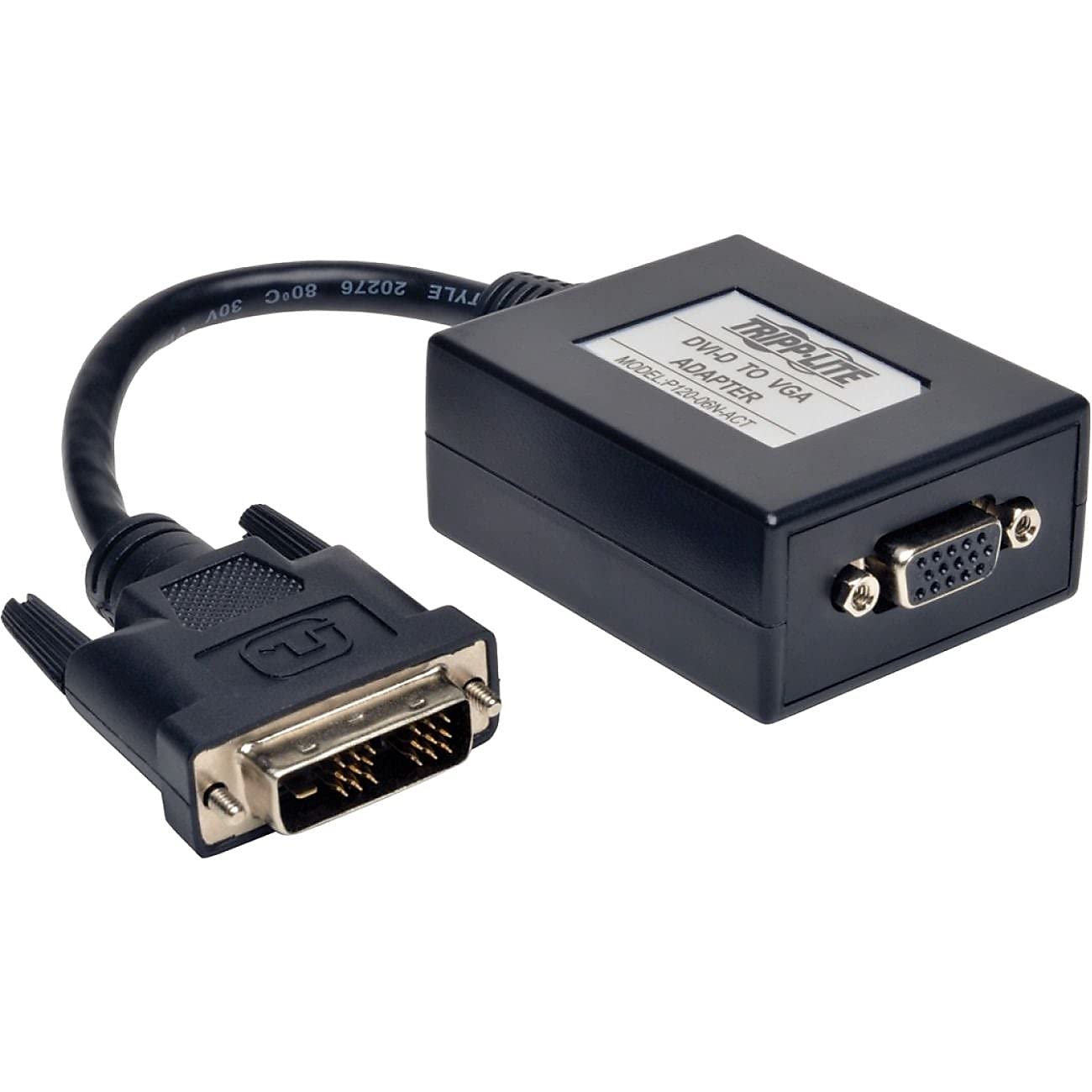
The premium converter engineered for very long VGA cable runs across a room.
This is the adapter you reach for when your monitor sits far from the computer, because it is explicitly rated to support VGA cables up to 100 feet. It converts a DVI-D digital signal to VGA analog and handles computer resolutions up to 1920 x 1200, or HD up to 1080p. A Micro USB port is included for applications where external power is needed to keep that long signal strong.
The long-run reliability is the defining trait — customers note it replaced a faulty adapter that was causing blue screens, and now delivers a stable signal with a 100-foot VGA cable and USB power with zero drops since. It also solved a DVI to VGA dual monitor problem that other adapters had failed at, thanks to the correct 18+1 pin configuration. The catch is that the box is visibly bulkier than a simple dongle, which is the price of housing the digital-to-analog conversion circuitry.
The honest limitation concerns cable quality: a heavy-duty 50-foot VGA cable produced nothing but a black screen with this adapter, while a cheap 3-foot cable worked flawlessly. That means the 100-foot rating assumes a decently shielded, properly terminated cable — a heavy industrial cable can still fail. Pair this with a quality VGA cable of moderate gauge and you will get the long-run performance you paid for.
Where It Excels
- Rated for VGA cables up to 100 ft, ideal for large rooms or projectors
- Micro USB port included for powered, stable long-run signals
- Supports both 1920 x 1200 PC and 1080p HD resolutions
- Solved dual monitor issues after multiple other adapters failed
Know Before You Buy
- A heavy-duty 50 ft cable produced a black screen, while a cheap 3 ft cable worked fine
- Bulky box design takes up more space than a compact dongle
Built for the long haul: This suits anyone running a projector or second monitor more than 25 feet from the computer with a quality VGA cable.
Not for you if: You plan to use a heavy industrial-grade cable, or you need a tiny, unobtrusive dongle for a laptop bag.
Understanding the Specs
Active Chip vs. Passive Cable
The single spec that decides everything is whether the adapter has an active conversion chip. DVI-D is digital and VGA is analog, so a passive cable that only routes pins will give you a black screen. An active adapter contains a chip that translates the digital stream into an analog signal the VGA monitor can display. If a listing does not say “active,” it is almost certainly a passive cable that will not work for this conversion.
EDID and Resolution Handshake
EDID is the small block of data your graphics card reads to learn what resolutions the attached display supports. A good adapter passes the monitor’s true native resolution through, so a 1920 x 1200 monitor shows full sharpness. Some budget adapters cap their EDID at 1080p, which forces you to manually override the resolution in your graphics driver — a headache on Linux, and invisible on Windows.
FAQ
Will a plain passive DVI-D to VGA cable work for me?
What is the difference between DVI-D 24+1 and 18+1?
Can I get 1920 x 1200 resolution from one of these adapters?
Why does my adapter need USB power?
How long can my VGA cable be before the signal degrades?
Is this adapter compatible with my Mac or Linux machine?
Why do I see static or a green tint on my display?
Can I use one of these adapters with a KVM switch?
Do I need to install any drivers for these adapters to work?
Final Thoughts: The Verdict
For most people, the best active dvi-d to vga adapter is the BENFEI 2-Pack because it pairs the highest practical resolution ceiling of 1920 x 1200 with a second backup adapter and an 18-month warranty. If you need a bus-powered, minimal-footprint solution for a standard desktop, the StarTech DVI2VGAE is the reliable middle-ground performer. And for a long cable run across a room or to a projector, the Tripp Lite P120-06N-ACT with its 100-foot cable rating is the one to reach for — just pair it with a quality VGA cable.
How We Picked
We do not accept paid placement. Every pick is matched to a real buyer and a real use-case; we do not hands-on test units.
Sources & Methodology
Specifications: manufacturer listings and product documentation. Review insights: verified customer reviews, as of August 2026. Pricing: not shown on this page (it changes often); check the current price via the retailer link.
As an Amazon Associate, Gadgets Feed earns from qualifying purchases. This does not affect which products we feature.