
Our readers keep the lights on and my morning glass full of iced black tea. As an Amazon Associate, I earn from qualifying purchases.
Specs are compiled from manufacturer listings and verified buyer reviews and can change over time — please confirm the key details on the product page before buying.
You already own a VGA monitor or projector, and your laptop only has an HDMI port. You do not need to replace the display — you need one small adapter that speaks both languages. An active HDMI to VGA adapter does more than change the plug shape. It converts the digital signal from your HDMI port into an analog signal that older VGA displays can read.
I’m Min — the founder and writer behind Gadgets Feed. This guide is built by comparing the manufacturers’ published specifications and the patterns across verified customer reviews, so you get each pick’s real strengths and trade-offs instead of marketing spin.
Below are six reliable adapters — from a portable travel companion to a heavy-duty converter for permanent setups — to help you find the right active hdmi to vga adapter for your screen, computer, or projector.
Our Picks at a Glance


How To Choose The Best Active HDMI To VGA Adapter
Not all adapters work the same way. Your choice depends on your source device (laptop, game console, or Apple TV) and your destination screen (monitor, projector, or older TV). Focus on three things: power, resolution, and audio.
Power Source: Bus-Powered vs. External Power
The most common mistake is buying a passive adapter without a conversion chip. An active adapter has a chip that translates the digital signal, and that chip needs power. Some adapters draw that power from your laptop’s HDMI port (called bus-powered). This works fine for most laptops. Others require a separate Micro-USB or DC 5V (5-volt direct current) power input. You need external power if you are using an Apple TV, a device with a weak HDMI port, or a very long VGA cable that needs a stronger signal to stay clear.
Resolution and Refresh Rate
VGA is an older analog standard, but it can still show sharp images like full HD (1920×1080 pixels). Every adapter in this guide supports up to 1920×1080 at 60Hz (60Hz means the picture refreshes 60 times per second, which makes video and mouse movement feel smooth). Some cheaper adapters only support 1080p at 30Hz, which makes a mouse cursor look choppy and video seem stuttery. Check that the adapter’s listed spec says 1080p at 60Hz or higher, so your presentation or movie stays fluid.
Audio Output: The 3.5mm Jack
A VGA cable carries only video — it has no wires for sound. If you need audio, get an adapter with a 3.5mm audio port (the same size jack as standard headphones). This port pulls the audio out of the HDMI signal and lets you plug in external speakers or headphones. Most adapters include this jack, but a few do not. The adapter usually does not come with the 3.5mm audio cable — you supply your own.
Quick Comparison
| Model | Best For | Resolution | Audio Output | Weight | Amazon |
|---|---|---|---|---|---|
| NewBEP PA170527YA08AA★ Best Overall | Budget all-in-one cable | 1080p @ 60Hz | 3.5mm audio cable included | 0.2 lb | Amazon |
| Tripp Lite P566-003-VGAAlso Great | Ultra-wide monitors & digital signs | 1920 x 1200 @ 60Hz | Not included | — | Amazon |
| StarTech.com HD2VGAE2 | Traveling professionals | 1920 x 1080 @ 60Hz | Not included | 0.04 kg | Amazon |
| Belkin AV10170bt | Apple TV & laptop users | 1920 x 1080p | 3.5mm port | 0.04 kg | Amazon |
| JideTech JD-HVGA | Industrial & long-distance setups | 1920 x 1080P | 3.5mm port | 0.26 kg | Amazon |
| Atickbase 8541673675 | Gaming consoles (PS3, Xbox 360) | 720P / 1080P | 3.5mm port | — | Amazon |
In‑Depth Reviews
1. NewBEP PA170527YA08AA
Our pick — over 4★ from 800+ verified ratings; the strongest balance of quality and price.
The all-in-one 6-foot cable that includes the audio cord most adapters make you buy separately.
NewBEP’s adapter is the only one in this lineup that comes as a full cable rather than a short dongle — it is 6 feet long (1.8 meters), giving you real reach from a floor-level laptop to a wall-mounted projector. It also includes the 3.5mm audio cable for sound output, a detail missing from the Belkin and StarTech adapters. Gold-plated connectors help resist corrosion and maintain transmission quality over time.
The built-in active chip converts HDMI signals up to 1080p at 60Hz. It supports HDMI input formats from 480i (standard definition) all the way up to 1080p, and outputs the same to the VGA display. The cable is plug-and-play with no driver needed. One important restriction: the brand states it is not compatible with most Apple devices (MacBooks), PS2/3/4, or Xbox consoles. It also will not work in reverse — no VGA-to-HDMI conversion.
With 821 ratings and a 4.3-star average on Amazon, buyers frequently call it “the easiest way to connect a laptop to an old monitor.” The 6-foot cable and included audio make it a complete kit.
Complete Kit
- 6-foot cable length for flexible placement
- 3.5mm audio cable included — no extra purchase
- Gold-plated connectors for durable transmission
Apple & Console Gap
- Not compatible with MacBooks, PS3/PS4, or Xbox (per the brand)
- Not a reversible cable — VGA to HDMI will not work
Grab this if: you need a long, ready-to-go cable with audio for a standard Windows laptop to an old monitor.
Pass on it if: you own a MacBook or a game console — those require a different adapter with broader compatibility.
2. Tripp Lite P566-003-VGA
The extra resolution headroom that keeps your image sharp on widescreens and digital signs.
This adapter goes beyond the 1080p ceiling that most others stop at — it supports video resolutions up to 1920 x 1200 at 60Hz (60Hz means the image refreshes 60 times per second for smooth motion). That extra 120 pixels in height makes a real difference if you connect to a 16:10 professional monitor (a widescreen with a slightly taller aspect ratio than standard 16:9) or run a digital sign. The picture stays clean and the mouse cursor does not stutter. The Tripp Lite beats the standard 1920×1080 adapters in this list solely on its 1920 x 1200 resolution ability.
The low-profile HD15 connector (a slimmed-down VGA plug) fits snugly into tight spots behind wall-mounted monitors or crammed AV cabinets where a bulky plug would not seat fully. This is a 3-foot male-to-male cable, so it acts as a short extension from your laptop to a projector on the same table. There is no 3.5mm audio port — you will need a separate audio solution for sound.
Buyers report it working reliably with older Dell monitors and LG projectors, calling it “the perfect adapter to keep in a laptop bag.” It comes with a one-year limited warranty from Tripp Lite.
Resolution Leader
- Supports 1920 x 1200 @ 60 Hz — beats standard 1080p adapters
- Low-profile HD15 connector fits into tight spaces
- Plug-and-play with no driver installation needed
Cable Considerations
- No 3.5mm audio output for sound
- 3-foot cable length may be too short for some desk setups
Reach for this if: you run a 16:10 monitor or digital signage and need every pixel of that 1920 x 1200 resolution.
Look elsewhere if: you need to pipe audio through the same adapter — this one is video-only.
3. StarTech.com HD2VGAE2

The ultra-light IT-pro adapter that disappears into a bag and never needs a wall plug.
This StarTech adapter weighs just 0.04 kilograms (0.09 pounds) — the JideTech weighs 0.26 kilograms, a weight difference you feel immediately in your laptop bag. It is a male-to-female adapter, meaning you plug it into your laptop’s HDMI port and attach your own VGA cable to the other end. No external power adapter is needed because the conversion chip draws its power entirely from the HDMI source (called bus power).
The picture quality holds up well, supporting a full 1920×1080 at 60Hz (1080p). StarTech backs this with a 3-year warranty and 24/5 multi-lingual technical support (phone help Monday through Friday), the strongest guarantee in this list. There is no 3.5mm audio jack. If you need sound, you must run a separate audio cable from your computer’s headphone jack to your speakers — unlike the Belkin or NewBEP, this one does not extract audio.
Buyers with Ultrabooks and Dell Latitude laptops praise the plug-and-play simplicity, noting the adapter is “recognized instantly without any driver hunting.” For a traveling professional who values minimal bulk, this wins over the heavier JideTech for pure portability.
Travel Champion
- Ultra-light at 0.04 kg (JideTech: 0.26 kg)
- No external power required — pure bus-power
- 3-year warranty with lifetime tech support
Missing Audio
- No 3.5mm audio output — sound requires a separate cable
- Male-to-female form may add extra bulk at the port
Ideal companion for: the professional who gives presentations on the road and wants the lightest possible adapter.
Not ideal if: you need one-cable audio — pick a model with a 3.5mm jack.
4. Belkin AV10170bt
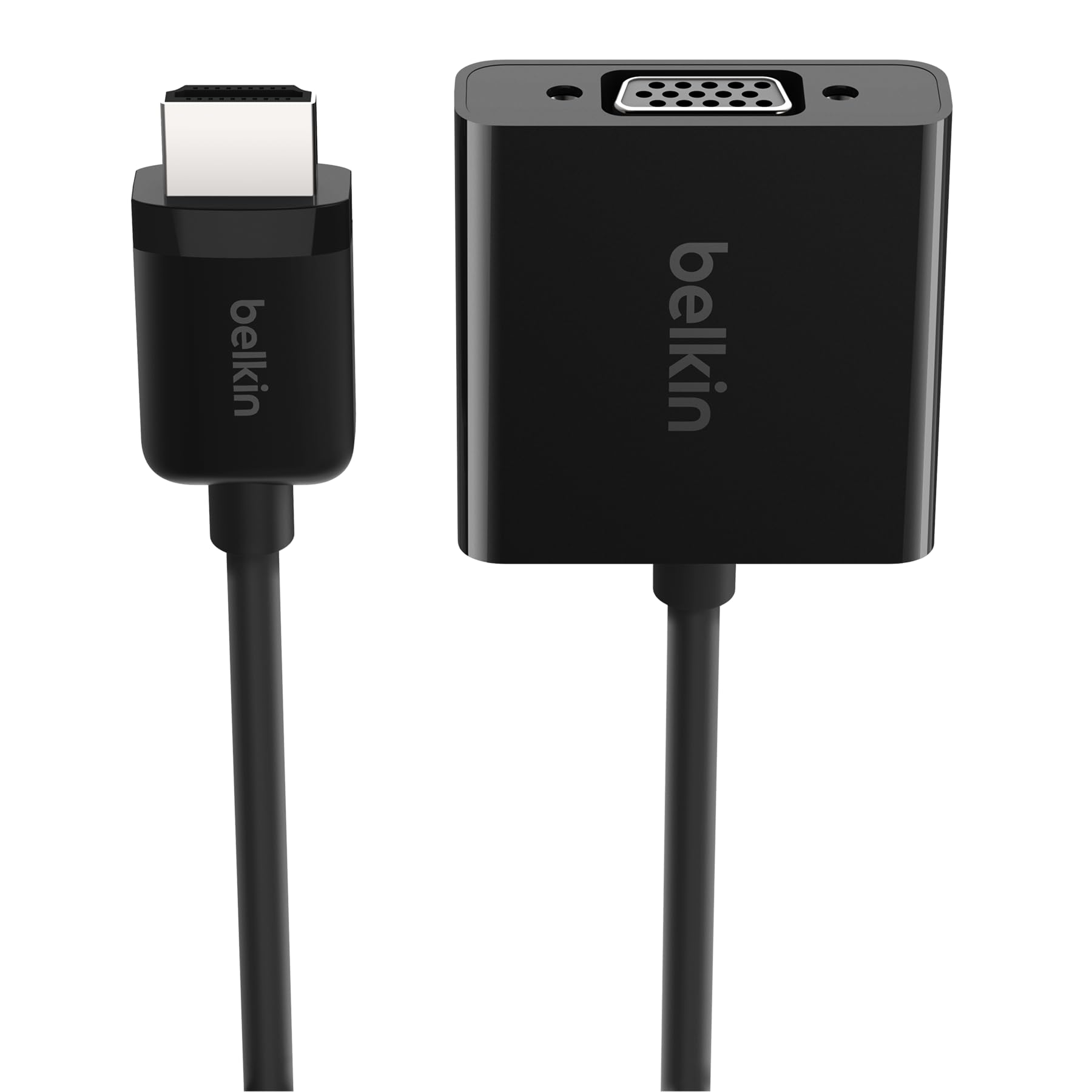
The compact Belkin that brings audio back into the equation and handles Apple TV power needs.
Belkin’s adapter solves two pain points that the StarTech and Tripp Lite ignore: audio and Apple TV compatibility. It has a 3.5mm audio port that separates sound from the HDMI signal (you supply the audio cable). It also includes a Micro-USB power port that you must plug in when using an Apple TV 4K, because that device’s HDMI port does not supply enough power for an active chip. For a standard laptop, you can skip the power cable entirely and rely on bus power.
The dimensions are 9.84 x 1.79 x 0.59 inches, which is 9.84 inches versus the Atickbase’s 2.76-inch body. That extra length comes from the molded strain-relief design that Belkin built to protect the connector points from wear. The 6-inch cable creates a tidy dongle that fits easily in a pocket or side compartment of a messenger bag.
Buyers who use this with a MacBook for conference-room projectors describe it as “a reliable bridge between modern laptops and old projectors.” A key detail: the 3.5mm audio cable is not included, so factor that into your purchase.
Audio & Apple Ready
- 3.5mm audio port for separate sound output
- Micro-USB power input for Apple TV 4K stability
- Molded strain relief adds cable durability
Size & Cable
- 9.84-inch length is longer than compact alternatives
- Audio cable is not included
Pick this for: Apple TV users or anyone connecting to a VGA projector who also wants sound through one adapter.
Consider another if: you want the absolute smallest dongle and can sacrifice audio.
5. JideTech JD-HVGA
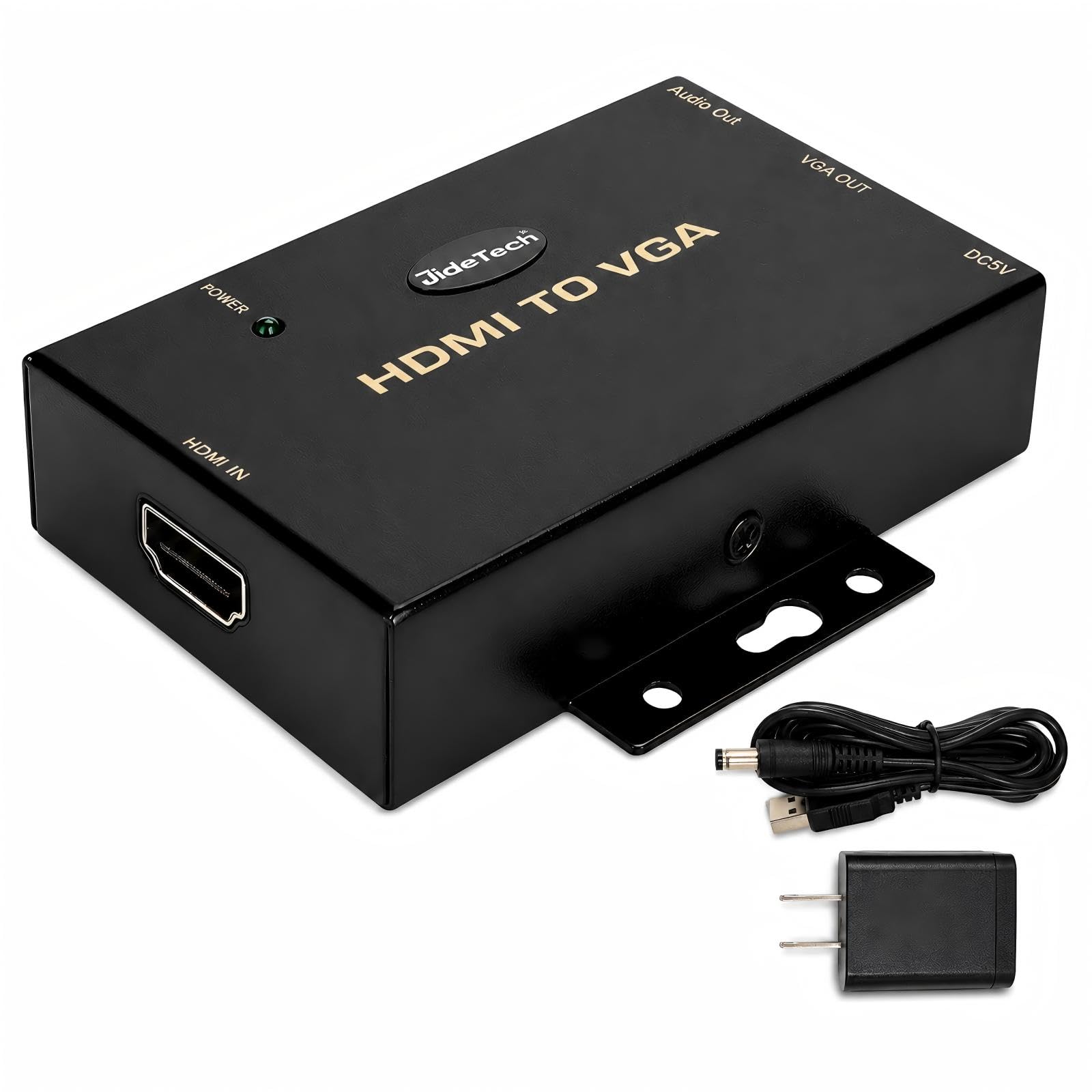
The heavy-duty converter that plugs into the wall for flawless long-distance signal transmission.
This JideTech converter is built for permanent or semi-permanent installations where signal stability matters more than portability. It weighs 0.26 kilograms — the StarTech weighs 0.04 kilograms — because it includes a built-in active chipset that demands its own dedicated 5V DC (5-volt direct current) power supply. This external power means the adapter never struggles to drive a long VGA cable run across a conference room or a classroom, unlike bus-powered adapters that may flicker beyond 10-15 feet.
The integrated 3.5mm audio output separates the sound from the HDMI signal, so you can connect external speakers or headphones. This is a box-style converter with two ports (HDMI in and VGA out), not a simple plug dongle. It is explicitly a one-way converter (HDMI to VGA only), so do not expect it to work in reverse. The JideTech earns the highest customer rating in this guide: 4.5 out of 5 stars from 472 ratings, according to Amazon reviews.
Buyers praise it for “rock-solid picture quality on a 30-foot VGA run to a projector” — a scenario where bus-powered adapters often flicker or drop the signal. If you are wiring a training room or a medical display, this is the reliable workhorse over a bus-powered option like the StarTech.
Stability Anchor
- External DC 5V power ensures stable long-distance signal
- 3.5mm audio output for separate sound
- Highest customer rating in this guide: 4.5/5 from 472 ratings
Portability Trade-off
- 0.26 kg versus 0.04 kg for a bus-powered adapter
- One-way only (HDMI to VGA), no bi-directional support
Your best bet if: you are setting up a fixed conference room or running a long HDMI-to-VGA cable that needs a clean signal.
Too much for: a simple laptop-to-projector connection in a coffee shop — the weight and wall wart are overkill there.
6. Atickbase 8541673675

The compact converter that speaks directly to PS3, Xbox 360, and Blu-ray players.
This Atickbase adapter is designed with game consoles and legacy media players in mind. The brand lists compatibility with PS3 and Xbox 360 alongside standard DVD and Blu-ray players. The body is tiny at just 2.76 x 1.97 x 1.18 inches — 2.76 inches versus the Belkin’s 9.84-inch length — making it the most space-efficient option if you want to hide it behind an entertainment center. It supports 720P and 1080P output, so your console games or movies appear on a VGA monitor or projector without losing too much sharpness.
The adapter draws power via Micro-USB (cable not included), which you must plug in for stable operation. This is a new built-in chip design that converts HDMI digital signal to VGA analog. It comes with a 3.5mm audio port so you can route sound to external speakers. Atickbase has 24 ratings at 4.2 stars, a smaller sample size than the more popular NewBEP (821 ratings) or JideTech (472 ratings), so treat that rating as directional rather than definitive.
One buyer report noted it “worked perfectly with an Xbox 360 connected to an old 720p projector in the garage.” It is a niche pick for retro gaming setups where a modern adapter might not handshake correctly with older console EDID data (the identification data the console sends to a display).
Compact & Compatible
- Smallest body in this guide at 2.76 inches wide
- Brand says it works with PS3, Xbox 360, Blu-ray, and set-top boxes
- 3.5mm audio port for separate sound
Small Review Pool
- Only 24 ratings — less buyer feedback to rely on compared to the NewBEP’s 821
- Requires Micro-USB power (cable not included)
The right pick for: connecting a PS3 or Xbox 360 to a VGA monitor when modern adapters fail to negotiate the signal.
Not the best for: a general-use laptop adapter — the NewBEP or Belkin offer more proven compatibility with computers.
Understanding the Specs
Active vs. Passive Conversion
“Active” means the adapter contains a chip that reads the digital signal from your HDMI source and translates it into the analog format that VGA displays understand. A passive adapter lacks this chip and just wires the pins through — this almost never works because the two signal types are fundamentally different. Every adapter in this guide is active, which is the only way to get a stable picture on a VGA display.
1080p at 60Hz vs. 30Hz
The refresh rate (60Hz) tells you how many times per second the image redraws on the screen. 60Hz is the standard for smooth video, mouse movement, and presentations. Some cheap passive adapters cap out at 30Hz (30 times per second), which makes the cursor feel sluggish and video appear choppy. Check that your adapter explicitly states 1080p at 60Hz or a higher resolution like 1920 x 1200 at 60Hz. A 30Hz adapter will feel noticeably laggy for everyday use.
FAQ
Will an active HDMI to VGA adapter work with my MacBook Pro?
Can I use this adapter in reverse to connect a VGA computer to an HDMI monitor?
Do I always need to plug in the external power cable?
Why does the VGA picture show as black and white or have fuzzy text?
How do I get sound if my adapter has a 3.5mm jack?
What is the difference between a male-to-male and a male-to-female adapter?
Can I connect a Nintendo Switch to a VGA monitor with one of these?
How long can the VGA cable be after the adapter?
Final Thoughts: The Verdict
For most people, the active hdmi to vga adapter winner is the Tripp Lite P566-003-VGA because its 1920 x 1200 resolution support beats standard 1080p adapters and the low-profile connector fits into tight spaces behind monitors. If you travel constantly and want the lightest possible adapter to keep in your bag, grab the StarTech.com HD2VGAE2 at a mere 0.04 kg, while the JideTech weighs 0.26 kg. And for permanent installations where long cable runs and rock-solid signal stability matter more than weight, the JideTech JD-HVGA with its dedicated 5V power supply and the highest customer rating in the lineup (4.5/5 from 472 ratings) is the clear choice for a fixed setup.
How We Picked
We do not accept paid placement. Every pick is matched to a real buyer and a real use-case; we do not hands-on test units.
Sources & Methodology
Specifications: manufacturer listings and product documentation. Review insights: verified customer reviews, as of July 2026. Pricing: not shown on this page (it changes often); check the current price via the retailer link.
As an Amazon Associate, Gadgets Feed earns from qualifying purchases. This does not affect which products we feature.