
Our readers keep the lights on and my morning glass full of iced black tea. As an Amazon Associate, I earn from qualifying purchases.
Specs are compiled from manufacturer listings and verified buyer reviews and can change over time — please confirm the key details on the product page before buying.
Adding a second screen to your laptop is the single biggest productivity move you can make. That constant Alt+Tab shuffle between emails, spreadsheets, and browser tabs? Gone. You just glance over. But not all monitors pair well with a laptop — some need a wall outlet nearby, others rely on a single USB-C cable, and a few are built to travel in your backpack. The right choice depends on how you work and where you work.
I’m Min — the founder and writer behind Gadgets Feed. This guide is built by comparing the manufacturers’ published specifications and the patterns across verified customer reviews, so you get each pick’s real strengths and trade-offs instead of marketing spin.
We looked at screen size, resolution, connectivity, and portability to find the best fits for every workflow. Meet the top additional monitor for laptop options that actually make your laptop feel like a full workstation.
Our Picks at a Glance



How To Choose The Best Additional Monitor For Laptop
Picking a monitor for your laptop hinges on one question: will it live on a desk or move with you? Desktop monitors give you bigger screens and better ergonomics for a fixed setup. Portable monitors trade size for weight and a single-cable connection that lets you work from a coffee shop or a co-working space. The table below helps you scan the key differences, but start with your daily routine before you look at any spec.
Connectivity: USB-C Is The Master Key
A monitor that connects through a single USB-C cable handles both video and power — your laptop stays charged while you see your second screen. This reduces cable clutter to almost nothing. If your laptop has a full-featured USB-C port (check for the DisplayPort Alt Mode symbol), a monitor like the Dell 27 Plus 4K with its 65W power delivery turns one cable into your entire desk. Without that port, you will need an HDMI cable plus a separate USB-A power line, which adds one extra wire on your desk.
Portability: Weight And Thickness Matter
A portable monitor is only useful if you actually carry it. Look for a unit under about two pounds and under half an inch thick so it slides into a laptop sleeve. The Lenovo L15 clocks in at “just under two pounds,” while the UPERFECT OLED is a remarkable 1.29 lbs and just 0.12 inches at its slimmest point. If you never leave your desk, skip the portable category entirely — a 24-inch or 27-inch desktop panel gives you more screen real estate for the same or less money.
Resolution And Panel Type: What Your Eyes Notice First
Resolution directly affects how sharp text and images look. A 1080p (Full HD) screen is perfectly fine for email, spreadsheets, and web browsing, but on a 27-inch panel the pixels become visible, making text look slightly grainy compared to your laptop’s Retina or HiDPI display. For that reason, a 4K screen (3840 x 2160) like the Dell 27 Plus is a much better match for a modern laptop. Panel type matters for color and viewing angles: IPS panels give consistent color from any angle and are the standard for reliable work. OLED panels deliver true blacks, infinite contrast, and vivid colors that make photos and movies pop, but they cost more and are mainly found in premium portable monitors like the ViewSonic VX1655-4K-OLED.
Refresh Rate: Beyond Gaming
A 60Hz monitor updates the image 60 times per second, which suits every office task. Higher refresh rates — 120Hz or 144Hz — make cursor movement, scrolling, and window dragging feel noticeably smoother and more responsive. The Dell 24 Monitor – SE2426H runs at 144Hz with a 1ms response time, which also makes it a solid companion for casual gaming on a laptop. For pure productivity, 60Hz is enough, but once you use 120Hz for daily work, 60Hz feels sluggish by comparison.
Quick Comparison
| Model | Best For | Resolution | Connectivity | Panel Type | Amazon |
|---|---|---|---|---|---|
| ASUS ZenScreen MB16ACV★ Best Overall | Lightweight Travel Productivity | 1920 x 1080 | USB-C & USB-A | IPS | $162.38$209.00Amazon |
| ASUS ProArt PA247CVColor-Pro Grade | Color-Accurate Desk Work | 1920 x 1080 | USB-C (65W PD), HDMI, DP | IPS | $179.00$239.00Amazon |
| Dell 27 Plus 4K S2725QCDesk Hub | Premium Single-Cable Desk Setup | 3840 x 2160 | USB-C (65W PD), 2x HDMI | IPS-LED | $314.99$349.99Amazon |
| UPERFECT OLED 14″ 3K | Portable Gaming & Creative Work | 2880 x 1800 | USB-C, mini HDMI | OLED | from $279.99Amazon |
| ViewSonic VX1655-4K-OLED | Ultra-Portable 4K Mobile Screen | 3840 x 2160 | USB-C (60W PD), mini HDMI | OLED | $499.93Amazon |
| SOTSU FlipAction Pro 16″ Gen 2 | Premium Portable for MacBook Pros | 2560 x 1600 | USB-C, mini HDMI | IPS-LCD | $599.00Amazon |
| Lenovo L15 Portable Monitor | Value Portable with Built-in Stand | 1920 x 1080 | 2x USB-C | IPS-LED | $149.99$239.99Amazon |
| Laptop Screen Extender DZVW 14″ | Budget Dual-Screen Travel Setup | 1920 x 1080 | USB-C, HDMI, USB-A | IPS-LCD | from $219.99Amazon |
| Dell 24 Monitor SE2426H | Budget Desk Companion | 1920 x 1080 | 2x HDMI | IPS | $99.99Amazon |
In‑Depth Reviews
1. ASUS ZenScreen MB16ACV 15.6 Inch Portable Monitor
Our pick — 4.5★ from 950+ verified ratings; the strongest balance of quality and price.
The portable monitor that trades a separate power cord for one-cable simplicity.
The defining feature here is the single hybrid-signal USB-C that carries both power and video, so there is no separate power adapter to pack. At under 3 lbs with a 1080p 60Hz IPS panel and an anti-glare surface, it is purpose-built for business trips and coffee shop work sessions. Buyers report it is “dream come true for minimalists” and that the included carry sleeve protects it well inside a backpack. The kickstand props it up in both portrait and landscape modes, and it even stands well on uneven surfaces like a bed or your lap.
The anti-glare surface is a real advantage over glossy portable monitors when working near a window or under overhead lights. ASUS includes TÜV Rheinland-certified Flicker-free and Low Blue Light technologies to reduce eye strain during long sessions — a feature the Lenovo L15 matches with its flicker-free backlight. The 3-year warranty adds confidence for frequent travelers.
The main limitation: your laptop needs a USB-C port with DisplayPort Alt Mode. Without it, you will need to install a DisplayLink driver for compatibility. A few buyers also note that desktop USB-C ports often do not work with it, and that it is not suitable for gaming. Brightness is not specified in the data, but reviewers describe the picture as “clear, but not 4K clear.”
What Stands Out
- Single USB-C cable handles power and video — no separate power brick to carry.
- Anti-glare surface reduces reflections in bright environments.
- Lightweight at under 3 lbs with a protective carry sleeve included.
What Holds It Back
- Requires USB-C with DisplayPort Alt Mode or a DisplayLink driver.
- 1080p resolution looks fine for productivity but not as sharp as 4K options.
- Not suited for gaming due to the 60Hz refresh rate and higher latency.
Ideal for: minimalists and frequent business travelers who want the lightest possible setup with the fewest cables.
Pass on it if: your laptop lacks a full-featured USB-C port or you need a sharper, higher-resolution display for creative work.
2. ASUS ProArt Display PA247CV
The 24-inch desktop monitor that treats color accuracy as a baseline, not a bonus.
If you work with photos, design layouts, or video timelines, the panel’s factory calibration is the headline. It covers 100% sRGB and 100% Rec. 709 color spaces, and it is Calman Verified with a Delta E of less than 2 — meaning the colors you see are the colors the file actually contains, right from the start. Buyers report that after two years of daily use theirs had no dead pixels and the color held up, with one photographer saying it replaced a much more expensive Eizo and does “exactly what I need” for retouching.
The USB-C port delivers 65W of power to your laptop, so a single cable handles display, charging, and data through its built-in USB 3.1 hub. Unlike the Lenovo L15 which relies on two basic USB-C ports, the ProArt includes a full set of DisplayPort, HDMI, and a 3.5mm audio jack for a cleaner permanent desk. One catch some buyers flagged: there is no included calibration software — you will need a separate calibration device like a Spyder to maintain that accuracy over time.
The 75Hz refresh rate is a small step above the standard 60Hz, making cursor movements feel just a bit snappier during long editing sessions. The included stand supports tilt, swivel, pivot, and height adjustment, which the Dell 24 Monitor SE2426H lacks entirely.
Where It Excels
- Factory calibrated Delta E < 2 color accuracy for photo editing.
- USB-C with 65W power delivery charges your laptop while it runs the display.
- 5-year warranty (3 years plus 2 with registration).
Fair Warning
- 1080p resolution can look slightly grainy on a 24-inch panel next to a Retina MacBook.
- No calibration software included — needs a third-party device for long-term accuracy.
- Integrated speakers are only useful for system sounds, not music or video.
Reach for it if: you edit photos or design layouts and need dependable, factory-accurate color without spending four figures on a pro monitor.
Think twice if: you want a sharp Retina-like text experience and your laptop already runs at a higher resolution than 1080p.
3. Dell 27 Plus 4K USB-C Monitor S2725QC
The 27-inch 4K workhorse that connects to your laptop through one single cable.
The single USB-C cable delivers a 4K image at up to 120Hz while sending 65W of power back to your laptop — one cable handles everything. That makes it the cleanest desk setup here. Unlike the ASUS ProArt PA247CV which tops out at 1080p, this Dell panel gives you a 3840 x 2160 resolution with a 1500:1 contrast ratio, so text stays razor-sharp and blacks look deep. Owners mention “near-OLED black levels” and one reviewer who uses it with an M2 MacBook Air called it a “great 4K expansion” with full port functionality.
It also includes a pair of built-in speakers that customers note are good enough to skip an external soundbar — a rare compliment for monitor audio. AMD FreeSync Premium keeps motion smooth during casual gaming, and the 120Hz refresh rate makes scrolling through long documents feel fluid. The stands supports tilt, swivel, pivot, and height adjustment, giving it far more ergonomic flexibility than the Dell 24 Monitor SE2426H which only tilts.
One trade-off: the Ash White color may not match darker desk setups, and the recessed VESA mount requires M4x10mm spacers if you want to use a monitor arm. It is heavier and larger than any portable option here, so this one stays on your desk.
Why It Works
- Single USB-C cable handles 4K video, 65W laptop charging, and data from the built-in hub.
- 120Hz refresh rate makes everyday scrolling and window management feel smoother.
- Built-in speakers are good enough for video calls and casual media playback.
The Catch
- White finish might clash with darker desks or other equipment.
- Recessed VESA mount needs special spacers for monitor arm installation.
- Assembly instructions were unclear enough that some buyers needed a YouTube video.
Choose it for: a one-cable 4K desk setup where your laptop lives closed or beside the monitor, and you want both sharp text and smooth motion.
skip it if: you need a monitor that travels in your bag — this is purely a desktop companion.
4. UPERFECT OLED Portable Monitor 14″ 3K

A 1.29-gram portable OLED that combines a high resolution with a buttery 120 Hz refresh rate.
The OLED panel is the main event here. With a 120% DCI-P3 color gamut, a 500,000:1 contrast ratio, and 500 nits of brightness, colors look punchy and blacks are truly black — something no IPS portable monitor can match. At 2880 x 1800 resolution on a 16:10 aspect ratio, it gives you noticeably more vertical space than a standard 1080p portable display. One reviewer wrote that the OLED “feels brighter than 500 nits” and successfully configured HDR with their MacBook for vibrant, convincing highlights.
It also runs at 120Hz with a 0.1ms response time, which makes it one of the fastest portable monitors available. For gaming on a laptop, this is a significant advantage over the ViewSonic VX1655-4K-OLED, which is capped at 60Hz. The full metal chassis measures just 0.12 inches at its slimmest point and includes a built-in 90-degree adjustable stand plus dual VESA mounting holes. Reviewers point out the magnetic folio cover doubles as a stand, and it fits inside a standard 14-inch laptop bag.
The caveat: when connected via mini HDMI, the resolution drops to 100Hz at 2880 x 1800 — full 120Hz only works over USB-C. A few early units had fan noise, but customer support replaced them quickly. The built-in speakers are described as adequate for casual use only.
Best In Class
- OLED delivers true blacks and vivid colors that IPS panels cannot match.
- 120Hz refresh rate with 0.1ms response for smooth gaming and scrolling.
- Ultra-slim 0.12-inch profile and 1.29-pound weight for true portability.
Know Before You Buy
- Full 120Hz only works over USB-C — mini HDMI caps at 100Hz at this resolution.
- Some units had fan or coil whine, though support handled replacements quickly.
- Speakers are fine for podcasts but weak for music or movies.
Grab it if: you want a portable monitor that doubles as a high-refresh gaming screen with OLED contrast that leaves all LCD options in the dust.
Look elsewhere if: you only need a simple 1080p second screen for email and documents — this is overkill for basic office work.
5. ViewSonic VX1655-4K-OLED 15.6 Inch Portable Monitor

A 15.6-inch 4K OLED that slips into a backpack at just 0.6 inches thick.
Four times the pixels of a standard 1080p portable in a package that weighs 1.5 lbs and measures 0.6 inches thick. The 3840 x 2160 OLED panel delivers an 80,000,000:1 contrast ratio and covers 1.07 billion colors, so text is piercingly sharp and images have the depth you expect from a premium OLED screen. One reviewer who used it with an M4 Max MacBook Pro called it “exactly what I wanted” for a dual-screen mobile workflow and said the image quality is “gorgeous.”
The USB-C port delivers 60W of power to your laptop, so you still get a single-cable connection when you are on the move. The included magnetic cover doubles as a stand and protects the screen in your bag. Unlike the SOTSU FlipAction Pro which uses an IPS panel, this ViewSonic gives you OLED blacks and contrast at a 15.6-inch size that matches many laptop screens exactly.
Reviewers do point out some compromises: the speakers are uniformly described as poor, the large external power brick adds bulk, and the micro HDMI and USB-C ports feel delicate. A few buyers also noticed faint vertical banding in gray shades, though it is only visible on solid gray backgrounds.
The Upside
- True 4K OLED resolution in a genuinely portable form factor.
- USB-C with 60W power delivery reduces your travel cable load.
- Magnetic cover stand protects the screen and props it up.
The Downside
- Speakers are barely usable — plan for headphones or a Bluetooth speaker.
- Large power brick is awkward to pack alongside a slim laptop charger.
- Ports feel fragile; the mini HDMI connector is a known weak point.
Perfect for: creative professionals who need 4K resolution and OLED color accuracy in a monitor that fits inside their laptop bag.
Not for: anyone who wants decent built-in audio or expects the monitor to run off laptop power alone without draining the battery fast.
6. SOTSU FlipAction Pro 16″ Gen 2 Portable Monitor
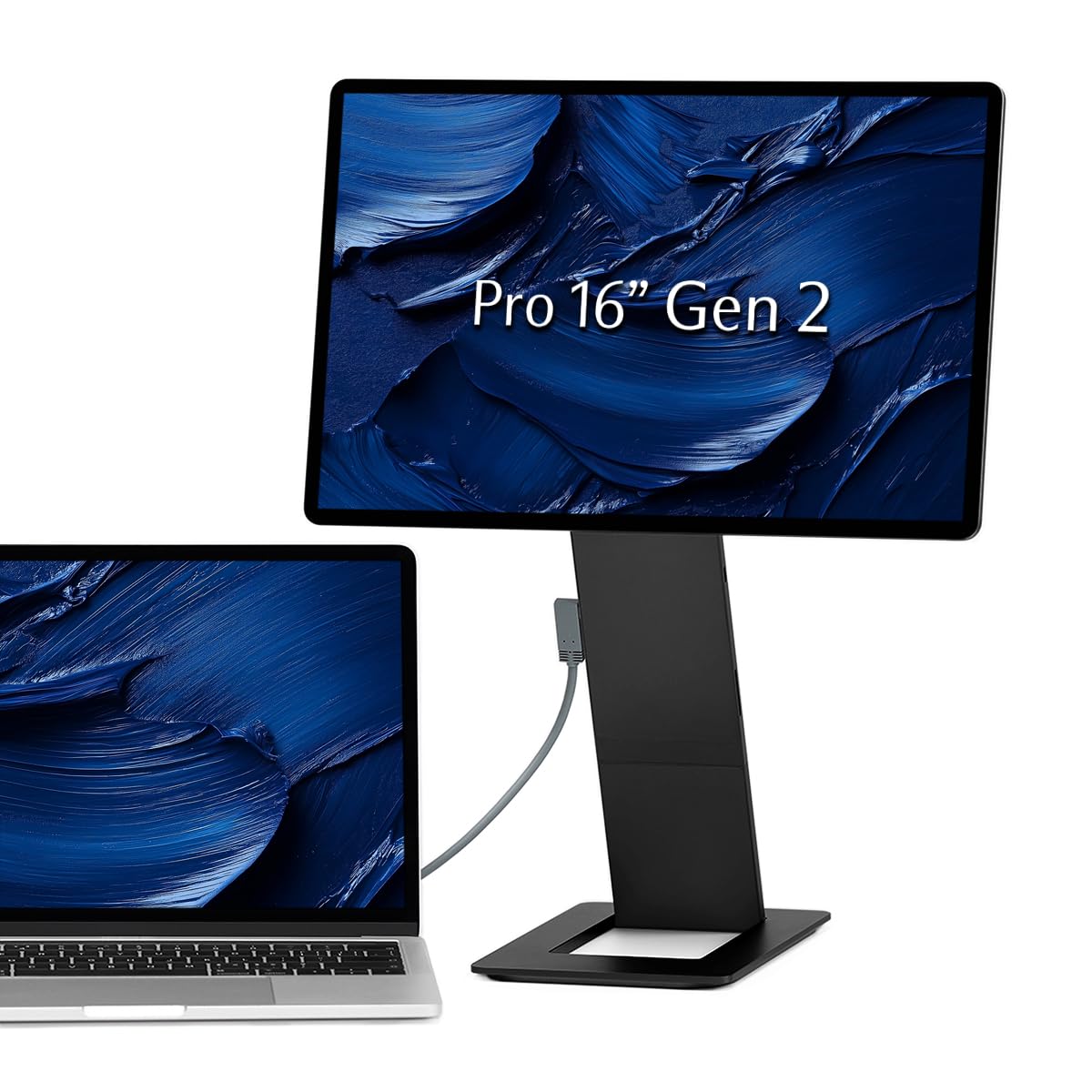
A CNC-machined metal monitor built specifically for the MacBook Pro crowd.
The FlipAction Pro stands out for its build quality and its stand system. The full-metal chassis is CNC-machined from aerospace materials with a sleek anodized finish, and the base stand magnetizes onto the back of the screen when folded so the whole unit is just half an inch thick for travel. The 2560 x 1600 (WQXGA) resolution on a 16:10 panel gives you extra vertical space compared to a standard 16:9 display — useful for reading documents or code without scrolling as much.
It runs at 120Hz with a 100% DCI-P3 color gamut and 400 nits brightness, putting it in the same class as the UPERFECT OLED for refresh rate but using an IPS-LCD panel instead. The built-in SD card slot in the kickstand is a thoughtful touch for photographers traveling without a card reader. Reviewers consistently praise the “top-tier stand system” that supports height adjustment and ranges of rotation from 0 to -90, 90, and 180 degrees.
The downsides are real. Multiple shoppers say the price feels high at its MSRP, with one saying to would be more reasonable. The IPS panel cannot match the black levels of the OLED options above, the stand wobbles at maximum height, and some units produce a high-pitch buzz when plugged in with the screen off. Mac users will need third-party software like BetterDisplay to handle scaling properly.
The Strengths
- Premium all-metal build with an innovative magnetic stand that folds flat.
- 120Hz refresh rate and 100% DCI-P3 color gamut for smooth, accurate visuals.
- Height-adjustable stand with excellent range of rotation for portrait mode.
The Trade-Offs
- IPS panel cannot match the deep blacks and contrast of an OLED screen.
- Price is steep for what you get; a few hundred less would feel fair.
- Stand is wobbly at full extension, and some units emit a buzz when idle.
Designed for: MacBook Pro users who want a premium-feeling, height-adjustable portable monitor that matches the look and feel of their laptop.
Better options exist if: deep black levels for photo or video work are more important to you than build quality — the OLED portables will serve you better.
7. Lenovo L15 Portable Monitor, 15.6” Display

The lightweight portable that keeps it simple with a built-in, height-adjustable stand.
At just under two pounds with two USB-C ports for power and video, the L15 is one of the lightest and most straightforward portable monitors you can buy. The built-in height-adjustable stand separates it from the ASUS ZenScreen MB16ACV, which uses a separate kickstand cover — you can prop the L15 up without any extra accessories. Reviewers call it “ultra-thin, lightweight, sharp display with good brightness and color,” and one buyer using it with a MacBook Pro confirmed that a single USB-C cable handles both power and display perfectly.
The 15.6-inch Full HD IPS panel runs at 60Hz with 250 nits brightness and includes flicker-free technology to reduce eye strain. That 250-nit brightness is noticeably lower than the Dell 24 Monitor SE2426H’s 300 nits — a 20% gap — which means the L15 can look a bit dim in brightly lit rooms or near a window. The 1000:1 contrast ratio is standard for an IPS panel and delivers acceptable clarity for documents, web browsing, and spreadsheets.
The standout honest concern from reviewers: a handful of units stopped connecting after about 60 days, with the monitor receiving power from USB-C but refusing to display an image from any laptop. Lenovo’s warranty support resolved some cases, but the issue appears in multiple reviews. The color gamut is not specified in the data, so it likely covers standard sRGB without the wider coverage of premium options.
Why It Is Popular
- Under two pounds with a built-in, height-adjustable stand — no extra case needed.
- Clear, sharp Full HD display with good color for everyday productivity tasks.
- Plug-and-play USB-C connection works with Mac and Windows laptops.
Why Caution Is Warranted
- 250 nits brightness is dimmer than many competitors in bright rooms.
- Some units have failed completely after a couple of months of use.
- No built-in speakers or additional ports beyond the two USB-C inputs.
Best for: budget-conscious users who want a lightweight, self-standing portable monitor for basic office tasks and travel.
Look elsewhere if: you need a bright screen for use in sunny rooms, or reliability is your top concern after reading the failure reports.
8. Laptop Screen Extender DZVW 14″ Dual Monitor
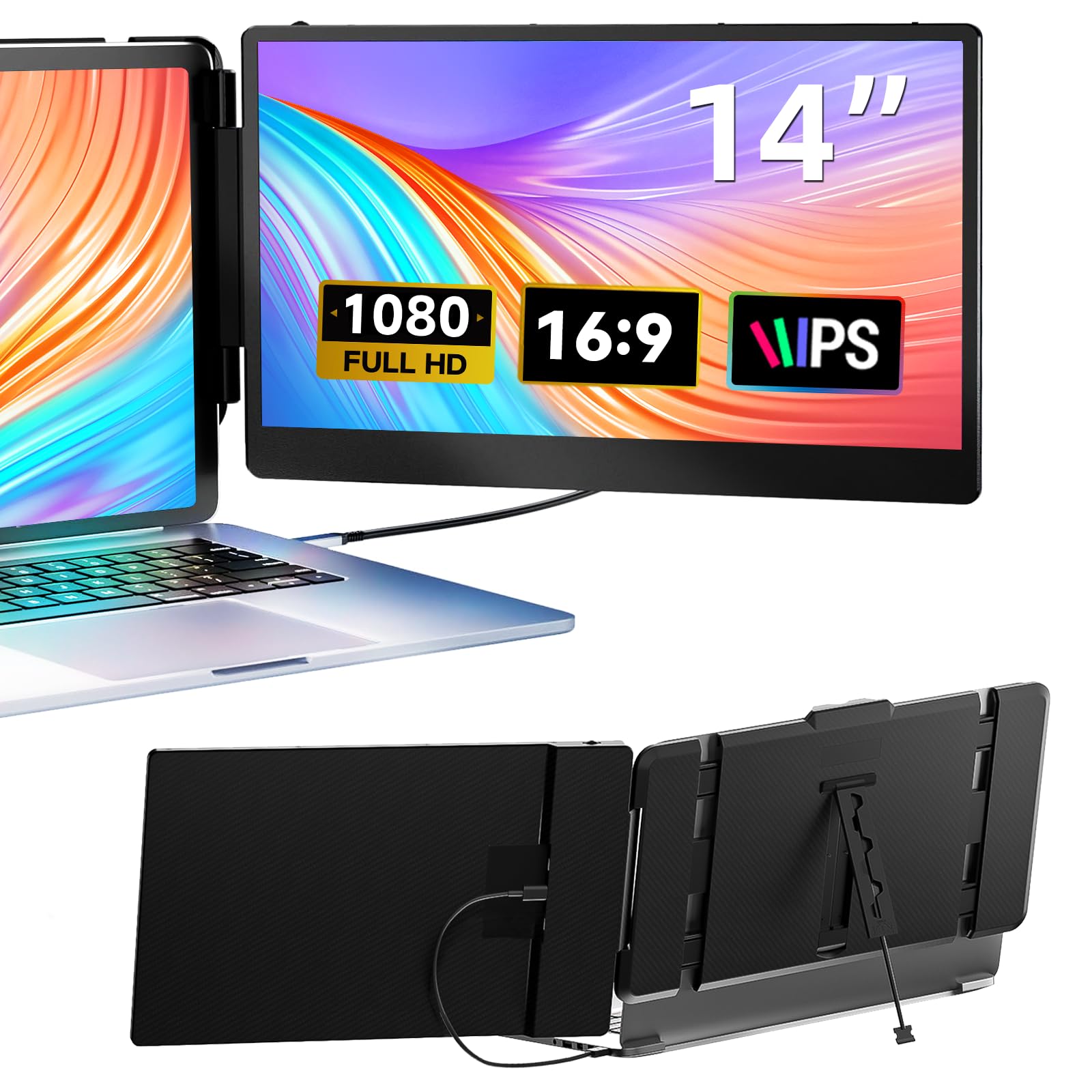
A folding dual-screen extender that clips onto your laptop lid for a true three-screen mobile setup.
This is the only product in the roundup that physically attaches to your laptop, adding two 14-inch 1080p IPS screens to either side of your existing display. It “folded to just 0.9″ thick and 2.34lbs, it’s easy to fold and take for professionals on the go,” as one buyer put it. The total package turns a single laptop into a three-monitor productivity station without needing any desk space. The 300-nit brightness and 1000:1 contrast ratio are respectable for portable use and match the brightness of the Dell 24 Monitor SE2426H.
Connectivity options are broad: USB-C for a single-cable connection, or HDMI plus a separate USB-A cable for power on laptops without a full-featured USB-C port. Reviewers consistently praise the “bright/clear screens” and the “quick setup,” with one remote worker saying it exceeded expectations for travel productivity. The 72% color gamut is typical for a budget IPS panel and fine for office work, though creative professionals will want the wider coverage of the ASUS ProArt or the OLED models.
The catch is laptop compatibility. The extender works best on 13.3- to 17-inch laptops, but the product notes that “some devices (like Surface Pros) may not be supported.” Your laptop needs a full-featured USB-C port or an available HDMI port for the second screen to work. The 60Hz refresh rate and 1080p resolution are purely productivity-focused — this is not a gaming or color-critical editing setup.
The Big Plus
- Adds two full 14-inch screens to your laptop without needing desk space.
- Folds down to 0.9 inches and weighs 2.34 lbs for easy travel.
- Multiple connection options (USB-C, HDMI + USB-A) for broad compatibility.
The Limitation
- Not all laptops are compatible — Surface Pro and some models may not work.
- 1080p resolution and 60Hz are fine for office tasks but not for creative work or gaming.
- Attached design means you cannot position the screens independently like separate monitors.
Great for: remote workers and frequent travelers who want a true multi-monitor setup in airports, cafes, or co-working spaces.
Not for: anyone who needs color accuracy for creative work or plans to use it with a Surface Pro or similarly restricted laptop.
9. Dell 24 Monitor SE2426H

The budget desk monitor that delivers a 144Hz gaming-grade refresh rate at a no-frills price.
Most budget monitors cap out at 60Hz or 75Hz, but this 23.8-inch Dell hits 144Hz with a 1ms MPRT response time and AMD FreeSync support. That means motion stays smooth whether you are scrolling through a spreadsheet or playing a fast-paced game on your laptop. The IPS panel delivers a 300-nit brightness, which is the same as the ASUS ProArt PA247CV and a noticeable step above the 250 nits on the Lenovo L15. The 178-degree wide viewing angle means colors stay consistent even if you are working beside a colleague and both looking at the screen from an angle.
TÜV Rheinland 3-star certification reduces harmful blue light while keeping color quality intact, so you can work through an afternoon without eye fatigue. Owners mention “great color and crisp picture” and called it “easy to install; ideal for daily desk use and home office.” One reviewer specifically noted they ditched the stand for a VESA mount, confirming the 100x100mm VESA compatibility for monitor arms.
The limitations are clear: this monitor only has two HDMI inputs and no USB-C connectivity, so you cannot charge your laptop through it. The stand only supports tilt — no height, swivel, or pivot adjustment. And while the 1080p resolution looks sharp on a 24-inch panel, customers note it is “not for gaming or large-screen needs,” meaning hardcore gamers might want a higher resolution and serious multitaskers might prefer a larger 27-inch panel.
The Appeal
- 144Hz refresh rate and 1ms response time for ultra-smooth motion.
- 300-nit IPS panel with excellent viewing angles for a budget price.
- TÜV Rheinland 3-star low blue light certification for all-day comfort.
The Shortfalls
- Only two HDMI inputs — no USB-C, no DisplayPort, no laptop charging.
- Stand only tilts; no height, swivel, or pivot adjustment.
- 1080p resolution on a 24-inch panel is fine but not Retina-sharp.
Snag it for: a budget desk setup where you want smooth 144Hz motion for everyday work and the occasional gaming session, and you do not mind a basic stand.
Give it a miss if: you need USB-C connectivity for a single-cable laptop setup, or you require a fully adjustable stand for ergonomic comfort.
Understanding the Specs
Resolution And Pixel Density
Resolution tells you how many pixels are on the screen — 1920 x 1080 (Full HD), 2560 x 1600 (WQXGA), or 3840 x 2160 (4K UHD). More pixels mean sharper text and finer image detail. A 1080p monitor looks crisp on a 15-inch portable screen but starts to look soft on a 27-inch desktop panel, where individual pixels become visible. For a desk monitor paired with a modern laptop that likely runs at a higher resolution, 4K is the best match for visual consistency. For a portable monitor you will use on the go, 1080p is still perfectly fine for email and documents because the screen is smaller and your eyes are closer to it.
Refresh Rate And Response Time
The refresh rate, measured in Hertz (Hz), is how many times per second the image updates. Standard is 60Hz, which covers all office tasks. Higher rates — 120Hz or 144Hz — make cursor movement, scrolling, and window dragging feel visibly smoother and more responsive. Response time (measured in milliseconds, ms) is how fast a pixel changes color; 1ms or lower prevents motion blur in fast-moving content. If you play games on your laptop or simply want a more fluid desktop experience, a 120Hz or 144Hz monitor is a noticeable quality-of-life upgrade. For purely productivity work, 60Hz is perfectly adequate and saves money.
Panel Type: IPS vs OLED
IPS (In-Plane Switching) panels are the standard for reliable, color-accurate monitors. They offer wide viewing angles — usually 178 degrees — so the image does not wash out if you view from the side. OLED (Organic Light Emitting Diode) panels produce true blacks because each pixel generates its own light and can turn off completely, leading to infinite contrast ratios and vibrant, punchy colors. OLED delivers a visibly superior image for movies, photos, and gaming, but costs more and can be prone to burn-in over many years of static desktop use. For a permanent desk monitor where you will have toolbars and taskbars in fixed positions, IPS is safer. For a portable monitor used for varied content, OLED offers a stunning visual experience.
Connectivity And Power Delivery
The connection type determines how many cables you need on your desk. A monitor with USB-C that supports DisplayPort Alt Mode and power delivery (PD) can carry video signal to the monitor and charging power back to your laptop through one single cable — the cleanest setup possible. Monitors with only HDMI or DisplayPort require a separate power cable for the monitor and do not charge your laptop. Portable monitors often rely on USB-C for both power and video, but check that your laptop’s USB-C port supports video output; some USB-C ports only carry data. If your laptop lacks a video-capable USB-C port, look for a monitor that also includes an HDMI input plus a separate power source.
FAQ
Will any USB-C monitor work with my laptop?
Can I use a portable monitor as my only display?
What is the difference between 60Hz and 120Hz for office work?
Does a monitor with built-in speakers replace external speakers?
Can I connect a monitor to my laptop via HDMI and still charge it?
How long does a portable monitor typically last before it fails?
Is an OLED portable monitor worth the extra cost?
Do I need a special cable to use a portable monitor with my laptop?
What is the ideal screen size for a laptop second monitor?
Can I use a gaming monitor as a productivity monitor?
Final Thoughts: The Verdict
For the majority of shoppers, the additional monitor for laptop winner is the Dell 27 Plus 4K S2725QC because it delivers a sharp 4K image, a smooth 120Hz refresh rate, and single-cable USB-C connectivity with 65W laptop charging — all in a well-built desktop package with surprisingly good speakers. If you need a color-accurate monitor for photo editing on a desk, the ASUS ProArt PA247CV gives you factory-calibrated colors and the same single-cable convenience at 1080p. And for portable use, the UPERFECT OLED 14″ 3K combines stunning OLED contrast with a 120Hz refresh rate in an ultra-slim 1.29-pound package that genuinely fits in a laptop bag.
How We Picked
We do not accept paid placement. Every pick is matched to a real buyer and a real use-case; we do not hands-on test units.
Sources & Methodology
Specifications: manufacturer listings and product documentation. Review insights: verified customer reviews, as of July 2026. Pricing: not shown on this page (it changes often); check the current price via the retailer link.
As an Amazon Associate, Gadgets Feed earns from qualifying purchases. This does not affect which products we feature.
Related Guides
Product prices and availability are accurate as of the date/time indicated and are subject to change. Any price and availability information displayed on Amazon at the time of purchase will apply to the purchase of this product. As an Amazon Associate I earn from qualifying purchases.
CERTAIN CONTENT THAT APPEARS ON THIS SITE COMES FROM AMAZON. THIS CONTENT IS PROVIDED "AS IS" AND IS SUBJECT TO CHANGE OR REMOVAL AT ANY TIME.
Amazon and the Amazon logo are trademarks of Amazon.com, Inc. or its affiliates.