
Our readers keep the lights on and my morning glass full of iced black tea. As an Amazon Associate, I earn from qualifying purchases.
Specs are compiled from manufacturer listings and verified buyer reviews and can change over time — please confirm the key details on the product page before buying.
Your laptop’s built-in speakers are small, fire downward, and muffle voices — which is exactly why you’re hunting for an additional speaker for laptop use. A desk speaker fixes this in minutes, with top models plugging straight into a USB port with zero software. This guide ranks top options by owner experience and key specs, so you pick one that makes dialogue and calls crisp.
I’m Min — the founder and writer behind Gadgets Feed. This guide is built by comparing the manufacturers’ published specifications and the patterns across verified customer reviews, so you get each pick’s real strengths and trade-offs instead of marketing spin.
External speakers make calls clearer and music fuller than your laptop’s thin, quiet built-ins. The Creative Pebble is the top pick for most desks, delivering deep bass from a compact footprint. Here is what to look for before you buy.
Our Picks at a Glance


How To Choose The Best Additional Speaker For Laptop
Most laptop speakers plug in via USB for power and a 3.5mm AUX cable for audio, while newer ones carry both power and sound through a single USB-C connection. Think about your desk setup, if you want wires or Bluetooth, and how much bass you actually need. A wired speaker is simpler and often cheaper, but Bluetooth frees you from cables.
Power And Connectivity: USB, USB-C, Or Bluetooth?
USB-powered speakers draw power straight from your laptop, so you never need a wall adapter. Single-cable USB-C models handle both power and audio in one plug — the easiest option. Bluetooth models cut the cable entirely but have a 10-meter range, meaning you can roam your desk without losing signal. Many owners prefer wired connections for calls and gaming, because they deliver zero lag compared to wireless.
Sound Quality: Drivers, Radiators, And Wattage
Larger drivers (measured in millimeters) generally push more air and produce fuller sound. Passive radiators — unpowered cones that move air in response to the main driver — add bass without needing a subwoofer. Wattage tells you how loud a speaker can get: 14W is plenty for a desk, while 60W fills a room. Higher wattage means bigger speakers and a larger footprint.
Form Factor: Bar, Pair, Or Clip-On
Some speakers come as a single soundbar that sits under your monitor, saving desk space. Others arrive as a stereo pair, giving you left and right separation for a more rich audio experience. A few use a clamp to attach directly to your monitor, which works great for thin screens but may fail on thick ones. Choose based on your available desk space and how you plan to position the audio.
Quick Comparison
| Model | Best For | Output Power | Drivers | Connectivity | Amazon |
|---|---|---|---|---|---|
| Creative Pebble★ Best Overall | Budget desktop clarity | — | Far-field with passive radiators | USB + AUX | Amazon |
| FUNLOGY 14WTilted Clarity Pick | Compact 30° tilted clarity | 14W | Dual 48mm full-range | USB + 3.5mm | Amazon |
| Cirqon Clamp | Monitor-mount space saving | — | Single driver unit | USB / USB-C | Amazon |
| Amazon Basics 2.0 | Value stereo pair | — | Dual dynamic drivers | USB + 3.5mm AUX | Amazon |
| Cyber Acoustics CA-2890BT | Calls and video meetings | 5W | Built-in speakerphone | USB + Bluetooth 5.0 | Amazon |
| Bluedee SK-900 | RGB gaming desk sound | 20W | 2 tweeters + 2 full-range + 2 radiators | Bluetooth 5.4 + USB/USB-C | Amazon |
| IBALL·BOX H1 | Audiophile multi-input desktop | 60W | 3″ woofers + 1″ silk tweeters | Bluetooth + USB-C + Optical + AUX | Amazon |
In‑Depth Reviews
1. Creative Pebble, 2.0 USB Desktop Stereo Speakers for PC/Laptop, White
Our pick — over 4.5★ from 67,500+ verified ratings; the strongest balance of quality and price.
The best-seller that proves small speakers can sound big, with a crowd of 4.6-star owners backing it up.
The Creative Pebble earns its spot because it delivers clear highs and adequate bass in a compact footprint that disappears on any desk. Its far-field driver setup (speakers that project sound outward rather than straight up) with rear-facing passive radiators (unpowered cones that move air to boost bass) pushes surprising depth for a unit this size. The drivers angle up at 45°, so sound aims at your ears, not your keyboard, making music and calls feel more direct.
Setup is genuinely low-maintenance — one USB cable powers it while a universal 3.5mm AUX-in handles audio, with front-facing controls for quick volume adjustments. Its sleek, modern design suits any workspace aesthetic. Buyers report a clean, full sound for the size, though the right and left speakers are permanently tethered together, which limits placement flexibility. If you need to spread speakers far apart, this is not the pick for you.
What wins people over is the sound quality — it’s the most-discussed aspect by a wide margin, with thousands of owners praising its clarity near-field. Volume feedback runs mixed; some find it plenty loud while others want more. A few units have stopped working after a few months or developed static, so treat the build gently. For everyday laptop audio — speech, gaming, music — this remains the value king.
What Owners Love
- Clear, crisp highs with adequate bass for its size
- Truly plug-and-play USB power — no adapter needed
- Compact, modern look that fits any workspace
Watch Out For
- Speakers are hardwired together, limiting placement
- Volume is mixed — not a room-filler for everyone
- Occasional reports of static or units dying after months
Reach for this if: you want a proven, budget-friendly upgrade that makes laptop audio clearer without clutter.
Look elsewhere if: you need room-filling volume or the freedom to place speakers far apart.
2. FUNLOGY Speaker – 14W Stereo PC Speakers, USB Powered, Compact Size with 30° Tilt Design, Volume Dial Control, Black
Palm-sized speakers with a 30° tilt that aim every word straight at your ears.
The FUNLOGY earns its place by solving the most common desk problem: speakers that fire into your chest instead of your head. Its 30-degree upward-facing layout delivers sound directly to your ears, which owners say noticeably improves clarity for voices and gaming. Despite the compact size, it pushes an impressive 14W total output from dual 48mm full-range drivers paired with passive radiators for punchy bass.
Setup takes seconds — plug in the included USB and 3.5mm cables and you’re done, no drivers or Bluetooth pairing. The front volume dial is a standout, letting you dial down to very low levels for background music while keeping precise control. On the spec side, at 5.2 inches deep it’s a touch bulkier than the ultra-slim Cirqon below, but the extra depth houses that bigger driver.
Build quality and sound quality are the top two things owners praise, with 154 and 147 mentions respectively — people consistently call it well-made with focused bass. Volume capability draws mixed feedback; it’s loud and clean, but a few want more headroom. Windows may detect it as headphones through the headphone jack, which is harmless but worth knowing. This is a great mid-range choice for laptop users who want clarity without a huge footprint.
Smart 30° design: angles sound at your ears for clearer voices in calls and games, saving desk space.
Honest limit: great for a desk, but not designed to fill a large room at maximum volume.
Best suited for: office workers and gamers who want punchy, ear-aimed sound in a compact form.
Not ideal for: anyone needing a single-cable USB-C connection or thunderous bass.
3. Cirqon Computer Speakers for Desktop PC, Easy Volume Knob, Sturdy Clamp, USB/USB C Adapter
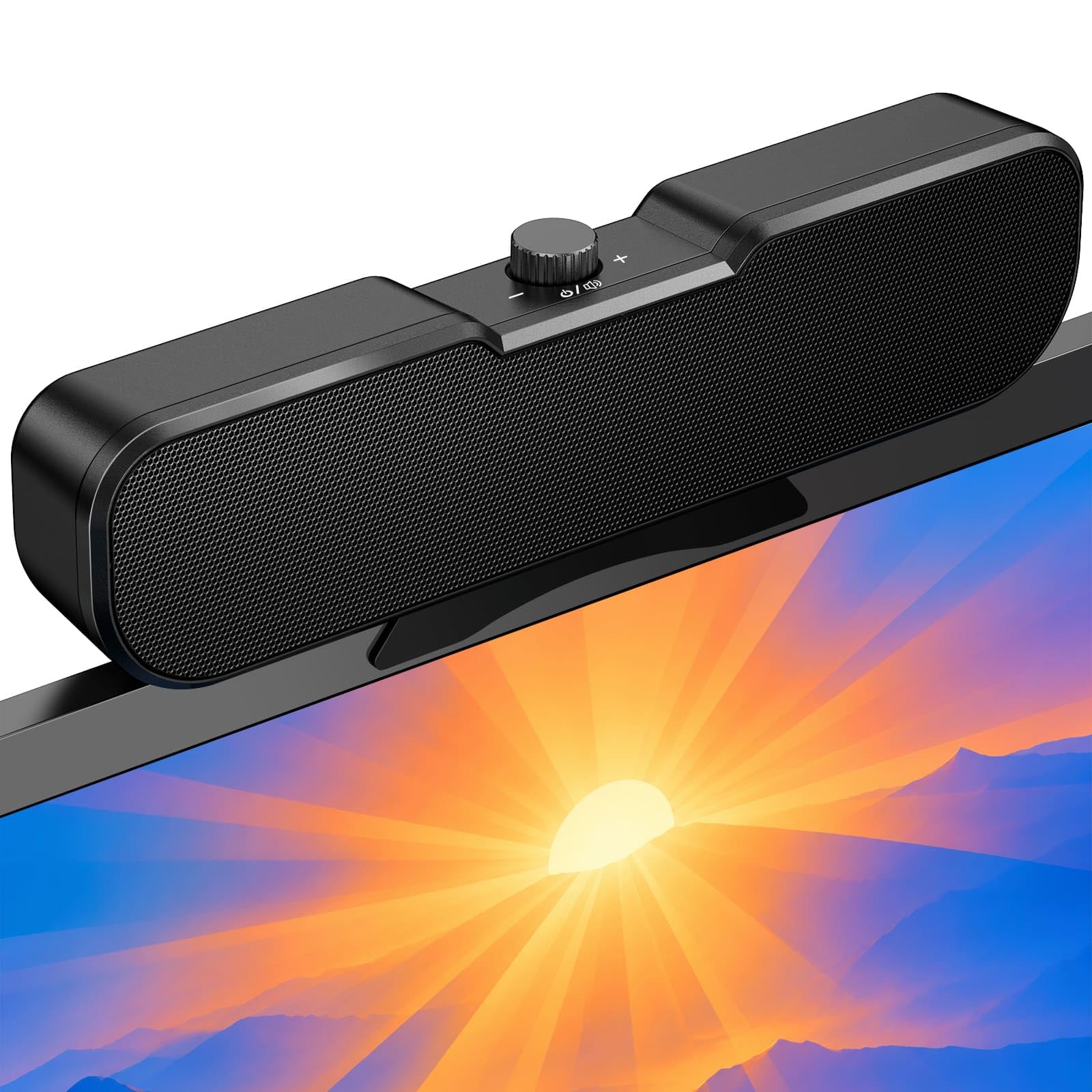
A space-saving speaker that clips onto your monitor and vanishes from your desk entirely.
The Cirqon is the answer if your desk is already crowded and you can’t spare an inch for speaker towers. Its upgraded non-slip clamp fits screens 0.1 to 0.98 inches thick, letting you attach it to the top, bottom, or sides of your monitor — or stand it independently if you prefer. Owners like how it clips to laptops and monitors, making it remarkably practical for small workstations.
Connectivity is dead simple: a single USB connection carries both power and audio, no AUX cable or software needed. The included high-quality USB-C adapter ensures broad compatibility with Windows, Mac, Android, Linux, PS, and Switch. Physically it’s dramatically slimmer than the FUNLOGY above — about 1.4 inches deep versus 5.2 inches — which shows in its 8.26-inch-wide single-bar design that tucks easily under a monitor.
The volume control earns consistent praise: one knob handles power, volume, and mute without complicated buttons. Sound quality and build quality are the top aspects owners mention, noting it stays clear even at maximum volume. A common minor gripe is that it slides around when you spin the knob — it needs more weight in the base. The sound is strong and clear for the price point, making it a top pick for minimalists.
Space-Saving Wins
- Clamp mounts to thin monitors, saving all desk space
- True plug-and-play with one USB or USB-C connection
- Simple one-knob volume and power control
Small Trade-Offs
- Light base slides during knob adjustment
- Long-term durability still unproven
Grab it when: desk space is precious and you want a clip-on speaker that stays out of the way.
skip it if: your monitor is thicker than 0.98 inches or you want pronounced stereo separation.
4. Amazon Basics Stereo 2.0 Speakers for PC or Laptop with Volume Control, 3.5mm Aux Input, USB-Powered, Black

A bestselling stereo pair that fits under your monitor and delivers surprising value for the money.
The Amazon Basics pair is the most-bought value option here, and for good reason: it’s simple, compact, and sounds better than your laptop’s built-ins. These are two separate speakers, giving you left and right channels for a true stereo image — unlike the single-bar Cirqon above. Both units are small enough to fit under a monitor, with a metal finish and scratch-free padded base that looks neat on any desk.
Power comes from your laptop’s USB port, and an in-line volume control gives you easy access without reaching behind the speakers. The bottom radiator is the clever part, producing what owners describe as “springy” bass sound that belies the compact size. A 3.5mm AUX input handles audio, so setup is as simple as two cables.
Sound quality is the most-praised feature by far, with ample volume for most casual use, though the bass still reads weak to some. The physical volume wheel is simple, but there’s no power button — the blue LED lights stay on and can’t be disabled, which bothers some owners. An occasional unit arrives defective, though most work flawlessly. For a basic, affordable PC upgrade, this pair is tough to beat.
Value-first pick: a trusted, ultra-popular stereo pair that’s louder and clearer than monitor speakers.
Keep in mind: the blue LEDs are always on, and true bass lovers will want a subwoofer.
Choose this when: you want a cheap, reliable stereo pair for casual music and video on a laptop.
Pass on it if: you need rich bass or the ability to turn off the LED lighting.
5. Cyber Acoustics CA-2890BT USB and Bluetooth Speaker Bar with Speakerphone

A slim speaker bar with a built-in mic that makes virtual meetings sound and feel professional.
The CA-2890BT is purpose-built for the work-from-home crowd. It’s a compact soundbar that attaches to the bottom of your monitor, and its calling credentials are strong: a built-in mic with mute and an LED indicator, plus a multi-function button to switch between USB and Bluetooth sources. Owners say it clips easily to monitors roughly 1 to 1.5 inches thick and delivers a big difference in call clarity.
Connectivity is flexible — plug into your PC or Mac via USB, or connect a smartphone over Bluetooth 5.0 for hands-free calls and virtual meetings. The included USB-A to USB-C converter is a thoughtful touch for newer laptops that dropped the larger port. It runs on 5W of power, which is modest, yet owners find it loud enough for Zoom calls and music with little distortion.
Sound quality is the single most-praised aspect, with clear vocals that work well for meetings. The form factor divides opinion: the space-saving design is great, but the clamp’s spring is strong and fails to attach to thicker monitors — some owners ended up clipping it to a nearby shelf instead. The LED is bright and can’t be turned off, and bass is weak by design. This is a niche pick for call-heavy laptop users.
Call-Forward Strengths
- Built-in mic with mute handles meetings cleanly
- Dual USB and Bluetooth 5.0 connectivity
- Slim bar attaches under the monitor to save space
Form-Factor Limits
- Clamp spring too strong for some thick monitors
- Bright LED stays on with no off switch
Pick it up if: you take lots of video calls and want a space-saving bar with a usable speakerphone.
Think twice if: your monitor is unusually thick or you prioritize music bass over voice clarity.
6. Bluedee Computer Speakers for Desktop PC, 20W Peak, Bluetooth 5.4 USB USB-C

A stylish 20W desktop pair with Bluetooth 5.4 and RGB lighting for a vibrant gaming setup.
The Bluedee SK-900 is a step up in both wattage and flair, delivering 20W peak power with an eye-catching RGB light show. It’s a proper stereo pair — two tweeters, two full-range drivers, and two passive radiators working together for crisp vocals and enhanced bass. Built-in DSP tuning smooths out harsh highs, making it a versatile pick for music, videos, and gaming alike.
Wireless freedom is the headline here: Bluetooth 5.4 delivers fast, stable streaming, while USB/USB-C plug-and-play keeps things wired when you want zero lag. The all-in-one control knob manages volume, play/pause, lighting effects, and connection modes with intuitive feedback. Compared to the 5W Cyber Acoustics bar above, this pushes four times the power with true stereo separation.
Sound quality and build quality are the top two aspects owners rave about, often calling it a no-brainer for the price-performance ratio. A reviewer running an HP 17 laptop with weak internal speakers found these a dramatic upgrade, connecting over Bluetooth or the included 56-inch USB-A/USB-C cord. The recurring hiccup is an occasional fluctuating sound issue that persists even after replacement — it sounds great when stable. Compact with fantastic value, this is the mid-range standout.
What Impresses
- Bluetooth 5.4 plus USB/USB-C for flexible connection
- 8 selectable RGB lighting effects with an off option
- Balanced stereo sound with real bass for the size
What To Watch
- Occasional fluctuating sound reported by some
- Size reads slightly bulky to a few owners
Best for: gamers and desk enthusiasts who want wireless freedom, RGB flair, and solid stereo sound.
Consider otherwise if: you’ve been burned by intermittent audio issues and want zero-risk reliability.
7. H1 Computer Speakers for Desktop PC, Monitor & Laptop, 60W Powered 2.0 Stereo with Bluetooth, 24-Bit USB-C DAC, Optical, 3.5mm AUX, Bass/Treble Control, Black
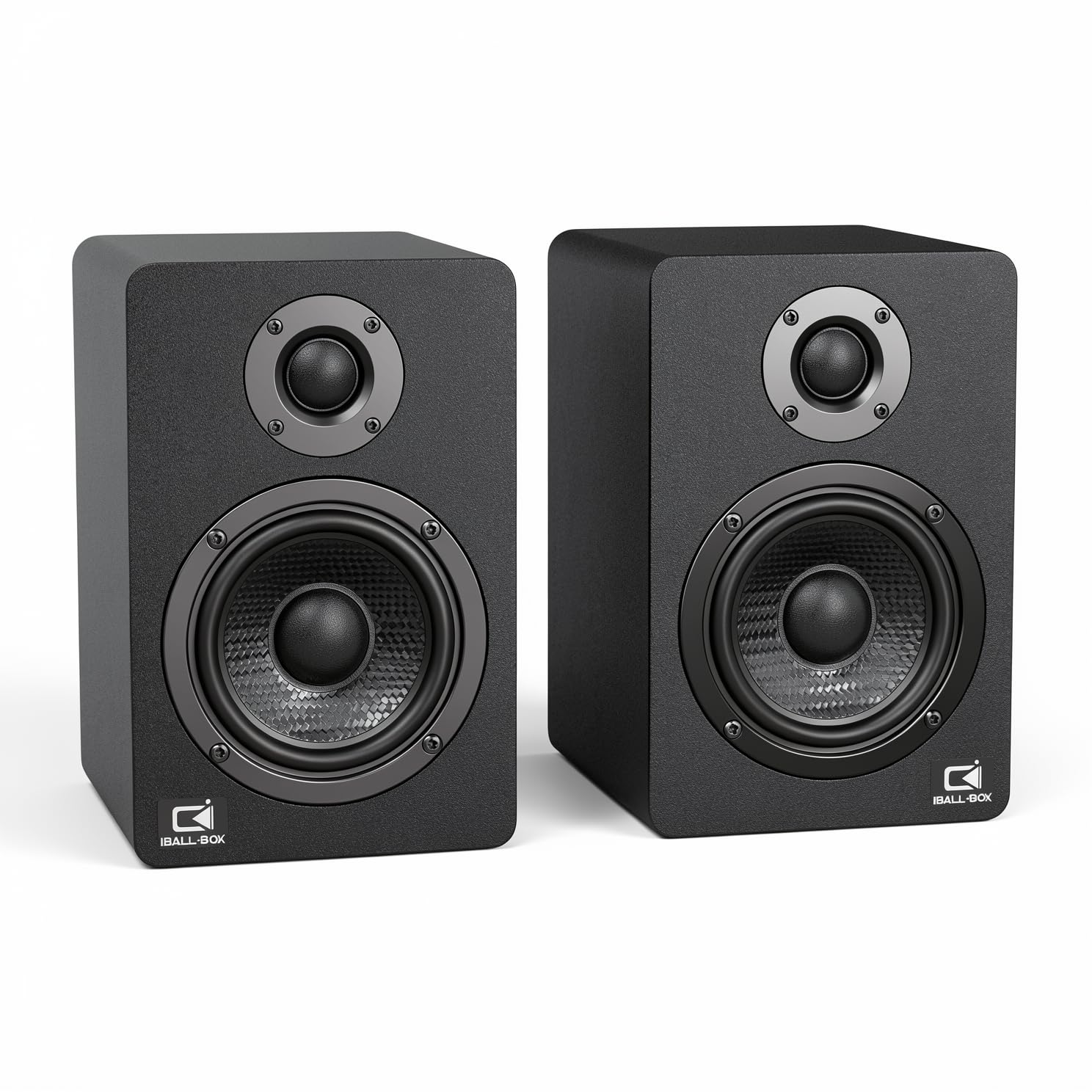
The serious 60W desktop system with a 24-bit USB-C DAC and optical input for true audiophile connectivity.
The H1 is the heavyweight of this list, and it’s in a different league for sound fidelity. It pumps out a beefy 60W of powered stereo sound through dual 3-inch carbon-fiber woofers and dual 1-inch silk-dome tweeters, covering a full 40Hz–20KHz range with a signal-to-noise ratio of 95dB or better. The rear bass reflex port adds depth — owners describe surprisingly good bass for a desktop setup. This pick replaces bulky, outdated speaker sets with a compact, cleaner upgrade.
Connectivity is where it truly shines: 24-bit wired playback through a USB-C DAC, plus optical input, 3.5mm AUX, and Bluetooth for wireless convenience. That optical connection is the star — owners running it via optical to their PC report superb movie and music audio. Front-panel bass and treble controls let you tune the sound for music, gaming, or video without touching any software.
Sound quality is unanimously the most-praised aspect, with owners noting zero distortion and excellent value. The build feels solid and well-packed, with all necessary cables included. The only real gripes are minor: some don’t love the front logos, and cable length opinions run mixed. This is the premium choice for laptop users who demand true audio performance and don’t mind the larger footprint.
Fidelity first: 60W output and a 24-bit USB-C DAC make this the clear step-up for critical listening.
Fair caveat: its size and 4-ohm impedance expect a proper desk, not a cramped nightstand.
Reach for this if: you’re an audiophile-on-a-desk who wants rich, tuned sound with optical and USB-C inputs.
Pass if: you need maximum portability or a single ultra-compact unit that hides away.
Understanding the Specs
Output Power (Watts)
Wattage tells you how loud a speaker can get before distorting. A 14W system like the FUNLOGY is plenty for a desk, while the H1’s 60W fills a room with headroom to spare. Match wattage to your room size, since more watts means bigger speakers and a larger footprint. It also correlates with bass depth — higher power can drive larger drivers and heavier sound.
Passive Radiators
A passive radiator is an unpowered cone that moves air in response to the main driver’s pressure, effectively adding bass without needing a subwoofer. The Creative Pebble uses rear-facing passive radiators to deliver enhanced bass reproduction from a compact body. This is the trick that lets small speakers sound bigger than their size suggests, making it a key spec to look for if you want richer low-end on a budget.
FAQ
Will a USB speaker work with any laptop?
Do I need both a USB cable and an AUX cable?
Is Bluetooth or wired better for laptop speakers?
How long do USB-powered laptop speakers last?
Can I connect a speaker to my monitor’s USB port?
What is a passive radiator and why does it matter?
Are soundbar-style speakers as good as stereo pairs?
Can laptop speakers be used with a smartphone or tablet?
What does DAC mean and should I care?
How do I fix static or buzzing from my laptop speakers?
Final Thoughts: The Verdict
If you want one dependable pick, the additional speaker for laptop choice is the Creative Pebble because it’s the proven crowd favorite — 4.6 stars from tens of thousands of owners who praise its clear sound and compact design. If you want wireless freedom and RGB style, grab the Bluedee pair. And for true audiophile fidelity on your desk, the H1 with its 60W output and optical input is the one to reach for.
How We Picked
We do not accept paid placement. Every pick is matched to a real buyer and a real use-case; we do not hands-on test units.
Sources & Methodology
Specifications: manufacturer listings and product documentation. Review insights: verified customer reviews, as of August 2026. Pricing: not shown on this page (it changes often); check the current price via the retailer link.
As an Amazon Associate, Gadgets Feed earns from qualifying purchases. This does not affect which products we feature.