
Buying an address label printer dumps you into a mess of DPI numbers, connectivity options, and brand lock-in traps — not exactly what you signed up for when you wanted to streamline your shipping workflow. You need a machine that spits out crisp, scannable labels at speed without bleeding you dry on expensive proprietary supplies later.
I’m Min — the co-founder and writer behind Gadgets Feed. This guide is the result of weeks dissecting customer feedback, comparing print-head resolutions, and analyzing the real-world compatibility of every thermal printer here across Windows, Mac, iOS, and Android ecosystems.
To cut through the noise, I’ve ranked and reviewed seven models to help you find the best address label printer for your small business, e-commerce store, or home office.
How To Choose The Best Address Label Printer
Picking the right thermal printer for address labels comes down to balancing your print volume, the operating systems you use, and whether you want to print from your phone versus a dedicated desktop. Here are the three critical factors to nail down before you buy.
Print Technology: Direct Thermal vs. Thermal Transfer
Every printer in this guide uses direct thermal technology, which applies heat directly to heat-sensitive label material — no ink cartridges, no toner, no ribbons. For address and shipping labels, direct thermal is the standard because it eliminates recurring consumable costs and keeps the printer compact. The trade-off is that direct thermal labels can darken under prolonged heat or direct sunlight, so keep your label stock stored in a cool, dry place.
Connectivity That Matches Your Workflow
If you print exclusively from a Windows or Mac desktop, a USB-only model like the Rollo or Westinghouse provides rock-solid reliability with the simplest driver setup. If you need to print from an iPhone, Android tablet, or multiple computers on the same network, prioritize Bluetooth or Wi-Fi models. The ORGSTA includes a Bluetooth dongle for computers without native wireless support, while the Brother QL-820NWB offers Bluetooth, Wi-Fi, and Ethernet — the most versatile connectivity suite in this lineup.
Print Resolution and Label Width Support
Most thermal printers in this category deliver 203 DPI, which produces crisp text and scannable barcodes for standard 4×6 shipping labels. If you print smaller address labels (like 2.4-inch-wide continuous rolls) or need the highest possible clarity for small barcodes, a 300 DPI model like the Brother QL-1100 is the better pick. Also check the maximum label width — the QL-1100 prints up to 4 inches wide, while the QL-820NWB and others cap at 2.4 inches for their standard address-label rolls.
Quick Comparison
On smaller screens, swipe sideways to see the full table.
| Model | Category | Best For | Key Spec | Amazon |
|---|---|---|---|---|
| Brother QL-820NWB | Wireless Pro | Multi-device network printing | 300 DPI, Bluetooth + Wi-Fi + Ethernet | Amazon |
| Rollo USB Shipping Label Printer | USB Workhorse | Reliable USB desktop printing | 203 DPI, 150mm/s, 4.1″ max width | Amazon |
| Brother QL-1100 | Wide Format | Wide 4-inch labels & high DPI | 300 DPI, auto-cutter, USB host | Amazon |
| Westinghouse WHTP203e | ZPL Supported | Ethernet-ready label jobs | 203 DPI, 6 ips, Ethernet + USB | Amazon |
| DYMO LabelWriter 550 Turbo | Speed Pick | High-volume address labels | 300 DPI, auto label recognition, LAN | Amazon |
| ORGSTA T001-Plus | Bluetooth Value | Phone-based label printing | 203 DPI, 150mm/s, Bluetooth dongle | Amazon |
| HP Shipping Label Printer | Entry Level | Simple USB label printing | 203 DPI, 6 ips, USB 2.0 | Amazon |
In‑Depth Reviews
1. Brother QL-820NWB Professional Label Printer

The Brother QL-820NWB is the most versatile address label printer in this lineup, packing Bluetooth, dual-band Wi-Fi, and Ethernet connectivity into a compact chassis. Its 300 DPI print head delivers noticeably sharper text and denser barcodes than the 203 DPI standard, and it prints up to 110 standard address labels per minute — fast enough for high-volume shipping days. The monochrome LCD screen enables standalone label creation without a computer, and the starter roll includes both DK-1201 die-cut address labels and DK-2251 red-and-black continuous tape for two-color printing.
Real-world feedback confirms that the Bluetooth connection works reliably with iPads and iPhones for on-the-go label creation, though pairing is limited to one device at a time. The direct Wi-Fi mode supports multiple computers across a network, which is ideal for teams sharing a single printer. Some users note that the initial setup workflow — downloading the P-Touch software and navigating the network configuration — can feel dated compared to plug-and-play USB models, but once configured, the printer remains stable for thousands of labels.
The key differentiator here is connectivity flexibility paired with 300 DPI resolution. If you switch between a desktop, laptop, and tablet throughout the day and need consistently sharp labels, the QL-820NWB eliminates the dongle-hassle that Bluetooth-only printers introduce. Just be aware that the maximum label width caps at 2.4 inches, so 4×6 shipping labels are out of range — this printer excels at address labels, shipping labels for smaller packages, and barcode labels.
Why it’s great
- 300 DPI resolution for ultra-sharp text and barcodes
- Bluetooth, Wi-Fi, and Ethernet give you three connectivity paths
- Red-and-black two-color label printing with the DK-2251 roll
- Standalone LCD operation for quick label tweaks without a PC
Good to know
- Maximum label width is 2.4 inches — no 4×6 shipping labels
- Setup software and network configuration can be finicky
- Bluetooth only pairs with a single device at a time
2. Rollo USB Shipping Label Printer

The Rollo USB Shipping Label Printer has earned a fierce reputation among small-business sellers for its dead-simple USB setup, consistent print quality, and broad compatibility across every major shipping platform. Rated at 203 DPI with a print speed of 150mm/s (roughly one 4×6 label per second), it delivers crisp barcodes and readable text that USPS, UPS, and FedEx scanners have no trouble interpreting. The printer handles label widths from 1.57 to 4.1 inches, making it suitable for everything from tiny barcode stickers to full-size shipping labels.
Customer feedback is overwhelmingly positive, with owners reporting twenty-minute setups from unboxing to first label — no network configuration, no app downloads, no Bluetooth pairing dance. Rollo’s companion shipping app provides access to discounted rates, though the printer works seamlessly with ShipStation, PirateShip, Etsy, eBay, Amazon, and Shopify without any special integration steps. The durable chassis and straightforward feed path mean fewer paper jams compared to some budget alternatives in the same price tier.
What holds the Rollo back from the top spot is its USB-only connectivity. If you need to print from an iPad or Android phone, this printer isn’t the right fit — it’s built for a dedicated computer workstation. The 203 DPI resolution is perfectly adequate for shipping labels, but if you print tiny address labels where every pixel matters, a 300 DPI model like the Brother QL-1100 or QL-820NWB will produce sharper results. For a desktop-centric small business shipping operation, however, the Rollo is an absolute workhorse.
Why it’s great
- Fast 150mm/s print speed with minimal setup friction
- Broad platform compatibility — works with Amazon, Etsy, Shopify, and more
- Adjustable label width from 1.57 to 4.1 inches
- Reliable feed system with few jams reported
Good to know
- USB-only connection — no wireless or Bluetooth option
- 203 DPI is adequate but not the sharpest in this roundup
- Requires driver download on first setup
3. Brother QL-1100 Wide Format Label Printer

The Brother QL-1100 is the wide-format champion in this list, printing labels up to 4 inches wide at a crisp 300 DPI resolution. This makes it the best choice for printing larger address labels, shipping labels for bulky packages, and professional visitor badges. The built-in auto cutter can handle a continuous-length label roll up to 9.8 feet via USB or 3 feet via serial, which means you can batch-print dozens of addresses without manually tearing each label. The printer also includes a USB host port for connecting a barcode scanner directly — a feature that warehouse and logistics users will appreciate.
Owners report that generic label brands like BETCKEY work without issues, saving significant money compared to Brother’s expensive supply packs. The 300 DPI prints are noticeably darker and more consistent than 203 DPI models, especially on small barcodes where legibility is critical. The setup process is straightforward for Windows users, though Mac and Linux owners need to download the correct P-Touch driver manually. The plug-and-label feature on Windows PCs lets you type and print without launching the full P-Touch Editor software, which speeds up quick single-label jobs.
The largest downside reported across multiple reviews is the cutter mechanism failing after extended use — one user reported failure after roughly 10,000 labels. While this is a high-volume scenario, the cutter repair or replacement effectively bricks the printer for continuous-label users. Additionally, the QL-1100 lacks wireless connectivity entirely, so it’s tethered to a single computer via USB or the optional serial interface. If you need 4-inch-wide labels and don’t mind a wired setup, this printer delivers outstanding print quality for the money.
Why it’s great
- 300 DPI resolution prints sharp, dark text and barcodes
- Supports labels up to 4 inches wide for larger shipping jobs
- Auto cutter handles continuous rolls up to 9.8 feet
- USB host port lets you connect a barcode scanner directly
Good to know
- Cutter mechanism may fail after heavy use (10,000+ labels)
- Wired-only connection — no Bluetooth or Wi-Fi
- Setup on Mac and Linux requires manual driver installation
4. Westinghouse WHTP203e Thermal Shipping Label Printer

The Westinghouse WHTP203e is a commercial-grade thermal printer that brings Ethernet connectivity and native ZPL support to the mid-range price tier — a combination usually reserved for more expensive industrial printers. It prints at 6 inches per second with 203 DPI resolution, supporting fanfold labels and label rolls across media widths from 0.78 to 4.6 inches. The package includes a starter roll of labels, a USB flash drive with drivers, and both a power cord and adapter, so setup is essentially driver-and-print out of the box.
Customer feedback highlights the remarkably straightforward setup — multiple users report being up and running in under 30 minutes from opening the box. The Ethernet port enables network printing for shared office environments, and ZPL support makes it compatible with enterprise-level labeling software. Build quality is consistently praised as sturdy and well-built, with a straight label path that minimizes frustrating misfeeds. The inclusion of both USB and Ethernet connectivity gives you flexibility to start with a single computer and later expand to a shared network printer.
The major limitation is the lack of Bluetooth — this is a wired-only printer. The Ethernet port requires a router running at under 1 GHz, which might conflict with some modern high-speed routers. Westinghouse also notes that Ethernet and USB-C cables are sold separately, so if you plan to use Ethernet networking, factor in that additional purchase. For users who need a reliable wired printer with ZPL compatibility and don’t care about wireless printing, the Westinghouse delivers exceptional value compared to the premium-tier Rollo.
Why it’s great
- Ethernet and USB connectivity for flexible network integration
- Native ZPL support for enterprise labeling software
- Straight-forward label path minimizes jams
- Includes starter labels and USB flash drive with drivers
Good to know
- Wired-only — no Bluetooth or Wi-Fi functionality
- Ethernet and USB-C cables sold separately
- Requires router under 1 GHz for Ethernet setup
5. DYMO LabelWriter 550 Turbo Label Printer

The DYMO LabelWriter 550 Turbo is built for pure speed — the “Turbo” in its name refers to its ability to churn through label batches faster than the standard 550 model, with a 300 DPI print head that delivers crisp address labels and shipping labels. Automatic Label Recognition technology detects the label size, type, and remaining count instantly, eliminating manual paper-size adjustments in the software. It connects via USB or LAN network, making it suitable for both single-workstation setups and shared office environments.
Longtime DYMO users who upgrade from the older 450 series will notice the 550 Turbo is significantly faster and produces sharper text. The LCD screen provides clear status readouts, and the 300 DPI prints are consistently dark and barcode-scannable. The LAN connectivity is a genuine asset for teams — multiple users in an office can queue label jobs to a single printer without cable-swapping. The build quality feels solid and professional, designed for daily commercial use rather than occasional home office printing.
The most significant controversy with this printer is the RFID-based label authentication. The 550 Turbo uses RFID tags embedded in DYMO-branded label rolls to verify authenticity — third-party labels will not work, period. This forces owners into DYMO’s higher-cost label supply chain, which is a deal-breaker for many small businesses that rely on generic thermal labels. If you are willing to pay the premium for DYMO labels and want the speed and automatic label detection, this printer is a beast. If not, the Brother QL-820NWB or the generic-friendly Rollo are smarter long-term investments.
Why it’s great
- 300 DPI print head for sharp, professional label quality
- Automatic Label Recognition saves manual configuration time
- USB and LAN connectivity for shared office workflows
- Fast batch printing for high-volume address label runs
Good to know
- RFID chip locks you into expensive DYMO brand labels
- Customer service complaints about warranty and support
- Initial cost is higher than comparable-speed competitors
6. ORGSTA T001-Plus Bluetooth Thermal Shipping Label Printer
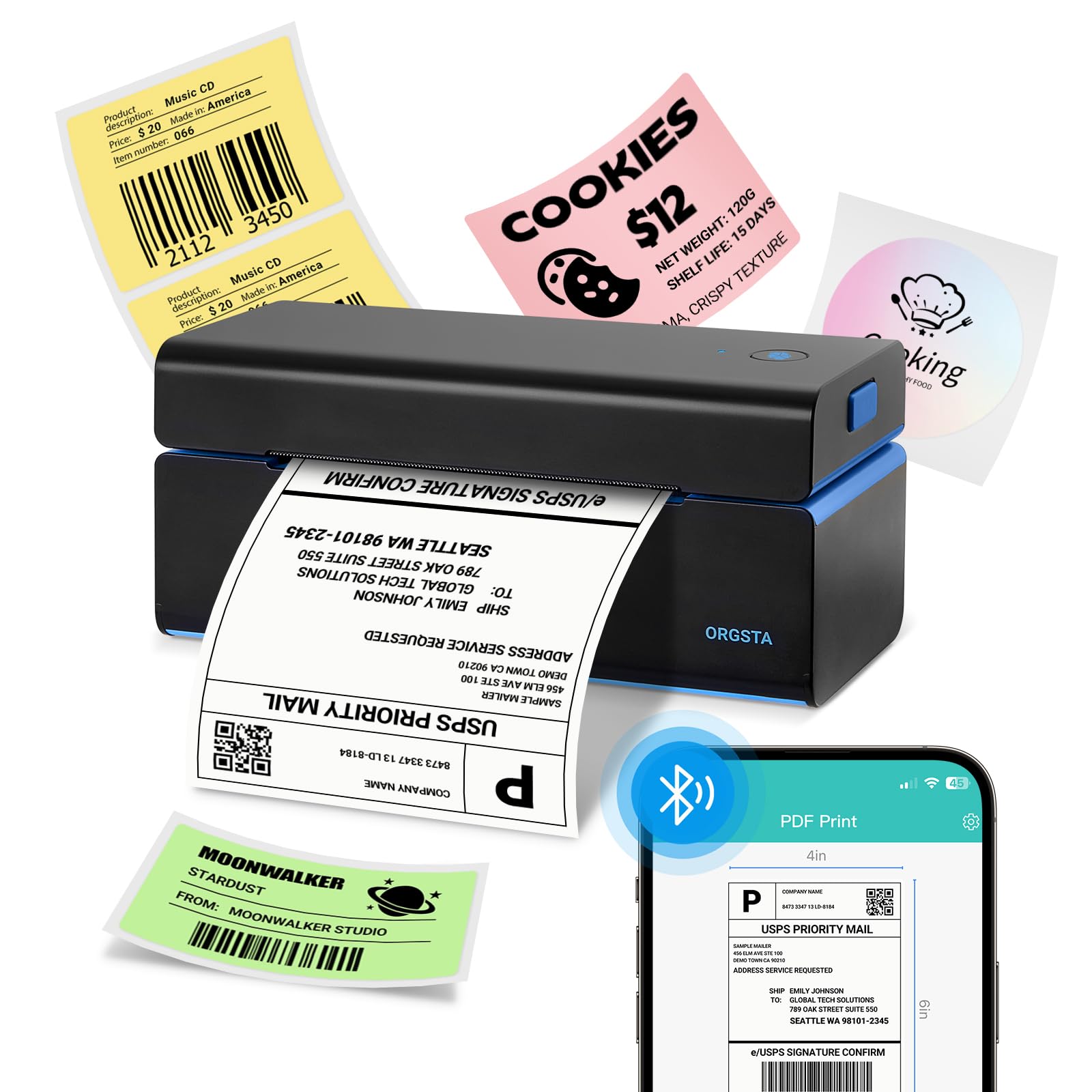
The ORGSTA T001-Plus is the only printer in this roundup that delivers true wireless printing without requiring a dedicated computer. It comes with an exclusive Bluetooth dongle that plugs into the USB port of any Windows, Mac, Linux, or Chromebook computer, instantly enabling wireless printing up to 20 meters away — similar to how a wireless mouse receiver works. For mobile and tablet users, native Bluetooth connects directly to the 4Barcode app on iOS and Android, allowing you to print address labels, shipping labels, and barcodes straight from your phone in seconds.
Print quality is rated at 203 DPI with a speed of 150mm/s (up to 72 labels per minute), and the printer handles label widths from 1.0 to 4.5 inches. The package includes 50 sheets of 4×6 thermal labels, a USB-C adapter, a power adapter, and the Bluetooth dongle, so everything you need is in the box. Users report that the 4Barcode app offers plenty of label editing options, and the Bluetooth connection is stable once you use the correct pairing passcode (0000, as several customers note after fighting with the sparse manual).
The biggest weakness is the poorly written instruction manual — multiple customers spent hours troubleshooting the phone pairing process before discovering the passcode workaround. The printer also lacks Ethernet and native Wi-Fi (the computer’s wireless connection is through the dongle, not the printer itself), so it is not designed for network-shared use in a busy office. For a solo entrepreneur or home-based seller who wants the ability to print from both a computer and a phone without running cables, the ORGSTA offers exceptional value at a budget-friendly price point.
Why it’s great
- Bluetooth dongle enables wireless printing from any computer
- Native Bluetooth connects to iOS and Android for mobile printing
- Supports label widths from 1.0 to 4.5 inches for versatile use
- Includes 50 starter labels and all necessary accessories
Good to know
- Instruction manual is unclear — especially for phone pairing
- No built-in Wi-Fi or Ethernet for network sharing
- Bluetooth range (20m) may require line-of-sight positioning
7. HP Shipping Label Printer 4×6

The HP Shipping Label Printer is a straightforward entry-level direct thermal model designed for small businesses that want a simple USB-connected label solution. It prints at 6 inches per second with 203 DPI resolution, handling labels up to 4 inches wide through a rear-loading feed that works with fanfold rolls or label rolls. The package includes the printer, power cord, AC adapter, USB cable, and a quick start guide — a clean, no-nonsense unboxing experience for first-time label printer buyers.
Customer feedback is mixed but leans positive for users with basic needs. Setup is simple — plug in the USB cable, install the driver, and start printing from platforms like USPS, UPS, Shopify, and Etsy. The printer is compact and doesn’t take up much desk space, and the direct thermal operation means zero ink or toner costs. Several sellers using PirateShip and Etsy confirm the printer works well for their daily shipping label needs, especially when label settings are adjusted in the driver preferences for optimal crispness.
The biggest complaints center around print quality inconsistency. Out-of-box labels sometimes come out faded or misaligned, though adjusting the print darkness and speed settings in the driver usually resolves the issue. A small but vocal number of users report major customer service headaches, including denied refunds and pushy upselling attempts for more expensive models. If you need a simple, cheap label printer for occasional use and are comfortable tweaking driver settings, the HP is a functional entry-level option. For higher-volume or mission-critical shipping, the more consistent Westinghouse or Rollo models are worth the upgrade.
Why it’s great
- Simple USB plug-and-play setup for basic label printing
- Compact footprint fits easily in small workspaces
- Direct thermal printing eliminates ink and toner costs
- Works with major shipping platforms like USPS and Shopify
Good to know
- Print quality can be inconsistent — may require driver tweaks
- Customer service and return support draw many negative reviews
- Wired USB only — no wireless or mobile printing support
FAQ
Can I use any thermal label with these printers?
Do I need an internet connection to print address labels?
How long does a direct thermal address label last before fading?
Final Thoughts: The Verdict
For most users, the best address label printer winner is the Brother QL-820NWB because its 300 DPI print quality, three-way connectivity (Bluetooth, Wi-Fi, Ethernet), and standalone LCD operation cover every real-world scenario from a home office to a shared workspace. If you need to print 4×6 shipping labels and want the most reliable USB desktop experience, grab the Rollo USB Shipping Label Printer. And if you print from both a computer and a phone and want to cut the cord entirely, the ORGSTA T001-Plus delivers outstanding mobile printing capability at a budget-friendly price.