
Our readers keep the lights on and my morning glass full of iced black tea. As an Amazon Associate, I earn from qualifying purchases.
Specs are compiled from manufacturer listings and verified buyer reviews and can change over time — please confirm the key details on the product page before buying.
If your wrists ache by mid-afternoon or you are constantly shifting in your chair to reach the keyboard, the problem is almost certainly desk height, not your chair. An adjustable keyboard tray drops your typing surface to the correct elbow level, but the wrong one wobbles, slides, or simply does not fit your desk’s underside. This guide cuts through the confusion by comparing the five most adjustable models on the market, focusing on the real specs that determine whether a tray actually works for your setup.
I’m Min — the founder and writer behind Gadgets Feed. This guide is built by comparing the manufacturers’ published specifications and the patterns across verified customer reviews, so you get each pick’s real strengths and trade-offs instead of marketing spin.
if you need a heavy-duty platform for a standing desk or a compact slide-out for a shallow desk, this roundup helps you find the best adjustable computer keyboard tray for your specific workspace and budget.
Our Picks at a Glance


How To Choose The Best Adjustable Computer Keyboard Tray
An adjustable keyboard tray is only useful if it fits both your desk and your body. The three specs that decide that fit are track length, adjustment range, and weight.
Track Length and Mounting Space
The track is the rail that bolts under your desk. If your desk has support bars, a thick underside frame, or a shallow depth, a track that is too long will stick out or simply not fit. Look at the track dimensions — not just the tray dimensions — before you buy. Many trays list a “bare minimum” mounting depth that still leaves several inches of track protruding.
Height, Tilt, and Swivel Adjustments
The entire point of an adjustable tray is to get your keyboard exactly at elbow height with your wrists straight. That means you need height adjustment (ideally several inches), tilt (a downward angle is called “negative tilt” and is best for wrists), and swivel (to angle the tray toward you or stow it sideways). Some trays offer all three, some only two.
Build Quality and Stability
A tray that bounces when you type defeats the ergonomic purpose. Heavy-duty steel construction and a solid mounting mechanism prevent wobble. The weight of the tray itself is often a good indicator — a heavier tray usually means thicker steel. Pay attention to the locking mechanism; a friction-based tilt lock can slip under the weight of your hands.
Quick Comparison
| Model | Best For | Track Length | Weight | Adjustments | Amazon |
|---|---|---|---|---|---|
| Mount-It! MI-7135★ Best Overall | Full-size keyboard & mouse | 18.2″ | — | Height, tilt, swivel, gel wrist pad | Amazon |
| 3M AKT80LEPremium Pick | Premium stability & fine adjustment | 17.75″ | — | Height, ±15° tilt, 360° swivel | Amazon |
| Uncaged Ergonomics KT2-b | Sit-to-stand desks | Shallower track (reviewer noted) | 18 pounds | Height, negative tilt, independent mouse tray | Amazon |
| Mount-It! MI-7132 | Shallow desks | 14.125″ | 12.27 pounds | 5.5″ height, 25° tilt, 180° swivel | Amazon |
| VIVO MOUNT-KB01 | Value with easy adjustability | 18″ | 10.34 pounds | Height, 360° swivel, tilt, plush padding | Amazon |
In‑Depth Reviews
1. Mount-It! Keyboard Tray Under Desk, Full Motion Computer Keyboard and Mouse Tray (MI-7135)
Our pick — over 4★ from 850+ verified ratings; the strongest balance of quality and price.
A full-motion tray that tilts, swivels, and raises to save your wrists.
This 26-inch-wide tray from Mount-It! gives you height, tilt, and swivel adjustments plus a gel wrist pad, which is more adjustment than many similarly priced competitors offer. The track measures 18.2 inches long and 7 inches wide, so check your desk’s underside clearance before buying — one reviewer noted the track requires significant space and returned it because their fiberboard desk could not handle the weight. The tray itself weighs 12.27 pounds versus the VIVO’s 10.34 pounds, meaning it uses thicker steel for a more solid feel.
Customers note the tilt friction lock is the weakest point — several mention that even when tightened fully, resting hands on the keyboard causes the tray to drop an inch or so. The gel wrist pad is removable, but some reviewers found it uncomfortable. On the positive side, installation takes about 15 minutes, and the slide-out action is smooth. One reviewer with a 17.5-inch deep desk confirmed this tray fits well for narrow setups where larger trays would not work.
Strong Points
- Full tilt, swivel, and height adjustment for custom positioning
- Heavy-duty steel construction (12.27 lbs) feels durable
- Includes a gel wrist pad for extra comfort
Weak Points
- Tilt friction lock slips under hand pressure, per multiple buyers
- Track requires 18.2″ of space — not for desks with crossbars
Solid for most desks: Pick this if you need full adjustment and a wide tray, but expect to watch the tilt lock.
Check your desk first: At 12.27 pounds plus the track length, measure your underside carefully before buying.
2. 3M Keyboard Tray with Adjustable Keyboard and Mouse Platforms (AKT80LE)
The gold standard for fine-tuning your typing position without any wobble.
You turn a single knob under the tray to adjust the height over a large range of +1.25 inches to -4.5 inches from the mounting surface, and you can tilt it forward or backward by 15 degrees in either direction. That wide height range makes this a strong option if your desk is significantly higher than your ideal elbow position. Buyers report it is very sturdy and does not bounce when typing, which is the main complaint with cheaper friction-lock trays.
The separate mouse platform attaches to the right or left and swivels independently, so you can angle it precisely without moving the keyboard. The 17.75-inch track requires a minimum 24-inch wide by 18-inch deep space under your desk. Owners mention the included gel wrist rests are removable, and many recommend removing them for better wrist alignment. One catch: a few buyers with narrow desks found the track sticks out when fully pushed back, so measure your clearance first.
3M backs the keyboard arm with a lifetime warranty, the platform for five years, and the wrist rests for one year — a confidence signal you do not see on most trays at this price tier. Unlike many friction-lock trays, the knob adjuster on this model stays put once tightened, so you do not have to re-adjust every time you lean on the keyboard.
Where It Excels
- Very wide height range (+1.25″ to -4.5″) from mounting surface
- Separate mouse platform swivels independently left or right
- Strong build — no bounce when typing, per buyers
The Trade-Offs
- Requires a substantial 24″ W x 18″ D clearance under desk
- Included wrist rests are often removed by users for better ergonomics
Best for precise adjusters: If you want a rock-solid tray with a huge height range and a separate mouse platform that stays where you set it.
Not for shallow desks: The 17.75″ track needs deep clearance — measure twice before buying.
3. Uncaged Ergonomics KT2-b Under-Desk Adjustable Height & Angle Keyboard Tray

The only tray built to follow you from sitting to standing height.
Unlike every other tray here, the KT2-b is designed specifically for standing desks. It lets you position the keyboard up to 10 inches below desk height and quickly improve it to about 8.5 inches above the desk surface — so you can stand and type without moving the tray. It also offers negative tilt (angling the keyboard away from you), which is the most wrist-friendly typing angle and something most trays in this price range lack. The independent mouse pad adjusts separately, so you can keep the mouse level even when the keyboard is tilted.
At 18 pounds, this is the heaviest tray on the list, and that weight reflects the commercial-grade steel construction. A reviewer who also tried trays from 3M and Mount-It noted this tray has a shallower track, making it easier to fit on desks with limited clearance. The load capacity is rated at 17 pounds, which is more than enough for a full-size keyboard and mouse. However, reviewers point out some issues: the mouse tray can tilt and squeak, the keyboard tray has a side-to-side wobble, and the plastic bearings make repositioning difficult. One buyer mentioned that assembly on an Ikea desk took two hours and required spacers for the crossbar.
Unique Strengths
- Full sit-to-stand range (10″ below to 8.5″ above desk height)
- Negative tilt for wrist-friendly typing
- Independent adjustable mouse platform
Where It Struggles
- Side-to-side wobble reported when typing
- Difficult assembly — some buyers needed spacers for modern desks
For standing desk users: If you switch between sitting and standing throughout the day, this is the only tray designed for that.
Not for quick setup: Expect a longer installation and some adjustment fiddling before it feels right.
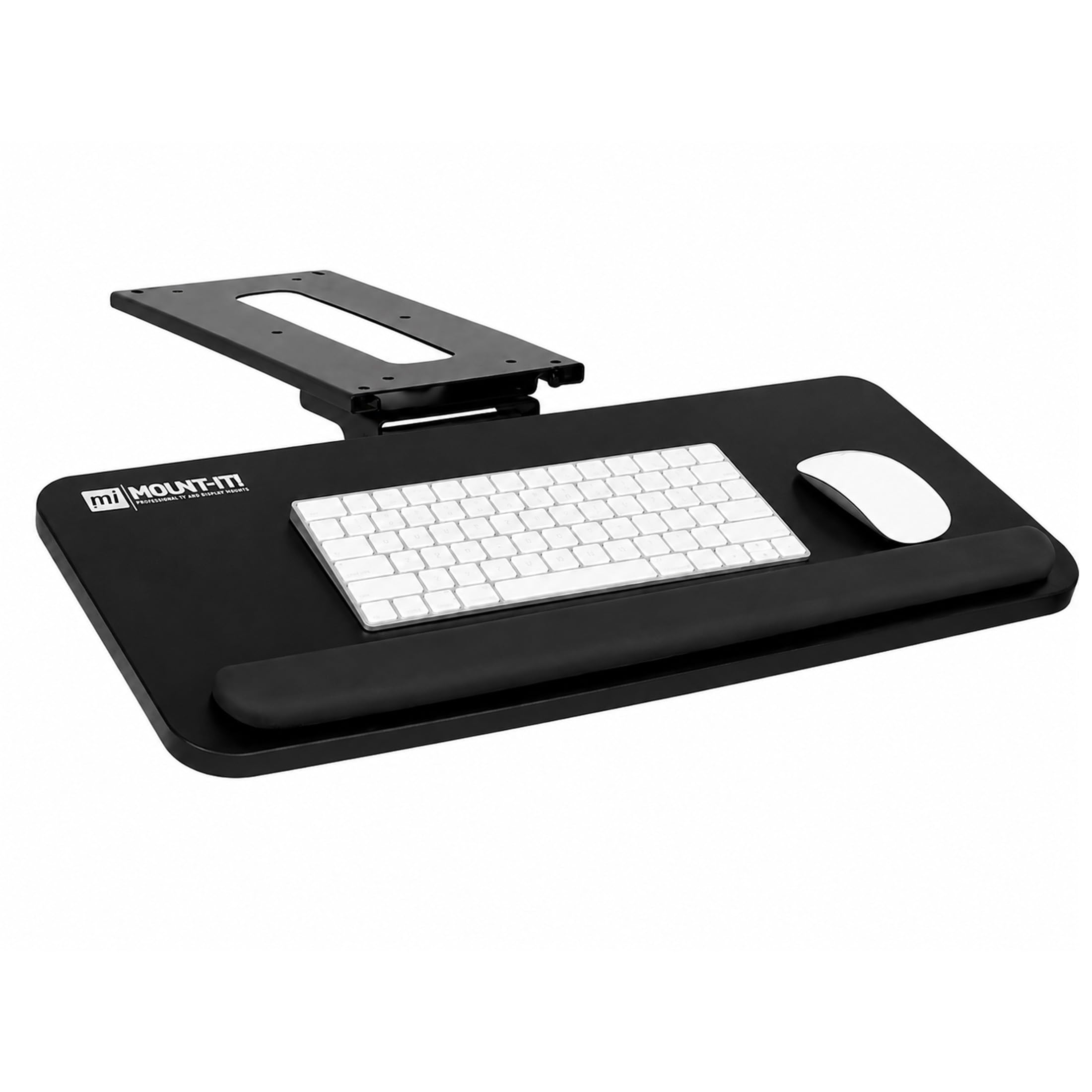
4. Mount-It! Under Desk Keyboard Tray, Slide-Out Keyboard Drawer (MI-7132)
A compact track that fits desks too narrow for anything else.
The MI-7132’s mounting track is just 14.125 inches long, which is dramatically shorter than the 18-inch tracks on most full-size trays. That makes this the go-to pick for shallow desks, IKEA desks, or any setup where support bars block a longer track. The tray itself is a generous 25 inches by 10 inches, so you still get room for a full-size keyboard and mouse. Height adjustment goes up to 5.5 inches, tilt reaches 25 degrees, and it swivels 180 degrees to stow completely under the desk.
Buyers with 15-inch deep IKEA desks confirm this tray fits without the track hitting support bars. One reviewer with a 17.5-inch deep, 33-inch high desk reported it was very sturdy and suited their needs perfectly. However, multiple shoppers say the tray still protrudes about 3 inches from the desk when fully pushed back — so “flush storage” is not quite flush. The tilt mechanism uses a screw for tension, and some buyers found the board leans slightly to one side under pressure. A few buyers added lithium grease to the sliders for smoother action.
At 12.27 pounds, this is the same weight as the MI-7135 above — notably heavier than the VIVO at 10.34 pounds — which indicates thicker steel and a more stable platform. Mount-It! backs it with a lifetime warranty and US-based support.
Why It Stands Out
- Short 14.125″ track fits shallow desks that reject longer trays
- Large 25″ x 10″ platform accommodates full-size keyboards
- Lifetime warranty from Mount-It!
Things to Know
- Still protrudes ~3″ when pushed fully back, per buyers
- Tilt tension screw can cause slight board lean
First choice for narrow desks: If your desk is only 15-17 inches deep, this is the tray that will actually fit.
Expect some overhang: The track may stick out a few inches when stowed, so check clearance.
5. VIVO Adjustable Computer Keyboard and Mouse Platform Tray (MOUNT-KB01)

A sturdy, budget-friendly tray that makes ergonomic typing affordable.
The VIVO MOUNT-KB01 is the lightest option here at 10.34 pounds — noticeably lighter than the Mount-It! MI-7132 at 12.27 pounds (a 19 percent difference) — but buyers still describe the construction as “sturdy” and “solid.” It offers a 25-inch by 10-inch tray, an 18-inch track, height adjustment with 5 inches of range, 360-degree swivel, and a tilting mechanism. The track is the same length as the higher-priced Mount-It! MI-7135, so it requires similar clearance under your desk.
Reviewers consistently mention the one-knob adjustment system is simple to use, though the knob sits under the tray and can bump your knees. The included plush padding is removable, and buyers report it helps with wrist comfort. The biggest trade-off is that the tray slides on a standard rack-mount slide, which some buyers found stiff — a few added grease to smooth it out. The locking mechanism uses a knob under the tray rather than a side lever, which one reviewer called “less convenient” than a rotate-lock design. VIVO backs this tray with a limited 3-year manufacturer warranty, and owners mention excellent customer service when issues arise, such as a delaminated tray being replaced promptly.
What Works Well
- Strong alloy steel and engineered wood construction for the price
- One-knob adjustment for height, tilt, and swivel
- 3-year manufacturer warranty with responsive support
What to Expect
- Slides may need grease from the start for smooth motion
- Locking knob under the tray is less convenient than side levers
Best for tight budgets: If you need a reliable, adjustable tray and are willing to spend a few minutes greasing the slides, this is the value pick.
Not for shallow desks: The 18-inch track needs the same clearance as premium trays.
Understanding the Specs
Track Length vs. Tray Size
The track is the metal rail that bolts to your desk. Its length determines whether the tray fits under your desk at all — many returns happen because buyers only look at the tray dimensions. A typical track is 14 to 18 inches long, and the tray itself is usually 25 to 27 inches wide. Measure the clear space under your desk (no support bars or crossbeams) before buying.
Negative Tilt
Negative tilt means the keyboard angles away from you (the spacebar side is higher than the number row). This keeps your wrists straight instead of bent upward, which reduces strain on the carpal tunnel. Only a few trays offer this adjustment, and it is especially important if you already have wrist discomfort.
FAQ
Will an adjustable keyboard tray fit any desk?
How much weight can an under-desk keyboard tray hold?
What is the difference between tilt and negative tilt?
Do I need a tray with a separate mouse platform?
How do I install an adjustable keyboard tray?
Can I use a keyboard tray with a standing desk?
What is the best keyboard tray for a shallow desk?
How do I stop my keyboard tray from wobbling?
Final Thoughts: The Verdict
For most people, the adjustable computer keyboard tray winner is the Mount-It! MI-7135 because it offers full height, tilt, and swivel adjustment plus a gel wrist pad at a mid-range price point, though you should watch the tilt lock. If you want a rock-solid tray with a massive height range and a separate mouse platform, grab the 3M AKT80LE. And for standing desk users who need the keyboard to rise with them, the standout is the Uncaged Ergonomics KT2-b.
How We Picked
We do not accept paid placement. Every pick is matched to a real buyer and a real use-case; we do not hands-on test units.
Sources & Methodology
Specifications: manufacturer listings and product documentation. Review insights: verified customer reviews, as of July 2026. Pricing: not shown on this page (it changes often); check the current price via the retailer link.
As an Amazon Associate, Gadgets Feed earns from qualifying purchases. This does not affect which products we feature.
Related Guides
Product prices and availability are accurate as of the date/time indicated and are subject to change. Any price and availability information displayed on Amazon at the time of purchase will apply to the purchase of this product. As an Amazon Associate I earn from qualifying purchases.
CERTAIN CONTENT THAT APPEARS ON THIS SITE COMES FROM AMAZON. THIS CONTENT IS PROVIDED "AS IS" AND IS SUBJECT TO CHANGE OR REMOVAL AT ANY TIME.
Amazon and the Amazon logo are trademarks of Amazon.com, Inc. or its affiliates.