
Our readers keep the lights on and my morning glass full of iced black tea. As an Amazon Associate, I earn from qualifying purchases.
Specs are compiled from manufacturer listings and verified buyer reviews and can change over time — please confirm the key details on the product page before buying.
Choosing an advanced robot kit is a decision between a toy that gathers dust and a project that sparks a genuine engineering curiosity. The best kits for you depend entirely on one question: do you want to see a robot move from the start, or do you want to understand the code that makes it think? This guide breaks down the real trade-offs between build complexity, programming depth, and everyday usability so you can match a kit to your own skill level and goals.
I’m Min — the founder and writer behind Gadgets Feed. This guide is built by comparing the manufacturers’ published specifications and the patterns across verified customer reviews, so you get each pick’s real strengths and trade-offs instead of marketing spin.
We have focused on kits that offer genuine learning value—from self-balancing bots to six-legged walkers—to help you find the best advanced robot kits for your experience and ambition.
Our Picks at a Glance


How To Choose The Best Advanced Robot Kits
Before you pick a kit, decide what you want the finished robot to do for you. Are you teaching a child the basics of logic, or are you an adult hobbyist looking to experiment with machine learning? Your goal determines if you need a simple Arduino board or a full Raspberry Pi system, and whether you prioritize sensors or a rugged chassis.
Match the Controller to Your Coding Ambition
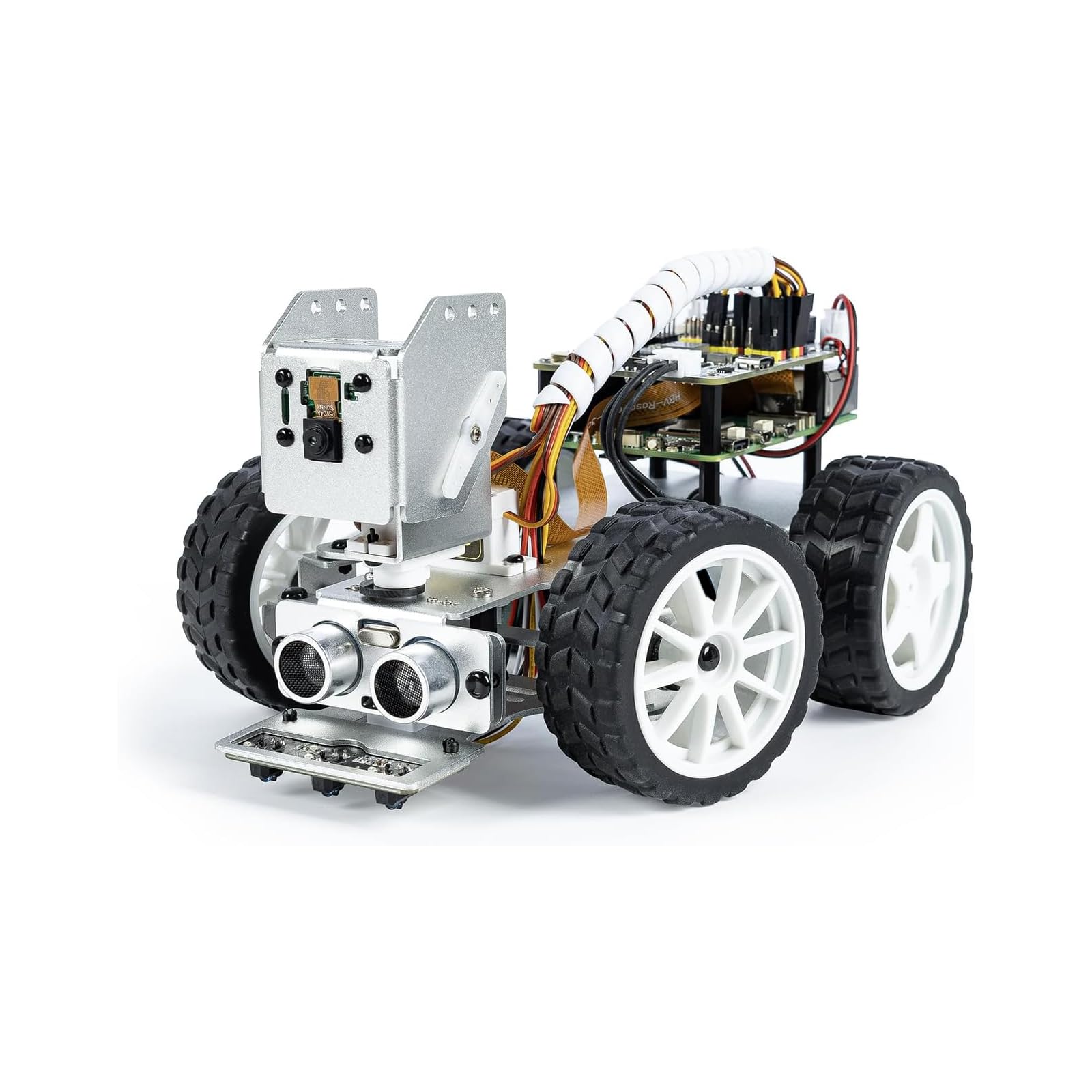
The controller board sets the programming ceiling: Arduino kits cap out at C++ logic, while Raspberry Pi kits open up Python and AI. Kits built around the ELEGOO UNO R3 are perfect for stepping from visual blocks to text-based Arduino IDE projects. If you want to run complex AI models locally, a Raspberry Pi-based kit—like the SunFounder PiCar-X—is the only way to go, since it runs a full operating system.
Look at the Sensors, Not Just the Motors
Sensors—ultrasonic, camera, or line-tracking—determine what your robot can perceive and how it reacts to its environment. An ultrasonic sensor lets it avoid walls like a bat uses sonar. A camera module opens the door to vision recognition and first-person driving. Kits with more sensor variety, such as line-tracking or color sensors, offer more experiments long after the build is done.
Consider the “Time to First Build”
Some kits take 20 minutes to assemble, while others are multi-hour weekend projects. A tracked tank chassis is usually simpler than a hexapod with six individually articulated legs. Be realistic about the patience of the person who will be building it—frustration early on can kill a budding interest in robotics.
Quick Comparison
| Model | Best For | Controller | Programming | Key Feature | Amazon |
|---|---|---|---|---|---|
| ELEGOO Conqueror★ Best Overall | Versatile First Build | UNO R3 + ESP32 | Block & Arduino | FPV Camera | Amazon |
| ELEGOO TumbllerBest for Balance | Self-Balancing Fun | Arduino | Block & Arduino | Bounce Mode | Amazon |
| SunFounder PiCar-XAI Powerhouse | AI & Voice Recognition | Raspberry Pi | Python & Scratch | LLM Integration | Amazon |
| Apitor Robot X | Building Block Fans | Proprietary | Graphical App | 12-in-1 Builds | Amazon |
| ACEBOTT QD043 | Robotic Arm + Tank | ESP32 | Arduino & Scratch | 5DOF Arm | Amazon |
| Thames & Kosmos | Younger Beginners | Bluetooth Box | App Interface | 8 Robot Builds | Amazon |
| Freenove Hexapod | Advanced Robotics | Raspberry Pi | Python | Six-Leg Walk | Amazon |
| Makeblock mBot Ranger | All-Terrain Play | Me Auriga | Scratch & Arduino | 3-in-1 Designs | Amazon |
| LewanSoul xArm1S | Precision Manipulation | Serial Bus | Arduino & PC | 6-Axis Metal Arm | Amazon |
In-Depth Reviews
1. ELEGOO Conqueror Robot Tank Kit
Our pick — 4.5★ from 300+ verified ratings; the strongest balance of quality and price.
The tracked all-rounder that streams live video while teaching real Arduino code.
This kit gives you a stainless-steel tracked tank that you assemble yourself, and it is the most complete package here for someone who wants a bit of everything. It ships with the UNO R3 controller plus an ESP32-WROVER Wi-Fi module, so you can switch between driving it like an RC car and writing your own programs in Arduino IDE. The chassis is built around a 7.4V battery pack, and the plug-in wiring means you never have to pick up a soldering iron to get it running.
The standout is the OV2640 camera, which streams a first-person view straight to your phone over Wi-Fi. The camera sits on a two-degree-of-freedom gimbal, giving you up to 180 degrees of horizontal control so you can look around while the tank crawls over obstacles. Beyond the camera, there are five interactive modes to explore, including obstacle avoidance, line tracking, and auto-follow, which means the learning doesn’t stop once the build is done.
What wins people over is the build quality—owners consistently praise the solid components and the rewarding feel of the stainless-steel frame. The most common piece of advice from experienced builders is to add a drop of thread-locker (like blue Loctite) to the screws, as they can work loose during rough play. The line-following sensor hangs low and can snag on uneven ground, so some owners simply remove it as a quick fix. While the controls can be finicky to master, the sheer range of what this tank can do makes it the best starting point for a serious hobbyist.
What Makes It a Great Buy
- First-person camera view with a 180-degree adjustable gimbal for rich driving.
- Five distinct modes (FPV, IR, obstacle avoidance, line tracking, auto-follow) offer huge variety.
- The stainless-steel chassis feels durable and looks impressive on a shelf.
Consider This First
- IR remote control can be blocked by the metal frame—you often have to aim from the rear.
- The initial instructions have a learning curve, so plan for a patient first assembly.
Reach for this if: you want a single kit that covers everything from driving to coding to camera work, and you don’t mind a slightly fiddly setup.
Think twice if: you’re buying for a very young child—the controls and instructions are better suited to ages 8 and up with adult help.
2. ELEGOO Tumbller Self-Balancing Robot Car Kit
A two-wheeled bot that defies gravity as it teaches the physics of balance.
Watching the Tumbller wobble upright on just two wheels is the kind of moment that makes a kid say “whoa.” It is a completely different lesson from the Conqueror tank: instead of rugged terrain, you are learning about gyroscopes (sensors that measure tilt) and feedback loops (systems that correct motion in real time). The kit is compatible with Arduino (an open-source electronics platform), so you can modify the default code and upload your own programs via the Arduino IDE (the software used to write and send code), and reserved pins let you add more sensors later.
You get six ways to play right from the start, from IR remote and app control to auto-follow and obstacle avoidance. The “bounce mode” and programmable LED effects add a layer of pure fun that keeps kids engaged long after assembly. The included tutorial is well-illustrated, and the whole build requires no soldering, making it an easy win for a teen who wants hands-on experience without the frustration of a complex wiring loom.
Owners praise its solid, weighty build and reliable performance straight from the start. One family recounted that after charging the batteries all night, the robot became hours of educational fun and a great bonding experience. The self-balancing itself can take a few tries to get set up perfectly, and the app interface isn’t the most intuitive, but the rewarding “it works!” moment is well worth the effort.
A Different Kind of Build: This is less about off-road durability and more about precision and code. The self-balancing mechanism (the system that keeps it upright) is the real teacher here, and it is fascinating to watch.
Who It’s Not For: If you want a rugged, go-anywhere machine, the Conqueror tank is the better fit—the Tumbller shines on flat indoor surfaces.
Best for: hobbyists and curious teens who want to understand the “how” behind a robot’s movement, not just raw speed.
Look elsewhere if: you need a robot that can handle grass or gravel—this one is happiest on a smooth floor.
3. SunFounder PiCar-X AI Robot Smart Car Kit
A smart car that chats, sees, and thinks using large language models.
This is not just a robot; it is a rolling AI experiment station. The PiCar-X is powered by Openclaw and works with multiple large language models (LLMs) like ChatGPT, Gemini, and Grok, meaning you can literally talk to your robot and it can understand you. It uses OpenCV and MediaPipe for vision, so it can recognize faces and even interpret hand gestures through its camera. Because it runs on a Raspberry Pi (which you must supply separately), it is a full Linux computer on wheels.
The emphasis here is on Python and Scratch programming, so you can grow from dragging blocks to writing real AI scripts. Assembly is simplified for beginners, but the setup for the Raspberry Pi operating system and software is time-consuming—this is a project for someone who wants to learn, not a plug-and-play toy. The aluminum body is reliable, and the expansion pins let you add radar sensors or other custom hardware.
Owners find it to be a fun kit that actually works and serves as a great starting point for improvements. The recurring gripe is the camera—some units have a fragile mount that can fall off, and low-light performance is poor without extra LED headlights. Reviewers also note that the gimbal (the moving camera mount) feels cheap with plastic joints. For a student or engineer wanting to explore machine learning hands-on, this is an excellent gateway, but you should budget time for troubleshooting.
The AI Advantage
- Voice interaction with TTS (text-to-speech) and STT (speech-to-text) for natural conversation.
- Visual recognition through the camera lets it solve math problems or interpret gestures.
- Supports both Python and Scratch, making it accessible yet expandable.
Setup Hurdles
- The Raspberry Pi, battery, and a monitor for initial setup are not included.
- The camera can be fragile; treat it gently, as some owners have had it break.
Reach for this if: you are a student or developer who wants to experiment with AI, voice recognition, and Python coding in a physical form.
Think twice if: you are a complete beginner to the Raspberry Pi ecosystem—this kit assumes some comfort with installing operating systems and software.
4. Apitor Robot Building Kit 12-in-1
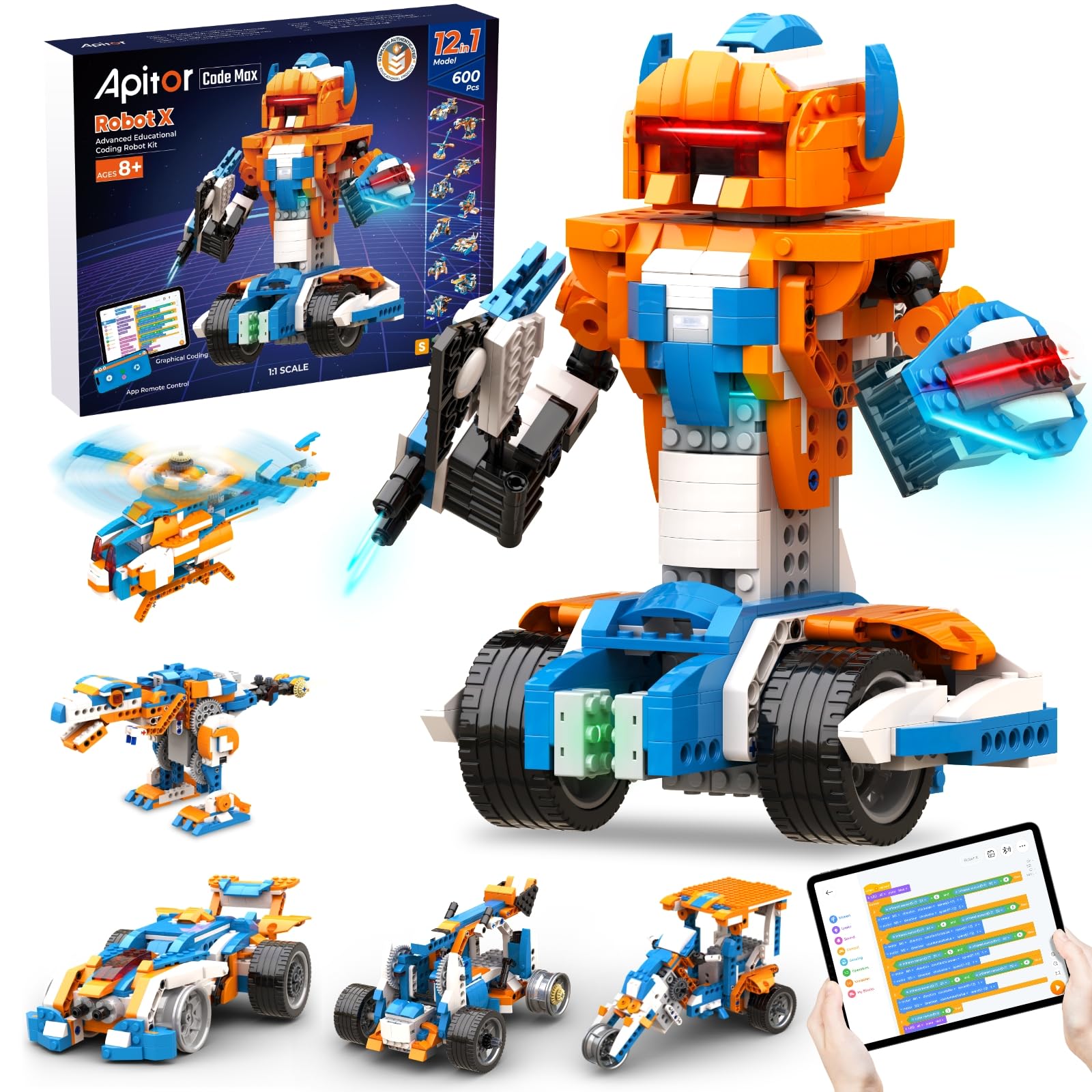
Twelve robots in one box for kids who love classic building blocks.
If your child already has a stash of building blocks, this kit will feel instantly familiar. The Robot X set includes over 600 blocks and a control unit with 7 multicolor LED lights, 2 infrared sensors, 1 color sensor, and 3 motors. Kids can build and rebuild it into 12 different robots, from a simple car to more complex contraptions, using the free Apitor Kit app for step-by-step visual instructions. It is designed for ages 8 and up, and it requires 3 AA batteries that are not included.
Owners are most impressed by the value and piece quality—parts snap together and apart cleanly without issues. It is a toy that provides hours of concentration and fun, with one 9-year-old staying busy with it for hours at a time. It’s not fast, and the app can take a moment to figure out, but for a young builder who loves construction, this is a superb gift.
A Pure Play Experience: This prioritizes construction and immediate app-driven fun over serious text-based programming. It is the gentlest introduction to coding logic in this list.
Good to Know: The included printed plan covers only one model; you need the app to access the other 11 builds.
Best for: the 8-12 age range where building with blocks is already a favorite activity.
skip it if: you want to teach a teenager text-based coding or Arduino hardware—this kit stays at the visual, block-based level.
5. ACEBOTT 4-in-1 Smart Robot Arm + Tank Car
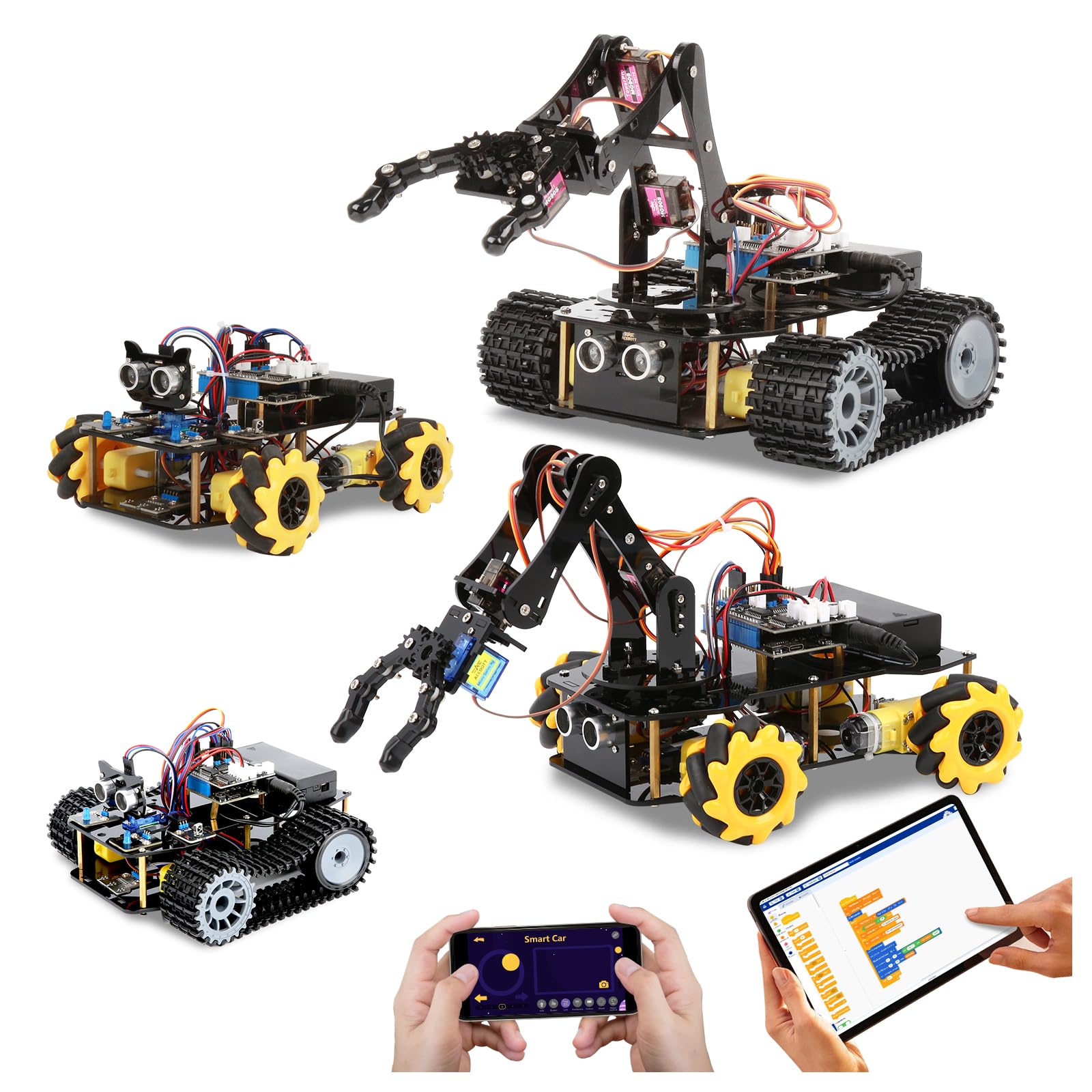
A modular kit that turns a gripper arm into a tank and back again.
This is a brilliant “two-for-one” concept that uses an ESP32 controller to power a 5DOF (five degrees of freedom) robotic arm and a rugged tank car. You can build a robotic arm car to grab and move objects, a tank robot for outdoor fun, or combine them into an arm-tank hybrid. The rubber tank treads handle grass, gravel, and slopes, so this kit is genuinely playable outside. It supports both Arduino and Scratch, with 16 guided tutorials and HD assembly videos to walk you through the process.
The modular design lets kids rebuild the kit into a car, tank, or arm-tank hybrid, encouraging creativity and problem-solving. The app control works for both iOS and Android, and the IR remote adds a low-tech option. The included components list is generous: a smart robot car kit, tank track expansion, and robotic arm kit all in one box, with a plastic material build.
Owners praise it as a great gift for a mechanically inclined youngster and a project that tests planning and thinking. There are a couple of important quirks to know about. The biggest is that flashing code to the ESP32 board requires you to manually short the 0 pin and GND because the board lacks a dedicated boot button—a fiddly step that an adult will need to help with. Also, it needs special batteries that do not come included, which was a point of frustration for some.
Why It Stands Out
- Four-in-one build options (car, arm, tank, and combos) give incredible value and replayability.
- Rubber tank treads make it genuinely off-road capable, unlike most desktop arms.
- 16 story-based tutorials make the coding concepts easy to grasp for beginners.
Watch Out For
- The ESP32 bootloader mode requires manual pin shorting—a potential stumbling block for novices.
- Required batteries are not basic AAs; you must find the specific type, and they are not included.
Reach for this if: you want a kit that offers both manipulation (the arm) and mobility (the tank) in one package without paying for two separate sets.
Think twice if: you want a truly out-of-the-box experience—the bootloader hurdle and battery hunt mean this is for a tinkerer, not a casual buyer.
6. Thames & Kosmos Robotics Smart Machines

A screen-driven kit that lets kids program eight machines with sonar smarts.
This kit takes a different path than the Arduino-based sets—it uses a Bluetooth battery box and a tablet or smartphone app as the brain. Kids can build eight different motorized machines and then program them to react to the world using an ultrasonic sensor, which works on the same principle as sonar used by submarines and bats. The full-color 64-page manual is excellent for teaching the real-world robotics concepts behind each model, and it has earned a Parents’ Choice Gold Award.
The programming is done entirely through the app interface, which is a level of abstraction that hides the code but is perfect for a younger audience (ages 8 and up). It requires a tablet or smartphone running iOS or Android, which is not included. The kit includes the ultrasonic sensor, Bluetooth battery box, motors, gears, building blocks, and a part separator tool, so everything you need to build is in the box.
Owners find it to be a well-made kit that kids love, but the pieces are tight and require adult strength to push together. The instructions can be complex, and parents often find themselves helping out. A few owners noted that the app lacks explanations for some of the arrows and categories, requiring a bit of online research. Bluetooth disconnects can also happen mid-play, which is a common frustration with app-driven toys, but the fundamental robotics learning is solid.
A Gentler On-Ramp: This is the best choice if you want to introduce a child to robotics without the intimidation of Arduino IDE or Python. The app handles the logic for them.
The Catch: The pieces require a surprising amount of force to snap together, so younger children will need a parent or grandparent on hand for assembly.
Best for: an 8-11 year old who loves building and is curious about how robots sense the world, but isn’t ready for text-based coding.
Look elsewhere if: you want a kit that introduces real programming languages—this one is purely app-based and graphical.
7. Freenove Big Hexapod Robot Kit

A six-legged walker that blends advanced Python control with face-tracking smarts.
The hexapod is the most ambitious build on this list, and it earns its premium spot. Each of its six legs has three motors—18 servos in total—giving it a staggeringly wide range of motion, including walking, self-balancing, and omnidirectional movement. The rotatable head carries a camera and an ultrasonic distance sensor, so it can avoid obstacles and even recognize faces. This is a serious robotics platform that runs on a Raspberry Pi (not included), not a toy.
There is no paper manual here—you download a step-by-step assembly guide and complete Python code from the product box. The Python source is fully reprogrammable, so advanced users can implement inverse kinematics or reinforcement learning. Owners who have done it describe the build as a five-hour project for a novice, best tackled with an electric screwdriver. The parts are top-quality, and the educational value is outstanding, but the learning curve is steep.
The biggest thing owners rave about is the quality and the sheer wow-factor of a walking robot. However, the assembly process draws a lot of mixed feedback—the instructions can be hard to follow even though the programming is well-explained. Battery life is the honest weak point: with an active load drawing 15A, runtime can be under 20 minutes on flat-top 18650 batteries (which you must buy separately). Some owners reprogram the idle mode to extend it to 45-180 minutes. This demands adult supervision and patience, making it best for a teen or adult hobbyist.
The Reward
- True 18-servo six-leg design allows walking, balancing, and head rotation.
- Camera plus ultrasonic sensor enable face recognition and real-time video.
- Fully reprogrammable Python source is ideal for advanced machine-learning projects.
The Effort Required
- Assembly is a multi-hour project that is the most demanding in this guide.
- Batteries are not included, and the robot draws 15A, so runtime is short unless you tweak the code.
Reach for this if: you are a serious hobbyist or older student who wants to dive deep into Python robotics and don’t mind a challenging, rewarding build.
Think twice if: you want a quick Saturday-morning project—this is a commitment of several afternoons and a budget for the Raspberry Pi and batteries.
8. Makeblock mBot Ranger 3-in-1

Three distinct robot shapes in one rugged metal kit that never gets boring.
The mBot Ranger delivers three distinct robots—a tank, a self-balancer, and a race car—from one set of parts. You can build the Land Raider (a tank for all terrains), the Nervous Bird (a self-balancing robot), or the Dashing Raptor (a three-wheeled race car). The sturdy metal parts and powerful motors are built to last, and the extraordinary grip tracks let you play outdoors on rough ground or indoors on smooth floors. It is powered by the Me Auriga mainboard.
For programming, it supports both Scratch (for beginners) and Arduino (for those ready to get their hands dirty with text). The mBlock5 Programming App provides professional guidance, letting kids progress from beginner to expert while playing. The kit is loaded with sensors: an ultrasonic sensor, line-tracking sensor, 2 light sensors, a gyroscope sensor, 12 RGB LEDs, a buzzer, a temperature sensor, and a Bluetooth module. That is a massive toolkit for experimenters.
Owners praise it as a great learning tool with solid build quality and a fantastic way to introduce coding to kids. The most-discussed catch is connectivity—some buyers report Bluetooth pairing issues and motors that didn’t work as advertised on the first try. The instructions also get mixed feedback. Another common note is that it eats AA batteries, so a lithium battery pack is a wise upgrade to consider. Despite these quirks, the 3-in-1 versatility makes it a favorite for families with kids aged 10 and up.
The Versatility Win
- Three distinct robot designs (tank, balancer, racer) from one kit ensures long-term replayability.
- Sensor suite includes gyroscope, ultrasonic, temperature, and line-tracking for advanced experiments.
- Metal chassis and grip tracks are genuinely durable for all-terrain outdoor play.
Setup Notes
- Bluetooth connectivity can be finicky; some owners needed to change board settings in the app to fix firmware updates.
- It requires 6 AA batteries or a lithium pack, and it’s a power-hungry device.
Best for: a family with a 10+ year old who wants to build something that actually survives outdoor play and offers room to grow from Scratch to Arduino.
pass on it if: you prefer a pre-assembled unit—this requires a build, and the initial app setup can be a hurdle.
9. LewanSoul xArm1S 6-Axis Robotic Arm

A ready-built metal arm that moves with surgical precision.
This is the only kit on the list that arrives fully assembled, which changes the experience entirely. The xArm1S is a desktop robot arm with 6 high-precision intelligent serial bus servos that give you position, voltage, and temperature feedback. It is built from an aluminum alloy bracket with industrial-grade bearings for rock-solid stability, and the powerful servos can grasp objects weighing up to 500g with ease. It is marketed as a bionic robotics learning platform.
You are not buying a build project; you are buying a working tool. It supports an incredible range of control methods: PC, phone app, mouse, PS2 wireless controller, and offline manual editing. The action editing interface is user-friendly, allowing you to create complex, repeatable motion sequences. Because it works with Arduino, you can also code your own custom behaviors and integrate them into larger projects.
Owners who love it describe it as a very well-designed precision arm with consistent, repeatable movements—one noted 0.24° servo precision at full reach. The hardware is solidly anodized aluminum, and the servos are strong. However, the documentation is the weak link here; the printed instructions are poor, and some owners had to do significant internet research to get the most out of the advanced features. The assembly of the base still takes a few hours, and you should sort the screws carefully first, as one or two may be defective.
The Precision Advantage
- Full metal aluminum alloy construction with industrial-grade bearings for stability.
- 6 intelligent bus servos provide feedback and can lift up to 500g objects.
- Multiple control methods (PC, app, mouse, PS2) make it a versatile teaching tool.
The Documentation Gap
- Printed instructions and video documentation are sparse; plan to research online.
- Software support for newer Macs (M1+ chips) has been flagged as missing.
Reach for this if: you want to study robot kinematics and control systems without spending hours on assembly, and you can navigate sparse documentation.
Think twice if: you are a beginner who wants a step-by-step guide—this arm favors those with some prior coding or engineering experience.
Understanding the Specs
Controller Board
The controller is the robot’s brain. An Arduino (like the UNO R3) is a microcontroller that runs simple, repetitive code—perfect for learning the fundamentals of electronics and C++ logic. A Raspberry Pi is a full computer that runs an operating system, which is required for heavy tasks like AI vision and running language models. If you want a kit that can grow with you, look for one that supports multiple languages or has expansion pins.
Servos vs. Motors
Motors spin continuously to drive wheels or tracks. Servos are precise motors that can move to a specific angle and hold position, which is essential for joints in a robotic arm or legs. The number of servos (often expressed as DOF, or degrees of freedom) determines how many independent axes of movement a robot has. A 5DOF arm is more limited than a 6DOF arm, which can reach points in space in more complex ways.
FAQ
What is the difference between a robot kit for beginners and an advanced robot kit?
Which is better for learning, an Arduino-based kit or a Raspberry Pi-based kit?
Will my child be able to build an advanced robot kit without help?
Why is the Raspberry Pi not included in some robot kits?
What kind of batteries do advanced robot kits need?
Can I use my own code with these robot kits?
What is a self-balancing robot and why is it a good learning tool?
Is a robotic arm kit harder to control than a wheeled robot kit?
How long does it take to assemble an advanced robot kit?
Is there a difference between “degrees of freedom” and “axes” on a robotic arm?
Final Thoughts: The Verdict
For most people, the winner is the advanced robot kits crowd favorite — the ELEGOO Conqueror — because it balances a rewarding metal build, a live video feed, and real Arduino learning without requiring a prior degree in computer science. If you want to explore the cutting edge of AI and voice interaction, the SunFounder PiCar-X is the one to reach for. And for the absolute best in precision manipulation, the LewanSoul xArm1S delivers a ready-to-code desktop arm that feels like a professional tool.
How We Picked
We do not accept paid placement. Every pick is matched to a real buyer and a real use-case; we do not hands-on test units.
Sources & Methodology
Specifications: manufacturer listings and product documentation. Review insights: verified customer reviews, as of August 2026. Pricing: not shown on this page (it changes often); check the current price via the retailer link.
As an Amazon Associate, Gadgets Feed earns from qualifying purchases. This does not affect which products we feature.