
Our readers keep the lights on and my morning glass full of iced black tea. As an Amazon Associate, I earn from qualifying purchases.
Specs are compiled from manufacturer listings and verified buyer reviews and can change over time — please confirm the key details on the product page before buying.
Finding a laptop that looks as good as it performs is harder than it should be. Most “stylish” machines cut corners on the specs that matter, and most powerful ones are dressed in drab plastic. You want the machine that turns heads in a coffee shop and still powers through your editing timeline, your spreadsheet, or your design portfolio without a hiccup.
I’m Min — the founder and writer behind Gadgets Feed. This guide is built by comparing the manufacturers’ published specifications and the patterns across verified customer reviews, so you get each pick’s real strengths and trade-offs instead of marketing spin.
From slim OLED stunners to featherlight titanium flagships, here are the aesthetically pleasing laptops that actually earn their place on your desk.
Our Picks at a Glance


How To Choose The Best Aesthetically Pleasing Laptop
Beauty in a laptop is not just about looks. It is about how the design choices affect your daily experience — weight, screen quality, keyboard feel, and materials.
Start with the screen you’ll stare at for hours
Choose a bright, high-resolution panel now because you cannot swap it out later. Look for bright panels if you work near windows, and OLED technology (self-emitting pixels that produce true blacks) if you want richer colors for media or design work.
Weight and build matter more than you think
Magnesium alloy and machined aluminum (shaped from a solid block of aluminum) feel premium and stay light. If you carry your laptop daily, a few pounds difference is felt in your shoulder every single commute.
Balance specs with your actual work
Dedicated AI processors (a small chip that speeds up tasks like background blur and photo editing) are common now, but you only need them if you do creative or multitasking-heavy work. Match the RAM and storage to what you really open each day.
Quick Comparison
| Model | Best For | Display | Weight | Battery Life | Amazon |
|---|---|---|---|---|---|
| Apple MacBook Pro M5 | Creative pros & Apple fans | 14.2″ Liquid Retina XDR | 3.41 lbs | All-day | Amazon |
| HP OmniBook X Flip 14 | Versatile 2-in-1 value | 14″ WUXGA IPS Touch | — | Up to 22h 45m | Amazon |
| Microsoft Surface Laptop (2024) | Windows elegance & security | 13.8″ Touchscreen | — | Up to 20 hours | Amazon |
| GEEKOM GeekBook X14 Pro | Ultralight OLED travel | 14″ 2.8K OLED | 2.2 lbs | Up to 16 hours | Amazon |
| Acer Aspire 2026 | AI-focused professionals | 14″ Touchscreen | 3.09 lbs | Long battery | Amazon |
| GEEKOM GeekBook X16 Pro | Big-screen creators | 16″ 2.5K IPS | 2.8 lbs | Up to 17 hours | Amazon |
| ASUS Vivobook S16 | Creators who want OLED & RGB | 16″ 2.8K OLED 120Hz | — | — | Amazon |
| Dell 16 Plus | Spreadsheet-heavy multitaskers | 16″ QHD+ | — | — | Amazon |
| ASUS Zenbook Duo | Dual-screen multitasking | Dual 14″ OLED 3K 120Hz | 3.64 lbs | Up to 16 hours | Amazon |
| Lenovo ThinkPad X1 Carbon Gen 13 | Business executives on the go | 14″ 2.8K OLED | 2.17 lbs | Up to 15 hours | Amazon |
| Lenovo ThinkPad X1 Carbon Gen 13 (Aura) | Ultra-light business power | 14″ 2.8K OLED 400 nits | From 2.17 lbs | — | Amazon |
| Dell XPS 14 | Premium design purists | 14.5″ Touch 3.2K OLED | — | — | Amazon |
| LG gram Pro 17 | Big-screen portability kings | 17″ Display | 3.3 lbs | Up to 25 hours | Amazon |
In‑Depth Reviews
1. Apple 2025 MacBook Pro M5
The sleek Space Black icon that makes every other laptop on the table look dated.
The 14.2-inch Liquid Retina XDR display and Space Black finish make it the most trusted premium pick. The 14.2-inch Liquid Retina XDR display hits up to 1600 nits peak brightness, which means it stays vivid and readable even in a sun-bright café. Owners call the design “sleek” and the build durable, with one saying the size, weight, and battery life make it a daily joy.
Inside, the Apple M5 chip pairs a 10-core CPU with a 10-core GPU, plus a Neural Accelerator (a chip that speeds up AI tasks) built into every core. That translates to fast creative work and on-device AI that keeps your data private — Apple even states it cannot access your data. The 12MP Center Stage camera keeps you framed in video calls, and six speakers with Spatial Audio and Dolby Atmos make movie nights feel like a theater.
Connectivity is generous for a slim laptop: three Thunderbolt 4 ports, MagSafe 3 charging, an SDXC card slot, HDMI, a headphone jack, and support for up to two external displays. Weighing 3.41 lbs and measuring 0.61 inches thin, it is a machine you will slip into a bag without a second thought. Buyers report the battery is genuinely all-day, which is the single biggest reason they stop carrying chargers.
The Stuff Owners Rave About
- Performance exceeds expectations across the board — it is the number one thing people talk about
- smooth compatibility with iPhone and the wider Apple ecosystem
- Design, durability, and battery life all earn repeated praise
Who Should Look Elsewhere
- Windows-only work software will not run natively here
- If you need a touchscreen, this MacBook does not have one
Reach for this if: you want the complete package — gorgeous design, all-day battery, and a screen that handles bright rooms with ease.
Think twice if: your workflow depends on Windows-exclusive apps or touch input, because this machine is macOS-only and lacks a touchscreen.
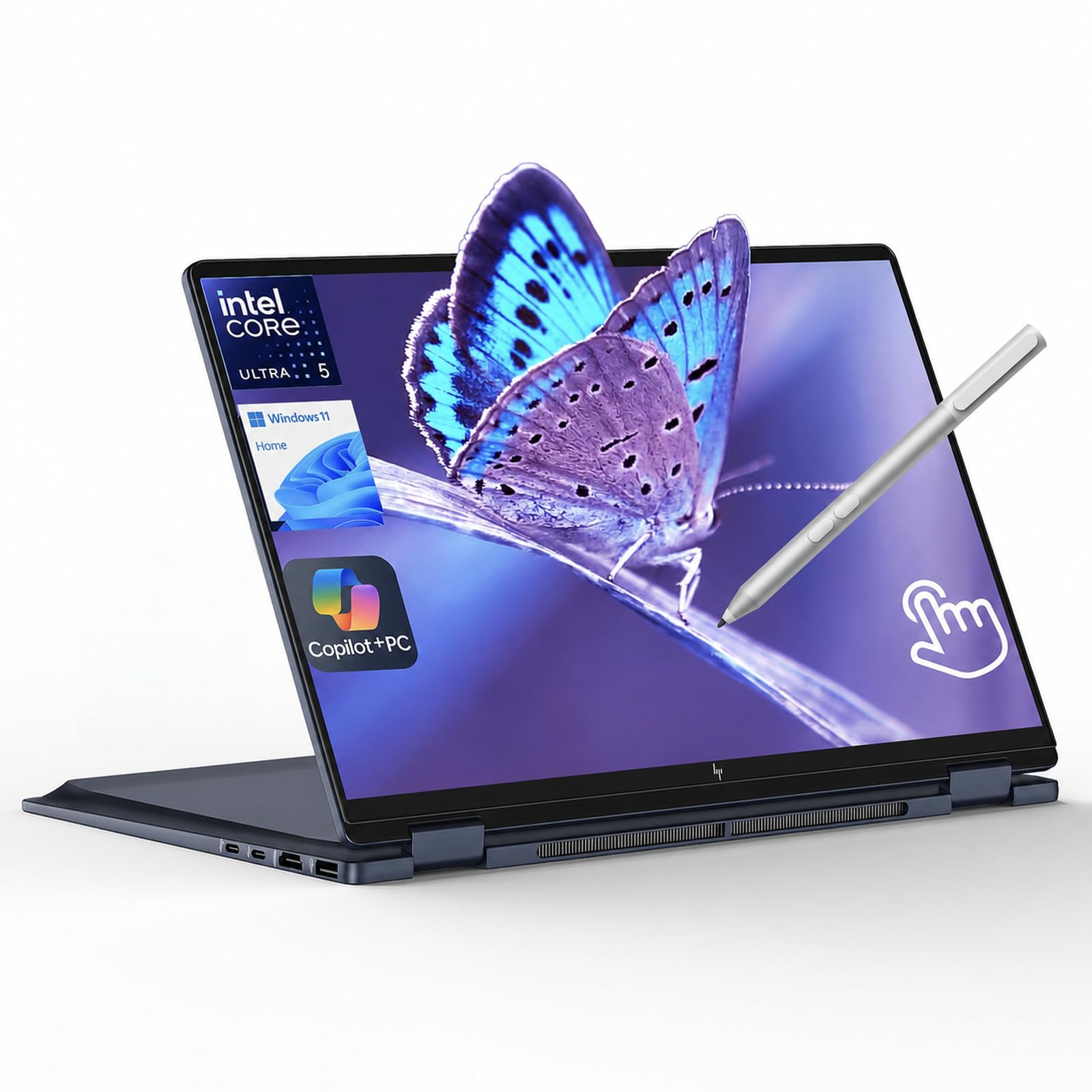
2. HP OmniBook X Flip 14 2-in-1
The elegant flip that folds flat, stands tall, and stretches a single charge across a workday.
You get a laptop that flips into a tablet, and its Intel Core Ultra 5 226V processor includes a dedicated 40 TOPS NPU — a chip that runs AI tasks like background blur and photo editing right on the device, so you do not need cloud services. The 14-inch WUXGA IPS touchscreen (a high-resolution, wide-viewing-angle display) reaches 400 nits brightness and an 89.5% screen-to-body ratio, meaning the bezels (borders around the screen) are thin and the display feels edge-to-edge. You can lay it flat, fold it back, or flip it around for tablet use.
Battery life is the headline: up to 22 hours 45 minutes, with fast charging. That is enough for a full workday plus a commute and still have power left. Buyers describe it as “really nice and elegant,” and one notes it handles both work and games extremely well. The keyboard is backlit (lit up for typing in the dark), and security extras like walk-away lock and wake-on-approach keep your data safer.
The honest caveats: a couple of buyers mention backlight bleed (light leaking around the screen edges), noticeable only in dark scenes. The stylus pen listed as bundled is provided by the seller “Super Prime Shop” — verify it is in your box. Connectivity is strong with 1 Thunderbolt 4 USB-C, 1 USB-C 3.1, 2 USB-A 3.1, and HDMI 2.1, so you can dock without a dongle.
Elegant all-rounder: the flip design plus 22+ hour battery makes this the pick for students and commuters who want one device for work and play. Buyers call it a “great buy for the money” and say it is worth every penny.
The fine print: a few units arrive without the stylus, and dark-scene backlight bleed is a known quirk — check your box before you rely on the pen.
Best for: anyone who wants a convertible touchscreen with all-day stamina and a price that undercuts most rivals.
Look elsewhere if: you are a strict typist who hates any screen imperfections, or you need the stylus guaranteed in-box — order from a seller that confirms it.
3. Microsoft Surface Laptop (2024)
A razor-thin Windows machine whose Dune color and soft keyboard feel genuinely premium.
Microsoft’s Copilot+ PC runs on a Snapdragon X Plus (10-core) chip, and the company claims it delivers faster performance than the MacBook Air M3 — a bold promise in this class. The 13.8-inch touchscreen is the centerpiece: bright HDR tech, an ultra-thin design, and boost screen space. Battery life runs up to 20 hours, enough to “focus, create, and play all day” as Microsoft puts it.
Most owners buy this for the design. Owners mention loving the sleek look, the size and weight for daily use, and the keyboard — one calls it a “soft and smooth keyboard.” Security features matter to professionals: a real estate owner specifically praised the protections after being hacked on an old laptop. It is light enough to slip into a smaller bag.
What wins people over is the combination of looks, weight, and all-day battery — the most-praised aspects. The honest trade-off: performance and value get mixed feedback. A 25-year IT professional warns it suits basic users best, citing USB-A driver incompatibilities and resume-from-sleep bugs. It has Wi-Fi 7, Bluetooth, USB, and USB-C connectivity, plus the touchscreen control.
Windows beauty queen: the Dune color, featherlight body, and haptic-feel trackpad make this the most Mac-like Windows laptop. Buyers call it “beautifully built” with impressions of its sleek design.
Fit note: performance and value are genuinely mixed — owners who push heavy multitasking or specialty peripherals should consider the Apple side, while basic users will adore it.
Reach for this if: you want a light, secure, drop-dead gorgeous Windows laptop for everyday work, browsing, and writing.
Think twice if: you drive finicky USB devices or demand flawless sleep/wake behavior — a few owners hit driver quirks.
4. GEEKOM GeekBook X14 Pro

At 2.2 lbs, this all-metal OLED slips into your bag like a magazine.
At 2.2 lbs, the magnesium-alloy chassis is light enough for daily commutes. The GeekBook X14 Pro weighs just 2.2 lbs and measures 0.23 inches thin, with a chassis (body) made from aerospace-grade magnesium alloy and a precision-milled CNC unibody. The multi-step coating gives a smooth, warm finish that resists smudges and fingerprints — a thoughtful detail for anyone who hates smudged metal.
The 14-inch 2.8K OLED display hits 100% DCI-P3 color coverage, a 120Hz refresh rate, and up to 450 nits of brightness. Self-lit pixels mean true blacks and rich contrast, which movie lovers and creators will immediately notice. With a 72Wh battery it runs up to 16 hours, and the 65W GaN charger gets it to 80% in about an hour while staying about 30% smaller than a typical adapter.
Performance comes from the Intel Core Ultra 9 185H with 16 cores, 22 threads, up to 5.1 GHz, and 24MB of Smart Cache. That is paired with 32GB of LPDDR5x RAM at 7500MHz and a 1TB PCIe Gen4 NVMe SSD. Customers note it handles Fusion 360 plus 15-20 Chrome tabs without breaking a sweat, and one notes it is “fantastic” for the price, staying cool and quiet.
What Impresses Owners
- Performance is the top praise — the Core Ultra 9 flies through real workloads
- Lightweight (2.2 lbs) and portability for travel earn strong notes
- Screen quality and speed both get called out as standout strengths
The Honest Trade-Off
- Battery life is mixed — great on sleep, but heavy use drains faster than the 16-hour claim
- A few owners find the trackpad less smooth than they would like
Best for: travelers and students who want a featherlight, all-metal OLED that outperforms pricier rivals.
Look elsewhere if: you need a premium trackpad experience or guaranteed marathon battery under heavy load — those are the two real gripes.
5. Acer Aspire 2026

The gray professional that quietly runs AI workloads without breaking a sweat.
Its 47 TOPS NPU runs Copilot+ features like background blur and auto-framing locally for privacy. That powers Copilot+ features like real-time video effects, background blur, auto-framing, and AI photo editing, all running locally for privacy. The Intel Core Ultra 7 258V processor reaches 4.8 GHz, paired with 32GB of LPDDR5X RAM and a 2TB PCIe SSD for near-instant boot times.
The 14-inch touchscreen supports stylus input, making photo retouching and precise edits more intuitive. At just 3.09 lbs and 0.7 inches thin, it fits any bag for commutes between home office and client meetings. The included USB hub brings HDMI, USB-A, USB-C, SD card, and Ethernet ports — so you skip the dongle drawer entirely. Reviewers point out it starts up quickly and performs well, with one using it to build AI businesses and praising its speed.
The main caveat is the display: one owner calls it “below average” and says it is not for watching movies, playing games, or editing photos, though it can do all of those “with ease” — just with an “ehh screen.” The touchscreen itself gets praised as handy. If visuals are your priority, the OLED picks above will serve you better.
AI workhorse: the 47 TOPS NPU and 32GB RAM make this a productivity beast for remote workers and AI tinkerers. Shoppers say it is “fast, smooth” and great for AI business use.
Display caveat: owners are clear that the screen is the weak link — fine for work, but not a media or creative display.
Best for: freelancers, consultants, and remote workers who want AI acceleration, huge storage, and 32GB RAM in a light 3.09 lbs body.
Think twice if: you are a content creator or movie buff — the display is honestly the weakest part of this machine.
6. GEEKOM GeekBook X16 Pro

A 16-inch screen in a 2.8 lbs body — the big-screen dream that still travels light.
You get a large screen without a heavy bag — this is the bigger sibling to the X14 Pro. The 16-inch IPS panel (a display type known for accurate colors and wide viewing angles) uses a 16:10 aspect ratio, giving you extra vertical room for timelines and panels. It delivers a sharp 2.5K (2560 × 1600) resolution, 100% sRGB coverage, up to 400 nits brightness, and a fluid 120Hz refresh rate (the screen updates 120 times per second, so scrolling looks smooth). The 77Wh battery (a measure of energy capacity) pushes battery life up to 17 hours.
Under the hood it shares the same Core Ultra 9 185H processor (16 cores, 22 threads, up to 5.1 GHz, 24MB Smart Cache) and 32GB of LPDDR5x RAM at 7500MHz. Storage doubles to a 2TB PCIe Gen4 NVMe SSD. The IceBlade 2.0 cooling system with dual fans and two heat pipes keeps it cool during demanding sessions. Buyers report it “ran circles around” a seven-year-old Dell, with one calling it “the best laptop I have ever had.”
Connectivity is generous: a 40Gbps USB4 Type-C port with Power Delivery and DisplayPort 2.1, a secondary USB 3.2 Type-C, HDMI 2.1, two USB 3.2 Type-A ports, a 3.5mm audio jack, and a microSD slot. Fingerprint open up adds security. The recurring honest gripe is the keyboard-and-trackpad “cockpit” — one owner calls it among the worst they have used, chiefly the trackpad. If you mostly use an external mouse, this is a non-issue.
Why Owners Stay Loyal
- Performance is the repeated top praise — it handles anything thrown at it
- Value for money earns consistent positive mention
- 2.8 lbs for a 16-inch is genuinely rare in this class
The Fit Warning
- The keyboard and trackpad combination is divisive — heavy typists should test it first
- A few owners wish the trackpad were smoother
Best for: creators and professionals who want 17-hour battery and a huge screen without the usual weight penalty.
Look elsewhere if: you live on the trackpad — this is the one real weak spot owners flag consistently.
7. ASUS Vivobook S16 AI PC

A Mist Blue OLED with RGB backlighting that bridges serious work and play.
Creators get a genuine treat here. The 16-inch 2.8K WQXGA+ (2880×1800) OLED panel runs at 120Hz with 600 nits HDR peak brightness and 100% DCI-P3 color coverage — numbers that make photo editing and movie watching gorgeous. It is powered by the Intel Core Ultra 9 285H processor (up to 5.4 GHz, 16 cores, 16 threads) with an Intel AI Boost NPU up to 13 TOPS. The integrated Intel Arc Graphics handles creative workloads.
With 32GB of LPDDR5X RAM and a 1TB SSD, this is a multitasking machine. The RGB backlit keyboard with num-key is a rare find on a creator laptop, adding both flair and function. Connectivity covers 2x USB 3.2 Gen 1 Type-A, 2x Thunderbolt 4 with display/power delivery support, HDMI 2.1, a 3.5mm combo audio jack, and a Micro SD card reader. Wi-Fi 7 and Bluetooth 5.4 keep things fast. The FHD IR camera with privacy shutter adds security.
Buyer feedback is enthusiastic but split on the trackpad. One owner calls it “amazing” and praises the picture and durability, another found it comfortable even with mild palsy. But a serious complaint exists: one owner describes the touchpad as a “nightmare” with a jumping cursor and over-sensitivity that made typing unreliable. Consider whether you rely heavily on the built-in trackpad before committing.
Visual powerhouse: the 600-nit OLED and RGB keyboard make this the most eye-catching creator machine here. Buyers call the picture “amazing.”
Trackpad roulette: experiences vary wildly — most love it, but heavy typists have hit a defective-feeling unit, so test yours early in the return window.
Best for: creators and designers who want OLED color accuracy plus RGB flair in a professional-shaped laptop.
Think twice if: you do marathon typing sessions and cannot tolerate a finicky trackpad — a minority of owners hit that exact issue.
8. Dell 16 Plus

An Ice Blue aluminum slab that makes staring at data sheets all day easier on your eyes.
The 16:10 screen shows more rows at once, reducing eye fatigue during long data sessions. The expansive 16:10 screen (a taller aspect ratio that shows more rows at once) is the standout, with buyers noting it reduces eye fatigue during long data-heavy sessions. The Intel Core Ultra 9 288V processor reaches 5.1 GHz, paired with 32GB of RAM, and owners say it handles multiple apps smoothly. The built-in FHD+ webcam enables fast Windows Hello face-recognition login.
Dell claims all Plus laptops pass rigorous military-grade testing for durability, and the aluminum build feels sleek. Buyers praise the speed, value, lightweight design, and the bright display — with performance being the most-mentioned positive. The 1 Year Onsite Service means Dell sends a technician to you if a hardware issue cannot be fixed remotely, saving you a trip to a repair shop.
There are honest compromises. The most consistent complaint is ports: owners flag the limited number of USB ports and the lack of an SD or microSD card reader, so a USB hub is effectively required. One buyer notes a short spacebar that causes typos, and another found the backlit keyboard auto-off annoying. If you live on USB sticks and camera cards, budget for a hub.
The Things Buyers Cheer
- Performance is the top praise — snappy and smooth for multitasking
- Bright, high-resolution screen that is easy on the eyes
- Fast, lightweight, and easy to set up
Plan Your Ports
- Limited USB ports and no SD/microSD card reader are the recurring complaints
- A short spacebar bothers some touch typists
Best for: analysts, accountants, and anyone who lives in spreadsheets — the tall screen is genuinely restful for the eyes.
Look elsewhere if: you need built-in SD card reading or lots of USB ports without carrying a hub.
9. ASUS Zenbook Duo

The dual-OLED conversation starter that makes a second monitor feel unnecessary.
Dual 14-inch OLED touchscreens let you run two apps side by side without an external monitor. The Zenbook Duo features dual 14-inch Lumina OLED touch displays, each with a 2880×1800 resolution, 500-nit HDR peak brightness, and a smooth 120Hz refresh rate. Pantone-validated 100% DCI-P3 color accuracy means what you see is true. You can use both screens side by side, stack them vertically in Desktop Mode, share content in Sharing Mode, or fold back to a single-screen Laptop Mode.
It is powered by the Intel Core Ultra 9 285H with Intel AI Boost NPU and Intel Arc graphics, paired with 32GB of LPDDR5x RAM and a 1TB SSD. At 3.64 lbs and 0.57 inches thin, it is surprisingly portable for a dual-screen device. The detachable Bluetooth keyboard and built-in kickstand let you use it as a tiny workstation anywhere. Buyers rave that they “can’t go back to one screen.”
The 75Wh battery delivers up to 16 hours of video playback in Laptop mode and 9 hours in Dual Screen mode — a real trade-off to know. Fast-Charge technology tops it up through Thunderbolt 4 USB-C ports. Connectivity is full: 2x Thunderbolt 4, USB 3.2 Gen 1 Type-A, HDMI 2.1, and a combo audio jack, plus Wi-Fi 7 and Bluetooth 5.4. In-box you get an ASUS Sleeve, ASUS Pen 2.0 with MPP 2.0 support, and a 65W USB-C charger.
What Makes It Special
- Dual-screen is the top praise — productivity and multitasking go to another level
- Performance is raved about across the board
- Vibrant, crisp OLED displays with true color accuracy
The Battery Reality
- Battery life is genuinely mixed — expect ~4-7 hours on real-world use
- Fans can get loud under load
Best for: traders, developers, and multitaskers who crave two screens without carrying a monitor.
Think twice if: you need all-day battery with both panels on — that is the one spec Intel silicon cannot fudge.
10. Lenovo ThinkPad X1 Carbon Gen 13

Lenovo’s flagship ultra-premium business laptop, weighing just 2.17 lbs with up to 15 hours of battery.
At 2.17 lbs, it is one of the lightest premium business laptops available. The ThinkPad X1 Carbon Gen 13 is Lenovo’s flagship ultra-premium AI business laptop at just 2.17 lbs, with up to 15 hours of battery life. The 14-inch 2.8K QHD+ (2880×1800) OLED display delivers 500 nits brightness, 120Hz VRR (variable refresh rate that adapts to content), and 100% DCI-P3 color. Dolby Vision and DisplayHDR True Black 500 make it a premium viewing experience.
It runs on the Intel Core Ultra 7 258V processor (up to 4.8 GHz, 8 cores) with a dedicated 47 TOPS NPU for AI acceleration. That pairs with 32GB of DDR5 8533 MT/s RAM and a 1TB PCIe NVMe M.2 SSD. The 1080P FHD IR Webcam supports facial recognition for secure login, and a fingerprint reader adds another layer. The bundled IST Computers 7-in-1 Hub expands connectivity with HDMI, USB-C, USB 2.0 ports, Type-C Power Delivery, and an SD/TF card reader.
Buyers are impressed with how light it feels and the crisp display, calling it “one of the lightest laptops I’ve experienced.” The MIL-STD-810H military-grade build adds durability confidence. The honest caveat: reliability and value get mixed reviews. Some praise it as worth the price, while one owner reported months of driver and hardware issues and regretted not buying a MacBook. It is also disclosed that the unit is resealed to upgrade the SSD, with a three-year warranty on the SSD from Issaquah Highlands Tech and one year from Lenovo on the rest.
The Executive Appeal
- Performance earns the top praise, ideal for day-to-day business
- The display is called “amazing” and the build quality is well-received
- At 2.17 lbs, it is one of the lightest premium laptops you can buy
Know Before You Buy
- Reliability is a mixed bag — most are happy, but a few hit persistent hardware issues
- The resealed-for-SSD-upgrade disclosure means it is not a factory-fresh sealed box
Best for: business leaders and consultants who want a featherlight, secure, premium machine with a gorgeous OLED screen.
Think twice if: you demand zero-risk reliability or a factory-sealed unit — a minority of owners had issues worth the extended warranty.
11. Lenovo ThinkPad X1 Carbon Gen 13 (Aura)
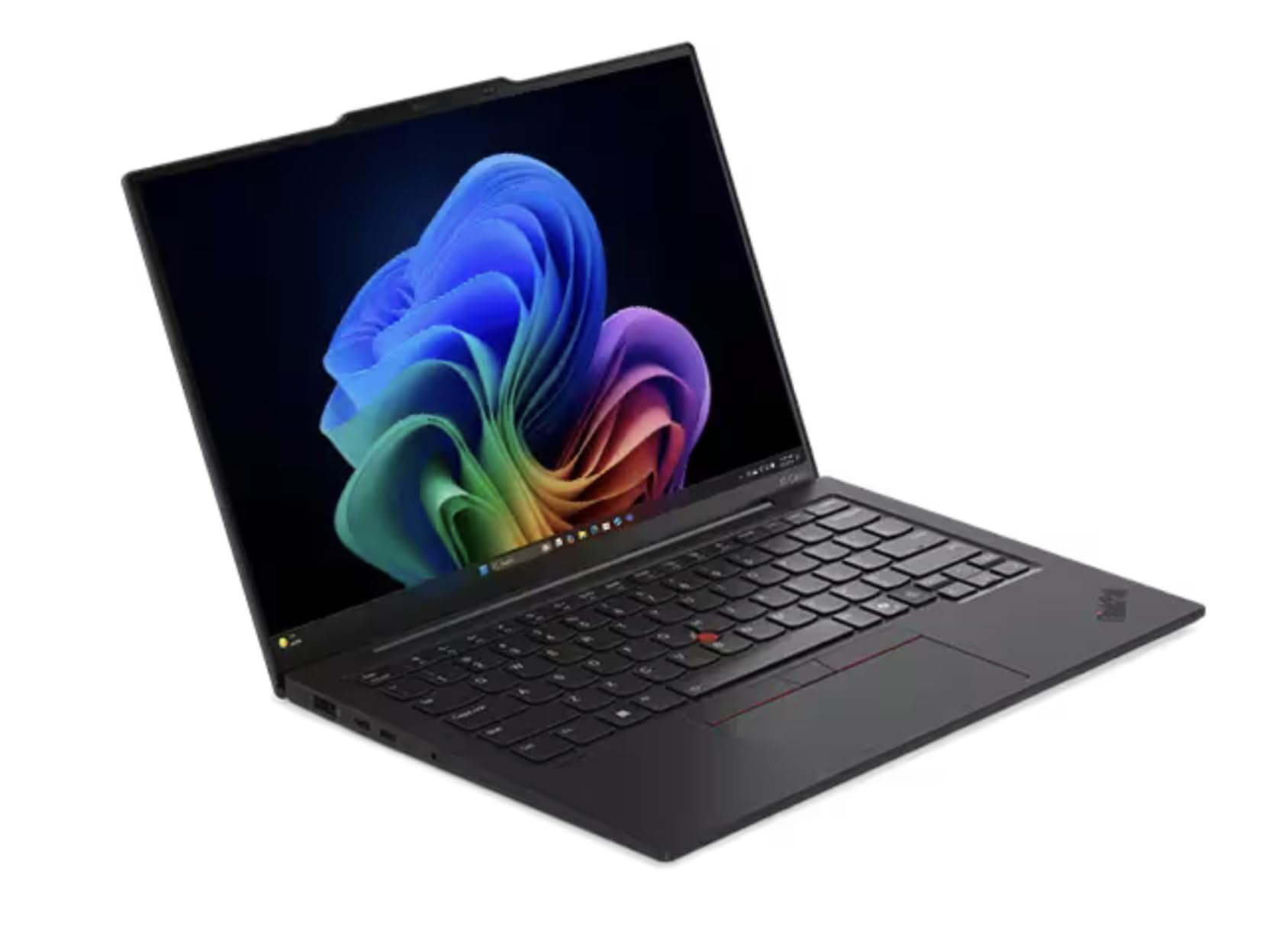
The “best ThinkPad ever” — ultra-light, blazing fast, and genuinely beautiful in Eclipse Black.
This Aura Edition takes everything great about the X1 Carbon and adds the vPro processor. It runs on the Intel Core Ultra 7 268V vPro (P-cores up to 5.00 GHz) with integrated Intel Arc Graphics 140V. The 14-inch 2.8K (2880×1800) OLED display is anti-glare, anti-reflection, and anti-smudge with HDR 500, 100% DCI-P3, 400 nits, and 120Hz. Low Blue Light technology helps reduce eye strain during long sessions.
It ships with 32GB of LPDDR5X-8533MT/s memory on package and a 1TB SSD M.2 2280 PCIe Gen4. Weighing from just 986g (about 2.17 lbs), it is astonishingly light. The 1080P FHD Infrared (IR) RGB Hybrid webcam includes a privacy shutter, and face recognition is built in for fast Windows Hello login.
Owners are emphatic. One calls it “the best Thinkpad ever” and says it arrived in better condition than described. Another notes it is “light and very speedy and performant,” adding that while expensive, “you get what you pay for.” A long-time Lenovo fan says it is “the best laptop I ever bought,” stunned by the computational power for the weight. Unlike the other X1 Carbon listing here, reviewers confirm this one shipped with the correct processor as listed.
Lightweight legend: owners consistently call this the finest ThinkPad they have owned, praising the weight-to-power ratio and the beautiful build.
The premium price: it is spendy — but owners mention the quality justifies it, with one noting it saved a few hundred dollars versus the Lenovo site list price.
Best for: power users and executives who want the best ThinkPad ever made, with vPro security and a stunning OLED panel at just 2.17 lbs.
Look elsewhere if: budget is your first concern — this is a flagship and priced as such, though owners insist it delivers.
12. Dell XPS 14 Premium
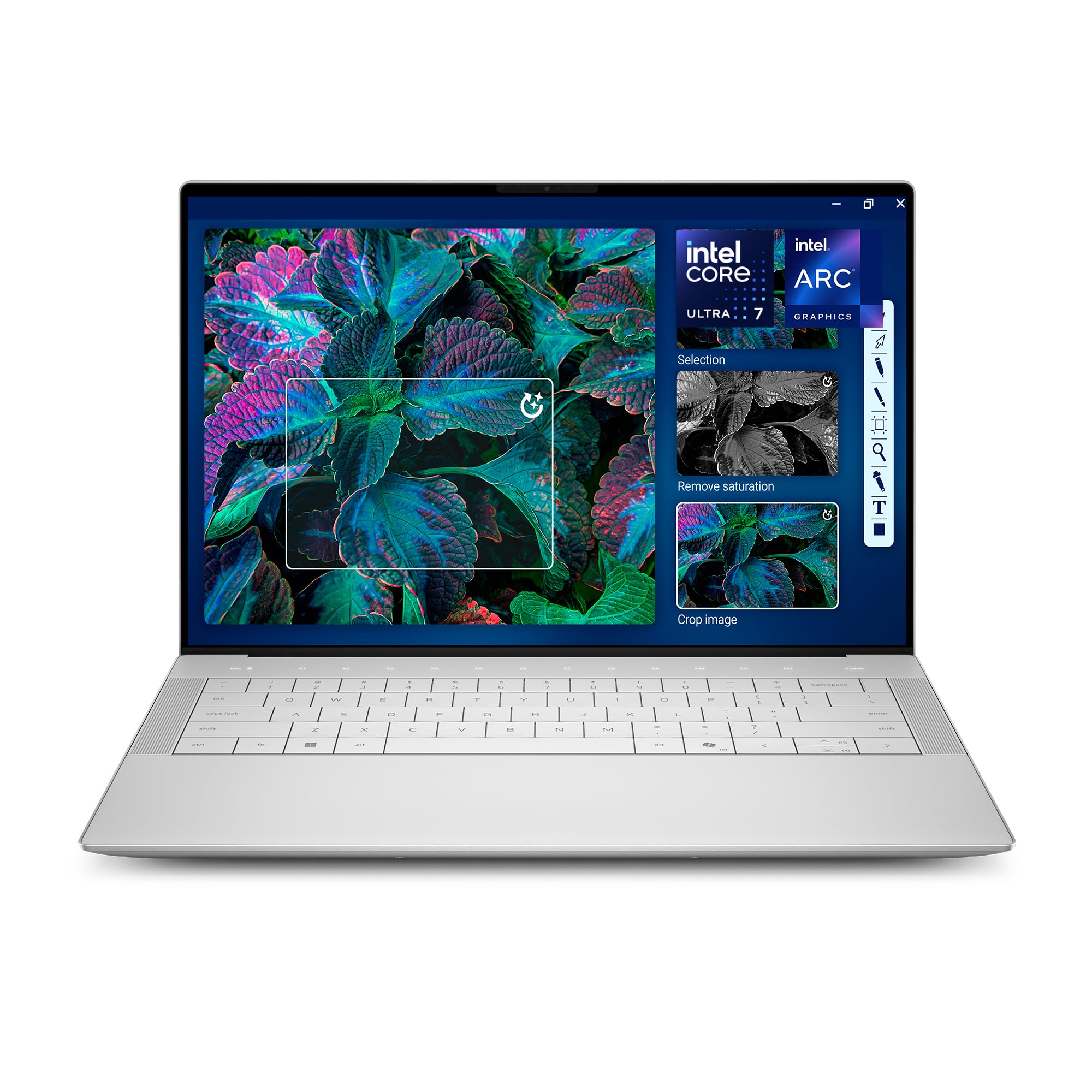
Machined aluminum and Gorilla Glass 3 in a Platinum shell that feels like jewelry.
The Dell XPS 14 is the design purist’s choice. The 14.5-inch touchscreen 3.2K OLED panel runs at a 48-120Hz variable refresh rate, which keeps moving content smooth while saving battery on static pages. The display is gorgeous — sharp, vivid, and bright enough for creative work. Crafted with machined aluminum and Gorilla Glass 3, it delivers strength without the weight penalty.
Inside is the Intel Core Ultra 7 255H processor (up to 5.1 GHz) with a dedicated AI engine, paired with Intel Arc Graphics, 32GB of memory, and a 1TB SSD. The backlit English keyboard includes a fingerprint reader for secure, fast login. Windows Copilot is built in as a personal AI assistant. Connectivity covers Bluetooth 5.4 and Wi-Fi, plus compatibility with external displays, mice, keyboards, and storage including microSDXC.
Buyers are mostly thrilled — one calls it a “great machine at a great price,” and a long-time Dell owner says this latest version “does not disappoint.” One buyer praised the Amazon purchasing experience itself as exceptional. The honest caveat: if you are a touch typist, the flat keyboard design is divisive, with one owner complaining about the tiny function row lights and invisible trackpad, needing tactile stickers. It is also a bit heavier than the Lenovo X1 series, per one comparison.
Design masterpiece: the machined aluminum and Gorilla Glass 3 build is what buyers notice first — it feels premium in hand.
Typist warning: the ultra-flat keyboard layout is polarizing; test it before committing if you type all day.
Best for: design-focused buyers who want a gorgeous OLED touchscreen in a solid aluminum body.
Think twice if: you are a fast touch typist who needs tactile key feedback — this keyboard is genuinely different.
13. LG gram Pro 17

A 17-inch screen that weighs 3.3 lbs with 25 hours of battery — the ultimate travel powerhouse.
A 17-inch screen at 3.3 lbs surprises everyone who picks it up. The 17-inch LG gram Pro weighs just 3.3 lbs — remarkably light for its size — and packs a 90Wh battery offering up to 25 hours of video playback. The NVIDIA RTX 5050 GPU delivers smooth gaming, fast rendering, and smart AI performance. It has passed seven military-grade standards for resilience and durability.
Performance comes from the Intel Core Ultra 9 285H processor with 32GB of DDR5 memory and a 2TB SSD. The variable refresh rate adapts from 31Hz to 144Hz for smooth, stutter-free visuals whether gaming, streaming, or multitasking. The LG gram Link feature connects with up to 10 devices across Android and iOS for file sharing and screen mirroring. The internal dual cooling system keeps it running efficiently.
Buyers are delighted by the weight — one loves “people’s surprised reactions when I hand it to them and they feel how light it is.” Another calls it “near perfect,” praising the slim build, quality, and lack of lag for business and video editing. One owner notes the full numeric keypad makes typing easy. The honest caveats: there is no Ethernet port (so you need Wi-Fi or an adapter for wired internet), and setup comes with pre-installed antivirus and apps that one buyer found annoying. No cooling pad is needed, which is a nice plus.
The Surprise Factor
- A 17-inch screen at 3.3 lbs is genuinely unheard of from most brands
- 25 hours of battery with a 90Wh cell is class-leading
- RTX 5050 GPU handles light gaming and creative work
The Fine Print
- No Ethernet port — you will need Wi-Fi or an adapter
- Pre-installed antivirus and apps annoy some owners during setup
Best for: road warriors who want a massive screen, all-day-plus battery, and the shock value of a laptop that defies its size.
Look elsewhere if: you need a wired Ethernet connection without a dongle, or you hate pre-installed software.
Understanding the Specs
OLED vs IPS Displays
OLED (organic light-emitting diode) screens light up each pixel individually, producing true blacks and vivid colors. IPS (in-plane switching) panels are brighter and cheaper but have lighter blacks. For movies, design, or just daily beauty, OLED wins; for bright offices, a high-nit IPS is fine.
Refresh Rate and Nits
Refresh rate (measured in Hz) is how many times the screen updates per second — 120Hz feels smoother for scrolling and video than the standard 60Hz. Nits measure brightness; 400 nits is good indoors, 600+ nits helps in direct sunlight.
FAQ
What makes a laptop “aesthetically pleasing” beyond just looks?
Is OLED worth it for a laptop I use for work?
How much weight difference actually matters for a daily carry?
Do I need an AI-focused processor (NPU) for daily tasks?
What is a 2-in-1 laptop and who should get one?
Which ports do I really need on a slim laptop?
Is a heavier laptop with better specs worth it?
How long do laptop batteries typically last per charge?
What does a 120Hz refresh rate actually feel like?
How do I choose between macOS and Windows for a premium laptop?
Final Thoughts: The Verdict
The aesthetically pleasing laptops winner is the Apple MacBook Pro M5 because it pairs stunning Space Black design with all-day battery, a 1600-nit display, and the most consistent performance record here. If you want the elegant 2-in-1 with marathon battery life, grab the HP OmniBook X Flip 14. And for the big-screen traveler who values portability above all, the LG gram Pro 17 is the one to reach for.
How We Picked
We do not accept paid placement. Every pick is matched to a real buyer and a real use-case; we do not hands-on test units.
Sources & Methodology
Specifications: manufacturer listings and product documentation. Review insights: verified customer reviews, as of August 2026. Pricing: not shown on this page (it changes often); check the current price via the retailer link.
As an Amazon Associate, Gadgets Feed earns from qualifying purchases. This does not affect which products we feature.