
The hurdle isn’t the price—it’s the setup. Many first-time buyers expect a weekend of tinkering, confused by bed leveling and slicing profiles. That expectation is outdated. The modern entry-level 3D printer arrives nearly ready, often printing within minutes of unboxing, with automated systems handling the tedious calibration work. The real decision is about build volume, speed, and whether you want the option to print in multiple colors from day one.
I’m Min — the co-founder and writer behind Gadgets Feed. I’ve spent countless hours analyzing the specifications, customer feedback, and real-world failure modes of dozens of FDM printers to separate hype from genuine beginner-friendly design.
This guide evaluates nine models across budget, mid-range, and premium tiers to help you find the best affordable 3d printer for beginners, factoring in print speed, auto-leveling reliability, and the quality of the out-of-box experience.
How To Choose The Best Affordable 3D Printer For Beginners
Beginners often overvalue build volume and undervalue auto-leveling and community support. A printer with a massive bed but finicky manual calibration will frustrate a new user far more than a smaller machine that works reliably every time. Focus on the systems that reduce hands-on interaction.
Auto-Leveling vs. Manual Calibration
Manual bed leveling using paper and knobs is a rite of passage but is the single largest source of failed first prints. Every printer on this list includes some form of automatic bed leveling, but the implementation varies. 16-point systems are good; 49-point systems like the Anycubic LeviQ 3.0 are better. Avoid any printer that requires you to manually level the bed as a standard procedure.
CoreXY vs. Bed-Slingers
Traditional bed-slinger designs (where the print bed moves on the Y-axis) shake more at high speeds, limiting quality. CoreXY printers use a gantry system where the print head performs all X and Y movement, allowing faster acceleration (up to 20,000 mm/s²) with less vibration. CoreXY machines like the ELEGOO Centauri Carbon and Bambu Lab P1S offer superior speed and stability, though usually at a higher entry price.
Build Volume and Realistic Expectations
A compact printer with a 100mm³ area can handle fidget toys, miniatures, and parts. A 256mm³ volume can manage a helmet or a full-sized drone frame. Beginners should match the volume to their project list, not buy the largest possible bed thinking they will need it. Larger volumes also mean longer print times and more waste if a print fails halfway through.
Multi-Color Printing and Filament Waste
The ability to print in multiple colors without painting is a massive appeal, but multi-color systems (like Bambu Lab AMS or Anycubic ACE) produce significant filament waste as the nozzle purges one color to switch to another. If you value simplicity and low waste, a single-color printer is the better starting point.
Quick Comparison
On smaller screens, swipe sideways to see the full table.
| Model | Category | Best For | Key Spec | Amazon |
|---|---|---|---|---|
| Bambu Lab A1 | Mid-Range | Best Overall | 256mm³ build volume | Amazon |
| Anycubic Kobra X | Mid-Range | Best Multi-Color | 600mm/s print speed | Amazon |
| ELEGOO Centauri Carbon | Mid-Range | Best Enclosed Value | 500mm/s CoreXY | Amazon |
| FLASHFORGE Adventurer 5M | Mid-Range | Fast Setup | 600mm/s print speed | Amazon |
| AOSEED X-Maker Joy AI+ | Mid-Range | Best for Kids | 400mm/s (peak) | Amazon |
| Creality SPARKX i7 Combo | Premium | AI Photo-to-3D | 260mm build volume | Amazon |
| Bambu Lab P1S | Premium | Pro-Grade Workhorse | 500mm/s CoreXY | Amazon |
| Geeetech M1S | Budget | Budget Value | 250mm/s print speed | Amazon |
| Entina Tina2C Bundle | Budget | Entry-Level Bundle | 100mm³ build volume | Amazon |
In‑Depth Reviews
1. Bambu Lab A1

The Bambu Lab A1 delivers a 256mm³ build volume with full-automatic calibration and active flow rate compensation, a feature set that was once exclusive to professional-grade machines. The 10,000 mm/s² acceleration translates to impressive speed without sacrificing corner accuracy, and noise levels stay under 48 dB even during active printing.
Print quality is consistently described by owners as “out of the box” perfect, with no manual adjustments required for flat, first-layer adhesion. The touchscreen interface and Bambu Studio slicer remove the guesswork for beginners, while the option to add an AMS Lite (sold separately) enables multi-color printing without replacing the entire printer.
Customers note that silent mode is quiet enough for a small room with a television running. The single weak spot is the lack of an enclosed chamber, which limits material compatibility to PLA, PETG, and TPU. If you need ABS or nylon, you’ll need an enclosed model.
Why it’s great
- Fully automatic calibration (no manual leveling)
- Quiet operation at 48dB
- Scalable to multi-color with AMS Lite
Good to know
- Open-frame design, not for ABS/ASA
- AMS Lite sold separately for multi-color
2. Anycubic Kobra X

The Anycubic Kobra X is the most compelling multi-color printer for beginners, offering native 4-color printing with the ACE 2 Pro system and the ability to expand to 19 colors. The LeviQ 3.0 auto-leveling performs a 49-point calibration for genuine 100% bed flatness, which is a significant upgrade over the 16-point systems found on cheaper machines.
Hardened steel nozzle and vibration compensation let it sustain 600mm/s print speeds while maintaining smooth layer lines. The reduction in purge waste (claimed 81.25% less than earlier systems) makes multi-color printing less punishing on the filament budget. A built-in AI camera detects spaghetti failures and pauses prints automatically.
Owner reports are overwhelmingly positive across 265+ hours of use, with zero adhesion issues on PLA, PETG, and TPU. The open ecosystem means no proprietary filament lock-in. The single major complaint is a unit-to-unit reliability inconsistency—a small minority report bed adhesion problems that require troubleshooting.
Why it’s great
- Native 4-color printing out of the box
- 49-point automatic leveling
- Low filament waste per color change
Good to know
- Reliability variations reported by some users
- ACE 2 Pro is incompatible with older ACE models
3. ELEGOO Centauri Carbon

The ELEGOO Centauri Carbon is the cheapest fully enclosed CoreXY printer in the mid-range segment, with a 256mm³ build volume and a die-cast aluminum frame that dampens vibration at 20,000 mm/s² acceleration. The enclosure means you can print ABS, ASA, and carbon fiber reinforced filaments without warping, a critical advantage over open-frame competitors at the same price point.
The brass-hardened steel nozzle reaches 320°C, which handles engineering-grade materials. Auto-leveling, vibration compensation, and pressure advance are all automatic. The built-in camera provides real-time monitoring and time-lapse recording, features that are usually reserved for more expensive machines.
Owner feedback highlights the “no assembly required” experience, with the printer arriving pre-calibrated and ready to print in under 30 minutes. A small number of users reported hotend communication errors early in the unit’s life, and the USB-C connector on the moving print head is a design weak point for those who move the cable frequently.
Why it’s great
- Fully enclosed for advanced materials
- 500mm/s CoreXY with die-cast frame
- 320°C nozzle for carbon fiber filaments
Good to know
- Heavy unit at 38.5 pounds
- USB-C connector on moving part can fail
4. FLASHFORGE Adventurer 5M

The FLASHFORGE Adventurer 5M is designed for the user who wants to minimize the time between unboxing and a completed print. With the claim of “from unboxing to first print in 10 minutes,” it features a Core XY architecture achieving 600mm/s at 20,000 mm/s² acceleration. The nozzle heats to 200°C in 35 seconds, and the full-auto one-click leveling system calibrates the bed without any user intervention.
The dual-sided PEI coated plate provides excellent adhesion for PLA, PETG, and TPU. Vibration compensation eliminates ghosting artifacts on complex geometry. The 220mm³ build volume is adequate for most beginner projects but is smaller than the 256mm³ standard set by Bambu and ELEGOO competitors.
Customer reviews consistently praise the reliability over hundreds of hours, with one user reporting 40+ prints over six months with zero failures. The most common complaint involves the firmware freezing occasionally, though this appears to be resolved with software updates. The open design is not suitable for printing ABS without adding an enclosure.
Why it’s great
- 10-minute setup to first print
- 35-second nozzle heat-up time
- Excellent long-term reliability
Good to know
- Smaller 220mm³ build volume
- No enclosure for advanced materials
5. AOSEED X-Maker Joy AI+

The AOSEED X-Maker Joy AI+ is the only printer on this list targeting children specifically, with an AI-powered app that generates 3D models from voice, text, or image prompts. The AI Doodle feature means a child can draw a character on a tablet and see it printed without learning CAD software. The printer includes 8 rolls of PLA filament (1kg total) and access to 8,000+ pre-loaded models through the Mini Make app.
Print speed reaches 400mm/s peak with 0.05mm precision, and the enclosed, pinch-resistant design prevents burns from the hot end. TÜV Rheinland certification indicates the PLA filament meets indoor air quality standards. The built-in camera enables real-time monitoring, and time-lapse recording captures the creation process for sharing.
Customer feedback is strong, with many parents reporting that 8-year-olds can operate the app independently. The main concern involves a single review where the printed parts were described as fragile and breaking quickly—a potential issue with the default slicer profiles. Leveling-free operation means no calibration frustration for young users.
Why it’s great
- AI voice-to-3D prints, no CAD needed
- Enclosed, pinch-resistant design
- 8,000+ pre-loaded model library
Good to know
- Parts can be fragile with default settings
- Small build volume suitable for toys only
6. Creality SPARKX i7 Combo
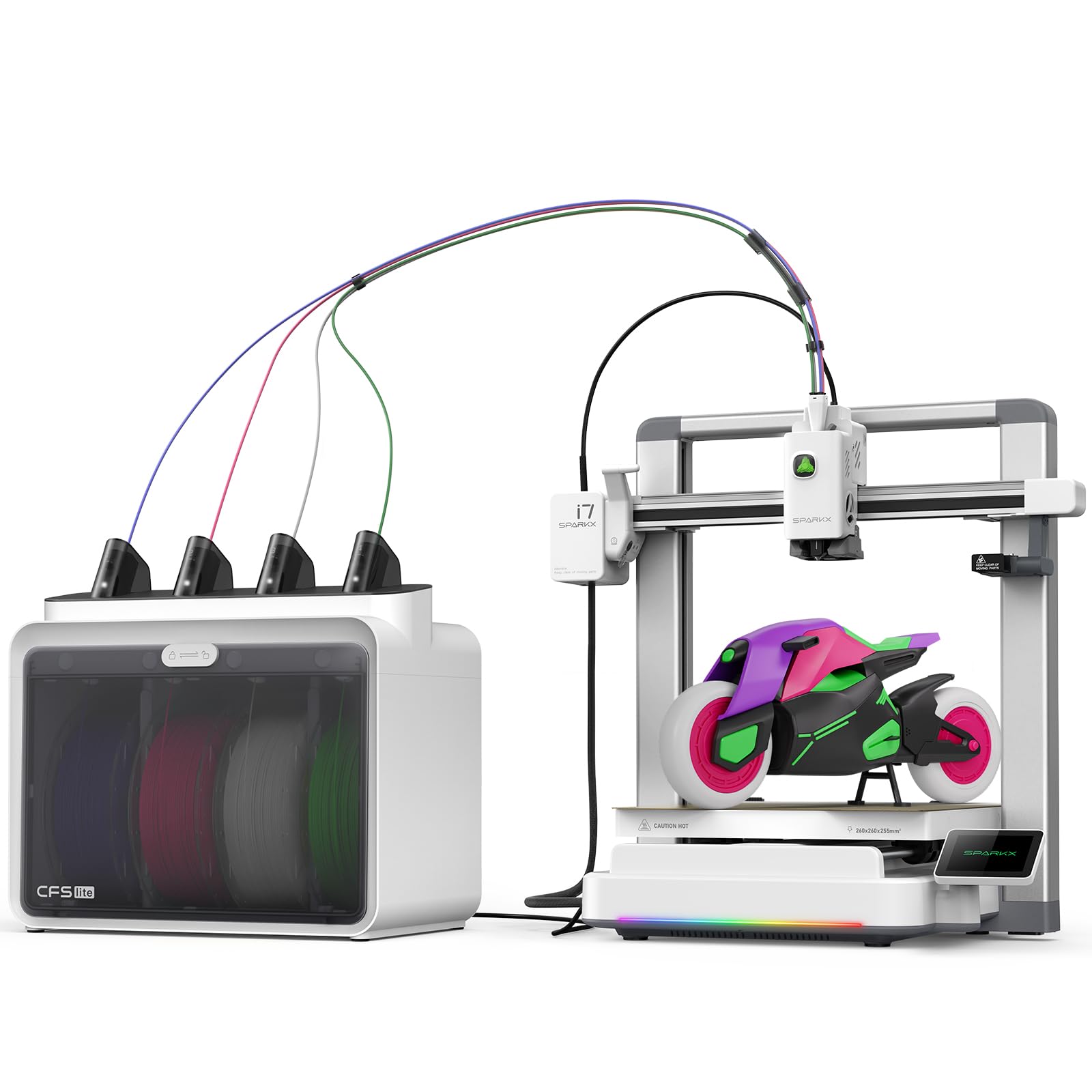
The Creality SPARKX i7 Combo introduces a unique AI photo-to-3D feature through Creality’s CubeMe AI, which converts a portrait photo into a 3D printable model in seconds. The printer arrives 95% pre-assembled, with a claimed 5-minute unbox-to-print experience. Multi-color printing with the CFS Lite system reduces waste by 50% compared to traditional systems, using four colors with smoother transitions.
The 260mm³ build volume (260x260x255mm) allows larger single-piece projects like airless basketballs. The AI camera detects spaghetti failures, air printing, filament tangles, and bed adhesion issues, pausing and alerting the user automatically. Quiet night mode reduces noise to whisper levels for overnight operation.
Customer reviews are sharply divided. Positive reviews emphasize build quality and the value of the multi-color system. Critical reviews cite a buggy slicer, fragile plastic gear components, and poor customer support that denied warranty claims for random print failures. Beginners comfortable with troubleshooting will find this capable; those wanting pure reliability should look higher in this list.
Why it’s great
- AI photo-to-3D conversion
- 260mm³ large build volume
- 50% less waste multi-color system
Good to know
- Buggy slicer and firmware issues reported
- Customer support is slow and inconsistent
7. Bambu Lab P1S

The Bambu Lab P1S is the premium pick for the beginner who wants to skip the upgrade path entirely. It is fully enclosed, supports up to 16 colors with multiple AMS units, and prints at 500mm/s with 20,000 mm/s² acceleration. CoreXY kinematics and automatic bed leveling ensure consistent quality across materials from PLA to ABS to PC.
The enclosed chamber enables engineering-grade filaments without warping, and the AMS system allows multi-material printing (including dissolvable PVA supports for complex overhangs). Setup takes about 30 minutes, and the Bambu Studio slicer features one-click profiles for every supported filament type.
Owner feedback is nearly universal in praise: it outperforms printers costing multiples more, with quiet operation, sharp details, and minimal layer lines. The P1S is the most reliable printer in this guide, but the upfront investment is higher than any other model listed. It is the right choice if you know you will outgrow an entry-level machine within months.
Why it’s great
- Enclosed chamber for ABS/ASA/PC
- Up to 16 colors with AMS
- Best-in-class reliability and print quality
Good to know
- Higher initial investment
- AMS sold separately for multi-color
8. Geeetech M1S

The Geeetech M1S is a fully assembled mini printer with a 3.94 x 4.33 x 3.94 inch build volume, designed for the absolute budget-conscious beginner who wants to test the hobby without financial commitment. The 16-point auto-leveling system and direct drive extruder with a 1:5 gear ratio provide reliable extrusion for small PLA and TPU projects.
Print speed reaches 250mm/s, which is adequate for small parts but noticeably slower than the mid-range options. The 2.4-inch LCD color screen and Geeetech app simplify model selection for children. One-button filament in/out reduces frustration during material changes. The printer ships with a small sample of filament, not a full spool, so buyers should budget for filament separately.
Reviews are mixed but generally positive for the price. Several users reported faulty units on arrival (auto-leveling failures) that were promptly replaced by Geeetech’s customer service. The WiFi connectivity is inconsistent after power cycles. This is a good entry point for a child or casual user, but serious enthusiasts will quickly outgrow the tiny build volume.
Why it’s great
- Very low cost for a fully assembled unit
- 16-point auto-leveling
- App-controlled, ideal for children
Good to know
- Tiny build volume (under 100mm³)
- WiFi connectivity can be unreliable
- Very little filament included
9. Entina Tina2C Bundle
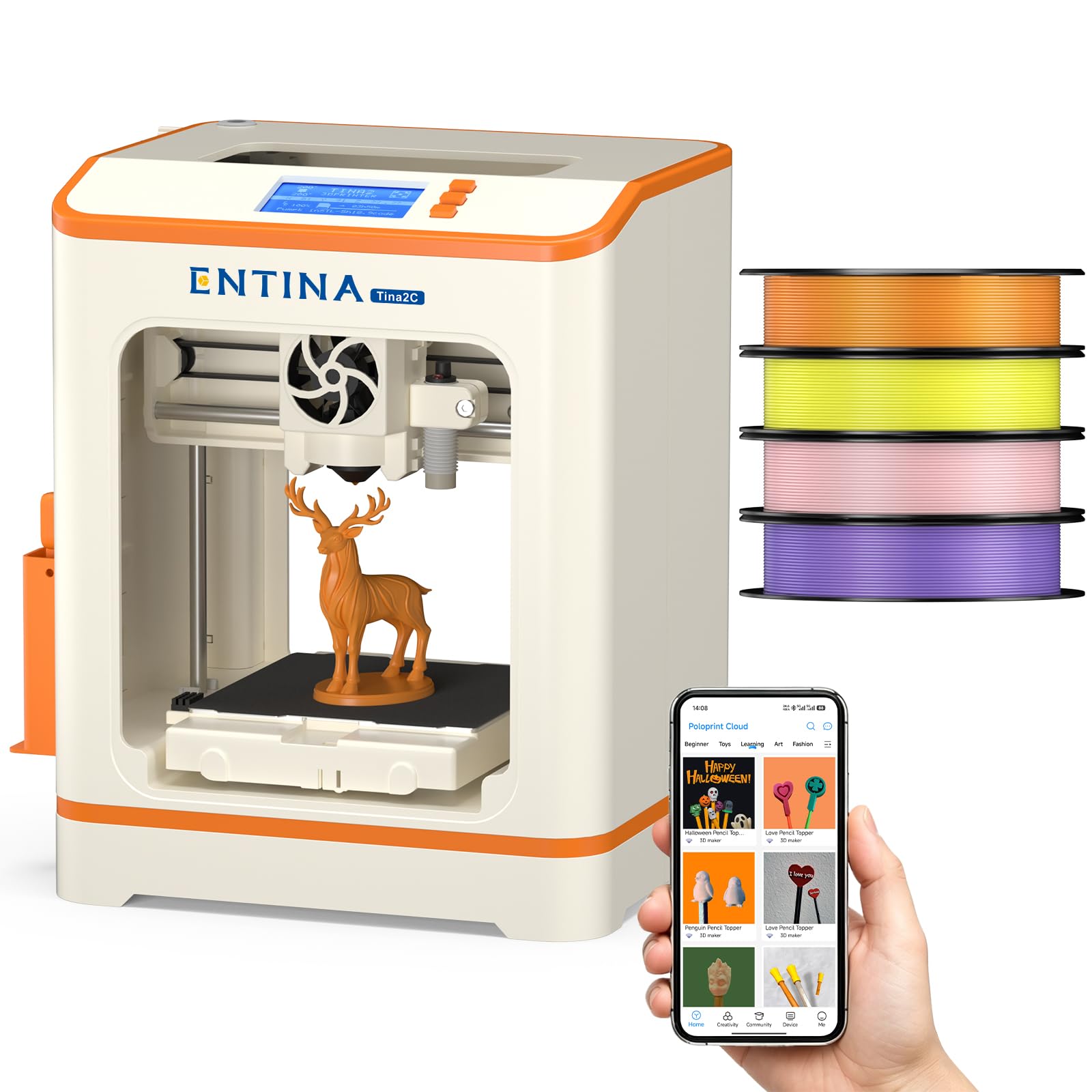
The Entina Tina2C Bundle is the most beginner-focused package in this guide, including the printer, 4 colors of PLA filament (approximately 1kg total), and a DIY module kit for 20 projects. The build volume is limited to 100mm³ (3.9 inches per side), which restricts projects to small toys, keychains, fidgets, and miniatures.
Auto-leveling is standard, and the Poloprint app provides guided setup, Wi-Fi printing, and a library of 3,000+ models. The flexible magnetic build plate allows easy print removal by simply bending the plate. Power-loss recovery pauses and resumes after interruptions, a valuable feature for the budget segment where such features are uncommon.
Customer reviews are overwhelmingly positive, with multiple verified buyers noting their young children (ages 9 and 10) were printing independently within minutes. The low noise level means it can run in a bedroom without disturbance. The 1kg of included filament is a genuine value addition—most printers in this price range ship with a tiny 50g sample. The disadvantage is the extremely small build volume that will limit the user within weeks.
Why it’s great
- Comes with 4 full spools of PLA filament
- Quiet enough for a child’s bedroom
- Power-loss recovery and auto-leveling
Good to know
- 100mm³ build volume limits project size
- App-only operation, limited slicer flexibility
FAQ
Do I need a fully enclosed printer as a beginner?
How much wasted filament does multi-color printing produce?
Can I trust the auto-leveling on a budget printer?
Is a 250mm/s printer too slow for a beginner?
Final Thoughts: The Verdict
For most users, the affordable 3d printer for beginners winner is the Bambu Lab A1 because it balances speed, reliability, and scalability at a price that doesn’t strain the beginner’s budget. If you want multi-color printing from day one, grab the Anycubic Kobra X. And for the ultimate smooth start with zero calibration and engineering-grade material support, nothing beats the ELEGOO Centauri Carbon.