
Our readers keep the lights on and my morning glass full of iced black tea. As an Amazon Associate, I earn from qualifying purchases.
Specs are compiled from manufacturer listings and verified buyer reviews and can change over time — please confirm the key details on the product page before buying.
If the video from your current laptop camera looks like you are calling in from a potato, it is time for an upgrade. But a good 4K webcam should not cost the same as a weekend getaway. The trick is knowing which specs actually matter for a crisp, professional image and which are just marketing noise.
I’m Min — the founder and writer behind Gadgets Feed. This guide is built by comparing the manufacturers’ published specifications and the patterns across verified customer reviews, so you get each pick’s real strengths and trade-offs instead of marketing spin.
From true native resolution to how the camera handles a dimly lit room, this breakdown of the affordable 4k webcam landscape will steer you straight to the model that fits your stream, your meetings, and your budget.
Our Picks at a Glance



How To Choose The Best Affordable 4K Webcam
Picking the right webcam is about matching your space, your computer, and your specific use case — whether that is streaming, video calls, or content creation. Here are the three specs that separate a great buy from a waste of money.
Sensor Size and Quality
The physical size of the sensor (measured in inches, like 1/2.55″ or 1/1.3″) determines how much light the camera can capture. A larger sensor generally gives you a clearer, less grainy image in dim conditions and provides a more natural background blur. Look for cameras that use a Sony STARVIS sensor if you often record or call in less-than-perfect lighting.
Autofocus Technology
Cheaper webcams use a slower contrast-detect autofocus that can “hunt” for focus. Phase Detection AutoFocus (PDAF) locks focus in under a second and is essential if you lean in or rock back while talking on camera. This is a major quality-of-life feature you should not compromise on for a mid-range or premium pick.
Field of View
This is the width of the scene the camera can see, measured in degrees. A 65-78 degree FOV is ideal for a one-person video call — it keeps you in frame without making the background look like a fishbowl. A wider 90+ degree FOV is better for showing off a desk setup or including a second person in the shot. Too wide, and you will look too small in the frame.
Quick Comparison
| Model | Best For | Sensor / Resolution | Autofocus Type | Field of View | Amazon |
|---|---|---|---|---|---|
| Logitech MX Brio★ Best Overall | AI-Enhanced Clarity | 8.5 MP | Autofocus | — | Amazon |
| EMEET PIXYBest Tracking | AI PTZ Tracking | 8 MP / 1/2.55″ Sony | PDAF 0.2s | — | Amazon |
| NexiGo N680E ProBest Lighting | Built-in Ring Light | Sony 4K Sensor | PDAF | 80° | Amazon |
| Razer Kiyo V2 | Low Light Streaming | 8.3 MP / Sony STARVIS | Autofocus | Ultrawide | Amazon |
| Dell WB7022 | Professional Workspace | 8 MP / Sony STARVIS | Autofocus | 65 / 78 / 90° | Amazon |
| OBSBOT Tiny 3 Lite | Compact AI Tracking | 1/2″ CMOS | PDAF | — | Amazon |
| Jabra PanaCast 20 | Intelligent Zoom+Light | 13 MP | Autofocus | — | Amazon |
| YOLOLIV YoloCam S3 | DSLR-Like Image | 1/1.3″ Sensor | PDAF | 82° | Amazon |
| Elgato Facecam 4K | Studio-Grade Control | Sony STARVIS 2 | Auto/Manual | — | Amazon |
In‑Depth Reviews
1. Logitech MX Brio Ultra HD 4K Webcam
Our pick — over 4.5★ from 200+ verified ratings; the strongest balance of quality and price.
The tank-like build hides smart AI that fixes harsh lighting on its own.
The Logitech MX Brio delivers 4K video at 30fps or 1080p at 60fps, and its 8.5-megapixel effective still resolution compared to the 8-megapixel EMEET PIXY for stills. What wins people over is the AI-enhanced image quality that handles dual face visibility and adjusts for harsh light without you touching a dial. The built-in dual microphones use AI noise reduction and beam forming to cut background chatter, so your voice comes through clean even in a noisy room. The privacy shutter and Show Mode — which tilts the camera to share items on your desk — add real utility for the hybrid worker.
The single weak point is the stand, which reviewers call wobbly, though the body itself feels sturdy. Buyers report a flickering issue that is fixed by changing the Hz setting in Logi Options+ from 60 to 50. Note that no USB-A adapter is included, so you will need a USB-C port or a separate adapter. At 4.6 stars across more than 200 ratings, this is the crowd favorite for good reason.
Why It Leads the Pack
- AI exposure and white balance adjust for tricky lighting automatically.
- Dual mics with beamforming let you skip a headset for most calls.
- Show Mode is a rare, practical feature for desk tours.
What to Watch For
- The included stand feels wobbly — a third-party arm solves it.
- No USB-A adapter in the box; your laptop needs USB-C.
Reach for this if: you want Logitech’s mature software and AI polish in a premium-feeling body.
Think twice if: you must have a rock-solid stand from the start or only have USB-A ports.
2. EMEET PIXY Dual-Camera AI-Powered PTZ Camera
A second camera and a 0.2-second autofocus bring pro motion tracking for under.
The EMEET PIXY is the first dual-camera AI-powered PTZ webcam. A main 8-megapixel 4K camera with a 1/2.55″ Sony sensor handles the primary image, while a second auxiliary camera detects your face position to tune focus and exposure. The result is PDAF and AI autofocus that locks in 0.2 seconds — a significant lead over the typical 1.1 seconds of other cameras. Its PTZ system enables a 310-degree pan and 180-degree tilt, and you can trigger tracking hands-free with a two-second open-palm gesture.
The triple-mic array offers three sound modes: Live Mode for steady background noise, Noise Canceling Mode for sudden sounds like keyboard clicks, and Original Sound Mode for music. The recurring trade-off, however, is that tracking loses you if you stand up or move fast — owners mention it requires very slow, deliberate movement to stay locked. Setup can be fussy with a Chinese instruction booklet and a broken QR code. Overall, for stationary presenters and streamers, the PIXY’s 4K video and AI tracking are a remarkable value.
The Star Features
- PTZ with 310° pan and 180° tilt covers a room.
- Gesture control with a two-second palm hold is intuitive.
- Three-mode mic array adapts to different recording scenarios.
The Fine Print
- AI tracking is too slow for fast or standing movements.
- Setup documentation is poor with non-functional QR codes.
Who it fits: seated streamers and educators who need auto-tracking without spending a fortune.
skip it if: you pace, dance, or stand up frequently while on camera.
3. NexiGo N680E Pro 4K Webcam with Ring Light
A Sony sensor and a three-tone ring light let you control your lighting without extra gear.
The NexiGo N680E Pro combines a Sony 1/2.5″ 4K sensor with a built-in ring light that offers three color temperature modes and stepless brightness control — just rotate the outer dial. This is a huge convenience for anyone who streams or calls from a dim room and does not want to buy a separate lighting kit. The camera also features PDAF autofocus, which delivers faster and more stable focusing than traditional AF systems, and a pair of noise-canceling mics.
You get crisp, clear video even in 4K streaming, according to buyers who praise the image quality. The plug-and-play USB-A connection works without any drivers or software, so you can plug it into Windows, Mac, Chrome OS, or Switch 2 (with a USB-C adapter) and be up in seconds. The 80-degree field of view (FOV — how wide the shot is) and a standard 1/4-inch tripod mount give you solid mounting flexibility. The trade-off is documentation that buyers found unclear, though setup is truly smooth.
What Stands Out
- The ring light has three tones and dims without any separate power.
- PDAF autofocus locks faster than traditional focus systems.
- No driver needed — plug into USB-A and it works immediately.
The Minor Catch
- Included documentation is vague, but the camera is truly plug-and-play.
Pick this for: streamers and remote workers who want studio-style lighting built right into the camera.
Look elsewhere if: you prefer a software-driven workflow and dislike adjusting physical dials.
4. Razer Kiyo V2 Webcam
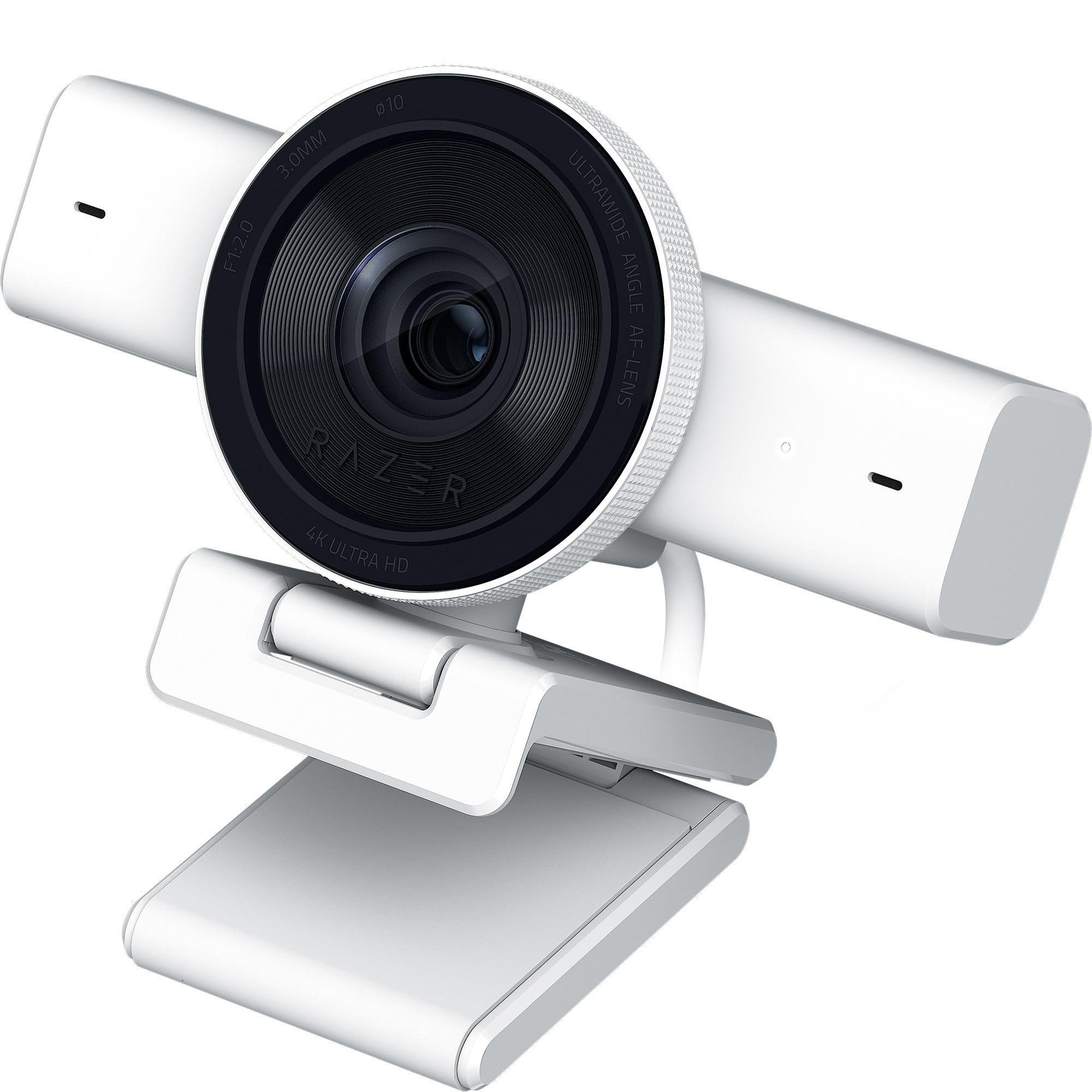
A Sony STARVIS sensor and AI auto-framing that looks amazing in a dim gaming cave.
The Razer Kiyo V2 uses a high-performance Sony STARVIS sensor to deliver excellent low-light performance, making it the go-to for streamers who work from a dark RGB-lit room. It shoots 4K at 30fps and uses AI-powered auto-framing with natural face tracking and intelligent pan, tilt, and zoom effects to keep you centered as you move. The ultrawide angle lens lets you zoom in for a tight face shot or pull out to show your entire setup without edge distortion.
Razer Synapse gives you DSLR-like control over ISO and shutter speed, and HDR support adds depth to your colors. The universal pivoting mount works on monitors and has a built-in tripod thread. Reliability is a mixed point, however — some customers note crashes with the software and occasional freezing that requires a USB reconnect. For the cost, you get one of the best images in low light, but you may need patience with the occasional glitch.
Highlights
- Sony STARVIS sensor excels in dark or backlit rooms.
- AI auto-framing with pan, tilt, and digital zoom feels polished.
- Full manual control via Razer Synapse (ISO, shutter speed).
Soft Spots
- Some users hit software crashes and freezing issues.
- Top-heavy metal build needs a stable mount.
Great for: gamers and night-owl streamers who rely on setup lighting rather than overhead lights.
Not for: anyone who needs absolute plug-and-play reliability without app involvement.
5. Dell 4K UHD Webcam WB7022

A premium aluminum body with three field-of-view options tuned for the corporate desk.
The Dell WB7022 is a professional-grade 4K webcam featuring a Sony STARVIS CMOS sensor and HDR video for sharp, vibrant clarity. It is certified for Microsoft Teams and Zoom and offers a unique triple field-of-view selector — 65, 78, and 90 degrees — so you can choose the framing that fits your desk setup. The camera uses an Image Signal Processor to tune picture quality in extreme lighting, with AI auto-framing that keeps you centered.
Build quality earns top praise, with all-metal construction and a smooth textured finish. The 5x digital zoom and magnetic privacy cap add to its office-ready design. But there is a critical trade-off: this webcam has no built-in microphone. Reviewers point out that for a premium-priced camera, the lack of a mic is a deal-breaker for many, and the image quality itself gets mixed feedback — some find it crisp while others say it is worse than a good 1080p cam. It works best with a dedicated USB mic or headset.
What You Get
- All-metal body with a premium, heavy feel.
- 65/78/90-degree FOV gives you framing flexibility.
- Teams and Zoom certified for corporate compatibility.
Critical Drawback
- No microphone means you need a separate audio solution.
- Image quality is inconsistent — some find it subpar for 4K.
Best for: corporate users who already own a good USB mic and want Teams-certified hardware.
Avoid if: you want an all-in-one webcam with a decent built-in mic.
6. OBSBOT Tiny 3 Lite

Smaller than its predecessor but packs a 1/2-inch sensor and spatial audio.
The OBSBOT Tiny 3 Lite proves big features come in small packages. It is smaller and lighter than the previous model, yet houses a 1/2-inch CMOS sensor that shoots 4K at 30fps or 1080p at 120fps for ultra-smooth motion. The upgraded triple-mic array delivers professional spatial audio, with an omnidirectional mic for scene capture and two MEMS directional mics for voice isolation. AI Tracking 2.0 can lock onto a single person, a group, or over 200 types of objects.
Voice and gesture controls let you command the camera without touching it — wake it, track, zoom, or switch presets. The OBSBOT Center software adds Beauty Mode, Background Blur, a Teleprompter, and NVIDIA Maxine Eye Contact. The biggest pattern among owners is praise for sharp 4K, smooth tracking, and clear audio, but a minority report that a firmware update ruined autofocus and exposure, and that the app can use excessive PC resources. If you get a good unit, it is a powerhouse.
Big Wins
- PDAF autofocus with a wide ISO range (100-6400) for low light.
- Spatial audio from a triple-mic array is rare at this size.
- AI tracks people, groups, or objects via voice/gesture.
Potential Headaches
- Firmware updates can introduce autofocus hunting issues.
- App is resource-heavy on some systems.
Pick this if: you want the most compact 4K PTZ webcam with high-end audio.
Think twice if: you prefer a low-maintenance camera that never needs firmware tinkering.
7. Jabra PanaCast 20 Conferencing Camera

A 13-megapixel sensor with on-device AI that adjusts lighting and zoom in real-time.
The Jabra PanaCast 20 uses a powerful 13-megapixel camera to deliver 4K Ultra-HD video with intelligent zoom that follows your movements automatically. Its lighting optimization analyzes your room and adjusts the image in real-time, so you look professional even in a dim corner. The camera is designed for plug-and-play simplicity with all leading UC platforms and is certified for Microsoft Teams and Zoom.
Build quality is stellar, with a metal construction and a heavy, stable feel that clips securely onto monitors. It comes with a protective carry case, making it a true travel companion. However, the camera runs very hot due to its on-device AI processing — owners note this as a recurring concern. The auto-zoom also gets mixed feedback, with some saying it frames the head too high and small with no simple adjustment. If you need reliable, professional video and already have a good mic, this is a solid choice.
Strengths
- On-device AI lighting and zoom work without any software.
- 13 MP sensor delivers very sharp 4K video.
- Included carry case is ideal for traveling professionals.
Trade-offs
- Runs significantly hot during use.
- Auto-zoom framing can be awkward and hard to adjust.
Great for: road warriors who need a high-end, portable, certified UC camera.
Not for: those who want adjustable auto-framing or are concerned about device heat.
8. YOLOLIV YoloCam S3

A 1/1.3-inch sensor — likely the largest in any webcam — gives you real depth-of-field blur.
The YOLOLIV YoloCam S3 is built around a 1/1.3-inch sensor, which the maker calls the largest ever in a webcam. This lets it capture uncompressed 4K video at 30fps with natural background blur that looks like a DSLR. The sensor is combined with PDAF autofocus that locks instantly, and the camera includes AI-enhanced imaging for clearer faces in low light, plus smart exposure, white balance, and HDR. The 82-degree FOV keeps you framed without losing quality on the edges.
Setup is simple plug-and-play via USB 3.0, and the foldable magnetic mount sticks to any metal surface while also accepting a standard 1/4-20 tripod mount. The YoloLiv Compose software gives you full manual controls for contrast, sharpness, saturation, exposure, and even pro color grading via Picasso Resolve (Windows only for now). The premium all-aluminum body acts as a heat sink to prevent overheating during 24/7 streaming. Owners rave about the image quality and build, calling it “DSLR-quality,” though connectivity has mixed feedback and some note it offers no SD card recording.
Pro-Level Features
- Large 1/1.3″ sensor creates cinematic depth of field.
- Uncompressed 4K/30fps video for pure image quality.
- All-aluminum chassis dissipates heat for non-stop streaming.
Limitations
- No SD card recording — you need the YoloBox to record standalone.
- Connectivity can be finicky for some users.
Reach for this: content creators who want the best possible image quality without jumping to a mirrorless camera.
Skip if: you need standalone recording or rely on macOS color grading tools.
9. Elgato Facecam 4K

A Sony STARVIS 2 sensor and a 49mm filter thread let you style your shot like a real lens.
The Elgato Facecam 4K delivers true 4K resolution at 60 FPS for silky-smooth streaming and content creation. It uses a premium Sony STARVIS 2 CMOS sensor with Elgato Prime Lens technology to produce sharp, vibrant video. The standout feature is the 49mm lens filter support — you can screw on ND, diffusion, or UV filters just like you would on a DSLR. This is unique among webcams and opens up creative control for serious streamers.
The free Camera Hub software gives you powerful effects and settings. Autofocus and manual focus options are available, but the lens is quite wide (roughly 20mm equivalent), so digital zoom to frame a tighter shot will drop you out of 4K resolution. The camera has no built-in microphone, which is a deliberate choice for the pro streaming audience who use separate mics. Quality is a polarizing point here — some find it impeccable while others say it is worse than expected for the tier. The Facebook community reports that the camera can be picky about USB cables; it needs a direct USB-C connection and may fail with hubs.
Studio-Grade Touches
- 4K at 60 FPS is the gold standard for smooth video.
- 49mm filter thread allows lens filters for pro control.
- Elgato Camera Hub software is powerful and free.
Honest Warnings
- No built-in mic — you must have a separate audio solution.
- Very picky about USB cables and may fail with hubs.
The best for: serious streamers who own a good mic and want lens filter compatibility.
Avoid if: you want an all-in-one webcam that works with any USB port on the go.
Understanding the Specs
Sensor Size
The sensor is the part of the camera that captures light. A larger physical sensor (like 1/1.3″ compared to 1/2.55″) collects more light, which gives you a clearer image in dim rooms and a more natural background blur. This is the single biggest factor separating a great webcam image from a mediocre one.
Phase Detection Autofocus (PDAF)
PDAF is a faster, more precise autofocus technology than the standard contrast-detect type. Where a contrast-detect system might “hunt” back and forth for a second or more, PDAF locks focus in a fraction of a second — 0.2s on some models. This matters if you move around on camera or hold objects up to the lens.
Field of View (FOV)
Measured in degrees, FOV (field of view — how wide the shot is) tells you how much of your background appears. A 65-degree FOV is tight and personal, good for solo calls. A 78-80 degree FOV is the balance for a single person with a small desk visible. A 90-degree or wider FOV is better for showing off a full desk setup or including two people, but it will make you look smaller in the frame.
HDR (High Dynamic Range)
HDR processing captures more detail in both the bright and dark parts of the same frame. This means that if you are sitting in front of a window, the camera can keep your face visible without blowing out the background light. It is a very useful feature for home offices with unpredictable natural light.
FAQ
Is a 4K webcam worth it if my monitor is only 1080p?
What is the difference between PDAF and standard autofocus on webcams?
Will these webcams work with streaming software like OBS?
How do I know if my computer can handle 4K video from a webcam?
Do I need a separate microphone if the webcam has built-in mics?
What does “certified for Teams and Zoom” actually mean?
How important is the field of view for a solo presenter?
Can these webcams be mounted on a tripod for a better angle?
Final Thoughts: The Verdict
For most buyers, the affordable 4k webcam winner is the Logitech MX Brio because it combines AI-enhanced imaging, a sturdy build, and Logitech’s mature software support for a well-rounded experience. If you want a built-in ring light to always look your best, grab the NexiGo N680E Pro. And for the most compact AI tracking with spatial audio, the OBSBOT Tiny 3 Lite is the one to reach for.
How We Picked
We do not accept paid placement. Every pick is matched to a real buyer and a real use-case; we do not hands-on test units.
Sources & Methodology
Specifications: manufacturer listings and product documentation. Review insights: verified customer reviews, as of July 2026. Pricing: not shown on this page (it changes often); check the current price via the retailer link.
As an Amazon Associate, Gadgets Feed earns from qualifying purchases. This does not affect which products we feature.